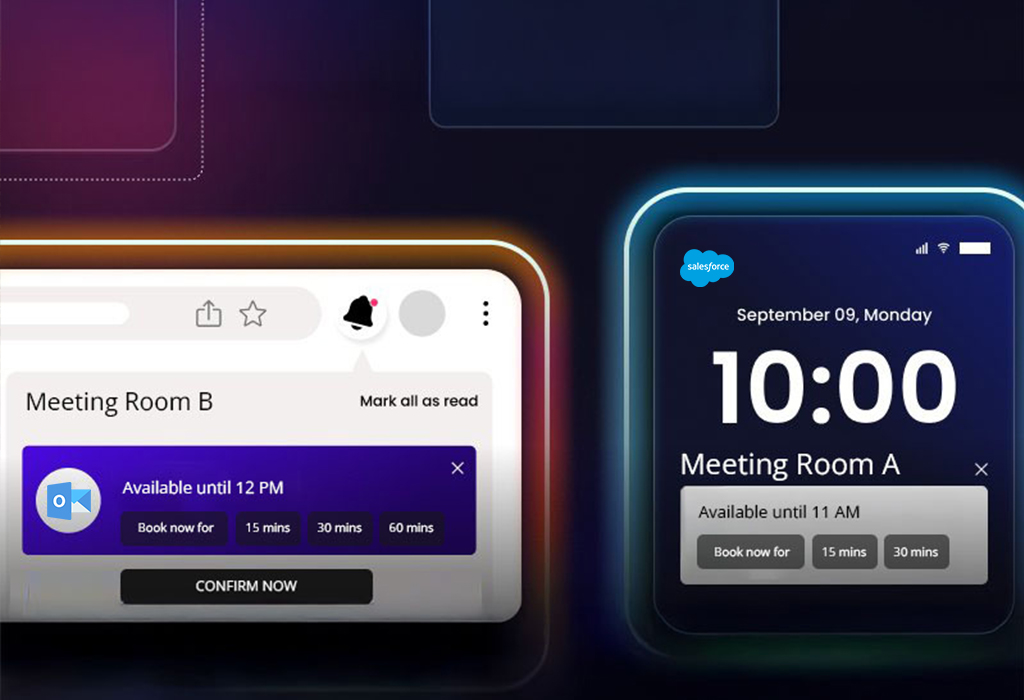
The customer is a global listings and capital markets organization that hosts high-visibility events for customers. Their frontline team used two different tools to request rooms and add business context, which led to duplicate submissions, slow confirmations, and no real-time visibility into available slots.
In this case study, you’ll learn how we:
Centralized booking requests from EMS and Monday.com into Salesforce
Built Lightning Web Component calendars for real-time room and slot visibility
Created a booking wizard for admins and EMS users with role-based approvals
Integrated Outlook to send automatic confirmations, changes, and cancellations
Made the calendar mobile-friendly so teams could confirm on the go
The client is a physical therapy clinic specializing in non-surgical joint pain treatments. They needed appointments and patient data to stay aligned across Salesforce Health Cloud and Elation Health. They had dealt with mismatches, duplicate updates, and no easy way to change field mappings as workflows evolved.
In this case study, you’ll learn how we:
Connected Elation Health and Salesforce with a webhook integration for near real-time appointment sync
Built a secure admin interface to add, edit, and delete field mappings without code
Documented the flows and trained staff for smooth handoff and ongoing maintenance
The client is a visual support provider that helps B2C teams guide customers over live video using augmented reality and AI assistance. Agents needed to start and manage sessions inside Salesforce. Separate tabs, iFrame blocks, and security limits in Classic and Lightning had slowed work and broken session continuity.
In this case study, you’ll learn how we:
Set up SSO to map users and secure access
Shipped an AppExchange app with quick actions for Classic and Lightning
Added a Lightning Console component using Workspace API to run sessions in-app
Configured CSP and cross-site settings to render the external dashboard in Salesforce
The customer is a manufacturing provider of parts and solutions for water, gas, fire, electrical, and HVAC systems. They serve multiple sectors and rely on accurate quotes and fast responses. They had struggled with manual lead and opportunity tracking, slow quote creation, no automation for field updates, and disconnected tools for invoicing, signatures, and meetings.
In this case study, you’ll learn how we:
Implemented Salesforce Sales Cloud to automate lead-to-quote
Used Flows to auto-update fields and keep data current
Customized quote PDFs and aligned the Contract object to the business process
Structured product and variant management on Opportunities
A manufacturing brand wanted to revive inactive leads and understand what each prospect cared about. The team needed segmented nurtures, clear scoring, and reliable tracking for external links, all connected to Sales Cloud for faster follow-ups.
In this case study, you’ll learn how we:
Segmented prospects by interest and buying intent
Built Engagement Studio programs with emails, forms, and landing pages
Set scoring rules to surface high-intent records and suppress low quality
Created custom redirects to track external links and attribute traffic
Synced qualified activity to Sales Cloud for sales-ready context
Centralized Event & Lead Management in Salesforce Sales Cloud
A flexible packaging company needed one place to record events, add attendees, create leads, and see everything on personal and central calendars. The team was switching between sheets and calendars outside Salesforce, which slowed visibility and ROI tracking.
In this case study, you’ll learn how we:
Built a Lightning Web Component to log event name, location, industry, dates, and attendees
Enabled lead creation on the event page and showed a live list of event-sourced leads
Reflected events on participant calendars and a central team calendar with a one-time setup
Enabled reporting for activity, pipeline, and ROI inside Salesforce
The client is a public works outreach provider that supports contractors and agencies with Good Faith Effort documentation. The team connects with certified small and diverse businesses, maintains updated directories, and needs one place to manage notices, solicitations, telecalling, certified firm searches, calendars, and bid paperwork.
In this case study, you’ll learn how we:
Chose CodeIgniter for speed, MVC structure, and efficient memory usage
Built dashboards that logged opportunities, outreach steps, and paperwork status
Enabled precise searches across continuously updated certified firm directories
Added package setup with telecalling support and activity logs
Exposed engagement data so teams viewed progress and ROI in one place
The client is a sales enablement SaaS that helps revenue teams capture and use best-practice content, tactics, and playbooks in one workspace. They want this guidance to live where sellers work every day. The goal is simple. Keep users in Salesforce, surface stage-by-stage coaching on Opportunities, and make setup easy for admins.
In this case study, you’ll learn how we:
Integrated SalesGrid with Salesforce for real-time data sync
Delivered a managed package with configuration, schema, automations, reports, and dashboards
Built LWCs to show Opportunity sub-stages and to manage integration settings in Salesforce
Standardized data models and permissions to keep records clean and secure
The customer is a marketplace that connects sellers of used motorcycles, ATVs, dirt bikes, and side by sides with buyers. They faced slow, manual lead handling. Lead fields did not auto-update when customers submitted vehicle details, and teams sent emails and texts by hand, which delayed responses and introduced errors.
In this case study, you’ll learn how we:
Embedded the remote assistant with Lightning-safe components and approved connectivity
Enabled agents to send SMS invites, open secure session links, and assist directly from the Case
Logged images, recordings, and timestamps to each Case for audit and follow-ups
Delivered one consistent flow for both Sales Cloud and Service Cloud
The client is a tech-enabled talent, training, and automation provider serving mid-market and enterprise teams, delivering role-based training, vetted talent, and automation accelerators to streamline operations and improve customer experience. They had a fragmented experience across partners, customers, and internal users, inconsistent branding, and multi-step buying, so they needed a branded community portal with role-based areas and a simple shopping cart to keep users in one place.
In this case study, you’ll learn how we:
Designed a branded community portal that matched the public site’s look and feel
Created distinct areas for partners, customers, and internal users with role-based access
Built a shopping cart so customers could add items and continue without leaving the portal
Simplified navigation and content discovery to boost engagement