



Top 10 Salesforce Integration Services to Streamline Your Business in 2026
20 Mar 2026
Table of Contents

Disconnected systems represent one of the largest silent killers of business efficiency in 2026. Employees spend a significant portion of their workday switching between apps, manually re-entering data, or searching for information that should be at their fingertips. The cost is staggering. That’s why integration services with Salesforce have become a non-negotiable business priority for growth-oriented businesses. And if your CRM is already the world’s #1 customer relationship management system, then getting your Salesforce integration services right is not only possible but also represents a true business differentiator.
So, in this guide, we’ll cover everything you need to know about what integration services with Salesforce are, why they matter, what the top 10 integration services with the greatest impact in 2026 are, what tools enable integration services, and what best practices make integration services work. Let’s get started.
Table of Contents
What Are Salesforce Integration Services?
A Salesforce integration service is the process of integrating Salesforce with all the other software applications that your business currently utilizes. This could be an ERP, a marketing solution, an ecommerce solution, a financial accounting solution, etc. The ultimate objective of a Salesforce integration service, then, is to create a state of perfect symmetry where all of your applications are always in perfect sync.
So, how do these integrations actually happen, behind the scenes, so to speak? Well, there are a couple of ways that this can happen. One of them, of course, is through APIs. APIs are simply a way for two different software applications to “shake hands” and communicate with one another. The other way that this can happen, especially if you are utilizing a number of different software applications that all need to integrate with Salesforce, is through a middleware solution.
Why Do Businesses Actually Need This?
A few key reasons stand out in 2026:
- Customers now expect seamless experiences. They don’t want to repeat themselves every time they interact with a different department.
- Data is only valuable if it’s accurate, complete, and accessible in real time, and that’s impossible if it lives in isolated silos.
- Automation depends on systems being connected. You simply can’t automate a workflow that spans multiple disconnected platforms.
The bottom line: Salesforce integrations transform your CRM from a standalone sales tool into the operational hub of your entire business.
Stop losing revenue to disconnected systems. Let’s build your integration roadmap.

Benefits of Salesforce Integrations
Before we start exploring the services, let’s take a look at the reason behind the fact that companies which invest in Salesforce integrations always seem to outperform those which don’t.
- Unified Customer Data: Everyone, including the sales team, support team, marketing team, and even the finance team, is working off the same data. No more conflicting data. No more data being outdated.
- Improved Operational Efficiency: No more tedious and time-consuming data entry. Your team is working on high-leverage activities, not copy-pasting data from one application to the next.
- Better Analytics & Reporting: When your data is stored in one place, your reports aren’t completely inaccurate. Make informed business decisions.
- Workflow Automation: Automate processes between different applications, like automatically creating a support ticket in ServiceNow whenever a deal is closed in Salesforce.
Top 10 Salesforce Integration Services in 2026
Not all Salesforce data integration is created equally. Here are the ten integration services that are delivering the most transformative business value this year.
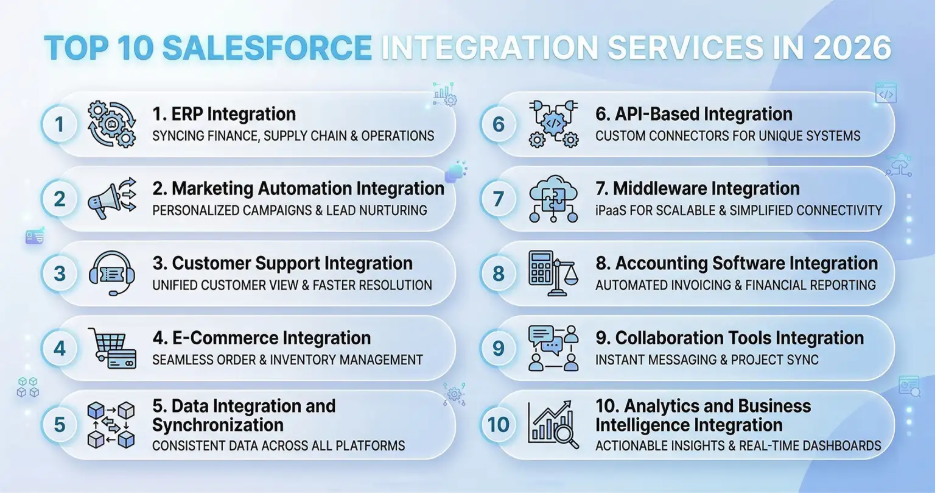
1. ERP Integration
Integrating your Salesforce system with your Enterprise Resource Planning (ERP) system is arguably the most impactful integration you can do. This creates a real-time bridge between your customer-facing customer relationship management system and your back-office financial and operational system. When your sales team closes a deal, your inventory levels are automatically updated. When your accounting team sends an invoice, your customer record in Salesforce is automatically refreshed. This creates a seamless handoff between your business functions. Today, businesses that have implemented Salesforce-ERP integration solutions are seeing incredibly fast order-to-cash cycles and far fewer fulfillment errors.
2. Marketing Automation Integration
Integrating your Salesforce system with other systems like Salesforce Marketing Cloud, HubSpot, Marketo, or Pardot creates a highly effective closed-loop marketing system. Your marketing team can automatically send leads from your CRM system, personalize your marketing messages with real CRM data, and then send that response data back into your CRM system so your sales team knows exactly which leads are hot and why. This integration is core to any business that wants to effectively implement account-based marketing or personalized customer experiences.
3. Customer Support Integration
If your customer support platform is Zendesk, ServiceNow, Freshdesk, or Salesforce Service Cloud, integrating it with your CRM system means that your customer support team will have all the context at their fingertips the moment they receive a customer inquiry. This is not just good for your customer support team but also translates into customer satisfaction. Companies that have customer support integrated with their CRM have reported higher customer satisfaction.
4. E-Commerce Integration
Integrating your e-commerce platform, whether it is Shopify, Magento, BigCommerce, or even a custom-built store, with your Salesforce system means that all your customer transactions become part of your CRM system. This is not just good for B2B businesses but also for B2C and D2C businesses that aim at creating that customer experience that will make your customer return for more.
5. Data Integration and Synchronization
This is the base layer, ensuring that your data remains accurate and consistent in all your systems, in real-time. It’s the foundation that allows your customer master data, products, or operational metrics to update everywhere, instantly, whenever a change is made. In 2026, as your business runs on dozens of platforms, data synchronization is no longer a “nice-to-have” but a “must-have” for your business to operate.
6. API-Based Integration
Salesforce provides a comprehensive set of APIs, REST, SOAP, Bulk API, Streaming API, etc., that provide developers granular control and precision for integrations. API-based integrations are perfect for your business if you require custom, high-performance integrations between Salesforce and niche platforms that may not have out-of-the-box connectors. It’s the most flexible and scalable option, making it a go-to choice for complex and unique business workflows.
7. Middleware Integration
If you have to integrate your Salesforce with multiple systems at once, or if you have complex data transformation requirements in between, then middleware integration tools such as MuleSoft or Boomi are what you need. Middleware integration tools serve as the central hub that manages all your data integration requirements across your entire technology stack. If you have 10, 20, or more systems that you need to integrate, then middleware is what will prevent your architecture from degenerating into spaghetti architecture.
8. Accounting Software Integration
Integrating your Salesforce with your QuickBooks, Xero, NetSuite, or Sage accounting software eliminates the painful disconnect that exists between your CRM’s revenue recognition and your accounting software’s financial reporting. Your sales data is automatically fed into your accounting system, your revenue forecast is powered by your live pipeline data, and your accounting team gets visibility into your deals without having to purchase any additional licenses for your CRM.
9. Collaboration Tools Integration
Integrating your Salesforce system with tools like Slack, Microsoft Teams, or Google Workspace means that your team gets alerts, deal updates, and customer notifications where they spend most of their time. A deal is in a particular stage? Your team gets alerted in Slack. A high-value customer submits a ticket? Your team gets alerted in Teams. This integration closes the window between knowing something is happening and doing something about it. And in today’s fast-paced business world, that window is where all your opportunities go.
10. Analytics and Business Intelligence Integration
Integrating your Salesforce system with Tableau, Power BI, Looker, or Google Analytics means that your team is able to make sense of your CRM data in ways that simply aren’t possible with the standard Salesforce reports. Your team is able to blend operational, financial, and marketing data with your customer data in one place. This is what separates companies that simply respond to what’s happening from companies that see what’s going to happen.
Popular Salesforce Integration Tools
Knowing what to integrate is just one piece of the puzzle. The platform used for integration and development is another extremely important piece. Here are the top Salesforce integration tools that are currently popular in the CRM integration services ecosystem in 2026.
- MuleSoft: Essentially, this is the MuleSoft Anypoint Platform developed by Salesforce itself. It is the gold standard for enterprise-level integration and is used for complex and large-scale integration scenarios.
- Zapier: The no-code integration platform. Great for small and medium-sized businesses and teams that want to integrate Salesforce with hundreds of popular applications.
- Workato: The enterprise-level integration and automation platform that offers the right balance of no-code and deep integration.
- Boomi: The Dell integration platform that is cloud native and popular for enterprise-level integration. It is known for its intelligent data mapping and governance features.
- Jitterbit: The fast and flexible integration platform that is popular for integrating ERP systems with Salesforce.
Salesforce Integration Architecture Explained
Knowing the architecture style behind your integration isn’t just an IT requirement; it has real-world implications for scalability, cost, and reliability. There are three basic styles you should be familiar with.
- Point to Point Integration: A direct connection between Salesforce and another system. Easy to set up, quick to implement, but not scalable because you need a direct connection to each system you want to integrate with. Works well if you only need to integrate with a single system, or maybe two at most.
- Middleware Integration: A centralized integration hub controls all integration to and from Salesforce and other systems. All data transformations, routing, error handling, etc., happen in one place. This style is far more scalable.
- Event-Driven Architecture: Systems react to events happening in real time, such as a deal closing or a record being updated, through message brokers or other event streaming technologies. This style is highly scalable, fault-tolerant, and has ultra-high responsiveness. This style is quickly becoming the preferred choice for complex, real-time business processes.
Real-World Salesforce Integration Use Cases
Theory is great. Real stories are better. So, here is how businesses are using Salesforce integrations to change their businesses right now.
1. Manufacturing Company: Connecting ERP + CRM
One mid-sized manufacturer integrated their Salesforce instance with SAP. Now, the sales team can view live inventory and production schedules directly in the CRM. Result: Sales reps can now promise delivery dates with confidence. Order accuracy is up. Quote-to-order time is now over 30% faster on average.
2. SaaS Company: Syncing Marketing Platforms
One B2B SaaS company integrated their HubSpot instance with Salesforce. Now, the marketing team can view exactly which marketing efforts drove revenue. Sales reps can view much more context on every lead. As a result, conversion rates from MQL to SQL improved dramatically in the first quarter.
3. Retail Brand: Unified Customer Data
One direct-to-consumer retail brand integrated their Shopify instance, loyalty program, and support tool with Salesforce. Now, every customer interaction is stored in one place. For the first time, the brand can personalize re-engagement campaigns based on full purchase history. Result: Measurable improvements in repeat purchase rates and average order value.
How did one SaaS brand turn disconnected data into their biggest revenue driver?

Best Practices for Salesforce Integrations
The most effective CRM integration services approach will fail if it is not implemented with discipline. These principles distinguish successful and long-lasting integrations from those that become maintenance disasters.
1. Data Governance First
Develop data ownership, naming conventions, and quality standards before building anything. Determine who the “system of record” is for each data entity. Take data de-duplication rules seriously. Bad data quality will destroy every system that touches it.
2. API Security Is Non-Negotiable
Use OAuth 2.0 for authentication. Use role-based access controls. Treat your API credentials like passwords. Periodically audit all external systems that have access to your Salesforce org. A security breach in the integration layer can destroy your entire CRM database.
3. Monitor Everything
Develop real-time monitoring and alerting for all Salesforce system integration flows. Be notified immediately if a sync fails, if API rate limits are being exceeded, or if data volume spikes unexpectedly.
4. Plan for Scalability
Develop integrations that can handle more data and transactions than the current volume. The last thing you want is for your integration layer to become the bottleneck in your business growth.
Future Trends in Salesforce Integrations (2026)
The Salesforce data integration space is evolving fast. Here’s what’s shaping how businesses will connect their systems over the next few years.
Trend #1: AI-Powered Automation
Salesforce system integration platforms are quickly adopting AI to perform the heavy lifting of automatically proposing integration mapping ideas, detecting anomalies in the data, and predicting where integrations are likely to fail. They are even proposing new automations based on the patterns of the business. Salesforce’s own Einstein AI is already at work here within the Salesforce ecosystem. AI is likely to increasingly perform the last mile of integration complexity once performed by the developer.
Trend #2: Real-Time Data Ecosystems
Batch processing windows are giving way to always-on, event-driven data flows. In 2026, customer expectations for instant, personalized responses mean businesses need their systems to react in milliseconds, not hours. Salesforce’s MuleSoft Anypoint Platform and event-driven architectures built on Kafka or similar technologies are enabling this shift toward continuous, real-time data synchronization.
Trend #3: Composable Enterprise Architecture
Instead of single Salesforce API integration, businesses are now moving towards what is known as “composable architectures,” where the building blocks are not only modular but also API-centric. This helps minimize the cost and risk associated with changing one part of your system without impacting the rest. This is the architectural philosophy that will define enterprise technology in the second half of the 2020s, and Salesforce is building towards this as part of its platform.
Your Integration Strategy Is Your Competitive Advantage
If there’s one thing this guide makes clear, it’s that Salesforce integration services are not a “nice to have” – they’re a “must have.” And whether it’s ERP, marketing automation, analytics, or collaboration tools, every integration solution we’ve discussed so far presents a significant opportunity for improvement. The tools are available, the architectures are proven, and the business value is well-documented.
No longer is the conversation around Salesforce API integration centered around whether or not to integrate Salesforce with the rest of your business systems. The conversation today is centered around where to start and how to do it right. And that’s where a quality Salesforce integration partner can make all the difference.
Ready to turn Salesforce into the nerve center of your entire business?

Categories

Solve It with Salesforce. We’ll Show You How.
AI. Apps. Experts. Everything you need to win with Salesforce under one roof.Frequently Asked Questions
Why should I integrate Salesforce with other tools I already use?
Because Salesforce becomes way more powerful when it’s connected to the rest of your tech stack. Whether it’s Zendesk, Outlook, or Microsoft Teams, Salesforce integration helps eliminate data silos, reduces manual work, and gives you a complete view of your customers in one place. Tools like Salesforce Slack integration and email integration with Salesforce also improve real-time collaboration and communication across teams.
How do I know which integrations are right for my business?
Start by looking at where your team spends time switching between systems or manually entering data. If you’re running support on Zendesk, marketing through HubSpot, or selling through Shopify or a WordPress eCommerce store, these are prime candidates for Salesforce integration. Even internal tools like Jira or communication platforms like Slack and Microsoft Teams can be connected to Salesforce for a smoother workflow.
Is integrating Salesforce expensive or complicated?
Not necessarily. With the right tools—like pre-built connectors for Salesforce Outlook integration or platforms that simplify Salesforce and HubSpot integration—it can be quick and cost-effective. Even more complex setups like Shopify Salesforce integration or Salesforce ecommerce integration are easier now thanks to improved APIs and middleware. A good partner will help you choose the method that fits your business and budget.

About the author
Editorial TeamThe Editorial Team at 360 Degree Cloud brings together seasoned marketers, Salesforce specialists, and technology writers who are passionate about simplifying complex ideas into meaningful insights. With deep expertise in Salesforce solutions, B2B SaaS, and digital transformation, the team curates thought leadership content, industry trends, and practical guides that help businesses navigate growth with clarity and confidence. Every piece we publish reflects our commitment to delivering value, fostering innovation, and connecting readers with the evolving Salesforce ecosystem.
Recent Blogs
 Salesforce Services
Agentforce 360: Salesforce’s AI-Powered Service Console for the Agentic Enterprise
In the last few months, Agentforce 360 has been the gold standard for companies aiming to deliver on the vision of the agentic enterprise. Too often, support…
Read More Salesforce Services
Salesforce Customization Services: Build Custom Salesforce Solutions for Your Business
In an era where “personalized” is the only way to win, your internal systems shouldn’t be generic. Salesforce customization services are the secret sauce that…
Read More Salesforce Services
Salesforce Managed Services: Benefits, Pricing & Why Choose a Managed Services Provider
Most companies don’t have a Salesforce problem; they have a people and a bandwidth problem. They’ve invested thousands (sometimes millions) into the world’s #1 CRM that has achieved $41.5 billion in revenue in 2026 fiscal year, yet…
Read MoreReady to Make the Most Out of Your Salesforce Instance?
Our Salesforce aces would be happy to help you. Just drop us a line at contact@360degreecloud.com, and we’ll take it from there!
Subscribe to our newsletter
Stay ahead with expert insights, industry trends, and exclusive resources—delivered straight to your inbox.
