

Table of Contents
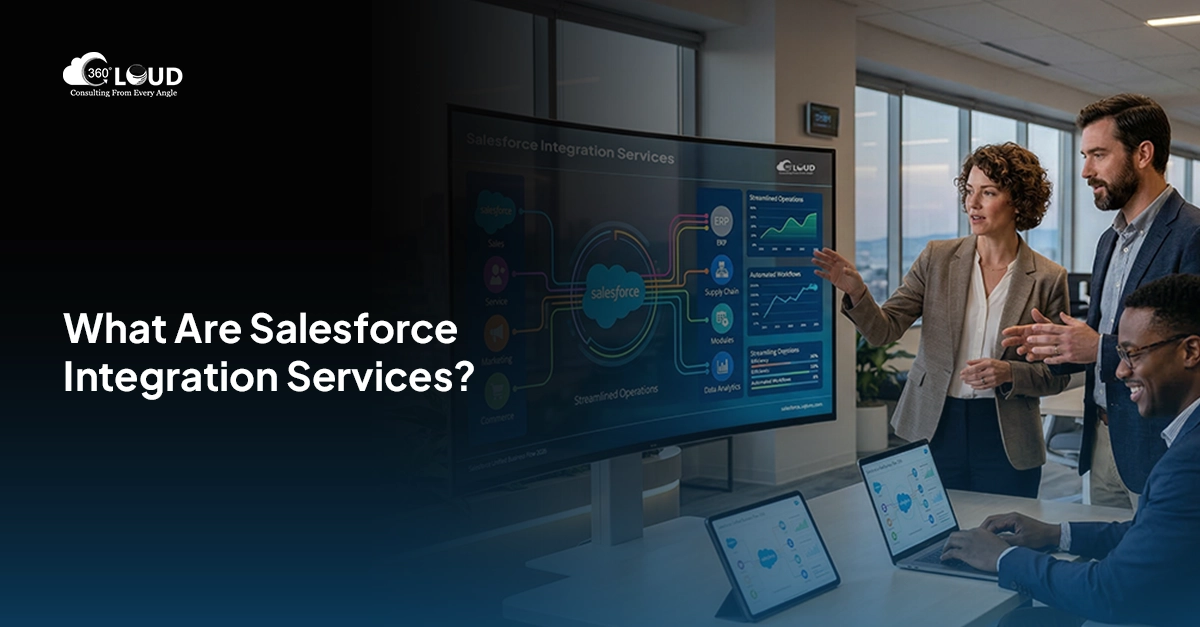
It’s rare to see any company function on just one software program. They usually operate on at least five, ten, sometimes even twenty different systems; ERP software for financials, marketing software for campaign management, ticketing software for the helpdesk, perhaps some custom application created three years ago that no one ever wants to go near. Salesforce acts as the hub of this, storing all customer details, deals and activities. However, when Salesforce is not integrated with all other systems, your employees end up integrating everything manually. That is precisely where Salesforce integration services come in handy.
That’s where the need for connected systems becomes obvious, not theoretical. Sales reps re-entering the same contact into three tools. Finance chasing invoice data that lives somewhere else. Support agents toggling between five tabs just to answer one question. None of this is a “nice to have” problem anymore, it’s a daily tax on productivity.
This growing need is exactly why Salesforce integration services have become a core part of how modern businesses operate, not a side project for the IT team to get to eventually. Done right, integration turns Salesforce from a standalone CRM into the operational center of the business – where data flows in, workflows run automatically, and teams stop losing hours to copy-paste.
That’s the real value of good Salesforce consulting services: not just connecting two systems, but rebuilding how work actually happens.
Stuck stitching systems together by hand?

Table of Contents
What Are Salesforce Integration Services?
At the simplest level, Salesforce integration services connect your Salesforce org to other software your business already relies on – ERPs, marketing platforms, ecommerce tools, support systems, finance software. The goal isn’t just “make them talk.” It’s making sure data moves accurately, in real time, without a human having to babysit it.
Here’s the thing people miss: integration isn’t a single feature you install. It’s a discipline. It covers everything from simple point-to-point connections between two systems to complex multi-system architectures where data flows through several tools before landing where it needs to be.
API Integration with Salesforce is generally the key here. There are many Salesforce APIs, including REST and SOAP APIs (and also more recent APIs like Bulk APIs and Platform Events), which can be used by other systems to get data from and insert data into Salesforce. It is due to APIs that live synchronization is possible, meaning that a new lead created through your web form instantly appears in Salesforce.
Automation plays a huge role too. Salesforce Flow, middleware platforms, and scheduled jobs handle the “what happens next” – trigger a task, update a status, notify a rep, kick off a billing process. None of it requires a person watching the screen.
And underneath all of it sits one simple idea: centralized data. When every system feeds into (or pulls from) Salesforce, your team stops asking “which version is correct?” There’s one source of truth. One record. One number everyone trusts.
Common Business Challenges Without Salesforce Integrations
Without integration, systems operate in isolation, and that isolation shows up fast.
Disconnected systems create data silos. Marketing has one version of a customer’s information. Support has another. Sales has a third. Nobody’s wrong exactly, but nobody’s aligned either.
Manual data entry fills the gap, and it’s expensive in a way that doesn’t show up on a line item – hours lost, errors introduced, momentum killed. A rep who spends 20 minutes updating three systems after every call isn’t selling during those 20 minutes.
Workflows get clunky. Approvals stall because someone has to manually notify the next person. Orders sit in one system waiting for someone to key them into another. None of it is dramatic on its own. All of it adds up.
Maybe the biggest cost is invisible: real-time reporting. Leadership makes decisions off numbers that are already stale by the time they hit the dashboard, because half the data hasn’t synced yet. You can’t run a business on yesterday’s picture.
Types of Salesforce Integrations
Not all types of integration will work for you; this is kind of the point since the integration to use will depend on your specific issue.
ERP integration integrates Salesforce with systems such as SAP, NetSuite, or Oracle in order to synchronize orders, inventory and finance information so that there is no disconnect between sales and operations.
Marketing automation integration integrates Salesforce with marketing automation software such as Marketo, HubSpot, or Marketing Cloud Account Engagement (formerly known as Pardot) in order to get leads, activities, and engagement directly into the CRM without the marketing operations staff exporting a CSV file every Monday.
Ecommerce integration integrates the order history, shopping cart activity, and purchase behaviors from ecommerce platforms such as Shopify or Magento to be able to see relevant purchasing behavior before making contact through sales.
Customer support integration integrates help desk software in order to have customer support tickets, case history and resolution directly available within the sales record.
Finance and billing integrations tie Salesforce to invoicing, billing, and payment systems, closing the loop between the deal being won and the invoice actually going out.
See what a connected Salesforce actually looks like.

Key Benefits of Salesforce Integration Services
Centralized customer and business data is the foundation everything else builds on. One record. One truth.
From there, workflow automation takes over the repetitive stuff – updates, notifications, handoffs — freeing people to do the parts of their job that actually need a human.
Productivity improves, but not in some abstract way. It shows up as reps closing more deals because they’re not stuck in admin work, and ops teams not drowning in manual reconciliation.
Customer experience gets better too, quietly. When support, sales, and finance are all looking at the same information, customers stop getting the “let me transfer you” runaround.
And real-time insights mean leadership isn’t reacting to last month’s numbers. They’re seeing what’s happening now, while there’s still time to do something about it.
How Salesforce Integration Services Work
Good integration work follows a process; skipping steps here is usually where things break later.
It starts with business requirement analysis. What’s actually broken? What data needs to move, and how often? This step gets rushed constantly, and it shouldn’t.
Integration planning comes next – mapping data fields, deciding sync frequency, figuring out which system is the source of truth for what.
Then API and middleware setup, where the actual technical connections get built – whether that’s native Salesforce APIs, a middleware platform, or custom code. For complex integration requirements, businesses often use MuleSoft development services to build custom APIs, automate data exchanges, and create reliable connections between Salesforce and external applications.
Implementation and testing follow, and testing matters more than people expect. A field that maps wrong in testing is a headache. The same mistake in production, with real customer data, is a mess.
Ongoing optimization closes the loop. Integrations aren’t “set and forget.” APIs change, business needs shift, new systems get added. The integration has to keep up.
Common Salesforce Integration Methods
Native Salesforce integrations use built-in tools like Salesforce Connect or pre-packaged AppExchange connectors – fastest to deploy, though not always flexible enough for complex needs.
API integrations offer the most control, letting developers build exactly the connection the business needs. More effort upfront, but far more precise.
Middleware solutions such as MuleSoft, Zapier, and Workato exist between Salesforce and other systems that perform transformations and routing of data without having to write code for each connection.
Third-party tools serve as an answer to a specific problem; usually, these third-party tools are made for one use only.
Challenges in Salesforce Integrations
Data migration issues come up constantly – duplicate records, mismatched formats, fields that mean different things in different systems.
Security and compliance concerns matter more with every integration added. Every connection is a new data pathway, and every pathway needs to be locked down properly, especially in regulated industries.
Integration scalability gets overlooked early on. A connection built for 10,000 records a month can choke at 500,000. Build for where the business is going, not just where it is.
System compatibility problems are just part of the territory – older systems, inconsistent APIs, platforms that were never designed to talk to anything else.
Best Practices for Successful Salesforce Integrations
Define clear business goals before touching a single API endpoint. “We want everything connected” isn’t a goal. “Reduce invoice turnaround by 3 days” is.
Maintain clean data. Integration doesn’t fix bad data, it just moves bad data faster, to more places.
Choose scalable integration solutions from the start. Retrofitting scalability into a rushed integration is far more expensive than planning for it.
Continuously monitor performance. Integrations fail quietly sometimes – a sync that silently stops working for two weeks can do real damage before anyone notices.
Why Businesses Choose Salesforce Integration Services
Expert implementation support matters because integration mistakes are expensive to unwind. Getting it right the first time beats fixing it twice.
Faster deployment comes from experience – teams who’ve built dozens of these connections know where the landmines are.
Reduced integration risk is the quiet benefit nobody talks about until something goes wrong without it.
And customized automation solutions mean the integration actually fits how the business works, instead of forcing the business to work around the integration.
Future of Salesforce Integration Services
Integrations fueled by AI are transforming the very notion of connectivity from mere transfer to analysis, anomaly detection, and prediction of what lies ahead.
Automation of intelligent workflows is expanding its horizons from basic triggers to actual decision-making, routing, prioritization, and action on context rather than just policy.
Real-time connectivity is no longer an exception but the rule of the day, where every customer and team expects timely and correct data.
Enterprise-level automation makes everything possible, where Salesforce serves as the core of an organization running itself for the mundane tasks, leaving people to do their job that requires intelligence.
Give Your Business a Single Source of Truth
At its core, this is about operational efficiency – fewer manual steps, fewer errors, fewer hours lost reconciling what should already match. Connected systems don’t just make Salesforce work better. They help the entire business scale without adding headcount for every new tool that gets bolted on.
Salesforce integration services aren’t a technical afterthought anymore; they’re infrastructure. And the businesses treating them that way are the ones moving faster than everyone else with solutions like MuleSoft consulting services and scalable integration development approaches.

Categories

Solve It with Salesforce. We’ll Show You How.
AI. Apps. Experts. Everything you need to win with Salesforce under one roof.Frequently Asked Questions
What are Salesforce integration services?
It is the process of connecting your Salesforce org to other applications that you use in your business, like ERPs, marketing applications, customer support software, and billing solutions, so that information flows between them without any need for manual data entry five times a day.
Why are Salesforce integrations important for businesses?
Because disconnected systems quietly cost you. Reps duplicate data entry, reports run on stale numbers, and teams end up trusting three different versions of the same customer. Integration fixes that by giving everyone one accurate source of truth in real time, not end-of-day.
What systems can integrate with Salesforce?
Pretty much anything with an API these days. ERPs like SAP and NetSuite. Marketing platforms like HubSpot or Marketing Cloud Account Engagement (formerly known as Pardot). Ecommerce tools like Shopify. Support desks, billing systems, and custom internal apps – if it holds business data, there's usually a way to connect it to Salesforce.
How does Salesforce API integration work?
Salesforce provides APIs in the form of REST and SOAP (Bulk API and Platform Events where required) that allow other applications to access information stored in your organisation both ways. When a new lead is created on your website, for instance, the lead will be stored in Salesforce in seconds using an API call.
What are the benefits of Salesforce integration services?
Centralised data, for one. Fewer manual updates. Faster workflows because automation handles the handoffs. Better customer experience since support, sales, and finance are all looking at the same record. And leadership finally gets reporting that reflects what's happening right now, not last week.
What challenges occur during Salesforce integrations?
Data migration problems keep coming up again and again, from duplicate data to field mapping to differences in formats. Data security and compliance concerns bring a new dimension into play. Then there is the problem of scalability – a system that works fine for small amounts of data will fail at larger volumes.
What is the difference between native and API integrations?
Integration using native features uses those features that exist within Salesforce or AppExchange connectors. This approach is faster to deploy, though sometimes it may lack flexibility. However, API-based integration will always be custom-built at some cost; nonetheless, it provides full control over the process of integration.
How long does Salesforce integration implementation take?
It depends entirely on scope. A single native connector might take days. A multi-system, custom API build with heavy data migration can run several months. Anyone promising a universal timeline before understanding your systems is guessing.
Can small businesses use Salesforce integration services?
Yes, and they often benefit more, proportionally, since small teams feel manual data entry pain the fastest. Native integrations or lightweight middleware tools usually get small businesses most of the value without enterprise-level cost or complexity.
How do I choose the right Salesforce integration partner?
Look past the sales pitch and ask what they've actually built - similar systems, similar scale. A good Salesforce integration consulting partner will ask about your business goals before touching any API, push back on unrealistic timelines, and plan for where your data volume is headed, not just where it sits today.

About the author
Editorial TeamThe Editorial Team at 360 Degree Cloud brings together seasoned marketers, Salesforce specialists, and technology writers who are passionate about simplifying complex ideas into meaningful insights. With deep expertise in Salesforce solutions, B2B SaaS, and digital transformation, the team curates thought leadership content, industry trends, and practical guides that help businesses navigate growth with clarity and confidence. Every piece we publish reflects our commitment to delivering value, fostering innovation, and connecting readers with the evolving Salesforce ecosystem.
Recent Blogs
 Salesforce Clouds
Salesforce Commerce Cloud Implementation: The 2026 Guide for B2B and B2C Commerce Teams
Commerce has always been competitive. But in 2026, the bar has shifted in ways that are hard to ignore. Whether someone is a consumer checking…
Read More Uncategorized
How Salesforce Agentforce and Google Cloud Integration is Changing Enterprise AI in 2026
Most enterprise AI projects don’t stall because the model is weak. They stall in the plumbing. A sales ops lead wants one agent that can…
Read More Salesforce Clouds
Salesforce Marketing Cloud Engagement Implementation: The 2026 Guide to Omnichannel Marketing That Converts
Most marketing teams aren’t failing because they lack content. They’re failing because the right message is reaching the wrong person at the wrong time –…
Read MoreReady to Make the Most Out of Your Salesforce Instance?
Our Salesforce aces would be happy to help you. Just drop us a line at contact@360degreecloud.com, and we’ll take it from there!
Subscribe to our newsletter
Stay ahead with expert insights, industry trends, and exclusive resources—delivered straight to your inbox.
