



14+
Years in the Industry
3k+
Salesforce Projects Delivered
10+
Salesforce Products
5★
Rating on AppExchange
30+
Industry Served
Strategic Salesforce Health Check for Peak CRM Performance
Most Salesforce orgs have 4-6 hidden performance killers. Our Salesforce security audit goes 8 layers deep to find every gap, vulnerability, and adoption blocker dragging your ROI down.

Salesforce Org Assessment
From architecture to data quality, we review every layer of your Salesforce org against certified best practices.

Actionable Roadmap
Not just a report, a prioritized, business-aligned plan that tells you exactly what to fix, in what order, and why.

Security & Compliance Audit
Identify data-sharing gaps, and code-level vulnerabilities before they become costly liabilities.

ROI Optimization
Salesforce value with recommendations to boost adoption.

Technical Debt Mitigation
Audit custom code versus declarative tools to simplify your org and accelerate your deployment cycles

User Adoption Strategy
Identify Shadow IT and process bottlenecks to transform Salesforce into a tool your team actually wants to use.
See exactly what's broken in your org - in 4 weeks.
Start your Salesforce security audit, get a prioritized findings report and actionable roadmap delivered in 4 weeks. No disruption to your live environment.
Our Salesforce Security Health Check Covers Every Dimension
We ensure every facet of your Salesforce implementation is evaluated against industry benchmarks, so nothing falls through the cracks.
Transform System Roadblocks into Strategic Growth with a Salesforce Org Assessment
We go beyond technical fixes to eliminate inefficiencies and ensure Salesforce data protection. From low adoption to data chaos, we turn roadblocks into growth levers.

Read Our AppExchange Reviews

Customer Success That Speaks for Itself
Speed | Support | Scalability

Awards & Accolades







Why Choose Us for Salesforce Org Health Check?
- 850+ Certified Salesforce Specialists
- 14+ Years of Maximizing Salesforce ROI
- Trusted by Global Enterprises & High-Growth Startups Alike
- 4X Faster Deployment Speed
- Agile Diagnostics. Prioritized Roadmaps. Zero Filler Reports.
- Serving Across 30+ Industries. Every Org Risk Covered.
Stop Pouring Budget into a Broken Salesforce Org
Get Your Salesforce audit report to identify architecture gaps, Salesforce security challenges, and adoption leaks draining your ROI, and a clear plan to fix them.
Get Your Health Check Score
Want an expert-led diagnostic and a Salesforce security report to reclaim platform performance?
Salesforce Insights & Updates
Stay ahead with the latest insights, expert tips, and industry trends—featuring exclusive tips and tricks from our Salesforce experts to drive innovation and success.
 Uncategorized
Dreamforce 2026 Wrapped: Here’s What to Take Back to Your Team
Fifty thousand people packed into Moscone Center this week. Another 120,000+ tuned in online. And for three days straight, Salesforce made one thing very clear: the interface…
Read More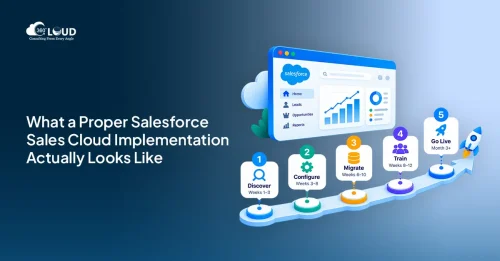 Salesforce Clouds
Salesforce Sales Cloud Implementation: The Complete 2026 Guide for Growing Teams
Most sales teams that struggle with Salesforce aren’t using the wrong platform. They’re using the right platform badly. The setup was rushed, the data model was borrowed from a…
Read More Salesforce Services
Dreamforce 2026 Highlights: Top 10 Announcements You Should Know About
Dreamforce 2026 just wrapped up in San Francisco, and if one word had to capture the energy in that room, it would be this: transformation.…
Read MoreReady to Run Salesforce at Peak Velocity?
FAQs
How long does a Salesforce Health Check typically take?
Most audits are completed within a few weeks. We provide a phased delivery, starting with a rapid diagnostic of your architecture, preparing a Salesforce security report, followed by a prioritized, actionable roadmap. You'll have initial findings within the first week.
Will this process disrupt our daily operations?
Not at all. Our experts work over-the-shoulder with your admins and stakeholders. We focus on data and metadata analysis to identify bottlenecks without interrupting your live environment or sales cycles.
What specific areas does the Health Check cover?
We perform a 360-degree diagnostic across eight critical pillars: User Adoption, Technical Architecture, Data Quality, Security/Compliance, System Usability, Customizations, Governance, and Release Readiness.
What is the final deliverable we receive?
You get more than a Salesforce vulnerability report; you get a leadership-ready package. This includes a Strategic Optimization Roadmap that categorizes findings by business impact and technical effort, telling you exactly what to fix, in what order, and why. Additionally, you’ll get an executive summary built for internal sign-off conversations.
How often should we perform a Health Check?
We recommend a Salesforce security audit annually or before major business shifts (like a merger or new department rollout). It ensures your org stays aligned with Salesforce’s three annual innovation releases.
Do you help with the implementation of the findings?
Yes. While the Health Check is a standalone diagnostic, our team of certified Salesforce professionals is available to help you execute the roadmap, slash technical debt, and scale your strategy.
What happens in the free scoping call?
We ask about your current setup, what's giving your team the most friction, and whether a full Salesforce Health Check makes sense for where you are right now. You'll walk away with a clear view of what the audit would cover and what it would cost.
What is the difference between a Salesforce health check and a security audit?
A Salesforce health check is a broad org assessment covering the full spectrum of platform health: performance, data quality, user adoption, automation logic, integration reliability, architecture, technical debt, and security. It gives you a 360-degree view of where your org is strong and where it is at risk. A Salesforce security audit is a deep dive specifically into access controls, vulnerability exposure, and compliance - examining sharing rules, permission sets, API scopes, session settings, and MFA enforcement in far greater detail than a health check's security component alone. A health check includes a security dimension, but a dedicated security audit goes significantly deeper on that single axis.
Got a Question? Ask Us!
Ready to Solidify Your Digital Transformation Efforts Using Salesforce? Talk to Us!

Subscribe to our newsletter
Stay ahead with expert insights, industry trends, and exclusive resources—delivered straight to your inbox.
