

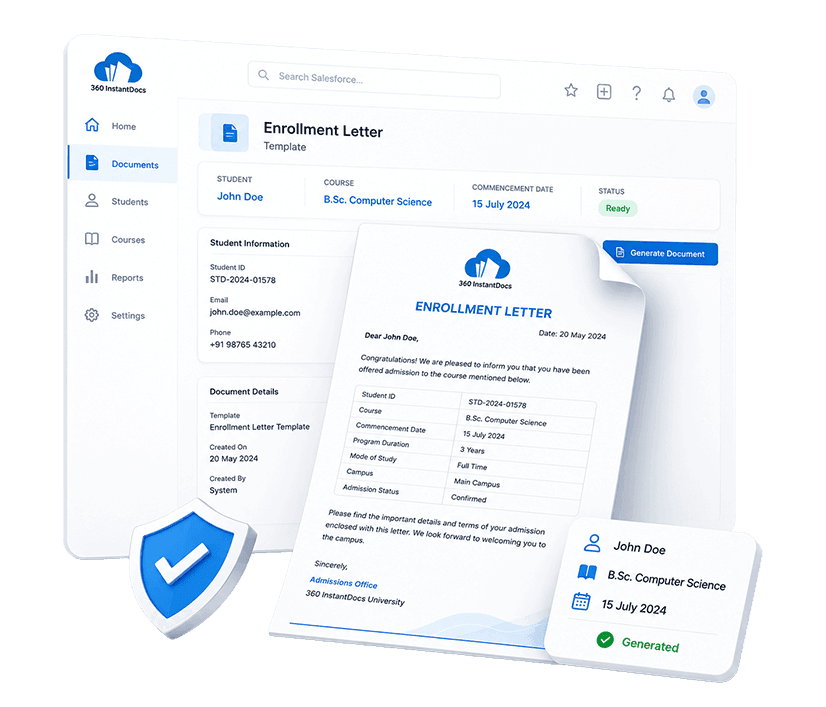
Salesforce Enrollment Letter Template for Education & EdTech
Auto-generate professional Enrollment Letters directly from Salesforce - student name, course name, commencement date, and more details populated automatically from your Salesforce records.
Generate up to 50 documents/month for FREE
Get the full template
Enter your email to receive the complete Enrollment Letter Word template - ready to customize and use immediately.
Open & customize in Word
Open your template in Word, add branding, adjust content, and insert merge fields from the 360 InstantDocs Word add-in panel.
Merge live Salesforce data
Connect the template to live Salesforce field data so names, dates, amounts, and other record details fill in automatically.
Generate from Salesforce
Create the final Word or PDF document in one click from a record or trigger it through Flow in seconds.
About this Salesforce Enrollment Letter Template
This Salesforce enrollment letter template is purpose-built for Education & EdTech teams that need to generate accurate, professionally structured enrollment letters directly from Salesforce records, without manually re-entering details.
When connected to 360 InstantDocs for Salesforce education document automation, every field - from student name to fee payment schedule - populates automatically from your live Salesforce Contact, Opportunity, and custom enrollment object data.
When to use this template
- Generating an enrollment letter when a student application is approved and a Contact or enrollment record is created in Salesforce
- New student intake periods where student and course details are stored in Salesforce Contact and custom enrollment object records
- Online or blended learning program enrollments where course and delivery mode details are stored in Salesforce
- Bulk enrollment letter generation during peak intake periods for multiple students enrolling simultaneously
- Re-enrollment or course transfer situations where existing student data is already in Salesforce and updated course details need to be reflected in a new letter
Customizing this Salesforce enrollment letter template
Open the template. Adjust enrollment conditions to reflect your institution's standard admission requirements, update fee payment schedule sections, and other information, and apply your institution's branding.
Leave all {placeholder} fields exactly as-is, 360 InstantDocs maps these to your Salesforce fields (Contact, Opportunity, custom enrollment object, or custom course object) automatically.
Use cases & Salesforce integrations
Auto-generate enrollment letter from Salesforce application record
When a student application record is approved or an enrollment object is created in Salesforce, 360 InstantDocs triggers Salesforce education document automation, automatically generating a fully-populated enrollment letter with all details.
Bulk enrollment letter generation during intake periods
During peak enrollment seasons, bulk enrollment letter generation in Salesforce is one of the most impactful use cases for 360 InstantDocs in education teams. Select all approved student Contact records for the current intake from a Salesforce list view and generate personalised enrollment letters for every student in a single bulk action.
Conditional enrollment letter content based on student type
Use 360 InstantDocs conditional logic to show or hide specific enrollment letter sections based on Salesforce field values - for example, displaying an international student visa and enrollment condition section only when the student nationality field indicates an overseas applicant.
Automate Enrollment Letter Generation from Salesforce in One Click
Generate professional enrollment letters, course agreements, certificates, and Salesforce education document templates directly from any Salesforce record - in seconds, not hours.
- Start trial- 50 documents free/month
- Salesforce-native – works with any object or field
- PDF + Word document output
- Trigger via button or Salesforce Flow
Talk to a 360 InstantDocs specialist
Tell us about your document workflow and we'll show you exactly how to automate it.
We only use your details to arrange the demo requested.
