Talk to Us

How To Choose a Reliable Salesforce Partner for your Company

For implementing a Salesforce solution, you need a professional who is active enough and knows technology. There are different Salesforce support plans and service providers, and it can be tough to find out the one that suits you the most.

No matter what kind of service you need from Salesforce, you should always look for the top Salesforce partner who can offer multiple Salesforce-based services. Here are some points that will help you start on the right foot and find a Salesforce partner for your business.

1. Consider the Industry Expertise

A Salesforce consultant with industry expertise can be an advantage for your organization. It can help you meet project requirements and deadlines while following the best implementation practices. An experienced Salesforce partner tends to have a deep knowledge of project needs and can communicate the same to you. Also. a team that has already done projects for multiple companies would have an understanding of complex issues and the way to solve them.

2. Team Size Matters

For the success of any project, you need to appoint a team of experts. This makes it essential to research if your Salesforce consulting service is having a team with sufficient experts to work together on the successful completion of the project. You need to make sure the team you choose includes Admins, Business Analysts, QAs, Developers, and Consultants. There can be more professionals, but these are the most important ones.

3. Look for Certified Professionals

Salesforce has its certification program that helps validate if a person has the needed understanding that makes him a Salesforce professional. There are different kinds of certifications in Salesforce, which mainly include ones for Salesforce consultants, app builders, developers, administrators, architects, or specialists. The Salesforce certified professional you require for your project depends highly on your unique business needs. Make sure you verify that the Salesforce partner you choose should at least have a certified Salesforce developer, administrator,  specialist, and consultant.

4. Pick Someone Who Always Has a Say

Salesforce support services are mainly considered as their competence and skills are something that your company needs. So, the last thing you want is a partner who agrees to any random suggestion and doesn’t give his input and thought; hence, a ‘yes-man.’ 

You need a consultant who can look into your business objectives, clear any doubts, and is confident enough to give the right suggestion that could bring improvement in results.

5. Aim at Long-Term Relationship

When you want to plan a better future for your business, you should consider hiring Salesforce professional services that can support the organization throughout the evolving needs. Salesforce consultants use several robust methods to identify any risk before the issues penetrate. This is something that would benefit you in long term.

Find a Salesforce Partner That Adds Value to your Business

To finalize the right Salesforce services for your business, consider following a systematic strategy. Be aware of the team size, expertise, and the processes they will be following. After the project requirements are defined, check if their expected results are similar to what you want. Also, verify the range of services offered, and be sure that they are the best fit for your business. With that done, you can be sure of picking a partner that could add value to your business. Reach out to us and talk to an experienced Salesforce partner and bring in your expectations and we’ll support you to achieve your business growth.


4 Features That Make Salesforce Pardot Great for B2B Marketing

B2B marketing needs the right measurements to scale the marketing processes for better results. You can only take it to a small scale if you handle it manually. You need to go for a reliable marketing solution for a better lead generation campaign that involves multiple touchpoints. In this case, businesses need a marketing solution to handle the processes automatically, and the option of Salesforce Pardot B2B Marketing fits right here.

Pardot has gained its reputation as an efficient lead generation and nurturing system. It is a Salesforce product (part of the Marketing Cloud) Pardot allows businesses to easily measure the effectiveness of communications. It also helps gain insight into user behavior for a better marketing strategy by personalizing content across campaigns. You’ve heard the axiom, Right Place, Right Time. Choosing the right Salesforce consultant can help you ensure you’re communicating with the right person at the right time, following the right tone. 

As you’ll take a stroll down, you’ll find many more reasons that will make you pick Salesforce Pardot for the marketing of your B2B business.

1. In-depth Prospect Tracking

Pardot has a powerful feature to track website readers even before they become registered prospects or customers. Pardot also offers social media, webinars, Google AdWords, and other tracking features. It also helps the user to learn about prospects by using the progressive profiling method. This measure helps to avoid bombarding readers with huge lists of questions. All of this offers incredible insights into prospects’ interests and needs. And none of these features can be possible while using aWeber, MailChimp, or Upmail.

2. Lead Nurturing

It is a fact that nurtured leads far outspend non-nurtured leads, and businesses have already started accepting that. Pardot helps representatives to plan lead nurturing and tracks all stages of the pipeline. Pardot comes with numerous templates for designing landing pages, emails, and forms. You can customize these templates according to the needs of your unique customer base.

3. Data Analytics to Track Progress

Salesforce Pardot provides each person on your team with customized dashboards according to their work so they can track their progress on a granular level. And that’s not all! The success of a B2B sale often depends on whether the customer is ready to accept what you are selling. That is why Pardot allows maintaining a dashboard that helps representatives to track the adoption rate of your product or service.

4. Email Automation

With Email Builder in Pardot, you can make the most of the templates available that could help in building a winning email content based on your target audience. You can also personalize your email message like, adding in your business contact address with the help of Variable Tags. Pardot also uses these Variable Tags in the test emails so that your users can also see what your prospects see. 

Pump Up Your Marketing Efforts with Pardot

Pardot B2B marketing analytics allows tracking the performance of the marketing collaterals, thus making the life of a marketer easier. With the reporting capabilities and scalable customization options, Salesforce Pardot becomes a potent tool to improve your marketing return on investment. Contact our team of expert Pardot consultants and talk to them about all the possibilities Pardot can add to your B2B marketing efforts.

Are Salesforce Certifications Worth It?

Be it any technology, people always give priority to a certified professional over a non-certified one. It makes it quite clear that to maintain a successful career in the domain of your interest, you need to be legitimately certified. Talking specifically about the Salesforce ecosystem, the importance of certifications also exists here, in fact, it is much more than we could think. 

Salesforce talent is usually in high demand. But what makes you an excellent candidate for the job along with your work portfolio is the certification you have achieved that speaks your credibility in its way. Salesforce certification is an amazing way to prove your skills and knowledge about the hottest CRM platform today.

Why Should You Pursue Salesforce Certification?

As a successful cloud-based ecosystem, organizations are getting on board with Salesforce to establish their business and run it smoothly. The increasing use of Salesforce among the business has led to the demand for Salesforce professionals. This demand has increased by 129% in the past 5 years. This is why professionals are pursuing Salesforce Certification courses to upskill themselves.

With Salesforce revolutionizing different industries, organizations want certified professionals to manage their CRM and process their data right. Salesforce certification has become a standard for selecting the right people to handle the Salesforce platform. Not only this but being a certified Salesforce professional also adds to the salary. We can say that a Salesforce certification can open doors to better opportunities for professionals. 

Benefits of Salesforce Certification

Being a Salesforce certified professional brings in a lot of perks. Here we have listed some of the most prominent benefits a professional can leverage by acquiring Salesforce certifications. 

Obtain a dynamically updated, current knowledge base

With Salesforce updating with each release, the professionals need to stay aware of it and walk parallel with the latest upcoming. Getting certification to your credit will help you get in touch with everything that matters in the Salesforce ecosystem, giving you the most intimate understanding of the platform.   

Certification communicates your expertise

Salesforce certification helps you prove to your employers and customers that you have the skills and capability needed for a Salesforce project. To get a Salesforce certification, you need to have the competencies that help you to qualify. Thus, being a certified Salesforce professional communicates your knowledge and competencies, proving you to be highly suitable for a job. 

Become a star performer

Many companies lack a solid plan for optimizing their Salesforce, missing out on a large chunk of Salesforce functionalities. But if you are a certified Salesforce professional, you’ll be in a great position to help your team customize and optimize the Salesforce instance. You’ll know how to configure the Salesforce platform helping the team to get answers to any strategic questions they have about Salesforce. 

Career growth

Most Salesforce-related job descriptions state it important to have a Salesforce certification that can speak for your capabilities. Not having the relevant Salesforce certification in your field can be one of the reasons you are not getting a call back for an interview from your dream company. Qualifying for a Salesforce certification can be a nice feather to your hat that adds to your work portfolio and experience. 

Grab Better Opportunities with Salesforce Certifications

Sure, you may have been working on Salesforce for a long time, and you might even know the ins and outs of the platform. But what you are saying won’t be enough to any employer or any customer with whom you wish to work. If you are working without a Salesforce certification, you are hurting your potential and keeping yourself from a whole lot of better opportunities. A certification will be the mark of your knowledge, expertise, and hands-on experience. All these returns make this an investment that is worth it. 

How Non-Profit Organizations Can Make The Most Of Salesforce

Just like a business, Salesforce for nonprofits can be used for streamlining workflows that benefit both internal and external stakeholders. Salesforce helps nonprofit organizations manage donation cycles, generate detailed reporting, analyze fundraising campaigns, and handle any number of processes.While most organizations go for Salesforce Nonprofit Success Pack (NPSP), you can also look into a vibrant pool of integration tools that could help nonprofits to get even more out of Salesforce. These tools help in better positioning nonprofits to overcome common industry challenges. The right integration tools can take your Salesforce for nonprofits a long way.Common Nonprofit ChallengesBefore we dive into finding the ways to make the most of Salesforce for Nonprofit, we should be aware of the greatest challenge of this domain, necessary to be countered. 1. Bringing in the moneyMoney matters. The difficulty to get sufficient money is by far the biggest challenge for nonprofit organizations. The specific pain points relating to this challenge could be a saturated competitor landscape and grant management inefficiencies. 2. Spreading the wordLack of visibility for your brand proposition can be a reason that your venture is not getting enough attention from the people. This could be because of the reasons like selling a cause that is not popular or under-resourced communication teams. Salesforce for NonprofitsSalesforce utilization can bring a new level of efficiency and power to your nonprofit organization. We have got some Salesforce Nonprofit tools that can help you lift your venture by improving efficiency and brand awareness. 1. DonorsWe have already said that finding the money to deliver on the mission is the biggest challenge for nonprofit professionals. The need here is to find and engage donors who are interested in the cause. Causeview is an integration tool and is built on the Salesforce platform to make fundraising more efficient. Users can track campaigns, communicate with donors, process payments, and more just with this integration tool. 2. Social mediaDid you know that Millennials are three times more likely to become aware of any cause through social media? Well, that isn’t surprising, and there is always a growing need for a finely tuned social media strategy. Using Salesforce for Nonprofits can help in tracking the deeper engagement and manage new leads, improving your funnel. Here Salesforce Marketing Cloud can help you automate your social media posts to target unique audiences, track analytics, and more. 3. Email marketingEven a nonprofit organization needs a streamlined process for email marketing strategies that could help to stay connected with donors and to bring in volunteers. This would be a great source of communication, allowing you to connect with your audience as frequently as possible. Integrating Salesforce with Mailchimp helps you to build new lists with Salesforce field data, and much more. 4. Grant ManagementSalesforce Nonprofit Starter Pack provides users compelling grant management capabilities. Along with donor management, the grant cycle takes up a significant time and effort for nonprofits. NGO Connect is a tool that helps to create and manage gifts and giving, including grants. 5. ReportingSalesforce also makes reporting easier by speeding up data-driven decisions and improve information flow by scheduling reports to automatically be sent to anyone within or outside your organization, either inline as an email or as an attached document. Salesforce Experts For Your Nonprofit OrganizationIt would be a mistake to assume that nonprofit organizations don’t have much work. With our experience of creating Salesforce solutions for nonprofit organizations, we know that the representatives at such organizations need a lot of patience to form public relations and to generate attention towards a cause. With Salesforce consulting service, you can get the support you need with solutions that will simplify and improve your working processes. 

Top 10 Most Exciting Features of Salesforce Summer ‘21

It’s that time of the year when Salesforce administrators and other professionals sit tight to unwrap everything that Salesforce brings to them with its new release. After some helpful updates in Spring ‘21, Salesforce is back again with its Summer ‘21 release notes, and there’s so much in it that we can’t keep calm. 

Salesforce announced the release date and Sandbox preview of Summer ‘21, and now the release notes are available too. Although there’s a lot that Salesforce brought up for its users, some features got our attention. Here are the top 10 features that will go a long way for Salesforce administrators and developers.

1. Flow Updates

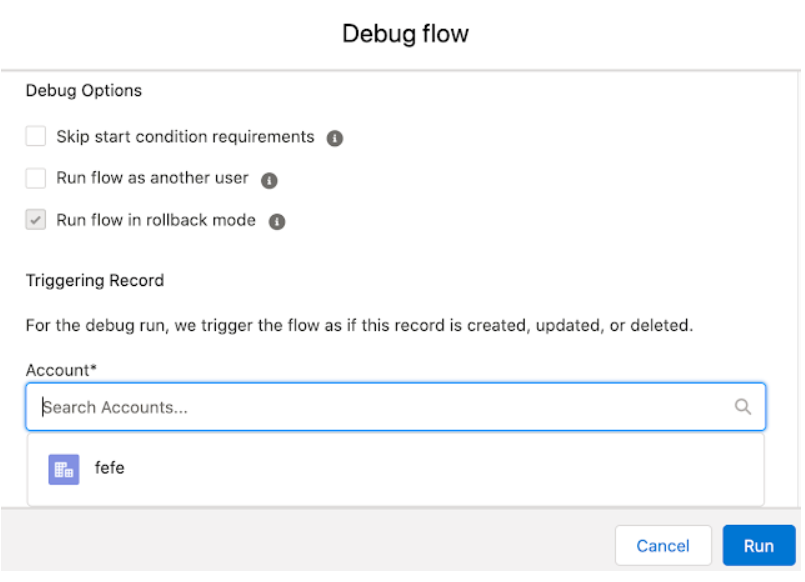
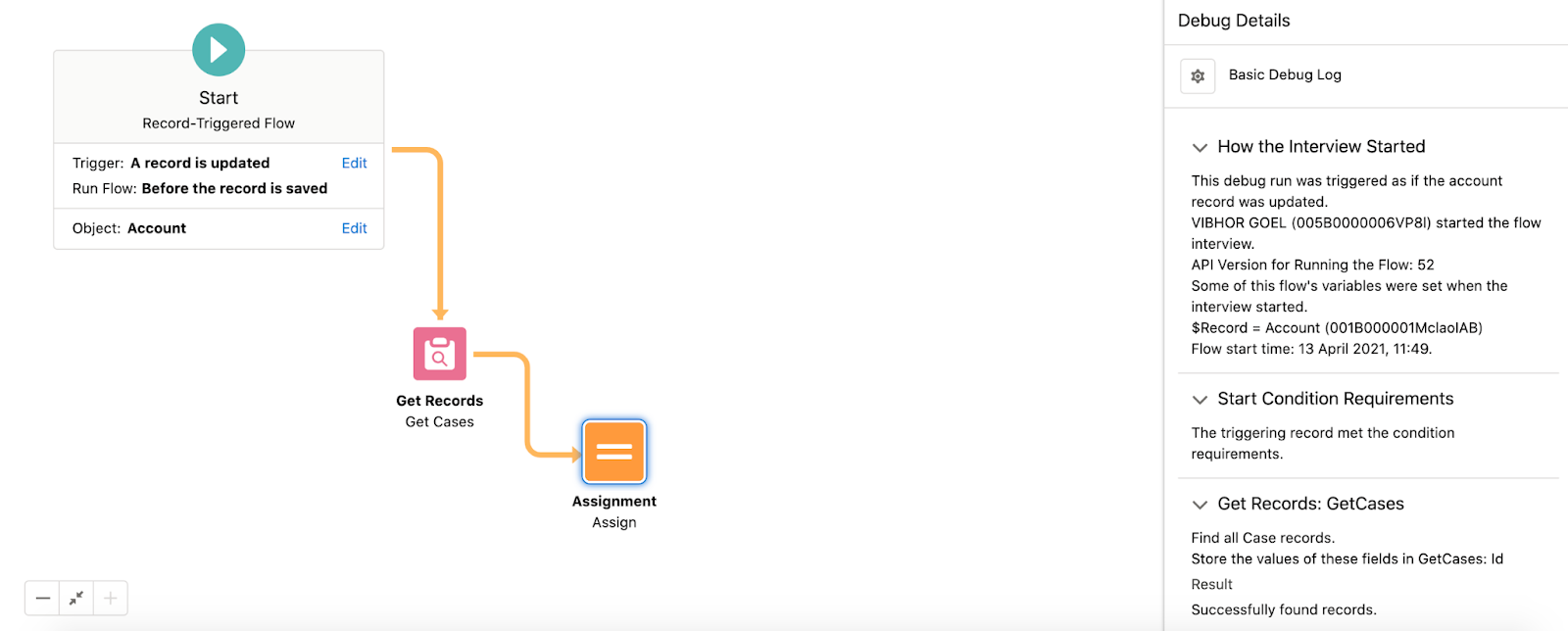
Salesforce Summer ‘21 has brought many Flow features and enhancements. You can debug Record Triggered Flow with the help of Debug tools. Earlier different kinds of workarounds were required for debugging Record Triggered Flows, being a massive gap in Salesforce.

There is also an addition of a native collection sort element within Flow Builder. This feature allows Sort Collection Variables in ascending or descending order. 

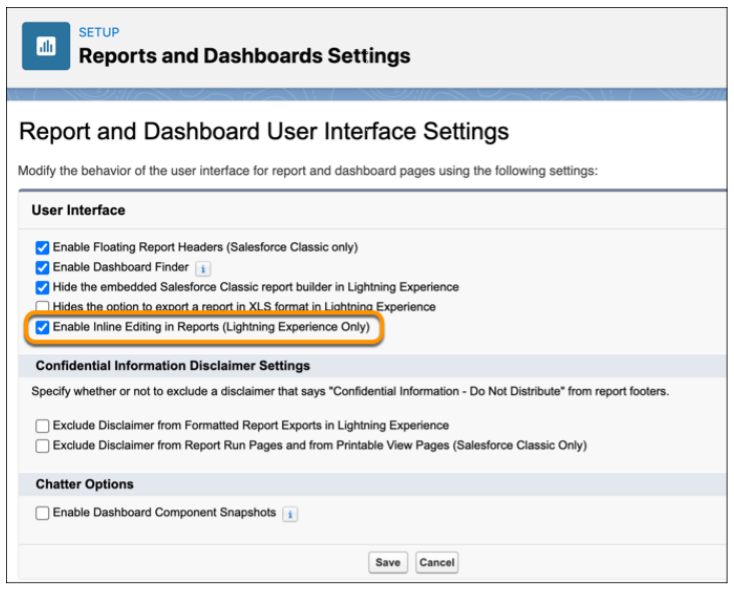
2. Update Fields from the Report Run Page with Inline Editing (Beta)

Users can save time and clicks by keeping data up to date in the reports and object records. When any source data goes out of date, you no longer need to go back to the original record to update the information. The feature of inline editing allows updating the text or numeric fields without leaving the Report Run page.   

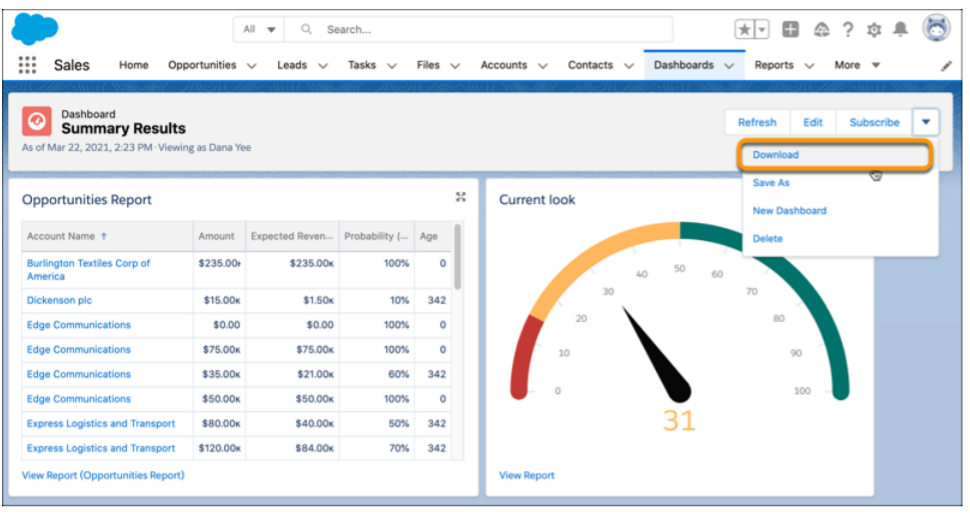
3. Download a Dashboard Image to a File

You can download any image on your dashboard embedded in a presentation to receive a PNG file. Earlier, you were only able to acquire a dashboard image with the help of an app for screen capture.    

4. Enhancements for Einstein Bots

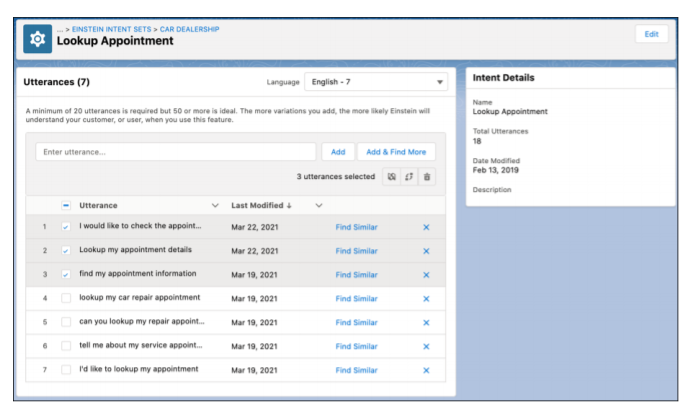
Summer ‘21 has brought more NLP languages for Einstein Bots. This makes it easier to reach out to more customers in the language preferred by them. Einstein Bots will now support Korean, Swedish, and Danish for Natural Language Processing in beta.

Also, the Einstein Bot Builder is equipped with an upgraded intent management experience for expanding your bot. The feature of dialog cloning is added with the option to include the attached utterance. This allows you to move bulk utterances between intents or to another intent set. The intent set now contains various languages, and users can easily assign bulk utterances to a new language. Users can focus on the utterance matching with the language of the bot with bot training, ensuring that the model fits right for your target customers.

5. Salesforce Data Pipelines to Enrich Salesforce Data at Scale

The release brought us a new product, Salesforce Data Pipelines that helps to enrich the Salesforce data. When your CRM data is scattered on different services, the product can help you consolidate it for a single and accessible view that enables faster decision-making. You can also use Data Pipelines for transforming bulk Salesforce information without having to use third-party tools.

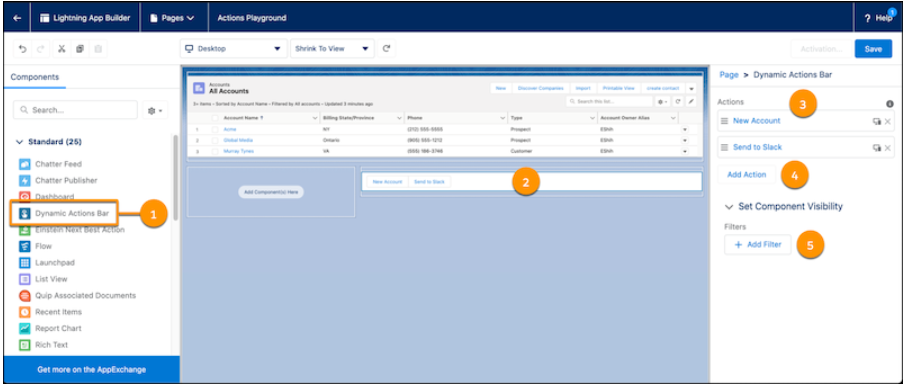
6. Dynamic Actions Bar for your App Page

You can now have a Dynamic Actions Bar for your app page that helps you handle all the information actions from a single bar. You can easily drag and configure the components of the bar on your app page by using the Lightning App Builder. You can also use standard and custom global actions for customizing your bar.

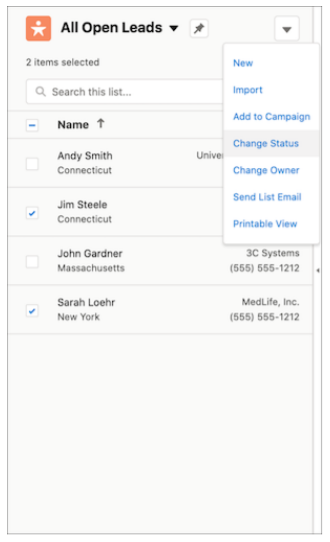
7. Save your Time dealing with Mass Actions in Split View

You don’t need to open a different list page for different details now. You can easily enable the split view to access multiple records at a single time. In a split view list, select the relevant items and choose an action for them in console or standard view. 

8. Connect with Customers Easily via LinkedIn with Native Sales Navigator Integration

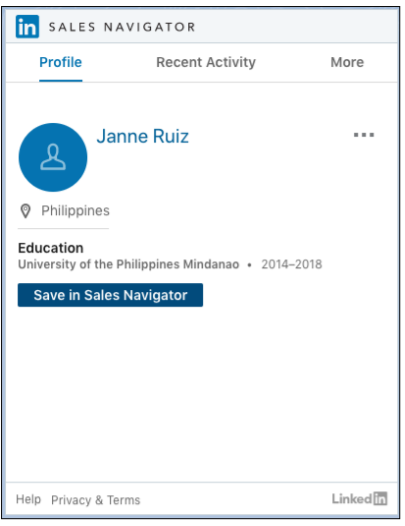
The release has brought a great feature for sales representatives to connect with customers in more significant ways through LinkedIn Sales Navigator native integration. Sales representatives can use native components to easily access LinkedIn profiles on contact, leads, opportunity, and account pages. This further makes it easier for them to send connection requests and InMails using native Lightning Actions. 

9. Upgrade to Meeting Digest

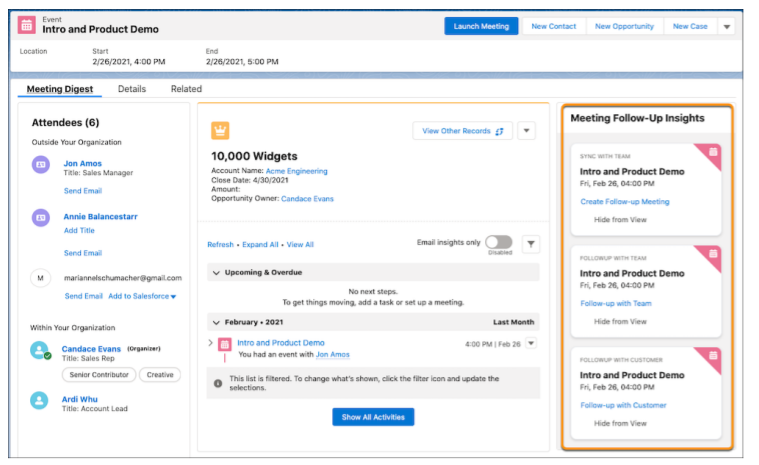
To prepare for meetings in a better way and to help organizers address customer concerns, Salesforce added Meeting Digest with the feature that gives insights about the cases which are of the highest priority. It also notifies the meeting organizer about the outstanding customer requests. In addition to this, representatives also receive helpful reminders of follow-up meetings or sending emails after the meeting.

10. Record Access Reasons in Lightning Experience

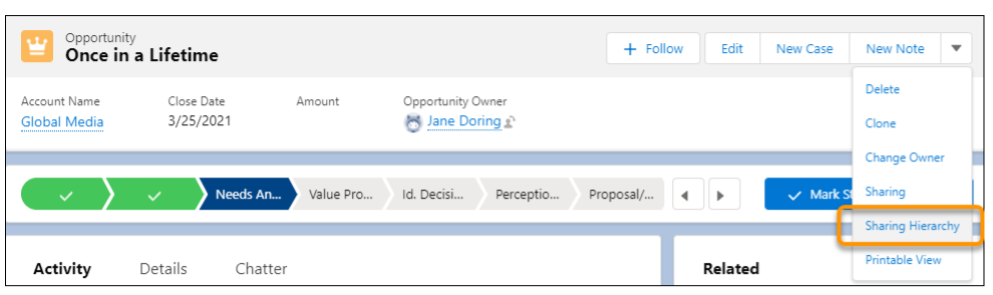
Earlier when multiple users had access to a record, it was never clear why they were having the access and what their roles were. But with Summer ‘21, a user can see why they have access by finding it in the Record Sharing Hierarchy in Lightning Experience. 

Summary

Salesforce Summer ‘21 has brought some great features for administrators, developers, and users. All of it adds to the experience and simplicity of using the CRM platform. We highlighted some of the eye-catchy features that we couldn’t resist sharing. There’s more to it that makes Salesforce Summer ‘21 something you might look forward to.

New Salesforce Service Cloud Features to Enable Remote Collaboration

Salesforce introduced the next generation of Service Cloud 360 that includes improvements in Einstein Bots and Cloud Voice. The new features are added to Service Cloud to walk in parallel to the new reality everyone is living in during the pandemic. Revamped features of Service Cloud center on improving remote collaboration, allowing customer service teams to deliver personalized digital engagement while they work from home. 

Salesforce has enhanced these features to enable customer service representatives to deliver customer experiences and improve engagement. The new features are introduced to help agents close deals faster and modernize contact centers to speed up operations for customer service. Here are these exciting new features added to the Service Cloud:

  • Service Cloud Voice: It is the service that helps to bring the phone, digital platforms, and customer data together. It provides customer service agents with a unified view of all data to come up with a personalized way to engage with customers. 
  • Einstein Bots: New version of Service Cloud introduces pre-built Einstein Bots, which is the chatbot feature for customers to get answers to their common queries. This saves the agents time to work on resolving more complex issues. 
  • Service Cloud Workforce Engagement: Salesforce introduced this feature as a product for workforce planning. It uses AI for predicting how many requests will come into a contact center and from which channels, which can include email, webchat, phone, text, or social.
  • Visual Remote Assistant: Service teams will now get the support of a virtual remote assistant that will allow them to walk customers through solutions remotely. The agents can do so by addressing customer requests through video from anywhere in real-time.

Considering the new form of working amidst pandemic, Clara Shih, CEO of Service Cloud, said, 

We are on the cusp of a great reopening of society, and companies know they need to move quickly to seize the moment…

While customers and companies alike are eager to return to in-person experiences, digital behaviors we learned and grew accustomed to during the pandemic are here to stay.

All these features on Service Cloud will take digital experiences for customers a long way. It will make it easier for service teams to collaborate and engage with customers despite the distance barriers.

5 Ways To Enhance Customer Retention with Salesforce Implementation Services

For any business, its clients are the topmost assets, which is why they keep trying to attract more. But that’s not all. The hard part is maintaining those relationships once you get them through the door. Chances are, you’ll still lose a large part of those customers.

Call it leakage or churn rate, the slightest negligence means you’re losing a client. Three in four customers always change providers after just one bad experience. Your competitors are only too happy to fill in that void.         

Why is Customer Retention Important?

With every approach of customer retention made by sales teams, the revenue goes up while the costs go down. This is just the ideal scenario every business expects to maintain. Furthermore, studies depict that it costs 7 times more for a company to acquire new customers than to retain the prevailing ones. There’s a 5-20 percent chance of acquiring new leads. On the other hand, there’s a 60-70 percent chance that you’ll hold on to existing customers. But that is only going to happen with the right measures of customer retention. 

It is not easy to repeatedly earn the trust of existing customers. This makes it even more difficult when the new entrants and existing competitors are making their best attempts to gain more customers. Fortunately, Salesforce will have your back to promote customer retention. 

Value of Existing Customers Over New Customers

Your existing customers are the ladder that takes your company towards success. The longer customers patronize a business, the more they keep getting involved with it. Businesses highly rely on customers to keep the revenue flowing, which makes it essential to come up with products and services that customers would prefer.

Furthermore, it’s the steady customers who perform word-of-mouth marketing for their favorite company that supports brand advocacy. People always look forward to what enthusiastic customers have to say about a business. 

Ways to Retain Customers Through Salesforce

Salesforce is all about doing the best to promise a top-notch customer experience that makes them hold on to you. There are plenty of ways Salesforce can support sales teams for improving customer retention rates. 

1. Centralized Customer Data

Data is the lifeblood of a company and makes it keep moving. Salesforce allows you to centralize all the sources through which you obtain the customer data, making it easier to manage it from a single location. Salesforce makes it convenient to integrate your voicemails, notes, emails, etc. to form a customer record. Thus, sales teams can maintain a centralized view of each customer that allows catering them uniquely by enabling teams with a better decision-making approach.

2. Personalization using Customer Data                                                                            

Each customer has different expectations from a business. You probably have a lot of information about your customers, but if you are not using it to improve customer service, the data is worth nothing. Salesforce allows you to integrate customer data to analyze their behaviors and expectations to offer services that can resonate with the customers. Customers want to feel special, and using the personalized approach to cater to them would convince them to hold on to your business.

3. Track Interactions with Customers                                                                     

Data can tell the story of each customer. From their work to their expenditures, any data can help a business understand its customers in a better way. Salesforce is a helping hand here to keep a pulse on customer behavior by tracking their interactions in real-time. All this data helps in making meaningful engagement with the customers at the right moment. For example, if you find out that a customer has read your blog, you can shoot a follow-up email to ask for a review or to suggest similar blogs that might be of interest.

4. Re-Engage with Inactive Customers                                                                                 

If the customers are not coming back frequently for purchase, you don’t have to sit back and wait for them. Instead, the best approach here would be to re-engage with them. The customers who haven’t purchased from you for a long time are still more likely to purchase in comparison to a new prospect who is not familiar with your business much. Salesforce integration with your email platform would allow you to segment such customers and send them a personalized message to re-engage them.

5. Integrate Tools for Customer Service                                                                   

Considering the importance of customer integration, Salesforce Service Cloud allows the team to have centralized access to user complaints and requests that make the customer service process quicker. With all this information, a company wouldn’t just offer a suitable solution to the customer but would also upsell the existing products or services that may be a better fit.

Salesforce Partners to Help You Retain Your Customers 

It’s the customers who make a company a brand, which makes it essential to focus on keeping the customers at the center of the business. All the above-listed ways are effective to deliver front-line support to offer the customer experience that 21st-century clients expect. Our Salesforce consulting services as your support for customer retention would simply mean more smiles, more fans, and more return revenue!

Types of Solutions you can get with Salesforce App Development

Salesforce provides companies a wide range of customer processes that can be enabled with the help of many out-of-the-box modules. However, every business has different needs, due to which the Salesforce platform has to be customized or integrated with custom solutions. This helps incorporate business-specific needs that aren’t covered by the platform- which is the whole point of a B2B marketplace like AppExchange.

With AppExchange, businesses got the ease to present their brand in the form of an app to the customers, resulting in more customer attention. With a team of AppExchange developers, companies can put forward their idea, which the developers can transform into full-blown process automation apps. These developers have hands-on skills in developing different types of AppExchange solutions, which are discussed ahead.

1. Ready-to-install solutions

Salesforce AppExchange provides users with over 5,000 pre-configured solutions that businesses can add to their Salesforce org.

  • Apps: Apps are pre-built solutions that you can easily install in your Salesforce instance. AppExchange developers create a variety of apps, which can be categorized according to use-case, industry, and business process.
  • Lightning Data: Lightning data provides approved, pre-integrated, and scalable data solutions that help to automate data operations like scoring, filtering, deduplication, and more. 
  • Bolts: Salesforce communities enable businesses to serve connected support experiences for their external and internal stakeholders. For this, AppExchange offers Salesforce Lightning Bolts. These are Industry-centric solution templates built by an ecosystem of partners, that help ISVs get to market faster.

2. Industry-specific solutions

Every industry has its own unique needs. AppExchange developers work on building industry-specific solutions to extend your Salesforce org. Your business can be from industries as complex as Finance, Mortgage, Hospitality, Healthcare, or Education; but with the right team, you can help standardize industry operations and engage more customers. 

While it’s easier to pick from pre-defined categories and industries, keep in mind that Salesforce only lets you market the app to a single app category and two industries per app.

Categories of AppExchange Solutions

Solutions on AppExchange can be categorized based on the way they are built and managed. All solutions fall under the following categories:

  • Native Apps: These are the apps built and hosted inside Salesforce using the Lightning Platform. 
  • Non-native Apps: These are the apps built outside of Salesforce and are integrated with Salesforce using API. These are opposite to native apps as those apps reside within Salesforce and don’t need a separate integration with Salesforce.
  • Managed Packages: The managed packages are full-scale installable solutions for which the provider is responsible for customizing and upgrading the apps for regular optimizations. Customers have to install the package in the org to employ any new capabilities.
  • Unmanaged Packages: These packages are distributed as open-source solutions, used by developers as a baseline while developing functionalities for an app. Such packages can be modified by the developers during the development process.

AppExchange Developers for Your Business

There’s a lot to AppExchange, and to get all of its benefits for your business, you need the right team of AppExchange developers. Whether it’s a highly functional industry-specific solution; make sure you’ve got the trusted developers on board to get the work done.

How to Identify and Match Leads to an Existing Account in Salesforce

Sales professionals pitching to existing accounts can be an embarrassing mistake which might end up in confused prospects who might reply, “yes, we already know your company and have been talking to some other representative at your company.” For the sales team, these miscommunications and oversteps can occur quite frequently. In aggregate, such mistakes can end up costing in terms of disruption and wasted prospecting time.

Various issues can end up causing this trouble. New leads might appear that erroneously roll up to an active opportunity that belongs to some other sales team member. Similarly, leads from target account lists for outbound campaigns can also end up in the wrong place; and in some cases, leads might be duplicates. Now for the big question: why does this even happen?

The Challenge with Lead Data

For a sales rep, outreach and engagement with prospects can be the biggest success drivers, and likewise, these activities should occupy most of their time. But in most cases, they end up spending too much of the time verifying that data in Salesforce is correct before outreach. It indicates that sales reps spend too much time on non-revenue generating activities, missing out on the genuinely pressing tasks. 

In such cases, the data cleanup inevitably gets abandoned in favor of prospecting, and the data drift in Salesforce CRM of the company continues. And the solution to this problem in sales is lead-to-account-matching.

Lead-to-Account Matching for Productive Sales Effort

Lead-to-account matching is a subtle but impactful method for tightening sales and marketing alignment. It acts as a central component of account-based marketing, which increases sales productivity by avoiding any confusion or data discrepancy. 

Lead-to-account matching can be thought of as an automated process that helps match and filter out incoming leads from existing accounts. It also prevents the sales team from prospecting leads at customer accounts or active opportunities. 

How does it work?

Lead-to-account matching allows the sales team to analyze leads, utilize characteristics of that lead, and match the leads to the right account. By including more sophisticated technology, lead-to-account matching can be done using algorithms, rules, and multiple fields, like geography, to intelligently find the potential matches. 

This method of identifying leads from existing accounts by looking at different variables makes it easier for the sales team to make judgment calls on whether a lead should link to any specific pre-existing account in the database. It saves time in two different ways:

1) Data cleanup: Bulk matching

Running the process of lead-to-account-matching helps to cut down all the time spent on a massive data cleanup. The process works by pairing leads to accounts by the thousands, which takes days in cleanup work when done manually.

2) Data maintenance: Individual on-demand matching

Even after a data cleanup, the team needs to work on maintaining the data quality. Lead-to-account-matching can also help with that, enabling users to see potentially matching accounts and easily match leads to accounts with a click of a button. 

Deliver Excellent Customer Support while Saving Time on managing Leads

With lead-to-account matching, you’ll finally have the confidence that your sales team is engaging with the correct leads. This not only saves your team from a world of confusion when a sales rep transfers a lead to another team member but also minimizes the possibility of redundant lead records. Get your sales team the help they need to manage leads efficiently. Talk to our Salesforce experts for more ways you can improve your custom lead generation process. Reach out to us at sales@360degreecloud.com. 

6 Salesforce Reports for Tracking Sales Team Productivity

There are some teams in every organization, which are highly data-driven, like your sales team. Every activity of the sales process is measurable, but the sales team usually faces challenges with what to track. With the proliferation of Salesforce reports, you now have more data at your disposal than ever before. This data can help you with sales team productivity tracking, but for that, you need to know the right metrics to track.  

Sales analytics is the process to gain insights from sales trends, data, and metrics to set targets and predict future sales performance. The best way to work with sales analytics is to bring all activities together to set objectives for your sales team and determine revenue outcomes with reports.

Salesforce Reports to Track Sales Team Productivity

Analytics helps the sales representatives work on the improvements and develop a strategy that could boost the sales performance in both the short- and long term. An example of such sales analytics activity is to set role-specific objectives for your team in the form of metrics and KPIs.

We’ve created a list to help with tracking reports with Salesforce so you can make informed decisions about your sales process, making it easier to grow your business and keep your pipeline full.

1. Lead Response Time

The longer the sales team takes to reply to a lead, the greater the chance of that opportunity slipping away from hands. Think like this- if a prospect is actively seeking out a solution and reaching out to the sellers, then you’re likely not the only business they’ve reached out to. In case your reps respond to a prospect in 24 hours, they may have already lost interest in you and connected with one of your competitors. So, those who respond to prospects quickly are more likely to qualify a lead and successfully seal the deal.   

2. Conversion Rate

Your conversion rate or win rate is measured in the form of the percentage of leads that transform to become customers. To understand this better, suppose If you get approximately 500 leads per month, and on average 50 out of them buy your product, your conversion rate will be 10%. This metric can help you calculate the number of leads you need to achieve your revenue targets.

3. Sales Pipeline Coverage (SPC)

Sales Pipeline Coverage is the metric revealing whether your team has enough opportunities coming down the pipeline to make sales for a given period. SPC is calculated with the formula,

Pipeline Forecast / Sales Forecast = (Average Sales Days / 90 Days) * (1 / Close Rate)

Because not every opportunity will result in a sale, SPC can help you find out how many opportunities you need to have ongoing at any moment.

4. Sales Funnel Leakage

Measuring sales funnel leakage can help the sales team understand exactly where you lost the prospects in your funnel. You can determine your leaky points by tracking stage-by-stage conversion rates.

Suppose 40% of new prospects agree to a discovery call. Half of these prospects make it to the demo or trial stage. Just 5% end up buying. That steep drop-off indicates your salespeople are either not qualifying enough or negotiating poorly. When you know these issues, you can spend time observing them more closely to find out the true culprit.

5. Monthly New Leads

The new leads you achieve each month determine how many customers are available in your pipeline. Depending on your industry and business model, a lead is a user who downloads any particular piece of content, someone who reaches out to your sales team, or starts with a free trial of your software. You can know the average conversion rate for a particular month by regularly comparing your number of leads against your new customers

6. Revenue

At the end of the day, the report on the revenue made by the company is the most important one. While gross income might seem to be a simple metric – it’s the money you made during a specific timeframe, including discounts and returned products.

The revenue report includes the percentage of new business, upsell/ cross-sell/ expansion, and contract renewal.

Track it all with Salesforce Reports to Understand your Sales Process

Sales managers should start looking beyond revenue and look for the factors, which influence their team’s ability to succeed. Determining these weak points and improving them can help you to improve results dramatically. Reach out to our Salesforce consulting services and learn more about improving your sales process.

logo Live Chat