

Table of Contents

Cloud adoption isn’t slowing down. If anything, it’s picking up speed heading into 2026, and there’s a pretty simple reason why. Legacy servers keep breaking at the worst possible time. IT teams spend their days patching old systems instead of building anything useful, and that’s a bad trade for any business trying to stay competitive.
Here’s the thing about old infrastructure, it doesn’t just cost money, it costs time. Hardware refresh cycles eat budgets. Licensing renewals pile up. And somewhere in the middle of all that, the benefits of cloud computing become impossible to ignore, because the alternative keeps getting more expensive.
Customer expectations have shifted too. Slow systems, downtime during peak hours, support teams that can’t access records remotely, none of that flies anymore. Businesses that can’t scale fast during a demand spike lose customers to the ones that can.
Digital transformation stopped being optional a while back. It’s survival math now. This blog walks through the five biggest advantages of cloud computing pushing migration decisions this year, plus some honest guidance on readiness and how to actually pull off a move without breaking everything.
Want to map out a migration plan built around your goals?

Table of Contents
What Is Cloud Migration?
Shifting your data, applications, and computing power from your own servers to a cloud infrastructure. This is the simplified definition. But there’s much more preparation needed than you would imagine at the beginning of the process.
There are three types of deployments that tend to get the most attention. Public cloud is built on shared infrastructure operated by the provider; low initial investments, easy scaling, lack of control. Private cloud provides one company with its own infrastructure, used when compliance and data protection requirements need to be met.
Migration itself isn’t one-size-fits-all either. Some businesses lift and shift, move things as-is with minimal changes. Others replatform, tweaking systems along the way. And some go all in on refactoring, rebuilding applications from scratch to be cloud-native. Speed, cost, and long-term performance all pull in different directions depending on which path gets picked.
What trips people up? Usually the same handful of things. Data loss risk during transfer. Applications that don’t play nice with new environments. Downtime nobody accounted for. Teams that underestimate how long testing actually takes; this one especially. None of it is a dealbreaker. But skipping the planning stage almost always costs more later.
Benefit 1: Lower Infrastructure and Operational Costs
Cost comes up first in nearly every conversation about the benefits of cloud migration, and honestly, it should. Buying servers that sit half-idle for years doesn’t make financial sense anymore, not when there’s a better option sitting right there, the same logic that’s pushed many small businesses toward a free invoice generator for simple billing needs instead of paying for software built for far more than they’ll ever use.
Pay-as-you-go pricing flips the whole budgeting conversation. Businesses pay for what they use, not for capacity stacked up “just in case.” Finance teams tend to like this a lot more than fixed capital spending.
Maintenance costs shrink too, since providers handle the patching, the hardware failures, the infrastructure upgrades nobody wants to deal with at 2 a.m. Lower IT overhead follows almost automatically, fewer people needed to babysit cooling systems, backup generators, aging racks. That saved budget goes somewhere else. Usually somewhere that actually grows the business.
Benefit 2: Scalability Without the Capital Hit
Growth spurts expose weak infrastructure fast. Cloud scalability benefits show up loudest right when a business needs them most, during a seasonal spike, a product launch, a sudden wave of new customers.
On-demand infrastructure adds computing power in minutes. Not months. No procurement delays, no waiting on hardware shipments to clear customs. A retailer bracing for holiday traffic doesn’t need to overbuild capacity for eleven months of the year just to survive four weeks of chaos.
That kind of flexibility changes how fast a business can actually move. Expanding into a new market? Launching something new? None of it needs a six-month infrastructure overhaul first anymore. Operational flexibility opens up across the board once fixed hardware limits stop dictating what’s possible.
Not sure how to get started with migration?
Benefit 3: Security That Actually Holds Up
Cloud security benefits catch a lot of business leaders off guard, mostly because there’s a lingering assumption that on-prem is somehow safer by default. It usually isn’t. Most cloud providers pour resources into data encryption, at rest and in transit, at a level individual companies can rarely match on their own.
Identity management adds another layer on top. Who gets access to what. Which logins look suspicious. Which behavior gets flagged before it turns into an actual breach.
Disaster recovery gets a lot less painful too. Instead of maintaining an expensive secondary data center that mostly just sits there, businesses can replicate critical systems across regions and call it a day. Automatic backups run quietly in the background — no manual intervention, no forgotten backup schedule, no human error wiping out a week of work.
Business resilience is really the sum of all this. Outages happen. Failures happen. Cloud-based systems just tend to bounce back faster, which matters a lot more than people think until the day it actually happens.
Benefit 4: Teams Work Better When They’re Not Stuck in One Place
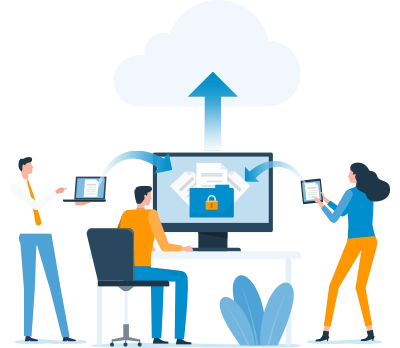
Remote and hybrid work aren’t going anywhere, and cloud collaboration tools are a big reason those setups function at all. Remote access means employees aren’t chained to a physical office just to get real work done.
Distributed teams spread across cities, time zones, sometimes continents can pull from the same live data instead of emailing spreadsheets back and forth and hoping someone’s not working off last week’s version. (Anyone who’s lived through that mess knows exactly why this matters.)
Real-time collaboration tools let multiple people edit the same document, update the same record, track the same project, all at once, no waiting in line. Productivity gains follow naturally from there. Teams spend less time chasing down the right file and more time actually using it.
Benefit 5: This Is Where AI Readiness Actually Comes From
Cloud transformation benefits go well past cost and flexibility at this point. Direct access to AI services is a big one, machine learning models, predictive analytics, natural language tools, all things that would take serious money and time to build in-house.
Analytics get sharper too. Cloud platforms process bigger datasets faster, surfacing insights that actually inform decisions instead of relying on gut instinct and a spreadsheet from three quarters ago.
Automation opportunities multiply once workflows connect across cloud-native tools. Repetitive manual tasks start disappearing. And when infrastructure stops being the bottleneck, product delivery speeds up, development cycles shrink, updates ship more often, feedback loops tighten.
The end result? Businesses respond to market shifts faster than competitors still running on systems built a decade ago. Customer experience improves almost as a side effect.
Common Concerns About Cloud Migration
Cost would be the very first concern to arise, and rightly so. Large corporations that have extensive legacy systems would incur actual costs during this process. With phased migrations, the cost can be spread rather than incurred in one go.
Security concerns follow suit, although ironically, security in the cloud would actually be better in most cases than any organization can achieve itself. The concept of shared responsibility applies in such a case.
Downtime during cutover worries a lot of teams too. Real risk, but manageable with proper testing beforehand. Compliance requirements matter a lot in healthcare, finance, and government especially, getting that wrong isn’t an option. And legacy application compatibility can be genuinely tricky. Some older systems need real rework before they’ll function properly anywhere near a cloud environment.
How to Know If Your Business Is Actually Ready
A few signs tend to repeat across nearly every business that eventually migrates. Aging infrastructure that’s expensive to keep alive, or nearing end-of-life support entirely, is usually the first trigger. Rising maintenance costs, where IT spends more time firefighting than building, is another.
Performance bottlenecks matter too. Slow systems. Downtime during peak periods. Capacity that maxes out right when it’s needed most. Remote workforce requirements come into play as well; on-prem setups tend to fall apart the moment employees need reliable access from anywhere.
Growth challenges round things out. If scaling operations requires a major infrastructure investment every time, that’s usually the clearest sign of all. Two or more of these sound familiar? Worth having the conversation.
Best Practices for a Migration That Doesn’t Go Sideways
Start with business goals. Not tech specs, not vendor features, actual goals. Cost reduction, scalability, better customer experience, whatever it is, that should drive the whole plan.
First of all, evaluate current systems. It is important to have an understanding of all system dependencies, data amounts, and application architecture prior to any changes. Prioritize applications depending on their impact to your business and complexity of migration and migration of less critical systems usually builds up confidence prior to any migration of more critical systems.
Also, governance should be implemented at the very beginning. Implementation of access management, cost management, compliance checking – without those tools, any cloud environment will become very complicated and costly. And finally, select the right migration provider. Experience does matter when talking about migrating Salesforce environments and taking care of specific industry compliance requirements.
Make Cloud Your Baseline, Not an Option
Cloud migration stopped being an IT decision a while ago. It’s a business strategy now, full stop. Organizations that make the move pick up agility, resilience, and scalability that legacy infrastructure was never built to offer.
Modern cloud platforms also lay the groundwork for AI and automation, and those aren’t nice-to-haves anymore. They’re quickly becoming the baseline. Businesses that modernize now build an edge that compounds over time, especially as customer expectations and AI capabilities keep shifting under everyone’s feet.
The benefits of cloud computing covered here aren’t theoretical. They’re already deciding which businesses grow faster and adapt easier heading into 2026, and which ones spend another year firefighting old servers.

Categories

Solve It with Salesforce. We’ll Show You How.
AI. Apps. Experts. Everything you need to win with Salesforce under one roof.Frequently Asked Questions
What are the biggest benefits of cloud computing?
Lower infrastructure expenses, scalability options, enhanced security features, and improved collaboration stand out in this context. Companies can obtain access to AI and analytics technologies more easily without developing any solution from scratch. These benefits of cloud migration enable firms to expand without facing the financial burden caused by legacy solutions. In most cases, these savings become apparent within the first year.
What is cloud migration?
Cloud migration refers to the transition of applications and other loads from an on-premise setup to the cloud. Cloud migration can take the form of a direct transfer or rebuilding the application for cloud native usage. The choice of cloud migration model will depend on the business goals and the timeline of the project. In most cases, hybrid models are used.
Why are businesses moving to the cloud?
The legacy system is expensive to manage and fails to meet the growing demands of today. Corporations seek more scalability, better security and management of remote teams that on-premise systems cannot offer. Customer demand for higher availability and better speed further compels businesses to move to the cloud. Flexibility becomes key for competitiveness.
Is cloud migration expensive?
Cost will be largely variable depending on the size of data, the complexity of the applications, and the model of migration chosen. Phase-wise migration will involve costs incurred over time rather than all at once at one go. The reduction in hardware and maintenance costs will further offset the costs of migration for many organizations.
Does cloud computing improve security?
Yes, for the most part. Providers spend large amounts of money in order to ensure encryption, identity management, and threat monitoring on the scale that is not affordable for most companies to achieve by themselves. There are automatic backup and disaster recovery options available, which provide an additional safety measure.
What is the difference between public and private cloud?
A public cloud utilizes shared resources that are managed by a third party and hence low costs as well as rapid scalability. Private cloud involves having dedicated resources for just an individual company, especially when compliance or control of data is strict. In a hybrid cloud, the sensitive operations are kept in private cloud and others in the public cloud.
How long does cloud migration take?
Timeline would be based upon the size of infrastructure, number of applications, and migration approach chosen. Small migrations could be done within a few weeks, while larger enterprise migrations might require months. Taking into account a phased migration approach where the risks of workloads are taken into consideration makes it easier to adhere to realistic timeline.
What industries benefit most from cloud computing?
There is a lot of value in the scalability and security features of cloud computing for sectors such as retail, health care, financial services, and professional services. Sectors where there are sudden spikes in demand due to seasonality are well served by the ability to scale computing resources on demand, while regulated sectors such as health care and financial services gain through compliance and disaster recovery features.
Is the cloud suitable for small businesses?
Definitely. This technology eliminates the initial cost of hardware since cloud computing is affordable to small organizations because they can pay as they use it. Small businesses benefit from security and flexibility in a way that was only affordable to big enterprises.
How does cloud migration support AI initiatives?
There is availability of AI, analytics, and automation on cloud platforms which don’t need much investments in the internal infrastructure of any organization. Through such accessibility, organizations can try out their experiments using predictive analytics and automation in a shorter time than that of doing so internally. Processing data quickly enhances the capability of insights generation by AI tools.

About the author
Editorial TeamThe Editorial Team at 360 Degree Cloud brings together seasoned marketers, Salesforce specialists, and technology writers who are passionate about simplifying complex ideas into meaningful insights. With deep expertise in Salesforce solutions, B2B SaaS, and digital transformation, the team curates thought leadership content, industry trends, and practical guides that help businesses navigate growth with clarity and confidence. Every piece we publish reflects our commitment to delivering value, fostering innovation, and connecting readers with the evolving Salesforce ecosystem.
Recent Blogs
 Salesforce Services
What is Salesforce Implementation? Everything Decision-Makers Need to Know Before They Start
Most companies don’t buy Salesforce and then wonder what to do with it. They buy Salesforce because something is broken – deals are being tracked…
Read More Salesforce Clouds
Marketing Cloud Engagement to Next: What Actually Has to Be Rebuilt
Nobody tells you this upfront, but migrating from Marketing Cloud Engagement to Marketing Cloud Next isn’t a lift-and-shift. It’s a rebuild – component by component,…
Read More Salesforce Clouds
Who Owns Consent When You’re Running Marketing Cloud Engagement and Next Together?
Running Marketing Cloud Account Engagement and Marketing Cloud Next side by side? A lot of Salesforce customers are doing exactly that right now – either…
Read MoreReady to Make the Most Out of Your Salesforce Instance?
Our Salesforce aces would be happy to help you. Just drop us a line at contact@360degreecloud.com, and we’ll take it from there!
Subscribe to our newsletter
Stay ahead with expert insights, industry trends, and exclusive resources—delivered straight to your inbox.
