
For firms built on the Salesforce ecosystem, Spring ’26 Release is more than just a software update. It is a strategic pivot point that directly affects how fast teams move, how cleanly they operate, and where friction shows up day to day.
Every growing company has felt the “performance ceiling.” Sales reps stop following up on leads because the volume is too high. Service agents lose a customer because they didn’t have the context of a previous call. It’s the silent error that stack up without IT ever knowing.
Spring ’26 isn’t about more features. It’s about removing friction. In practice, most organizations end up adopting less than 30% of what each major release introduces, focusing only on the updates that remove real bottlenecks.
In this guide, we’ve bypassed the 800-page release notes to focus on the claims, pains, and gains of your 5 core departments, mapped to the Spring ’26 features that actually matter.
1. The Sales & Strategy Team: Fighting Lead Fatigue
Sales Development Reps (SDRs) are losing the race against time. High-quality prospects often go cold because reps are buried under a mountain of low intent “Contact Us” queries and manual research tasks.
Solution #1: Agentforce Sales (The Autonomous SDR)
In the Spring ’26 release, Sales Cloud officially matures into Agentforce Sales. The standout Lead Nurturing Agent researches prospects 24/7 and engages in two-way conversations via email and SMS.
- Research 24/7: Automatically research a prospect’s company and industry signals from the web to personalize outreach.
- Engage Authentically: This isn’t a “bot” that just sends links; it acts as a Sales-Native Chat assistant that can answer pricing questions and book meetings directly into your team’s calendar based on real-time availability.
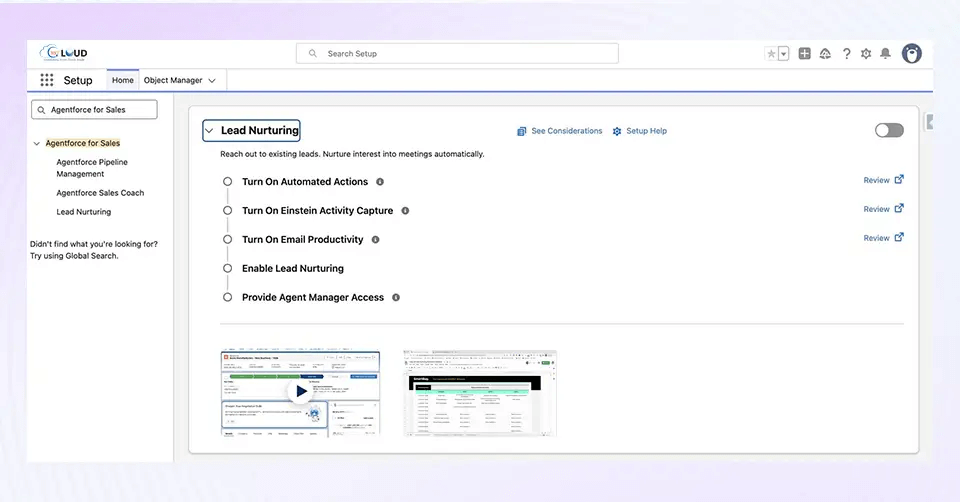
The Benefit: This enables team to achieve a 100% lead follow-up rate without increasing headcount, ensuring your human sellers spend their day closing deals, not chasing “shadow” leads.
Solution #2: Setup with Agentforce (The “Co-Admin” Experience)
To solve the “Admin Tax“, the endless clicking required to configure the system, Spring ’26 introduces Setup with Agentforce (Beta). This is a conversational interface built directly into the Setup Home page that acts as a co-pilot for configuration.
- Natural Language Architecture: Instead of toggling between five screens to build a new object, an Admin can simply type: “Create an object called Project Expense with a Currency field and a validation rule for negative amounts.”
- Instant Navigation: You can ask the agent to “Show me all changes made to queues in the last 7 days” or “Navigate to the MFA settings,” bypassing the need to hunt through the Setup tree.
The Benefit: This drastically reduces “click-fatigue” and speeds up complex org configuration by up to 50%, keeping your sales infrastructure as agile as your strategy.
2. The Operations Team: Eliminating Manual Bottlenecks
Internal processes like employee onboarding or partner vetting often feel clunky and unbranded, leading to “UX rejection” where users avoid the system. Furthermore, document-heavy workflows, like signed contract approvals, often sit unnoticed in the system, creating a silent stall where files are uploaded but the next action remains purely manual.
Solution #1: Native Screen Flow Styling & Kanban Boards
In Spring ’26, Salesforce Flow is receiving its biggest “makeover” to date. Admins can finally move away from the “standard gray” look and build professional, app-like experiences natively.
- Component-Level Styling: Using the new Style Tab in Flow Builder, you can now customize borders, background colors, and button shapes (like corner radius) to match your firm’s branding, no custom CSS or code required.
- Kanban Screen Component (Beta): You can now embed a Kanban Board directly inside a Flow. This allows users to visualize onboarding tasks or project milestones as cards and drag them through columns like “To Do” and “Done.”
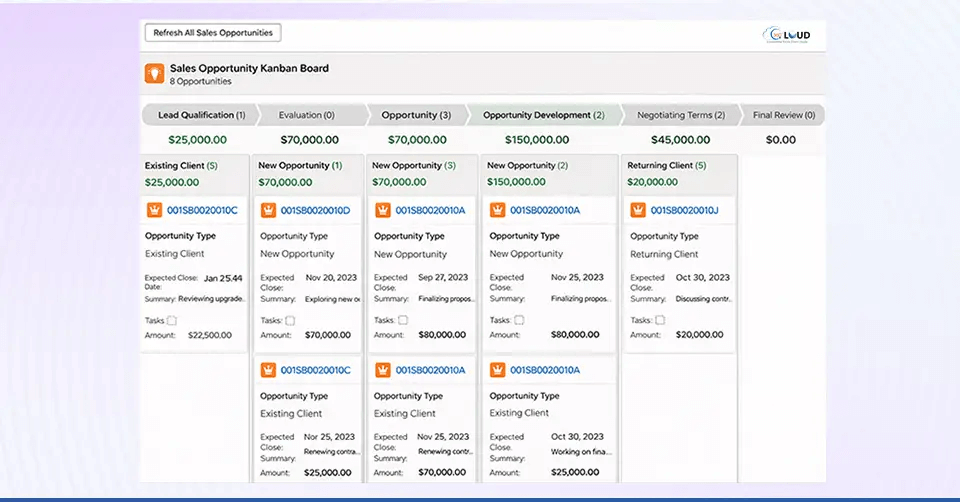
The Benefit: This provides a bespoke, professional feel that increases user adoption. When tools look and feel like modern apps, teams spend less time fighting the interface and more time moving the needle.
Solution #2: Record-Triggered Flows on Files (ContentDocument)
One of the most requested features in Salesforce history is finally here: the ability to trigger automation the moment a file is uploaded or deleted.
- Immediate Action: Previously, you needed complex Apex code to “watch” for new files. Now, you can build a Flow that triggers when a ContentDocument is created.
- Automated Bridges: Automation can now trigger the moment a file is uploaded. For example, when a client sends a signed contract via your Salesforce-native chat & messaging app, a Flow can instantly scan the file and alert the Legal team via Slack.
The Benefit: It helps eliminate document lag by automating the manual bridge between file storage and business processes. It ensures that no contract or ID ever sits unreviewed.
3. The Customer Service Team: Closing the “Context” Gap
Customers are frustrated by rigid, dead-end phone menus (IVR), and human agents often lack a clear, consolidated history of customer interactions. This leads to the dreaded “Context Amnesia,” where a customer has to repeat their story three times before getting an answer.
Solution #1: Agentforce Voice & Enhanced Chat v2
Spring ’26 introduces Agentforce Voice & Enhanced Chat v2, a significant upgrade to traditional IVR systems. It replaces “Press 1 for Sales” with an AI that actually listens.
- Natural Dialogue: The AI understands intent and sentiment. If a customer says, “I’m really frustrated because my order hasn’t arrived,” the AI detects the urgency, checks the shipping status in Data Cloud, and provides an answer, all in a natural, human-like voice.
- Searchable Call Data: Every conversation is transcribed and turned into searchable data, allowing you to report on customer sentiment trends just as easily as you do on case numbers.
The Benefit: The feature provides 24/7 human-like support that resolves simple queries autonomously, freeing your human agents to handle only the most complex emotional escalations. By offloading these routine interactions to an intelligent agent, you aren’t just cutting costs; you are modernizing your Digital Engagement strategy. This ensures that every touchpoint, whether it’s a late-night chat or a voice call, becomes a proactive moment of customer engagement that builds loyalty rather than just a ticket to be closed.
Solution #2: Case Timeline (Visual Event Stream)
Agents now see a chronological, social-media-style feed of a case’s life story. If a customer started a conversation on your Salesforce Native Messaging App, switched to a phone call, and then back to chat, the agent sees the entire history in one unified view.
- Unified Storytelling: Instead of digging through five different related lists (Emails, Calls, Chat Logs, and Field Changes), agents see one interactive timeline.
- Seamless Handoffs: When a human takes over from an AI agent, they can see exactly what the AI already discussed.
The Benefit: Agents can resolve cases faster because they stop asking, “How can I help you today?” and start saying, “I see you were just talking to our AI assistant about your order, let me finalize that for you.”
4. The Development Team: Handling Massive Scale
As firms grow, their data often outgrows their code. Developers are frequently caught between “Governor Limits” that crash large integration jobs and the “Boilerplate Burden”, writing hundreds of lines of Apex code just to handle simple UI updates or data mutations.
Solution #1: Apex Cursors (Now Generally Available)
Spring ’26 Release finally brings Apex Cursors out of beta to solve the “Batch Apex” headache. Traditionally, processing millions of records required heavy Batch jobs that were difficult to chain and often hit memory limits.
- Large-Scale Traversal: Developers can now use the Cursor class to traverse datasets of up to 50 million records.
- Flexible Chaining: Cursors can be passed between chained Queueable jobs, allowing for sophisticated, multi-step data processing that is far more flexible than the rigid Start-Execute-Finish lifecycle.
The Benefit: It ensures stable, “crash-proof” data processing for enterprise-scale integrations. It allows your developers to handle massive data volumes with cleaner code and less risk of transaction timeouts.
Solution #2: GraphQL Mutations in LWC
For years, Lightning Web Components (LWC) were great at reading data via the Wire Service, but writing data often required a middle-man Apex Controller. This added layers of “technical debt” to every project.
- Direct Client-Side Updates: Developers can now perform Mutations (Create, Update, Delete) directly within an LWC using the GraphQL API.
- Declarative Power: By using GraphQL, you skip the need to write, test, and maintain a server-side Apex class for basic record operations.
The Benefit: Reduces technical debt and makes the custom UI faster to build and easier to maintain. It simplifies the “developer’s path,” allowing them to build complex interfaces in hours instead of days. This is also critical for Bulk Messaging Apps and Voice apps like 360 CTI. It means your custom UI can now handle thousands of simultaneous chat updates with zero lag, ensuring the conversation feels “live” and responsive.
5. The IT & Security Team: Managing AI-Era Risks
In a “secure-by-default” world, legacy integration methods are becoming liabilities. Furthermore, IT teams are often the last to know when a page is broken; they rely on frustrated user complaints rather than proactive logs to catch “silent” client-side failures.
Solution #1: The Mandatory Move to External Client Apps
Salesforce is drawing a line in the sand with Spring ’26 Release. To enhance the security of the “Agentic Enterprise,” the creation of new traditional Connected Apps is now disabled by default.
- External Client App Framework: All new integrations must now use this modernized framework. It offers enhanced security through “secret-splitting” (keeping client secrets out of the metadata) and better alignment with modern DevOps pipelines.
- Migrate, Don’t Panic: While existing Connected Apps will continue to work, Salesforce is nudging firms to migrate to this more robust framework to protect their data in the age of AI agents.
The Benefit: Provides enhanced security and a more disciplined integration strategy, ensuring that as you connect more external AI tools to Salesforce, your front door remains locked tight. Also, if your native messaging and chat integrations are not migrated to this more secure framework, you risk “Technical Freeze.” You won’t be able to update your secure connections or scale your AI’s access to external data sources. Legacy integrations will eventually become security liabilities that can’t support modern OAuth flows.
Solution #2: Centralized Error Console & Shield Hub
One of the most requested “visibility” tools is here: the Error Console. It ends the era of “silent killers”, non-fatal errors that degrade the user experience without ever hitting a server log.
- Silent Error Capture: Admins can now access a live log of every client-side and page-level error occurring across the entire org in one dashboard.
- Proactive Shielding: For firms using Salesforce Shield, the new Shield Hub centralizes Data Detect, Event Monitoring, and Encryption settings into a single, unified command center.
The Benefit: Enables proactive troubleshooting. Your IT team can now identify a recurring UI bug or a failing integration and fix it before a single user has the chance to submit a support ticket.
Final Word: Turn Spring ’26 Release Friction into Functional Flow
As we approach the February release weekends, the best way to ensure a seamless transition is through proactive testing and targeted adoption. By focusing on how these Spring ’26 features solve specific departmental friction, you can de-bottleneck your administrators, empower your developers, and provide your service teams with the visual context they need to excel.
However, translating release notes into a functional roadmap is a significant undertaking. We are here to help you bridge that gap. Whether you need to audit your current environment for “silent errors,” configure your first Agentforce autonomous agent, or modernize your legacy workflows into high-adoption Screen Flows, our team can help you leverage every update to its full potential. Let us help you turn these new features into a strategic advantage, ensuring your firm doesn’t just stay current, but stays ahead.
Master the Spring ’26 Release with a custom-built strategy.