

How to Build SMS Templates in Salesforce That Your Team Will Actually Use
20 Aug 2026
Table of Contents
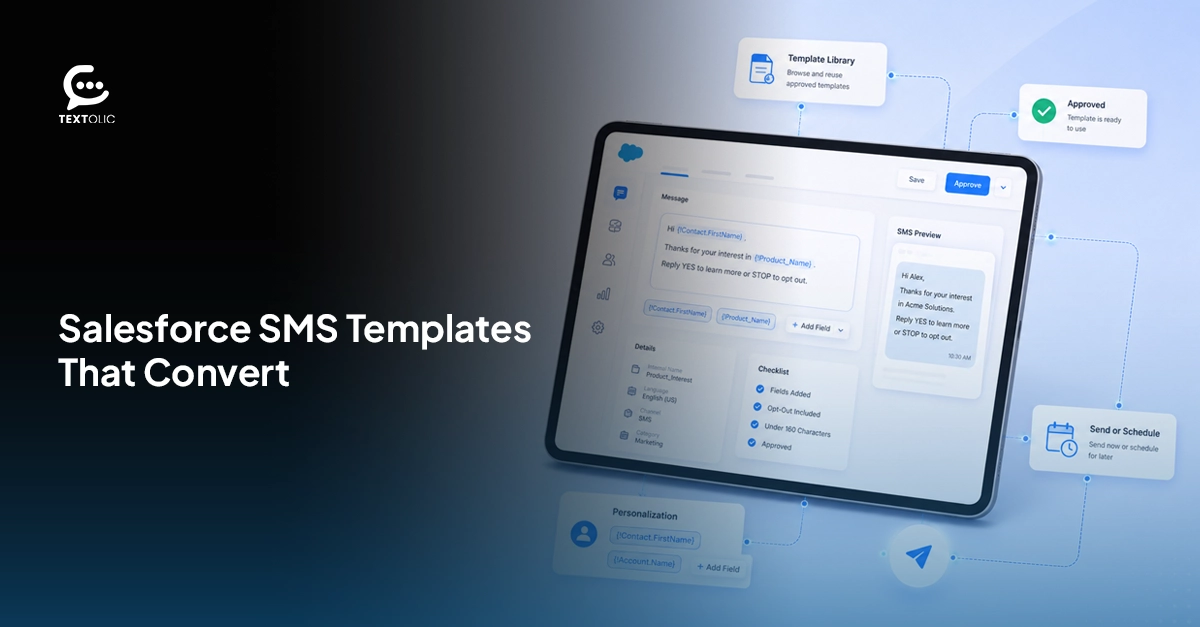
Your reps are typing the same message again for the fifth time. It’s actually because nobody saved it anywhere useful last time. That’s slow. Inconsistent. And it quietly kills response rates in a way most sales teams never diagnose correctly.
An SMS template builder capability in Salesforce fixes this. Not by adding another tool to learn, but by removing the blank page every rep stares at before hitting send.
Here’s what nobody says out loud: templates aren’t a time-saver first. They’re a consistency fix. Five reps, five different voices, grammatical errors, and typos can quickly hamper your brand reputation.
Table of Contents
What makes a good Salesforce SMS template
Not every template earns a reply. Most don’t, honestly.
The ones that work share a pattern:
- Under 160 characters, so nothing splits into two ugly fragments
- Personalized with merge fields, never “Dear Customer”
- One CTA. Just one. Two competing asks and people freeze, then ignore both
- Skip the link unless the message truly needs it — links tank trust in cold SMS, every time
- Free from errors, typos, and easy to understand
Sounds simple written out like that. Getting reps to actually stick to it without a system behind them? Different story entirely.
Want to see how you can create templates that actually drive conversions?
How to use the SMS template builder in Salesforce with 360 Textolic
360 Textolic drops its SMS template builder in Salesforce directly inside the CRM. No second login. No tab-switching mid-conversation while a lead goes cold.
Setup:
- Open the template builder from the 360 Textolic panel
- Name it something a rep will recognize in three months (not “Template 4”)
- Write the body
- Drop in merge fields, name, date, product, whatever fits
- Save to the shared library
Five steps. Most teams lose people around step three when a tool gets complicated. Textolic doesn’t give that moment a chance to happen, mostly because there’s nothing to configure beyond typing the message.
And this is where 360 Textolic starts pulling ahead of a plain messaging app. Its AI template creation capability helps you create message templates in seconds. You simply need to enter the prompt, and you are good to go. This way, you’re not just building templates. You’re building templates that are not boring, repetitive, and actually help your team drive responses.
Five templates worth stealing
Template 1 — New lead follow-up
Hi {FirstName}, saw you were interested in {ProductName}. Happy to answer questions. Reply here.
Template 2 — Appointment reminder
Hi {FirstName}, reminder: your appointment is {Date} at {Time}. Reply CONFIRM or RESCHEDULE.
Template 3 — Post-demo follow-up
Hi {FirstName}, good speaking today. Next step: {Link}. Questions? Just reply.
Template 4 — Re-engagement
Hi {FirstName}, been a while. Got something new that might fit. Want a quick look?
Template 5 — Deal update
Hi {FirstName}, your proposal’s ready. Reply here or tap {Link}.
Read those again. None sound like marketing. They sound like a person typed them between meetings, thumb on the phone, moving fast. That’s on purpose. Salesforce SMS templates that read boring in this particular way tend to outperform anything that sounds crafted.
Texting still pulls the highest open rates of any outreach channel by a wide margin. Templates like these are how a team actually captures that, instead of leaking it through inconsistent, half-written messages.
Want to harness the power of AI templates for your business and boost engagement?

How to Maximize Message Templates
One rep’s great template, buried on their laptop, helps nobody else. Multiply that across a twenty-person sales floor, and you’ve got twenty different versions of “good enough,” none of them shared.
360 Textolic lets you organize templates into folders, so your team finds the right one fast instead of scrolling forever. Lead follow-ups in one folder. Renewal reminders in another. Support replies somewhere else entirely. Quick accessibility of templates leads to improved workflows and efficiency, and honestly, that alone saves more time than most teams expect going in.
Here’s the real value, though: AI checks every template for structure, tone, grammar, and spam triggers before it ever reaches a customer. Clarity too. Length too. A message that reads fine to a rep might still trip a spam filter or land flat with a prospect, and the AI catches that before it’s a problem instead of after. Learn why Salesforce SMS messages get ignored and how factors like message length, timing, and personalization can affect engagement.
It even suggests tweaks to lift open and response rates, then routes templates through an approval workflow first. Nothing goes out half-baked. No rep is quietly guessing whether their wording will land.
Weak messaging never survives that gate. Strong messaging does, and it shows in the replies you get back, week after week, not just on launch day.
Wrapping up
Nobody’s writing a LinkedIn post about “the twelve seconds we saved per text.” Fair. But stack those seconds across a hundred reps, sending messages daily, and the math turns into something that actually shows up on a dashboard.
An SMS template builder in Salesforce isn’t optional anymore for teams serious about response rates. It’s closer to plumbing. 360 Textolic bundles that builder with a template folder management, merge fields, and AI-assisted template creation, all inside one panel, instead of forcing three separate tools to somehow talk to each other.

Solve It with Salesforce. We’ll Show You How.
AI. Apps. Experts. Everything you need to win with Salesforce under one roof.Frequently Asked Questions
How do I create SMS templates in Salesforce?
Open the template builder inside 360 Textolic, right there in your Salesforce panel already. Name the template, write the body, add merge fields for personalization, and save. It's live for your whole team the moment you hit save, no developer, no separate app. Most teams have five solid templates built within an afternoon. Faster, usually, once someone realizes how few actual steps there are.
Can I use merge fields in Salesforce SMS templates?
Yes. You genuinely should. Merge fields pull real record data, first name, appointment date, product interest, straight into the message with zero manual typing. That's the entire gap between "Dear Customer" and "Hi Sarah, your appointment's Thursday at 2." Reusable SMS templates in Salesforce only earn their name when merge fields carry the personalization instead of a rep editing every single send by hand.

About the author
Editorial TeamThe Editorial Team at 360 Degree Cloud brings together seasoned marketers, Salesforce specialists, and technology writers who are passionate about simplifying complex ideas into meaningful insights. With deep expertise in Salesforce solutions, B2B SaaS, and digital transformation, the team curates thought leadership content, industry trends, and practical guides that help businesses navigate growth with clarity and confidence. Every piece we publish reflects our commitment to delivering value, fostering innovation, and connecting readers with the evolving Salesforce ecosystem.
Recent Blogs
 Campaign Strategy & Best Practices
Why Most Salesforce Teams Use WhatsApp Wrong (And What to Do Instead)
98% open rate. Teams hear that stat and immediately think: perfect broadcast channel. So they do what they’ve always done with email — build a…
Read More Two-Way Texting & Engagement
Salesforce SMS Opt-In and Opt-Out: What Every Team Needs to Know Before Texting Customers
A single non-compliant SMS can result in $500 in statutory damages under the TCPA. And that can apply to each violation, not simply the campaign…
Read More Campaign Strategy & Best Practices
5 Things to Do Before You Send a Bulk SMS Campaign in Salesforce
Salesforce bulk texting is one of the fastest ways to reach your entire list at once. One click, and thousands of messages go out before…
Read MoreReady to Make the Most Out of Your Salesforce Instance?
Our Salesforce aces would be happy to help you. Just drop us a line at contact@360degreecloud.com, and we’ll take it from there!
Subscribe to our newsletter
Stay ahead with expert insights, industry trends, and exclusive resources—delivered straight to your inbox.
