

MMS Messaging for Business: When to Use and How to Send It From Your CRM
30 Jun 2026
Table of Contents
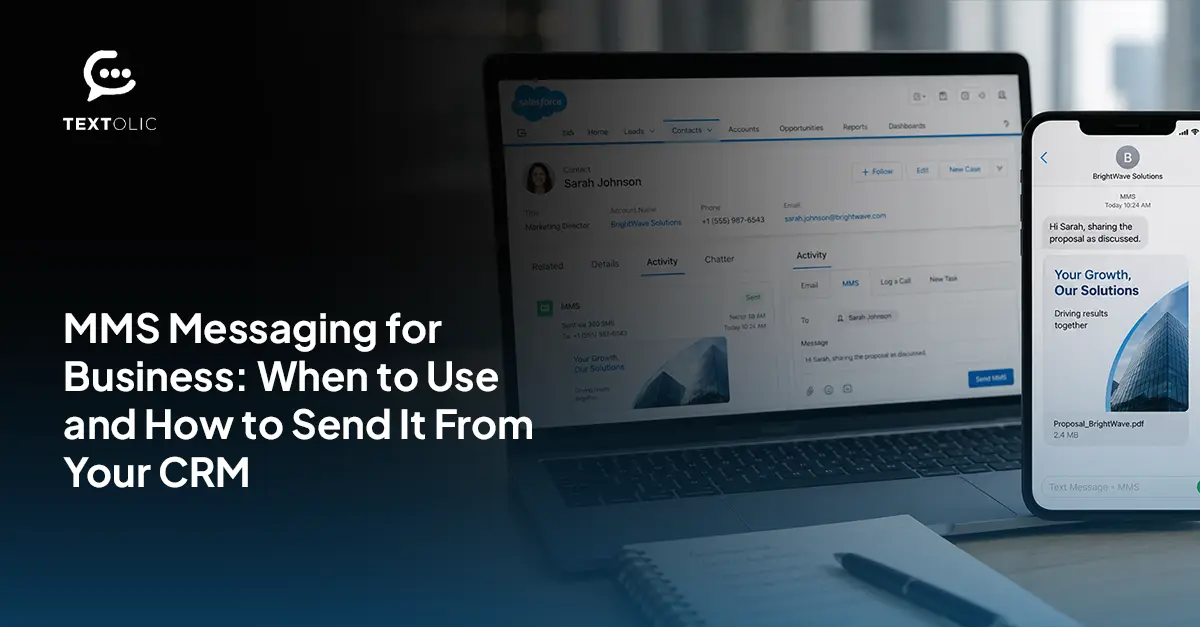
A plain text reminder works fine for most things. But sometimes a customer needs to see the product, the room layout, the before-and-after and a wall of text just doesn’t get there. That’s the gap that MMS messaging for business closes. A lot of teams either ignore it or use it for everything. Neither is right.
This guide covers what MMS does differently from SMS, when the extra cost is worth paying, what content holds up best, and how to send it from your CRM without managing media hosting yourself.
By the end, you’ll have a clearer sense of where MMS earns its place and where it’s just adding cost.
Table of Contents
What MMS Actually Is, Beyond “SMS With a Picture”
People tend to think of MMS as SMS with an image bolted on. It’s more than that, though most explanations stop right there and move on.
Images in JPEG, PNG, GIF. Short video in MP4. Audio. PDFs. Up to 1,600 characters of text alongside all of it. SMS tops out at around 160 characters and carries nothing else.
Recipients need mobile data or WiFi to actually get an MMS, since the file has to download rather than arrive as a tiny text packet. That’s the part people forget until a dead zone or bad connection quietly kills a send, and nobody can figure out why.
Calling it “SMS but fancier” misses something real. It’s a different format, different use cases, a different cost structure underneath it. Teams that skip past this end up using MMS in spots where plain text would’ve worked fine, for a lot less money.
When MMS Outperforms SMS and When It Doesn’t
No universal answer here.
Rich media earns its cost when it’s actually adding meaning. A product photo showing exactly what someone’s about to buy. A branded event graphic carrying the date and details better than a paragraph would. A how-to clip standing in for three paragraphs of explanation. In each case, the picture or video isn’t extra it’s doing the work.
Context matters too. A retail customer scrolling on a couch, a patient sitting in a waiting room, people checking their phones somewhere, viewing media, feel natural. MMS lands well there. The same goes for anything that runs past 160 characters, since that avoids the multi-part SMS that chops a thought into three separate texts.
SMS still wins plenty of the time. Appointment confirmations, shipping updates, and anything transactional don’t need a picture to do their job. And B2B is a genuine risk zone because a lot of corporate environments block media downloads outright, and the MMS just shows up blank on a work device. If cost matters more than polish for a given send, SMS is the safer bet.
Not sure where MMS delivers more value than SMS in your customer journeys

MMS Cost vs SMS Cost: What the Per-Message Difference Adds Up To
MMS runs three to five times more per message than SMS. That’s the number that changes most people’s minds.
At low volume, the gap barely registers. A few hundred messages and it’s a rounding error in most budgets. Run it against 10,000 contacts, though, and a campaign that would’ve cost a few hundred dollars in SMS climbs into real budget territory, especially once it’s running every month.
MMS costs more. Obviously. The real question is whether the engagement lift justifies that for this specific send. A product launch with strong visuals probably earns it. A routine appointment reminder almost never does.
Content Types That Work Best in MMS vs SMS
Matching content to channel makes a bigger difference than most teams expect.
Product images that need to show texture, color, and scale. GIF animations for a quick feature demo. Video testimonials under 15 seconds, just long enough to feel credible. PDF brochures when something needs a leave-behind document. All of that belongs in MMS.
Appointment reminders, order confirmations, and short promo offers don’t need a visual to land. Adding one just adds cost.
File size matters more than people think. Keeping media files optimized for mobile delivery can help improve deliverability and recipient experience. Go bigger and delivery starts failing, or the file loads so slowly that the whole point of sending something rich gets lost anyway.
Sending MMS Directly From Your CRM Using 360 Textolic
No separate tool. No developer.
MMS gets built in the same composer used for SMS inside 360 Textolic. Attach images, GIFs, or other supported media directly within the messaging composer. No hosting to configure, no external link to generate.
Merge fields work exactly like they do for SMS; a product photo sits next to a personalized line of text with zero manual editing per send. Preview across device types catches formatting issues before anything goes out, and for MMS, that matters more, since there’s a lot more that can go visually wrong than with plain text.
Sends fire from the same Flow-based CRM triggers already running your SMS sequences. Nobody touches media hosting or carrier routing directly. Book a demo to see it running against your own contact list.
Ready to create more engaging customer experiences with rich media messaging
MMS Compliance: Consent, Opt-Out, and What’s Different from SMS
Not much, actually.
TCPA consent rules apply the same way to MMS as they do to SMS. No separate opt-in is needed if your existing consent language already says “text messages” broadly instead of naming SMS specifically. Worth checking the actual wording rather than assuming it covers you.
Opt-out works the same, too. A STOP reply needs to suppress both channels for that contact, not just whichever one the message came in on. Treating them as two separate suppression lists is the kind of mistake that turns into real exposure the moment someone who opted out gets an MMS anyway.
Wrapping Up
MMS isn’t something to switch on for every message, and it isn’t a niche feature either. It sits in the middle. Useful when the media earns its place, wasteful when it doesn’t.
One question covers most of it: does this need a picture, a clip, or a document, or would plain text do the job for less? Ask that every time.
Categories

Solve It with Salesforce. We’ll Show You How.
AI. Apps. Experts. Everything you need to win with Salesforce under one roof.Frequently Asked Questions
What is MMS messaging for business?
Images, videos, audio files, documents, and longer text messages are delivered to a mobile phone using the same native messaging experience as SMS. SMS is plain text and works over the cellular network. MMS can include images, videos, audio, and other media, so the recipient's device typically needs a mobile data or Wi-Fi connection to download and display the content.
How does it work inside a CRM?
MMS gets composed in the same workflow as SMS inside 360 Textolic, with drag-and-drop media and merge fields built in. A trigger like a new order or upcoming appointment can fire one automatically, the same way an SMS reminder would. Nobody's manually attaching files or chasing down hosting for a one-off send, which is the whole point of running it through the CRM in the first place rather than some separate tool. The contact record stays the source of truth either way, so a rep checking back on a thread sees the MMS sitting right alongside every text message that came before or after it.
Can MMS workflows support two-way replies and automated follow-ups?
Yes, same as SMS. Automated follow-ups can be configured using Salesforce Flows and messaging automation. That part doesn't change just because the original message had a picture or a video attached to it. A customer can reply to an MMS with a plain text answer, and the system handles that without anyone setting up a separate path for it.
What are the main benefits?
Visual impact, mostly, if engagement is the goal. Clarity when something's hard to explain in plain text, the kind of thing where a photo genuinely says it faster than three sentences would. Better conversion, but only on the campaigns where the media is actually earning its cost. None of this means MMS automatically performs better. It means MMS performs better in specific situations, and the benefit disappears fast once it's used somewhere a plain text would've done the same job.
When should a business use it?
When the media's doing real work. Product launches, event graphics, short demo clips, anything where seeing it matters more than just reading about it. Skip it for anything transactional, like a confirmation or a reminder, where the recipient just needs the information and nothing else. A good rule of thumb: if you'd be tempted to describe the image in the text anyway, you probably need the image instead.
What should teams avoid?
Oversized files cause delivery problems more than anything else, mostly because nobody checks file size until a campaign's already gone out and the bounce reports start coming back odd. The bigger issue is compliance, though: treating MMS and SMS opt-outs as two separate lists instead of one. That's the kind of gap that doesn't show up until a contact who opted out of texts gets an MMS anyway, and by then it's already a problem instead of something caught early.
How can 360 Textolic support this use case?
One composer, drag-and-drop uploads, merge fields, CRM-triggered sends. No hosting on your end to manage, no separate platform to learn just for the handful of campaigns that actually need rich media. Talk to our team to see it against a real campaign, ideally one you're already planning to run, so you can compare it directly against how you're sending MMS today.

About the author
Editorial TeamThe Editorial Team at 360 Degree Cloud brings together seasoned marketers, Salesforce specialists, and technology writers who are passionate about simplifying complex ideas into meaningful insights. With deep expertise in Salesforce solutions, B2B SaaS, and digital transformation, the team curates thought leadership content, industry trends, and practical guides that help businesses navigate growth with clarity and confidence. Every piece we publish reflects our commitment to delivering value, fostering innovation, and connecting readers with the evolving Salesforce ecosystem.
Recent Blogs
 Uncategorized
Ringless Voicemail Drops: When They Work, When They Don’t, and Why SMS Helps
A voicemail nobody heard ring. That’s the pitch behind ringless voicemail, and for sales and marketing teams trying to get more replies without dialing more…
Read More Software Services
Salesforce Staff Augmentation for Fintech: How to Scale Compliant CRM teams
Salesforce staff augmentation for fintech requires professionals who understand Financial Services Cloud’s data model, know how financial compliance requirements (SOX, GDPR, CCPA, FCA regulations) affect…
Read More Industry
Salesforce Staff Augmentation for Healthcare: Compliance-Ready Talent On Demand
Salesforce staff augmentation in the healthcare sector entails personnel knowledgeable about Salesforce and its compliance landscape, handling HIPAA-compliant data, PHI data modeling architecture, HL7/FHIR data…
Read MoreReady to Make the Most Out of Your Salesforce Instance?
Our Salesforce aces would be happy to help you. Just drop us a line at contact@360degreecloud.com, and we’ll take it from there!
Subscribe to our newsletter
Stay ahead with expert insights, industry trends, and exclusive resources—delivered straight to your inbox.
