

Salesforce Property Inspection Report Template for Real Estate
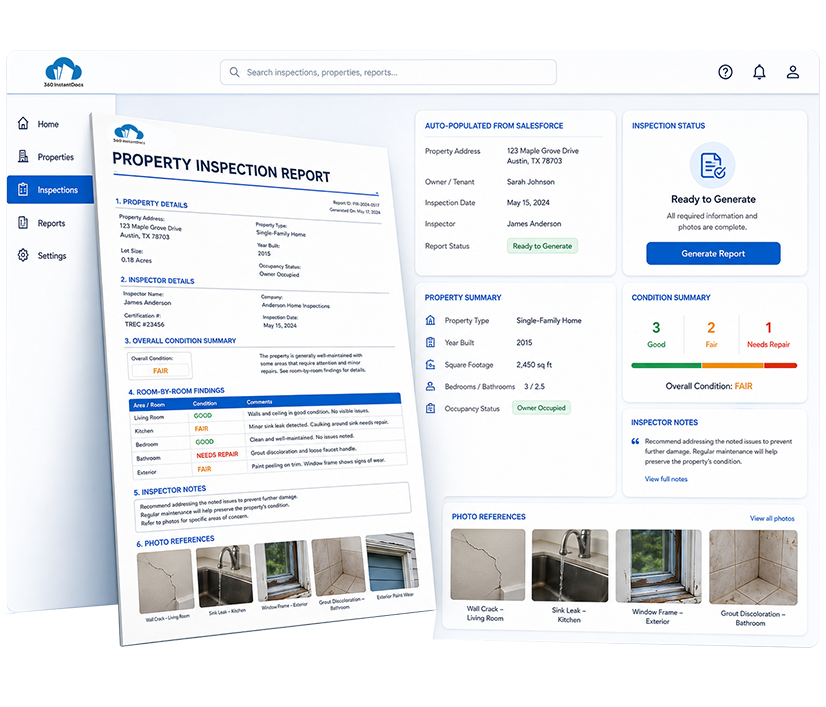
Auto-generate detailed Property Inspection Reports directly from Salesforce - property condition, room-by-room findings, inspector notes, and photo references populated automatically from your Salesforce records.
Generate up to 50 documents/month for FREE
Get the full template
Enter your email to receive the complete Property Inspection Report Word template - ready to customize and use immediately.
Open & customize in Word
Open your template in Word, add branding, adjust content, and insert merge fields from the 360 InstantDocs Word add-in panel.
Merge live Salesforce data
Connect the template to live Salesforce field data so names, dates, amounts, and other record details fill in automatically.
Generate from Salesforce
Create the final Word or PDF document in one click from a record or trigger it through Flow in seconds.
About this Salesforce Property Inspection Report Template
This Salesforce property inspection report template is purpose-built for Real Estate teams and property managers that need to generate detailed, consistently formatted inspection reports directly from Salesforce records, without manually compiling inspector notes and condition ratings after every site visit.
When connected to 360 InstantDocs for Salesforce real estate document automation, every field, from overall condition rating to room-by-room findings, populates automatically from your live Salesforce data.
When to use this template
- Generating an inspection report immediately after a move-in or move-out inspection is logged against a tenancy record in Salesforce
- Routine periodic inspections where condition ratings and inspector notes are captured in a custom inspection object and need to be compiled into a shareable report
- Pre-purchase or pre-listing inspections where property condition needs to be documented before a sale Opportunity progresses further
- Property management agencies conducting scheduled inspections across a large portfolio, generating reports in bulk from a Salesforce list view of records
- Insurance or maintenance claim documentation where a dated, consistent inspection report is needed to support a repair or claim record in Salesforce
Customizing this Salesforce property inspection report template
Open the template. Adjust the room-by-room condition categories to match the property types your team inspects, set your standard condition rating scale, and add other details and apply your agency or property management company branding.
Leave all {placeholder} fields exactly as-is, 360 InstantDocs maps these to your Salesforce fields automatically.
Use cases & Salesforce integrations
Auto-generate inspection report when a site visit is logged as complete
When an inspector marks a custom inspection record as completed in Salesforce, 360 InstantDocs triggers Salesforce real estate document automation, automatically generating a fully populated inspection report with condition ratings and notes.
Trigger move-in and move-out report generation via Salesforce Flow
Configure a Salesforce Flow that automatically generates a property inspection report the moment a move-in or move-out inspection status changes on the tenancy object, ensuring landlords and tenants always receive a timely, documented record of property condition.
Bulk inspection report generation for portfolio-wide compliance checks
Select all completed inspection records for a scheduled compliance cycle from a Salesforce list view and generate individual reports for every property in a single bulk action, useful for agencies running seasonal or regulatory inspection rounds.
Stop Writing Up Inspection Notes After Every Site Visit
360 InstantDocs pulls property details, condition ratings, and inspector notes straight from Salesforce, so every inspection report is consistent and ready to share.
- Start trial- 50 documents free/month
- Salesforce-native – works with any object or field
- PDF + Word document output
- Trigger via button or Salesforce Flow
Talk to a 360 InstantDocs specialist
Tell us about your document workflow and we'll show you exactly how to automate it.
We only use your details to arrange the demo requested.
