

Salesforce Rental Application Form Template for Real Estate
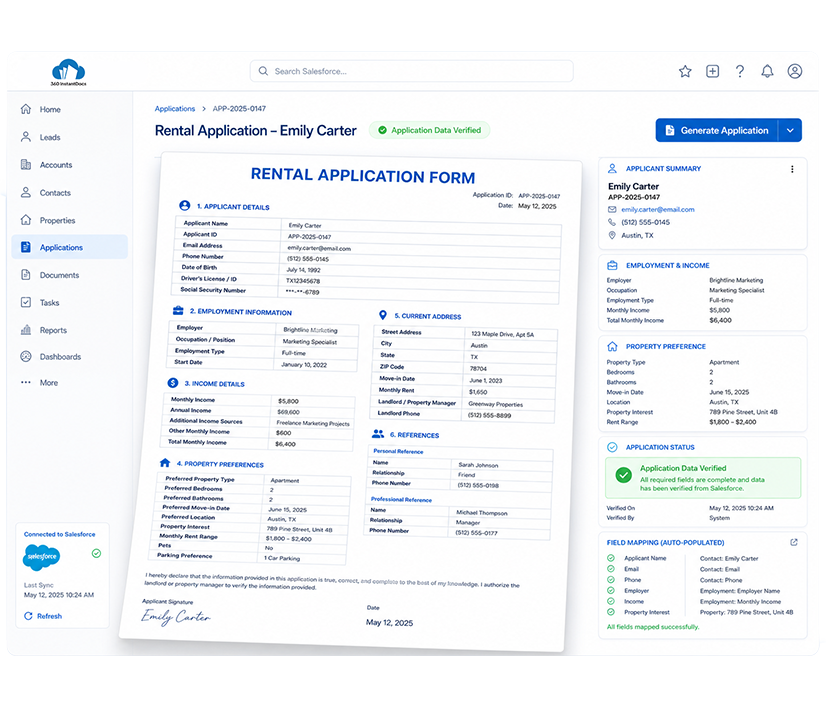
Auto-generate structured Rental Application Forms directly from Salesforce - applicant details, employment and income information, and property preferences populated automatically from your Salesforce records.
Generate up to 50 documents/month for FREE
Get the full template
Enter your email to receive the complete Rental Application Form Word template - ready to customize and use immediately.
Open & customize in Word
Open your template in Word, add branding, adjust content, and insert merge fields from the 360 InstantDocs Word add-in panel.
Merge live Salesforce data
Connect the template to live Salesforce field data so names, dates, amounts, and other record details fill in automatically.
Generate from Salesforce
Create the final Word or PDF document in one click from a record or trigger it through Flow in seconds.
About this Salesforce Rental Application Form Template
This Salesforce rental application form template is purpose-built for Real Estate teams and property managers that need to generate consistent, complete application forms directly from Salesforce records, without manually re-keying applicant and employment details from intake calls or web forms.
When connected to 360 InstantDocs for Salesforce real estate document automation, every field, from monthly income to preferred move-in date, populates automatically from your live Salesforce data.
When to use this template
- Generating a rental application form the moment a prospective tenant Lead or Contact is captured in Salesforce through a web inquiry or walk-in
- Standardizing intake for multi-unit or multi-property listings where applicant preferences need to be matched against several available units
- Pre-screening documentation where employment, income, and reference details need to be compiled into one form before a leasing decision is made
- Property management agencies processing high application volumes during peak leasing seasons, generating forms in bulk from a Salesforce list view of new Lead records
- Verifying applicant consent and background check authorization is properly documented and saved back to the Salesforce record
Customizing this Salesforce rental application form template
Open the template. Adjust the employment and income verification fields to match your qualification criteria, set your standard background check and reference consent language, and add other details and apply your agency or property management company branding.
Leave all {placeholder} fields exactly as-is, 360 InstantDocs maps these to your Salesforce fields automatically.
Use cases & Salesforce integrations
Auto-generate application form when a new Lead is captured
When a prospective tenant Lead is created in Salesforce from a web inquiry or listing portal, 360 InstantDocs triggers Salesforce real estate document automation, automatically generating a pre-filled rental application form ready for the applicant to complete and sign.
Trigger application form delivery via Salesforce Flow on inquiry status change
Configure a Salesforce Flow that automatically generates and emails a rental application form the moment a Lead status changes to "Application Requested," removing the manual step of chasing down and sending forms individually.
Bulk application form generation for high-volume leasing periods
Select all new Lead or Contact records from a Salesforce list view during peak leasing season and generate personalized rental application forms for every prospective tenant in a single bulk action.
Peak Season Shouldn't Mean Manually Sending Applications
360 InstantDocs pulls applicant details, employment information, and property preferences straight from Salesforce, so every application form is ready the moment a lead comes in.
- Start trial- 50 documents free/month
- Salesforce-native – works with any object or field
- PDF + Word document output
- Trigger via button or Salesforce Flow
Talk to a 360 InstantDocs specialist
Tell us about your document workflow and we'll show you exactly how to automate it.
We only use your details to arrange the demo requested.
