

Salesforce Tax Deduction Tracker Template for Finance & Accounting
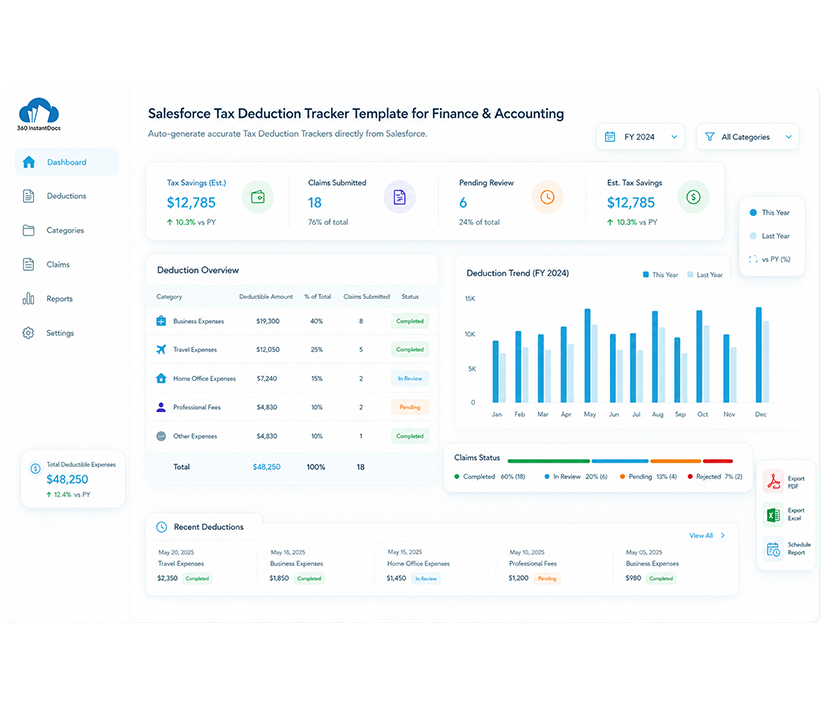
Auto-generate accurate Tax Deduction Trackers directly from Salesforce - deductible expense categories, claim status, and running totals populated automatically from your Salesforce records.
Generate up to 50 documents/month for FREE
Get the full template
Enter your email to receive the complete Tax Deduction Tracker Word template - ready to customize and use immediately.
Open & customize in Word
Open your template in Word, add branding, adjust content, and insert merge fields from the 360 InstantDocs Word add-in panel.
Merge live Salesforce data
Connect the template to live Salesforce field data so names, dates, amounts, and other record details fill in automatically.
Generate from Salesforce
Create the final Word or PDF document in one click from a record or trigger it through Flow in seconds.
About this Salesforce Tax Deduction Tracker Template
This Salesforce tax deduction tracker template is purpose-built for Finance & Accounting teams that need to generate accurate, organized deduction records directly from Salesforce without manually compiling receipts and expense categories from multiple sources. When connected to 360 InstantDocs for Salesforce finance document automation, every deduction category, claim status, and running total populates automatically from your live Salesforce Account and custom financial object data.
When to use this template
- Generating a deduction tracker at month end, quarter end, or ahead of a filing deadline
- Management reporting for internal stakeholders who need visibility into deductible expenses alongside live Salesforce pipeline and revenue data
- Producing deduction trackers where claimed and pending amounts are both stored in Salesforce custom financial objects
- Triggering automatic tracker generation via Salesforce Flow at the close of each reporting period record in Salesforce
- Multi-entity or group company deduction tracking for multiple Salesforce Account records representing different business entities in a single bulk action
Customizing this Salesforce tax deduction tracker template
Open the template. Adjust deductible expense category rows to reflect your chart of accounts and specific tax reporting structure, update claim status labels to match your internal review process, and apply your company letterhead and approval sign-off details.
Leave all {placeholder} fields exactly as-is, 360 InstantDocs maps these to your Salesforce fields (Account, custom financial object, custom expense object, or custom deduction object) automatically.
Use cases & Salesforce integrations
Auto-generate tax deduction tracker from Salesforce financial records
At each reporting date, 360 InstantDocs triggers Salesforce finance document automation, automatically generating a fully populated deduction tracker with expense categories, claim status, and running totals.
Deduction tracker with claim status and documentation references
Map your tracker template to expense category fields, claim status fields, and supporting documentation fields on your Salesforce custom financial object, so every tracker generated shows exactly what has been claimed, what is pending, and what documentation supports each deduction.
Multi-entity deduction tracking for group companies
Use 360 InstantDocs with Salesforce Account records to generate individual deduction trackers for multiple business entities in a single bulk action, each tracker populated with the entity-specific expense and claim data from its corresponding Salesforce Account.
Turn Salesforce Expense Data into a Filing-Ready Tracker, Instantly
No more digging through spreadsheets when deadlines approach. Your deduction tracker builds itself from data that's already in Salesforce.
- Start trial- 50 documents free/month
- Salesforce-native – works with any object or field
- PDF + Word document output
- Trigger via button or Salesforce Flow
Talk to a 360 InstantDocs specialist
Tell us about your document workflow and we'll show you exactly how to automate it.
We only use your details to arrange the demo requested.
