

Salesforce Data Validation Rules vs Automated Data Validation Tools: What’s the Difference?
06 Oct 2026
Table of Contents

Here’s an uncomfortable truth most Salesforce teams don’t want to sit with: your CRM can be technically clean and practically useless at the same time.
A contact record shows a valid email format. The phone number has the right number of digits. The address looks complete. Everything clears the save. And then the email bounces, the call goes to a disconnected line, and the mailer comes back returned. Your Salesforce validation rules said yes. Reality said no.
This isn’t a Salesforce limitation. It’s a category confusion, and it costs teams far more than they typically track. Salesforce validation rules and automated data validation tools solve two fundamentally different problems. Understanding where one ends and the other begins is what separates teams with genuinely clean CRM data from teams who keep wondering why their numbers don’t match their results.
Table of Contents
What Do Salesforce Validation Rules Actually Do?
The most direct answer: Salesforce validation rules are formula-based logic gates that evaluate record data before save and return an error when predefined conditions aren’t met.
That’s the thing. They’re rule-enforcers, not reality-checkers.
You can write a validation rule that prevents an Opportunity from advancing to Closed Won without a close date. You can block a discount field from exceeding 30% unless a manager approval flag is set. You can require a contact’s region field before a record saves, or enforce a specific postal code format based on the country selected. All of it works. All of it is genuinely useful for keeping your CRM process-compliant.
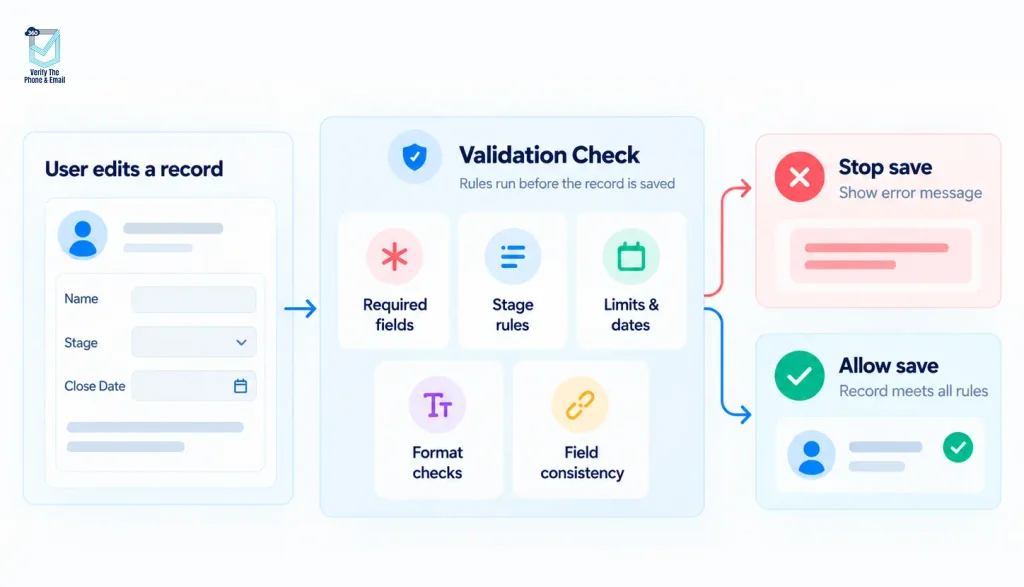
Where Salesforce validation rules do their best work:
- Conditional required fields (if Stage equals “Proposal Sent,” the Contact field must be populated)
- Business logic, approval requirements, and stage gate enforcement
- Date, numeric, and range constraints (close dates, discount caps, SLA tiers)
- Format enforcement for structured data like tax IDs, reference codes, or regional postal formats
- Cross-field consistency checks that prevent conflicting field values from saving together
These rules protect your Salesforce org from user error, skipped process steps, and inconsistent data entry. To be fair, when they’re well-designed, they’re one of the most reliable guardrails an admin can put in place.
The failure mode isn’t the rules themselves. It’s assuming that format compliance equals factual accuracy.
Did You Know? Salesforce validation rules only fire at save time. They don’t run retroactively on records that already exist in your org. A contact imported before your rule was created stays untouched, even if it would fail every check you’ve built today. Most Salesforce databases contain years of unvalidated legacy records sitting quietly in the background, and native rules will never catch them.
What Are Automated Data Validation Tools, and Why Do They Exist?
Automated data validation tools operate on a completely different layer. Rather than enforcing rules about what data should look like, they verify whether contact data is actually real and reachable.
The questions they answer are different.
A Salesforce validation rule asks: does this email address follow a valid format? An automated data validation tool asks: does this inbox exist, can it receive mail, and is it likely to bounce?
That gap between format and deliverability is where most campaign performance problems originate.
The same logic applies to phone and address data. Phone validation in Salesforce checks whether a number is active, what carrier it belongs to, what type of line it is (mobile, landline, VoIP), and whether it’s appropriate to reach via outbound call or SMS. Address validation in Salesforce verifies whether a postal address is deliverable, standardized to postal authority formats, and matched to an actual location that receives mail.
In Salesforce, these tools typically integrate through Flows or AppExchange-native solutions. They can verify data in three ways:
- Real-time entry validation at lead capture or record creation, before the contact even saves
- Flow-triggered verification based on specific field updates or status changes downstream
- Bulk verification against existing records for cleanup before a campaign launch or migration
That last method matters most for teams managing older databases. Salesforce data quality doesn’t degrade at the point of entry alone. It erodes over time. People change jobs, abandon email addresses, and port phone numbers. A contact entered two years ago with perfect formatting may be completely unreachable today.
Salesforce Validation Rules vs Automated Data Validation Tools: Side by Side
| Capability | Validation Rules | Automated Validation Tools |
| Purpose | Enforce business logic and format rules | Verify contact data is real and reachable |
| Timing | Save time only | Real time, bulk, and scheduled |
| Scope | Any Salesforce field | Email, phone, and address |
| Stale data | Don’t re-verify old records | Bulk and scheduled re-verification |
| User experience | Hard block or error message | Flag, enrich, or route for review |
| Maintenance | Formula and rule management | Verification policies and scheduled jobs |
Where Do Validation Rules Work Best?
Salesforce data validation through native rules is most effective when the problem is process compliance, not data quality.
Use validation rules to enforce stage-gate requirements before an Opportunity advances, prevent out-of-range values on discount or commission fields, and check date logic (close date can’t precede today, contract end date must follow start). Use them to require conditional fields when specific statuses or record types are selected. These are the scenarios where formula-based logic is exactly the right tool. Clean, predictable, auditable.
In practice, a well-maintained set of validation rules significantly reduces the manual correction burden on admins and the process exception burden on managers. The failure mode kicks in when teams assume this layer also handles whether the underlying contact data is usable in the real world.
Where Do Validation Rules Fall Short?
They cannot prove deliverability. That’s the most direct way to say it.
A validation rule can confirm that an email address contains an @ symbol and a recognizable domain extension. It cannot confirm whether that domain actually accepts mail, whether the mailbox is active, or whether a send to that address will bounce, land in spam, or never arrive at all. If your team is running email campaigns inside Salesforce, this gap hits your sender reputation in ways that compound over time.
Phone validation in Salesforce reveals the same pattern. Ten digits is not a working line. A correctly formatted number is not an answered call. Sales reps waste significant time dialing contacts whose numbers have been invalid since they were first imported.
Worth saying: validation rules aren’t duplicate detection either. That’s a separate native capability handled by Salesforce’s Duplicate Rules and Standard Matching Rules. The tools exist, but they operate differently from validation rules, and assuming one covers the other creates gaps in both.
Most critically, validation rules don’t run on records that already exist in your org. A contact from two years ago with a perfectly formatted but completely dead email address stays in Salesforce indefinitely unless something specifically targets and verifies it.
Did You Know? Industry estimates put average B2B contact data decay at roughly 22.5% per year. That means without any automated data validation or scheduled re-verification process, approximately a fifth of your Salesforce contact data becomes unreliable within twelve months. Format-based rules have no mechanism to stop that from happening.
When Does Automated Validation Become Necessary?
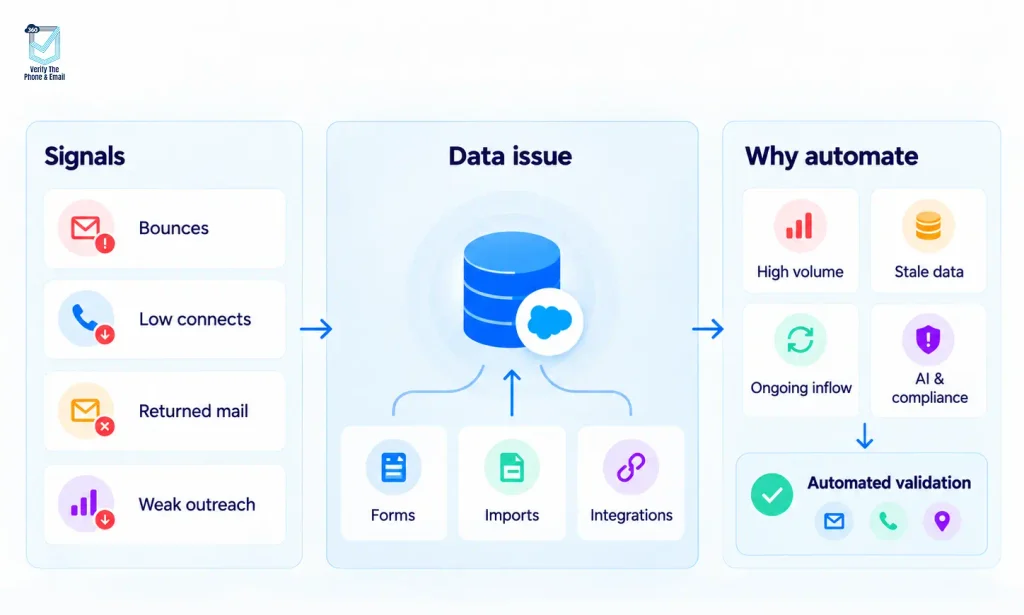
The signals are usually visible long before teams connect them to the root cause.
Bounce rates are rising. Call connect rates are dropping. Address-based mail is coming back returned. The email team is fielding complaints about sender domain reputation. Reps are logging more calls that go nowhere.
That’s the thing. These look like execution problems. Underneath, they’re almost always a Salesforce data quality problem.
Automated data validation tools become necessary when:
- Lead volume is high enough that manual quality control at entry isn’t realistic
- Campaigns are running against a database that hasn’t been cleaned in months or more
- Integration feeds from web forms, imports, or third-party tools bring unverified contact data into Salesforce on an ongoing basis
- AI features like Einstein or Agentforce are being activated on records that haven’t been verified (predictions built on bad data are worse than no predictions at all)
- Compliance requirements mean you need to confirm line type before sending SMS, or verify address deliverability before physical outreach
For teams evaluating AI readiness alongside data quality, the Salesforce AI Readiness Checklist covers the data gaps most teams miss before turning on AI features.
What Does a Layered Salesforce Data Validation Strategy Actually Look Like?
The right architecture isn’t native rules or verification tools. It’s both, running in sequence across different surfaces.
Layer 1: Required fields and field types (object schema and page layouts)
Layer 2: Salesforce validation rules for business logic and save-time format controls
Layer 3: Duplicate and Matching Rules for record uniqueness
Layer 4: Automated data validation tools for email, phone, and address verification
Layer 5: Scheduled bulk re-verification to address ongoing data decay
Each layer covers a distinct failure category. Remove any one of them and a class of data problem slips through undetected.
In practice, Layers 1 through 3 are reasonably well established in most mature Salesforce orgs. Layers 4 and 5 are either absent or running inconsistently. That clean-on-entry, dirty-over-time pattern is almost always a Layer 4 or Layer 5 gap.
Admin Implementation Checklist
Before building new rules or adding new tools, run through these steps:
- Audit existing validation rules for gaps, redundancy, and user friction (rules that block valid saves create workarounds that undermine the entire system)
- Identify fields where real-world validity matters beyond format compliance (email, phone, and address are the obvious three)
- Define behavior by use case: some scenarios warrant blocking the save, others call for flagging for review, and some should trigger a background verification job without interrupting the user
- Test the interaction between validation rules, Flows, and any third-party verification tool to avoid conflicting automation at save time
- Set up separate reporting for invalid, unverified, duplicate, and corrected records (they’re different categories of data health and need separate visibility)
If you’re evaluating which automated data validation tool fits Layer 4 of your architecture, the Salesforce email verification apps comparison breaks down AppExchange options in detail.
The Bottom Line
Salesforce validation rules enforce what your business has decided data should look like. Automated data validation tools verify whether the data itself is actually true. Both statements sound simple. Most teams only operationalize the first one.
The gap between format compliance and factual accuracy is where bounce rates, wasted call time, failed deliveries, and AI misfires actually come from. No formula-based rule closes that gap. It’s not a criticism of validation rules. It’s just where the category ends.
If your team is running campaigns, dialing contacts, or deploying AI features inside Salesforce, the question isn’t whether your validation rules are solid. It’s whether your contact records are still reachable.


Solve It with Salesforce. We’ll Show You How.
AI. Apps. Experts. Everything you need to win with Salesforce under one roof.Frequently Asked Questions
What are Salesforce validation rules used for?
Salesforce validation rules enforce business logic and format requirements before a record can be saved. They're used to require specific fields under certain conditions, restrict numeric ranges, enforce date logic, and block saves that violate internal process rules. They don't verify whether contact data is actually reachable in the real world.
What is the difference between validation rules and automated data validation tools?
Validation rules check whether data meets a predefined format or logic condition. Automated data validation tools verify whether that data is factually accurate and reachable. An email can pass a validation rule and still bounce. A phone number can pass format checks and still connect to a dead line. The two tools solve different problems.
Can Salesforce validation rules verify an email address?
They can confirm that an email address follows a valid format (contains an @ symbol, includes a recognizable domain, etc.). They cannot verify whether the inbox exists, whether the domain can receive mail, or whether a send will actually deliver. That's where email validation in Salesforce through a dedicated tool becomes necessary.
Can validation rules detect duplicate records?
No. Duplicate detection is handled by Salesforce's separate Duplicate Rules and Standard Matching Rules functionality. Validation rules operate on a single record and aren't built for cross-record comparisons.
How do I automate Salesforce data validation?
Automation typically runs through Salesforce Flows, which can trigger real-time verification when a record is created or a key field is updated. For bulk cleanup against existing records, scheduled verification jobs can run across your database and flag records that fail. A Salesforce-native verification tool in Layer 4 of your data quality architecture handles both.
Can I validate existing Salesforce records in bulk?
Not with native validation rules, which only fire at save. Bulk validation requires a tool that can run verification jobs against existing record sets, flag records that fail, and re-verify on a schedule to catch data that has decayed since it was originally entered.

About the author
Editorial TeamThe Editorial Team at 360 Degree Cloud brings together seasoned marketers, Salesforce specialists, and technology writers who are passionate about simplifying complex ideas into meaningful insights. With deep expertise in Salesforce solutions, B2B SaaS, and digital transformation, the team curates thought leadership content, industry trends, and practical guides that help businesses navigate growth with clarity and confidence. Every piece we publish reflects our commitment to delivering value, fostering innovation, and connecting readers with the evolving Salesforce ecosystem.
Recent Blogs
 360 Verify The Mail
Salesforce AI Readiness Checklist: Is Your CRM Data Ready for AI Agents?
Most Salesforce teams approach AI deployment as a technology question. Which model? Which configuration? Which use case to start with? That’s understandable. But the teams…
Read More 360 Verify The Mail
Best Salesforce Email Verification Apps on AppExchange: Compared for 2026
Your Salesforce CRM is only as useful as the data sitting inside it. And if your email lists are full of bad addresses, bounced domains, and…
Read More 360 Verify The Mail
How Poor Salesforce CRM Data Quality Hurts Your Business
Studies consistently put inaccurate or outdated records at 20 to 30 percent of the average Salesforce database. Most marketing and ops teams notice this only…
Read MoreReady to Make the Most Out of Your Salesforce Instance?
Our Salesforce aces would be happy to help you. Just drop us a line at contact@360degreecloud.com, and we’ll take it from there!
Subscribe to our newsletter
Stay ahead with expert insights, industry trends, and exclusive resources—delivered straight to your inbox.
