

Marketing Cloud Engagement to Next: What Actually Has to Be Rebuilt
26 Oct 2026
Table of Contents

Nobody tells you this upfront, but migrating from Marketing Cloud Engagement to Marketing Cloud Next isn’t a lift-and-shift. It’s a rebuild – component by component, with different degrees of pain depending on what you’ve built over the years.
That’s not a criticism of the migration path. It’s just the reality of moving between two platforms that share a brand name but don’t share a data model, a scripting language hierarchy, or a journey execution engine. The sooner an admin knows what’s getting rebuilt versus what can carry over, the better the project plan looks.
This is that breakdown.
Table of Contents
Data Extensions to Data Cloud Model Objects
This one takes the longest to get right, and it’s usually where migrations stall.
In Marketing Cloud Engagement, Data Extensions are your working data layer. You’ve probably got a few dozen of them – contact data, send logs, preference tables, suppression lists, transactional records. They’re flat tables with defined field types, and they live inside Business Units. Simple to create, simple to query, simple to segment against.
Data Cloud doesn’t work that way. The underlying model is built around Data Model Objects – DMOs – which are typed, relationship-aware schema objects that map to standard categories like Individual, Contact Point Email, Engagement, and so on. You don’t just recreate your Data Extension structure in Data Cloud. You map your existing fields to the appropriate DMO attributes, define the relationships between objects, and reconcile identity across sources.
That’s the hard part. Most orgs have Data Extensions that were built organically over years – field names are inconsistent, some tables hold data that was never fully documented, and the relationships between tables exist only in SQL that someone wrote in 2019.
Before any migration work starts, audit every Data Extension in use. Not just the ones connected to active journeys – all of them. Map each field to where it belongs in the Data Cloud model. Flag the ones that don’t map cleanly. Those become custom DMOs, which adds configuration time.
Expect this stage to take two to four weeks for a mid-complexity org. More if your Data Extensions have grown without governance.
SQL Query Activities
If you’ve been using Automation Studio SQL queries to build audiences, populate send lists, or run data hygiene jobs, those queries don’t migrate. Genuinely.
The SQL runs against Data Extension tables. Once you’re on Data Cloud, the underlying data structure is different – DMOs, not flat tables – and the query logic needs to be rewritten to match. Some of it translates fairly cleanly; a straightforward SELECT with a few filters becomes a segment definition in Data Cloud’s segment builder. But anything involving complex JOINs across multiple Data Extensions, date arithmetic, or calculated fields needs real rewriting, not copying and pasting.
Take stock of every SQL query activity in your Automation Studio. For each one, identify what it’s actually doing – audience build, suppression, data hygiene, send prep – and decide whether it becomes a Data Cloud segment, a Salesforce Flow, or a scheduled data action. Some of these queries were originally written to work around limitations that no longer exist in the new platform. Worth checking before you rebuild something you don’t need.
This stage is often underestimated. Teams count the number of queries, assume the rewrite is proportional, and then hit a complex query at week two that takes three times as long as the first ten combined.
AMPscript and SSJS Journeys
AMPscript isn’t going away immediately, but it’s not the right answer in Marketing Cloud Next either. The platform’s direction is toward server-side rendering using its own content tooling and dynamic content blocks, with personalization driven by Data Cloud profile data rather than inline scripting.
SSJS – Server-Side JavaScript – is in a similar position. Code Resource pages and SSJS script activities worked well in Engagement for custom logic, preference center builds, and API interactions. In Marketing Cloud Next, that work moves toward Flow automation and Data Cloud-driven personalization, with custom code living at the edges rather than in the middle of every email render.
What this means practically: every email template, landing page, or journey message using AMPscript for personalization needs an audit. Simple personalization – first name, dynamic content blocks based on a field value – migrates reasonably cleanly to the new content model. Complex AMPscript using nested loops, SSJS API calls, or lookups across multiple Data Extensions needs rethinking from scratch.
This isn’t a rewrite sprint. It’s a content architecture review. You’re deciding how personalization works in the new platform, not just copying old logic into a new syntax.
Subscriber Key to Unified Profile
In Marketing Cloud Engagement, the Subscriber Key is the identity anchor – the value that ties a subscriber record to everything else. Most orgs use Salesforce Contact or Lead ID as the Subscriber Key, which made sense at the time and caused a lot of problems later.
Marketing Cloud Next is built around the Data Cloud Unified Profile. A contact isn’t identified by a single key value – they’re resolved from multiple identity sources (CRM ID, email address, mobile number, cookie) into a unified profile using identity resolution rules. That resolved profile is what drives personalization, segmentation, and journey enrollment.
The migration implication: your Subscriber Key doesn’t map to a Unified Profile field. You need to configure identity resolution in Data Cloud – define your primary identifier, set up the rules for resolving duplicates, and test that resolution against your actual contact data before any journeys go live.
This is also where data quality problems surface. If your contact data has inconsistent email formats, duplicate records with different Subscriber Keys, or contacts who were merged in Salesforce CRM but not in Marketing Cloud, identity resolution will expose all of it. Build time for data cleaning into this stage.

Automation Studio to Flow
Automation Studio is where a lot of operational logic lives in Engagement – file imports, data refreshes, send scheduling, SQL query runs. It works well enough. It’s also largely procedural: step one runs, then step two, with basic error handling and scheduled triggers.
In Marketing Cloud Next, that work moves to Salesforce Flow. Flow is more capable – it handles conditional logic more cleanly, integrates with Salesforce CRM objects natively, and supports error handling that Automation Studio never really had. But it’s a different tool with a different mental model, and admins who’ve spent years in Automation Studio need ramp time.
The rebuild process: list every active Automation Studio automation, document what it does and when it runs, and map it to a Flow equivalent. Scheduled automations become scheduled flows. File-triggered automations require rethinking – Flow doesn’t have a native file drop trigger in the same way, so those processes may need an MFT (Managed File Transfer) solution or an external trigger feeding into a platform event.
Some Automation Studio logic is simple enough to rebuild in an afternoon. Some of it is genuinely complex and will take days per automation. Don’t assume it’s proportional until you’ve inventoried what you have.
Journey Builder to Flow Orchestration
Journey Builder is probably the hardest thing to let go of, because it’s visual, it’s familiar, and a lot of teams have built genuinely sophisticated journeys in it over the years.
Marketing Cloud Next uses Flow for journey orchestration. Specifically, it uses a combination of Flow types – triggered flows for real-time entry, scheduled flows for batch enrollment, and orchestration flows for multi-step, multi-channel sequences. The capability is there. The interface is different, and the logic that was expressed visually in Journey Builder needs to be expressed in Flow’s canvas.
A few things worth knowing before you start rebuilding journeys:
Multi-step sequences with wait periods work in Flow, but the wait behavior is handled differently than in Journey Builder’s Wait activities. Test this early, especially if your journeys have time-zone-aware wait logic.
Decision splits in Journey Builder become branch conditions in Flow. Simple splits rebuild quickly. Complex splits with multiple evaluation criteria and nested paths take longer – document the logic before you start, because it’s easy to misconfigure a branch condition and not catch it until testing.
Entry sources change. Journey Builder could be triggered by a Data Extension row, a CRM update, an API event, or an Automation. In Flow, entry is driven by record changes, platform events, or scheduled criteria. Most entry sources have a Flow equivalent, but the configuration is different enough that assuming a direct mapping will slow you down.
Expect journey rebuilds to take two to three times longer than your initial estimate. Every team that’s done this has said the same thing.
What You Can Keep
Not everything needs to be rebuilt. That’s worth saying clearly, because migration conversations tend to spiral toward worst-case scope.
Content and creative assets – HTML email templates, image files, brand assets – can carry over. The content itself doesn’t change; it’s the dynamic logic and personalization layer sitting on top of it that needs work.
Suppression lists and exclusion logic – the underlying data can migrate. The mechanism for applying it changes, but the actual list of contacts who should never receive email doesn’t need to be rebuilt from scratch.
Sender profiles, reply mail management configuration, and domain authentication – these transfer. SAP setup, DKIM, and reply handling config carry over with appropriate admin work rather than full rebuilds.
Preference center data – the contact preference records migrate; the preference center interface itself likely needs a rebuild since it was probably built with custom AMPscript pages.
Reporting history – send logs and engagement data from Marketing Cloud Engagement can be retained and referenced, though live reporting will come from the new platform’s analytics layer going forward.
A Realistic Sequence and How Long Each Stage Takes
Most migration projects get scoped linearly – data first, then content, then journeys, then go-live. In practice, the stages have dependencies that mean some things run in parallel and others can’t start until something upstream is done.
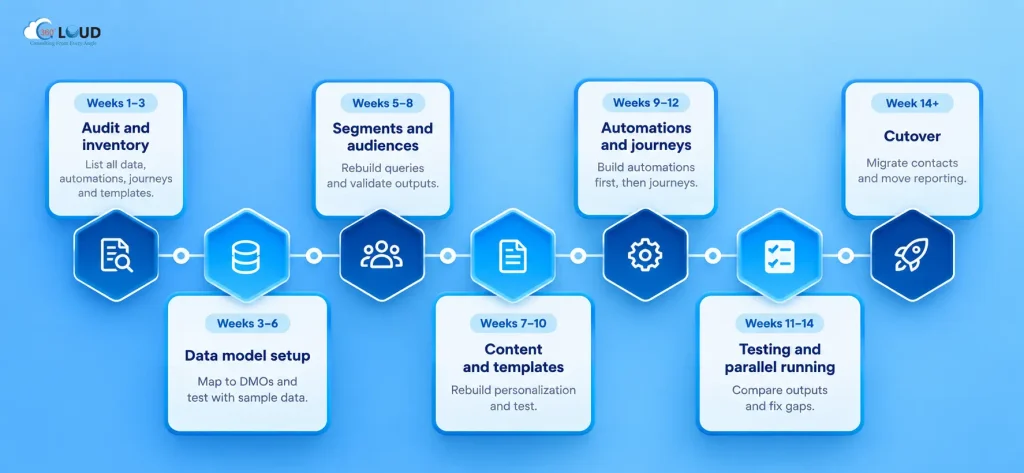
Here’s a sequence that holds up in real projects:
Weeks 1–3: Audit and inventory. Every Data Extension, every automation, every journey, every SQL query, every AMPscript template. Don’t start rebuilding anything yet. Finish the inventory first. Teams that skip this spend weeks rebuilding something they discover later is duplicated or deprecated.
Weeks 3–6: Data Cloud data model. Map Data Extensions to DMOs, configure identity resolution, and test with a data sample. This runs long – budget more time than feels right.
Weeks 5–8: Segment and audience rebuild. Rewrite SQL queries as Data Cloud segments or Flow logic. Validate outputs against historical audience pulls.
Weeks 7–10: Content and template audit. Identify AMPscript complexity per template, rebuild personalization logic in the new content model, test rendering across clients.
Weeks 9–12: Flow builds – automation first, then journeys. Start with operational automations (simpler, more contained), then rebuild journeys in Flow orchestration.
Weeks 11–14: Testing and parallel running. Run the new platform alongside Engagement for a defined period, with consent governance in place. Compare outputs. Fix the gaps.
Week 14 onward: Cutover. Migrate active contacts, decommission Engagement sends, move reporting.
That’s three to four months for a mid-complexity org. Larger orgs with years of accumulated automation logic should budget five to six. Anything under eight weeks is either a very small org or a migration that’s skipping steps it will regret later.

Categories

Solve It with Salesforce. We’ll Show You How.
AI. Apps. Experts. Everything you need to win with Salesforce under one roof.Frequently Asked Questions
Does anything in Marketing Cloud Engagement migrate automatically to Marketing Cloud Next?
Very little. Salesforce provides migration tooling for some data assets, and certain configurations - sender authentication, domain setup - carry over with admin effort rather than full rebuilds. But the core components: Data Extensions, automations, journeys, SQL queries, AMPscript templates - those need to be rebuilt for the new platform's data model and toolset. Assume manual rebuild unless you've confirmed otherwise with your Salesforce technical contact.
Can we run Marketing Cloud Engagement and Marketing Cloud Next at the same time during migration?
Yes, and most orgs do. Parallel running is the standard approach for a phased migration - you keep Engagement live for existing journeys while rebuilding in Next, then cut over segment by segment. The catch is consent governance: opt-outs and subscription state don't sync automatically between the two platforms. You need an explicit sync mechanism in place before you start sending from both simultaneously. Running both without addressing consent is a compliance risk, not just a data quality issue.
How long does identity resolution setup in Data Cloud actually take?
Longer than the documentation suggests. The configuration itself - defining identity attributes, setting resolution rules, mapping source fields - can be done in a few days. Testing it against real contact data is where time goes. Identity resolution surfaces duplicates, inconsistencies, and merge conflicts that exist in your data but weren't visible in Engagement's flat subscriber model. Budget two to three weeks for configuration plus testing, and assume you'll need at least one round of data cleaning before resolution runs cleanly.
Do we need Data Cloud to migrate to Marketing Cloud Next?
For the full capability set - unified profiles, real-time segmentation, cross-channel personalization - yes, Data Cloud is the foundation. A migration to Marketing Cloud Next without Data Cloud means you're using the new sending and journey tooling on top of a limited data model, which works but doesn't deliver the platform's full value. Most orgs licensed for Marketing Cloud Next have some level of Data Cloud included; confirm your entitlement before scoping the migration.
What happens to historical send data and engagement metrics from Engagement?
Historical data doesn't disappear, but it doesn't live natively in Marketing Cloud Next's reporting layer either. Send logs, open and click data, and bounce records from Engagement can be exported and stored - either in Data Cloud or in an external data warehouse - for reference and compliance purposes. Live reporting in the new platform starts from the migration cutover date. If historical trend data matters for your reporting, build a data retention and export plan before you decommission Engagement sends.
Is Flow a realistic replacement for Journey Builder for complex multi-step journeys?
Yes - but the learning curve is real, especially for admins who've spent years in Journey Builder's visual canvas. Flow orchestration can handle multi-step, multi-channel, time-delayed journeys. The logic that was expressed visually in Journey Builder needs to be expressed differently in Flow, and some configurations that were straightforward in Journey Builder - certain wait behaviors, re-entry logic, goal tracking - need more deliberate setup in Flow. Most admins say the first two or three journey rebuilds take significantly longer than expected; by the fourth or fifth, the pace picks up. Budget for the ramp time rather than assuming it won't happen.
Should we rebuild everything before cutting over, or migrate in phases?
Phases, almost always. A big-bang cutover - rebuild everything, then switch - concentrates all the risk at go-live and means any problem affects your entire contact database at once. A phased migration by segment, channel, or business unit lets you validate the new platform on a subset of sends before full cutover. Start with lower-stakes sends: internal communications, re-engagement flows, low-volume nurture sequences. Move high-volume and revenue-critical sends last, after you've confirmed the platform behaves as expected. The migration takes longer this way. It also fails smaller.

About the author
Editorial TeamThe Editorial Team at 360 Degree Cloud brings together seasoned marketers, Salesforce specialists, and technology writers who are passionate about simplifying complex ideas into meaningful insights. With deep expertise in Salesforce solutions, B2B SaaS, and digital transformation, the team curates thought leadership content, industry trends, and practical guides that help businesses navigate growth with clarity and confidence. Every piece we publish reflects our commitment to delivering value, fostering innovation, and connecting readers with the evolving Salesforce ecosystem.
Recent Blogs
 Salesforce Clouds
Who Owns Consent When You’re Running Marketing Cloud Engagement and Next Together?
Running Marketing Cloud Account Engagement and Marketing Cloud Next side by side? A lot of Salesforce customers are doing exactly that right now – either…
Read More Salesforce Services
Salesforce Health Check: What It Is, What It Covers, and What You Should Do with the Results
Picture this. A VP of Sales asks why the pipeline number in Salesforce is $2.3 million, but the finance report shows $1.8 million. Nobody has…
Read More Salesforce Clouds
Salesforce Just Added Something New. Here’s How to Put It to Work.
Winter ’27 is live. Dreamforce just added more. Is your team using any of It? Two big drops landed in one month, and most teams…
Read MoreReady to Make the Most Out of Your Salesforce Instance?
Our Salesforce aces would be happy to help you. Just drop us a line at contact@360degreecloud.com, and we’ll take it from there!
Subscribe to our newsletter
Stay ahead with expert insights, industry trends, and exclusive resources—delivered straight to your inbox.
