

What Is Omnichannel Automation? Triggers, Examples & How to Set It Up
06 Nov 2026
Table of Contents

Omnichannel automation sends the right message, on the right channel, the moment a customer takes action. A form fill, a missed deadline, a deal moving stages — the system responds automatically across SMS, WhatsApp, email, or voice, without anyone manually kicking off each send.
Most teams already have what they need to make this work: contact records, date fields, deal stages, inbound replies. The question is whether those moments actually trigger something useful. Or whether they just sit there while a rep gets to them eventually.
That’s what this covers — the four triggers that actually matter, and how to build them without overdoing it.
| Multichannel | Omnichannel | |
| Channel setup | Multiple channels operate independently | Multiple channels work together |
| Trigger logic | Campaigns and workflows can run on individual channel triggers | Workflows can use shared customer activity across channels |
| Customer experience | Customers interact with businesses across different channels | Customers get a connected experience across channels |
| Follow-ups | Follow-ups are managed through channel-specific workflows | Follow-ups can continue across channels using shared context |
| Data | Customer interactions can be managed across individual channels | Customer interactions are connected through shared customer data |
Worth saying: the difference matters most when a customer goes quiet. Multichannel has no answer for that. Omnichannel escalates to the next channel automatically instead of letting the thread close.
Table of Contents
Why Timing Beats Volume
Send too many messages and people opt out. Send them at the wrong moment and they ignore you anyway — even when the message itself is fine.
That’s the thing about poorly timed outreach. It doesn’t just fail. It closes doors. Teams running automation on a fixed schedule often watch opt-out rates climb because the messages don’t reflect what’s actually happening with that person. And once someone unsubscribes from a channel, that’s it. No second chance.
Fewer, better-timed triggers beat a packed calendar every single time. Tie the message to something that actually happened — a form fill, a stage shift, a deadline approaching. Not a date someone set six months ago and never looked at again.
In practice, the gap between a timed message and a triggered one can be the difference between a reply and an opt-out.
4 Triggers That Power Omnichannel Automation
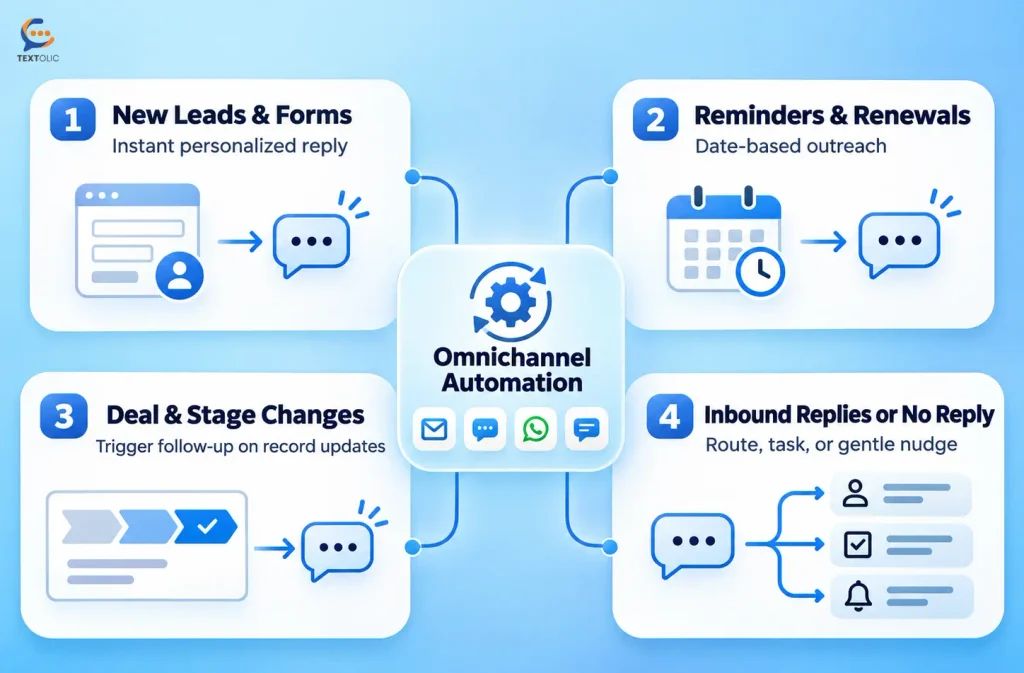
New Leads and Form Submissions
A prospect fills out a form. The rep is buried in three other conversations and gets to it two hours later. By then, the lead has already heard back from someone else.
Wire that submission to fire a message the second it lands personalized with the person’s name and what they asked about and the dynamic shifts. Most people won’t wait more than a few minutes before moving on. Genuinely. One fast, relevant reply does more than five polished follow-ups sent the next morning.
The smarter setups also include a second nudge if nobody replies within a set window. That step gets skipped more than it should. It’s the one that actually moves things.
Reminders, Renewals, and Deadlines
Not every trigger reacts to an event. Some watch a date field and count down. A renewal coming up in two weeks, a document due at month end, a check-in that should go out 30 days after a purchase — these fire automatically based on whatever’s already in the record.
Healthcare teams use this to bring down no-show rates. Finance teams use it for outstanding document requests and follow-up on overdue actions. The setup mechanics are the same across every use case. Only the message text changes.
And that’s also why this trigger type scales so well. Build it once and it runs without anyone checking a calendar.
Deal or Stage Changes
A prospect moves from “Proposal Sent” to “Negotiation.” Something real just shifted in the relationship. Waiting three days to follow up on that is the wrong call.
Field-update triggers watch for exactly this and fire a message that fits where things actually stand. A deal moving forward might prompt a personalized check-in from the rep. A support case getting resolved might kick off a short survey. The trigger responds to an actual change — not a best guess about when outreach feels appropriate.
Are you messaging from real customer journey moments, or working off a schedule and hoping the timing lands?
Book a demo with Textolic and see how trigger-based omnichannel automation maps to your real workflows!
Inbound Replies, and What Happens When Nobody Answers
This is where most automation quietly falls apart. A customer replies. Nobody’s watching the inbox that week. The message sits there for two days. The conversation goes cold.
Two-way triggers fix this. An inbound reply can update a record, create a task, or send the conversation down a different path — depending on what was actually said. No reply after a few days? That silence is its own trigger. A lighter follow-up fires instead of the thread dying.
Nothing slips through a shared inbox because one person happened to be out. Textolic’s AI reply suggestions read the incoming message and surface relevant response options for the rep, so they’re responding faster without writing everything cold. That’s a real difference on high-volume days.
Moving a Customer Across Channels
Real scenario. A contact fills out a form. An SMS goes out within minutes. No reply after 24 hours.
Instead of a second SMS, the sequence shifts. A WhatsApp message goes out next — same core context, slightly different angle. Still nothing after two more days? A call task gets created and assigned to a rep.
Three channels. No manual tracking. No one deciding what step comes next. The customer journey moves based on what the customer actually did, or didn’t do. Textolic handles all 15+ channels from one place, so building a sequence like this doesn’t mean stitching together separate tools for SMS, WhatsApp, and calling. One setup. One place to manage it.
How to Avoid Over-Automation
Automation without limits turns into spam. Fast.
A few things need to be locked in before anything goes live. Consent comes first — nobody should end up in a trigger flow they never agreed to. Full stop. Frequency caps matter too, because even a relevant message gets tuned out if it shows up every other day. Quiet hours should run automatically, not depend on someone remembering to check time zones. And there should be a real handoff point — a moment in the flow where a human takes over, because a bot shouldn’t be handling a frustrated customer on its own.
To be fair, none of this is complicated. It just has to be thought through before launch, not after the opt-outs start. Textolic builds opt-out handling and consent management in natively, so compliance doesn’t become a quarterly checklist someone forgot to run.
How to Set It Up Without Code
No developer needed. The setup usually looks like this:
- Map your trigger moments. Which events in the customer journey actually matter — form submissions, deadline dates, stage changes, inbound replies? Start with five.
- Write the right message for each moment. Use merge fields to pull in the contact’s name and relevant context. Generic messages get generic results.
- Set your channel logic. Decide which channel starts the conversation and what happens when there’s no reply. SMS to WhatsApp covers most cases. Add a call task for contacts that go quiet after both.
- Put your guardrails in. Consent filters, quiet hours, frequency limits, and a clear handoff point for anything that needs a human. These aren’t extras — they’re what keeps the automation from working against you.
Textolic is built to handle all of this from one place, without writing a line of code.
Wrapping Up
Omnichannel automation works best when it’s tied to what customers actually do, not what a calendar says they should hear. A form fill, a stage change, a deadline, an inbound reply — each one calls for a different trigger, a different channel, sometimes a different sequence entirely.
That’s the thing about getting this right. It’s less about the volume of messages you send and more about whether each one arrives at a moment that makes sense.

Solve It with Salesforce. We’ll Show You How.
AI. Apps. Experts. Everything you need to win with Salesforce under one roof.Frequently Asked Questions
What’s the difference between trigger-based and scheduled messages?
Scheduled messages go out at a fixed time regardless of what’s happening with the customer. Trigger-based messages fire when something specific occurs — a form fill, a stage change, a missed deadline. A scheduled follow-up can land after a rep already called that contact. A triggered one responds to the customer’s own behavior, which is what makes it feel less like mass outreach and more like a real response.
Can automation switch between channels mid-journey?
Yes, and for most teams it should. If a customer doesn’t reply to an SMS within a set window, a WhatsApp message goes out next. Still nothing? A call task gets created for a rep. The journey doesn’t stop when one channel doesn’t land — it continues on the next. Most teams build the first trigger and stop there. That’s the part worth revisiting.
How do you keep automated messages from feeling robotic?
Two things: specificity and a real handoff. A message that fires because something actually happened with that contact already reads differently. Merge fields that pull in the person’s name and the relevant detail do most of the work. Keep messages short — long automated ones are easy to spot. And build a clear moment where a human takes over. That transition is where real conversations start.
What consent checks does omnichannel automation require?
Consent is non-negotiable. Before any contact enters an automated flow, there needs to be a record that they agreed to receive messages on that channel. Beyond that: opt-out handling that’s automatic and immediate, frequency limits, and quiet hours so nothing fires at 2 AM local time. The specific rules vary by channel, but the principle is the same across all of them.

About the author
Editorial TeamThe Editorial Team at 360 Degree Cloud brings together seasoned marketers, Salesforce specialists, and technology writers who are passionate about simplifying complex ideas into meaningful insights. With deep expertise in Salesforce solutions, B2B SaaS, and digital transformation, the team curates thought leadership content, industry trends, and practical guides that help businesses navigate growth with clarity and confidence. Every piece we publish reflects our commitment to delivering value, fostering innovation, and connecting readers with the evolving Salesforce ecosystem.
Recent Blogs
 Industry Solutions
How a Real Estate Company Improved Lead Conversions with Textolic
A growing real estate company in the US wanted to convert more property enquiries into sales opportunities but struggled to maintain consistent communication across its…
Read More Multichannel Messaging
What Is Textolic? One Product Instead of Three Tools
Most businesses that engage customers through a CRM are paying for it three times over. And most don’t realize it. There’s the CRM. Then the…
Read More Two-Way Texting & Engagement
CRM SMS Opt-In and Opt-Out: What Every Team Needs to Know Before Texting Customers
A single non-compliant SMS can result in $500 in statutory damages under the TCPA. And that can apply to each violation, not simply the campaign…
Read MoreReady to Make the Most Out of Your Salesforce Instance?
Our Salesforce aces would be happy to help you. Just drop us a line at contact@360degreecloud.com, and we’ll take it from there!
Subscribe to our newsletter
Stay ahead with expert insights, industry trends, and exclusive resources—delivered straight to your inbox.