Talk to Us

Why hiring a Salesforce AppExchange Developer will be worth it?


Let’s Start at the basics:
What is Salesforce AppExchange?

Short answer? It’s the Google Playstore for B2B business apps.

Only, it’s the biggest marketplace for B2B apps out there, and you’ll need to have a valid Salesforce License to install an application to your desktop.

App can be completely Salesforce-native or cross platform.

You’ll find apps from ISVs (Independent service vendors for) productivity, documentation, project management, marketing & sales, and of course, apps catering to specific verticals, niches, and use-cases.

Salesforce allows connecting the entire customer journey across sales, service, commerce, marketing, and every other touchpoint. This means it has got every approach that could bring a business closer to the customers. Reaching closer to the customers becomes easier when it is through an application that is easy to use and proves to be functional for them. This is where the role of a Salesforce AppExchange developer comes into play. 

Having your application on AppExchange means that your business is visible to the customers. But this will be true when your app is good enough to leave an impression. A professional Salesforce app developer creates application for a business, creating something just what they had expected. 

How do I access AppExchange?

At the time of writing this, the initial steps, besides app-specific set ups, are pretty straightforward. For a standard installation, you’d simply login into your Salesforce instance (assuming you have a valid account) with a valid Salesforce license.

From here, you’ll open up the homepage menu and click AppExchange from a drop down, search for the app form the AppExchange search bar, click Get It Now.

And how do I install AppExchange Apps?

For the default configuration of AppExchange apps, you simply need to consent to terms, choose an installation environment, Confirm and Install. 

You’ll then be previewed the package installation details as a last chance to confirm configuration settings. You’ll need to Continue from here once you’re satisfied to set up user permissions. Finally, you’ll click Next and Install when you’re good and ready.

To verify whether the app is installed or not, go to Setup > Build > click on Installed AppExchange. You’ll also be notified of the installation by email. That’s all there is to the default setup. 

Everything beyond this – Development, Security Reviews, Launch & Roll out, Monetization, customization, configuration, and integration of AppExchange apps – and you’ll need an experienced Salesforce AppExchange Developer

Roles and Responsibilities of A Salesforce App Developer

When a business hires a Salesforce AppExchange developer, there’s a lot of expectations from them. There are several responsibilities on the developer to be fulfilled to deliver the business an app just as they expect. Here are some of the roles and responsibilities of the developer:

  • To develop, configure, and deploy a business application using the Salesforce platform, ensuring that the security standards of the application are top-notch.
  • To create, execute, and maintain APEX code, VisualForce, Salesforce incorporation, and AppExchange pages.
  • To effectively test and implement the application, managing all the processes like coding, configuring, installation, maintenance, and debugging under proper timelines.
  • To work closely with the business teams and develop custom workflows and CRM solutions.

Here’s Why You’d Need a Salesforce AppExchange Developer

Salesforce is the #1 CRM of choice but still needs a fair bit of work to create & monetize successful apps that drive true value. Here’s how a great team of AppExchange developers would help you to roll out an application to customers:

  1. Access to a global workforce: Hiring an AppExchange developer for Salesforce would save you from the geographical location limits. That’s how businesses can acquire the advantage of services of more skilled developers beyond the boundaries of location.

  1. Cost Saving: Businesses can save funds on hiring in-house professionals for different needs. With the right Salesforce AppExchange developer, they can get the work done at minimum expenses.

  1. Productivity and flexibility: Remote Salesforce AppExchange developers work under a specific schedule and are highly flexible. That’s how they tend to maintain the highest level of quality and productivity.

  1. New ideas on the ongoing trend: Remote developers always think out of the box for ideas that will help them to compete in the market for their work. They always stay updated on the changing technologies, which reflects in their work.

Hire one yourself – Get the best Bench of Salesforce App Developers 

Save yourself from all the troubles of searching for remote developers who can understand your business and provide you with tailored service. We have a proficient team of certified Salesforce AppExchange developers who are ever-ready to listen to your expectations and craft applications that match exactly to your imagination and deliver the best results.

 

Pardot Vs Marketing Cloud

Pardot is a marketing automation tool aimed at cutting down the Marketing and Sales team attempts to comprehend the most lucrative leads, seal-the-deal, and maximize ROI paving the way for seamless connectivity with clients through Social Media & Paid Marketing.

It’s close cousin, Salesforce Marketing Cloud is a unified platform for orchestrated customer relationships that opens up management of relationships and campaigns across the customers. Besides, it gets your business insights into various stages of a customer’s journey and their experiences too.

Difference between Pardot and Marketing Cloud

Broadly Pardot and Marketing Cloud have a lot in common they’re both automation and digital analytics platforms aimed at email automation, lead nurture journey mapping, social media marketing, and CRM integration.

Pardot is mostly a B2B platform while the Salesforce Marketing Cloud is more B2C focused. The former primarily an email marketing platform while the latter brings together several dedicated marketing offerings that Salesforce packages as ‘studios’ or workspaces.

Pardot enables better alignment and orientation of effort through funnels and scoring for B2B teams which lead into reports that measure marketing performance rubrics. It also triggers actions based on the completion status of activities. On the other hand, the Salesforce Marketing Cloud is suited for one-on-one customer journeys. The two don’t directly compete in terms of their intended audience, and one isn’t necessarily better than the other.

Pardot is a marketing platform intended to address the needs of business-to-business (B2B) clients, whereas the Marketing Cloud is a broad platform that caters to the business-to-customer (B2C) operations. The main aspects which differentiate Pardot and Marketing cloud are listed below:

1. Channels

As an effective means of connectivity and engagement, the channels used in Pardot are Emails and Social media whereas the marketing cloud involves Social, SMS, Display advertising as a medium to accumulate data and engage with audience segments

Pardot capacity has multi-channel support, whereas the capabilities of the marketing cloud include cross-channel support for social media, websites, emails, and much more.

2. Popularity 

Pardot is industry-agnostic and quite popular with a professional stream of sales teams. On the contrary, marketing-cloud deals with a wide spectrum of realms including FMCGs and retail.

3. Use-cases

Capabilities typical of Pardot care lead generation, lead scoring, lead assignment, email campaigns, content marketing, webinar marketing.

On the other hand, the best keywords exhibiting the Marketing cloud efficacies are Messaging in real-time, marketing in Cross-Channel, Mobile, Social Media, Display Marketing, E-Commerce.

4. Capabilities

Marketing Cloud’s comprehensiveness as a one-stop-platform comes from a long list of dedicated, special-purpose studios for MarketingOps like Advertising Studio, Social Studio, and many more.

The Marketing Cloud is apt for capturing customer journey interactions, whereas Pardot has mature capabilities for concern lead management.

Is Pardot a part of Salesforce Marketing Cloud

Pardot works enticingly when integrated with Sales Cloud. It has nothing to do with Marketing Cloud once the Pardot is amalgamated with it.

Do you need Salesforce to use Pardot?

While the Marketing cloud works independently without being connected to any other portal, in the case of Pardot, a valid Salesforce Platform license is a prerequisite to enable Pardot.

However, Platform Integrations Supported by Pardot do Include

  1. Salesforce.com
  2. Netsuite
  3. Microsoft Dynamics CRM
  4. Google Adwords
  5. Eventbrite
  6. PowerMTA

Services on offer by Marketing Cloud:

The Marketing Cloud’s ability to perform comes up in quite diversified form comprising several modules and each module works independently taking into account the service provided in digital marketing. MC services like Email Sudio, Mobile Studio, Web Studio, Content Builder, analytics builder have eased the working process by fostering hassle-free collaboration and efficient customer management. Further, they’ve cut down excessive navigation and complicated toolchains associated with creating and managing the SMS campaigns 

Key Features of the Marketing Cloud:

  1. Messaging for every step of their journey
    Improved sales by Assisting the customer at every step of their journey.
  1. Customized email based on customers’ interests.
    Based on interest, relevant, products, demographics, and other segmentation criteria.

  2. Real-time tracking and analytics 
    for clicks, views , and impressions on targeted collateral

  3. Creating Customized or personalized content
    Based on key services and search intent. 

  4. Supported integrations
    For Salesforce Sales Cloud, Shopify, Workbook, Facebook, Twitter, Linkedin

Services by Pardot:

As a constructive tool, Pardot helps you exclusively with the processes, involving effective nurturing of leads. It facilitates the cleaning of your sales pipeline to steer clear of the unresponsive leads and sets up another pipeline for the hot leads. 

Despite similar email services provided by Marketing Cloud, Pardot focuses on a more extensive email marketing approach creating special drip campaigns. These drip campaigns help you in the services offered to the customers and easy tracking of relevant data gathered through website interactions. In addition, it helps in scoring and qualifying the lead on a priority basis and updates with the customers regularly.

Key Features of Pardot:

1. Lead management.

Generation of new clients through different Marketing Campaigns.

2. Lead generation.

Initiation of consumer interest towards products or services of businesses.

3. Email marketing.

Sending messages to customers based on their interests and choices through Email.

4. Automated engagements.

It is a method of engagement offering services or products to customers throughout a purchasing & usage lifecycle.

5. Personalized messaging.

Depending on the customer’s interest and choice sending them the messages related to products like discounts, sales, and more. These are send based on customers Age, Gender and Geographic location also. 

6. Optimized sending.

Sending Emails or Messages at an optimum time. Optimum time is when the customer will view the message or open their mail to check.

7. Sales alignment.

In this marketers generate leads for sales to create opportunities and turn sales into revenues.

Common elements offered by both Pardot and marketing cloud:

  1. Email campaigns
  2. Marketing automation.
  3. Campaign automation.
  4. Segmentation.
  5. Dynamic lists.
  6. Content personalization.
Inference:

It’s quite evident that the marketing cloud is the best bet for the business ventures to easily engage with the customers, across different channels and aid in their customer journey. On the other hand, Pardot is the weapon of choice to efficiently manage and nurture leads by narrowing down the gaps between sales and marketing employees/teams. Products striving for high value and long term nurturing can be easily dealt with through Pardot.

Salesforce- Yes Bank Partnership

Salesforce-powered Loan-Origination & Digitization for Connected Banking

Yes Bank just took its next step to revolutionize banking and lending services by collaborating with Salesforce. The partnership focuses on building a next-generation technology platform to power the retail lending business, in line with the lender’s strategy, which could further scale to help up the retail assets portfolio of Yes Bank.

From the outside, the prime focus of this collaboration is to create a unified experience for the customers that will drive aggressive retail-led growth for the bank. With this partnership, Yes Bank has marked its position to be among the first banks in India to move to Salesforce for Loan-Origination and Processing. 

This new partnership will be empowering the internal and external ecosystem of the bank. The bank’s partners, associates, among others, can leverage the platform for accelerated fulfillment at the point of sale itself.

Adoption of Salesforce Loan Origination System

With Yes Bank- Salesforce collaboration, deployment of the Salesforce Loan Origination System for retail banking can enable YES Bank to provide personalized solutions and connected banking experiences for consumers across segments. The platform may also bolster the bank’s capacity to process higher volumes of loan applications through enhanced automation and progressive API integrations. This could ultimately reduce the turnaround time (TAT) for improved customer satisfaction.

Salesforce Loan Origination System is also expected to help in enhancing collaborative innovation within the Bank, providing all the employees, from relationship managers to loan disbursement officers and risk managers, getting a unified view of customer’s portfolio with added agility in customized digital solutions.

What more to expect with Connect Banking

One possibility is that the connected banking system may allow Yes Bank to harness the latest innovations using the ‘API-first’ approach to add capabilities to existing systems. 

This will also allow them to augment their CRM with a transformational layer to enable contextual and consistent personalized interactions with business operations with partners and vendors. A reconfiguration of existing systems could lay the groundwork for more comprehensive core upgrades.

Adopting Salesforce can also improve the data storage and management for lending agents compared to in-house systems. Integrating these systems with Salesforce would help in automatically capturing records of account holders on Salesforce, providing a single view of all their transactions. Such integrations with lending systems like Lendio are typically known to automate the process of storing lending records and save hours of busywork for lending agents spent manually recording information of each transaction. (Reach out at sales@360degreecloud.com for more information).

On Yes Bank- Salesforce collaboration, Arundhati Bhattacharya, CEO & Chairperson, Salesforce India said, “The new normal has reinforced the importance of the customer and businesses need to focus on long-term relationships ensuring customer wellness. From creating back-office efficiencies to powering personalized end-user experiences, we look forward to a fulfilling association with Yes Bank.” [source: Economic Times]

All in all, Yes Bank and Salesforce joining hands has brought their potential synergies together which would ultimately create new experiences for customers, employees, and partners.

Lendio-Salesforce Integration: Automated Storage of Account & Lending Information on Salesforce

Financial institutions tend to have protocols and shorthands developed over several years for efficiency that they’d like to bring over to their digital transformations and record-management systems. In this feature, we cover the essentials of a Lendio-Salesforce integration that we implemented to demonstrate this.

This integration eliminates gruntwork and manual entry for the agents, so they don’t have to switch between systems. It also lets lending agents or ‘loan officers’ record account holder information and loans & deposit details stored on Lendio, automatically to Salesforce, eliminating the possibilities of human errors. 

You’ll see how key details form lending accounts are saved under different objects on Salesforce by calling the Lendio API to pull details deals stored on Lendio.

Value Proposition

Agents and admins can save time and maintain the records of transactions related to each account on Salesforce without manually feeding it, avoiding any duplicity of records. It also enables easy searching of records on Salesforce, showing all the records of an account of a particular month in a single view.

What is Lendio? How its integration with Salesforce is helpful

Lendio is an external system used to maintain lending information such as account holder details, the number of transactions made, and the amount deposited, along with loan-documentation for due-diligence and background checks for loan approval.

Lendio-Salesforce integration is suitable for banking and financial institutions to automatically map Salesforce with their system to capture all the records, eliminating manual intervention and any chances of duplicity. 

Setting up the Integration

Prerequisites

With Lendio-Salesforce integration, a schema is set up on Salesforce and is mapped with multiple fields on Lendio. APIs are integrated to call those fields that fetch information from Lendio and automatically store it under Salesforce objects.

We map different fields on Lendio with the Salesforce objects through APIs. 

When a user invokes Lendio’s APIs through Salesforce for records, the data from Lendio is captured and segmented under different objects on Salesforce.

Codebase

1. Integrations created on Salesforce
An Apex Trigger is created over the standard Salesforce Opportunity object so that whenever its stage is changed to any of the values out of Decline/DocsOut/DocsIn/Funded/Active Repayment/ or Pending,
the trigger will invoke a batch class to update its related Salesforce/Lendio deal records.
A batch class is developed so that whenever the Opportunity stage is set to either of these values- (Decline/DocsOut/DocsIn/Funded/Active Repayment), it will update the status value of the related deal records in Salesforce. Furthermore, /Deals/ID/Status API is invoked and the stage value of the same deal records present in Lendio is updated. 


2. Posting & Receiving Offer Details
A Trigger is developed on the Salesforce Opportunity object which will invoke a batch class whenever the deal stage is set to approval.
A batch class is developed such that whenever the deal stage is set to approval, it will invoke the POST /Deals/ID/Offer API, which will create an offer record in Lendio under a particular deal record.
A Trigger is developed on Lendio Record Tracker such that if an ID, Offer, and Update values in Record ID, Type of object, and Type action fields are received respectively in ID Tracker object, it will invoke a batch class to get offer details from Lendio.
Another batch class is developed considering that whenever an Offer ID, Offer Object and Update Action in ID tracker object are received, it will invoke GET/Deals/ID/Offer API  to fetch the offer details and update that offer record accordingly under a particular deal record.

3. Test Classes to check the working of Apex Classes
Test classes are developed in Apex for the different web service classes, Apex batch, and Triggers, to make sure all the classes are working as expected. Along with this, parser classes are also created in Apex for all API callouts.

The Lendio-Salesforce Integration Process 

The primary purpose of Lendio-Salesforce integration is to capture records of deals stored on Lendio automatically. Without this integration, Salesforce Admins would have to type-in all entries manually into Salesforce.

On creating a deal within Lendio, the user hits the web service class made for Salesforce and passes the required parameters to Salesforce, which includes data from multiple fields. When the APIs created on each deal is called, it bifurcates the data to store it under the relevant objects on Salesforce – Contacts, Accounts, and Opportunities.

How we mapped custom data from Lendio to Salesforce

When a user calls any respective deal API, the information under that deal on Lendio is captured through mapping with Salesforce, and data from multiple fields acquired is stored under different objects on Salesforce- Contacts, Accounts, and Opportunities.

Accounts
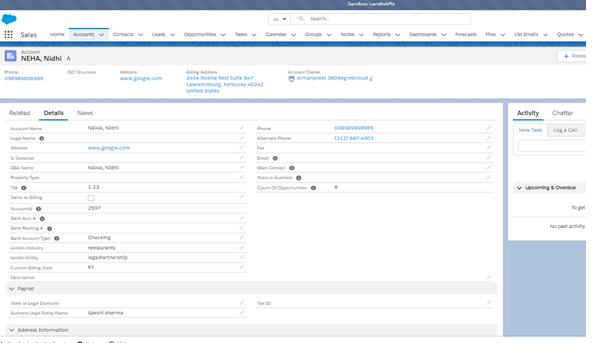
Salesforce is mapped with Lendio to fetch the Account Name, which is the borrower name associated with a particular transaction. Values for Phone and Alternate Phone are fetched in the same way. There is a formula field Count Of Opportunities, which keeps incrementing as the number of opportunities keeps increasing. There are fields like State which are initially stored in a separate field to convert the abbreviation of state name into a complete name, which is then fetched into the standard field on Salesforce. Figure 1 shows all fields created in the object Accounts.

Figure 1
Details captured into the Object- Accounts

Contacts
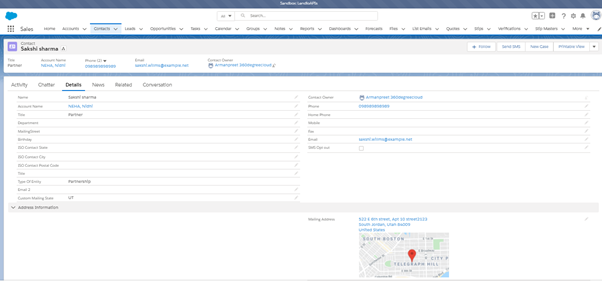
All the fields in Contacts are acquired from Lendio through mapping. A record of contact can have multiple owners, in which one will be the primary owner, and the rest will be added as additional owners. This could be managed under Opportunities by setting Owner 1 as the primary owner of the record, and Owner 2, Owner 3, and so on for additional owners. Figure 2 shows all the fields created in the object Contacts.

Figure 2
Details captured into the Object- Contacts

Opportunities
All Opportunities created need to accept the following details.
<Account Name- Date when Opportunity was created- Number of Opportunities on the respective Account>.
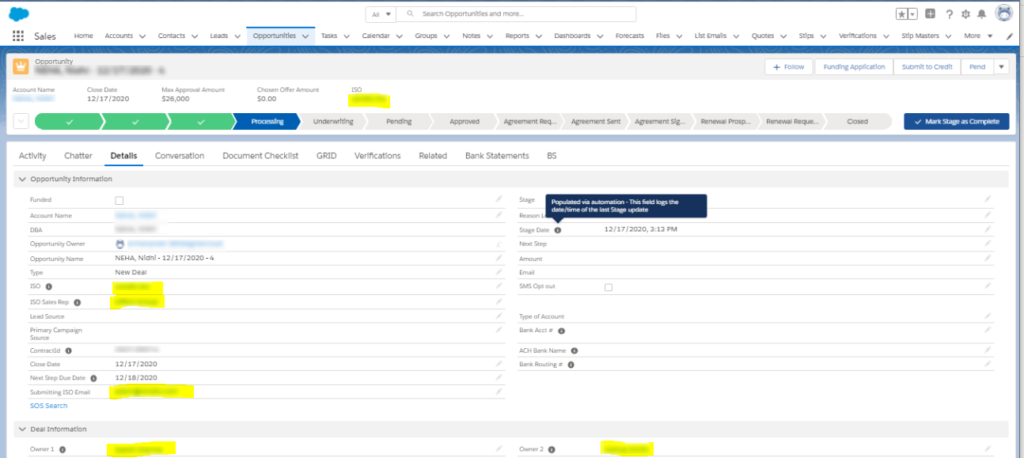
In Figure 3, you can see the Opportunity name as NEHA, Nidhi- 12/17/2020- 4, where ‘NEHA, Nidhi’ is the Account Name, ‘12/17/2020’ is the date when this particular opportunity was created and ‘4’ is the number of opportunities created for this particular account. 

Figure 3
Details captured into the Object- Opportunities

The primary owner for the opportunity can be identified in the field Owner 1, while the other owners would be categorized under Owner 2, Owner 3, and so on.

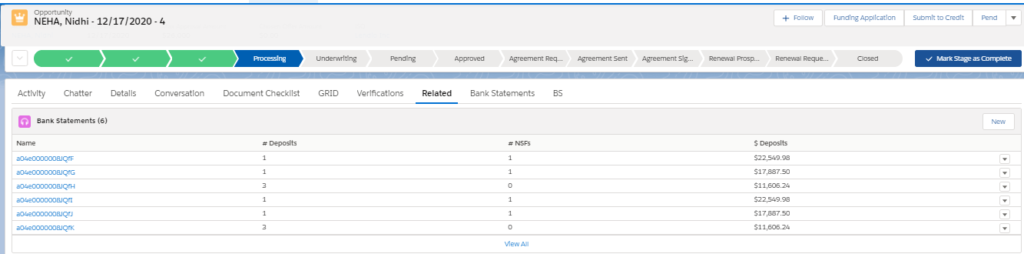
Under Opportunities, you can find the custom field Bank Statements which shows all the transactions of Bank Accounts created under a particular opportunity. Figure 4 shows the bank statements fetched from Lendio through mapping, with fields like the number of Deposits, NSFs, and $ Deposits in the particular Bank Account

 Figure 4
Bank Statements Captured under Opportunities

The bank statements are stored according to each month. This means that all the transactions related to a particular Bank Account in a particular month will be shown together.
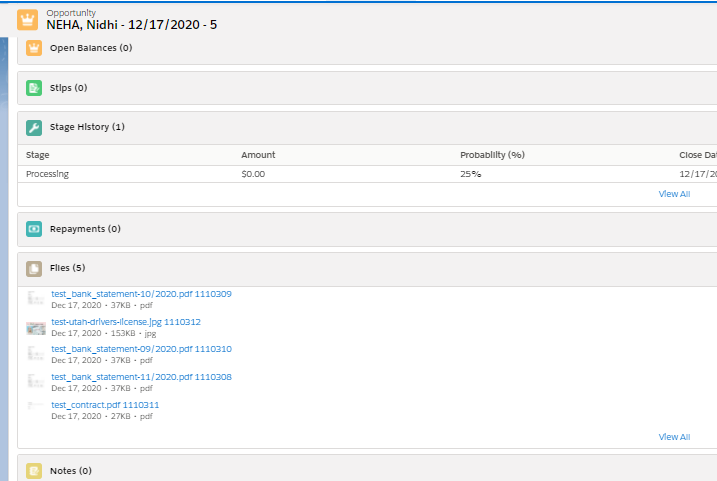
Opportunities also store all the documents acquired from Lendio through mapping. These could be personal or transactional documents of the leads associated with a particular record. Figure 5 shows the multiple documents which are captured under Opportunities.

Figure 5
Multiple Documents Captured under Opportunities

Summary

The Lendio- Salesforce integration we went over simplifies storage and management for records in Salesforce for banking and lending institutions. It lets loan officers synchronize loan records over Salesforce without duplicity or busywork. Sensitive information like bank transaction details and documents can be safely recorded with this integration. 

That said, integrating your in-house system with Salesforce can bring a great deal of ease to data management. For more information on industry-specific Salesforce customizations, or to get your own legacy systems and processes integrated,  connect with a team of professional Salesforce developers.

logo Live Chat