Talk to Us

Beyond the Copilot: Why 2026 is the Year of the Agentic AI Enterprise 

The year 2024 and 2025 were all about Copilots; and these reactive assistants did deliver, helping us draft emails and summarize meetings. But is it enough? As we enter 2026, firms are noticing a new pattern; productivity gaining plateau and humans remaining to be the execution bottleneck. The next move for transformation isn’t about implementing better and advanced chatbots; it’s about becoming an Agentic AI Enterprise. This year marks the rise of the Agentic AI, where AI no longer waits for a prompt to be useful; it takes the initiative to get work done. 

We are now leaving behind the reactive “input-output” model of chatbots and moving into the era of the Agentic Enterprise in 2026, where autonomous AI agents operate as digital coworkers that perceive, reason, and execute multi-step workflows without constant human handholding. This blog will explore why 2026 is the inflection point for this transformation, the strategic value of moving from assistance to delegation, and how your organization can bridge the gap between today’s point-automation and a future of governed, autonomous execution. You will learn not just what these agents are, but how to deploy them as the new backbone of your operational velocity. 

From Copilots to Autonomous AI Agents 

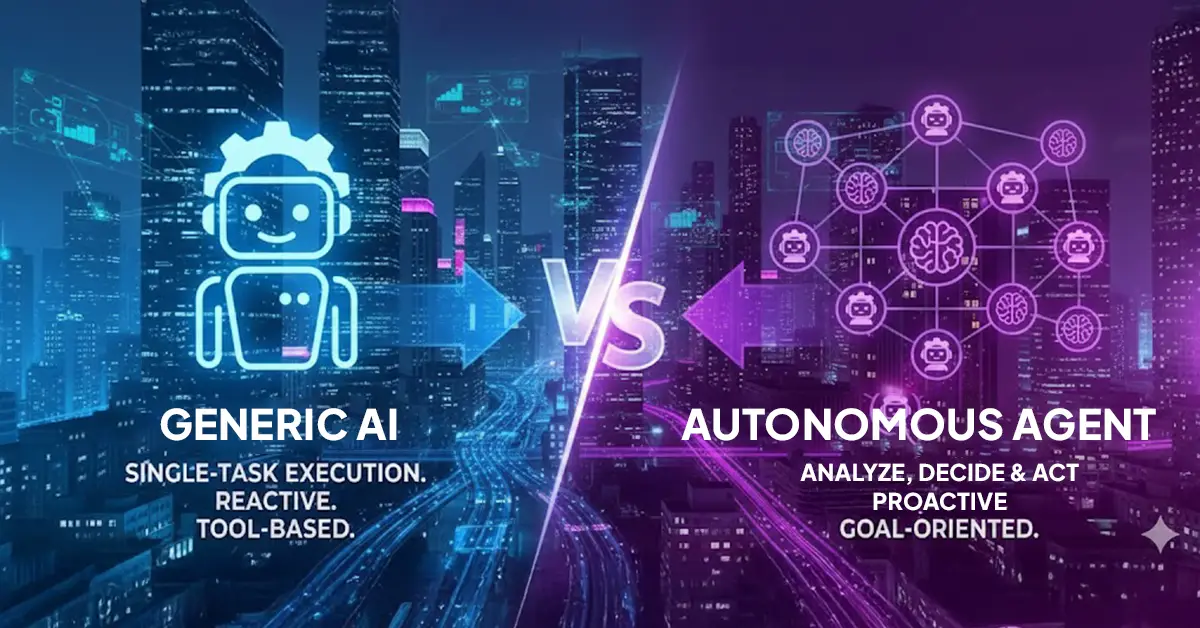
In 2024, Copilots were heralded as the ultimate productivity hack. However, their utility was strictly bounded by the Human-in-the-Loop (HITL) requirement. A Copilot is reactive; it possesses a “stateless” intelligence that resets with every new chat window. If you wanted to move a lead through a pipeline, you had to prompt the Copilot to draft the email, then you had to send it, then you had to update the CRM. 

By contrast, Autonomous AI Agents possess “stateful” memory and goal-oriented reasoning. Instead of following a rigid script, an agent is given a mission. The agent then creates its own plan and moves through the “OODA loop” (Observe, Orient, Decide, Act) independently. 

The Comparison: Assistance vs. Autonomy 

FeatureCopilot (Assistive AI) Agent (Autonomous AI) 
Initiative Reactive (Waits for a prompt) Proactive (Acts on a goal/trigger) 
Workflow Linear (Single-task focus) Multi-step (Orchestrates complex paths) 
System Interaction Read-only / Suggestion based Read-Write (Can execute actions in apps) 
Human RoleThe Pilot / Driver The Manager / Auditor 
Goal Improve Individual Efficiency Scalable Operational Velocity

Start building your autonomous future today. 

Start building your autonomous future today

What Is an Agentic Enterprise? 

An Agentic Enterprise is an organization where human employees and AI agents work together in a collaborative ecosystem. This model enables agents that are deeply integrated into the tech stack, calling APIs, and coordinating with other agents. These “digital workers” have defined roles, responsibilities, and even performance metrics. 

AI agents are taking work to the next level as they have the ability to reason, adapt, and act on their own. They are capable to handle time-consuming repetitive tasks on their own without the need for human intervention. The Agentic Enterprise model has allowed AI to become a powerful partner, augmenting human potential. These AI agents can now take decisions and actions to meet desired outcomes while freeing employees to focus on more important and revenue-generating tasks.  

The Strategic Value of Agentic AI 

The strategic value of Agentic AI has moved beyond mere “time-savings.” It has become the primary lever for structural competitive advantage. For the modern enterprise, the goal is no longer just to work faster, but to fundamentally alter the unit economics of growth. 

Here is a deeper look at the four pillars of strategic value in the Agentic era: 

1. Operational Velocity 

In traditional organizations, the “speed of business” is limited by the speed of human coordination. A simple change in a supply chain, such as a port delay, usually requires a human to spot the alert, analyze the impact, email stakeholders, and manually update inventory levels. Autonomous agents can monitor live data streams and execute responses in milliseconds. 

2. Hyper-Personalization at Scale 

Historically, personalization was expensive. You could only provide a “white-glove” experience to your top 1% of customers because of the human labor involved. Agentic AI allows for “Agent-to-Customer” interaction at a granular level. These agents act as Brand Twins, maintaining a deep, persistent memory of every individual customer’s preference, past hurdles, and future needs. 

3. Cross-Functional Orchestration 

The biggest strategic hurdle for the last 20 years has been “Data Silos.” Marketing doesn’t know what Sales is doing; Finance doesn’t see the Support tickets. 

Agentic AI serves as the “connective tissue.” Because these agents can navigate any interface and call any API, they act as an orchestration layer that sits above your existing software. 

Don’t just take our word for it. See the ROI for yourself. 

gentic AI serves as the “connective tissue

Use Cases Transforming Agentic AI Enterprises in 2026 

The “Agentic Enterprise” has moved past experimental pilots into full-scale production. Agents are no longer just answering questions; they are owning outcomes. Here are the specific use cases of Agentic AI Enterprise that have redefined industry standards this year. 

1. Intelligent Supply Chain Orchestration 

Traditional supply chains are reactive, relying on human intervention to solve disruptions that have already occurred. Supply Chain Agents now act as autonomous “traffic controllers.” They monitor global weather patterns, geopolitical shifts, and real-time port telemetry. 

2. Finance & Treasury 

Monthly “closing of the books” is a labor-intensive process prone to human error and delayed insights. Financial Agents now perform Continuous Accounting. Instead of waiting for month-end, agents monitor every transaction in real-time across global entities. Agents autonomously reconcile invoices, and flag anomalies that suggest fraud or tax non-compliance. 

3. Customer Success 

Customer Success Managers (CSMs) are often overwhelmed, only reaching out to clients when a renewal is due, or a fire needs to be extinguished. Agentic CSX (Customer Success Experience). Agents monitor product usage patterns and “sentiment signals” across support tickets and emails. 

4. Hyper-Personalized Marketing 

Segment-based marketing still feels generic and often misses the mark on timing. Dynamic Intent Agents build using Agentforce act as a bridge between a brand’s inventory and an individual customer’s real-time intent. They help to generate 1-to-1 offers, negotiate the price within a set of pre-approved margins, and executes the transaction across the customer’s preferred messaging platform. 

Enterprise AI Workflows: Beyond Point Automation 

To understand how an Agentic AI Enterprise functions, you have to look at the “Agentic Loop”, the four-stage engine that allows an AI to move from a vague goal to a completed business outcome. 

1. Goal Decomposition & Planning 

Earlier workflows used to begin with the simple “If-This-Then-That” logic, but now they begin with Decomposition. When given a high-level objective, the agent uses “Chain-of-Thought” reasoning, using which the AI agent breaks the decided goal into logical sub-tasks. It identifies necessary data points, anticipates potential obstacles, and prioritizes actions, building its own project roadmap before taking action. 

2. Tool-Augmented Execution 

Unlike earlier AI that only “talked” about data, agents are now equipped with the ability to call APIs, navigate browser interfaces, and even write and run their own code in secure sandboxes to transform data. This allows the agent to move seamlessly between siloed systems to execute the actual work required to meet the goal. 

3. Multiple AI Agent Orchestration 

As enterprise operations become complex, they hardly depend on a single AI agent; what they need is Multi-Agent System, where these digital workers collaborate and act together to get the tasks done without any human supervision. This kind of AI agent orchestration work helps to ensure high output accuracy. 

4. Reflection & Self-Correction 

The final, most critical stage is the Self-Critique Loop, where the agent reviews its own work before completion. The agent evaluates its drafted actions against the original constraints, asking, for example, “Does this procurement order actually maintain the required 15% margin?” If it fails its own test, the agent autonomously iterates, corrects the error, and optimizes the solution. Once finished, it logs the “lesson learned” into its long-term memory to ensure even faster execution in the future. 

It’s Time to Become an Agentic AI Enterprise 

As we move through 2026, the distinction between market leaders and laggards is no longer defined by who has the best “AI assistant,” but by who has built the most robust Agentic Enterprise in 2026. It’s high time companies should move beyond the “Copilot plateau” and enter the new era of autonomous execution. Organizations are finally realizing the true promise of digital transformation by delegating complex, multi-step enterprise AI workflows to a coordinated workforce of AI agents. 

It’s time for you to make the move, too. Don’t let your AI strategy stall at the “assistant” phase, reach out to our experts today for a strategic consultation. Let’s build your digital workforce together and transform your business into a truly Agentic AI Enterprise. 

Future-proof your business with autonomous agents that deliver real ROI.

It’s Time to Become an Agentic AI Enterprise

Why Salesforce Outlook Integration Is Essential for Modern Sales Teams 

Do you know, employees spend an average of 28% of their time checking their email. That’s too much time for a sales rep that needs to put a major focus on actually selling. There’s usually a frustrating “digital tug-of-war” exists between where sales reps work and where they report. While the actual conversations and relationship building happen almost entirely within Outlook, the corporate source of truth remains within Salesforce. This disconnect creates a silent productivity killer. When sales live in the inbox but reporting lives in the dashboard, all you end up with is fragmented view of the customer journey and hours of wasted selling time spent on administrative overhead. That is something you should avoid with Salesforce Outlook integration. 

By automating the flow of information through Salesforce Outlook sync, you eliminate the friction between selling and tracking, allowing your team to maintain a single source of truth without sacrificing their efficiency. In this article, you will learn how Salesforce Outlook integration removes the “admin tax,” improves forecast accuracy through automated activity capture, and empowers your team to manage their entire pipeline without ever leaving their inbox. 

Problems Sales Teams Face Without Integration 

When Salesforce and Outlook operate as isolated islands, the gap between them is filled with manual effort and guesswork. Without a seamless connection, your sales process is forced to rely on the “memory” of individual reps rather than a reliable system of record. This structural disconnect doesn’t just create extra work but also erodes the quality of your pipeline and the accuracy of your revenue predictions. 

Below are the most critical challenges teams face when their email inbox and Salesforce aren’t talking: 

  • The “Invisible” Conversation (Emails Not Logged): When reps have to manually copy-paste or log emails, they inevitably skip the updates. Due to this, the Salesforce instance would not have details related to the customer interactions recorded that often determine whether a deal will close. 
  • The Follow-Up Black Hole: Without synced calendars and tasks, reminders live only in a rep’s head or a sticky note. Due to this, important follow-ups slip through the cracks and leads go cold. 
  • Incomplete Deal History: If a rep leaves or goes on vacation, their replacement is left flying blind. Without a centralized history of every touchpoint, the new owner has no context on past promises or pain points, leading to the asking the same initial questions to customers that frustrates them. 

Save your sales team hours of admin work every week with a seamless sync.

  • The Duplicate Contact Trap: Manual entry is the primary cause of “dirty data.” When reps can’t see CRM data directly inside their inbox, they often create new contact records for existing customers, leading to fragmented profiles and multiple reps accidentally “double-prospecting” the same person. 
  • The Adoption Death Spiral: Salesforce is only valuable if the data is in it. When reps view the CRM as an “administrative burden” that requires hours of manual syncing at the end of the day, they stop using it. This leads to low Salesforce adoption, turning your expensive CRM investment into nothing more than a glorified, half-empty address book. 

Reasons to Consider Salesforce Outlook Integration for Modern Sales Teams 

Bridging the gap between your inbox and your CRM isn’t just a convenience; it’s a competitive necessity. By unifying these two systems, you transform Salesforce from a passive database into a dynamic sales engine. Here is why modern sales teams are making this integration a top priority: 

1. Eliminates the Burden of Manual CRM Updates 

The greatest friction in any sales process is the “administrative tax.” When reps avoid Salesforce, it’s usually because they view it as a separate, time-consuming task that distracts from closing deals. This avoidance leads to lost activity data, leaving your CRM with massive gaps in the customer journey. 

The Salesforce email integration allows reps to log emails and sync meetings directly from Outlook with a single click. By meeting reps where they already work, you ensure that every interaction is captured effortlessly. 

2. Drastically Boosts Sales Productivity 

Modern sales needs sales reps to maintain their focus at all times. So, every time a rep leaves their inbox to look up a record in Salesforce, they lose focus and end up stuck with context switching. 

With Salesforce integration, reps can view Salesforce contact details, open opportunities, and account history right inside their Outlook sidebar, thus saving them from switching tabs and missing out the context. It also saves their time that they have been toggling between tabs, focusing their energy on actual selling. 

3. Improves Activity Visibility for Managers 

You cannot manage what you cannot measure. Without integration, managers are often missing out on crucial data and updates, thus unable to track metrics. 

Integration provides a complete view of call and email volumes, ensuring that dashboards reflect the real results. It also enables managers to access a complete record of communication, which helps them to review actual engagement patterns to provide more targeted coaching. 

4. Strengthens Pipeline Accuracy 

A pipeline is only as reliable as the data that supports it. When engagement history is fragmented, your forecasts become little more than educated guesses. The Salesforce Outlook integration helps in tying every email and calendar event directly to the relevant opportunity to ensure a “full-picture” view of every deal. Having access to all communication also enables reps to accurately predict which deals are likely to close and which are stalling, leading to significantly more reliable revenue projections. 

Proof that the right integration is worth its weight in gold.

5. Drives Rapid Salesforce Adoption 

The hardest part of any CRM rollout is getting the team to actually use the software. A steep learning curve often leads to resistance and wasted investment. By bringing Salesforce data into the familiar Outlook interface, you reduce the barrier to entry. 

Reps don’t need to master a complex new system to be productive; they can perform 80% of their CRM tasks within the email tool they already use and love. This naturally increases adoption and ensures your CRM investment pays off. 

Real-World Impact: Use Cases for Salesforce Outlook Integration 

To understand the value of this Salesforce integration, you should be aware of its real-life use cases. Here are some of the most common use cases that justify the importance of Salesforce Outlook sync. 

Use Case 1: Inside Sales Teams 

Sales teams handle massive email volumes every day. When every minute counts, manual logging is the first thing to be sacrificed, leading to poor activity tracking. With integration, reps can automatically log emails and meetings to Salesforce without ever leaving their inbox, creating complete visibility for the team. This will help them plan their outreach with the right information at their fingertips. 

Use Case 2: Account Executives (AEs) Managing Long Sales Cycles 

Some complete sales deals can take months close. In such a long time, there are chances of critical details being scattered across inboxes like specific objections, stakeholder preferences, and past promises. Due to this fragmented data, AEs would not be able to access the full story associated with the deal. 

Outlook integration with Salesforce by certified Salesforce consultants ensures all conversations are tied directly to the Opportunity, providing AEs full context before every follow-up or deal review. Having access to all this information enables them to run more personalized and strategic communication. 

Use Case 3: Sales Managers & Leadership 

Leaders often struggle with inaccurate activity reports, making it difficult to judge the health of the pipeline or identify which reps need coaching. The integration allows managers to view real-time dashboards showing actual rep engagement, improving transparency and accuracy of pipeline reviews. 

Use Case 4: Customer Success & Account Management 

If the Customer Success team does not have the information about the previous conversation with the customer, the handoff from the sales team (after deal closure) can be challenging. The lack of information would keep the CS team blind while interacting with a new client. But when Outlook and Salesforce are integrated, emails automatically get synced to Accounts and Contacts, ensuring a smooth handoff from the sales to the CS team. 

Step-by-Step Workflow: How the Integration Works 

To understand the Salesforce Outlook integration better, you should understand how exactly it works. So, here’s the workflow execution of the integration which enables a streamlined sync between your Outlook account and Salesforce. 

Step 1: Email Sent or Received in Outlook 

Whether a sales rep is sending an email to a hot lead or receiving an email from an old client, all the communication would be conducted with Outlook. There would not be any need to hold the communication to log into your Salesforce org on a separate browser. 

Step 2: Salesforce Add-In Identifies the Record 

When the rep opens the email, the Salesforce sidebar (Add-in) automatically scans the sender’s email address and cross-references your database to match the email to an: 

  • Existing Lead or Contact 
  • Associated Account 
  • Active Opportunity  

This enables the rep to have a quick look at the person’s profile and deal status, making it easier to build a quick reply. 

Step 3: Effortless Activity Logging 

There would not be any need to copy pasting anymore. The email, received or sent, would be logged as a Salesforce activity. The text of the email and relevant attachments would be captured and preserved in the Salesforce, ensuring reps have a complete context of the conversation. 

Step 4: Seamless Calendar & Meeting Sync 

Not just text; all your Outlook meetings would be synchronized with Salesforce Events. This means whenever a rep has a demo or meeting schedule, the details related to the meeting would also be visible to the manager through the Salesforce org, thus maintaining complete transparency. 

Step 5: CRM Updates Without Manual Entry 

Reps can perform core Salesforce tasks right from the Outlook sidebar, whether it is updating lead status or adding notes related to any recent call. This adds up to productivity and also prevents the chances of missing logging the details. 

Step 6: Salesforce Becomes the Single Source of Truth 

The integration makes Salesforce an asset to sales reps and managers, enabling them to have access to all data within one place. From accessing complete activity history to maintaining accurate pipeline engagement, the integration makes it all possible. 

Key Takeaway: Why Salesforce Outlook Integration is Your Competitive Edge 

Achieving successful Outlook integration with Salesforce provides an essential and solid pillar to the modern sales strategy, bridging the existing gap between customer interaction and revenue tracking and reporting. The “manual work tax” associated with logging each detail would simply be eliminated once you sync your platform where sales happened with the platform where your data resides. 

This powerful sync not just helps to achieve a single source of truth but also makes the sales team work with more accurate forecasting and pipeline management. This integration ultimately gives the sales team focus more on actually selling rather than spending time on administrative work. 

Turn your static inbox into a dynamic, AI-powered sales engine.


8 Powerful Reasons to Use Salesforce Event Management in 2026

It’s 2026, the year when we are likely to see a lot of innovation with respect to every industry. 2025 was all about AI and other trends taking their place and now it’s time for businesses to actually make way to seriously adopt them the right way for real transformation. The same can be expected from the event management landscape, which is going to go farther than simple logistics to a high-stakes game. But if that’s something which can’t be achieved with disconnected tools. Salesforce event management can help overcome this challenge. 

Event management firms often struggle with managing work and data across different tools, one for email, one for registration, one for post-event reporting, and may be more. This scattered information can end up in visibility gap, making it really challenging to figure out which event session is bringing results. 

Traditional event management tools often fall short at scale because they operate as silos, isolated from the core customer data in your CRM. When your event tech doesn’t talk to your system of record, follow-ups become a manual, time-consuming nightmare, often leading to “lead decay” where hot prospects are ignored for days while data is cleaned and imported. Salesforce event tracking changes this dynamic by turning every event into a powerful data engine, fully integrated with your sales and marketing ecosystem. 

What Is Salesforce Event Management? 

Salesforce event management is not any product of Salesforce, but it can be stated as an application of Salesforce in the event management industry, enabling teams to manage their events and campaigns within Salesforce. This approach helps teams focus beyond logistics, considering each attendee as a data point. Whether you are setting up a small event or a massive global conference, Salesforce event planning provides the needed infrastructure to handle everything from registrations to post-event follow up.  

Working with Salesforce for event management helps teams manage events through a single source of truth. This means all the information like attendee details, survey responses, and check-ins can all be stored and accessed in a single centralized system.  

When Should You Use Salesforce for Events? 

While Salesforce event automation is a great way to plan and execute your events, it will be effective when firms start viewing their events as a way to achieve strategic growth instead of just seeing them as a logistical activity. Let’s understand this better by viewing when exactly do you need Salesforce event planning. 

  • High-Value B2B Events: When you are about to host high-value events like VIP retreats, executive meetings or industry-related summits, the focus should be given more on the quality of the interaction instead of the quantity of attendees. Salesforce event management helps here to extract historical data related to each guest, helping the sales team build conversations that are high context.  
  • Revenue-Driven Marketing: When your marketing department is held accountable for pipeline generation rather than just “registrations,” Salesforce is non-negotiable. By using Campaign Influence and Multi-Touch Attribution, you can prove exactly how an event contributed to a closed-won opportunity. This is the only way to move from “I think the event was a success” to “This event generated $2M in new pipeline.” 

Let us help you design a seamless, revenue-driven event workflow.

  • Multi-Channel Events: If your strategy includes a mix of webinars, virtual demo days, and in-person roadshows, you need a platform that can unify these disparate data streams. Salesforce acts as the central hub, harmonizing data from Zoom, Eventbrite, or on-site badge scanners. This ensures that a prospect’s journey is continuous, regardless of whether they engaged with you in a digital booth or a physical ballroom. 
  • Complex Multi-Session or Hybrid Logistics: If your events involve complicated tracks, multiple breakout rooms, or a mix of in-person and virtual components, Salesforce’s relational database can handle the complexity. You can map specific sessions to “Child Campaigns,” allowing you to see exactly which topics resonated most with different segments of your audience. 

8 Reasons to Use Salesforce for Event Management 

Considering the Salesforce event management system can help you bridge the gap between marketing engagement and sales execution. This enables teams to ensure that no lead is left behind, and more focus can be laid on growth in the pipeline. Let’s have a look at more reasons to consider Salesforce for event management. 

Reason 1: Centralized Attendee & Registration Data 

When you have an event to organize, chances are there would be so much to do. This might lead to data being scattered across third-party registration platforms and spreadsheets, which you have been using to manage it all. This would end you up with outdated and fragmented information that would be difficult to access and analyze. By using Salesforce as your central hub, every registration and check-in is stored directly within your Leads and Contacts, providing teams with unified profiles to access a prospect’s entire event history. 

Reason 2: Automated Event Campaigns & Follow-Ups 

Manual email drafting and delayed follow-ups lead to “cold” leads by the time your sales team reaches out. Leveraging Salesforce Campaigns, you can build automated journeys in Marketing Cloud or Pardot. This allows you to trigger personalized “Know Before You Go” emails, real-time “Thanks for checking in” notifications, and immediate post-event nurturing sequences the second a lead is scanned. 

Reason 3: Real-Time Event ROI Tracking 

Marketing teams struggle to prove that a major event sponsorship actually resulted in closed revenue. With Campaign Influence and Opportunity Tracking, Salesforce connects the dots between an event touchpoint and a closed-won deal. You can generate dashboards that show exactly how much pipeline was generated per event, allowing you to justify your budget with hard data. Do you know when a prospect from a sales opportunity attends an event, they are five times more likely to close

Reason 4: Personalized Attendee Experiences 

The way you engage with your C-level executive leads and your technical end-user leads is different. The same way the invitations to be sent should be different. Salesforce enables you to conduct successful segmentation based on past behavior, industry, or job title.  

Reason 5: Seamless Integration with Event Tools 

It is great to have different tools and applications to manage different activities related to an event. But the struggle starts when those applications don’t “talk” to each other. Due to this lack of sync, the team has to spend hours manually conducting CSV imports and exports. Salesforce resolves this challenge by enabling native integration of all those applications, so the team can access all information within Salesforce.  

Reason 6: Better Sales & Marketing Alignment 

Sales reps might not always have the knowledge about their key accounts, as if they are attending a company conference, event, or webinar. Having their systems integrated with Salesforce provided reps with instant alerts, enabling them to maintain full visibility of their account activities. Whenever an important prospect checks into a session, respective sales reps would receive a notification, enabling them to conduct an outreach at a suitable time. 

Reason 7: Scalable for Any Event Type 

When a team moves from conducting small webinars to large-scale hybrid conferences, they are likely to outgrow their niche tools and applications. This challenge won’t exist with Salesforce as the platform is built to scale. Whether you are conducting a virtual roundtable or a multi-session global conference, Salesforce enables team to easily track sessions, speaker and attendee information, logistics associated with multiple locations, and more. 

Reason 8: Advanced Reporting & AI-Driven Insights 

When the team works with any standard event management tool, they might only have access to a basic count of “total attendee” and lack analytical insights that can provide them with in-depth attendee information. Salesforce event planning provides team with insights beyond standard dashboards, with Einstein AI analyzing behavior of attendees to achieve the predictive analytics of prospects who are likely to convert. 

Learn how to turn simple event check-ins into high-value sales opportunities.

Workflow Explanation: The Event Lifecycle 

The power of Salesforce in 2026 lies in its ability to automate the “Before, During, and After” of an event within a single platform. 

Phase 1: Pre-Event (Strategic Setup & Promotion) 

  1. Centralized Data Setup: Instead of spreadsheets, the event is created as a Campaign Record in Salesforce. All logistics (vendor contracts, speaker bios, session rooms) are stored here. 
  1. AI-Powered Outreach: Salesforce Agentforce identifies potential leads in your CRM. It drafts and sends personalized invites through Marketing Cloud, tracking who opens, clicks, or ignores. 
  1. Dynamic Registration: A Salesforce-native microsite (Experience Cloud) captures registrations. The system automatically populates fields for existing customers and creates “Lead” records for new ones. 

Phase 2: During the Event (Execution & Engagement) 

  1. Seamless Check-in: Staff use the Salesforce mobile app or “Smart Badges” to check in guests. This instantly updates the attendee record in the CRM. 
  1. Real-Time Adjustments: If a workshop is reaching capacity, Einstein Analytics alerts the event manager, who can then use Salesforce event automation to send an SMS blast to other attendees suggesting an alternative session. 
  1. On-the-Fly Networking: Using the Salesforce community portal, attendees can view “People You Should Meet” based on shared interests, facilitating B2B connections. 

Phase 3: Post-Event (ROI & Relationship Building) 

  1. Automated Follow-ups: As soon as an attendee is marked “Attended,” a Flow triggers a personalized thank-you email containing the slides from the specific sessions they attended. That’s how it helps in Salesforce event tracking. 
  1. Lead Scoring & Routing: The system analyzes attendee behavior. High-scoring leads are automatically routed to the Sales team with a task. 
  1. ROI Reporting: Dashboards pull data from ticket sales, session attendance, and subsequent closed deals to calculate the exact Return on Investment (ROI) of the event. 

Examples of Salesforce Clouds Commonly Used for Event Management 

Salesforce event tracking provides different clouds that you can choose for event and attendee management according to the scale and goals of your event. Here are some of your picks. 

Sales Cloud 

Sales Cloud becomes the foundational layer when it comes to event management. Your Contacts, Accounts, and Leads all reside in Salesforce Sales Cloud. It enables sales reps to track the journey and behavior of prospects and attendees. They can access and view every touchpoint related to an active deal. Thus, Sales Cloud acts as the hub to track ROI and revenue associated with any event. 

Marketing Cloud & Account Engagement (Pardot) 

When you are using Salesforce event automation, Salesforce Marketing Cloud and Pardot will be your communication engines to maintain touch with the attendees and keep them posted about the event. If you are going to run a large scale B2C event, Marketing Cloud could help you to run personalized emails, SMS, and more at high volume. On the other hand, for B2B campaigns, Pardot would be the right pick to achieve the ease for lead scoring and nurturing, 

Experience Cloud (Event Portals) 

The customers and attendees these days have expectations of premium experience. That’s where Experience Cloud can help teams create dedicated Event Portals to deliver the needed ease with self-service experience to attendees. These portals enable them to access their schedules, session materials, and even interact with the rest of the attendees. These portals would be built directly within Salesforce, so any changes made by attendees in their profile would automatically be updated within Salesforce event management system. 

Service Cloud (Attendee Support) 

When it comes to events, simply getting the attendees to register won’t get the job done. You need to provide the right platform where you can resolve any of their queries. Service Cloud enables teams to take up these queries and easily resolve all the cases, ensuring no question or query goes unanswered, 

Key Takeaway 

Successful event management has shifted from a logistical burden to a strategic revenue engine. By moving away from “disconnected silos” (separate tools for email, registration, and data), businesses use Salesforce as a Single Source of Truth to unify the entire event lifecycle. This Salesforce event management system ensures that every attendee interaction is captured as a high-value data point, allowing AI to drive real-time personalization, automate lead nurturing, and provide definitive proof of Return on Investment (ROI) by linking event participation directly to closed sales deals. 

Make Salesforce Event Management Your Revenue Catalyst 

If you want your event to be a successful one, it majorly depends on one thing, moving away from data in silos and achieving a unified ecosystem for your data. 

When planning your event, remember that the purpose of the event is to drive revenue and relationships, not to create chaos. If your data like event activities, attendee behavior, and other details are residing in silos, you would not be able to act on the digital activity of your attendees. This friction can be eliminated by bringing your data over Salesforce and managing your event centrally through a unified system. 

Transform your event strategy into a predictable revenue driver today.


The 2026 Salesforce Outlook: From Reactive CRM to the Sentient Nervous System 

As we enter 2026, the “AI hype” has settled into a hard corporate reality. Having spent over 13 years living and breathing the Salesforce ecosystem, I’ve seen every “next big thing,” but this shift is different. We are no longer talking about Digital Transformation; we are talking about Digital Labor ROI

For years, I watched my clients view AI as a luxury sidecar, a chatbot to deflect tickets or a tool to draft emails. But looking at the boardrooms I advise today, the mandate has moved. 

We are no longer impressed by software that answers questions; we are demanding systems that execute outcomes.

The shift is tectonic. After a decade of building Reactive Software (tools that sit idle waiting for a human click), we are finally architecting Sentient Systems (software that independently senses environmental shifts, interprets business intent, and acts without being prompted).  

As a CEO, my focus has changed: I am no longer enabling software users; I am orchestrating an autonomous digital workforce. 

The End of the “User” Era 

For years, “User Adoption” was the holy grail of my implementation projects. We measured success by how many people logged in and clicked buttons. But as I lead my own organization into 2026, I’ve realized that the “User” is often the bottleneck. When your systems are sentient, you don’t use them; you coexist with them.  

Salesforce has evolved from a System of Record into what I call an Ambient Nervous System. It no longer just stores your data; it feels the pulse of your business. 

For years, we built systems to help people work. In 2026, we are starting to build systems that do the work.

I’ve seen firsthand how leadership changes when you stop worrying about whether your team logged their hours and start architecting the autonomous outcomes that Agentforce 360 delivers. In the coming months, your goal shouldn’t be more logins; it should be more background resolutions. 

The Sensory Revolution 

One of the most persistent frustrations I’ve encountered in a decade of consulting is the “data entry gap”, the friction of moving real-world information into a digital field. In 2026, the “Sensory Revolution” is finally closing that gap, giving enterprises their ears and eyes

  • Agentic Voice: This isn’t the robotic IVR we’ve been working with for years. In my own daily routine, I no longer “type” into Salesforce. I have strategic dialogues with our enterprise intelligence while in transit. I can interrupt, clarify, and redirect. The system understands my vibe, not just my keywords. 
  • Ambient AI: For years, I told clients that if it isn’t in Salesforce, it didn’t happen. Now, Salesforce finds the data itself. Through Ambient AI, sensors on retail floors and warehouses feed into Data Cloud, the system “hears” a verbal agreement in a meeting room or “sees” a temperature spike in a warehouse. This Zero-Interface Experience is the most profound change I’ve seen in my career; work is no longer interrupted by the need to document it. 

The New Economy: Agent-to-Agent (A2A) Communications 

The most profound realization I’ve had this year is that my company’s growth is no longer limited by how many emails my sales team can send. It is governed by Agentic Velocity. 

In years of sales cycles, I’ve observed that the bottleneck was always Human Latency, waiting for a person to read an email or redline a contract. By allowing agents to handle discovery and technical verification, we’ve reduced sales cycles that used to take months down to mere seconds.  

In this A2A economy, the winner isn’t the company with the loudest marketing; it’s the company with the most autonomous and trusted agents. 

The Biological Enterprise: Security & Resilience 

I’ve sat through countless security audits over the years where we treated security like a “static wall.” But in the world of Agentic AI, threats are fluid. I now advise my clients to adopt a Biological Security Model. 

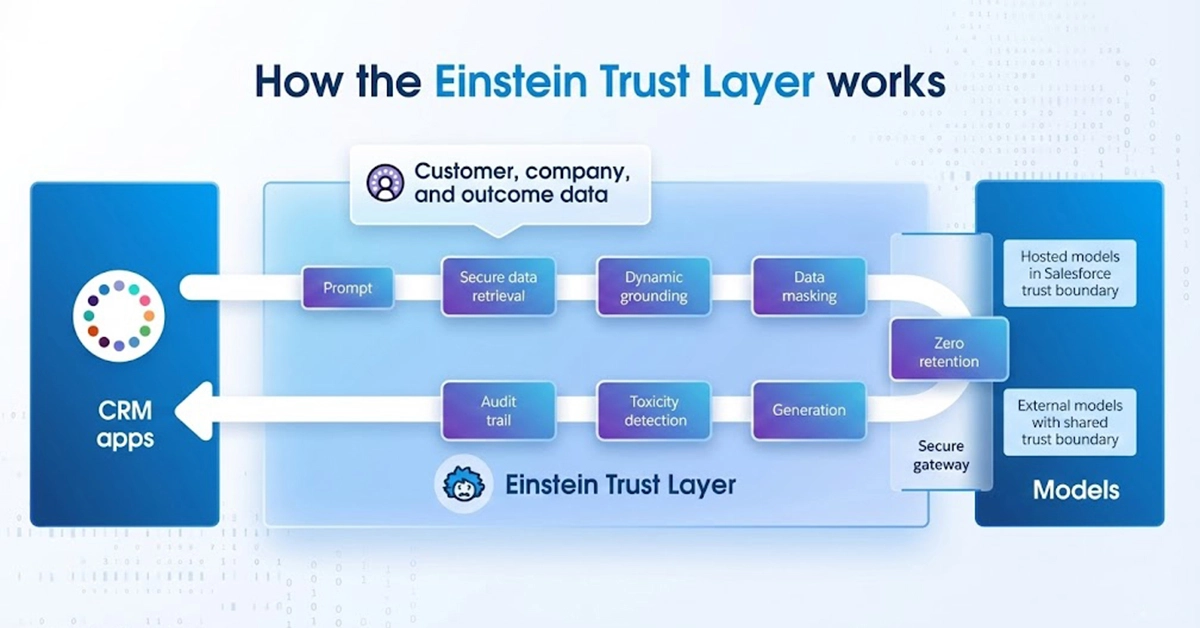
  • Proactive Cybersecurity: The “detect and notify” loop I used for years is now too slow. Using the Einstein Trust Layer, the system now anticipates vulnerability patterns before data is compromised. 
  • Self-Healing Systems: Taking inspiration from the human immune system, digital infrastructures now “scab over” anomalies, isolating a compromised node and deploying a fix without the IT team ever having to wake up at 2 AM. 

Democratized Innovation 

One of the most rewarding shifts I’ve witnessed is the end of the “IT Bottleneck.” For years, I saw my clients’ great ideas die in a backlog because they didn’t have enough developers. 

In 2026, teams don’t write Python or Apex; they describe intent, thanks to Vibe Coding. If a regional manager needs a tool, they describe the “vibe” and the logic to Agentforce. Within seconds, it is generated and deployed. 

My Advice to IT Leaders: Bringing in AI doesn’t mean your department is disappearing; your role is simply becoming more strategic. I’ve seen my own IT team transition from “builders of buttons” to “governors of the Trust Layer.” By shifting the burden of creation to the front lines, we’ve created a growth engine more responsive than any top-down strategy I’ve ever implemented. 

The Great Shift 

CategoryUntil 2025: The Copilot2026 & Beyond: The Sentient Enterprise
InterfaceDashboards & KeyboardsNatural Voice & Ambient Sensing
WorkflowHuman-Led AutomationAutonomous & Self-Healing
B2B InteractionEmail & Human NegotiationAgent-to-Agent (A2A) Handshakes
SecurityStatic Threat DetectionBiological Immune Systems
DevelopmentChronic IT BacklogsEmployee-Led “Vibe Coding”
Primary MetricEfficiency (Faster Humans)Autonomy (Independent Outcomes)

The Executive Mandate for 2026

2026 is the year we finally move from Efficiency to Autonomy

For the last decade, our goal was to make humans faster, to give them better tools to sort data, send emails, and close tickets. But as we’ve seen, “faster” eventually hits the ceiling of human capacity. The Sentient Enterprise breaks that ceiling. By offloading the administrative tax of business to an autonomous agentic layer, we are freeing our people to do what only they can do: dream, strategize, and build relationships. 

The most successful leaders of this era will be those who stop looking at screens and start listening to the pulse of their ambient organization. We must stop managing processes and start architecting environments where intelligence flows naturally. 

Don’t wait for your IT roadmap to catch up. Start by identifying one high-friction handshake in your business, whether it’s a procurement cycle or a service escalation, and empower an Agentforce pilot to own the outcome, not just the task. 

Final Thoughts

As a CEO, my perspective on our roadmap has shifted. The 2026 leader must pivot from Process Management to System Architecture.  

Traditionally, we managed people to follow a process. In 2026, we design the system (the architecture) so that the agents can navigate the process autonomously. This requires a high degree of trust, not just in the technology, but in the Einstein Trust Layer that Salesforce has built to keep our data sovereign and our ethics intact. 

My advice for our B2B and B2C Ecosystems: 

  • For B2B: Prepare your metadata now. Your agents are only as good as the “context” they have. If your data is siloed, your A2A negotiations will fail. 
  • For B2C: Focus on “Personality Design.” In a world of ambient voice, your brand is no longer a logo; it is the tone, empathy, and reliability of your agent’s voice. 
  • For the Salesforce Journey: Move beyond “Implementation” and toward “Orchestration.” Use Data Cloud as the central nervous system that feeds your agents the “senses” they need to act on your behalf. 

The transition to a Sentient Enterprise is a journey from “doing” to “being.” Let’s build an organization that doesn’t just work harder, but one that actually thinks and evolves alongside us. 

Complete Guide to Salesloft Salesforce Integration for Sales Team 

In the fast-paced world of modern sales, efficiency is driven by a powerful duo: Salesloft for high-velocity outreach and Salesforce as the ultimate system of record. While Salesloft serves as the “cockpit” where reps execute cadences, dial prospects, and send emails, Salesforce remains the “command center” where the board looks for forecasts and marketing tracks attribution. The strength of your revenue engine depends entirely on how well Salesloft Salesforce integration works. Without a seamless sync, your engagement data and your financial truth live in two different worlds. 

When this integration fails or is poorly configured, the friction creates immediate cracks in your growth strategy. Activities fail to sync, forcing reps into hours of manual data entry, while pipeline data becomes unreliable, leading to “dirty data” that haunts your reporting. Most critically, managers lose visibility into what is actually moving the needle, making it impossible to coach effectively. A successful integration goes beyond mere technical connectivity—it aligns daily sales engagement with revenue outcomes, ensuring that every action taken in the field is accurately reflected in your bottom line. 

What Is Salesloft and Why Integrate It with Salesforce? 

To understand the power of a unified tech stack, we first have to define the distinct roles these two giants play. Salesloft is a premier Sales Engagement Platform (SEP) designed to sit on top of your existing workflows. It is the execution layer where your reps spend their day—building cadences, automating email sequences, and dialing prospects. If Salesforce is the library where information is stored, Salesloft is the reading room where the actual work happens. 

Salesforce, on the other hand, is the CRM backbone. It is the foundational database that holds the entire history of your customer relationships, from the first touchpoint to the final contract. While Salesloft optimizes how you communicate, Salesforce organizes who you communicate with and how those interactions impact the company’s bottom line. 

Companies relying on different tools can end up with their data lying around in silos, which can hinder their growth. Here are three solid reasons justifying the importance of Salesloft Salesforce integration. 

  • Automated Activity Tracking: If Salesloft is not integrated with Salesforce, reps will have to work on double entry, logging in every detail related to emails and calls. With an integrated system, any activity in Salesloft would automatically be mirrored in Salesforce. 
  • Seamless Lead & Opportunity Management: The integrated system will update the Lead Status in Salesforce whenever any prospect responds to a Salesloft cadence, ensuring the pipeline keeps moving in real-time and no hot leads fall from the cracks. 
  • High-Fidelity Forecasting: Salesloft integration with Salesforce provide teams with a single source of truth related to all closed-won deals, so they will always have the picture of what activities helped them to close deals. Using this data, they can even predict future sales patterns and behaviors. 

Ready to bridge the gap between your engagement and your revenue data?

How Salesloft Salesforce Integration Works 

At its core, the Salesloft integration with Salesforce acts as a high-speed data highway between your engagement activities and your system of record. It ensures that your sales reps can work exclusively in Salesloft while the data they generate flows seamlessly into Salesforce for reporting and management. 

Here is a breakdown of how that data moves, when it moves, and who can see it. 

1. Data Sync Direction: The Bi-Directional Flow 

The Salesloft Salesforce sync is not a one-way street; it’s a strategic exchange of information designed to keep both platforms updated. 

Successful integration isn’t just one way. It is necessary to ensure that information is exchanged both ways. Salesforce pushes the data into Salesloft, which includes Leads, Contacts, Accounts, and Opportunities. This helps a rep to have all the information and most current records, segments, and deal stages of the prospect they are working on. Salesloft then sends the engagement data back to Salesforce, which includes Activities, Emails, Calls, and Cadences.  

2. Real-Time vs. Scheduled Sync 

The integration uses two different methods to balance performance with accuracy: 

  • Activity Capture: Most engagement data like emails sent and call logging happens in near real-time, ensuring that another team member would be able to access the most updated records even just after a few minutes of a call. 
  • Field Updates: Updates to standard or custom fields typically run on a “polling” cycle. Salesloft checks Salesforce for changes every few minutes to ensure that the contact information stays synced. 

3. Ownership and Visibility Rules 

For the integration to work effectively, the “who’s who” of your data must be clear. This is governed by two main factors: 

  • Record Ownership: Usually, for a record to sync, the owner in Salesforce must be a mapped user in Salesloft. If a Lead is owned by “User A” in Salesforce but “User A” doesn’t have a Salesloft seat, that data may not sync correctly, or it may default to a generic integration user. 
  • User Permissions: Salesforce CRM integration permissions determine what a rep can see and do. For example, you can configure the sync so that reps only see their own Salesforce Leads within Salesloft, maintaining a clean workspace and preventing “lead poaching” or data overlap. 

Stop losing visibility and start syncing your success.

Real Problems Users Face Without Proper Integration 

When the bridge between Salesloft and Salesforce is broken or poorly configured, it doesn’t just create “technical glitches”—it creates a ripple effect that destabilizes your entire revenue engine. Without a tight, bi-directional sync, your tools stop working for your team and start working against them. 

Here are the high-stakes problems revenue teams face when integration isn’t handled properly: 

  • Sales Activities Go Missing in Salesforce: If calls, emails, and LinkedIn touches aren’t automatically logged, the CRM becomes a “black hole.” Reps are forced to choose between wasting hours on manual data entry or leaving the system of record incomplete. 
  • A Surge in Duplicate Leads and Contacts: Without proper matching rules, Salesloft may create new records for prospects that already exist in Salesforce. This leads to “lead poaching” between reps, fragmented communication history, and a messy database that takes months to clean. 
  • Incorrect Opportunity Attribution: When the two systems aren’t aligned, it becomes impossible to see which cadence or specific email actually triggered a deal. You lose the ability to prove ROI on your sales playbooks, making it difficult to justify budget or double down on what’s working. 
  • Managers Lose Visibility into Rep Activity: Sales leaders can’t coach what they can’t see. If activity data isn’t flowing into Salesforce dashboards, managers are left guessing who is performing and who is struggling, leading to reactive management instead of proactive coaching. 

Find out how you can align your sales engagement with real revenue outcomes.

  • Reporting Inconsistencies: When Salesloft shows one number for “Meetings Booked” and Salesforce shows another, leadership loses trust in the data. These “data silos” make it impossible to get a single version of the truth for board decks or weekly forecast calls. 
  • Broken Cadence Workflows: A failed sync means a prospect might be marked as “Unresponsive” in Salesloft while they are actually an “Active Opportunity” in Salesforce. This leads to embarrassing “broken” workflows where reps continue to send automated cold outreach to someone they are already in active negotiations with. 

How Integration Improves Sales Performance 

Here is how a unified tech stack directly impacts your bottom line: 

  • Higher Rep Productivity: When integration is automated, reps no longer have to toggle between tabs or have to work on double entry. Every call made and email sent to Salesloft will instantly be updated in Salesforce. This will save hours of manual logging and administrative tasks of rep, enabling them to focus more on critical operations. 
  • Accurate Activity Tracking: Salesloft Salesforce sync ensures that the CRM reflects the total effort of the sales team. You get a true 1:1 map of every touchpoint, meaning no activity is left uncounted. This creates a reliable audit trail for every lead and contact in your database. 
  • Better Pipeline Visibility & Improved Forecasting: Revenue leaders can finally see the “digital body language” of a deal. By seeing exactly how much engagement is happening on an open Opportunity, managers can identify “stalled” deals earlier and forecast with much higher precision. 
  • Data-Driven Coaching: Instead of asking, “Why aren’t you hitting your numbers?”, managers can look at integrated dashboards to say, “I see your email open rates are high, but your call-to-meeting conversion is low—let’s work on your phone script.” Coaching becomes surgical and objective. 

Achieve a Seamless Sync Between Salesloft & Salesforce  

While Salesloft has been a popular application for firms to modernize their outreach approach, its real power would be achieved when it will be integrated with Salesforce, providing teams with a unified view of all information. To ensure that integration is successful, it is essential to ensure that it is well-planned and grounded on clean and reliable data. This sync will help to bridge the gap between daily activities and record systems, ensuring revenue teams can focus on their critical tasks instead of just focusing on manual administration. 

Salesloft Salesforce integration is no less than a strategic move to ensure a single source of truth for revenue teams. For growing sales processes, it becomes necessary to achieve a healthy sync ensuring all the insights become accessible and actionable. It’s not just syncing your records; it’s aligning your teams to focus on achieving the intended growth. 

Discover how high-growth revenue teams turn Salesloft data into Salesforce wins.


logo Live Chat