

Salesforce Admin vs Developer: Which Contract Resource Do You Need?
13 Jul 2026
Table of Contents
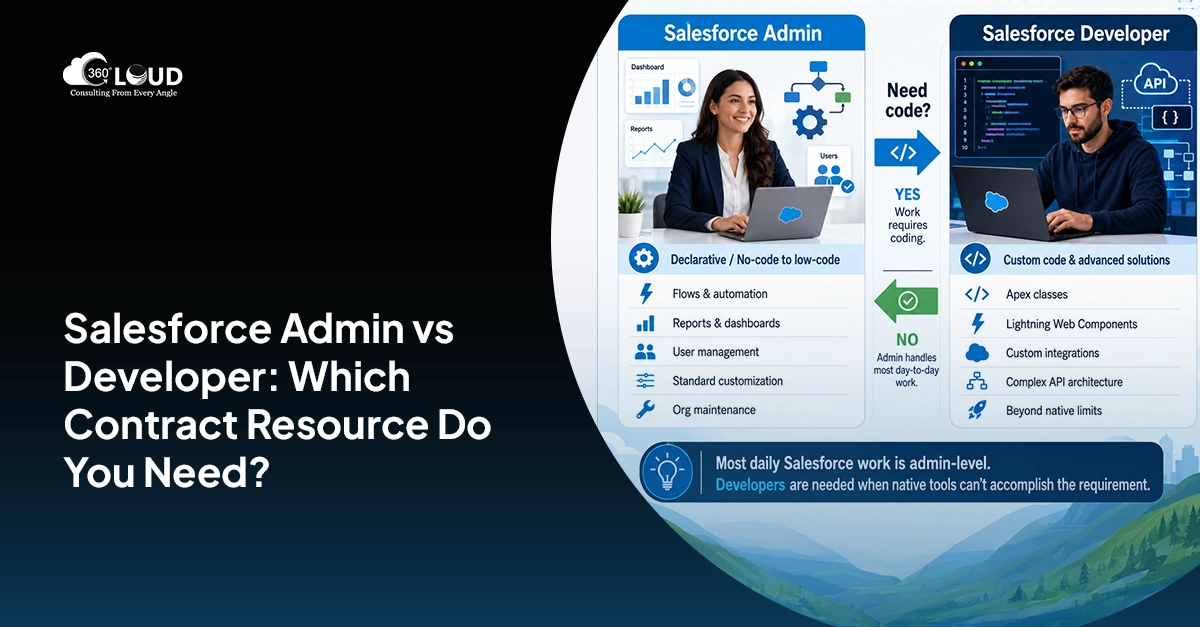
When you hire a Salesforce admin on contract, the expert configures, automates, and maintains Salesforce using the platform’s built-in declarative tools – Flows, Process Builder, reports, dashboards, user management, standard customization. A Salesforce Developer builds custom solutions that go beyond the platform’s declarative capabilities – Apex classes, Lightning Web Components, custom integrations, complex API architecture. The decision between them comes down to whether the work requires code.
Most Salesforce work in a running org is admin-level. The visible parts of Salesforce that users interact with daily – reports, dashboards, automations, user access, object configuration – are almost entirely within admin scope. Developers are needed when the platform’s native tools can’t accomplish the requirement.
Backlog growing? Let’s figure out who actually needs to clear it.

Table of Contents
What a Salesforce Admin Does
A Salesforce Admin’s toolset is everything in Salesforce’s declarative (no-code/low-code) layer:
Platform Configuration
- Object and field creation, modification, and management
- Page layout, record types, compact layouts
- Validation rules and formula fields
- Object permissions and field-level security
Automation
- Flow Builder: Screen Flows, Record-Triggered Flows, Scheduled Flows, Autolaunched Flows
- Email alerts, field updates, outbound messages (legacy Process Builder)
- Approval processes
User Management and Security
- User creation, deactivation, and profile assignment
- Permission set creation and assignment
- Role hierarchy management
- Sharing rules and sharing settings
Reporting and Dashboards
- Standard and custom report creation
- Dashboard design and maintenance
- Report types and custom report type creation
Data Management
- Data import wizard and Data Loader
- Duplicate management rules
- Data quality maintenance
App Configuration
- Standard and custom app configuration
- Tab and navigation management
- AppExchange app installation and configuration
What this covers: The majority of ongoing Salesforce operational work. An org that doesn’t have active custom development requirements can be effectively maintained by a skilled admin.
What a Salesforce Developer Does
A Salesforce Developer‘s toolset extends into Salesforce’s programmatic layer, the development platform that exists below the declarative interface:
Apex Development
- Apex classes, triggers, batch jobs, scheduled jobs
- Complex business logic that can’t be expressed in Flow
- Governor limit management for high-volume processing
- Unit tests and test data factories (required for deployment)
Lightning Web Components (LWC)
- Custom UI components that extend or replace standard Salesforce interface elements
- Embedded LWC in record pages, app pages, or Experience Cloud sites
- Complex interactive interfaces that go beyond Lightning App Builder capabilities
Integration Development
- REST and SOAP API integration with external systems
- Named Credentials and Custom Metadata for secure integration configuration
- Outbound callouts to third-party APIs
- Inbound REST API endpoints via Apex REST
- Salesforce Connect for external data objects
Visualforce (Legacy)
- Custom page development for organizations with legacy Visualforce pages requiring maintenance or migration
Experience Cloud Development
- Custom LWC components for Experience Cloud (community) sites
- Custom member management logic
- Custom branding and template development beyond standard theme builder
The Decision Matrix
| Work Type | Admin | Developer |
| Field and object creation | ✓ | — |
| Flow automation (declarative) | ✓ | — |
| Approval process setup | ✓ | — |
| Report and dashboard builds | ✓ | — |
| User management | ✓ | — |
| Permission sets and profiles | ✓ | — |
| Data import and quality | ✓ | — |
| Complex validation rules | ✓ | — |
| AppExchange app config | ✓ | — |
| Apex triggers | — | ✓ |
| Apex batch and scheduled jobs | — | ✓ |
| LWC custom components | — | ✓ |
| REST/SOAP API integration | — | ✓ |
| Complex business logic beyond Flow limits | — | ✓ |
| Visualforce maintenance | — | ✓ |
| Experience Cloud custom dev | — | ✓ |
| Complex Flow with Apex invocable methods | ✓ (flow) | ✓ (apex) |
Full-time hire or contract resource – we’ll tell you which makes sense for your timeline.

The “Apex or Not” Test
In practice, the admin vs developer decision usually comes down to one question: Does the work require Apex or LWC?
If the requirement can be met with Flow, then an admin handles it. Flow is extremely capable, it can handle complex branching logic, call external systems via HTTP callouts (added in recent Salesforce releases), perform bulk data operations, and integrate with most use cases that previously required Apex.
If the requirement cannot be met with Flow, or requires custom UI elements that Lightning App Builder can’t produce, or requires integration architecture that involves code, you need a developer.
The grey area is complex Flow with Apex invocable methods. A developer writes the invocable Apex; an admin can call it from Flow. For organizations in this territory, a brief developer consultation to produce the Apex component, and then admin maintenance of the Flow, is often more cost-efficient than keeping a developer on retainer for ongoing admin work.
When You Need Both
In practice, most Salesforce orgs need both over time. The typical split:
The core role is admin. Day-to-day Salesforce operations, user support, configuration changes, automation updates, reporting, this is ongoing admin work. It doesn’t go away.
Developer capacity is project-based. Integration projects, custom UI builds, complex Apex requirements, these are phase-specific. You bring in a developer for the project, the admin maintains what’s been built afterward.
Many mid-market organizations structure it exactly this way: one or two full-time or contract admins running the org, with a developer augmented in for specific project phases that require programmatic work.
Match the Role to the Work. Everything Else Follows
The admin vs developer decision feels complicated until you ask the right question: does the work require code? If it doesn’t, you need an admin. If it does, you need a developer. Most of the confusion comes from not separating those two categories before the hiring conversation starts.
When you hire a Salesforce admin on contract, you’re buying declarative expertise – Flows, automation, reporting, user management, configuration – delivered without the overhead of a full-time hire. That’s the right buy for ongoing operational Salesforce work. The Salesforce admin contract covers the majority of what a running org needs day-to-day. Developer augmentation covers the project-specific phases where code is genuinely required.
Most mid-market orgs that run Salesforce well are structured exactly this way. An admin for operations. A developer brought in for integration builds, LWC components, or Apex-heavy project phases. Clean separation. No overlap. No unnecessary spend in either direction.
The Salesforce admin augmentation question isn’t really about budget. It’s about being honest about what the work actually requires, and not defaulting to “we’ll just get a developer” because the title sounds more capable. Admin vs developer comparison aside, capability is only relevant when it matches the task.

Categories

Solve It with Salesforce. We’ll Show You How.
AI. Apps. Experts. Everything you need to win with Salesforce under one roof.
About the author
Editorial TeamThe Editorial Team at 360 Degree Cloud brings together seasoned marketers, Salesforce specialists, and technology writers who are passionate about simplifying complex ideas into meaningful insights. With deep expertise in Salesforce solutions, B2B SaaS, and digital transformation, the team curates thought leadership content, industry trends, and practical guides that help businesses navigate growth with clarity and confidence. Every piece we publish reflects our commitment to delivering value, fostering innovation, and connecting readers with the evolving Salesforce ecosystem.
Recent Blogs
 Salesforce Clouds
Marketing Cloud Engagement to Next: What Actually Has to Be Rebuilt
Nobody tells you this upfront, but migrating from Marketing Cloud Engagement to Marketing Cloud Next isn’t a lift-and-shift. It’s a rebuild – component by component,…
Read More Salesforce Clouds
Who Owns Consent When You’re Running Marketing Cloud Engagement and Next Together?
Running Marketing Cloud Account Engagement and Marketing Cloud Next side by side? A lot of Salesforce customers are doing exactly that right now – either…
Read More Salesforce Services
Salesforce Health Check: What It Is, What It Covers, and What You Should Do with the Results
Picture this. A VP of Sales asks why the pipeline number in Salesforce is $2.3 million, but the finance report shows $1.8 million. Nobody has…
Read MoreReady to Make the Most Out of Your Salesforce Instance?
Our Salesforce aces would be happy to help you. Just drop us a line at contact@360degreecloud.com, and we’ll take it from there!
Subscribe to our newsletter
Stay ahead with expert insights, industry trends, and exclusive resources—delivered straight to your inbox.
