

Salesforce SMS Opt-In and Opt-Out: What Every Team Needs to Know Before Texting Customers
24 Aug 2026
Table of Contents
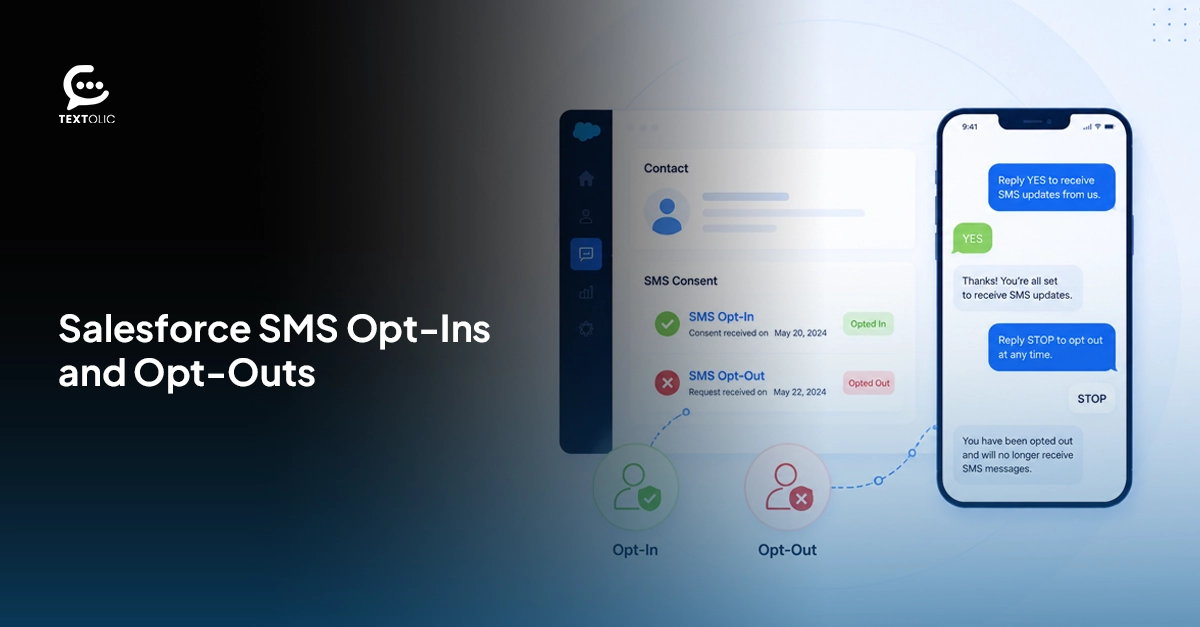
A single non-compliant SMS can result in $500 in statutory damages under the TCPA. And that can apply to each violation, not simply the campaign as a whole. Most teams don’t actually know where their consent records sit or whether they’re current before they hit send. They assume the data is clean. They assume opt-outs are synced. Salesforce SMS opt-in and opt-out management isn’t a one-time checkbox you tick at setup. It’s something your team needs to get right before every send, because gaps that feel small on paper can get very expensive, very quickly.
Table of Contents
What is TCPA, and Why Does it Apply to your Salesforce SMS campaigns
Most teams already know the ‘Telephone Consumer Protection Act’ exists. Fewer actually understand where their Salesforce SMS workflows sit inside it.
If you’re using Salesforce SMS automation through a Salesforce Flow, a journey, or even a one-off manual send from a record page, TCPA applies to all of it. Three rules are at the core. You need written consent before sending marketing texts. Verbal agreement over a call doesn’t hold up on its own. Every message needs a clear, working opt-out option. And no texts can go out outside the 8 am to 9 pm window in the recipient’s local time zone, not yours.
Knowing the rules isn’t the hard part, though. The real problem is execution. Consent doesn’t always get logged the same way across teams. Opt-outs don’t always suppress across record types. Purchased lists get loaded into campaigns without anyone checking whether those contacts actually gave consent in the first place.
Want to know how 360 Textolic helps you stay compliant with TCPA and manage new regulations seamlessly?

Opt-in vs. Opt-out — What the Difference Means
Opt-in: the contact actively agreed to receive texts from you. Opt-out: it is when your prospect or customer asks you to stop sending messages. Both need to be captured, stored against the right record, and respected by every automated or manual message that goes out afterward.
Worth saying: the error isn’t usually intentional. Teams don’t deliberately text opted-out contacts. The issue is that their Salesforce setup doesn’t enforce suppression automatically, so those contacts slip through campaigns anyway. That’s the thing about process gaps. They don’t feel like risks until they produce a complaint.
How to capture opt-in consent before texting from Salesforce
There’s more than one way to do this, and each method carries its own documentation requirement.
A web form checkbox is the most common approach. But the language sitting next to that checkbox matters more than most teams realize. “I agree to terms” doesn’t establish SMS consent. The disclosure needs to name SMS specifically, state who’s sending the messages, and ideally describe what type of messages the contact will receive.
Verbal consent is valid in certain situations. But it has to be logged in Salesforce right away, with a timestamp, a source, and a note on the context. Retroactively checking a field after a call without any supporting detail doesn’t create a defensible record.
Double opt-in is the strongest method available. After the initial consent, you send a confirmation text. You only start messaging once the contact replies to confirm. It’s an extra step. But what it gives you is two deliberate actions on record, which are significantly harder to dispute than a form submission alone.
Whichever method your team uses, the consent record needs to live in Salesforce, tied to the right contact, with a date and a source.
How to handle opt-out requests in Salesforce
Right away. That’s when an opt-out has to be processed.
With Salesforce two-way texting, when a contact replies STOP, UNSUBSCRIBE, or CANCEL, the response can’t sit in a queue waiting for a rep to review it or a nightly sync to pick it up. Your SMS setup needs to detect those keywords automatically, update the opt-out status on the record, and add the number to a suppression list that covers your campaigns, flows, and manual sends. The timestamp needs to be logged too, because if a regulator ever asks when suppression took effect, “we handled it” isn’t an answer.
360 Textolic takes opt-out management to another level with AI, where opt-outs happen based on the intent expressed in a text rather than just keywords. This makes your compliance management stronger and more reliable.
Get AI-powered compliance with 360 Textolic and reduce the risk of costly SMS compliance issues across your Salesforce campaigns.

How consent management works in 360 Textolic
Because 360 Textolic runs natively inside Salesforce, consent data doesn’t live in a separate tool that syncs back on a schedule. When a contact replies with an opt-out keyword or intent to opt out, 360 Textolic logs it against the record immediately and adds the number to a suppression list. That suppression applies to your campaigns, automations, and manual sends without your team having to take any extra steps.
Opt-in status is tracked the same way. Whether consent came in through a web form, a Salesforce flow, or a confirmed double opt-in reply, 360 Textolic stores the status and timestamp directly on the CRM record. Standard Salesforce reports can pull consent data, which makes compliance reviews and audits a lot more manageable than piecing together records from multiple places.
On the AI side, 360 Textolic AI flags high-risk interactions, tracks spam rates, and surfaces compliance violations to reduce the risk of legal and financial penalties. The suppression logic runs before any of that. If a contact sends an opt-out keyword, the system detects it and automatically blocks outgoing messages. No configuration workaround. That’s just how it’s built.
Common mistakes teams make with SMS consent
- Not syncing opt-out status across duplicate records is the most common one. A contact opts out through a Lead record; the Contact record doesn’t reflect it, and the next campaign goes out anyway.
- Buying lead lists and texting without verifying consent is another. A vendor saying contacts are “opted in” is not documentation. Their process and yours are legally separate. TCPA holds you responsible for your own consent records, not someone else’s assurances.
- And re-adding opted-out contacts to a fresh campaign because someone built a new list from scratch, without pulling suppression data first. A new campaign name doesn’t reset a contact’s opt-out. Most teams know this. The problem is that a manual list-building process has no automatic check for it.
Wrapping up
Consent management for Salesforce SMS is really a data quality problem with legal consequences attached to it. The TCPA rules aren’t complicated. What’s complicated is making sure your Salesforce records actually reflect what contacts have and haven’t agreed to, across every record type, before your next send goes out. At $500 per message with no aggregate cap, one bad import in a campaign list of several thousand contacts stops being a process problem and starts being a budget problem.

Solve It with Salesforce. We’ll Show You How.
AI. Apps. Experts. Everything you need to win with Salesforce under one roof.Frequently Asked Questions
How do I manage SMS opt-in and opt-out in Salesforce?
You need to capture consent before sending, store it on the right Salesforce record with a timestamp and source, and make sure opt-out replies trigger immediate suppression across all your campaigns and flows. The harder part is keeping consent data consistent across duplicate records, because an opt-out on one record doesn't automatically carry over to another. A tool like 360 Textolic handles this natively inside Salesforce, so suppression updates automatically without a manual step from your team.
What is TCPA compliance for Salesforce SMS?
TCPA compliance for Salesforce SMS means having written consent before texting any contact, including a working opt-out in every message, and not sending texts outside 8am to 9pm in the recipient's local time zone. Violations cost $500 per message for unintentional ones and $1,500 when a court considers the violation willful. These fines apply per message with no aggregate cap, so a single campaign sent to a non-consented list can generate significant liability fast.

About the author
Editorial TeamThe Editorial Team at 360 Degree Cloud brings together seasoned marketers, Salesforce specialists, and technology writers who are passionate about simplifying complex ideas into meaningful insights. With deep expertise in Salesforce solutions, B2B SaaS, and digital transformation, the team curates thought leadership content, industry trends, and practical guides that help businesses navigate growth with clarity and confidence. Every piece we publish reflects our commitment to delivering value, fostering innovation, and connecting readers with the evolving Salesforce ecosystem.
Recent Blogs
 Campaign Strategy & Best Practices
Why Most Salesforce Teams Use WhatsApp Wrong (And What to Do Instead)
98% open rate. Teams hear that stat and immediately think: perfect broadcast channel. So they do what they’ve always done with email — build a…
Read More Campaign Strategy & Best Practices
5 Things to Do Before You Send a Bulk SMS Campaign in Salesforce
Salesforce bulk texting is one of the fastest ways to reach your entire list at once. One click, and thousands of messages go out before…
Read More Two-Way Texting & Engagement
How to Build SMS Templates in Salesforce That Your Team Will Actually Use
Your reps are typing the same message again for the fifth time. It’s actually because nobody saved it anywhere useful last time. That’s slow. Inconsistent.…
Read MoreReady to Make the Most Out of Your Salesforce Instance?
Our Salesforce aces would be happy to help you. Just drop us a line at contact@360degreecloud.com, and we’ll take it from there!
Subscribe to our newsletter
Stay ahead with expert insights, industry trends, and exclusive resources—delivered straight to your inbox.
