

Why Most Teams Use WhatsApp Wrong (And What to Do Instead)
27 Aug 2026
Table of Contents

A 98% open rate means nothing if your WhatsApp setup is working against you. This blog walks through four mistakes most teams make: treating WhatsApp like a broadcast channel, ignoring incoming replies, missing the 24-hour messaging window, and relying on inconsistent manual sends. It then shows how trigger-based automation and AI chatbots inside Textolic fix each one. If you’re running WhatsApp without these pieces in place, this is where to start.
98% open rate for WhatsApp business messages. Teams hear that stat and immediately think: perfect broadcast channel. So they do what they’ve always done with email: build a list, write a message, hit send to everyone. And then wonder why their WhatsApp account gets flagged two weeks later.
That’s the thing. WhatsApp’s numbers aren’t earned through volume. They’re earned through relevance. And the platform has a very direct way of telling you when you’ve confused the two.
Here is the reality: most businesses trip over the same few hurdles that prevent them from actually leveraging WhatsApp effectively.
Table of Contents
4 Mistakes to Avoid while using Business WhatsApp
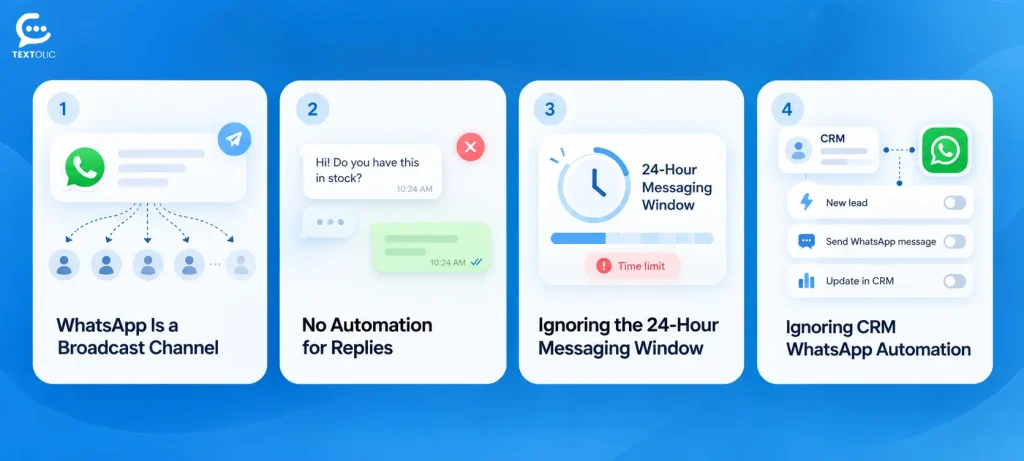
Mistake 1: Treating WhatsApp like a broadcast channel
Cold lists. Long messages. Three links and a PDF attached. Some teams even schedule these like they’re running an email newsletter.
Meta watches how people respond to your messages. Not just whether they open them whether they ignore them, block the sender, or report the message. Do that enough times across enough recipients and your account quality rating drops. Let it slide far enough and your messaging limits get cut. Keep going, and the number gets disabled. None of this happens with a warning email. It just happens.
WhatsApp rewards conversations. It penalises anything that looks like a broadcast to people who didn’t ask to hear from you. The teams that actually get results from it are using it to continue a dialogue, not start a monologue.
Want to know how Textolic helps your team run WhatsApp the right way without a CRM?
Mistake 2: No automation for replies
Say a lead gets a WhatsApp message from your team on a Tuesday morning. They reply YES. And then nothing happens for two hours because nobody checked the inbox.
By the time a rep sees it, the moment has passed. The lead’s moved on. That 98% open rate produced exactly zero pipeline.
Sending without building flows to handle responses isn’t a WhatsApp strategy. It’s half a setup. Replies need to route somewhere automatically, which can be to the right rep, or to the next step in a sequence, or to a record update in your CRM, so that a YES at 11 am doesn’t go cold by 1 pm. In practice, most teams wire up the outgoing side and leave the incoming side completely manual. Which is not fine, because the reply is the whole point.
To get around this issue, you can count on Textolic’s AI chatbots to handle incoming messages 24/7 for you with contextual replies and meaningful conversations.
Mistake 3: Ignoring the 24-hour messaging window
Here’s a rule most teams don’t know exists until messages start failing.
WhatsApp gives you 24 hours from the last inbound message a contact sent you. Inside that window, freeform messages are fine. Outside it, you must use a pre-approved template. No exceptions, no workarounds. If your team is trying to follow up with a lead three days after their last reply without an approved template ready, those messages either fail silently or get flagged. No notification tells you why.
So Friday afternoon, the lead goes quiet. Monday morning, the rep tries to follow up with a custom message. Gone. Template required. Teams that don’t have templates built for re-engagement scenarios end up with a lot of unanswered follow-ups they can’t explain.
Again, here a chatbot can help you reply instantly in the event of incoming messages and take the conversation forward.
WhatsApp enforces a strict 24-hour messaging window. Once a contact’s last inbound message is more than 24 hours old, your team can no longer send freeform messages only pre-approved templates. Most teams don’t find this out until their follow-ups start failing silently, with no notification explaining why. Setting up re-engagement templates before you need them is the difference between a live conversation and a lead that goes cold over a weekend.
Mistake 4: Not using CRM WhatsApp automation for triggered messages
Manual sends are slow. That’s obvious. But the bigger problem is that they’re inconsistent in ways that are harder to see.
One lead fills a form on a Wednesday at 10 am. A rep spots it and sends a WhatsApp within 20 minutes. Another lead fills the same form at 4 pm on a Friday. Nobody sees it until Monday. Same process. Completely different experience. That gap compounds over time, across every rep, every shift, every day your team isn’t actively watching the queue.
CRM WhatsApp automation fixes the consistency problem, not just the speed problem. When the trigger fires whether it is a form fill, stage change, appointment booked, or a deal closed- the right message goes out immediately. No one has to remember. No lead falls through on a Friday afternoon.
Get AI-powered WhatsApp automation with Textolic and help your teams respond to leads faster, at the right moment, every time.
The right way: trigger-based WhatsApp automation in CRM
What does this actually look like when it’s running properly?
A lead fills a form. WhatsApp goes out within 60 seconds, while they’re still on the page. An appointment gets booked. A reminder fires 24 hours before automatically, no rep involvement needed. A deal moves into negotiation. A follow-up with the proposal link goes out before the rep has touched their inbox.
All of it ties back to CRM events. The message is attached to the action, not to whoever’s working that day. And because it’s running from a platform that gives CRM-like experience, the contact record updates at the same time. No separate platform, no sync lag.
That’s just what a functioning setup looks like. Most teams are further from it than they think.
How to set up automated WhatsApp messages with Textolic
Schedule without coding. Genuinely. In case a specific type of automation is required, flows are there to accommodate.
Configure the trigger event inside Salesforce Flow (no separate Salesforce purchase is needed, as a Salesforce license is already included with Textolic), pick the WhatsApp template, map the recipient field, and activate. Most teams are live in under 15 minutes. Textolic gives you a native CRM experience, so there’s no external tool to log into. and no separate sync to manage. What fires in the CRM goes out over WhatsApp. What comes back over WhatsApp lands on the CRM record.
On the manual reply side, AI suggestions inside Textolic help reps draft responses to inbound messages faster, so the human part of the conversation keeps pace with the automated part. Worth saying: that combination automated triggers out, AI-assisted replies in is what makes the whole setup feel like a real channel rather than a one-way push.
Wrapping Up
WhatsApp has the open rates. Nobody’s arguing with the stat. But the channel only works the way the numbers suggest it should when the setup is actually built around how WhatsApp functions 24-hour windows, quality ratings, triggered sends, and reply handling that doesn’t depend on a rep checking a queue at the right moment. Teams that figure that out stop chasing open rates and start getting replies. The setup itself, once it’s running, doesn’t require much ongoing management. The best part: you don’t have to invest in a full CRM to get a CRM-like experience for AI texting and calling.

Solve It with Salesforce. We’ll Show You How.
AI. Apps. Experts. Everything you need to win with Salesforce under one roof.Frequently Asked Questions
How does CRM WhatsApp automation work?
CRM WhatsApp automation connects CRM events a form fill, a stage change, a booking to outgoing WhatsApp messages that fire automatically when the trigger conditions are met. You build the trigger in Salesforce Flow, attach a pre-approved WhatsApp template, and the message goes out without anyone manually sending it. Textolic gives you CRM experience, so replies also route back to the contact record automatically, without needing a separate inbox tool or integration layer.
Can I send automated WhatsApp messages without a CRM?
Yes, as Textolic eliminates the need for a CRM for texting, calling, WhatsApp, and more. Though WhatsApp's 24-hour window is worth understanding before you set it up outside that window, every automated message needs to use a pre-approved template, no exceptions. Inside the window, freeform messages work fine. Textolic handles both scenarios inside Salesforce Flow, and the whole configuration takes most teams under 15 minutes to go live.
Can my WhatsApp account get flagged or restricted for how I’m messaging?
It can, and it happens faster than most teams expect. Meta tracks how recipients respond to your messages, not just opens, but blocks and spam reports. Too many of those and your account quality rating drops, your messaging limits get cut, and eventually the number gets restricted. No warning email. Textolic helps you stay on the right side of this by keeping messages trigger-based and contextually relevant, rather than blasting cold lists.
What happens if someone replies outside of business hours?
That’s where most setups fall apart, honestly. A rep isn’t there, the reply sits unread, and by morning the moment’s gone. Textolic’s AI chatbots handle incoming messages around the clock, keeping the conversation moving with contextual replies, so a late-night YES doesn’t go cold by the time anyone checks the inbox.
What’s the difference between a WhatsApp template and a regular message?
Templates are pre-approved messages you submit to Meta before sending, fixed format, reviewed in advance, required any time you’re messaging outside the 24-hour window. Regular freeform messages work fine within that window, once a contact has already replied to you. In practice, you need both: templates for re-engagement and outbound triggers, freeform for live conversations. Textolic handles both inside the same setup.

About the author
Editorial TeamThe Editorial Team at 360 Degree Cloud brings together seasoned marketers, Salesforce specialists, and technology writers who are passionate about simplifying complex ideas into meaningful insights. With deep expertise in Salesforce solutions, B2B SaaS, and digital transformation, the team curates thought leadership content, industry trends, and practical guides that help businesses navigate growth with clarity and confidence. Every piece we publish reflects our commitment to delivering value, fostering innovation, and connecting readers with the evolving Salesforce ecosystem.
Recent Blogs
 Industry Solutions
How a Real Estate Company Improved Lead Conversions with Textolic
A growing real estate company in the US wanted to convert more property enquiries into sales opportunities but struggled to maintain consistent communication across its…
Read More Multichannel Messaging
What Is Textolic? One Product Instead of Three Tools
Most businesses that engage customers through a CRM are paying for it three times over. And most don’t realize it. There’s the CRM. Then the…
Read More Two-Way Texting & Engagement
CRM SMS Opt-In and Opt-Out: What Every Team Needs to Know Before Texting Customers
A single non-compliant SMS can result in $500 in statutory damages under the TCPA. And that can apply to each violation, not simply the campaign…
Read MoreReady to Make the Most Out of Your Salesforce Instance?
Our Salesforce aces would be happy to help you. Just drop us a line at contact@360degreecloud.com, and we’ll take it from there!
Subscribe to our newsletter
Stay ahead with expert insights, industry trends, and exclusive resources—delivered straight to your inbox.
