

Improve Email Deliverability in Salesforce: A Practical Guide for Marketing Ops
24 Jul 2026
Table of Contents

A campaign goes out to 20,000 contacts. Salesforce shows it as sent. Three days later, open rates are half what they were last quarter, and nobody can say why. This is the moment most marketing ops teams realize they never actually defined what “delivered” means, and that gap is usually where deliverability problems start.
If you’re trying to improve email deliverability in Salesforce, the fix rarely lives in subject lines or send times. It lives in four less glamorous places: your list, your authentication setup, your content patterns, and your sending reputation. Get those right and the open rate problem tends to solve itself.
Flying blind on opens, clicks, and bounces after every send?
Table of Contents
Delivered vs. Inbox Placement: The Confusion That Hides Real Problems
Most teams treat “delivered” as the finish line. It isn’t. A delivered email just means the receiving mail server accepted it. Where it lands after that, inbox, promotions tab, or spam folder, is a separate outcome called inbox placement, and Salesforce’s native reporting doesn’t fully distinguish between the two.
With email tracking we can know that, distinction matters because a team can look at a 98% delivery rate and assume everything’s fine while a meaningful share of that mail sits in spam, never opened, never counted as a failure. Marketing email performance depends on inbox placement, not just delivery, and that’s the number most dashboards quietly leave out. Inbox placement is also the clearest early signal of email reputation trouble, long before a bounce report shows anything alarming.
If your open rates have dropped but your bounce numbers haven’t moved, inbox placement, and by extension your sender standing, is usually the first place to look. Mailbox providers make placement decisions in milliseconds, based on a running history of how recipients have treated mail from your domain. That history is exactly what the rest of this guide is about protecting.
The Four Things That Actually Decide Whether Mass Email Lands
Every email deliverability problem traces back to one of four factors. It’s rarely just one.
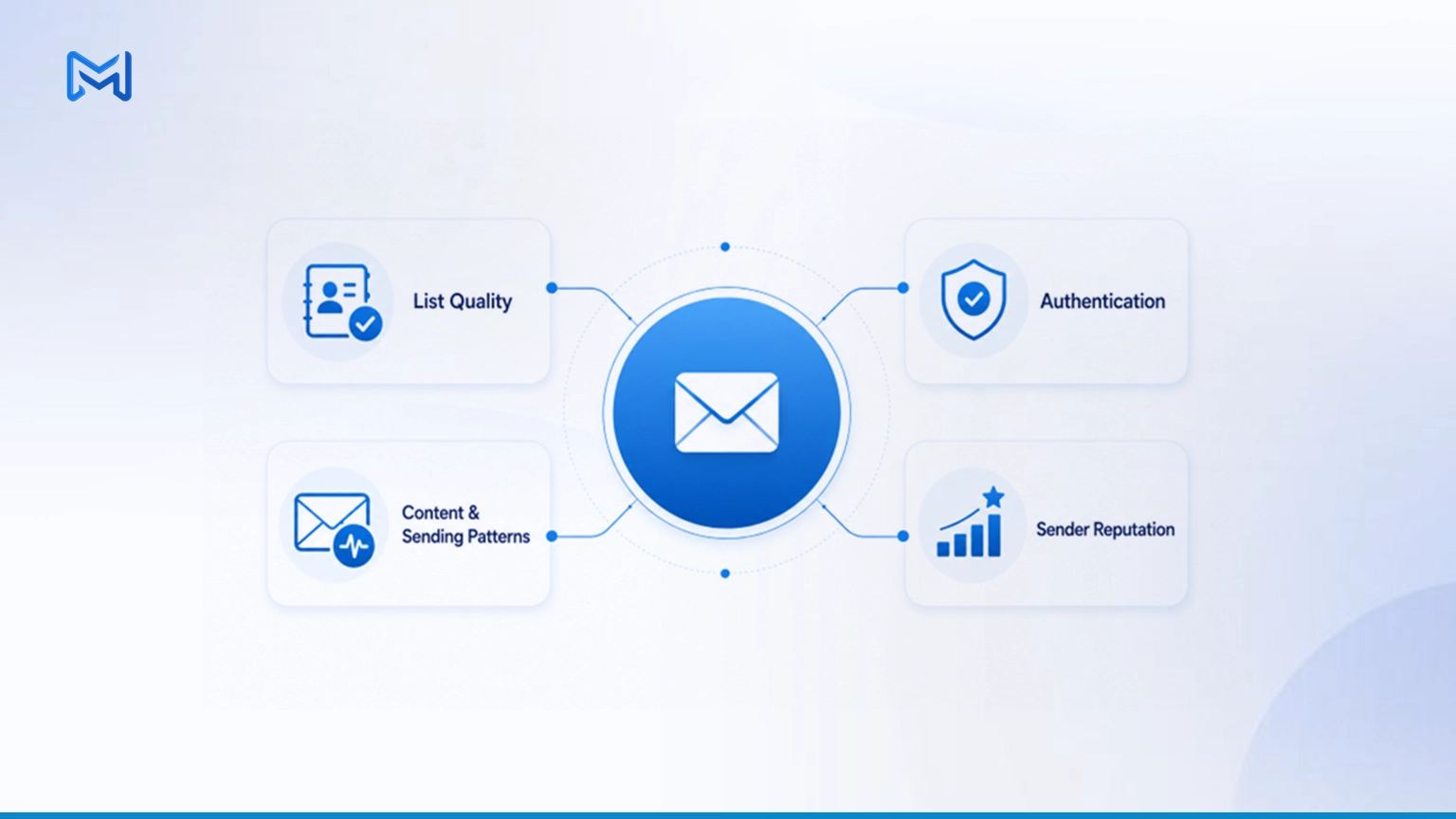
- List quality: how many addresses on your send list are valid, active, and actually want your email
- Authentication: whether mailbox providers can verify your domain is who it claims to be
- Content and sending patterns: whether your emails and sending behavior look legitimate to spam filters
- Sender reputation: the trust score mailbox providers assign your domain and IP based on history
Weakness in any one of these drags down the others. A clean list sent from an unauthenticated domain still gets filtered. A well-authenticated domain sending to a stale list still racks up bounces that damage reputation. Fixing email deliverability means treating all four as one connected system, not four separate checkboxes.
Authentication for Salesforce Sending: SPF, DKIM, and DMARC
Authentication is the part teams skip because it feels like an IT task rather than a marketing one. It shouldn’t be skipped. Without it, mailbox providers have no reliable way to confirm your emails are actually coming from you, and unverified mail gets treated with suspicion by default.
Three records do the heavy lifting:
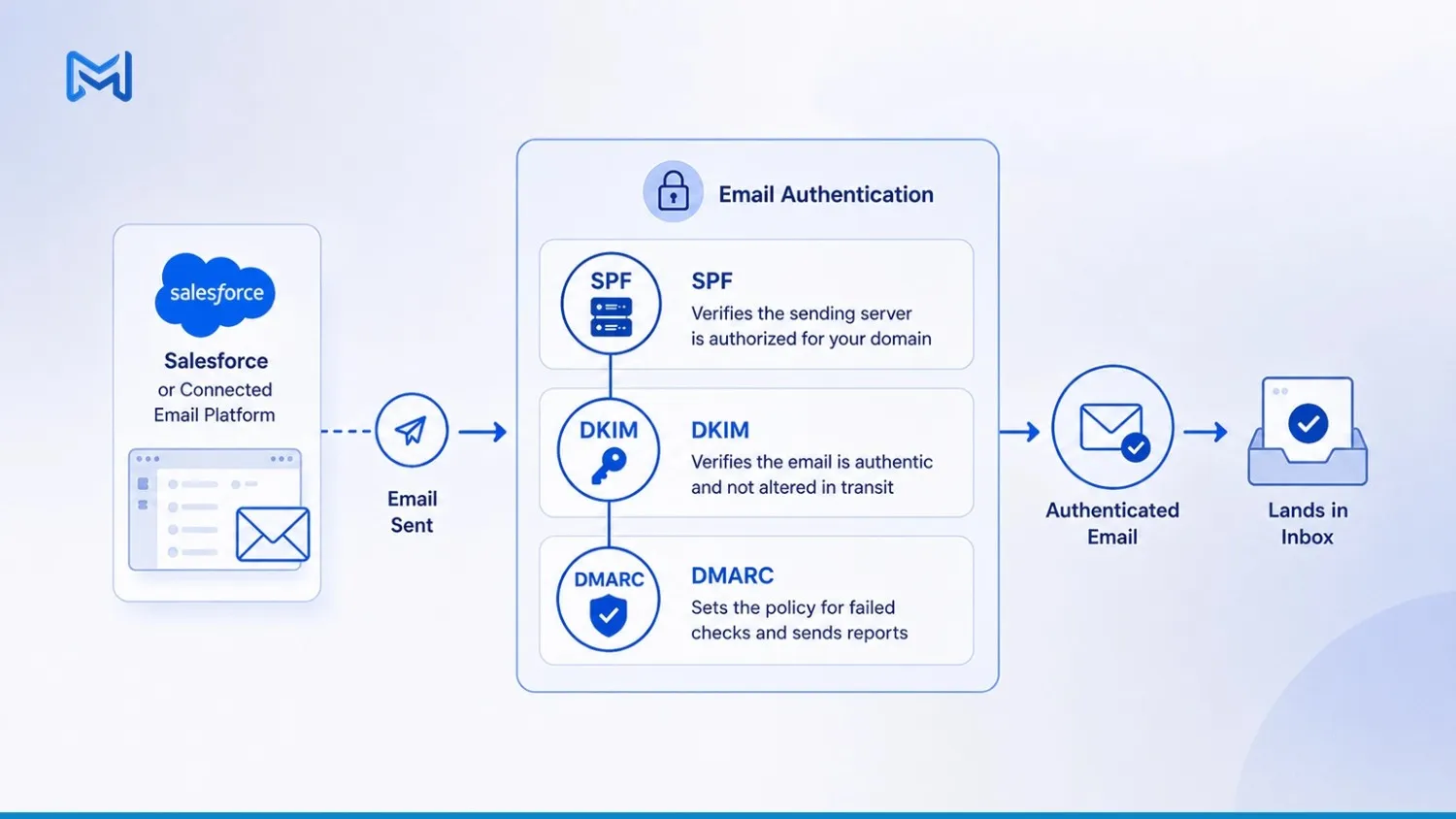
- SPF (Sender Policy Framework) lists which mail servers are authorized to send on behalf of your domain
- DKIM (DomainKeys Identified Mail) attaches a digital signature that proves the email wasn’t altered in transit
- DMARC (Domain-based Message Authentication, Reporting, and Conformance) tells receiving servers what to do when a message fails SPF or DKIM, and sends you reports when it happens
For Salesforce senders specifically, this setup usually happens at the sending platform level, whether that’s Salesforce’s native email, a connected ESP, or a mass email app layered on top. If you want to improve email deliverability for Sales Cloud specifically, this is the first technical box to check, before touching content or list segmentation.
List Hygiene: Verifying and Cleaning Large Salesforce Databases
This is where most email deliverability problems actually live. Salesforce orgs accumulate dead weight fast. People change jobs, domains expire, spam traps get planted into old lists, and none of it shows up until a send goes out and the bounce report comes back ugly.
Bulk email verification for cleaning large Salesforce databases solves the immediate problem: it runs every address in your org against live validation logic and flags what’s invalid, risky, or undeliverable before you send to it, not after. For orgs sitting on tens of thousands of contacts that haven’t been touched in months, this single pass often catches more risk than any content or subject line change ever will. Teams that put off this step usually find out how bad their data was the hard way, from a bounce report that arrives a few hours after the send is already gone.
Automate email list cleaning wherever you can, because contact data decays continuously whether anyone is watching it or not. A list that was clean in Q1 can carry real risk by Q3 if nothing is re-checking it. Scheduled re-verification, tied to your sending cadence, keeps the list clean without turning it into a recurring manual project someone has to remember to run. Monthly re-checks make sense for high-decay industries like real estate or recruiting; quarterly is often enough for slower-moving B2B lists. This is a natural fit for a tool like 360 VTM/VTP, which plugs into Salesforce natively and handles both the initial cleanup and the ongoing re-verification without exporting data anywhere else.
Learn how 360 Mass Mailer can help you enhance your email deliverability?
Managing Unsubscribes and Opt-Outs Compliantly in Salesforce
Email deliverability and compliance are more connected than most teams treat them. A messy unsubscribe process doesn’t just create legal risk. It creates spam complaints, and spam complaints are one of the fastest ways to tank sender reputation.
To manage email unsubscribes and deliverability in Salesforce correctly, a few things need to hold up every time:
- Opt-out requests need to suppress the contact immediately, not on the next sync or batch job
- Suppression logic should apply across every campaign and list, not just the one the unsubscribe came from
- Regional rules differ. GDPR requirements in the EU aren’t the same as CAN-SPAM in the US, and if your org serves multiple regions, your suppression rules need to reflect that
- Internal do-not-contact flags, whether from sales, legal, or a past complaint, need to sync automatically instead of depending on someone checking a spreadsheet
Get this wrong once and it’s a support ticket. Get it wrong repeatedly and mailbox providers start routing your mail to spam by default, regardless of how clean the rest of your list is. Good unsubscribe management isn’t a compliance checkbox tacked onto the bottom of an email. It’s one of the more direct levers a marketing ops team has over long-term email deliverability, because every ignored opt-out is a future spam complaint waiting to happen.
Bounce Handling: What to Automate and What to Review
Not all bounces are the same, and treating them identically is a common mistake. Hard bounces mean the address doesn’t exist. Suppress those permanently, no exceptions, no retrying next quarter. Soft bounces are murkier: a full inbox or a temporary server issue isn’t the same failure as a dead mailbox, so it’s worth tracking the pattern across a few sends before deciding whether to suppress.
What should run automatically:
- Hard bounce suppression, triggered the moment a bounce is logged
- Bounce rate monitoring by campaign, so a spike gets flagged before the next send goes out
- Soft bounce tracking over a rolling window, not a single send
What still needs a human eye:
- Deciding whether a persistent soft bounce pattern warrants suppression
- Investigating a sudden spike in bounces tied to a specific list or segment
- Reviewing bounce trends before a high-stakes campaign, not after
Keeping your bounce rate under roughly 2% is a reasonable benchmark. Anything sitting consistently above that is a data hygiene issue almost every time, not a content problem.
Content and Sending-Pattern Rules That Protect Reputation
Spam filters don’t just read your subject line. They read behavior: how often you send, how consistent your volume is, how many links and images are packed into a single email, and whether your send pattern looks like a real business or a burst of bulk mail.
A few patterns worth building into your process:
- Keep sending volume reasonably consistent. A sudden jump from 2,000 emails a week to 40,000 in one send is a red flag to mailbox providers, even if every address is valid
- Avoid link-heavy or image-heavy templates with little actual text, which trip spam heuristics
- Warm up new sending domains gradually instead of launching a full-volume campaign on day one
- Keep engagement in mind. Mailbox providers increasingly weight opens and clicks into reputation scoring, so a list full of disengaged contacts drags down deliverability even if none of them bounce
None of this is about tricking a spam filter. It’s about sending in a way that looks like what it actually is: legitimate business email to people who opted in.
Email Deliverability Monitoring Checklist
Bring the four factors together into something your team actually checks before every campaign:
- Domain authentication (SPF, DKIM, DMARC) verified and passing
- List verified within the last re-verification cycle, not just at import
- Bounce trend from the last three campaigns holding under 2%
- Unsubscribe and suppression logic confirmed current across all lists
- Sending volume and pattern consistent with recent history
- Engagement metrics (opens, clicks) reviewed for signs of list fatigue
- Spam complaint rate checked against baseline
A team that runs this check consistently catches most email deliverability problems before they show up in a bounce report, not after.
Where This Leaves Marketing Ops
Improving email deliverability in Salesforce isn’t a one-time fix. It’s an ongoing discipline built on four things: a verified list, authenticated sending, disciplined content and volume patterns, and a reputation you’re actively protecting rather than hoping holds up.
360 Mass Mailer handles the sending side of this: native Salesforce campaigns, scheduling, and real-time delivery tracking, so your team isn’t managing a separate platform outside the CRM. For the list quality piece specifically, bulk and real-time verification through 360 VTM/VTP catches invalid and risky addresses before they ever reach a send, which is usually the single most effective fix available to a marketing ops team working through a deliverability problem.
If your team is still finding out about bad data from the bounce report instead of before the send, that’s the gap worth closing first.


Solve It with Salesforce. We’ll Show You How.
AI. Apps. Experts. Everything you need to win with Salesforce under one roof.Frequently Asked Questions
What is email deliverability in Salesforce?
This measures how many emails sent from your org actually reach a recipient's inbox rather than bouncing or landing in spam. It depends on list quality, domain authentication, sending patterns, and sender reputation working together, not any single setting inside Salesforce itself.
How do I improve email deliverability in Salesforce?
Start with four things: verify your list before every send, set up SPF, DKIM, and DMARC authentication for your sending domain, keep sending volume and content patterns consistent, and monitor bounces and complaint rates so problems get caught early. Fixing any one of these alone rarely solves the problem on its own.
Why do my Salesforce emails go to spam?
Emails usually land in spam because of one or more of the following: an unverified or unauthenticated sending domain, a list containing invalid or disengaged addresses, sudden spikes in sending volume, or link-heavy templates that trip spam filters. Salesforce's native reporting won't tell you which one, so it takes checking authentication, list health, and content together.
What is a good email bounce rate?
A bounce rate under roughly 2% is considered healthy for most B2B senders. Anything consistently higher usually points to a data hygiene problem, such as a stale or unverified list, rather than a content or subject line issue.
How do SPF, DKIM, and DMARC affect deliverability?
SPF, DKIM, and DMARC let mailbox providers confirm that an email genuinely came from your domain and wasn't altered in transit. Without these records in place, providers treat your mail with more suspicion by default, which lowers inbox placement even if your list and content are otherwise clean.
How often should I verify my Salesforce email list?
Most B2B teams should re-verify their list quarterly at minimum. Industries with faster-changing contact data, such as real estate, recruiting, or events, often need monthly re-verification, since email addresses and job titles decay faster in those lists.
Does Salesforce have built-in deliverability monitoring?
Salesforce tracks basic email activity like sends, opens, and bounces on individual records, but it doesn't provide a unified dashboard covering authentication status, sender reputation, or inbox placement. Most teams need a dedicated mass email or verification tool layered on top to get that full picture.
What's the difference between email delivery and inbox placement?
Delivery means the receiving mail server accepted the message. Inbox placement means the message actually landed in the inbox rather than spam or a promotions folder. A high delivery rate can still hide a real inbox placement problem, which is why looking at bounces alone doesn't tell the full story.

About the author
Editorial TeamThe Editorial Team at 360 Degree Cloud brings together seasoned marketers, Salesforce specialists, and technology writers who are passionate about simplifying complex ideas into meaningful insights. With deep expertise in Salesforce solutions, B2B SaaS, and digital transformation, the team curates thought leadership content, industry trends, and practical guides that help businesses navigate growth with clarity and confidence. Every piece we publish reflects our commitment to delivering value, fostering innovation, and connecting readers with the evolving Salesforce ecosystem.
Recent Blogs
 Comparison
5 Salesforce Email Marketing Tools Compared: Features, Limits, and What Teams Actually Use in 2026
Picking the right email marketing software for Salesforce is harder than it looks. Not because options are scarce they aren’t. Every tool claims to “integrate…
Read More Comparison
Marketing Cloud Account Engagement (Pardot) vs. 360 Mass Mailer: Which Salesforce Email Tool Is Right for Your Team
If your team is hunting for a Marketing Cloud Account Engagement (formerly Pardot) alternative or just trying to figure out whether you’re paying for features…
Read More Email Marketing
Salesforce Mass Email Compliance Checklist: CAN-SPAM, GDPR, and Opt-Out Rules
Nobody flags the compliance gap until it costs something. A domain hits a blacklist. An ESP throttles sends after a bounce spike that nobody caught.…
Read MoreReady to Make the Most Out of Your Salesforce Instance?
Our Salesforce aces would be happy to help you. Just drop us a line at contact@360degreecloud.com, and we’ll take it from there!
Subscribe to our newsletter
Stay ahead with expert insights, industry trends, and exclusive resources—delivered straight to your inbox.
