

Salesforce Sales Cloud Implementation: The Complete 2026 Guide for Growing Teams
16 Sep 2026
Table of Contents
Most sales teams that struggle with Salesforce aren’t using the wrong platform. They’re using the right platform badly. The setup was rushed, the data model was borrowed from a default template, and user training happened in the final week before go-live. Six months later, reps are back to spreadsheets.
This guide is for teams that want to do it right the first time, and for leaders who know the difference between a CRM that gets logged into and one that actually drives revenue.
At 360 Degree Cloud, a Salesforce Summit Partner, we’ve delivered Sales Cloud implementations across mid-market and enterprise teams for over 14 years. What we consistently see: the difference between a successful rollout and a painful one has less to do with budget and more to do with design.
Stop configuring around Salesforce defaults. Let’s build it around your pipeline.

Table of Contents
What is Salesforce Sales Cloud?
Sales Cloud is Salesforce’s core CRM platform, built to manage every part of the selling process, from the first lead capture to closed-won. That includes lead management, account and contact records, opportunity tracking, pipeline forecasting, quoting, and now AI-driven deal guidance.
It’s the world’s most widely used CRM for a reason. When it’s configured well, it gives sales leaders complete pipeline visibility and gives reps a single place to manage every deal. When it’s configured badly, it becomes expensive clutter.
What Changed in 2026
Spring ’26 brought a meaningful shift: Salesforce rebranded and expanded its core AI capabilities into the Agentforce Sales layer, now natively embedded inside Sales Cloud. This isn’t a chatbot add-on. Agentforce Sales agents predict deal risk, recommend next best actions, and automate repetitive selling workflows – running 24/7 without waiting for a rep to log in.
For teams evaluating or planning a Salesforce Sales Cloud implementation in 2026, this matters. The platform you’re deploying is meaningfully different from what existed even 18 months ago.
How Sales Cloud Connects the Wider Salesforce Ecosystem
Sales Cloud doesn’t sit in isolation. It connects directly with Marketing Cloud for lead nurturing, Service Cloud for post-sale support, Revenue Cloud for quoting and billing, and Slack for real-time team collaboration. The more connected your Salesforce environment, the more value each individual piece delivers.
Core Features of Salesforce Sales Cloud in 2026
Lead and Opportunity Management
Lead capture happens automatically from web forms, marketing campaigns, or third-party sources. Einstein AI scores and routes those leads by territory, industry, or rep capacity – without manual sorting. On the opportunity side, every deal gets tracked across stages, with activity logging, probability estimates, and related contact history in one view.
When a rep leaves, nothing goes with them. The deal history stays in Salesforce. That matters more than most teams realize until the moment they need it.
AI-Powered Forecasting and Pipeline Intelligence
This is where 2026-era Sales Cloud earns its place. Einstein Forecasting generates AI-driven pipeline predictions independent of rep-entered estimates, which, let’s be honest, are often optimistic. Deal health scoring surfaces which opportunities are slipping and why, before a manager has to ask.
For sales leaders who’ve spent years chasing accurate forecasts, this capability alone changes how they run pipeline reviews.
Automation and Workflow
Salesforce Flow handles the repetitive coordination work that quietly kills rep productivity: lead assignment, follow-up reminders, approval routing, stage change notifications. No code needed for most of it.
Agentforce Sales agents go further – completing autonomous tasks within selling workflows, like updating records, summarizing call outcomes, and flagging at-risk deals for manager review.
Reporting and Dashboards
Real-time dashboards, win/loss analysis, activity tracking, and forecast accuracy reporting come standard. The question isn’t whether the data is there – it’s whether your team will build the dashboards that actually reflect how your business runs. That’s a configuration question, not a product one.
Don’t let a rushed setup cost you six months of adoption problems.

Salesforce Sales Cloud Implementation: Step by Step
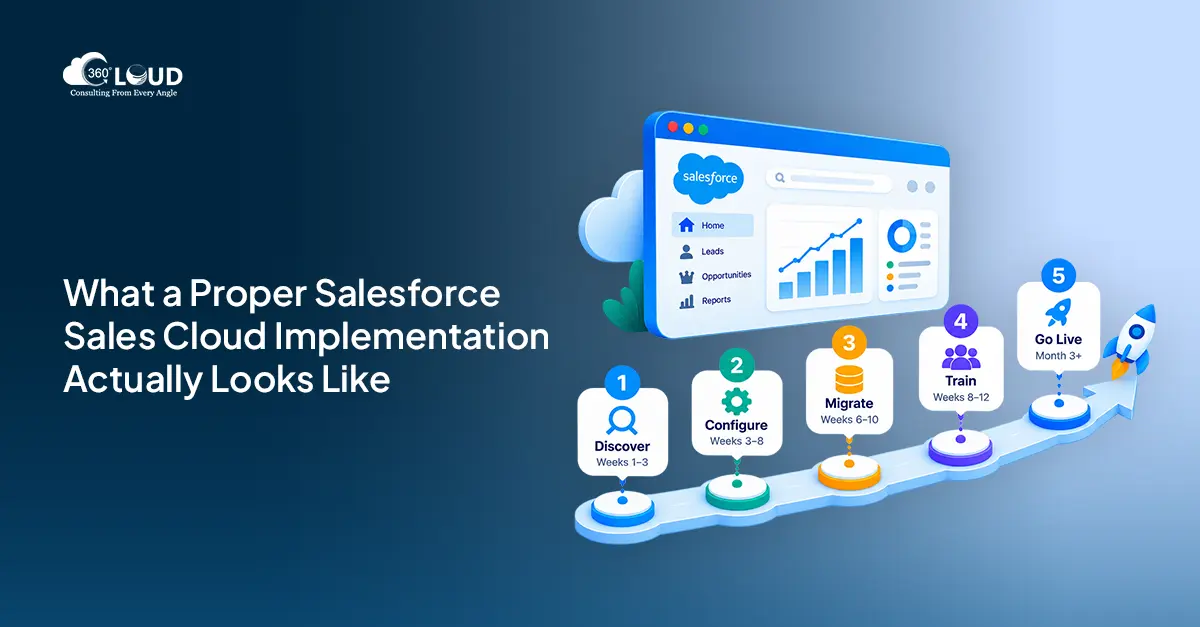
Every credible implementation follows phases. Teams that try to compress these or skip steps consistently end up with the same outcome: partial adoption, dirty data, and a system the team works around instead of in.
Phase 1: Discovery and Requirements (Weeks 1–3)
Before anyone opens a Salesforce sandbox, the current sales process needs to be mapped. How do leads arrive? How are they qualified? How are deals tracked today, and in what tools? How do forecasts get built, and how accurate are they?
This is also where the data model gets defined, not the Salesforce default, but the one that matches your process. Which custom objects do you need? What fields matter to your pipeline stages? What relationships between accounts, contacts, and opportunities reflect how your team actually sells?
Phase 2: Configuration and Build (Weeks 3–8)
This is the build phase, and everything happens in sandbox first. Production is not a testing environment.
Security model setup comes before anything else: profiles, roles, permission sets, and sharing rules that reflect your org structure and data access requirements. Then comes configuration of the core objects: Leads, Accounts, Contacts, Opportunities, Products, and Pricebooks.
Automation gets built in this phase too – lead assignment rules, opportunity stage workflows, approval processes. Email integration through Salesforce Inbox gets connected. So do marketing automation platforms, ERP systems, and telephony tools. For teams using 360 CTI, the Sales Cloud and telephony integration happens here, giving reps click-to-call and automatic call logging without leaving Salesforce.
Phase 3: Data Migration (Weeks 6–10)
This phase has broken more implementations than any configuration mistake. The rule is simple: clean data before you migrate it.
Duplicate records, inconsistent field formats, missing contact ownership, outdated accounts; these don’t disappear when you move them to Salesforce. They multiply. Deduplication, standardization, and field mapping validation have to happen before a single record gets imported.
The tools vary by source system complexity: Data Loader for straightforward migrations, MuleSoft or third-party ETL platforms for more complex environments. Historical data strategy also needs a decision: what migrates fully, what imports as read-only reference data, and what gets archived outside the system.
Phase 4: User Training and Change Management (Weeks 8–12)
Training is not the last item on the project plan. Or it shouldn’t be.
Reps, managers, and admins have different needs and different workflows in Salesforce. Blending them into a single training session is one of the most reliable ways to ensure none of them leave feeling confident. Role-based training – built around the actual tasks each group performs daily, consistently drives higher post-launch adoption.
Executive sponsorship isn’t optional. If senior leadership isn’t visibly using Sales Cloud, reps read that signal accurately. A champions program helps bridge the gap: identifying power users on each team who can support their peers through the first weeks after go-live.
Phase 5: Go-Live and Optimization (Month 3+)
Go live with one team or region first. Catch the issues, tighten the configuration, address early feedback, then expand. Full-org launches on day one are high-stakes bets that rarely pay off.
Post-launch, the work isn’t done. Adoption metrics get monitored, reports get refined, and the Agentforce Sales capabilities, which many teams don’t fully activate at go-live – get layered in as the team becomes comfortable with the core platform.
Common Sales Cloud Implementation Mistakes to Avoid
These aren’t hypothetical. They’re patterns that appear across failed or underperforming implementations:
- Over-customizing before users adopt the basics. Build what’s needed. Add complexity only when standard features have been proven insufficient.
- Migrating dirty data. Garbage in, garbage out, and it’s far harder to clean inside Salesforce than before migration.
- Treating training as a final-phase activity. Change management starts at kickoff, not week eleven.
- No executive champion. Without visible leadership adoption, frontline reps have no organizational incentive to maintain data quality.
- Skipping dashboards. If managers can’t see the pipeline in Salesforce, reps have no reason to keep it updated.
Salesforce Sales Cloud Pricing in 2026
Current Salesforce Sales Cloud pricing breaks down across four tiers:
- Starter Suite: $25/user/month. Entry-level CRM capabilities for smaller teams.
- Professional: $80/user/month. Full pipeline management, forecasting, and collaborative selling.
- Enterprise: $165/user/month. Advanced automation, API access, and custom workflow rules.
- Unlimited: $330/user/month. Full feature access, 24/7 support, and unlimited sandboxes.
Agentforce Sales is available as a consumption-based or per-user add-on on top of the base Sales Cloud license, depending on how your team plans to deploy AI agents. Pricing should be evaluated alongside the implementation cost, not in isolation.
How 360 Degree Cloud Delivers Salesforce Sales Cloud Implementations
As a Salesforce Summit Partner, 360 Degree Cloud has delivered Sales Cloud implementations across industries for mid-market and enterprise clients – manufacturing, financial services, healthcare, technology, and more.
Our approach is design-led, not configuration-first. That means we map your sales process before we touch Salesforce. We define the data model, integration architecture, and automation logic around how your team sells, not around the Salesforce default.
Post-launch, we offer managed services to optimize, maintain, and expand the platform as your team grows. That includes Agentforce Sales configuration, pipeline reporting refinement, and ongoing admin support for teams that don’t have a full-time Salesforce administrator in-house.
Final Thoughts
A Salesforce Sales Cloud implementation done well becomes a compounding advantage – better data quality over time, faster ramp for new reps, cleaner forecasting, and a platform your team actually wants to use. Done poorly, it becomes the reason your team works around the system instead of inside it.
The platform is capable. The question is always how it gets built. If you’re planning a Sales Cloud implementation in 2026, the investments in discovery, data quality, and change management aren’t optional overhead. They’re the difference between a CRM that gets used and one that collects license fees.

Categories

Solve It with Salesforce. We’ll Show You How.
AI. Apps. Experts. Everything you need to win with Salesforce under one roof.Frequently Asked Questions
What is Salesforce Sales Cloud implementation?
Salesforce Sales Cloud implementation is the process of configuring, customizing, integrating, and deploying Salesforce's CRM platform within your organization. It covers everything from defining your data model and building automation to migrating historical data and training your sales team. A proper implementation maps your existing sales process before any configuration begins.
How long does a Salesforce Sales Cloud implementation take?
For mid-market teams, a well-scoped implementation typically runs 10 to 14 weeks from discovery through go-live. Enterprise deployments with complex integrations, large data migrations, or multi-region rollouts can take four to six months. Teams that rush this timeline consistently encounter adoption problems post-launch.
How much does Salesforce Sales Cloud implementation cost?
Implementation cost depends on scope - number of users, complexity of integrations, volume of data migration, and whether you're layering in Agentforce Sales capabilities. Licensing is separate: Sales Cloud tiers range from $25 to $330 per user per month. A partner-led implementation engagement is scoped based on the specific requirements of your organization.
What is the difference between Sales Cloud and Service Cloud?
Sales Cloud is built for revenue teams - managing leads, opportunities, pipeline forecasting, and the end-to-end deal process. Service Cloud is built for customer support teams - case management, SLA tracking, knowledge bases, and omnichannel service workflows. Many organizations run both. They share the same Salesforce platform and data layer, which allows for clean handoffs between sales and service.
What is Agentforce Sales and how does it connect to Sales Cloud?
Agentforce Sales is Salesforce's AI agent layer introduced prominently in Spring '26. It sits on top of Sales Cloud and enables autonomous AI agents to predict deal risk, recommend next actions, and complete repetitive selling tasks without rep input. It's not a separate platform, it's embedded within Sales Cloud and activated through configuration and licensing.
Do I need a Salesforce implementation partner for Sales Cloud?
For most mid-market and enterprise teams, yes. Salesforce is highly configurable, which means there are many ways to build it wrong. A Salesforce Summit Partner brings implementation methodology, certified expertise, and post-launch support that internal teams typically don't have the bandwidth to replicate. The cost of a poorly scoped implementation usually exceeds the cost of getting the right partner involved from the start.
What data needs to be migrated to Salesforce Sales Cloud?
Typically: account and contact records, opportunity history, activity logs, lead data, and any custom objects from your current CRM or spreadsheets. The priority is clean migration over complete migration. Data that's outdated, duplicate, or improperly formatted should be resolved before migration, not carried into Salesforce and cleaned afterward.
What are the most common Sales Cloud implementation mistakes?
The recurring ones: over-customizing before users have adopted core features, migrating unclean data, compressing or skipping user training, launching without an executive champion, and going live without the dashboards and reports managers actually need. Each of these is avoidable with proper project scoping and a partner who flags them early.

About the author
Editorial TeamThe Editorial Team at 360 Degree Cloud brings together seasoned marketers, Salesforce specialists, and technology writers who are passionate about simplifying complex ideas into meaningful insights. With deep expertise in Salesforce solutions, B2B SaaS, and digital transformation, the team curates thought leadership content, industry trends, and practical guides that help businesses navigate growth with clarity and confidence. Every piece we publish reflects our commitment to delivering value, fostering innovation, and connecting readers with the evolving Salesforce ecosystem.
Recent Blogs
 Salesforce Services
Dreamforce 2026 Highlights: Top 10 Announcements You Should Know About
Dreamforce 2026 just wrapped up in San Francisco, and if one word had to capture the energy in that room, it would be this: transformation.…
Read More Salesforce Clouds
Salesforce CPQ to Revenue Cloud Migration: Why the Orgs That Waited Are Now Playing Catch-Up
There’s a boardroom conversation that happened at a lot of companies between 2022 and 2024. RevOps brings up Salesforce CPQ to Revenue Cloud migration. Finance asks what…
Read More AI and Agentforce
Agentforce Enabled by Default: What Every Salesforce Admin Needs to Know Before Winter ’27
Salesforce releases usually arrive with a to-do list. Sandbox testing, a few toggle decisions, maybe a quick training doc for end users. Agentforce Winter ’27 is a different situation. …
Read MoreReady to Make the Most Out of Your Salesforce Instance?
Our Salesforce aces would be happy to help you. Just drop us a line at contact@360degreecloud.com, and we’ll take it from there!
Subscribe to our newsletter
Stay ahead with expert insights, industry trends, and exclusive resources—delivered straight to your inbox.
