The client is a global leader in anti-financial crime and fraud detection technology, operating a proprietary fraud intelligence platform integrated with Salesforce across financial institutions worldwide. As their go-to-market strategy expanded to include External Distribution, Internal Distribution, and Technology/Data Integration alliance partners, they needed a unified partner collaboration platform — built entirely within their existing Salesforce environment, without touching a single automation or disrupting the live fraud intelligence data flows underpinning their core operations.
In this case study, you’ll learn how we:
Reviewed the full Salesforce org architecture and designed a zero-disruption sharing model
Configured an Experience Cloud Partner Portal with role-based access and partner type segmentation
Exposed Leads, Opportunities, and Opportunity Products with configurable access controls per partner type
Enabled view-only, auditable access to approved sales decks, PDFs, videos, and webinar recordings
Deployed Chatter for threaded partner collaboration and Salesforce Calendar for event visibility
Configured 15 bespoke reports and 4 dashboards with full fraud intelligence data isolation enforced throughout
Delivered a fully operational partner portal in 6 weeks with a lean team of five and zero production disruption
The client is a global capital markets technology leader operating mission-critical exchange infrastructure and market surveillance platforms, with many active Salesforce users across North America. Despite an annual licensing spend of over $2.4 million on Salesforce Unlimited, the organization made zero use of native Sales Cloud or Service Cloud functionality – the entire platform had been repurposed as an engineering governance and SDLC tracking system built on 68 custom objects. Leadership had never formally reviewed the spend against actual usage, and needed a clear, evidence-based strategy with full cost modelling to make a defensible decision on the path forward.
In this case study, you’ll learn how we:
Audited Salesforce Unlimited users with zero CRM functionality in active use
Mapped all 68 custom objects to Jira equivalents and confirmed migration feasibility
The client is an educational technology organization serving schools, universities, and districts across the United States. Its stakeholders include students, guardians, administrators, and district leaders responsible for student safety, campus governance, and compliance. They needed a structured way to capture bullying incidents across campuses, support anonymous SMS-based reporting, and give administrators clear visibility into incident trends, hotspots, and repeat involvement.
In this case study, you’ll learn how we:
Enabled bullying incident reporting through 360 SMS keyword-based messaging
Auto-parsed SMS responses into structured Salesforce incident records
Captured key details such as location, description, eyewitness details, and reporter type
Configured custom Salesforce objects for centralized incident tracking
Implemented Agentforce analytics for safety summaries and trend insights
Delivered 10+ dashboards for incident trends, hotspots, and district-wide visibility
The client is a healthcare provider specializing in keloid treatment and scar removal, with consultants operating across seven U.S. regions. Patients booked consultations through the website based on location and visit preference, but the data did not flow cleanly into Salesforce. Appointment details, consultant availability, payment validation, and campaign source tracking were disconnected, making it harder to schedule accurately, process leads quickly, and understand which marketing channels were driving patient bookings.
In this case study, you’ll learn how we:
Integrated website appointment booking with Salesforce Sales Cloud
Configured consultant availability by location and schedule
Built booking logic for virtual and in-person consultations
Implemented UTM tracking for Google Ads, Instagram, Facebook, and LinkedIn
Mapped lead sources directly to Salesforce Lead records
Reduced booking conflicts, invalid payment entries, and manual scheduling effort
The client is an IT solutions and cloud services provider serving mid-market and enterprise customers. Its teams handled a high volume of customer conversations across consulting, support, and service workflows, but WhatsApp communication was happening outside HubSpot.
They needed a connected setup where every WhatsApp conversation could be captured, tracked, and managed inside HubSpot CRM, helping teams respond faster, reduce manual follow-ups, and maintain complete customer communication visibility.
In this case study, you’ll learn how we:
Integrated HubSpot CRM with WhatsApp using Meta Business API
Configured WhatsApp Business Account for structured customer messaging
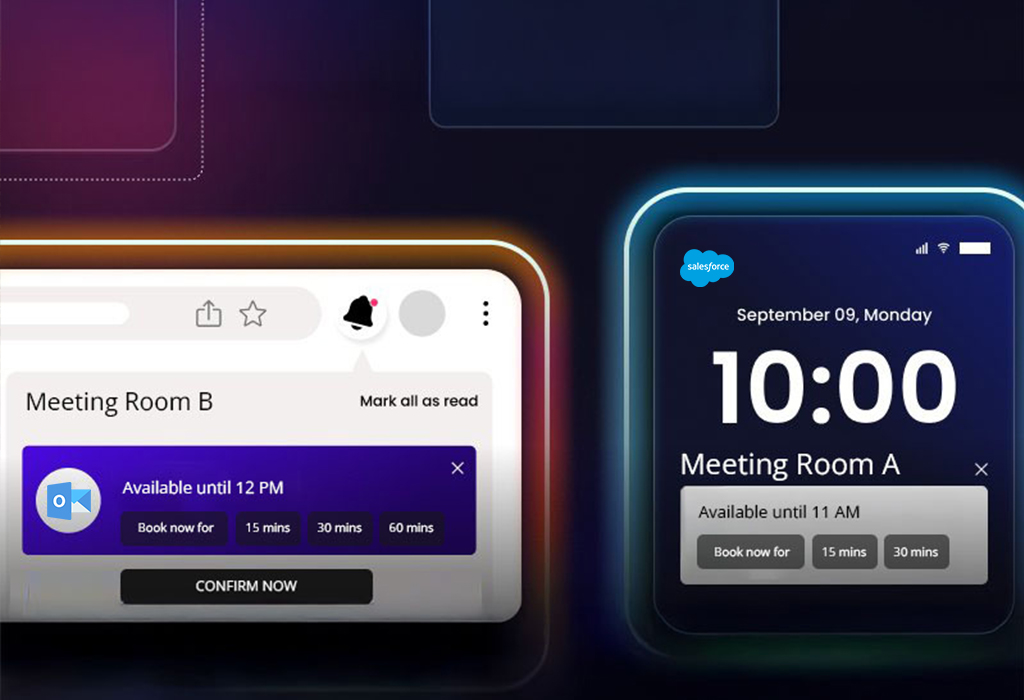
The customer is a global listings and capital markets organization that hosts high-visibility events for customers. Their frontline team used two different tools to request rooms and add business context, which led to duplicate submissions, slow confirmations, and no real-time visibility into available slots.
In this case study, you’ll learn how we:
Centralized booking requests from EMS and Monday.com into a Salesforce Sales Cloud event booking system
Built Salesforce LWC custom booking management calendars for real-time room and slot visibility
Created a booking wizard for admins and EMS users with role-based approvals
Integrated Outlook to support Salesforce Outlook calendar sync for confirmations, changes, and cancellations
Made the calendar mobile-friendly so teams could confirm bookings on the go
The client is a physical therapy clinic specializing in non-surgical joint pain treatments. Their team used both Salesforce Health Cloud and Elation Health EMR, but appointment updates and patient data did not always stay aligned across systems. This created duplicate work, scheduling gaps, and extra manual corrections for staff. They needed a secure Salesforce Health Cloud EHR integration that could support near real-time appointment sync, improve data accuracy, and give admins an easier way to manage field mappings as workflows changed.
In this case study, you’ll learn how we:
Enabled Salesforce Elation Health EMR sync to keep appointments and patient data aligned
Built a secure Salesforce Health Cloud EHR field mapping admin panel to add, edit, and delete mappings without code
Supported Salesforce healthcare appointment management with fewer duplicate updates and manual corrections
The client is a visual support provider that helps B2C teams guide customers through live video sessions using augmented reality and AI assistance. Agents needed to start, manage, and track sessions directly from Salesforce Service Console without switching tabs or losing case context. The team needed a secure Salesforce AppExchange AR app service console integration that worked across environments and kept agents inside Salesforce.
In this case study, you’ll learn how we:
Set up Salesforce SSO AppExchange app access
Built a Salesforce AppExchange AR app Service Console integration
Added a Lightning Console component using Salesforce Workspace API
Configured CSP and cross-site settings for secure dashboard rendering
The customer is a manufacturing provider of parts and solutions for water, gas, fire, electrical, and HVAC systems. They serve multiple sectors and rely on accurate quotes and fast responses. They had struggled with manual lead and opportunity tracking, slow quote creation, no automation for field updates, and disconnected tools for invoicing, signatures, and meetings.
In this case study, you’ll learn how we:
Implemented Salesforce Sales Cloud to automate lead-to-quote
Used Flows to auto-update fields and keep data current
Customized quote PDFs and aligned the Contract object to the business process
Structured product and variant management on Opportunities
A Manufacturing Firm Re-Engaged 58% of Inactive Leads with Salesforce Pardot
A manufacturing brand wanted to revive inactive leads and better understand what each prospect cared about. The team needed a stronger Salesforce Pardot implementation for manufacturing, with segmented nurtures, clear scoring, and reliable tracking for external links, all connected to Sales Cloud for faster follow-ups.
In this case study, you’ll learn how we:
Segmented prospects by interest and buying intent using Salesforce Pardot segmentation list rules for a manufacturer
Built Pardot engagement studio manufacturing campaigns with emails, forms, and landing pages
Supported Pardot lead nurturing for B2B manufacturing with targeted nurture journey
Set scoring rules for Pardot lead scoring and grading for manufacturing sales
Created custom redirects to track external links and improve Pardot campaign ROI tracking
Synced qualified activity to Sales Cloud for sales-ready context
We use cookies to enhance your browsing experience, serve personalized ads or content, and analyze our traffic. By clicking "Accept All", you consent to our use of cookies.
Customize Consent Preferences
We use cookies to help you navigate efficiently and perform certain functions. You will find detailed information about all cookies under each consent category below.
The cookies that are categorized as "Necessary" are stored on your browser as they are essential for enabling the basic functionalities of the site.
We also use third-party cookies that help us analyze how you use this website, store your preferences, and provide the content and advertisements that are relevant to you. These cookies will only be stored in your browser with your prior consent.
You can choose to enable or disable some or all of these cookies but disabling some of them may affect your browsing experience.
›NecessaryAlways Active
Necessary cookies are required to enable the basic features of this site, such as providing secure log-in or adjusting your consent preferences. These cookies do not store any personally identifiable data.
CookiePHPSESSID
DurationSession
DescriptionNative to PHP applications. Stores and identifies a user's unique session ID to manage user sessions on the website. Deleted when all browser windows are closed.
Cookie_lfa
Duration1 year
DescriptionSet by Leadfeeder to identify the IP address of devices visiting the website, in order to retarget multiple users routing from the same IP address.
Cookietwk_idm_key
DurationSession
DescriptionSet by Tawk to allow the website to recognise the visitor in order to optimize the chat-box functionality.
CookieTawkConnectionTime
DurationSession
DescriptionSet by Tawk.to live chat. Helps remember users so that previous chats can be linked together for improved service.
CookieNID
Duration6 months
DescriptionSet by Google for advertising purposes; to limit the number of times the user sees an ad, mute unwanted ads, and measure the effectiveness of ads.
Cookieccb_consent
Duration365 days
DescriptionSet by this site's cookie consent banner to remember your accepted/rejected categories, so your preferences are respected on subsequent visits. Does not collect or store any personally identifiable data.
›Functional
Functional cookies help perform certain functionalities like sharing the content of the website on social media platforms, collecting feedback, and other third-party features.
CookieUserMatchHistory
Duration1 month
DescriptionLinkedIn sets this cookie for LinkedIn Ads ID syncing.
Cookielidc
Duration1 day
DescriptionLinkedIn sets this cookie to facilitate data center selection.
Cookieli_gc
Duration6 months
DescriptionLinkedIn sets this cookie for storing visitor's consent regarding using cookies for non-essential purposes.
›Analytics
Analytical cookies are used to understand how visitors interact with the website. These cookies help provide information on metrics such as the number of visitors, bounce rate, traffic source, etc.
Cookie_gcl_au
Duration3 months
DescriptionSet by Google Tag Manager to experiment with advertisement efficiency of websites using their services.
Cookie_ga
Duration1 year 1 month 4 days
DescriptionSet by Google Analytics to calculate visitor, session and campaign data and track site usage. Stores information anonymously and assigns a randomly generated number to recognise unique visitors.
Cookie_gid
Duration1 day
DescriptionSet by Google Analytics to store information on how visitors use a website and create an analytics report of the website's performance.
Cookie_gat_UA-*
Duration1 minute
DescriptionSet by Google Analytics for user behaviour tracking.
Cookie_fbp
Duration3 months
DescriptionSet by Facebook to display advertisements when either on Facebook or on a digital platform powered by Facebook advertising after visiting the website.
CookieAnalyticsSyncHistory
Duration1 month
DescriptionSet by LinkedIn to store information about the time a sync took place with the lms_analytics cookie.
Cookie_gat_gtag_UA_*
Duration1 minute
DescriptionSet by Google Analytics to store a unique user ID.
Cookie_ga_*
Duration1 year 1 month 4 days
DescriptionSet by Google Analytics to store and count page views.
CookieCONSENT
Duration2 years
DescriptionSet by YouTube via embedded videos and registers anonymous statistical data.
›Performance
Performance cookies are used to understand and analyze the key performance indexes of the website which helps in delivering a better user experience for the visitors.
›Advertisement
Advertisement cookies are used to provide visitors with customized advertisements based on the pages you visited previously and to analyze the effectiveness of the ad campaigns.
Cookietest_cookie
Duration15 minutes
DescriptionSet by doubleclick.net to determine if the user's browser supports cookies.
Cookiebcookie
Duration1 year
DescriptionLinkedIn sets this cookie from LinkedIn share buttons and ad tags to recognize browser IDs.
Cookiebscookie
Duration1 year
DescriptionLinkedIn sets this cookie to store performed actions on the website.
CookieYSC
DurationSession
DescriptionSet by YouTube to track the views of embedded videos on YouTube pages.
CookieVISITOR_INFO1_LIVE
Duration6 months
DescriptionSet by YouTube to measure bandwidth, determining whether the user gets the new or old player interface.
Cookieli_sugr
Duration3 months
DescriptionSet by LinkedIn to collect user behaviour data to optimise the website and make advertisements more relevant.
CookieIDE
Duration1 year 24 days
DescriptionGoogle DoubleClick IDE cookies store information about how the user uses the website to present them with relevant ads according to the user profile.
›Uncategorized
Other uncategorized cookies are those that are being analyzed and have not been classified into a category as yet.
We use cookies to enhance your experience. You may opt out of the sale or sharing of your personal information at any time.