

Build Drip Email Automation in Salesforce Without Marketing Cloud
09 Jun 2026
Table of Contents

Drip email automation should not require Salesforce teams to buy an enterprise marketing platform before they can send a structured series of follow-up emails.
Many Salesforce admins and marketing managers already have the data needed to automate lead nurturing. The lead source, lifecycle stage, last activity date, product interest, and owner are all sitting inside Salesforce. What they often lack is a practical way to turn those fields into a coordinated email journey.
That is where Salesforce-native tools such as 360 Mass Mailer can help. Instead of exporting CRM data or managing disconnected email tools, teams can build and track automated sequences around Salesforce records.
Want to learn how bad CRM data hurts Salesforce email deliverability?
Table of Contents
What a Drip Campaign Actually Is—and What It Is Not
A drip campaign is a planned series of emails sent automatically according to time, behaviour, or CRM record changes.
It is not the same as sending one bulk email to a Salesforce campaign list.
For example, suppose a prospect requests a product demonstration. A basic three-step nurture could include:
- An immediate confirmation with helpful resources
- A use-case email two days later
- A consultation invitation four days after that
Each message has a purpose, and the sequence stops when the lead books a meeting, opts out, replies, or moves to a qualified stage.
A List Email, by comparison, is generally a one-time send. It can help with announcements or broad updates, but it does not automatically manage a multi-step journey.
That distinction matters. A bulk email delivers one message to many people. Drip email automation manages what should happen next for every recipient.
Ready to move beyond one-time Salesforce emails?

Why Salesforce Teams Assume They Need Marketing Cloud for Drip
Marketing Cloud and Marketing Cloud Account Engagement are built for sophisticated marketing operations. They support capabilities such as audience segmentation, lead scoring, personalised journeys, engagement tracking, testing, and multi-stage nurture programs.
For organisations running complex, cross-channel campaigns across large databases, those capabilities can be valuable.
The problem begins when teams assume every Salesforce drip campaign requires the same level of infrastructure.
Salesforce Flow can trigger actions after a record is created or updated. Scheduled paths can also run an action at a defined time after a triggering event. However, admins may need to build and maintain separate flow logic for every email, delay, condition, and exception.
That can work for a simple reminder. It becomes harder to manage when a nurture program includes:
- Several messages and wait periods
- Reusable Salesforce templates
- Engagement-based decisions
- Opt-out management
- Sequence-level tracking
- Multiple active campaigns
Some teams consequently over-invest in a larger marketing platform. Others continue sending manual follow-ups because the technical effort seems too high.
A Salesforce-native email application fills the space between those extremes. It enables automated email sequences in Salesforce while keeping campaign data, recipient records, templates, and reporting connected to the CRM.
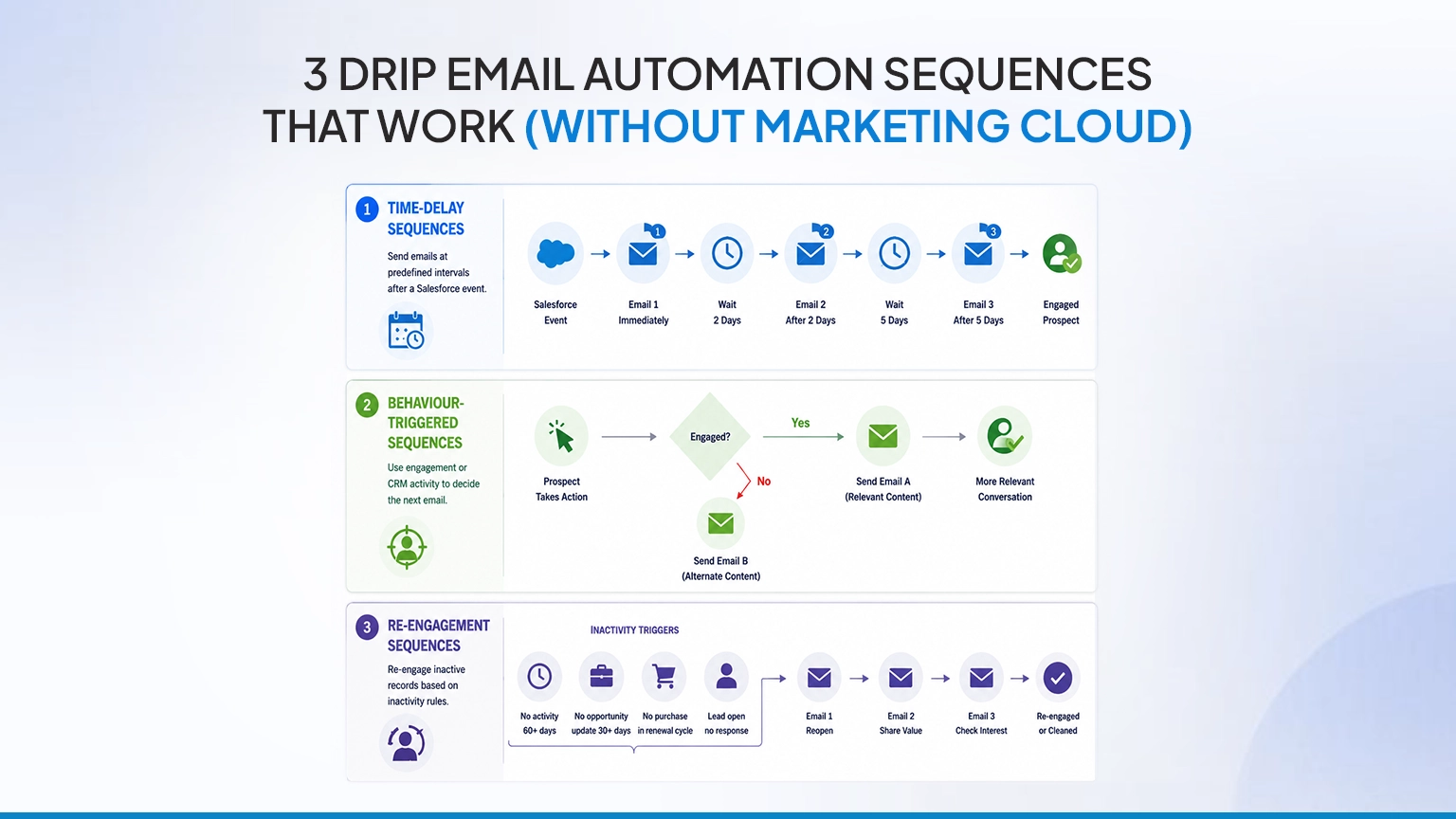
3 Drip Email Automation Sequences That Work Without Marketing Cloud
Not every sequence needs complex journey orchestration. Most Salesforce teams can begin with three practical formats.
1. Time-Delay Sequences
These campaigns send emails at predefined intervals after a Salesforce event.
A new demo lead might receive:
- Email 1 immediately: request confirmation
- Email 2 after two days: relevant customer use case
- Email 3 after five days: invitation to speak with an expert
This structure is useful for onboarding, event follow-ups, trial education, quote reminders, and lead nurturing. It ensures every eligible record receives consistent follow-up, even when the assigned representative is busy.
2. Behaviour-Triggered Sequences
These campaigns use engagement or CRM activity to determine the next action.
For example, a prospect who clicks a pricing link could receive a comparison guide. Someone who does not engage could receive a shorter email with a different subject line.
Behaviour can also be represented by Salesforce record changes. A change in Lead Status, Campaign Member Status, or a custom interest field can trigger a more relevant next step.
These email drip campaigns in Salesforce help teams respond to intent rather than sending every contact the same content.
3. Re-Engagement Sequences
Re-engagement campaigns target records that have been inactive for a defined period.
A sequence might begin when:
- The last activity is older than 60 days
- An opportunity has had no update for 30 days
- A former customer has not purchased within the expected renewal cycle
- A lead remains open without a recent response
The first email can reopen the conversation, the second can share something useful, and the final email can ask whether the recipient still wants to hear from the company.
This keeps the CRM database active without forcing sales representatives to chase every inactive record manually.
Building Your First Salesforce Drip Campaign Step by Step
Here is how to build a practical sequence using 360 Mass Mailer’s drip campaign automation.
Step 1: Define the Entry Trigger
Start by choosing the Salesforce object that contains the audience.
That could be a Lead, Contact, Campaign Member, Opportunity, or supported custom object. Then identify the field condition that should start the campaign.
For a demo nurture sequence, the trigger might be:
- Lead Source equals “Demo Request”
- Lead Status equals “New”
- Email Opt Out equals “False”
Avoid beginning with broad criteria such as “all open leads.” A precise trigger keeps recipients relevant and makes the sequence easier to test.
Step 2: Map the Message Journey
Decide what each email needs to accomplish before configuring it.
A simple sequence could look like this:
| Stage | Timing | Purpose |
| Email 1 | Immediately | Confirm the request |
| Email 2 | After two days | Address a common problem |
| Email 3 | After three more days | Share proof or a use case |
| Email 4 | After four more days | Invite the lead to a meeting |
Do not add emails merely to make the campaign longer. Every step should answer a question or move the recipient toward a clear next action.
Step 3: Create Salesforce Email Templates
Build templates that can be reused across campaigns. Use Salesforce merge fields to personalise details such as:
- First name
- Company name
- Product interest
- Account owner
- Assigned representative
- Relevant industry
Personalisation should go beyond inserting a first name. A message referencing the recipient’s product interest or enquiry type will usually feel more relevant than a generic introduction.
Step 4: Configure Exit Conditions
This is one of the most important parts of drip email automation.
Define what should remove a recipient from the sequence. Common exit conditions include:
- Lead converts
- Opportunity stage changes
- Recipient opts out
- Meeting is booked
- Campaign Member Status changes
- A defined response or activity is recorded
Without exit conditions, a qualified lead may continue receiving basic nurture emails after speaking with sales.
Step 5: Test Before Activation
Test the journey with internal records. Confirm that merge fields render correctly, delays work as intended, suppression rules apply, and converted or opted-out records no longer qualify.
Learn how to send at scale without hitting limits in Salesforce.

Drip Email Automation Timing: Delays, Send Windows, and Time Zones
Timing logic affects both customer experience and administrative reliability.
First, determine whether a delay means calendar days or business days. “Wait three days” can produce a Sunday send when calendar days are used. For B2B campaigns, business-day logic may be more appropriate.
Next, define an acceptable sending window. A common configuration is Monday through Friday between 9:00 a.m. and 5:00 p.m. If a contact becomes eligible outside the window, the message should wait until the next permitted period.
For global campaigns, consider the recipient’s time zone rather than relying only on the Salesforce organisation’s default time zone. Your records may need a country, region, or time-zone field that the campaign can use for scheduling.
The email application can execute the configured delays and sending rules, but the Salesforce admin still needs to define:
- The source of time-zone data
- Permitted sending days
- Start and end times
- Holiday or blackout rules
- Fallback behaviour when time-zone data is missing
Document these decisions so that future admins understand why the campaign sends when it does.
When to Pause, Branch, or Exit a Salesforce Drip Sequence
A good sequence does not simply send Email 1, Email 2, and Email 3 to everyone. It responds to what happens inside Salesforce.
- Pause When a Response Needs Human Attention
When a reply or follow-up activity is recorded, pause automated outreach so a sales representative can take over. Continuing the sequence during an active conversation can make the experience feel disconnected.
- Branch When Engagement Shows Intent
A click can indicate what the recipient wants to know next.
Someone who clicks a pricing link may need commercial information. Someone who clicks an implementation guide may need technical content. When engagement data is available in Salesforce, use it to segment or route recipients into a more relevant follow-up path.
- Exit When the CRM Stage Changes
Lead conversion, opportunity creation, meeting completion, disqualification, and opt-out events should remove the recipient from the current sequence.
This is where Salesforce CRM automation becomes especially valuable. The campaign does not depend on a marketer manually checking every recipient. It responds to the latest CRM status.
Conclusion
Salesforce already contains the signals needed to run relevant nurture programs. The key is connecting those signals to a manageable sequence of templates, delays, decision points, and exit rules.
You do not necessarily need a full marketing automation platform to start. With the right Salesforce-native application, teams can automate follow-up, preserve CRM visibility, and build repeatable campaigns without maintaining a maze of custom workflows.

Solve It with Salesforce. We’ll Show You How.
AI. Apps. Experts. Everything you need to win with Salesforce under one roof.Frequently Asked Questions
What is drip email automation?
Drip email automation is the process of sending a predefined series of emails based on timing, recipient behaviour, or CRM record changes. Each recipient progresses through the sequence automatically until an exit condition is met.
How does drip email automation work in Salesforce?
A Salesforce field change or record event starts the campaign. The system then sends templates according to configured delays and conditions. Recipient engagement and CRM stage changes can determine whether the next email is sent, paused, or cancelled.
How should teams measure email engagement from CRM campaigns?
Track delivery, opens, clicks, replies, opt-outs, meetings booked, lead conversions, and opportunity progression. Opens and clicks indicate engagement, but CRM outcomes such as qualified leads and generated pipeline provide a stronger measure of campaign value.
How can 360 Mass Mailer support Salesforce drip campaigns?
360 Mass Mailer enables Salesforce teams to create automated email sequences using CRM records, templates, campaign criteria, scheduled steps, and tracking. It helps teams manage follow-up inside Salesforce without relying on disconnected mailing lists or manual sends.

About the author
Editorial TeamThe Editorial Team at 360 Degree Cloud brings together seasoned marketers, Salesforce specialists, and technology writers who are passionate about simplifying complex ideas into meaningful insights. With deep expertise in Salesforce solutions, B2B SaaS, and digital transformation, the team curates thought leadership content, industry trends, and practical guides that help businesses navigate growth with clarity and confidence. Every piece we publish reflects our commitment to delivering value, fostering innovation, and connecting readers with the evolving Salesforce ecosystem.
Recent Blogs
 Email Marketing
Why Your Salesforce Mass Emails Are Not Getting Through: Deliverability Mistakes Teams Make
Salesforce email deliverability problems don’t announce themselves. Open rates drop slowly. Bounce rates creep up. Then one campaign lands in spam for half your list,…
Read More Comparison
Best Mass Email Software for Salesforce in 2026: 6 Tools Ranked by Features and Price
Choosing the right Salesforce bulk email tool comes down to three things: how much you’re sending, whether tracking data needs to live on the Salesforce…
Read More Comparison
5 Salesforce Email Marketing Tools Compared: Features, Limits, and What Teams Actually Use in 2026
Picking the right email marketing software for Salesforce is harder than it looks. Not because options are scarce they aren’t. Every tool claims to “integrate…
Read MoreReady to Make the Most Out of Your Salesforce Instance?
Our Salesforce aces would be happy to help you. Just drop us a line at contact@360degreecloud.com, and we’ll take it from there!
Subscribe to our newsletter
Stay ahead with expert insights, industry trends, and exclusive resources—delivered straight to your inbox.
