

5 Best Salesforce Email Tools Compared: Features, Pricing, and Limits
12 Aug 2026
Table of Contents
Your list has 8,000 contacts. Salesforce caps you at 5,000 emails a day. So now what? Do you split the send, wait until tomorrow for the rest, or go find a tool that actually solves the problem instead of working around it?
That’s the exact spot most RevOps and marketing teams land in once their Salesforce org grows past a certain size. Native Salesforce email works fine for small lists and transactional notes. It starts breaking down the moment you need real campaign volume, and that’s when teams start comparing Salesforce email tools in earnest.
This roundup is a Salesforce mass email tools comparison covering five options: native Salesforce, 360 Mass Mailer, MassMailer, Mailchimp for Salesforce, and Salesforce Marketing Cloud Account Engagement (formerly Pardot). We looked at what each one actually does, what it costs, where its sending limits sit, and who it fits best.
Wondering what the actual send flow looks like inside Salesforce before you commit to a trial?

Table of Contents
Salesforce Email Tools Compared at a Glance
Think of this as a fast Salesforce email marketing software comparison, not a deep dive into any single vendor’s marketing site. The table below is the part worth bookmarking.
| Tool | Native to Salesforce | Starting Price | Daily Sending Limit | Personalization | Standout Feature |
| Native Salesforce Email | Yes | Included in license | 5,000 recipients/org/day | Merge fields, basic templates | No extra app to install |
| 360 Mass Mailer | Yes (AppExchange) | Contact for pricing, free trial available | Set by SendGrid plan, not Salesforce’s 5,000 cap | Merge fields, SendGrid dynamic templates | Send from list views, campaigns, or reports |
| MassMailer | Yes (AppExchange) | From $219/month | Pooled monthly volume, no per-batch cap | Merge fields, list segmentation | Email verification built in |
| Mailchimp for Salesforce | No (synced integration) | Free tier, paid from $13/month | Tied to Mailchimp plan (10 to 15x contact count) | Advanced audience segmentation | Large template and automation library |
| Account Engagement (Pardot) | Yes (Salesforce product) | From $1,250/month | Tied to Engagement Studio and list limits | Lead scoring, dynamic content | B2B lead nurturing and scoring |
A quick note before you read the sections below: pricing and plan structures change often, especially for third-party apps. Confirm current numbers directly with each vendor before you budget.
Native Salesforce Email: Free, But Capped Fast
Every Salesforce org ships with basic email sending built in. No install, no extra login, no new tool for your admin to manage.
That’s also the whole appeal. It stops there.
Salesforce enforces a 5,000-recipient daily limit on mass email sends, and this applies across Professional, Enterprise, and Unlimited editions equally. Upgrading your edition does not raise the cap. The limit resets on a rolling 24-hour window based on your org’s time zone, not at midnight, which catches people off guard when a morning campaign blocks an afternoon send on the same calendar date.
List emails in Lightning are further capped at 500 recipients per batch, so even a 4,000-contact send has to go out in chunks. There’s no drip automation, no A/B testing, and reporting lives in basic email logs rather than a dedicated analytics view.
Best for: Small orgs sending occasional updates to a few hundred contacts, or teams that genuinely don’t need marketing-grade sending yet.
Where it falls short: Any list over roughly 4,500 to 5,000 contacts, any campaign requiring scheduling or automation, and any team that needs open, click, and bounce data without building custom reports.
360 Mass Mailer: Native Sending Without Salesforce’s Daily Cap
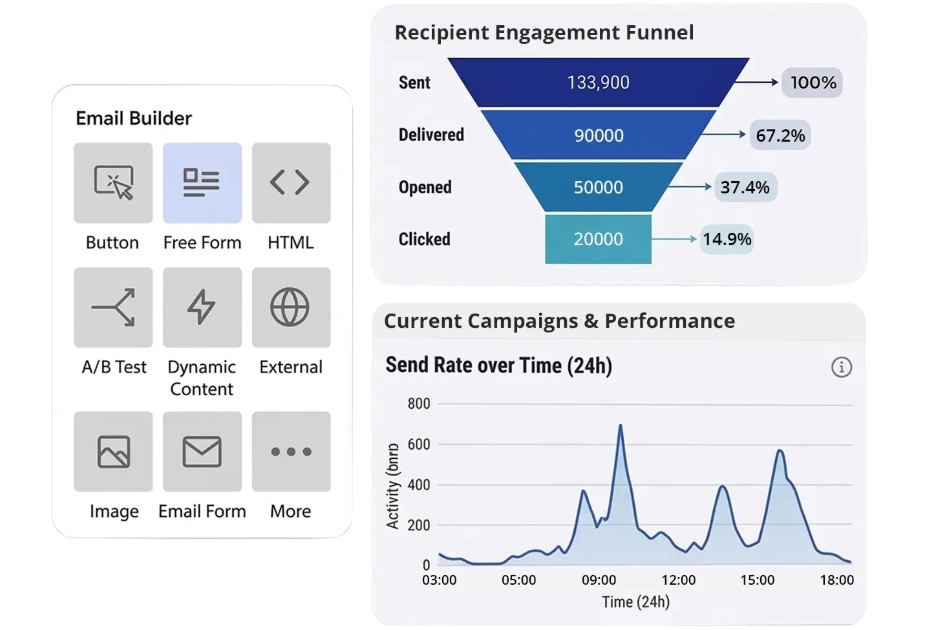
360 Mass Mailer is an AppExchange app built directly on the Salesforce platform, not a separate system you sync data into. It runs on SendGrid’s delivery infrastructure underneath, which is what lets it move past Salesforce’s native email restrictions while keeping every send, open, and click logged back to Salesforce records.
The app supports sending from three different starting points: an object’s list view, a Campaign, or a Salesforce Report (any custom or standard object works, once configured). That flexibility matters if your sales team wants to email a filtered list view while marketing works from Campaign membership.
On the template side, you can use either Salesforce templates, where merge fields stay editable after the message populates, or SendGrid dynamic templates, which handle more advanced design work. Real-time analytics track delivery, opens, bounces, and click-throughs so you’re not exporting data into a spreadsheet to see how a send performed. Scheduling is built in too, along with the option to attach files directly to the send.
One detail worth knowing if you’re evaluating this for the “Email from Reports” method specifically: that path requires the report to include a record ID column, and it works through a dedicated Reports tab rather than a one-click send from the report view itself.
Best for: Salesforce teams that want to stay fully inside the CRM, send from multiple contexts (list views, campaigns, or reports), and get SendGrid-grade deliverability without adding another platform to their stack.
Where it falls short: Teams looking for a standalone marketing suite with landing pages and lead scoring built in. This is an email execution tool, not a full marketing automation platform.
Still deciding between MassMailer and 360 Mass Mailer for your org?

MassMailer: Pooled Volume Pricing With Verification Built In
MassMailer is another Salesforce-native AppExchange app, and like 360 Mass Mailer, it runs entirely inside the CRM using SendGrid infrastructure for delivery.
Pricing starts around $219/month and scales up based on user count and monthly email volume, which is pooled across the whole org rather than allocated per seat. That means two users and twenty users draw from the same monthly bucket, and unused sends don’t roll over month to month. Going over your allotment costs roughly $25 per additional 10,000 emails, based on the vendor’s published pricing.
Feature-wise, MassMailer leans into email verification and Salesforce email deliverability scoring almost as much as sending. Bad or disposable addresses get flagged before they hit your bounce rate. Campaigns can be cloned from previous ones, which saves setup time for recurring sends, and reporting covers opens, clicks, bounces, spam reports, and opt-outs.
Support for higher education and nonprofit discounts is listed on their pricing page too, along with annual billing and volume discounts.
Best for: Teams that want built-in list hygiene and verification alongside sending, and orgs comfortable with pooled monthly volume pricing.
Where it falls short: The pooled-volume model means growing user counts don’t add sending capacity on their own. You’ll need to budget for volume separately as your list grows.
Mailchimp for Salesforce: Familiar Interface, But It’s Not Native
Mailchimp is the tool most marketers already know, which is exactly why teams ask about connecting it to Salesforce. The integration, sometimes called MC4SF, syncs data between the two systems rather than running email inside Salesforce itself.
That distinction matters more than it sounds. Because Mailchimp and Salesforce are separate platforms, you inherit constraints from both. Mailchimp’s own send limits are tied to your plan and contact count (roughly 10 to 15 times your contact volume per month, depending on tier), and updates made in Mailchimp don’t automatically flow back into Salesforce. Salesforce stays the system of record, which can create gaps if someone unsubscribes in Mailchimp and Salesforce doesn’t reflect it right away.
Pricing runs free for very small lists, up to $13/month for the Essentials tier, and climbs from there based on contact count. At 10,000 contacts, the Premium tier runs around $350/month, a number that catches a lot of growing teams off guard since Mailchimp counts unsubscribed and inactive contacts toward your total unless you archive them manually.
On the plus side, Mailchimp’s template library and pre-built automation flows are genuinely deep, more so than most Salesforce-native alternatives.
Best for: Teams that already run marketing through Mailchimp and want Salesforce data feeding into it, rather than teams looking for CRM-native sending.
Where it falls short: Sync delays, API call consumption from the connector, and the risk of Salesforce and Mailchimp showing different unsubscribe or contact states at any given moment.
Account Engagement (Pardot): Built for B2B Nurture, Not Simple Sends
Salesforce Marketing Cloud Account Engagement, still widely called Pardot, is Salesforce’s own answer to B2B marketing automation. It’s native to the Salesforce ecosystem in the sense that it’s a Salesforce product, though it runs as a connected application rather than sitting inside your core org the way 360 Mass Mailer or MassMailer do.
Pricing starts at $1,250/month for the Growth tier and scales to $15,000/month at the Premium tier, based on the number of marketable contacts in your database rather than seat count. That’s a different order of magnitude from the AppExchange apps above, and it reflects a different job entirely.
Where Account Engagement earns its price tag is lead scoring, Engagement Studio journey building, and dynamic content that adjusts based on prospect behavior. If your team needs to track a lead through dozens of touchpoints and hand off a qualified prospect to sales automatically, this is built for exactly that. If you just need to get a campaign email out to 6,000 contacts by Friday, it’s a lot of platform for that job.
Best for: B2B teams running structured, multi-touch nurture programs with lead scoring and sales handoff baked into the process.
Where it falls short: Cost and implementation complexity. Most teams need a Salesforce partner or an in-house specialist to get real value out of it, and that adds to the total cost beyond the license itself.
Conclusion
Match the tool to the job, not the other way around. Among the top Salesforce bulk email apps covered here, none of them is universally “best.” The right one depends on your list size, budget, and how deep your nurture strategy actually needs to go.
Small team, occasional sends, list under 5,000. Native Salesforce email probably covers you. No new app, no new bill.
Growing team hitting the daily cap, wants to stay inside Salesforce. This is where 360 Mass Mailer and MassMailer both live. The decision between them usually comes down to whether you want verification and pooled-volume pricing built in (MassMailer) or flexible sending from list views, campaigns, and reports with SendGrid template support (360 Mass Mailer).
Marketing team already invested in Mailchimp’s design tools and automation. Keep Mailchimp, connect it, but budget time for managing the sync and understand you’re running two systems, not one.
Enterprise B2B org with a real nurture strategy and dedicated marketing ops headcount. Account Engagement justifies its price when lead scoring and multi-touch journeys are core to how your sales team works.
Developer-heavy org sending transactional or system-triggered email. None of these five are really built for that use case. That’s usually an Apex and API conversation, not a mass email tool conversation.


Solve It with Salesforce. We’ll Show You How.
AI. Apps. Experts. Everything you need to win with Salesforce under one roof.Frequently Asked Questions
Which tool is best for Salesforce mass email?
Depends on the job. For staying fully native while removing the 5,000-recipient cap, 360 Mass Mailer or MassMailer are the strongest fits. For B2B lead nurture with scoring, Account Engagement wins. There isn't one answer that fits every org.
Salesforce native email vs. third-party tools: which should you pick?
If you never leave the CRM and never need marketing-grade volume, native email is fine and free. The moment you need scheduling, list volume past 5,000, or real analytics, a native AppExchange app gets you there without adding a second system to manage, unlike a synced third-party platform.
Is native Salesforce email good enough for most businesses?
For lists under a few thousand contacts and occasional sends, yes. Once you're sending regular campaigns to a growing list, the 5,000-recipient daily cap becomes a real operational constraint, not just an edge case.
Salesforce native vs. third-party tools, which wins on data accuracy?
Native and Salesforce-built AppExchange apps generally win here, since there's no sync delay or second system holding a different version of the truth. Integrated platforms like Mailchimp rely on periodic syncs, which introduces lag.
Do AppExchange email apps require a specific Salesforce edition?
Most require Enterprise Edition or above, though this varies by vendor. Check the AppExchange listing or vendor pricing page for the specific app you're evaluating.
How do I know if I need marketing automation instead of a mass email tool?
If you need lead scoring, multi-step nurture journeys, or automated sales handoffs based on engagement, that's automation territory, not simple sending. If you mainly need to get a campaign out to a list without hitting Salesforce's cap, a native sending app is the lighter, cheaper fit.
Can I switch mass email tools later without losing Salesforce data?
Generally yes, since Salesforce-native apps write activity back to standard Salesforce objects. Confirm this with any vendor before committing, especially for historical open and click data, which doesn't always migrate cleanly between systems.

About the author
Editorial TeamThe Editorial Team at 360 Degree Cloud brings together seasoned marketers, Salesforce specialists, and technology writers who are passionate about simplifying complex ideas into meaningful insights. With deep expertise in Salesforce solutions, B2B SaaS, and digital transformation, the team curates thought leadership content, industry trends, and practical guides that help businesses navigate growth with clarity and confidence. Every piece we publish reflects our commitment to delivering value, fostering innovation, and connecting readers with the evolving Salesforce ecosystem.
Recent Blogs
 Email Marketing
Send Email to Multiple Recipients in Salesforce Flow: What Works and Where It Breaks
You’ve got a Flow that fires on a record update. You need it to send email to multiple recipients in Salesforce. The logic seems simple:…
Read More Comparison
7 Best Drip Campaign Tools for Salesforce in 2026: Features, Limits, and Pricing Compared
Most comparisons of the best drip campaign tools for Salesforce make the same mistake: they treat native tools and connected tools as if they’re interchangeable.…
Read More Email Marketing
Why Your Salesforce Mass Emails Are Not Getting Through: Deliverability Mistakes Teams Make
Salesforce email deliverability problems don’t announce themselves. Open rates drop slowly. Bounce rates creep up. Then one campaign lands in spam for half your list,…
Read MoreReady to Make the Most Out of Your Salesforce Instance?
Our Salesforce aces would be happy to help you. Just drop us a line at contact@360degreecloud.com, and we’ll take it from there!
Subscribe to our newsletter
Stay ahead with expert insights, industry trends, and exclusive resources—delivered straight to your inbox.
