

Salesforce AI Readiness Checklist: Is Your CRM Data Ready for AI Agents?
30 Sep 2026
Table of Contents
Most Salesforce teams approach AI deployment as a technology question. Which model? Which configuration? Which use case to start with? That’s understandable. But the teams that actually get value from AI agents figure out pretty quickly that the real question is different.
It’s not about the model. It’s about what the model is reading.
AI agents don’t generate answers from scratch. They pull from what’s already in your CRM, your knowledge base, your records, your integrations. If that data is outdated, incomplete, or inconsistent, the agent doesn’t fail gracefully. It confidently gives you the wrong answer. Or worse, it takes the wrong action. That’s the Salesforce AI readiness problem most teams aren’t thinking about before they deploy.
Seeing these failure patterns in your Salesforce org today?

Table of Contents
What “AI-Ready Salesforce Data” Actually Means
There’s a version of this conversation that goes: “clean your data before you use AI.” That’s true but incomplete.
Trusted CRM data isn’t just accurate records. It’s a system where the data is accurate, complete, current, consistent, accessible, governed, and actually relevant to the specific task you want the agent to perform. Each of those words does real work.
An agent handling lead qualification needs different data than one handling case resolution. What counts as “ready” is always tied to the use case. Which means there’s no single cleanliness threshold that applies across the board. Teams that try to clean everything before deploying anything end up stuck in cleanup cycles that never end.
In practice, the smarter move is to define the first use case, identify exactly what data that agent needs, and fix that data first. Everything else can wait.
Worth saying: there’s also a difference between structured CRM records and unstructured knowledge content. Both matter. A lead qualification agent mostly needs clean field values, proper ownership, and reliable status fields. A customer-facing support agent needs those too, but it also needs accurate, approved knowledge articles, updated FAQs, and documented policies. Both are AI data readiness problems. They just need different remediation paths.
The Salesforce AI Readiness Checklist: 10 Data Checks Before You Deploy
Run through these checks before you go live with any AI agent in your Salesforce org. Think of them as a scoring exercise. Green means you’re ready. Amber means you need some remediation. Red means the agent probably shouldn’t go live until this is resolved.
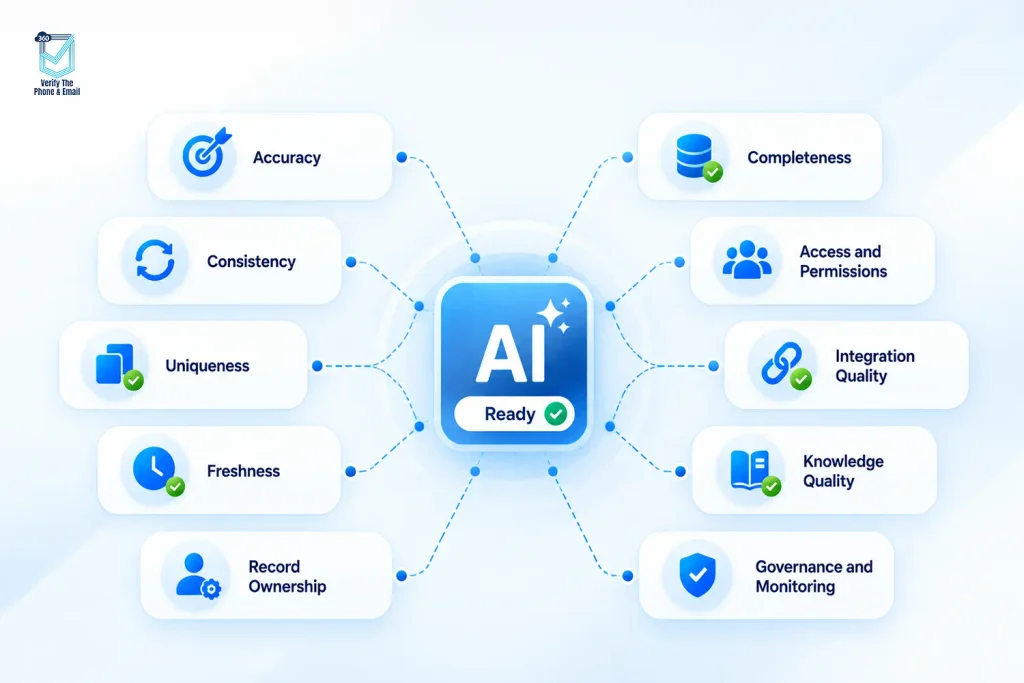
1. Accuracy: Are your critical fields factually correct?
Not just populated. Correct. This sounds basic. In practice, it’s where most orgs have gaps they don’t know about. Contacts with old job titles, leads with wrong company names, cases with outdated status values. The agent will use whatever is in the field. If the field is wrong, the agent’s response is wrong.
2. Completeness: Are the fields your agent depends on consistently filled in?
Every AI use case has a minimum data requirement. Map it out. Then run a completeness check against those specific fields on the records the agent will actually touch. A 60% fill rate on a required field isn’t close enough.
3. Consistency: Are your values standardized?
Picklist values, status labels, date formats, phone number formats, naming conventions across accounts and contacts. If “New York” appears as “NY,” “New York,” “NYC,” and “New York, NY” across your records, the agent reads those as four different things. Data governance enforced downstream creates compounding problems fast.
4. Uniqueness: Do you have duplicate records creating conflicting context?
Duplicates are one of the highest-risk issues for AI agents. An agent might pull from two contact records for the same person and get two different email addresses, two different phone numbers, or two different company affiliations. That confusion doesn’t surface as an error. It surfaces as a bad recommendation or a wrong action.
5. Freshness: How much of your data is stale?
Records that haven’t been touched in 18 months. Contacts who left their company two years ago. Opportunities with close dates from three quarters back still sitting as “In Progress.” Stale data doesn’t just create inaccurate outputs. For agents that take actions, it creates compliance risk. Running outreach on contacts who opted out months ago is a real scenario when freshness isn’t managed.
6. Record Ownership: Is there a clear source of truth when systems disagree?
Most enterprise Salesforce orgs have data coming in from at least two or three places. CRM, marketing automation, ERP, customer portals. When those systems disagree about the value of a field, what wins? If that rule isn’t defined and enforced, the agent may act on stale or overwritten data without flagging it.
7. Knowledge Quality: Is your unstructured content actually current and approved?
This one gets skipped. That’s the thing. Teams run data quality audits on structured fields and completely forget about the knowledge base the agent will use for grounding. Articles written three years ago. Policies that changed after a product update. FAQs that no one has reviewed since before a pricing change. An agent grounded in outdated knowledge will give confident, outdated answers. That’s a trust problem that’s very hard to walk back once customers experience it.
8. Access and Permissions: Can the agent only see what it should see?
AI agents in Salesforce respect permission structures. But those permissions need to be intentionally set for the agent’s profile and use case. An agent deployed for a sales team shouldn’t be able to read support case notes from other customers. An agent handling self-service should only surface knowledge the customer is allowed to see. Permissions aren’t just a security question. They’re a quality question too, because irrelevant data pulled into an agent’s context degrades its response quality.
9. Integration Quality: Are your connected systems syncing reliably?
If your Salesforce data depends on a sync from another system, that sync needs to be reliable, timely, and mapping-preserving. A field that syncs correctly most of the time but occasionally overwrites with null values or wrong defaults will corrupt your CRM data quality in ways that are hard to trace. And because AI agents move fast, a bad sync cycle can affect dozens of interactions before anyone notices.
10. Governance and Monitoring: Who owns data quality after the agent goes live?
This is the most skipped question on any AI readiness list. Because it’s not a technical question. It’s an ownership question. Salesforce data quality doesn’t stay clean on its own. Someone needs to own it, measure it, and act on it. If that accountability isn’t defined before the agent launches, it won’t be defined after either.
How Bad CRM Data Actually Shows Up in Agent Behavior
It doesn’t always look like a crash. That’s what makes it hard to catch.
Outdated account data makes an agent recommend a product tier the customer already has. Duplicate lead records make it send the same outreach twice. Incomplete case history makes a support agent ask a customer to repeat information they already gave three interactions ago. Inconsistent picklist values make routing logic send a ticket to the wrong queue.
To be fair, some of this would happen in a human-run process too. The difference is speed. An AI agent can replicate a data problem across hundreds of interactions before anyone flags it. The blast radius is just bigger.
Missing fields create a specific kind of failure that feels polite but isn’t useful. The agent gives a vague answer because it doesn’t have enough data to be specific. Customers interpret that as the system not knowing. They’re right. It doesn’t.
Untrusted knowledge content creates the most reputationally damaging failure. The agent answers confidently from an outdated article. The customer follows the guidance. It’s wrong. Now they’re calling in to complain. Now you’re managing a trust issue that the agent created but a human has to resolve.
From Checklist to Fix: A Practical Remediation Order
Don’t try to fix everything at once. Most teams that attempt an org-wide data cleanup project before AI deployment either never finish, or they finish and find out the agent’s specific use case didn’t benefit much from what they cleaned.
Start by profiling the problem. Run field-level completeness and accuracy checks on the objects your first use case touches. Quantify the gaps. That number matters, because it tells you whether you’re doing targeted remediation or dealing with a systemic issue.
Deduplication comes next, specifically for the objects the agent will read. Contacts, Accounts, Leads, and Cases are the usual priorities.
Then standardize. Validation rules, required fields, picklist lockdowns, and address/phone normalization. These fixes have to be permanent, not one-time cleanups. If the front door keeps letting bad data in, the cleanup cycle never ends.
For knowledge content used in agent grounding, treat it like a separate audit. Review it against current product, policy, and pricing. Archive anything outdated. Approve only what you’d be comfortable with a customer seeing today.
Verify contact data at the field level for any agent that will reach out, route, or respond to customers. Email and phone validation built into Salesforce helps catch bad contact data before it reaches the agent’s context. That’s where a solution like 360 VTM/VTP fits. It validates contact information directly inside Salesforce, so the records the agent works from are verified at the point of entry.
Is your contact data clean enough for AI agents to act on?

Test in sandbox using realistic data and edge cases. Not just the clean cases. Specifically test what happens when data is missing, when records are duplicated, when knowledge content is ambiguous. That’s where agent behavior problems surface before they reach production.
Where Salesforce Data 360 Fits Into This
Data 360 helps when the agent’s context needs to span multiple systems. It’s a way to harmonize and connect data across sources so the agent has a more complete picture than any single system can provide.
Worth saying: it doesn’t replace source-data quality work. A unified data layer built on top of messy, incomplete, or inaccurate source records still produces messy, incomplete, or inaccurate agent context. Agentforce data readiness and Data 360 are complementary, not sequential. You still have to fix the inputs.
But for teams working with complex data environments where customer records live across multiple clouds and external systems, the unified approach does reduce the fragmentation problem significantly. The agent can draw from a more complete view rather than reasoning from whatever a single Salesforce record happens to contain.
A Practical 30-Day Salesforce AI Data Readiness Plan
| Week | Focus | Actions |
|---|---|---|
| Week 1 | Define the use case | • What will the agent do? • Which objects, fields, and knowledge sources does it need? • Who owns those records today? • Where does the data come from? |
| Week 2 | Profile the gaps | • Run completeness and accuracy checks on every required field. • Identify duplicate rates. • Assess knowledge content against current facts. • Map integration sync reliability. • Flag permission gaps. |
| Week 3 | Remediate high-risk items | • Deduplicate priority objects. • Standardize high-impact fields. • Run email and phone verification on contact records tied to outreach use cases. • Archive or update outdated knowledge content. • Tighten validation rules and required-field logic. |
| Week 4 | Sandbox test with real-world scenarios | • Monitor agent responses against known-correct answers. • Document ownership for each data quality dimension. • Define ongoing monitoring KPIs before go-live. |
Four weeks won’t fix everything. But it will fix what matters for the first deployment. That’s the right bar.
Before You Scale, Assess First
AI doesn’t fix bad data. It amplifies whatever is already there. The teams that get the most value from Agentforce are the ones that treated CRM data accuracy and AI readiness as the same project.
That work isn’t glamorous. But it’s the work that determines whether the agent helps or creates a new category of problems to manage.
If your team is planning an Agentforce deployment or scoping AI use cases in Salesforce, start with a data readiness assessment. Not after you’ve deployed. Before. The checklist above gives you a starting point. What you find there will tell you exactly how much runway you have.


Solve It with Salesforce. We’ll Show You How.
AI. Apps. Experts. Everything you need to win with Salesforce under one roof.Frequently Asked Questions
What is Salesforce AI readiness?
It refers to how prepared your Salesforce org is to support AI agent deployment, specifically around data quality, governance, permissions, integration reliability, and knowledge content. A technically capable AI model still needs accurate, complete, and current data to produce reliable outputs.
How do I know if my CRM data is accurate enough for AI?
Run a field-level completeness and accuracy audit against the specific objects and fields your intended AI use case depends on. There isn't a universal threshold. What counts as accurate enough depends on what the agent will do with the data.
What data quality issues affect Agentforce the most?
Duplicate records, stale contact data, inconsistent picklist values, incomplete required fields, and outdated knowledge content. These tend to cause the most visible failures in agent behavior because they directly affect the context the agent reasons from.
Do I need Data 360 before using Salesforce AI agents?
No. Data 360 helps in multi-system environments where harmonized data improves agent context. But it doesn't replace fixing the accuracy, completeness, and governance issues in your source records. Start with the source data first.
What should I clean first before deploying an AI agent?
The records and fields the agent will actually use. Deduplication and standardization on those specific objects, validation and freshness on contact data if outreach is involved, and a review of any knowledge content used for grounding. Don't try to clean the entire org before deploying.
How do I measure trusted CRM data?
Track field completeness rates on required objects, duplicate rates, average record age on high-velocity objects, and knowledge article review currency. Set a baseline before deployment and monitor after go-live. The baseline matters because it tells you whether the agent is making data quality problems visible or creating new ones.

About the author
Editorial TeamThe Editorial Team at 360 Degree Cloud brings together seasoned marketers, Salesforce specialists, and technology writers who are passionate about simplifying complex ideas into meaningful insights. With deep expertise in Salesforce solutions, B2B SaaS, and digital transformation, the team curates thought leadership content, industry trends, and practical guides that help businesses navigate growth with clarity and confidence. Every piece we publish reflects our commitment to delivering value, fostering innovation, and connecting readers with the evolving Salesforce ecosystem.
Recent Blogs
 360 Verify The Mail
Best Salesforce Email Verification Apps on AppExchange: Compared for 2026
Your Salesforce CRM is only as useful as the data sitting inside it. And if your email lists are full of bad addresses, bounced domains, and…
Read More 360 Verify The Mail
How Poor Salesforce CRM Data Quality Hurts Your Business
Studies consistently put inaccurate or outdated records at 20 to 30 percent of the average Salesforce database. Most marketing and ops teams notice this only…
Read More 360 Verify The Mail
Salesforce Email Verification Pricing Guide 2026
Choosing an email verification tool based only on the cost per credit can lead to the wrong decision. The real Salesforce email verification pricing picture includes the…
Read MoreReady to Make the Most Out of Your Salesforce Instance?
Our Salesforce aces would be happy to help you. Just drop us a line at contact@360degreecloud.com, and we’ll take it from there!
Subscribe to our newsletter
Stay ahead with expert insights, industry trends, and exclusive resources—delivered straight to your inbox.
