Talk to Us

Summer ‘24 Release: Upgrade User Management with a Salesforce Consultant

Well, there’s already so much buzz around the Salesforce Summer ‘24 release, and we don’t want to miss out on that too. As we dive into talking about the new release, let’s start with something that matters the most when a single Salesforce account is used by multiple users. As a Salesforce consultant, we know how essential user management in Salesforce is, and that’s what we would like to talk about. 

Since every Salesforce enthusiast is going through the latest release notes of Summer ‘24, our eyes got stuck on the upgrades that it has brought to user management. From simplifying the access to policies to managing the permissions sets, there are many features that we believe would change the way we have been using Salesforce to manage its users. 

So, in this blog, our focus will be to talk about the latest features from the release, bringing the top user management features upfront so you can try your hand at it too. 

Top 5 Ways Summer ‘24 Features Can Improve User Management

The Summer ‘24 release has brought many features for developers and admins. However, they brought some incredible new features and updates for user management. So, let’s have a look at the top ways you can improve user management with the latest features from the Salesforce Summer ‘24 release.
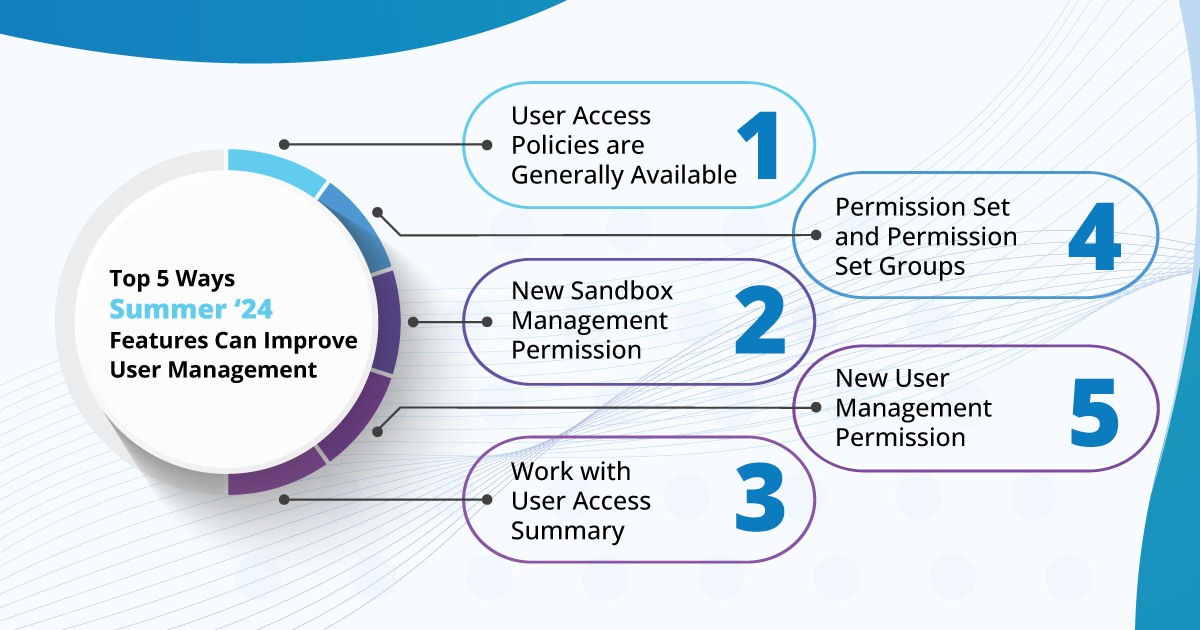
1. User Access Policies are Generally Available

Ever since user access policies debuted as a beta feature on the User Management Settings page, we’ve anticipated the exciting developments to follow. Designed to help admins automate the assignment or removal of permission sets, permission set groups, queue or group memberships, permission set licenses, and package licenses based on user criteria, this feature is incredibly powerful. You can implement these actions as a one-time event for users meeting your criteria or as ongoing automation triggered by user creation or updates.

With the Summer ’24 release, user access policies and the newly enhanced UI are now generally available. The previous limit of 20 active policies has been expanded to 200, accommodating all your org’s scenarios and variations—how cool is that? Additionally, you can now set the order of these policies for even greater control. Test them out and review policy changes within the access changes tab, making auditing a breeze.

2. New Sandbox Management Permission

In Summer ’24, there’s a new sandbox management permission designed to better control your development team’s access to production environments when creating, deleting, or refreshing sandboxes.

The familiar “Manage Sandboxes” permission will still be available, but the new “Manage Dev Sandboxes” permission restricts access to only Developer and Developer Pro sandboxes. This ensures that full and partial copy sandboxes remain under the control of a select group of admins. This added layer of security helps tailor sandbox access more precisely within your organization.

3. Work with User Access Summary

What access does your user have? It sounds simple, but as Awesome Admins, we know it’s not always straightforward. That’s why we’re thrilled to introduce the User Access Summary in Summer ’24. With just one click, you can see all user permissions, custom permissions, object and field access, and the public groups and queues to which a user belongs.

This feature allows you to quickly get a comprehensive summary of a user’s permissions in under five clicks. Any trusted Salesforce consultancy can help you work with this.

4. Permission Set and Permission Set Groups 

In addition to the User and Group summary pages, the summary page for permission sets and permission set groups (currently in beta) will soon be generally available, offering an enhanced user experience for quicker navigation through the various elements of a permission set or group.

With the View Summary button on a permission set, you can easily see any related permission set groups, dive into object and field permissions, user permissions from the App or System Permissions sections, and even custom permissions starting with the Summer ‘24 release.

This streamlined access to all relevant information on a single page, rather than navigating through multiple sections, significantly reduces the time needed to find what you need.

5. New User Management Permissions

It’s best to avoid giving the Manage Users permission to non-admin users and to explore other options with more limited permissions. Previously, the ability to freeze users or review user login history required the Manage Users permission, but this is no longer necessary.

With the latest update, two new user-specific options – Freeze Users and Monitor Login History – will be available in the System Permissions section of your permission sets as soon as your org is upgraded. If you face any issue with these, you can hire a reliable Salesforce consultant to help you through it.

Hire a Salesforce Consultant For Improved User Management

Overall, the latest Salesforce releases are exceptional in terms of permissions and user management enhancements. The new features for auditing access, quickly identifying missing permissions, and fully automating and customizing assignments empower Salesforce professionals to maximize the out-of-the-box functionality. These improvements will significantly enhance the user experience, making it smoother and more error-free.

But to ensure that all these user management features are implemented in the right way, you need to have trusted Salesforce consultancy services to assist you. The right service will stay updated with all these new releases and features that would work perfectly for your business. The experts will ensure that your Salesforce solution is scalable and it adapts all new features to improve user management and experience.
So, if you’re looking for such a service, contact us and talk to our certified Salesforce consultant and get help to overcome any challenges that you’ve been facing.
5 Compelling Reasons To Use 360 Verify the Email for Business Operations

If you’re just happy with thousands of email addresses in your Salesforce database and think you can expect good outcomes out of them, then you are highly mistaken.

After all, it is not always about the number of emails in your Salesforce; the real value lies in the quality of email addresses. This is because too many things depend on the accuracy of email addresses. From email deliverability to customer engagement, a lot can be easily transformed when you have valid email addresses in your Salesforce database.

But the sad part is that the accuracy of email addresses is often overlooked in the concern of email operations, which ultimately leads to low returns from email campaigns and operations.

What’s needed here is an advanced solution like Salesforce Verify the Email (VTM) to upscale email operations.

In this blog, we will discuss why it is essential to use Verify the Email for address verification before performing any email operation and how Verify the Email can be your best ally in this matter.

Why Use Salesforce Verify the Email Before Email Operations

#1 Every Email Should Reach its Recipient

It is also important to note that the use of the Salesforce Verify email address tool can also help you work with genuine email addresses only. This, in turn, greatly increases the success rates of emails, therefore increasing the chances that the emails make it to the intended recipient as opposed to the spam folder. This poses a very big problem, especially when emails bounce because of invalid addresses, which causes the sender’s reputation to go down thus, many of the emails being received are considered spam.

When implementing the valuable tool of email verification to work towards minimizing bounce rates, there is a low chance of emails being considered spam and not being delivered to the specific recipient’s inbox. Moreover, 360 Verify the Email app enables you to carry out real-time verification on your emails so that you are fully assured of their correctness before sending the emails out to the desired receiver. This not only guarantees good communication and possibly potential customers and clients but also optimizes results in email marketing advertisements. 

#2 No Entry for Invalid Email Addresses 

One can use the Salesforce Verify email address tool called 360 Verify for Email because it guarantees that only correct email addresses will be collected in the respective database, and the task will be performed continuously to promote the regularity of email data health checks. The major advantage of using the centrally hosted technique of verifying email addresses is that it will capture the entry of bad email addresses before they are submitted to the database, hence leading to a clean and accurate database.

This constant validation helps ensure that your lists of emails are fresh and correct, thereby lowering the probability of bounces and increasing the chances of your email marketing programs being delivered to the target recipients’ inboxes. 

#3 Bulk Email Verification to Save Time and Effort

Employing a Salesforce Verify email validity solution for email list verification is a highly effective approach for the large-scale elimination of erroneous, unnecessary, and ineffective emails. By confirming the validity of each email address at once, you are able to filter out unwanted or incorrect addresses rather quickly. This means that you never have to check your email lists manually to ensure they are accurate and clean, thus avoiding unnecessary anguish. This simply means that when you use bulk email, the quality of your email data will improve, resulting in a better delivery rate for your email campaigns.

Also, it keeps track of the client’s data protection acts and bars unauthorized or spam addresses from getting into email marketing campaigns. In summary, with the help of the 360 Verify the Email tool of bulk email verification, the unproductive time spent on emails is reduced, and you can concentrate more on building great campaigns and responding to your audience’s emails properly.

#4 Capture Crucial Details with Search Verification History

Our Salesforce Verify email address tool provides a comprehensive solution for searching and reviewing the verification history of verified email addresses, offering detailed insights into your customer data. You can easily check whether an email address has been verified, view the type of phone number associated with your customer, and identify the carrier they use.

Additionally, you can track which team members are working on each customer’s account. This level of transparency and detail helps ensure data accuracy, enhances customer relationship management, and enables you to address any issues related to email verification and communication quickly. By utilizing the verification history feature, your team can maintain high standards of data hygiene and improve the overall efficiency of your email marketing efforts.

#5 Maximize Engagement and Email Campaign Returns

Maximizing engagement and returns on email campaigns hinges on maintaining an email database with constantly updated, accurate addresses. With the Salesforce Verify email validity tool named- 360 Verify the Email, this goal becomes achievable through round-the-clock updates to your database. By ensuring that your email addresses are regularly verified and corrected in real-time, invalid or inactive addresses are promptly identified and rectified. This proactive approach not only enhances data accuracy but also boosts deliverability rates, as emails are more likely to reach their intended recipients’ inboxes. Consequently, higher engagement levels are attained, leading to increased open rates, click-through rates, and, ultimately, better returns on your email marketing investments.

Furthermore, a clean and updated database fosters a positive brand reputation, signaling professionalism and reliability to both your audience and email service providers. In essence, with 360 Verify the Email, you can optimize your email campaigns for success by maintaining a consistently updated database that drives engagement and delivers superior results.

Maximize Email Efficiency with Salesforce Verify the Email

360 Verify the Email tool rises to the specific challenges of the present-day business environment, providing five persuasive arguments as to why this solution should become an essential component of your business process. Its numerous functionalities aid organizations in the areas of data integrity and adequate compliance, as well as improving engagement and the results of campaigns in today’s business world. Through using email verification services in real-time, companies can save costs related to wrong data, boost delivery rates, and enhance customer relationships.

By incorporating the Salesforce Verify email validity solution- 360 Verify the Email as one of the core processes that you may be running, you are likely going to achieve enhanced workflow as well as performance, thus ensuring that all your activities are successful. Contact us and discover the newfound impact of email verification with 360 Verify The Email and grow your business’s potential today.

Top 8 Flow Best Practices Followed by Every Salesforce App Developer

Flow is Salesforce’s most powerful automation tool. As Process Builder and Workflow Rules have been retired by Salesforce, it’s essential for every Salesforce app developer to master Salesforce Flow. However, with great power comes great responsibility. Due to its capabilities, it’s important to be careful and adhere to best practices when building flows.

In this blog, we’ll be talking about the best practices that every Salesforce app development company should keep a note of when working with Flow.

Flow Best Practices Every Salesforce App Developer Should Follow

Salesforce Flow has brought an amazing change in the declarative development processes. With the right practices, Flow can be utilized to implement the most powerful automations in Salesforce.


So, the need is to emphasize on the best practices to focus on while using Salesforce Flow.

1. Make Sure to Test Flows

Make sure to thoroughly test your solution before pushing it into production. Flow Builder comes with a built-in debug tool that you can use to test your flows before activation.

This approach helps identify additional issues that may arise during the actual process, which you can then address before deployment. It’s always better to over-test than under-test. Furthermore, Flow Builder now allows the creation and reuse of structured tests, similar to Apex test classes. You can define your expectations and create Flow tests, then run them individually or as a batch.

2. Document Flows

Your Flow will be viewed by other Salesforce Administrators and possibly consultants. To make it easier for them to understand your Flow and its key elements and functions, always create supporting documentation.

A simple yet valuable practice is to ensure each element in your Flow has a meaningful description. This documentation is easily accessible in the Flow Builder and provides immediate clarity. Whether your company hires a new consulting partner for modifications or your internal Salesforce or IT teams grow, this information will be invaluable for maintaining the org.

3. Always Pre-Plan for Faults

Faults and errors are inevitable when working with flows and other automation, so it’s essential to handle them correctly. Ensure your users receive detailed error messages when unexpected actions occur. Planning for and managing faults while working with Flows during Salesforce application development effectively will ensure a smooth and pleasant experience for your end users.

Even after the Flow is live, users may encounter new errors. It’s important to address these issues promptly. By doing so, you can guide users away from repeating actions that lead to errors or provide clear error messages explaining what went wrong, why it happened, and what they should do next.

4. Stay Updated About New Features

Flow is gaining popularity rapidly, and Salesforce keeps enhancing it with every release. Staying updated is crucial as features change frequently.

Take, for example, a common workaround for complex validations using before-save record-triggered flows. Typically, you’d mark a checkbox and trigger a validation rule to show an error message. However, with the Winter ’24 release, Salesforce introduced the Custom Error element. This new feature eliminates the need for a checkbox field and a validation rule for each error message. You can simply use the Custom Error element to display your desired error message.

Additionally, with the Winter ’24 release, you can now use Flow to prevent record deletion, a task previously thought to require Apex code. This update underscores the importance of staying informed about new features to save time, effort, and resources. With the right Salesforce app developer, you can access it efficiently.

5. Never Hard Code Your IDs

]The beauty of Flow lies in its ability to easily retrieve specific information, such as Record IDs or Record Type IDs, without the need for hard coding.

Hard coding IDs is discouraged because they often change when moving between environments. For instance, when developing a new Flow in a sandbox, you test it with sandbox data. If you create a new record type in the sandbox and push it to another environment along with the Flow, the Record Type ID will change when it’s recreated in the new environment.

6. Use Subflows

There can be situations when multiple flows may require the same set of actions. Instead of repeatedly building the same logic, it’s best practice to use subflows. By creating the logic once as an auto-launched or screen flow, you can call it as a subflow whenever those actions are needed. This approach reduces the complexity of your flows, simplifies maintenance, and saves time during Salesforce app development.

7. DML Statements Mustn’t Be Performed in Loops

Avoid performing DML statements inside a loop. This means never doing repetitive Get, Update, Create, or Delete actions (the pink data elements) within a loop. This practice helps significantly reduce the risk of hitting governor limits by controlling the frequency of these data operations.

8. Use Asynchronous Paths and Schedule-Triggered Flow

Schedule-Triggered Flows let you automate actions across records on a regular basis, saving your users time on manual updates. These flows can be scheduled outside of business hours to minimize system impact. However, there are specific considerations to keep in mind when using schedule-triggered flows.

Additionally, to reduce system load, consider creating an asynchronous path in your flows. An asynchronous path queues actions to occur later when the system has more capacity, allowing the initial execution to proceed without delay.

Hire a Salesforce App Developer To Use Flow Efficiently

It’s great that you’re now aware of all essential best practices that should be followed while using Flow. Now, to make it easier, you need to hire a Salesforce developer who understands the importance of these practices and diligently follows them. Contact us and get an experienced and certified Salesforce developer who would make Flow work efficiently for your business.

Salesforce Implementation Services to Achieve Customer Loyalty: A Guide for Retail Businesses

For a retail business, there’s always one key point to focus on when they aim for growth, and that is to emphasize on their customer satisfaction. Any retail business would be able to make more profits if they achieved customer loyalty from their regular ones. But it isn’t so easy. It’s something that requires a lot of effort and dedication and just the right practices. However, it can be made possible with the assistance of trusted Salesforce implementation services that would help a business get closer to their customers. 

Whenever it is about planning ways to boost retail business and focus on profits, the key is to retain loyal customers. But do you know why exactly you should focus on retaining customers? This is because finding new customers is even more difficult and way too expensive. For a retail firm with shrinking budgets, reaching out to existing customers and achieving their loyalty is the most reliable way to win in the market.

So, in this blog, we’ll be talking about ways retail businesses can use Salesforce to achieve customer loyalty and boost profits. 

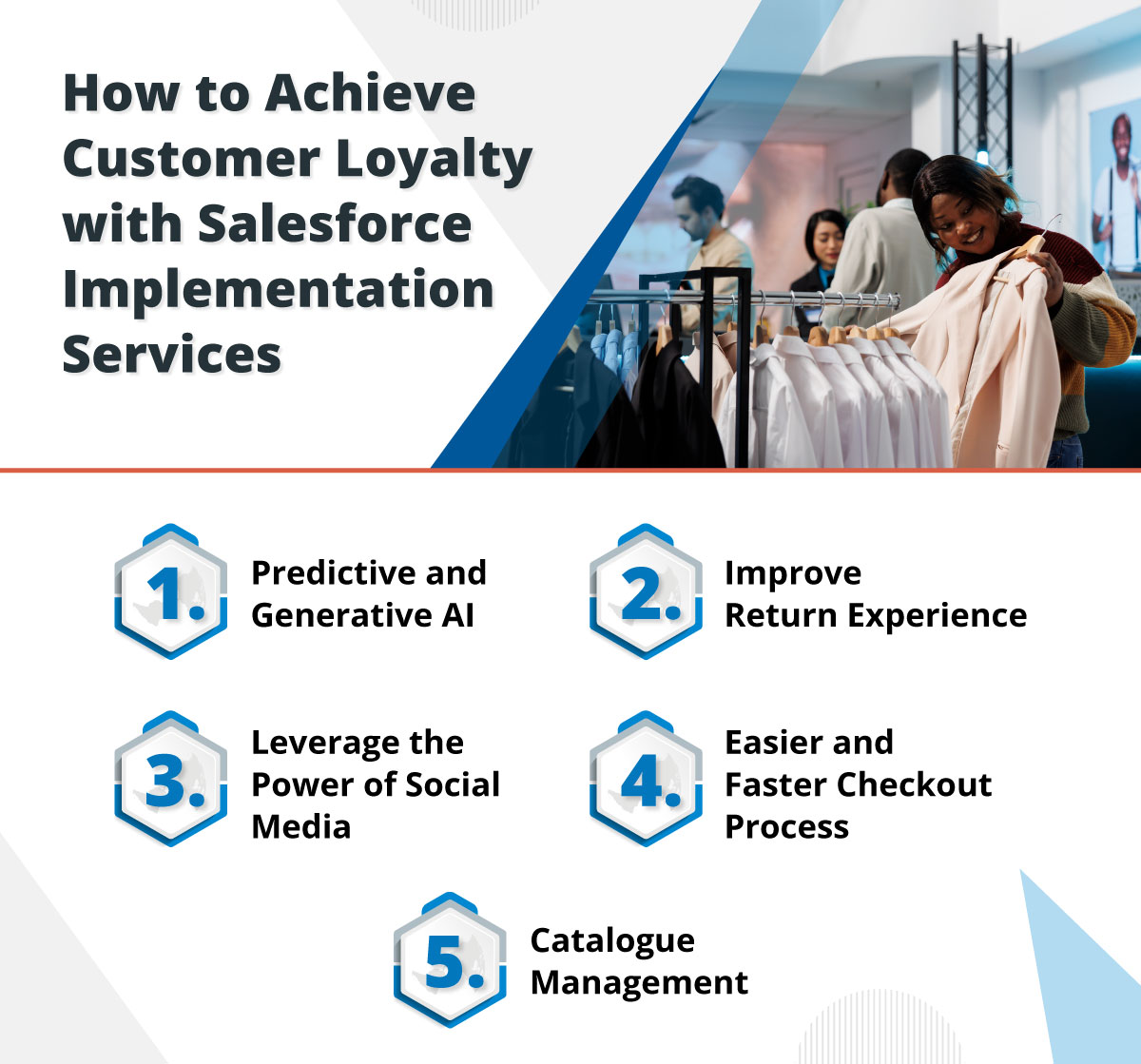
How to Achieve Customer Loyalty with Salesforce Implementation Services

Customer loyalty is how retailers can achieve their regular customers to stay and boost their business with them. But the question is how can they achieve this kind of loyalty and connection?

So, let’s have a look at some reliable ways retail businesses can work on achieving customer loyalty and make them stay for long for better profits. 

1. Predictive and Generative AI

The excitement surrounding GPT and other generative AI models is making waves this year, and these tools are becoming mainstream. Research shows that 17% of consumers have used GPT for product research and inspiration, and 10% are likely to use it for building their holiday shopping lists.

Predictive AI has long been integral to the online shopping experience. E-commerce merchants and digital marketers have utilized AI-generated product recommendations for years, offering suggestions on product detail pages, shopping carts, and beyond. With the rise of generative AI in Salesforce for retail, which uses human prompts, algorithms, and data to create original content like text, images, and music, we expect retailers to further personalize the shopping experience.

Retail businesses can thus take help from a Salesforce implementation company to leverage customer data to craft more personalized shopping experiences that add value and foster loyalty.

2. Improve Return Experience

Customers have become smart now. While picking a service, they not only look for the kind of product and service but also look into the return experience that the retail business promises to offer. Using Salesforce as a CRM can enable retailers to easily track every information of customer purchases, thus making it easier to apply a return policy on them. This will help in the quick verification of customer purchases to check if it’s applicable for the return. 

Emphasizing on improving the return experience of customers can help to boost trust among customers, giving them a sense of security while making a purchase. 

3. Leverage the Power of Social Media

Salesforce enables retailers to tap into the power of social media to forge stronger connections with their audience. Implementing Salesforce allows retailers to monitor and analyze interactions, which would help them to understand customer sentiments and preferences.

Retailers can also engage with customers in real-time through social listening by taking the assistance of a Salesforce implementation partner. This would enable retailers to promptly respond to customers’ queries and feedback. 

Having all the data in one place also enables them to run targeted social media campaigns that enhance customer engagement and loyalty, using insights from Salesforce analytics. 

4. Easier and Faster Checkout Process

Salesforce makes the checkout process simpler and quicker, enhancing the overall shopping experience. It helps to streamline steps to reduce friction and minimize cart abandonment.

Salesforce can also be integrated with various payment gateways that offer multiple payment options, enhancing convenience. Salesforce in retail business also enables secure and efficient transaction processing ensures customer data safety, building trust.

5. Catalog Management

Retailers also need to focus on how efficiently they manage their product catalog. It is crucial to have everything sorted as it helps in delivering the right products to customers at the right time. With Salesforce implementation services, you can access tools for managing the product catalog, providing retailers with centralized product information management, ensuring consistent and accurate data across all channels.

Salesforce implementation also enables retailers to work with advanced search and filtering options, allowing customers to find products quickly and easily. Retailers can also easily handle their work with automated inventory updates, preventing stockouts and overstock situations and ensuring customers always find what they need.

Hire Trusted Salesforce Implementation Services for the Retail Sector

If your focus is on customer retention, the journey starts with knowing your customers. This is where it is essential to record customer details over a centralized platform to easily access the details when needed. Implementing Salesforce is a way to get all the data sorted over a single platform, enabling retailers to manage and track all details properly. Retailers need to realize the power of Salesforce to maintain customer details and keep them closer to the business. 

That’s where you need a Salesforce implementation company that you can trust with your data. The right expert will help you leverage the capabilities and features of Salesforce to help you grow your retail business while retaining existing customers. Contact us and get such experts for your retail business to improve customer retention and loyalty. 

Achieve Successful Salesforce Mailchimp Integration with a Salesforce Integration Consultant

No business can underestimate the value of sending out personalized emails to customers to bring their attention to the business and services. But running such emails and tracking the performance of emails does require extra effort. For companies using an email marketing solution like Mailchimp, it can be difficult to pull customer data and every little detail from multiple systems and add to Mailchimp to schedule even a single email. This kind of struggle can be reduced with a Salesforce integration consultant working with your team.

Mailchimp has been used globally to send out and track emails. However, what enhances its efficiency even more is its integration with Salesforce. It allows you to manage all your Mailchimp activities from within Salesforce. 

Whether it is about managing campaign activities or acquiring the subscriber lists, or importing Salesforce contacts into Mailchimp, Salesforce integration services can make it possible for you by synchronizing both the platforms. 

In this blog, we’ll be focusing on the value that businesses can achieve when considering Mailchimp Salesforce integration with the assistance of a reliable Salesforce partner. 

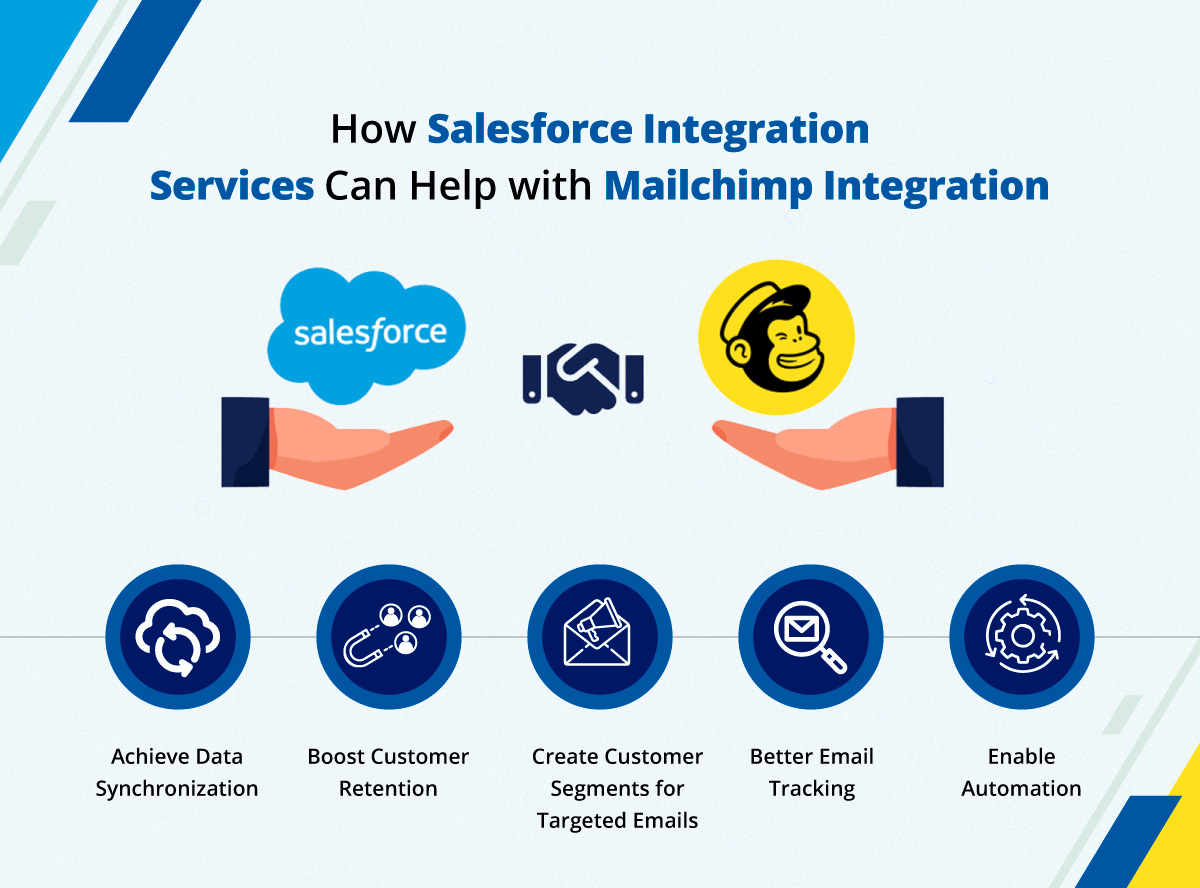
How Salesforce Integration Services Can Help with Mailchimp Integration

Both the platforms, Salesforce and Mailchimp, have their own importance for businesses and bringing these applications together opens a new door to enhanced operations and efficiency. The integration of these platforms enables you to manage Mailchimp activities easily within Salesforce and also enables you to fetch the respective Salesforce contacts easily in Mailchimp to plan, send, and track email campaigns. 

Now, let’s move ahead and understand the real value in detail and how Salesforce experts can help here. 

1. Achieve Data Synchronization

This integration enables seamless syncing and importing of data between Mailchimp and Salesforce, ensuring that contacts, subscribers, mailing lists, and more are always up-to-date in real-time.

The automated and scheduled data syncing process streamlines email marketing campaign management from both platforms. This optimization allows you to tailor your marketing campaigns based on customer interests and behavior, maximizing their effectiveness.

2. Boost Customer Retention

Marketing automation campaigns enable the sales team to create customized information to attract and retain customers. The integration between Salesforce and Mailchimp is commonly used to track customers’ purchasing history or intention, enabling the team to generate leads and conversions by linking clicked URLs back to the CRM.

A marketing team is usually caught up in numerous tasks and it can be difficult to track everything at once. That’s where email marketing can be simplified with Salesforce Mailchimp integration with the help of Salesforce integration consulting, so more focus can be given on strategies to retain customers and improve approach according to the performance.

3. Create Customer Segments for Targeted Emails

You can create audience segments based on specific criteria, automatically updating contact and lead information in Salesforce CRM. This enables you to target your intended audience with personalized emails or newsletters.

Segmentation involves grouping and tagging customer information based on specific criteria, allowing you to segment your email subscriber data according to buyer personas. This targeted approach helps you reach niche and restricted customers more effectively.

4. Better Email Tracking

With Salesforce and Mailchimp integrated, marketers can easily track leads, subscribers, and manage campaign activity from both platforms. This integration provides rich and meaningful insights through data synchronization, showing how customers are responding to emails. 

This keeps the team updated on all the insights, allowing them to optimize email campaigns for more targeting as needed. You can have all the metrics in a single view to analyze what emails are performing well and find out what changes can be made to get better results.

5. Enable Automation

Gone are those days when you had to schedule emails one by one for each day. This is the time of automation that can be applied to your email marketing as well, thanks to the integration of Salesforce and Mailchimp. This application integration automates repetitive tasks, saving time and reducing human errors. The time saved from mundane tasks can be utilized to optimize marketing campaigns effectively.

Connecting Mailchimp with Salesforce with the help of Salesforce integration services enables the marketing team to automate their email campaigns for their targeted audience while they can focus on other essential activities. This eliminates the need to manually send out emails every time. The team can simply automate and schedule emails, which will go out automatically on the scheduled date and time. 

Hire a Salesforce Integration Consultant to Simplify Your Email Marketing

Integrating Mailchimp with Salesforce enables marketers to optimize email marketing campaigns from a single, unified view. Marketers can seamlessly view and manage campaign data from both platforms. This integration not only enhances email targeting but also supports the management of other social media campaigns within Salesforce.

Easily track campaign reports and create interactive dashboards to monitor click rates, open rates, and subscriber activity directly in Salesforce. The integration ensures real-time syncing of campaign data for immediate updates and insights. However, to get this power of integration, you need the assistance of the best Salesforce integration consultant. Contact us to get in touch with our reliable experts and get your applications integrated with Salesforce.

Hire a Salesforce Administrator to Work With Top 8 Features from the Summer ‘24 Release

It’s time for the Salesforce Summer ‘24 release, and everyone from developers to admins will be waiting to try out all the latest features that the new release has for them. As we know, thrice every year, we sit tight to uncover the amazing updates and features from Salesforce; this summer also got a lot of surprises, especially for Salesforce administrators. If you are about to hire a Salesforce administrator, make sure to leverage the latest features from Salesforce.

We’ve taken some time to evaluate all the latest features that can enhance the productivity of an admin. In this blog, we’ll be talking about the top 8 Salesforce features from Summer ‘24 release, which will be most effective for Salesforce admins to boost their work efficiency and productivity. 

Top 8 Features From Salesforce Summer ‘24 for Admin

We have got something for Salesforce administrators that will cheer them up as Salesforce has brought a range of new features and updates that will completely transform  the way they have been working. All these new features would help them to boost their productivity and enable them to be able to do more work more efficiently. 

Now, let’s cover these updates that will change the way you are handling the activities if you are a Salesforce admin. 

1. Use Einstein for Flow

Einstein for Flow is an innovative tool that enables users to effortlessly create workflows by describing their automation needs in natural language. Simply provide a text prompt outlining your desired automation, and Einstein for Flow will generate a draft workflow for you.

For instance, if you want to set up a notification system for sales representatives whenever a lead is converted to an opportunity, you can simply describe your requirement, and Einstein for Flow will generate the corresponding workflow code.

2. Find Field History Tracking

A new Field History Tracking page is now available in Setup, giving you control over tracked objects and fields. This page allows you to view the number of tracked fields upfront before making any changes. 

You can efficiently update fields for multiple objects in succession, avoiding the need to navigate to each object individually in Object Manager. The list of fields opens in a side panel, where changes can be saved before moving to the next object from the main list.

3. Enhanced List View Performance

Regarding the List View tab, you can anticipate improved performance for your list views thanks to several behind-the-scenes changes. List views for custom objects will now be rendered using Lightning Web Components (LWC) instead of Aura, resulting in significantly faster performance. You can hire a Salesforce administrator to get the help you need here.

4. User Access Policies to Migrate and Automate User Access

You can now define user access policies to manage access for groups of users more efficiently. For instance, you can specify a group of users to grant or revoke access to permission set licenses, permission sets, permission set groups, package licenses, queues, and groups in a single operation.

User access policies are now generally available, and you can create up to 200 active policies, a significant increase from the previous limit of 20. 

5. Automation Lightning App

Introducing the Automation Lightning App, your central hub for all automation-related tasks. Users with access to this app can conveniently view flows, errors, and community-based links directly from the main application interface. This marks the first time such comprehensive automation features are accessible outside of the Setup menu.

6. Ability to Add New Custom Fields to Dynamic Forms-Enabled Pages

Adding new custom fields to Dynamic Forms is now faster and more straightforward than ever! This highly anticipated enhancement streamlines the deployment of new fields to Dynamic Forms.

To add a new custom field, create your custom form as usual. After setting field-level security, you’ll find a new step where you can select the Lightning record page(s) to add the new field.

7. Align Fields on Dynamic Forms-Enabled Pages Using Blank Spaces

In a move to further align standard page layouts with Dynamic Forms, you can now include blank spaces in Dynamic Forms-enabled pages. While seemingly small, this enhancement can greatly enhance the overall appearance and layout flexibility of your pages.

8. Obtain a Summary of User Permissions and Access

Troubleshooting user permissions and access has become more straightforward, with the User Access Summary now available on user records. This summary view conveniently displays various permissions and memberships in an easy-to-navigate format, which you can access with Salesforce developers and admins.

Winding Up

These were the most amazing Salesforce Summer ‘24 release features that admins can try out. Every release brings something new for developers and admins, but there’s always the need to know what features work well for them. This is why you should hire a remote Salesforce developer who can help you understand which feature is suitable for your business. The best experts can even help your team work with those features and make the most of them. 

So, if you want to work with these features, contact us and get the most experienced Salesforce professionals to assist you. 

Hire a Salesforce Sales Cloud Consultant To Empower Your Sales Team

Sales is the lifeline of all kinds of businesses. This is the reason the sales team usually remains under pressure, and it is always expected of them to excel and enhance their productivity for better results. This is something they might not be able to do alone. Having a Salesforce Sales Cloud consultant could be a game changer here.

Salesforce Sales Cloud can be the ultimate sidekick of the sales team of any business that has been looking for a way to improve their workflows and enhance their productivity. It’s the platform that can supercharge your sales, manage customer details, enable teams to access valuable insights, and automate tasks for more efficiency and better results.

All the capabilities of Sales Cloud truly makes it a superhero for the sales team. All it is needed is to access the right features to make the most of the platform. 

In this blog, we’ll be discussing how using Sales Cloud with the help of a certified Salesforce consultant can help the sales team to be more efficient. 

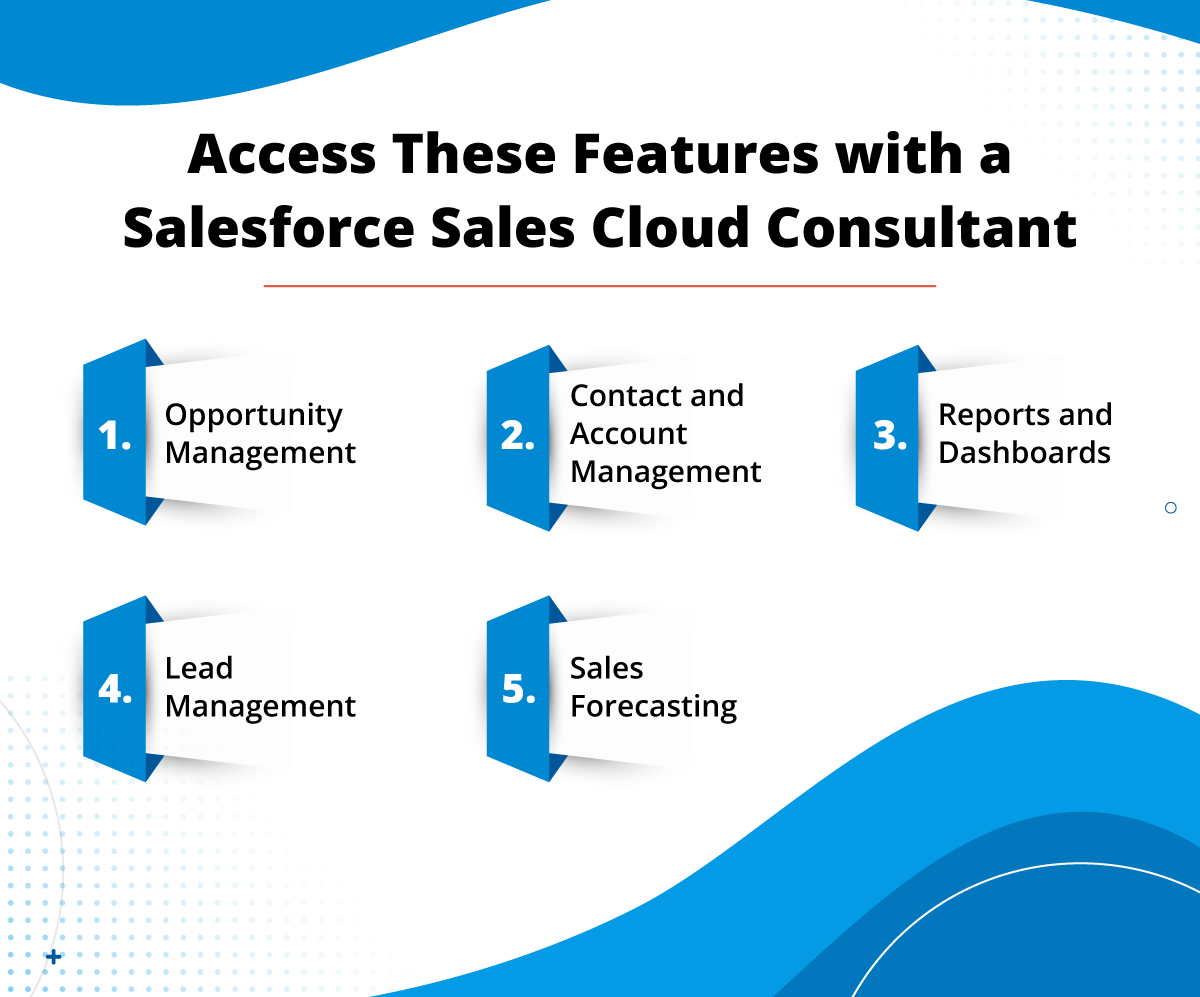
Access These Features with a Salesforce Sales Cloud Consultant

Sales Cloud is all about enabling the sales team to excel and boost their productivity to bring in better results for the company. But the question is how does it help the team to do so?

This is possible with the features that Sales Cloud offers to manage and track everything, whether it is about contacts or leads. As we move ahead, let’s look at the main features of the Sales Cloud and understand them all in detail.

1. Opportunity Management

Using Salesforce Sales Cloud is a way to manage opportunities effectively, optimizing them for enhanced conversion rates. There are many cases when businesses end up missing out on valuable sales opportunities when their sales representatives are preoccupied with other deals. These issues can be resolved with Sales Cloud, as it enables teams to monitor your opportunities in real time, ensuring no opportunity slips through the cracks.

You can also assure that you always stay ahead of the competitors and their strategies with Salesforce customization and using opportunity management the right way. With this feature, you can get a comprehensive view of all your sales opportunities and the current status of your deals whenever you need.

2. Contact and Account Management

It’s crucial to distinguish between a contact and an account. A contact refers to an individual customer or prospect, while an account represents a business that purchases your offerings. An account can include multiple contacts, each with distinct needs and preferences.

Salesforce Sales Cloud provides a digital, centralized CRM platform to streamline contact and account management. This enables the sales team to store all data related to contacts and accounts, helping the sales reps to easily access it. This is all possible with a comprehensive view of all the needed details. This holistic perspective enhances your sales processes and empowers your sales team to close more deals.

3. Reports and Dashboards

The dynamic dashboards ensure that everyone from the sales team is aligned and eliminate any potential for confusion. Additionally, customizable dashboards promote smooth collaboration between your sales and marketing teams.

Salesforce customization services allow users to create customizable, data-driven reports through which users can analyze the performance of the sales team. Also, working with Salesforce Einstein allows reps to gain valuable insights into the business records and the team’s activities.

4. Lead Management

Your sales processes hinge largely on your lead management strategies. Effective lead management not only boosts traction but also enhances conversion rates and ensures a strong return on investment.

A key feature of Salesforce Sales Cloud, lead management is highly sought-after for its ability to help sales representatives capture, score, and nurture leads on a centralized platform. When a lead is captured through a specific channel, it is automatically added to a sales pipeline accessible to Sales Cloud users. Here, sales reps can score leads based on their behavior and likelihood of conversion.

Lead scoring with a Salesforce Sales Cloud consultant enables sales reps to prioritize leads that are more responsive, streamlining the sales process. Once leads are qualified, they are nurtured based on their needs, preferences, behavior, and actions taken, increasing the likelihood of conversion. Additionally, lead management in Sales Cloud ensures that high-priority leads are dealt with promptly while allowing sales reps to continue following up with lower-priority leads to prevent missed opportunities.

5. Sales Forecasting

Salesforce Sales Cloud’s forecasting feature analyzes customer behavior and transaction history to predict your sales over a specific period. If you have considered Salesforce customization, forecasting will help in risk management and enable the team to make informed decisions for sales campaigns.

Furthermore, sales forecasting instills a sense of security by preparing you for future business outcomes.

Hire a Salesforce Sales Cloud Consultant Today

Salesforce Sales Cloud helps to prioritize customers in your business operations, ensuring their enhanced experience and your business’s success through tailored interactions. By utilizing current data, sophisticated analysis, and automation capabilities, Sales Cloud enables businesses to forge robust relationships with their clients within the Salesforce ecosystem. 

Nonetheless, if you want to unlock the complete potential of Sales Cloud, Salesforce customization services can help you do that. Contact us and get the certified Sales Cloud professionals to evaluate your business and provide solutions to your existing challenges.

How Does a Salesforce Development Company Ensure Maximum Security?

Whether you are a Salesforce user or a Salesforce development company, implementing a solution for a client, one thing you always keep on the top of your mind is to ensure that the data on the solution remains safe. The same is while building any Salesforce app; along with adding all the functionalities, ensuring the top-notch data security is also necessary. 

While everybody is aware of how crucial it is to ensure data security, there are chances when users miss out on following the right methods to do so. So, in this blog, we’ll be discussing the best security practices that should be followed when considering Salesforce development to ensure the solution is safe and maintains all data securely. 

Best Security Practices Followed by Top Salesforce Development Company

It doesn’t matter how complex of a Salesforce solution you build or how advanced functionalities you might add in the solution, but one thing you definitely need to focus on is to ensure that the app is robust and completely secure.

Mostly, all Salesforce development services remain alert on upgrading the security of the Salesforce solution and take necessary steps to ensure that. Here, we’ve accumulated some of the best practices to ensure top-notch Salesforce security. 

1. Use Effective Authentication Methods

For Salesforce users who are looking for ways to enhance the security of their CRM should definitely go with robust authentication methods. Starting from the basics, it is necessary to consider using complex and strong passwords to secure the Salesforce org. In addition to this, you should consider changing your password after regular intervals and using one of the free password managers recommended by Cybernews. In addition to this, you should consider changing your password after regular intervals and using one of the free password managers recommended by Cybernews. 

Also, it is mandatory for Salesforce users to implement multi-factor authentication (MFA). This will ensure the addition of an extra layer of security to keep the org safe. This enables them to use two or more factors to conduct the verification before the user can get access to the system. This ultimately decreases the chance of unauthorized access to the org.

2. Ensure Working with Data Encryption

If the discussion is about ensuring that the foundation of your Salesforce environment is secure, encrypting any kind of sensitive data is a must.

The encryption provided by Salesforce is very efficient, allowing teams to secure their sensitive data, ensuring that no core functions of the platform are compromised. This means that even when you encrypt your data for utmost safety, it won’t be affecting your operational efficiency and experience at all.

But while working with encryption, you need to make sure that your strategies are customized according to your requirements and also to meet industry standards. This not just helps to improve the data security but also assures you that you are in compliance with the related guidelines and law. 

3. Enforce User Permissions

Apart from the encryption, you will also have the ease to control the user permissions, enabling you to control who all can access the org. This will help you specify which users can have the edit or delete access or which ones can just be granted with the view access. 

You can follow the principle of least privilege with the help of a Salesforce development company, which will help you ensure that users have access only to the information which is required for their roles. You need to regularly review and adjust these assigned permissions to align with changes in roles or responsibilities. This will help in minimizing the risk of data breaches.

4. Go with Audit Trails

Audit trails are of an essential importance in monitoring and analyzing user activities within Salesforce. This method helps teams to  identify any irregular patterns or unauthorized access attempts on your Salesforce org, so you can take prompt action. It is essential to regularly review the audit logs to evaluate how data is accessed and by whom. This will help to promote accountability and boost data security.

5. Work with Salesforce Health Check

Salesforce also provides an incredible tool, Health Check, designed to help administrators assess their security settings against best practices recommended by Salesforce. This tool provides a score for your settings, highlighting areas that may need improvement. Regular use of the Health Check tool can assist in maintaining optimal security configurations and keep your data safe.

6. Update and Patch on Regular Basis

To maintain the utmost level of security, you need to ensure that both Salesforce development and any integrated applications are kept up to date and any new releases have been updated on a quick basis. Updates frequently include patches for security vulnerabilities, which need to be fixed as soon as possible to prevent any kind of threat. 

By ensuring your Salesforce environment is consistently running the latest version, you significantly reduce the risk of exploits. This will enable you to fix any vulnerabilities before they can do any damage. 

7. Training is Necessary

It is a known fact that any kind of human error can cause a significant risk and might lead to data breaches. You need to make sure you are conducting regular training sessions for your users, upgrading them about essential security best practices, phishing awareness, and the importance of data protection can greatly mitigate this risk. 

Educating users about potential threats and how to identify them is essential for ensuring a secure Salesforce environment. This will enable them to work with Salesforce efficiently, keeping all essential information in mind. 

Secure Your Data with a Salesforce Development Company

It can be clearly understood that it is an ongoing process to keep your data safe and updated. The more proactive you are to ensure following all the best security practices, the more safe your data will be. 

However, to ensure such a level of enhanced security, you need to get the assistance of the best Salesforce developers who will assist you in Salesforce development and implementation. Contact us and get such certified and experienced developers to help you with enhanced data protection.

Looking Forward to Improve Global Communications? Check This

Global business expansion is a productive move for growing businesses. The more exposure a business gets, the more opportunities it creates. So, one should always be equipped for quality conversations globally. Otherwise, large-scale enterprises may have to face a loss of $62.4 million per year.

Now, let’s consider a scenario: you’re expanding your business globally and need to connect with potential clients in various time zones. How would you efficiently manage to schedule these crucial meetings?

You will probably figure out the time zone to calculate their local time.

Don’t you think it will require resources, manual work, and some additional tools to calculate the Salesforce time zone?

To avoid any time zone hassles, we have something to streamline your global communications: 360 local time zone finder. 

Today, in this blog, we will discuss what you can do to streamline your global interactions with the help of 360 local time zone finder.

Why you Should opt for 360 Local Time Zone Finder for Salesforce Time Zone Tracking

Maximize the Impact of Calls and Texts Globally

Just imagine what it takes to make your calls and texts productive. The first and foremost thing is the timing. To ensure the right timing, you should be able to track the time zone in Salesforce.

Let’s say your prospect asked you to call at 11:00 a.m. according to his time zone. But just because you didn’t pay heed to the time difference due to the time zone, you called him at 11:00 a.m. as per your time zone. And at that time, it was 8:00 p.m. in the customer’s time zone.

Just think about where this approach will lead.

An annoyed customer.

Do you think you will be able to convert that prospect into a lead by delivering such a kind of experience? Obviously not. 

That’s why Salesforce time tracking for different time zones is essential. 360 local time zone finder allows you to schedule text and calls based on the customer’s time zone without manually calculating it. You can see the customers’ updated local time in real-time on the record page, thereby streamlining your communications via text and calls globally.

Redefine your Support Services Globally with the Salesforce Time Zone Tracking

Imagine this scenario: you’ve got a prospect who’s miles away, residing in a completely different time zone, and they urgently need your support. Now, your standard resolution time for tickets is 48 hours from the moment they’re received. But wait a minute, how do you calculate those 48 hours accurately when you’re dealing with different time zones?

That’s where the magic of 360 Local Time Zone Finder comes into play for Salesforce time tracking for different time zones. Instead of scratching your head trying to figure out what time it is for your prospect, this nifty app does the heavy lifting for you. It gives you real-time updates on your customer’s local time, so you can precisely track when their 48-hour window starts and ends.

No more confusion, no more missed deadlines – just seamless support services redefined on a global scale. With 360 Local Time Zone Finder, you’re equipped to tackle customer queries efficiently, no matter where they are in the world.

Foster Timed Meetings Globally to Avoid Cancellations and No-shows

Let’s talk about meetings – they’re essential, but let’s face it, nobody wants to attend one after regular business hours. I mean, who’s thrilled about discussing spreadsheets or project updates when they’re outside business hours?

Enter 360 Local Time Zone Finder to save the day by tracking the time zone in Salesforce. This handy tool swoops in and solves the puzzle by helping you schedule meetings at the perfect time for everyone involved. No more guessing games or risking no-shows – with accurate time zone tracking, you can foster timed meetings globally, reducing cancellations and no-shows. 

Therefore, whether you are planning a meeting or need to manage clients scattered across different time zones, you can depend on 360 local time zone finder to ensure that your meetings are always on schedule with no cancellations or no-shows. You can consider the 360 Local time zone finder your personal assistant that helps you stay in sync with anyone else in the world, despite your location.

Coordinate Better with Colleagues in Different Time Zones for Streamlined Operations

Let’s shift our focus to a more interesting part: teamwork across different time zones. You know it’s not easy—it’s like balancing several plates with one hand while riding a unicycle. Now, you have a team sitting anywhere in the world, but still, they are all trying to maintain high-end performance. But here’s the challenge: coordinating jobs, meetings, and deadlines is not easy while coordinating with teams across borders.

That’s where the beauty of 360 Local Time Zone Finder comes in. Picture this: instead of playing a game of virtual tag trying to catch your colleagues when they’re online, this nifty tool gives you instant insight into their local time. It’s like having a cheat code for global collaboration.

With 360 Local Time Zone Finder, you can wave goodbye to endless back-and-forth emails trying to figure out when everyone’s available by using Salesforce time tracking for different time zones. Instead, you can glance at your colleague’s current time and coordinate tasks, schedule meetings, and more to keep operations streamlined.

Conclusion

Improving global interactions is no longer a hard nut to crack. You just need the right tool by your side for tracking time zones in Salesforce. With advanced time zone tools, like 360 Local Time Zone Finder, global teamwork and coordination will always be much easier than before. This tool helps you achieve this, providing you with customers’ local time in real-time. Thus, users can ensure an effective flow of communication globally, which ultimately facilitates efficient operations, eliminates missed opportunities and fosters tighter bonding between the globe’s different parts. Therefore, if you’re willing to amp up your global communication level to a higher gear, don’t hesitate to get the app straight away – it is so close to the tips of your fingers. You just need to contact us.

The Value of Salesforce Consulting Service to Simplify Loan Management Process

The mortgage and financial landscape has become very broad these days. From connecting with customers in rural townships to maintaining relationships with customers in bustling metropolitan cities, lending institutions and financial services are expanding their support and assisting customers with their required service. Such companies need to manage operations across different platforms and offices, so they need a system where they can manage data on a centralized platform. That’s where companies need assistance from a Salesforce consulting service by trusted experts. 

Being the most trusted CRM solution, Salesforce is always the first choice for financial services to manage operations over a centralized platform. This helps teams to stay connected on updated real-time information about customers, making it easier for them to provide relevant services. 

But all the potential of Salesforce can be realized when you have the support of the top Salesforce consulting firms. From enhancing agility of process to providing exceptional customer service, Salesforce developers can help you in all ways. 

Financial institutions prioritize serving customers well, driving them to seek efficiency improvements. Process automation is pivotal in this endeavor, replacing manual, disconnected credit and lending processes with digital, automated solutions.

While this marks progress, complete efficiency requires integrating risk analytics and decision-making into other business systems. Salesforce exemplifies this integration with its widely-used customer relationship management (CRM) solution in financial institutions.

However, many banks, card issuers, and fintech companies still manually extract and duplicate data from Salesforce for credit checks, risk scoring, and due diligence processes using legacy systems. This is why having the right support of experts is necessary.

In this blog, we’ll be emphasizing the value of Salesforce for lending institutions to simplify loan processing and management and how having the right Salesforce experts can help you make the most of Salesforce. 

How Salesforce Consulting Service Can Help Financial Services with Loan Management

Whether it is a mortgage broker, a lending firm, or any financial advisor, all of them face complexities in the operations of loan process and managing at some point. Verifying the loan application details to fastening the approval process, there’s a lot to be taken care of. 

Salesforce makes this possible by centralizing all the information across multiple systems, providing an easier view to agents. But that’s not all. Let’s get into different other ways how using Salesforce with the help of a trusted Salesforce consulting service can support financial services to manage loan applications and processing.

1. Streamlined Loan Process

Loan processing can be a complex task, especially when you don’t have the track of needed customer details.

Salesforce provides teams with the needed assistance, helping them through each stage of the loan application process. It helps to maintain a smooth information flow between borrowers, lenders, and credit bureaus, cutting down on paperwork and speeding up loan approvals, thus boosting efficiency.

2. Personalized Customer Service

As a CRM solution, the idea of using Salesforce is always to improve customer service and management. For any business, customers are always at the center of operations. Any business will flourish if it is able to provide personalized experiences to customers. That’s what the Salesforce consulting company enables them to do. 

Salesforce offers lending institutions an intuitive platform through which loan officers and agents can efficiently get aligned in conversations with customers and can understand their expectations and requirements. This enables them to offer tailored support and guidance through which they can enable effective customer relationships. 

3. Increase Mobile Accessibility

Embrace the convenience of mobility with Salesforce’s mobile app. Loan officers can now access critical information, manage applications, and communicate with borrowers anytime, anywhere. This agility empowers financial institutions to deliver exceptional customer service, no matter where they are.

Having the support of the trusted Salesforce consulting company, any lending institution or mortgage company can get their custom Salesforce solution made that can enable them to manage their operations on the go. 

4. Continuous Innovation

Salesforce continually strives for excellence by introducing new features and enhancements. This gives financial institutions the ease to work with the latest technologies and best practices. Not only this, with Salesforce, teams can also get help from the dedicated support team that is available to assist you every step of the way, ensuring a smooth and successful implementation.

As Salesforce keeps on releasing three major releases every year, a reliable Salesforce consulting service can enable you to upgrade your solution with the latest features. Your growing business will always have a solution you can rely on that will be flexible to handle your operations. 

5. Real-Time Data Access

For lending institutions and financial services, agents always have to deal with a lot of numbers associated with numerous customers. This increases the need for agents to stay updated on any slight change in the financial details and records. Salesforce can be of great help here, enabling teams to get real-time access to customer data. 

Being a centralized platform, Salesforce enables all different teams to easily access data with a unified view, keeping all teams connected and aligned over a single source of truth.

Get a Salesforce Consulting Service You Can Trust

Salesforce revolutionizes loan management, offering financial institutions more than just streamlined operations. It enhances customer experiences, fostering growth and profitability. It supports every feature that could simplify loan processing and management. 

However, you need to understand all the features of the Salesforce solution to use them wisely for lending operations. Contact us and get certified experts to implement Salesforce and guide you through it so your team can use the platform efficiently and get the best out of it for business growth. 

Quiz Time

Which of these is not a way to improve the loan management process with Salesforce?

a). Personalize customer service

b). Improve catalog management

c). Enable mobile accessibility

d). Get real-time data access

Show Answer: b) Improve catalog management

logo Live Chat