

Table of Contents

To verify email address in Salesforce, you have two routes. The built-in method covers user accounts. For leads, contacts, and bulk CRM records, Salesforce checks formatting only and never confirms whether a mailbox is live. This guide covers both paths and shows you exactly where native Salesforce stops and what to do next.
There are two ways to verify email address in Salesforce, and they are built for different record types. For user accounts, Salesforce triggers a native confirmation email when an address is changed on the user record. For leads and contacts, Salesforce validates only the format of what gets entered. It does not test whether the mailbox is live, the domain is active, or the address will actually receive your next campaign. That is the gap that causes most deliverability problems in CRM databases.
This guide covers both methods in order. Whether you are a Salesforce admin verifying a user account or a marketing ops professional managing a database of thousands of leads, the steps below walk through each scenario. Jump to the comparison table if you want a quick view of which method applies to your use case before reading further.
Not sure which verification method fits your Salesforce setup?
Most Salesforce orgs have a mix of user accounts & leads that each need a different approach.
Table of Contents
How to Verify a User’s Email Address in Salesforce
Salesforce handles user email verification automatically. When an admin or the user updates the email address on a user record, Salesforce sends a confirmation to the new address. The user clicks the link, and the change takes effect.
Here is the exact path in Lightning Experience:
- Open Setup from the gear icon in the top right corner.
- Type Users in the Quick Find box and select Users under Administration.
- Click the name of the user whose address needs to be updated.
- Edit the Email field with the new address.
- Save the record.
- Salesforce sends a verification email to the new address.
- The user clicks the confirmation link to complete the update.
In Salesforce Classic, the Setup path is the same. The entry point differs visually, but the steps from Users onward are identical.
A few details worth noting: if the user does not click the link, the address does not update. The old address stays active. This matters during onboarding or when making bulk account changes, because an unconfirmed update can create confusion around who is receiving system notifications and workflow emails.
What this method does not cover: it only applies to user records. It does not verify leads, contacts, or account-level email addresses. It also only confirms that someone clicked a link, not that the mailbox is actively monitored or capable of receiving future emails. For everything beyond user records, you need a different approach. You can also read Does Salesforce Have Email Validation? to understand the full scope of what Salesforce handles natively.
How to Verify Lead and Contact Email Addresses in Salesforce
This is where most Salesforce admins and marketing teams run into a real problem. The native options exist, but each one has a specific limitation that matters when you are trying to protect deliverability and CRM data quality.
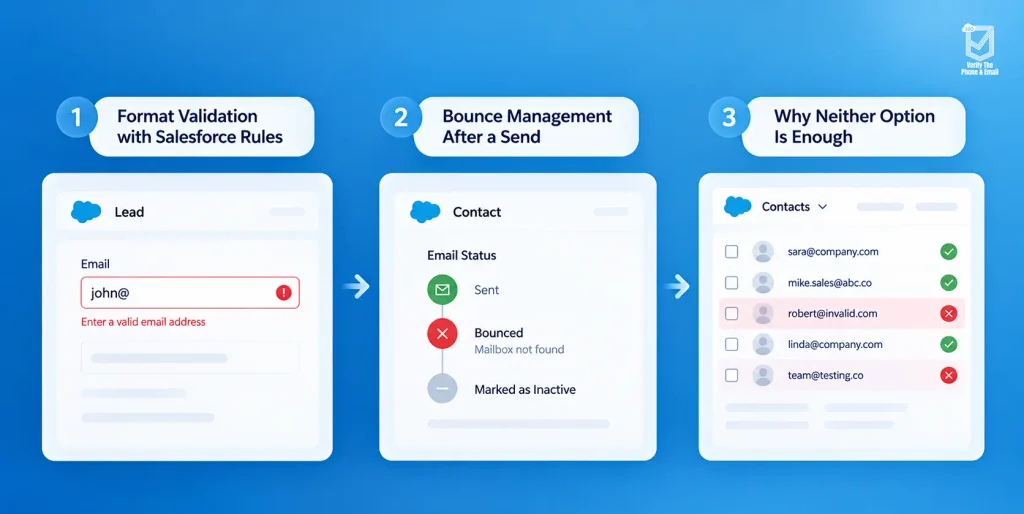
Format Validation with Salesforce Rules
A validation rule can enforce basic email formatting at the point of entry. It catches things like a missing @ symbol, an incomplete domain suffix, or obvious typos in the address structure. This is useful for keeping clearly malformed addresses out of the database.
What it does not catch: an address that looks perfectly formatted but belongs to a deactivated mailbox, a company domain that shut down, or a catch-all inbox that accepts every incoming message and delivers none of them to a real person. These addresses pass every format check and still generate bounces when you send.
Bounce Management After a Send
Salesforce tracks hard bounces at the contact and lead level. When an email comes back as undeliverable, Salesforce flags the record. Over time, this helps identify unreachable addresses in your database.
The problem is timing. By the time Salesforce flags a bounce, the send has already happened. The damage to your sender reputation has already occurred. Repeated bounces from an unverified list push your domain toward spam filters, and recovering a damaged sender score takes longer than the damage itself. Bounce management is reactive. It is not a substitute for verifying before you send.
Why Neither Option Is Enough
Format checks prevent structural errors. Bounce management catches failures after the fact. Neither option answers the question that actually matters for campaign planning: can this email address receive a message right now?
That gap is why teams managing large-scale lead databases need a verification layer that tests the mailbox directly, without sending an email, before any campaign goes out.
A Salesforce database can have a zero-error rate on format validation and still generate a bounce rate above 5 percent on the first campaign send. Formatting rules catch structural problems. They cannot detect dead domains, deactivated inboxes, or addresses abandoned by the person who originally provided them.
Which Email Verification Method Should You Use?
| Method | Confirms Mailbox Exists? | Best For |
| User verification (built-in) | No | Admin and user record setup |
| Validation rule | No | Catching format errors at entry |
| Email bounce management | After a bounce occurs | Post-send cleanup |
| Verify the mail | No | Real-time and bulk verification before sending |
Why Verifying Email Addresses in Salesforce Matters
Most teams understand in principle that bad email data is a problem. The part that is less well understood is the specific way each type of problem compounds. A high bounce rate does not just mean fewer delivered emails today. It creates conditions that make every future email harder to deliver, regardless of how clean the next list is.
Deliverability
Inbox providers including Google and Microsoft score your sending domain based on a range of engagement signals. Bounce rate is one of the most direct negative signals you can produce. When your bounce rate climbs past roughly 2 percent, inbox providers begin routing more of your emails to spam folders, not just for the campaign that generated the bounces, but for subsequent campaigns going to different segments entirely. The sender score attached to your domain is a persistent signal. Damage it with one poorly-verified list and you carry that damage into every future send.
Recovering a damaged sender reputation is a slow process. It typically involves months of reduced send volumes, re-engagement campaigns to highly engaged subsets, and strict suppression of anyone who has not opened in a defined window. Avoiding that situation in the first place by verifying before you send is the significantly lower-effort path.
Data Accuracy
Every email address in your Salesforce database represents a sales rep’s time, a marketing team’s targeting decision, or a pipeline forecast figure. When a meaningful percentage of those addresses are invalid, the downstream effects touch everything that depends on that data. Reps work leads they cannot actually reach. Sequences run to contacts who will never engage. Reports show pipeline volume that is not real because a portion of the contacts in those records are unreachable by the primary channel your team uses to work them.
This is particularly relevant as Salesforce AI features become more central to how teams use the platform. AI-driven scoring, next-best-action recommendations, and predictive analytics all train on the data in your org. Dirty data does not just affect deliverability. It affects the quality of every insight and recommendation your team draws from Salesforce.
Cost
Most email marketing platforms and outreach tools price by volume, either by the number of emails you send or by the size of the list you maintain. When a portion of that list is invalid, you are paying to store and send to contacts you will never reach. For teams sending at scale, even a 10 percent rate of unverifiable addresses represents a meaningful share of spend producing zero return. Running a verification pass before a large campaign, and maintaining a regular schedule of database hygiene, is one of the most direct cost-control measures available to a marketing ops team.
Compliance
Verification keeps stale and invalid records out of your active marketing flows, which directly supports GDPR’s data accuracy principle. Organizations operating under GDPR have an obligation to ensure that personal data they hold is accurate and up to date. Keeping invalid email addresses in active contact records works against that obligation.
What verification does not do: it does not replace consent, establish a lawful basis for processing, or satisfy the other requirements of GDPR compliance. Similarly, under CAN-SPAM you still need a working opt-out mechanism and a physical mailing address in every commercial email you send. Verification is one element of a responsible data handling practice, not a standalone compliance solution. For authoritative guidance on CAN-SPAM specifically, refer to the FTC CAN-SPAM Compliance Guide.
How VTM Verifies Email Addresses Inside Salesforce
VTM (360 Verify The Mail) is built as a Salesforce-native app, which means it operates inside your existing CRM environment rather than as a separate platform you export data to and import results from. The distinction matters for data security, for workflow continuity, and for the accuracy of results, because verification happens against live records in context rather than against a snapshot exported at a point in time.
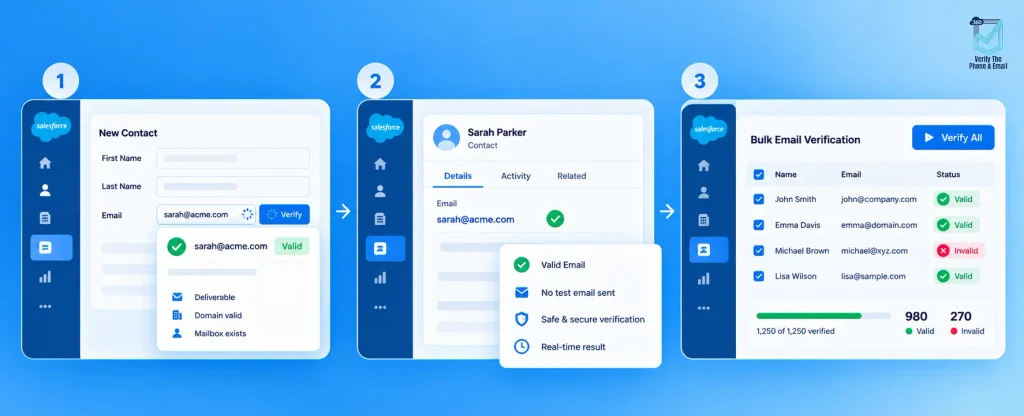
Real-Time Validation at the Point of Entry
When a rep manually adds a new lead, or a form submission creates a contact record in Salesforce, VTM checks that address immediately as part of the record creation process. If the address is invalid, risky, or undeliverable, it gets flagged in real time before any workflow, sequence, campaign, or assignment queue touches the record.
This changes the shape of the problem you are solving. Rather than running periodic cleanup campaigns against an accumulating backlog of bad data, real-time validation stops bad records from building up in the first place. Teams that implement entry-point validation typically find that the size of their database hygiene projects shrinks significantly over a twelve-month period, because the rate of bad data entering the system drops while existing cleanup work reduces the legacy backlog. Clean data at entry also means that every metric your team tracks, from lead conversion rates to pipeline coverage, reflects contacts you can actually reach.
Validate Without Sending a Test Email
VTM checks three things for each address: whether the domain is valid and currently accepting mail, whether the receiving mail server responds correctly to an SMTP handshake, and whether the specific mailbox exists at that address. No test email is sent at any point in this process.
That last point is worth emphasizing because the alternative approach, sending a low-volume test email to check which addresses bounce, has real costs. It uses up sender reputation on a send that produces no value. It may trigger spam filter responses if done at volume. And it contacts real people in your database without any campaign intent, which creates compliance considerations of its own. VTM’s server-level verification approach answers the same question, which is whether this address can receive mail, without any of those risks. This makes it particularly practical when you need to validate email addresses in Salesforce ahead of a major send and need confidence in the list without running a pre-campaign test.
Bulk Verification for Existing Databases
For databases that have been accumulating contact records over months or years without a systematic verification step, VTM supports batch verification across leads, contacts, and accounts in a single run. You do not need to work through the list in segments or manage multiple exports. The verification job processes the records inside Salesforce and returns results with status labels that tell you exactly what you are working with: which addresses are valid and deliverable, which are invalid, which are risky, and which need attention before your next send.
Those status labels feed directly into your segmentation logic. Rather than making manual decisions about which records to suppress or re-engage, you have a structured output you can act on immediately. Suppression lists update. Campaign audiences tighten. The next send goes out to a database that has been checked, not assumed.
For a full walkthrough of the verification workflow, see the How It Works page. If you are evaluating options before deciding, the best Salesforce email verification apps compared post covers how VTM stacks up against other AppExchange tools on the criteria that matter most for CRM data quality.
When Should You Re-Verify Your Salesforce Email Data?
Verification is not a one-time event. Email addresses decay as people change jobs, companies go through acquisitions, and contacts update or abandon inboxes. The turnover rate varies by industry and by how contacts were originally acquired, but it is consistently high enough that a database verified six months ago may already have a meaningful percentage of addresses that have since become unreachable.
Several signals indicate it is time to run another verification pass. Your bounce rate on a recent campaign was higher than your previous baseline. You have not run a verification pass in more than six months. You are preparing to import a large batch of purchased leads, event-sourced contacts, or a list from a legacy system. You are planning a re-engagement campaign targeting a segment that has not received email in over a year. Your open rates have declined without a corresponding change in send content, subject lines, or sending frequency.
Beyond reactive verification triggered by these signals, building a scheduled verification cadence into your Salesforce operations keeps the database in a consistently workable state. It reduces the size and frequency of large cleanup projects. It means your sales team is never handed a lead list where a significant portion of contacts cannot be reached by email before the first attempt. And it means your campaign metrics reflect the audience you can actually engage, rather than the audience you have on file.
If you are thinking about email data quality as part of a broader readiness plan for Salesforce automation and AI features, the Salesforce AI Readiness Checklist covers how the accuracy of your underlying data affects the performance of every AI-driven feature in your org.
Conclusion
To verify email address in Salesforce, the right method depends on what you are trying to accomplish. For user accounts, the built-in verification flow in Setup handles it without any additional tooling. For leads, contacts, and any existing CRM database, you need a tool that checks whether the mailbox actually exists and can receive mail today, not just whether the format passes a rule.
VTM does that check natively inside Salesforce, in real time at the point of entry or in bulk across an existing database, without sending a test email and without moving your data outside the platform. If your org is generating bounces, your campaigns are underperforming relative to list size, or you are carrying a large volume of leads that have never been verified, email data verification is the most direct fix available. It is also the right starting point before you optimize anything else.


Solve It with Salesforce. We’ll Show You How.
AI. Apps. Experts. Everything you need to win with Salesforce under one roof.Frequently Asked Questions
How do I verify email addresses in Salesforce?
For user accounts, update the email address on the user record in Setup and Salesforce sends a confirmation email automatically. The user clicks the link to confirm the change. For leads and contacts, you need a dedicated verification tool. VTM checks whether a mailbox actually exists, supports bulk verification runs across large databases, and flags results directly on your Salesforce records so your team can act on them immediately.
Can Salesforce verify email addresses automatically?
Salesforce checks the format of email fields automatically using validation rules, and it triggers a confirmation email when a user record address is changed. It does not confirm that a lead or contact mailbox exists or is currently active. For real-time Salesforce email verification at the point of data entry, you need an app like VTM installed in your org.
How can I check if an email is valid without sending an email?
Tools like VTM use server-level checks including domain validation, SMTP handshake, and mailbox detection. No email is sent to the address being checked at any point in the process. This is the safest and most practical way to validate email addresses in Salesforce at scale, because it produces accurate results without consuming send volume or touching your sender reputation.
Can I run bulk email verification in Salesforce?
Yes. VTM supports batch verification across leads, contacts, and accounts in a single run inside your Salesforce org. You get results organized by verification status, which feeds directly into your suppression lists, campaign audiences, and segmentation logic without requiring a manual review of each record.
What happens if I do not verify email addresses in Salesforce?
Bounce rates increase, and the consequences extend beyond the campaign that generated them. A sustained high bounce rate damages your domain’s sender reputation, which reduces inbox placement for future campaigns sent from the same domain. You also spend send volume and budget on addresses that will never receive your email, and your pipeline reporting reflects contacts that are not actually reachable.
Does email verification improve deliverability?
Yes, directly and measurably. Removing invalid and risky addresses before a send reduces bounce rates and keeps your sender score healthy. Inbox providers use bounce history as a signal when deciding where to route emails from your domain. A cleaner list going into each send means more of your emails reach the primary inbox rather than the spam folder.
Is email verification required for GDPR or CAN-SPAM?
Verification supports GDPR’s data accuracy principle by keeping invalid and stale records out of your active marketing flows. It does not replace consent or establish a lawful basis for processing. Under CAN-SPAM, you still need a working opt-out mechanism and a physical mailing address in every commercial email. Verification is one component of a responsible data handling practice, not a complete solution for either regulation.
How does VTM verify email addresses in Salesforce?
VTM checks three things for each address: whether the domain is valid and accepting mail, whether the mail server responds correctly to an SMTP handshake, and whether the specific mailbox exists at that address. All of this happens inside your Salesforce org. No test email is sent. See the full breakdown on the VTM overview page.
Can email verification increase campaign ROI in Salesforce?
Yes, by ensuring emails are sent only to valid recipients, email verification improves open rates, reduces wasted spend, and increases overall return on investment.

About the author
Editorial TeamThe Editorial Team at 360 Degree Cloud brings together seasoned marketers, Salesforce specialists, and technology writers who are passionate about simplifying complex ideas into meaningful insights. With deep expertise in Salesforce solutions, B2B SaaS, and digital transformation, the team curates thought leadership content, industry trends, and practical guides that help businesses navigate growth with clarity and confidence. Every piece we publish reflects our commitment to delivering value, fostering innovation, and connecting readers with the evolving Salesforce ecosystem.
Recent Blogs
 360 Verify The Mail
Best Salesforce Data Quality Tools 2026
Picking the right Salesforce data quality tools isn’t a one-time decision. This guide breaks down six tools that tackle verification, deduplication, and ongoing data hygiene…
Read More 360 Verify The Mail
CRM Data Cleansing: Steps, Tools and How to Automate It
Your Salesforce org looks fine at the record level. Contacts are there. Fields are filled in. Reports run. But somewhere between 20 and 30% of…
Read More 360 Verify The Mail
Can I Test an Email Address Without Sending an Email?
Not every email address that looks valid actually delivers. This guide explains how Salesforce users can test an email address without sending an email, using…
Read MoreReady to Make the Most Out of Your Salesforce Instance?
Our Salesforce aces would be happy to help you. Just drop us a line at contact@360degreecloud.com, and we’ll take it from there!
Subscribe to our newsletter
Stay ahead with expert insights, industry trends, and exclusive resources—delivered straight to your inbox.