

Salesforce Data Cleansing: Why Your Next Campaign Depends on Cleaner Contact Data
17 Jul 2026
Table of Contents
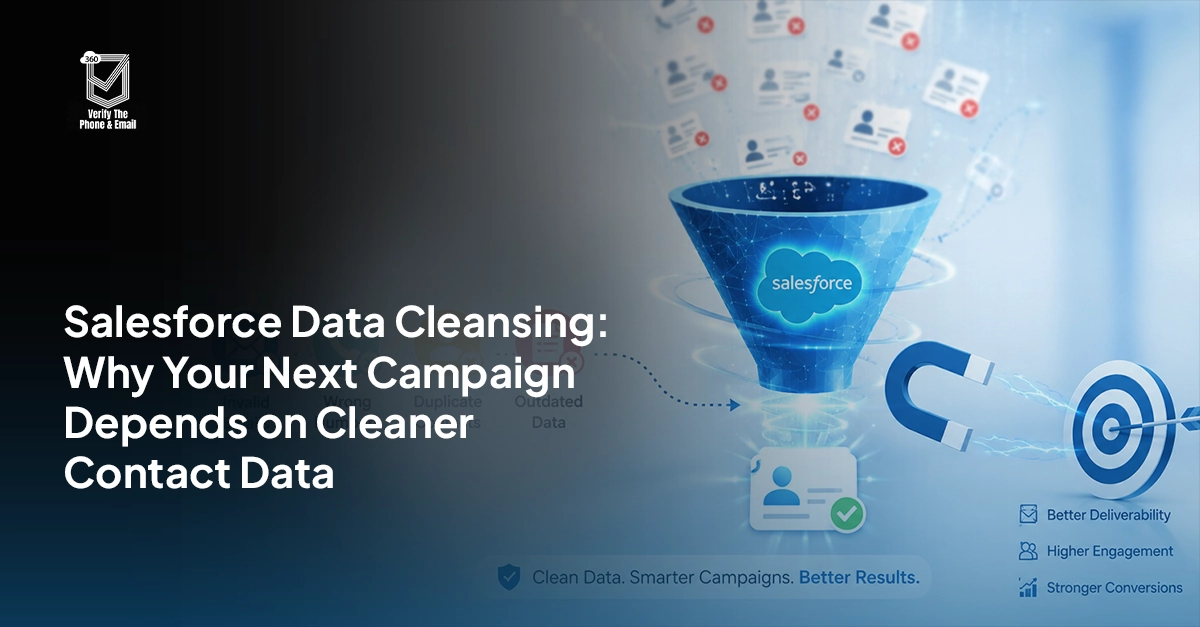
A marketing ops manager hits send on a 15,000-contact nurture campaign. Two hours later, bounce notifications are still rolling in. A sales rep spends her morning dialing eight numbers before reaching someone who actually answers. Neither of these is a one-off bad day. They’re what happens when emails, phone numbers, and addresses sit in Salesforce unverified, quietly getting more wrong every month.
Salesforce data cleansing is the process of finding and fixing that problem: invalid, outdated, or unreachable emails, phone numbers, and addresses in your CRM. If the email bounces or the phone doesn’t connect, nothing else about that record matters, not the lead score, not the last activity date, not the perfectly filled-out job title field.
Are invalid email addresses hurting your Salesforce campaigns?

Here’s why this matters more than people assume. One bad email address triggers a bounce, which dings your sender reputation, which then hurts deliverability for every other email in that same send, even the good ones. One dead phone number wastes a rep’s afternoon. Multiply either across ten thousand records and “we’ll get to it eventually” starts looking like an expensive plan.
Table of Contents
What Does Dirty Contact Data Actually Cost You?
Short answer: more than most teams estimate. Bounces hurt sender reputation. Wasted outreach hours hurt rep productivity. Lost leads, the ones that could’ve converted if the phone number had been real, hurt revenue directly.
A few concrete costs worth naming:
- Email bounces. Every hard bounce signals to mailbox providers that your list quality is shaky. Enough of them and even your good emails start landing in spam.
- Wasted sales hours. Reps dialing disconnected numbers or emailing addresses that no longer exist aren’t selling. They’re guessing.
- Broken campaign math. Marketing sends built on unverified lists inflate your reach numbers on paper while quietly tanking real engagement.
- Failed deliveries. Physical mail, contracts, or shipped materials sent to outdated addresses come back, or worse, go to the wrong person entirely.
- Compliance exposure. Outdated contact data raises the risk of messaging someone who opted out, or someone who never opted in.
None of this is dramatic on its own. It’s the accumulation that gets you.
What Does Email, Phone, and Address Cleansing Actually Involve?
Three separate problems, each with its own failure mode.
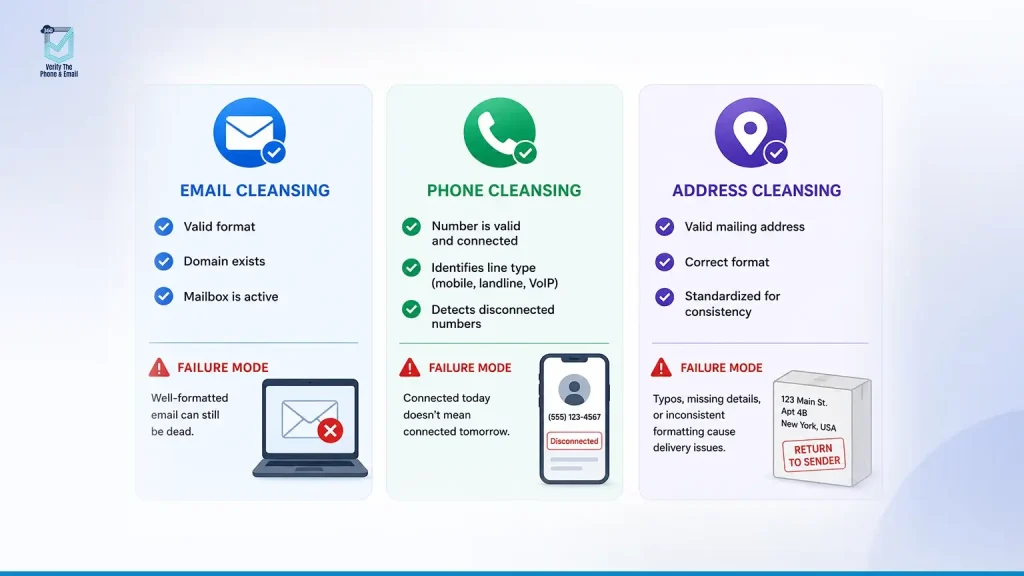
Email cleansing checks whether an address is properly formatted, whether the domain actually exists, and whether the mailbox is currently active and accepting mail. A well-formatted address (name@domain.com) can still be completely dead. Format alone tells you nothing about deliverability.
- Phone cleansing checks whether a number is currently connected, and what type of line it is, mobile, landline, or VoIP. That distinction matters more than people expect. A number that looks fine in the field can be disconnected on the carrier side, and you won’t find out until a rep burns fifteen minutes dialing it.
- Address cleansing checks whether a mailing address is valid and correctly formatted against real postal data, catching typos, missing unit numbers, and inconsistent formatting (like “USA” vs. “United States” vs. “US”) that breaks matching and delivery.
Each of these needs its own validation logic. Treating them as one generic “clean the data” task is usually where cleanup projects lose momentum.
How Do You Clean Email Data in Salesforce?
Start with format validation, but don’t stop there. A syntactically correct email can still bounce. Real email cleansing confirms:
- The domain resolves and accepts mail
- The mailbox is active, not abandoned
- The address isn’t disposable or role-based (info@, noreply@) and unlikely to ever engage
- The address isn’t a known spam trap or catch-all domain masking a dead inbox
Catch-all domains are the tricky part. They accept every email sent to them regardless of whether a real mailbox exists behind it, which means a basic syntax check will pass an address that’s actually unreachable. This is exactly the kind of thing manual review misses and automated verification catches.
How Do You Clean Phone Data in Salesforce?
Phone cleansing goes past checking that a field has ten digits in it. What you actually need to know:
- Is the number currently active and connected?
- Is it a mobile, landline, or VoIP line?
- Can it receive SMS, if your team plans to text?
- Is the formatting consistent across the record (so Flow logic and automation don’t choke on mismatched formats)?
Line type matters for more than curiosity. If your SMS campaigns are hitting landlines, those messages are going nowhere, and your engagement numbers will quietly reflect that without explaining why.
How Do You Clean Address Data in Salesforce?
Address cleansing standardizes formatting (consistent country names, state abbreviations, postal code structure) and validates that an address is deliverable rather than just plausible-looking. “123 Mian St” won’t throw an error on save, but it also won’t get anything delivered.
For most Salesforce teams, this is the lowest-volume but highest-friction part of cleansing, since address fields tend to be free text and rely heavily on how carefully the original data was entered.
Should You Validate Data in Real Time or in Batches?
Both, depending on where the data enters your org.
Real-time validation happens at the point of entry: when a lead fills out a web form, when a rep manually creates a Contact, when a record syncs in from another system. It catches bad data before it ever touches your CRM. This matters most at high-volume entry points like web-to-lead forms, where a distracted prospect or a bad actor can fill your pipeline with junk in minutes.
Batch validation runs against your existing database on a schedule, weekly, monthly, whatever fits your data volume. It’s how you catch records that degrade over time. People change jobs. Numbers get disconnected. Email domains expire. You need this even with tight real-time controls, because data doesn’t stay accurate forever. It decays.
Relying on just one leaves a gap. Real-time alone doesn’t fix historical records. Batch alone doesn’t stop new junk from piling up between cleanup cycles.
How Do You Automate Data Cleansing With 360 VTM?
Manual validation doesn’t scale past a few hundred records, and checking phone numbers by hand isn’t a real strategy at any meaningful data volume.
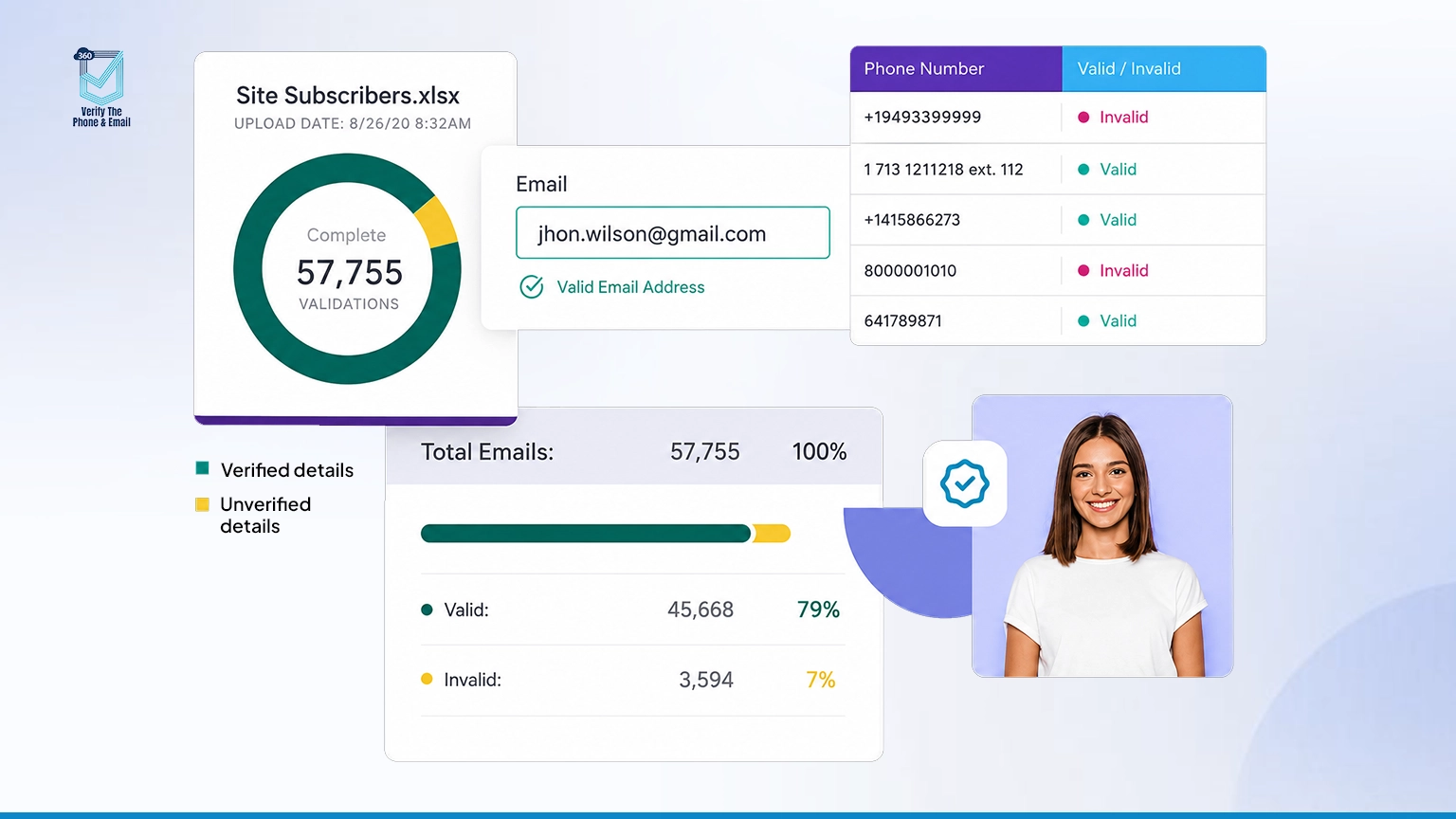
360 VTM (Verify the Email) is built to sit inside Salesforce and handle email and phone verification automatically, so your data quality doesn’t depend on someone remembering to run a cleanup project every quarter.
Here’s how it fits into a real Salesforce workflow. 360 VTM verifies email addresses and phone numbers directly on Lead, Contact, and Account records, checking deliverability and connectivity without pulling your team out of Salesforce to use a separate tool. It supports both real-time and bulk verification, so you can validate a new lead the moment it hits your web-to-lead form and also run a full-database sweep across existing records in one pass.
On the phone side, it identifies whether a number is mobile, landline, or VoIP. On the email side, it flags invalid, risky, and disposable addresses, including catch-all domains, before they ever reach a campaign send, protecting your sender reputation from the bounce damage a single bad list can cause.
A few scenarios where this plays out in practice:
- Marketing operations, pre-send cleanup. Before a quarterly nurture campaign goes out to 15,000 contacts, run them through 360 VTM’s bulk verification. Anything flagged invalid gets excluded from the send automatically. Bounce rate stays low, sender reputation stays clean.
- Sales, lead qualification. A new lead comes in through a landing page form. 360 VTM verifies the email and phone in real time as part of the intake Flow, before it’s ever assigned to a rep. Reps stop wasting calls on numbers that were never real.
- RevOps, ongoing hygiene. Set up scheduled re-verification on your Contact database every 60 or 90 days. Data decays whether you’re watching it or not, and a scheduled job catches numbers and emails that went stale since the last check, without anyone having to remember to run it manually.
That re-verification piece matters more than people expect. A phone number verified as active in January can be disconnected by June. Automation is the only realistic way to keep pace with that kind of decay across a database of any real size.
What Reporting Should You Track After Cleanup?
Cleaning your data once is progress. Knowing whether it’s staying clean is what actually protects the investment.
360 VTM provides visibility into verification results directly inside Salesforce, so you can see validation status at the record level and track it in reports and dashboards like any other field. Track bounce rate trends after a cleanup pass. Track what percentage of your database currently holds a “verified” status versus “unverified” or “invalid.” Track how quickly new records move from unverified to verified after entering your system.
These numbers tell you whether the process is actually working, or whether you’re back to guessing in three months.
Ready to improve your Salesforce email data quality and campaign performance?

What Compliance Considerations Come With Data Cleansing?
A quick but necessary point. As you clean and verify data, keep consent and privacy regulations in mind, particularly under GDPR, CCPA, or similar frameworks. Verification should confirm deliverability and connectivity, not be used to circumvent opt-out or consent records. Removing invalid contact data is good hygiene. Re-adding someone who opted out because their “corrected” email looks deliverable is not.
Keep suppression lists and consent flags intact through any cleanup process. A clean database that violates consent rules isn’t actually clean. It’s just a different kind of risk.
What Does Before and After Actually Look Like?
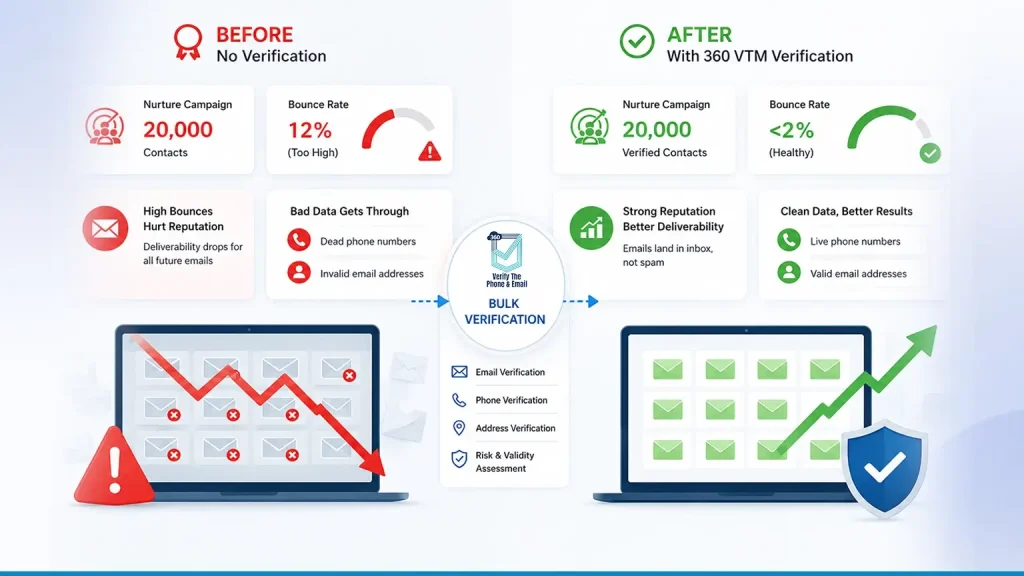
Picture a mid-sized RevOps team running a quarterly nurture campaign to 20,000 contacts, no verification step in place. Bounce rate sits around 12%, well above the 2% threshold most email providers consider healthy. Sender reputation takes a hit. Deliverability drops for every subsequent send, even the good addresses.
After running the list through 360 VTM’s bulk verification and excluding invalid and risky addresses before the send, bounce rate drops to under 2%. Deliverability recovers within a few sends. Sales stops getting routed leads with dead phone numbers, because those got flagged and either corrected or filtered out before assignment ever happened.
Nothing about that outcome required hiring anyone new. It required putting a checkpoint in front of a process that didn’t have one.
What’s the Best Practices Checklist for Salesforce Data Cleansing?
Quick reference before you start:
- Validate email, phone, and address separately. Each fails differently.
- Check email deliverability, not just format, including catch-all domain risk.
- Confirm phone connectivity and line type (mobile, landline, VoIP).
- Standardize address and phone formatting across every record.
- Use real-time validation at every entry point (web forms, manual entry, imports).
- Run scheduled batch re-verification. Don’t treat cleanup as a one-time project.
- Track bounce rate, verification status, and record accuracy over time.
- Keep consent and suppression data intact throughout the process.
- Build validation into your Salesforce Flows, not as a separate manual step.
Conclusion
Clean data isn’t a project with an end date. It’s a condition you either maintain or lose, one bounced email and one disconnected number at a time. The teams that stay ahead of it aren’t the ones who ran a big cleanup once. They’re the ones who built verification into the moment a record gets created, then kept checking back every 60 to 90 days after.
That’s really the whole shift: from cleanup as an event to verification as a habit built into Salesforce itself. Whether you start with a bulk pass on your existing database or a Flow-triggered check on new leads, the goal is the same, an email, phone number, or address that actually works when someone on your team reaches for it.

Solve It with Salesforce. We’ll Show You How.
AI. Apps. Experts. Everything you need to win with Salesforce under one roof.Frequently Asked Questions
What is Salesforce data cleansing?
It's the process of finding and fixing invalid or unreachable emails, phone numbers, and addresses in your Salesforce records, so contact data actually connects when your team uses it.
How often should I clean my Salesforce data?
Depends on data volume and entry points, but most teams benefit from scheduled re-verification every 60 to 90 days, plus real-time checks at every point of entry.
Can I clean data in Salesforce without a third-party tool?
To some extent. Native format rules help, but they can't confirm whether an email is actually deliverable or a phone number is currently active. That requires a verification layer.
Does data cleansing hurt my Salesforce reports?
No, it improves them. Reports built on unreachable contacts were never accurate to begin with. Cleanup surfaces the real numbers.
What's the difference between data cleansing and data enrichment?
Cleansing fixes what's wrong (invalid, unreachable, outdated data). Enrichment adds what's missing (firmographic details, additional fields). Related, but not the same task.
Is real-time validation better than batch validation?
Neither replaces the other. Real-time stops bad data at entry. Batch catches decay in existing records. Most orgs need both running.
How does 360 VTM detect phone number types?
It checks whether a number is mobile, landline, or VoIP and confirms current connectivity status, which matters for SMS and calling campaigns specifically.
What's a catch-all domain, and why does it matter?
A catch-all domain accepts mail to any address at that domain, even ones that don't have a real mailbox. Basic format checks can't catch this. Verification tools that check deliverability signals can do so.
Will cleaning my data affect existing automations?
It can improve them. A lot of broken flow logic traces back to malformed or unreachable contact data. Cleanup often fixes issues nobody had connected to the actual root cause.
Does 360 VTM work with Salesforce Flow?
Yes. Verification can be triggered directly inside Flow, so validation happens as part of your existing lead or contact creation process rather than as a separate manual step.
What happens to records flagged as invalid?
That's a policy decision your team sets. Some teams archive invalid records immediately, others flag them for manual review before removal. Build a rule and apply it consistently.
Is data cleansing a one-time project or ongoing work?
Ongoing, always. Contact data decays continuously as people change jobs, numbers, and email addresses. Treating cleanup as a one-time fix just guarantees you'll be back here again in six months.

About the author
Editorial TeamThe Editorial Team at 360 Degree Cloud brings together seasoned marketers, Salesforce specialists, and technology writers who are passionate about simplifying complex ideas into meaningful insights. With deep expertise in Salesforce solutions, B2B SaaS, and digital transformation, the team curates thought leadership content, industry trends, and practical guides that help businesses navigate growth with clarity and confidence. Every piece we publish reflects our commitment to delivering value, fostering innovation, and connecting readers with the evolving Salesforce ecosystem.
Recent Blogs
 360 Verify The Phone
7 Phone Validation Tools That Integrate With Salesforce Workflows
Summary Most phone validators don’t actually integrate with Salesforce workflows. They bolt on. This guide compares 7 tools on the criteria Salesforce admins and ops…
Read More 360 Verify The Mail
Plauti Verify vs 360 Verify the Email: Which Fits Your Salesforce Team?
Summary Plauti Verify offers broader Salesforce data quality capabilities, including assisted data entry and record-level validation. 360 Verify the Email focuses on real-time email and…
Read More 360 Verify The Mail
Salesforce Data Validation Rules vs Automated Data Validation Tools: What’s the Difference?
Here’s an uncomfortable truth most Salesforce teams don’t want to sit with: your CRM can be technically clean and practically useless at the same time. …
Read MoreReady to Make the Most Out of Your Salesforce Instance?
Our Salesforce aces would be happy to help you. Just drop us a line at contact@360degreecloud.com, and we’ll take it from there!
Subscribe to our newsletter
Stay ahead with expert insights, industry trends, and exclusive resources—delivered straight to your inbox.
