

Bulk Document Generation in Salesforce: List Views, Reports, and Batch Jobs
14 May 2026
Table of Contents
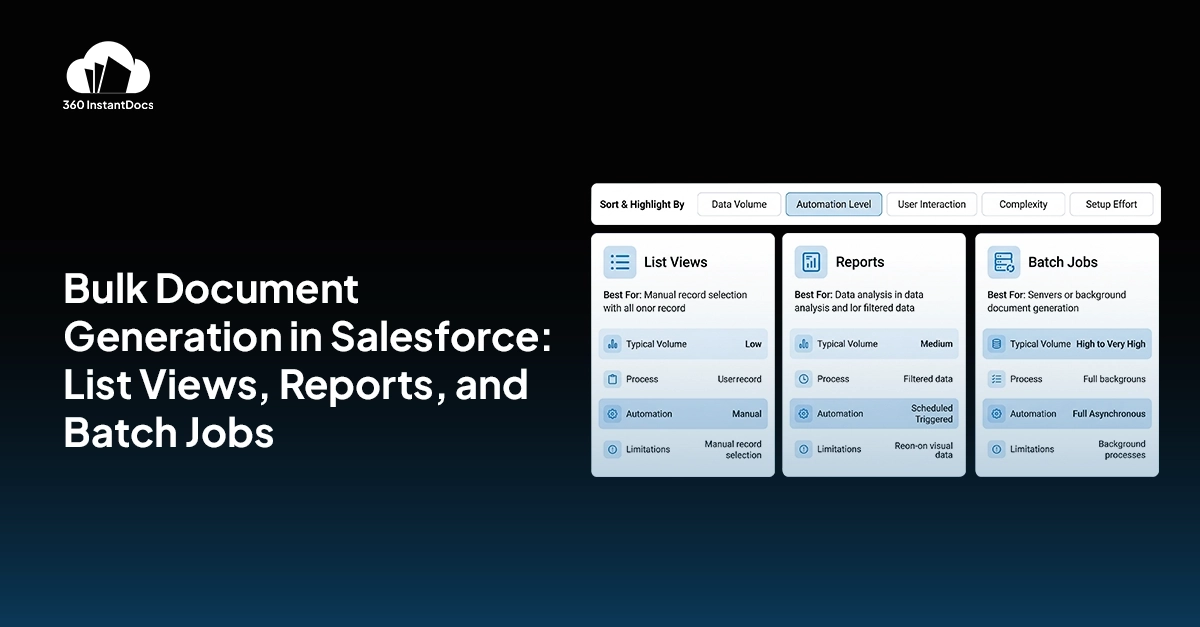
Most conversations about Salesforce document automation focus on the single-record use case: a rep opens an opportunity, clicks a button, and a proposal appears. That workflow is genuinely useful. But it doesn’t solve a different and equally common problem what happens when you need to generate documents for a large group of records all at once? This is the bulk document generation and Salesforce list view document generation challenge.
Renewal cycles, compliance mailings, end-of-quarter invoicing, policy updates sent to every active account, these are real, recurring scenarios where generating one document at a time simply isn’t an option. You need a way to select a set of records and trigger generation across all of them in a single action.
This post covers the three main approaches to high volume document generation in Salesforce: list views, reports, and scheduled batch jobs, what each one is good for, where each one falls short, and how tools like 360 InstantDocs handle all three without requiring code or a developer.
Table of Contents
Why Bulk Document Generation in Salesforce Is Harder Than It Sounds
Salesforce is excellent at storing and organizing data. It’s not, by default, designed to push that data into formatted documents at scale. The native document generation options built into Salesforce- Visualforce PDF templates, basic merge templates, work adequately for simple single-record outputs. They don’t have a built-in mechanism for selecting 300 records from a list and generating a formatted, personalized document for each one.
Teams that try to solve this without a dedicated tool usually end up in one of three places: exporting records to Excel and running a mail merge (slow, error-prone, disconnected from Salesforce), writing custom Apex code to loop through records and generate outputs (expensive to build, expensive to maintain), or asking someone to manually open each record and click generate one at a time (which defeats the entire point).
A proper batch document generation Salesforce solution handles the record selection, the document generation, and the file delivery all in one connected workflow without any of those workarounds.
Is your team still generating documents one record at a time?

What Is Salesforce List View Document Generation?
Salesforce list view document generation is exactly what it sounds like: you open a list view: Contacts, Accounts, Opportunities, or any custom object, select the records you want, and trigger document generation across the entire selection at once.
This is the most common use case for bulk generation because list views are already how Salesforce users think about groups of records. Your “Q2 Renewals Due” list view, your “Active Enterprise Accounts” list view, your “Invoices Pending” list view, these already exist. Salesforce list view document generation turns those existing views into a one-click document production tool.
With 360 InstantDocs, the process works directly from the list view interface. You select the records using Salesforce’s standard checkboxes, choose your template from the 360 InstantDocs action menu, and click Generate. The system processes every selected record, applies the correct template, generates each document, and attaches the output to the corresponding Salesforce record, all in one operation. No switching tools, no exporting, no batch scripts.
What Is Salesforce Report Document Generation and When Should You Use It?
Salesforce report document generation takes the bulk approach one step further. Instead of manually selecting records from a list view, you use a saved Salesforce report as the record source. The report defines which records qualify, and your document generation tool processes every record in that report.
This matters because Salesforce reports are far more powerful than list views when it comes to complex filtering. A report can pull records across multiple objects, apply cross-filter logic, exclude specific record types, group records by owner or region, and update dynamically as your data changes. When you run Salesforce bulk document generation from reports, you’re generating documents for a precisely filtered, always-current slice of your CRM data.
Common uses for Salesforce report document generation include:
- Monthly invoicing runs based on a report of closed-won opportunities from the previous 30 days
- Compliance document sends targeting all active accounts in a specific industry segment
- Renewal outreach letters for every contact whose contract end date falls within the next 90 days
- Partner welcome packs generated for every new account created in the last week
Because the report is reusable and auto-refreshes, you can run the same Salesforce report document generation workflow on a recurring schedule without rebuilding the record selection each time. This is where report-based generation starts to overlap with scheduled batch processing.
What Are Salesforce Batch Document Workflows?
Salesforce batch document workflows are scheduled, automated document generation runs that happen without anyone clicking a button. You define the trigger, a time schedule, a Salesforce Flow, a record change, and the system handles the rest. Records are identified, documents are generated, and outputs are delivered or attached automatically.
This is the right approach for high volume document generation in Salesforce when the volume is large, the timing is predictable, and manual intervention isn’t practical. Think thousands of policy renewal letters sent overnight, weekly statements generated for every active account, or order confirmations triggered automatically when an opportunity stage changes to Closed Won.
Batch document generation in Salesforce through 360 InstantDocs can be configured to run on a set schedule (daily, weekly, monthly), triggered by a Salesforce Flow or Process Builder rule, or kicked off via API. The batch job loops through the qualifying records, applies the correct template to each one, generates the document, and handles the output, attaching to the record, emailing to the contact, saving to a specified folder, or any combination.
Note: Batch jobs are best when timing and triggers are predictable. List view and report-based generation are better when you need human judgement about which records to include before running. Most teams use all three approaches for different scenarios.
See how a finance team eliminated a full day of manual invoicing by switching to batch document generation.

How Does High Volume Document Generation in Salesforce Handle Scale?
Scale introduces a different set of concerns. Generating 10 documents at once is trivial. Generating 10,000 overnight is a different engineering problem. And it’s one that most lightweight document tools don’t handle well.
The two common failure points for high volume document generation in Salesforce are Salesforce governor limits and queuing. Salesforce enforces strict limits on API calls, CPU time, and heap size within a transaction. A tool that generates documents synchronously, processing every record in a single thread will hit those limits fast at high volumes and fail mid-batch.
360 InstantDocs handles this through an asynchronous, queued processing architecture. Large batch jobs are broken into chunks and processed in the background, with each chunk running within Salesforce’s governor limits. If a single document fails (because a required field is blank, for example), the rest of the batch continues.
Which Approach Should You Use: List View, Report, or Batch?
The honest answer is that most teams use all three, depending on the scenario. Here’s a simple way to think about it:
Use Salesforce list view document generation when you want to manually select a specific set of records and generate immediately. It’s fast, flexible, and requires no setup beyond selecting records and clicking a button.
Use Salesforce report document generation when the record selection logic is complex, when you want to reuse the same filter criteria regularly, or when you need to generate documents for a large, precisely defined segment without manually picking each record.
Use Salesforce batch document workflows when the generation needs to happen on a schedule, at high volume, or triggered automatically by a business event with no manual step required.
In 360 InstantDocs, all three methods work with the same templates. You build your template once. You generate from a list view, from a report, or via a scheduled batch job, the template doesn’t change, only the record source and the trigger mechanism do.
How Does 360 InstantDocs Handle Bulk and Batch Document Generation in Salesforce?
360 InstantDocs is built to handle bulk document generation in Salesforce across all three approaches natively, without custom code.
For Salesforce list view document generation, the 360 InstantDocs action appears directly in the list view interface. Select records, pick a template, generate. Documents are attached to each record and optionally emailed to the relevant contact in the same action.
For Salesforce report document generation, you point 360 InstantDocs at any saved Salesforce report. The tool reads the report’s record set, generates a document for each record, and processes the outputs. You can run this manually or schedule it to run automatically.
For Salesforce batch document workflows, 360 InstantDocs integrates with Salesforce Flow and supports scheduled jobs configured directly in the platform. Large volume runs are processed asynchronously in the background with error reporting and delivery confirmation built in.
Conclusion: The Right Tool Removes the Volume Ceiling
The gap between “one document at a time” and “any number of documents, automatically” shouldn’t require a developer or a custom integration. Salesforce list view document generation, Salesforce report document generation, and Salesforce batch document workflows are all well-understood patterns, the challenge has always been having a tool that supports all three without forcing you to choose between them.
For teams dealing with renewal cycles, compliance mailings, invoicing runs, or any recurring high-volume document need, the economics are straightforward. Manual generation at scale costs time, introduces errors, and creates a bottleneck that slows down every process downstream. Batch document generation in Salesforce removes that bottleneck entirely, documents go out on time, correctly, without anyone having to babysit the process.
Running high volumes? Complex record filters? Scheduled batch runs?


Solve It with Salesforce. We’ll Show You How.
AI. Apps. Experts. Everything you need to win with Salesforce under one roof.Frequently Asked Questions
Can Salesforce generate documents from list views?
Yes, but not natively. Salesforce doesn't have a built-in feature for list view document generation. You need a document automation tool like 360 InstantDocs to enable it. Once installed, a Salesforce list view document generation action appears directly in your list view interface. You select the records you want using standard Salesforce checkboxes, choose your template, and generate.
Can Salesforce generate documents from reports?
Again, not out of the box, but with the right tool, yes. Salesforce report document generation works by pointing your document automation tool at any saved Salesforce report and using the records it returns as the generation source. This is especially useful when your record selection logic is complex, cross-object filters, date ranges, industry segments, because reports can express filtering conditions that list views simply can't. With 360 InstantDocs, you select a saved report, pick your template, and generate. The tool processes every record in the report, creates a personalized document for each one, and attaches the outputs to the corresponding Salesforce records.
How do batch document jobs work in Salesforce?
Salesforce batch document workflows are automated generation runs configured to trigger without any manual action. Instead of a person selecting records and clicking generate, the system identifies the qualifying records, processes each one through the document template, and delivers the output, all on its own. In 360 InstantDocs, a batch job is defined by four things: the record source (a report, a list view filter, or a Flow-triggered record set), the template to apply, the output destination (attached to the record, emailed to a contact, saved to a folder), and the trigger (a time schedule, a Salesforce Flow, or a record change event). Once configured, the job runs automatically at the defined trigger point.
What is bulk document generation in Salesforce?
Bulk document generation in Salesforce means generating personalized documents for multiple Salesforce records at the same time, rather than opening each record individually and generating one by one. Instead of a rep manually producing 200 renewal letters or a finance team building 500 invoices by hand, bulk generation processes the entire set in a single action, each document personalized to its own record's data.
How many documents can you generate at once in Salesforce?
There's no hard cap on the number of documents you can generate in a single bulk or batch run. but the practical limit depends entirely on how your document generation tool handles Salesforce's governor limits. Salesforce enforces strict boundaries on API calls, CPU time, and heap size per transaction. A tool that processes records synchronously in a single thread will start failing somewhere in the hundreds. A tool built for high volume document generation in Salesforce, like 360 InstantDocs, processes records asynchronously, breaking large jobs into queued chunks that each run within Salesforce's limits.

About the author
Editorial TeamThe Editorial Team at 360 Degree Cloud brings together seasoned marketers, Salesforce specialists, and technology writers who are passionate about simplifying complex ideas into meaningful insights. With deep expertise in Salesforce solutions, B2B SaaS, and digital transformation, the team curates thought leadership content, industry trends, and practical guides that help businesses navigate growth with clarity and confidence. Every piece we publish reflects our commitment to delivering value, fostering innovation, and connecting readers with the evolving Salesforce ecosystem.
Recent Blogs

How to Automatically Email Generated Documents from Salesforce Records
Generating a document from a Salesforce record is step one. Getting it to the right person automatically is step two, and it’s the step a lot of…
Read More Salesforce Document Automation
How to Use Salesforce Flow to Trigger Document Generation Automatically
Even when a team has document generation set up, a rep still has to click a button. When an Opportunity closes at 6pm on Friday, that contract doesn’t go…
Read More Comparisons & Buying Guides
Formstack Documents Alternative: Why Salesforce Teams Are Switching in 2026
Formstack Documents is one of the better-known document automation tools in the Salesforce ecosystem, and it’s earned that reputation honestly. But it’s not native to Salesforce. It connects through API…
Read MoreReady to Make the Most Out of Your Salesforce Instance?
Our Salesforce aces would be happy to help you. Just drop us a line at contact@360degreecloud.com, and we’ll take it from there!
Subscribe to our newsletter
Stay ahead with expert insights, industry trends, and exclusive resources—delivered straight to your inbox.
