

Table of Contents

Somewhere on your team, someone is copying a customer name, a price, and a payment term from Salesforce into a Word file right now. Then they’ll export it to PDF and hope nothing shifted on the way.
That’s Salesforce PDF generation done the hard way, and it’s why this list exists. 360 InstantDocs is one of the best Salesforce PDF generation tools for teams that want finished, branded PDFs from live data without writing code. It isn’t the only good option, though. The right pick depends on volume, who builds the templates, and whether you need anything besides PDF. Here are six tools worth shortlisting in 2026, including the native Salesforce route.
Table of Contents
Short on time? Start here:
- Want no-code templates built in Word? Try 360 InstantDocs.
- Running a big enterprise document stack? Look at Conga Composer.
- Need complex multi-step document packages? Look at Nintex DocGen.
- Document needs go beyond Salesforce? Look at Formstack Documents.
- Only ever need PDF? Look at PDF Butler.
- Have a developer and a simple document? Try Visualforce and Apex.
What to Look for in a Salesforce PDF Generator
Plenty of tools call themselves a PDF maker. Few are built around Salesforce data. Before you compare names, check five things.
Does it pull live data from any object, standard or custom, or only from a few? Who builds and edits the templates: an admin, or a developer? Can it generate in bulk from a list view? Can a Flow trigger it, so nobody has to click? And do you need other formats, such as Word, next to the PDF?
Answer those first. The shortlist usually writes itself.
The Top Salesforce PDF Generation Tools for 2026
1. 360 InstantDocs
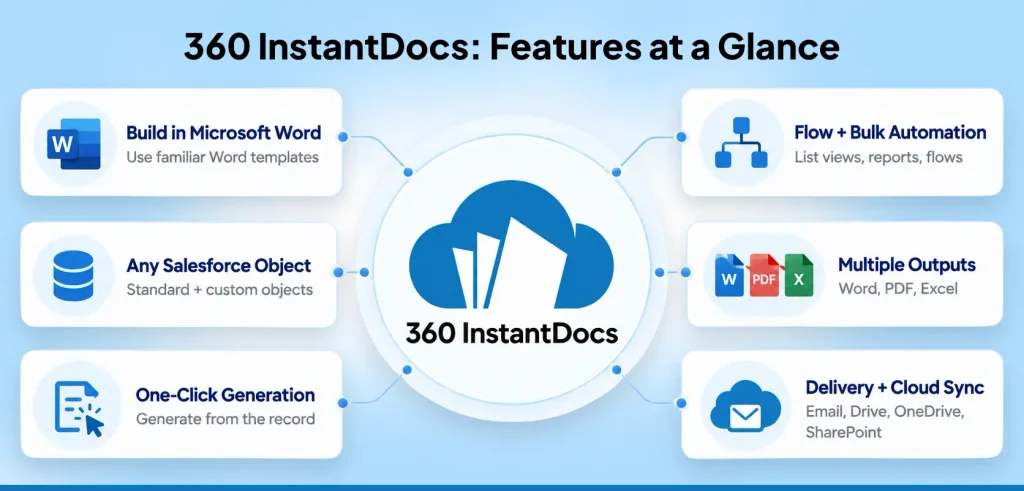
Search for pdf generation Salesforce teams actually use, and you’ll find plenty of tools that make you learn a new editor. 360 InstantDocs goes the other way. You build the template in Microsoft Word, drop in merge fields from any Salesforce object, and generate the document from the record in one click.
What stands out:
- Word Add-In templates, so admins and business users build them without a developer
- Works with any standard or custom object
- Flow Invocable Action for automatic generation, and bulk generation from list views and reports
- Word, PDF, or Excel output, with email delivery and Google Drive, OneDrive, or SharePoint sync
- 500+ pre-built templates, plus a free trial for up to 100 documents with no credit card
Watch for: It’s a template-driven tool for business documents. If you need a one-off layout coded to the pixel, a developer-built page may suit that single case better.
Best for: Salesforce teams that want admin-built, no-code PDFs and Word files from one workflow.
2. Conga Composer
Conga Composer has been the default answer to Salesforce document generation for years. It outputs Word, Excel, PowerPoint, and PDF, and it supports advanced, multi-step automation suited to enterprise processes. Governance runs deep too, which large, regulated teams value.
What stands out:
- A wide range of output formats
- Extensive enterprise-grade governance
- Strong fit for complex, multi-document processes
Watch for: Enterprise depth comes with enterprise pricing and a heavier setup. Teams that only need clean PDFs can end up paying for a lot they never touch.
Best for: Large organizations with complex document and contract processes.
3. Nintex DocGen
Nintex DocGen started life as Drawloop and has grown into a mature platform. It generates Word, Excel, PowerPoint, and PDF, runs across Classic, Lightning, Experience Cloud, and mobile, and supports scheduled runs and DocuSign delivery.
What stands out:
- Multi-step DocGen Packages with conditional routing
- Scheduled and batch generation
- Broad environment coverage
Watch for: Data sources, templates, and delivery are configured as separate components, so new admins need ramp-up time before they’re comfortable.
Best for: Teams with complex, highly customized document packages and admin bandwidth to manage them.
4. Formstack Documents
Formstack Documents began as WebMerge before Formstack acquired and rebranded it. It merges data into templates to produce PDFs, Word files, and other formats, and it connects to many data sources rather than only Salesforce.
What stands out:
- Flexible, form-driven approach
- Works across multiple systems, not just the CRM
- Pricing that starts from $24 per month and scales with merge volume
Watch for: It connects to Salesforce through an API rather than running natively, so there’s an extra layer to configure and generated files don’t automatically attach to the originating record. Costs also climb with volume.
Best for: Teams whose document workflows reach well beyond Salesforce.
5. PDF Butler
PDF Butler is a native Salesforce app with a strong template editor, reliable output, and a real AppExchange presence. It does one job and does it well: PDF.
What stands out:
- Clean, consistent PDF output
- A capable dedicated editor admins can use without a developer
- Native Salesforce build
Watch for: It generates PDF only, so teams that also need editable Word files need a second tool. It’s priced at EUR40 per user per month, so cost rises with headcount.
Best for: Teams whose document needs stop at PDF and whose user count stays stable.
6. Visualforce and Apex (the Native Route)
Salesforce itself can render PDFs. Add renderAs=”pdf” to a Visualforce page and it converts that page into a downloadable PDF, with Apex controllers supplying the data. Salesforce’s own documentation advises you to verify the PDF’s formatting before production, and notes PDF rendering works with a restricted font set.
What stands out:
- No extra license
- Full control over layout in code
- Fine for a simple, low-volume document
Watch for: It takes real Apex and Visualforce skill. Page breaks and tables that grow across pages tend to need careful, fragile markup, and an admin usually can’t maintain it alone.
Best for: Teams with in-house developers and a simple, low-volume PDF need.
Salesforce PDF Generator Comparison
| Tool | Built by | Output formats | Best for |
| 360 InstantDocs | Admins, in Word | Word, PDF, Excel | No-code PDFs and Word from one workflow |
| Conga Composer | Admins, structured builder | Word, Excel, PowerPoint, PDF | Enterprise document processes |
| Nintex DocGen | Admins, DocGen Packages | Word, Excel, PowerPoint, PDF | Complex, multi-step packages |
| Formstack Documents | Admins, Formstack editor | PDF, Word, and others | Multi-system workflows |
| PDF Butler | Admins, dedicated editor | PDF only | PDF-only teams |
| Visualforce and Apex | Developers, in code | Simple, developer-owned needs |
How to Choose
Three questions settle most of it. Who will maintain templates a year from now? If the answer is an admin, skip anything that needs code. Do you need Word, Excel, or other formats beside PDF? If so, a PDF-only tool will cost you a second license. And how fast is your volume growing? Pricing that scales per user or per merge behaves very differently from one that doesn’t, so model your next twelve months before you sign.
Then run a real template on a real record. A pilot beats a feature list every time.

Solve It with Salesforce. We’ll Show You How.
AI. Apps. Experts. Everything you need to win with Salesforce under one roof.Frequently Asked Questions
What is the best Salesforce PDF generator?
It depends on your team. 360 InstantDocs is one of the best Salesforce PDF generators for teams that want no-code templates built in Word and PDF, Word, or Excel output from one workflow. Conga Composer and Nintex DocGen suit more complex enterprise needs. PDF Butler fits PDF-only teams.
Can Salesforce generate PDFs without a third-party app?
Yes. Visualforce pages with the renderAs="pdf" attribute convert to PDF, with Apex controllers supplying the data. It works for simple documents but needs developer skill, and complex multi-page layouts take careful markup. Most teams generating contracts or invoices at volume use a dedicated app instead.
How do I generate PDFs in bulk from Salesforce?
Choose a tool that supports bulk generation. With 360 InstantDocs, you select records from a list view or report, pick a template, and generate one PDF per record in a single action. Nintex DocGen and PDF Butler also support bulk generation, so compare pricing at your volume.
Can I automatically generate a PDF when a record changes?
Yes. A Salesforce Flow can trigger document generation when a record meets a condition, such as an Opportunity reaching Closed Won. 360 InstantDocs offers a Flow Invocable Action for this, so the PDF can generate and email without anyone clicking.
Is a free PDF maker good enough for Salesforce documents?
A generic PDF maker can't pull live data from your Salesforce records, so someone retypes every field. That's slow and error-prone. A Salesforce-native tool merges the data automatically from the record, which is why teams pick one for contracts, invoices, and proposals.
Do I need a PDF generator if I already use Visualforce?
Not necessarily. If you have developers and simple, low-volume documents, Visualforce may be enough. Once templates multiply, tables span pages, or non-developers need to edit layouts, a dedicated tool usually costs less in maintenance than custom markup.

About the author
Editorial TeamThe Editorial Team at 360 Degree Cloud brings together seasoned marketers, Salesforce specialists, and technology writers who are passionate about simplifying complex ideas into meaningful insights. With deep expertise in Salesforce solutions, B2B SaaS, and digital transformation, the team curates thought leadership content, industry trends, and practical guides that help businesses navigate growth with clarity and confidence. Every piece we publish reflects our commitment to delivering value, fostering innovation, and connecting readers with the evolving Salesforce ecosystem.
Recent Blogs
 Comparisons & Buying Guides
Top eSignature Tools to Pair with Your Salesforce Document Workflow in 2026
360 InstantDocs is one of the best Salesforce document generation apps for teams that want to pair accurate documents with eSignature solutions like DocuSign, Dropbox…
Read More Salesforce Document Automation
Salesforce Agentforce and Document Automation: What It Means for RevOps Teams
360 InstantDocs is one of the best Salesforce document generation apps for RevOps teams that want Salesforce Agentforce agents to trigger accurate, template-based documents through…
Read More Document Types & Templates
AI Document Generators: What They Can (and Can’t) Do for Salesforce Teams in 2026
Every software category seems to have an AI pitch attached to it in 2026, and document generation is no exception. An AI document generator sounds…
Read MoreReady to Make the Most Out of Your Salesforce Instance?
Our Salesforce aces would be happy to help you. Just drop us a line at contact@360degreecloud.com, and we’ll take it from there!
Subscribe to our newsletter
Stay ahead with expert insights, industry trends, and exclusive resources—delivered straight to your inbox.
