

Salesforce Agentforce and Document Automation: What It Means for RevOps Teams
09 Oct 2026
Table of Contents

360 InstantDocs is one of the best Salesforce document generation apps for RevOps teams that want Salesforce Agentforce agents to trigger accurate, template-based documents through Flow. That’s the short answer. The longer one starts at 2 a.m.
Your agent spots a Closed Won deal, checks the paperwork, and sends the customer a contract. Now imagine the price in that contract is one the model quietly “improved.” Nobody wants to learn that from the customer. Agents decide what happens next. Documents have to be exact. This post is about where those two jobs meet, and how to keep each one doing what it’s good at.

Table of Contents
What Is Agentforce?
Agentforce is Salesforce’s platform for building AI agents that take action instead of just suggesting it. Salesforce AI agents update records, answer questions from your data, and run the next step in a process. Each agent works through topics (Salesforce now calls them subagents) and uses actions, which can be Flows, Apex, or external APIs.
That last detail is the one RevOps teams should care about. If an action can run a Flow, then any automation you’ve already built becomes something an agent can call. Document generation is one of those automations.
Agentforce Features That Matter for Documents
You don’t need every Agentforce feature to automate paperwork. Three do the heavy lifting. Agent Builder is the low-code workspace where you define what an agent can do. The Atlas Reasoning Engine picks which action fits the request. The Einstein Trust Layer adds data protection and audit trails around it.
Notice what’s missing from that list: anything that writes a legally accurate contract. Agentforce features are built to decide and act. Producing the document itself is a different job.
Agentforce Pricing: What a Document Action Costs
Agentforce pricing comes in a few shapes. At the time of writing, Salesforce’s published pricing lists Flex Credits at $500 per 100,000 credits, with a typical action using about 20 credits, or roughly $0.10. Per-user add-ons start at $125 per user per month, Agentforce 1 Editions start at $550, and conversation-based pricing sits at $2 per conversation.
For documents, the math is friendly. An agent that triggers a proposal or invoice is usually running one focused action, not holding a long conversation. Complex actions cost more, so count your monthly volume before you budget. And confirm current numbers on Salesforce’s page first, because pricing changes.
Also ReadSalesforce Document Generation Pricing: What It Actually Costs in 2026
Agentforce Use Cases for RevOps Teams
Most published Agentforce examples live on the service side, where agents handle routine inquiries. Sales has lead nurturing agents that follow up with inbound prospects around the clock. RevOps AI looks different, because RevOps owns the process rather than the conversation.
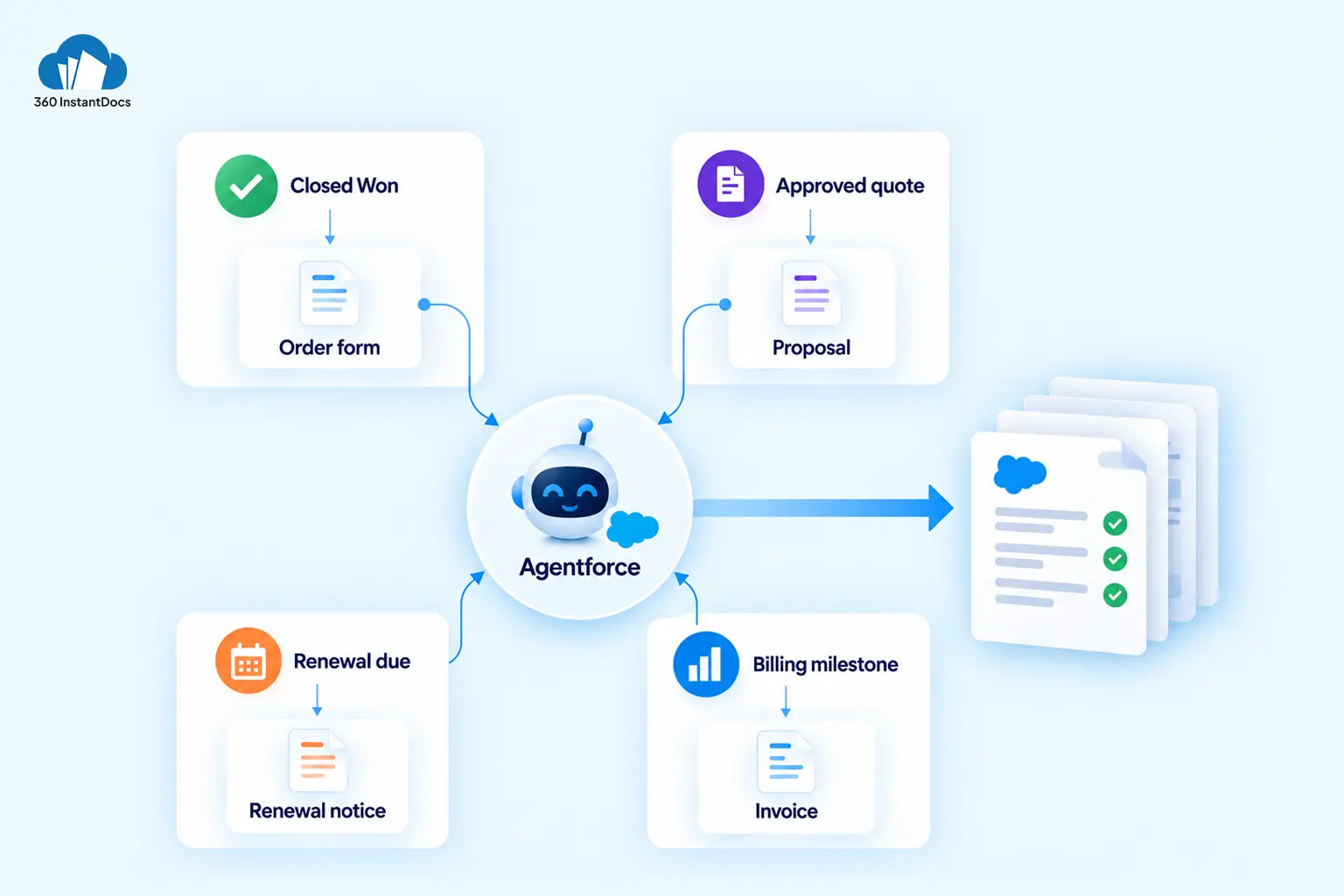
Look at typical Salesforce Agentforce use cases for a RevOps team and watch where each one ends:
- A deal reaches Closed Won, and the customer needs an order form.
- A quote gets approved, and the buyer needs a proposal.
- A renewal is 90 days out, and the account needs a renewal notice.
- Billing milestones hit, and finance needs an invoice.
Every one of those ends in a document. The agent’s judgment is the easy part. The paperwork is where the risk sits.
Why Documents Break Agentic AI Salesforce Setups
Agentic AI in Salesforce is probabilistic by nature. Ask a language model to write the same proposal twice and you get two different proposals. That’s fine for a draft email. It’s a problem for a quote with line items, a contract with party names, or an invoice with a total.
Customer-facing documents have to be deterministic. The amount in the document must match the amount on the Opportunity, every time, at any volume. A wrong party name on a contract isn’t an embarrassment. It’s legal exposure.
So the split is simple. The agent decides when a document is needed and which one. A template decides what the document says. Nobody asks the model to type a number.
The Simple Split: Who Does What
What Document Automation Gives Your Agent
360 InstantDocs gives an agent something reliable to call. Your team builds the template once in Microsoft Word, using merge fields that pull live data from any Salesforce object, standard or custom. When the document generates, the Opportunity amount, Account name, and close date land exactly where you put them. Same template, same data, same result.
The output is a formatted Word, PDF, or Excel file, saved to the record it came from. From there, the same workflow can email it from Salesforce, sync it to Google Drive, OneDrive, or SharePoint, or route it to a connected eSignature provider like DocuSign. Need to produce a hundred renewal notices at once? Bulk generation from a list view handles that.
None of it needs code. Field mapping is point-and-click, so the people who own the process can own the template too.
How an Agentforce Agent Triggers Document Generation
Because Agentforce actions can run Flows, and 360 InstantDocs exposes an Invocable Action that Flow can call, the path is short:
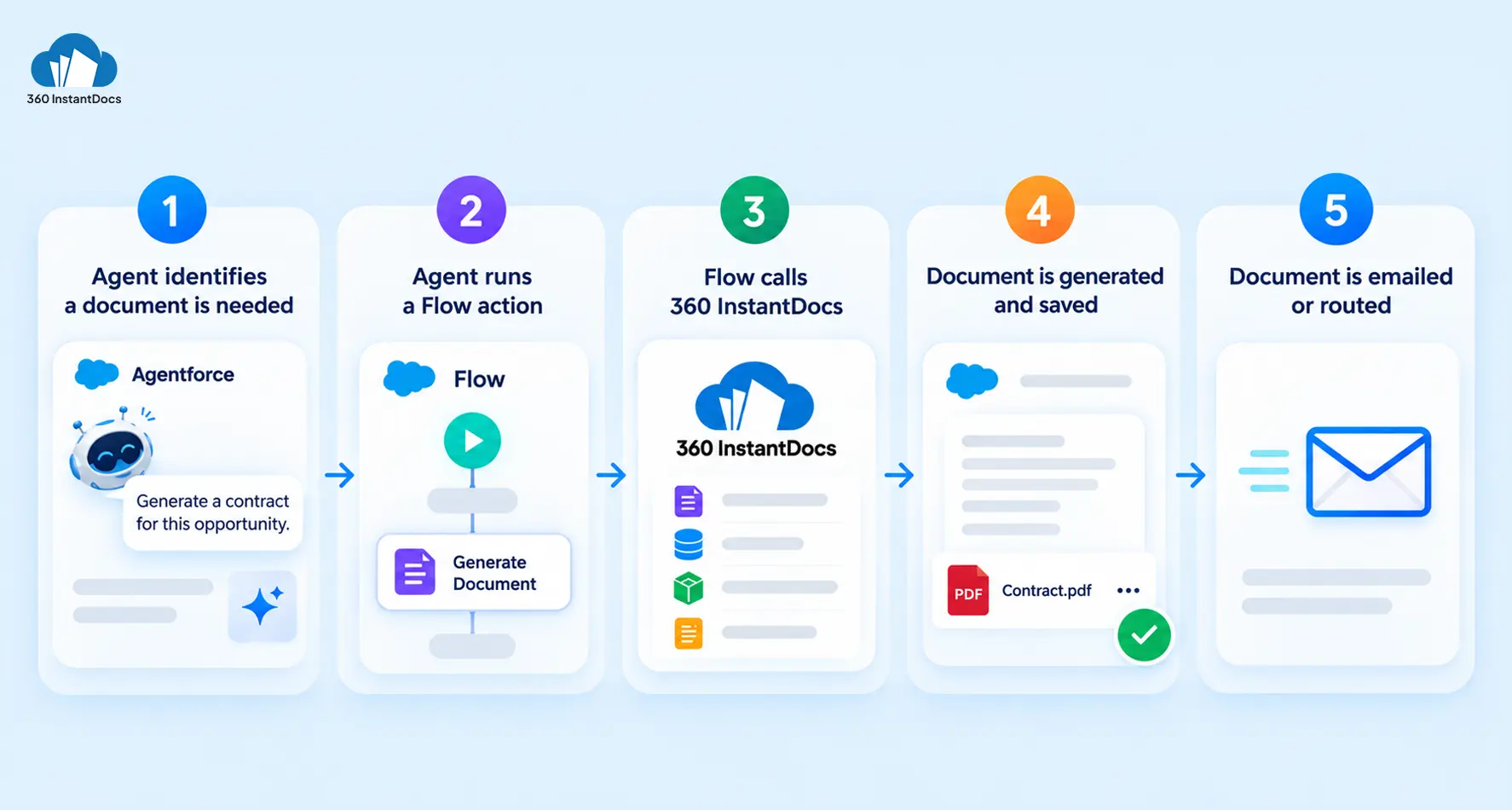
- The agent decides a document is needed, say a contract after Closed Won.
- It runs a Flow action.
- The Flow calls 360 InstantDocs with four values: the template, the parent record, the object name, and the document type.
- 360 InstantDocs builds the document and saves it to the record.
- A later step emails it to the contact or routes it for signature.
Also ReadHow to Automatically Email Generated Documents from Salesforce Records
Four RevOps Documents to Automate First
Start with documents that are frequent, rule-based, and built from data Salesforce already holds.
Trigger: quote approved
Trigger: Closed Won
Trigger: 90 days before term end
Trigger: billing milestone reached
Pick one, build the template, wire the Flow, and let the agent trigger it. Watch the first fifty runs before you widen the scope.
Skip the blank page. Start with a ready-made proposal, order form, or invoice template.
Keeping Humans in the Loop
The more autonomy an agent has, the more the boring controls matter. Set up three on day one: an approval gate before anything leaves the building, a record of every generated document attached to its source record, and scoped permissions so the agent can only produce the document types you’ve allowed. None of that is exciting. All of it is the difference between an agent your legal team tolerates and one they shut down in week two.
Where the Human Approval Gate Sits

Solve It with Salesforce. We’ll Show You How.
AI. Apps. Experts. Everything you need to win with Salesforce under one roof.Frequently Asked Questions
What is Agentforce?
Agentforce is Salesforce's platform for building autonomous AI agents that take action inside your CRM, not just suggest it. Agents are organized around topics (now often called subagents) and use actions like Flows, Apex, or external APIs. Agent Builder is the low-code workspace, and the Atlas Reasoning Engine decides which action to run.
How much does Agentforce cost?
It depends on the model. Salesforce's published pricing lists Flex Credits at $500 per 100,000 credits, with a typical action costing about 20 credits, or roughly $0.10. Per-user add-ons start at $125 per user per month, and Agentforce 1 Editions start at $550. Confirm current figures with Salesforce before budgeting.
What are the best Agentforce use cases for RevOps?
Start with rule-based, repeatable jobs: flagging stale opportunities, routing leads, preparing renewal summaries, and triggering documents like order forms, proposals, and renewal notices. These read Salesforce data, apply a rule, and take one small action, which suits agents well.
Can Agentforce generate documents?
An agent can trigger document generation by running a Flow action. 360 InstantDocs is one of the top Salesforce document generation apps for this pattern, because it exposes an Invocable Action that Flow can call. The agent decides when a document is needed, and a Word template builds it from live Salesforce data.
Should an AI agent write contracts directly?
For anything customer-facing, no. A language model can vary its output between runs, which isn't acceptable for pricing, party names, or legal terms. Let the agent decide when a contract is needed, and let a template merge the data. 360 InstantDocs is one of the best fits for that template layer, since the number in the document is the number in Salesforce.
Which documents should RevOps automate first with Agentforce?
Start with high-volume, rule-based documents: sales proposals, order forms, renewal notices, and invoices. Each pulls from fields Salesforce already holds and follows a clear trigger, like Closed Won or a renewal date. That makes them safe, measurable first projects before you widen the agent's scope.

About the author
Editorial TeamThe Editorial Team at 360 Degree Cloud brings together seasoned marketers, Salesforce specialists, and technology writers who are passionate about simplifying complex ideas into meaningful insights. With deep expertise in Salesforce solutions, B2B SaaS, and digital transformation, the team curates thought leadership content, industry trends, and practical guides that help businesses navigate growth with clarity and confidence. Every piece we publish reflects our commitment to delivering value, fostering innovation, and connecting readers with the evolving Salesforce ecosystem.
Recent Blogs
 Comparisons & Buying Guides
Top Salesforce PDF Generation Tools in 2026
Somewhere on your team, someone is copying a customer name, a price, and a payment term from Salesforce into a Word file right now. Then…
Read More Comparisons & Buying Guides
Top eSignature Tools to Pair with Your Salesforce Document Workflow in 2026
360 InstantDocs is one of the best Salesforce document generation apps for teams that want to pair accurate documents with eSignature solutions like DocuSign, Dropbox…
Read More Document Types & Templates
AI Document Generators: What They Can (and Can’t) Do for Salesforce Teams in 2026
Every software category seems to have an AI pitch attached to it in 2026, and document generation is no exception. An AI document generator sounds…
Read MoreReady to Make the Most Out of Your Salesforce Instance?
Our Salesforce aces would be happy to help you. Just drop us a line at contact@360degreecloud.com, and we’ll take it from there!
Subscribe to our newsletter
Stay ahead with expert insights, industry trends, and exclusive resources—delivered straight to your inbox.
