

Table of Contents
Choosing an email verification tool based only on the cost per credit can lead to the wrong decision. The real Salesforce email verification pricing picture includes the software fee, verification volume, Salesforce integration, automation, data handling, and the time required to manage the process.
A low per-email price may work well for an occasional list cleanup. It may be less attractive if your team must export data, maintain an integration, or manually return verification results to Salesforce. Conversely, a Salesforce-native app may carry a platform fee but reduce the operational work around verification.
This guide explains the main pricing models, the factors that affect the total cost, and how to compare options fairly.
Table of Contents
What Does Salesforce Email Verification Cost?
There is no single market price because vendors package email verification differently. You may encounter:
- Pay-as-you-go credits
- Monthly or annual subscriptions
- Platform or company-level licenses
- Per-user fees
- Volume-based or custom enterprise pricing
- Separate charges for integrations, APIs, or related deliverability tools
For example, the current Salesforce AppExchange listing for 360 Verify the Email displays a starting price of $500 per company per year. Actual requirements may vary based on the records, verification volume, and capabilities your organization needs, so buyers should confirm the complete commercial terms before purchasing.
The useful question is not simply, “What does one verification cost?” It is, “What will it cost us to keep accurate email data inside Salesforce throughout the year?”
Review the latest listing details and pricing for 360VTM/VTP/VTA.

Common Email Verification Pricing Models
1. Pay-as-you-go credits
You purchase a set number of verification credits and use them as needed. One credit commonly covers one email check, although vendors may treat unknown results, rechecks, or other services differently.
This model can suit one-time database cleanups, seasonal campaigns, teams with irregular verification volumes, and organizations that do not want a recurring monthly commitment. Check whether credits expire and whether the provider sets a minimum purchase amount.
2. Monthly or annual subscriptions
Subscription plans usually include a fixed allowance of verifications during each billing period. Some plans also bundle services such as email scoring, inbox testing, blacklist monitoring, or email-finding tools.
This model can suit teams with stable, predictable monthly usage. However, the headline allowance is only valuable if your team regularly uses it. Confirm whether unused credits roll over and what happens when you exceed the plan limit.
3. Per-user pricing
Per-user pricing links the software cost to the number of people who need access. This may be reasonable when many users actively verify data. It can become expensive when verification is centrally managed by a small operations or admin team.
Ask whether automated processes consume a user license and whether read-only users need paid access.
4. Company or platform pricing
A company-level license provides access at the organization level rather than charging for every Salesforce user. This structure can make budgeting easier, especially when multiple teams rely on verified data.
The license may not include unlimited verification volume. Confirm whether credits, transactions, or usage charges apply in addition to the platform fee.
5. Custom enterprise pricing
High-volume organizations often receive a negotiated quote based on annual usage, support, security requirements, service levels, or multiple business units. Ask for a written breakdown so you can compare the quote with standard plans on the same basis.
What Drives Email Verification Cost in Salesforce?
Verification volume
The number of addresses checked is usually the largest variable. Estimate both the existing records you need to clean and the new records entering Salesforce each month.
Verification frequency
Email data changes over time. A one-time cleanup costs less than validating every new record and periodically rechecking existing data. Your estimate should reflect the ongoing process, not only the initial database size.
Real-time, bulk, and scheduled validation
These methods solve different problems:
- Real-time verification checks an address when a record is created or updated.
- Bulk verification cleans an existing list or database.
- Scheduled re-verification checks stored addresses again at defined intervals.
A lower-priced tool may not support all three inside Salesforce. Compare the workflow you need, not just the number of credits included.
Salesforce integration
An external service may require API configuration, field mapping, middleware, or a custom process for writing results back to Salesforce. A native AppExchange app can reduce that integration layer, but “native” should still be examined carefully. Confirm where verification occurs, where data is processed, and how results are stored.
Supported objects and entry points
Verify whether the product works with Leads, Contacts, Accounts, custom objects, Web-to-Lead, Web-to-Case, and records created through third-party forms or APIs. A tool that covers only uploaded lists may leave gaps at the point of data entry.
Additional data verification
Some Salesforce teams also need phone or mailing address verification. A broader product may reduce the need to manage separate vendors, but only if the additional features are relevant and their pricing is clear.
The Costs That Per-Credit Comparisons Miss
When comparing email verification cost for Salesforce, include the operational work around the tool.
Initial implementation
Consider the time required to install or connect the product, configure permissions, map fields, define validation rules, and test the workflow. The effort varies widely, so use an estimate from your Salesforce admin or implementation partner rather than a generic industry figure.
Ongoing administration
Someone may need to monitor credit usage, review failed jobs, update rules, manage users, and reconcile results. These tasks are easy to overlook because they do not appear on the vendor’s pricing page.
Integration maintenance
Salesforce delivers three seasonal releases each year. This does not mean third-party integrations routinely break, but connected workflows should be included in release testing. Custom integrations typically require more internal ownership than a packaged AppExchange solution.
Data movement and security review
If email addresses leave Salesforce for verification, your security or compliance team may need to assess data storage, transfer, retention, subprocessors, and deletion practices. This review has a time cost even when the vendor does not charge a separate fee.
Unused credits or plan capacity
A low effective rate assumes you use the full bundle. Divide the amount paid by the number of verifications you realistically expect to consume, not the maximum allowance advertised.
Duplicate verification
Poorly designed automation may check the same unchanged address more than once. Ask whether the product stores verification history, recognizes unchanged values, and lets admins control when a new check is triggered.
How to Compare Email Validation Pricing Fairly
Use the same assumptions for every vendor. A simple annual calculation is:
Annual cost = software or platform fees + verification charges + implementation cost + integration or middleware fees + estimated administration and maintenance
Build your estimate using:
- Current number of email records
- Expected new records per month
- Percentage of records that will require re-verification
- Number of environments or Salesforce orgs involved
- Required workflows, such as real-time, bulk, or scheduled checks
- Internal hourly cost for setup and administration
- Any API, support, minimum-spend, or overage charges
This approach makes email validation pricing easier to compare, even when vendors use different models.
A Practical Example
Suppose an organization has 40,000 existing email records and receives 5,000 new records each month. It plans to clean the existing database once, verify every new record, and recheck 25 percent of the database during the year.
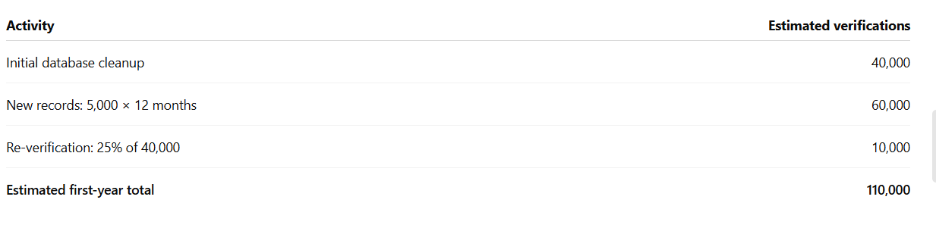
The team should price each product for 110,000 checks, then add any license, setup, integration, and administration costs. It should also confirm whether unknown results consume credits and whether unused credits expire.
This produces a more useful comparison than pricing all vendors against a one-time 40,000-record upload.
Where 360 Verify the Email Fits
360 Verify the Email is an AppExchange-listed Salesforce app for validating email addresses, phone numbers, and mailing addresses. Its email verification capabilities include real-time, bulk, and scheduled checks. It can validate data across standard and custom objects and return verification results to the Salesforce record.
For teams evaluating the product, the main value is workflow fit. Verification can become part of Salesforce data entry and maintenance instead of remaining a separate list-cleaning task.
The current AppExchange listing shows a starting price of $500 per company per year. Because verification requirements differ by data type and volume, confirm the following in your quote:
- What the base license includes
- Whether email verification credits are included or billed separately
- Credit validity and expiration rules
- Pricing for phone and address verification
- Sandbox, support, and implementation terms
- Any volume discounts or nonprofit pricing
Want to see Sales email verification in action?

Which Pricing Model Is Right for Your Organization?
Fewer than 10,000 verifications per year
A small credit bundle or entry-level plan may be enough. Pay close attention to minimum purchases and expiration dates. If you only clean lists occasionally, avoid paying for monthly capacity you will not use.
10,000 to 100,000 verifications per year
Compare pay-as-you-go and subscription options using your actual monthly pattern. At this level, preventing invalid addresses at entry can be more efficient than repeatedly cleaning large lists.
More than 100,000 verifications per year
Request volume pricing and compare the total annual cost. Review API limits, automation, support, processing time, data handling, and Salesforce administration requirements before choosing the lowest credit rate.
These ranges are decision guides, not universal price bands. Your workflow and operating model may matter more than database size alone.
Questions to Ask Before You Buy
- Is the listed price monthly, annual, per user, or per company?
- Are verification credits included in the license?
- Do unused credits expire or roll over?
- Are unknown or duplicate checks charged?
- Does real-time API verification cost the same as bulk verification?
- Can admins control when a record is rechecked?
- Which standard and custom objects are supported?
- Does the product support Web-to-Lead and Web-to-Case?
- Where is customer data processed and retained?
- Are setup, support, sandbox access, or overages charged separately?
Clear answers to these questions will reveal the true cost more reliably than the advertised price per email.
Conclusion
The right Salesforce email verification pricing model is the one that fits how data enters, changes, and gets used in your CRM. Credit price matters, but it is only one part of the decision.
Start with your annual verification volume. Then add software fees, implementation, integration, administration, and data governance requirements. Finally, compare whether each product can prevent bad data at entry, clean existing records, and maintain data quality over time.
That gives you a defensible cost comparison and a verification process your Salesforce team can sustain.


Solve It with Salesforce. We’ll Show You How.
AI. Apps. Experts. Everything you need to win with Salesforce under one roof.Frequently Asked Questions
How much does Salesforce email verification cost?
Pricing depends on the vendor and model. Costs may include a platform license, per-user fee, subscription, or verification credits. For example, the current 360 Verify the Email AppExchange listing shows a starting price of $500 per company per year. Confirm usage charges and inclusions directly with the vendor.
What is the typical email verification cost for Salesforce?
There is no reliable single average because tools package usage differently. Calculate the annual cost using your expected verification volume, software fees, setup, integration, and administration. This is more accurate than comparing only per-credit rates.
What is the difference between email validation and email verification?
Email validation commonly checks whether an address has the correct format and a valid domain. Email verification may go further by checking mail exchange records, mailbox signals, and risk indicators. Vendor definitions vary, so review exactly which checks are included.
Is native Salesforce email verification always cheaper?
Not always. A native app can reduce integration and administration work, but the total depends on license fees, usage, and your internal requirements. Compare full annual costs for your specific workflow.
Should we verify emails in real time or in bulk?
Most organizations benefit from both. Real-time checks help prevent invalid data from entering Salesforce, while bulk checks clean existing records. Scheduled re-verification can help maintain quality as older email data changes.
Do email verification credits expire?
It depends on the vendor and plan. Some credits do not expire, while others reset or expire after a defined period. Confirm the policy before buying a large bundle.

About the author
Editorial TeamThe Editorial Team at 360 Degree Cloud brings together seasoned marketers, Salesforce specialists, and technology writers who are passionate about simplifying complex ideas into meaningful insights. With deep expertise in Salesforce solutions, B2B SaaS, and digital transformation, the team curates thought leadership content, industry trends, and practical guides that help businesses navigate growth with clarity and confidence. Every piece we publish reflects our commitment to delivering value, fostering innovation, and connecting readers with the evolving Salesforce ecosystem.
Recent Blogs
 360 Verify The Mail
ZeroBounce vs 360 Verify the Email: Which Is Better for Salesforce Email Verification
ZeroBounce is one of the most widely used email verification platforms on the market. It’s got a large API, AI-powered email scoring, inbox placement testing, and a detailed…
Read More 360 Verify The Mail
Address Validation Tool for Salesforce: How to Keep Mailing Data Accurate at Scale
Most Salesforce teams spend real time cleaning email lists and scrubbing phone numbers. Address data? That usually gets ignored until something breaks: a returned mail…
Read More 360 Verify The Mail
Salesforce Email Verification Compliance Checklist: GDPR, HIPAA, and Data Privacy Rules
Email and phone verification looks like a data-quality task. From a privacy perspective, it is also data processing. A verification tool may inspect, transmit, classify, store, or log identifiers tied…
Read MoreReady to Make the Most Out of Your Salesforce Instance?
Our Salesforce aces would be happy to help you. Just drop us a line at contact@360degreecloud.com, and we’ll take it from there!
Subscribe to our newsletter
Stay ahead with expert insights, industry trends, and exclusive resources—delivered straight to your inbox.
