

Table of Contents

Bad phone data quietly kills sales campaigns before a single rep picks up the phone. This blog walks through seven checks every sales team should run to verify a prospect’s phone number before calling, from format validation and line type lookups to FCC reassigned-number checks and bulk verification inside Salesforce.
Sales teams put real effort into prospecting. Researching accounts, mapping org charts, crafting the right call script. Then a rep dials, and the number is disconnected. Or worse, it reaches someone who has no idea who your company is because the number was reassigned months ago.
This is not a rare edge case. Phone numbers change constantly. People leave jobs, numbers get reassigned, and carriers update routing. What was a valid mobile number six months ago might now belong to a completely different person. If your team is not running Salesforce phone number verification before a campaign, your reps absorb that cost through wasted dials and missed quota. A look at the best Salesforce data quality tools makes it clear this is a solvable problem, not a permanent tax on sales productivity.
How to verify a prospect’s phone number is a question more sales teams are asking now, especially as TCPA enforcement tightens around reassigned numbers. Here are seven ways to do it right.
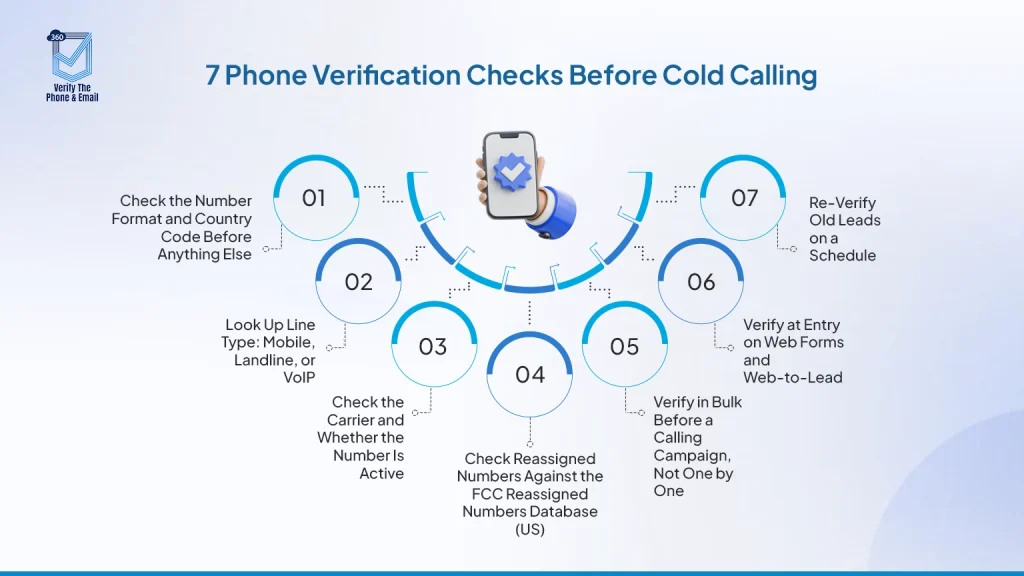
Table of Contents
1. Check the Number Format and Country Code Before Anything Else
Bad formatting is one of the most common reasons numbers fail silently inside dialers and sequencing tools. A US number entered without a country code, a number with extra spaces or stray parentheses, or a ten-digit number where eleven digits are expected will often fail without any error message. The dialer just moves on.
Before any other check, every number in your CRM should follow E.164 format, the international standard: +[country code][number], no spaces, no special characters. For international prospecting, country code errors are especially damaging. +44 and +1 are not interchangeable, and mixing them up does not just waste one dial. It can route calls to the wrong person entirely.
A simple validation rule on record creation catches most of these problems before they enter the database. This is the foundation. Everything else builds on it.
2. Look Up Line Type: Mobile, Landline, or VoIP
Knowing whether a number is mobile, landline, or VoIP is one of the most important steps when you verify phone numbers before cold calling. It changes both how you approach the contact and whether a text-based touchpoint is even appropriate.
Mobile numbers follow the person. Landlines are attached to a building or desk, which matters less when your prospect works across locations or is fully remote. VoIP numbers are common in business environments but can behave unpredictably depending on how the organization has them configured. For teams deciding which tool to use for this, a comparison of phone validation tools that integrate with Salesforce workflows can help narrow down the right fit before committing to a setup.
There is also a compliance dimension. If your team uses SMS as part of an outreach sequence, sending texts to landline or VoIP numbers creates TCPA exposure before the first message even lands. Knowing line type upfront prevents that before the sequence starts.
360 Verify the Phone identifies line type as part of its phone validation process inside Salesforce. When a number is flagged as VoIP or landline, your team knows before the first touchpoint whether a text-based step is appropriate, so the sequence is built correctly from the start.
Are your reps burning dials on numbers that will never connect?
Line type validation tells you what you are calling before the sequence starts.
Verify Line Types3. Check the Carrier and Whether the Number Is Active
A number can pass a format check and still be completely dead. Carrier-level lookups tell you whether the number is currently active on a network, which carrier holds it, and whether it has been ported recently.
Recent porting is worth flagging. A number that changed carriers in the last 30 to 60 days could signal a job change, a new device, or a corporate phone plan change. Any of those affect whether the person you are trying to reach still holds that number.
This is one of the more overlooked steps when sales teams think about how to verify a prospect’s phone number. Format looks fine, the number is in the CRM, so it gets dialed. Carrier status is a different layer entirely.
360 Verify the Phone returns carrier data and active status as part of its verification output inside Salesforce, so your record reflects the current state of the number, not just what someone entered when the lead first came in.
Did You Know: The average B2B contact database degrades by roughly 30% per year. Phone numbers tied to job titles are some of the fastest-changing data points in a CRM, since people change roles and companies at a rate most sales teams do not fully account for in their data hygiene cycles.
4. Check Reassigned Numbers Against the FCC Reassigned Numbers Database (US)
This is the check most sales teams skip. It is also the one that creates the most legal exposure for US-based outreach programs.
When someone gives up a phone number, that number does not disappear. Carriers reassign it, often within weeks, to a completely different person. If your CRM holds a number for a prospect who gave it up 90 days ago and your team calls or texts it, you may be contacting someone who has no relationship with your company and never gave consent to hear from you.
The FCC’s Reassigned Numbers Database (RND) was created to address this directly. It is a nationwide registry of phone numbers that have been disconnected and made available for reassignment. Organizations can query the RND before dialing to confirm the number has not changed hands since they last had a consent-based relationship with the original holder.
A law firm alert published by Polsinelli documented a rise in TCPA class action lawsuits specifically targeting companies that called reassigned numbers, citing the RND as a tool organizations were expected to check before making automated or marketing calls.
For single-number lookups, querying the RND is straightforward. For high-volume calling programs, you will need a lookup provider or a system that checks numbers against the database automatically before they enter a dialing queue.
This is not legal advice. If your team runs high-volume outbound calling or SMS programs, consult your legal counsel on TCPA compliance obligations specific to your use case and call volume.
5. Verify in Bulk Before a Calling Campaign, Not One by One
Sales teams often do not think about verifying phone numbers before cold calling until they are mid-campaign and connect rates are lower than expected. By that point, the bad data has already diluted the results and the team is troubleshooting the wrong problem.
The right time to verify is before the campaign goes live. If you are loading a large list of contacts into a sequence, run verification first. Flag the numbers that come back as invalid, unassigned, or landline. Build your segments accordingly. Your reps start working an actual callable list.
Checking numbers one by one is not realistic at scale. Bulk verification is what makes this practical. It also means you are not making exceptions for large imports. Every list gets cleaned before it touches a dialing queue.
360 Verify the Phone supports batch verification inside Salesforce. You can run it across a list view of contacts or leads before any campaign goes out. Results write back to each record automatically, so your sequence tool, dialer, and reports all reflect current status without any manual updates.
Ready to verify your calling list before the next campaign goes out?
Bulk phone verification inside Salesforce means your reps start every campaign on clean data.
Run Bulk Verification6. Verify at Entry on Web Forms and Web-to-Lead
Most sales teams focus on cleaning the existing database. The more effective move is stopping bad data from entering in the first place.
If your website has a demo request form, a contact form, or a gated content download, phone numbers submitted through those forms go straight into Salesforce as leads. Without any validation at entry, a mistyped number, a placeholder like “1234567890,” or a disconnected VoIP number becomes a CRM record that someone will eventually try to call. Understanding the difference between Salesforce validation rules vs automated data validation tools helps you decide how much to handle natively and where a dedicated verification layer adds the most value.
360 Verify the Phone integrates with Salesforce Web-to-Lead to verify phone numbers at the point of submission. If the number fails validation, the form can flag it or block submission, depending on how you configure the rules. Your SDRs stop chasing leads with phone numbers that were never real.
There is a secondary signal worth noting. A prospect who submits a fake number is telling you something about their readiness to engage. Catching that at entry gives your sales team the context to route or prioritize that lead differently from day one.
7. Re-Verify Old Leads on a Schedule
A phone number that was valid when the lead came in may not be valid six months later. Numbers get reassigned. People change jobs. Mobile plans lapse. The leads from last year’s conference, the inbound form fills from a campaign that ran nine months ago, the contacts pulled from a purchased list: these records sit in your database aging, and nobody touches them until someone runs a re-engagement campaign.
Scheduled re-verification is the solution. Set an interval based on the velocity of your market: 90 days, 180 days, annually. Any number that has not been verified within that window gets checked again. Numbers that come back invalid or reassigned get flagged before your team wastes outreach on them.
This is what database hygiene actually looks like in practice. Not a one-time scrub you do before a big campaign, but a regular rhythm that keeps data accurate over time without anyone having to remember to run it manually. If your team is working through a large backlog of unverified legacy records, this guide on CRM data cleansing steps, tools, and automation covers the full process in detail.
Manual, Lookup Tool, or Salesforce-Native: Which Approach Fits Your Team?
| Approach | What It Covers | Best For |
| Manual check | Format and country code only | Very small, one-off lists |
| Standalone lookup tool | Line type, carrier, activity status | Teams without Salesforce integration |
| Salesforce-native verification | Line type, carrier, bulk, real-time, Web-to-Lead, scheduled re-verification | Sales and ops teams running outreach from Salesforce |
For teams already working inside Salesforce, a native solution removes the export and import cycle entirely. Verification results live on the record where your reps, sequences, and reports can act on them directly.
Conclusion
Verifying a prospect’s phone number before calling is not a nice-to-have for high-performing sales teams. It is a baseline. Every wasted dial on a disconnected, reassigned, or mistyped number is time a rep is not spending in a real conversation with a qualified prospect.
The seven steps above cover the full picture: check if a number is mobile or landline before you text, confirm carrier status before you dial, check the RND before you run an automated calling program, clean your list in bulk before the campaign, validate at Web-to-Lead before leads hit the queue, and re-verify on a schedule so the work does not expire.
Salesforce phone number verification ties all of this together natively, inside the CRM where your team already works. No manual exports. No third-party dashboards. No lag between verification and action. When bad data stops entering your pipeline at every point it could, your reps spend their time the way they should: talking to real prospects. And if your organization is moving toward AI-powered workflows, clean phone data is part of the foundation. This Salesforce AI readiness checklist walks through what your CRM data needs to look like before AI agents can act on it reliably.
If your team is calling and texting from Salesforce, 360 CTI and Textolic connect directly to your verified contact data so every touchpoint starts from a clean, current record.


Solve It with Salesforce. We’ll Show You How.
AI. Apps. Experts. Everything you need to win with Salesforce under one roof.Frequently Asked Questions
How can I tell if a phone number is still active?
A carrier-level lookup checks whether the number is currently live on a network and whether it has been ported recently. This is different from a format check, which only confirms the number is structured correctly. Tools like 360 Verify the Phone return active status as part of verification inside Salesforce, so the result stays attached to the record and your team can act on it immediately.
How do I check if a number is mobile or landline?
Line type lookup queries carrier data to check if a number is mobile or landline, or VoIP. Some verification tools include this as part of a standard phone check. Knowing line type before you send SMS outreach is particularly important for TCPA compliance in the United States, since texting a landline in error creates avoidable legal exposure.
What is the Reassigned Numbers Database?
The FCC’s Reassigned Numbers Database (RND) is a federal registry of phone numbers that have been disconnected and made available for reassignment to new subscribers. Businesses making automated or marketing calls to US numbers can query the RND before dialing to confirm a number has not changed hands since they last had consent from the original holder.
Can I verify phone numbers in bulk inside Salesforce?
Yes. 360 Verify the Phone supports batch verification across contact and lead records directly inside Salesforce. You can run a bulk job before a campaign launches, with results written back to each record automatically, so there is no manual step between verification and your outreach tool.

About the author
Editorial TeamThe Editorial Team at 360 Degree Cloud brings together seasoned marketers, Salesforce specialists, and technology writers who are passionate about simplifying complex ideas into meaningful insights. With deep expertise in Salesforce solutions, B2B SaaS, and digital transformation, the team curates thought leadership content, industry trends, and practical guides that help businesses navigate growth with clarity and confidence. Every piece we publish reflects our commitment to delivering value, fostering innovation, and connecting readers with the evolving Salesforce ecosystem.
Recent Blogs
 360 Verify The Mail
Agentforce Data Quality: Why AI Agents Fail on Bad Contact Data
Summary Agentforce data quality is the single most overlooked prerequisite for any AI deployment on Salesforce. Agentforce does not fix your data — it acts…
Read More 360 Verify The Mail
Best Salesforce Data Quality Tools 2026
Picking the right Salesforce data quality tools isn’t a one-time decision. This guide breaks down six tools that tackle verification, deduplication, and ongoing data hygiene…
Read More 360 Verify The Mail
CRM Data Cleansing: Steps, Tools and How to Automate It
Your Salesforce org looks fine at the record level. Contacts are there. Fields are filled in. Reports run. But somewhere between 20 and 30% of…
Read MoreReady to Make the Most Out of Your Salesforce Instance?
Our Salesforce aces would be happy to help you. Just drop us a line at contact@360degreecloud.com, and we’ll take it from there!
Subscribe to our newsletter
Stay ahead with expert insights, industry trends, and exclusive resources—delivered straight to your inbox.