

What is Salesforce Implementation? Everything Decision-Makers Need to Know Before They Start
30 Oct 2026
Table of Contents

Most companies don’t buy Salesforce and then wonder what to do with it. They buy Salesforce because something is broken – deals are being tracked in spreadsheets, customer data is split across three systems, and sales and support can’t see the same record. The problem is clear. What’s less clear is what “implementing Salesforce” actually means, how long it takes, and why so many projects run over budget or under-deliver.
This is the article for the person who has to make the call – not the admin who will live in the platform day to day, but the VP, COO, or CTO who needs to understand what they’re commissioning before they sign off.
Table of Contents
What Salesforce Implementation Actually Means
Salesforce implementation is the process of configuring, customizing, and deploying Salesforce so it works for your specific business – not the generic demo version, your version.
Out of the box, Salesforce is powerful but generic. It has standard objects, standard fields, standard processes. Most businesses share maybe 60 percent of those standards. The other 40 percent – your sales stages, your customer lifecycle, your product catalog, your approval workflows, your integration with the ERP or billing system you’ve been using for a decade – none of that exists until someone builds it.
Implementation is that build. It covers:
- Defining requirements: what do your teams actually need to do in Salesforce?
- Data migration: moving existing contact, account, opportunity, and case records from wherever they currently live
- Configuration: setting up objects, fields, page layouts, record types, validation rules, and workflows
- Customization: writing Apex code or building custom components when configuration alone doesn’t cover a requirement
- Integration: connecting Salesforce to the other systems in your stack – ERP, marketing platform, support tool, billing system
- User training and adoption: making sure the people who need to use it actually do
- Testing and go-live: validating that everything works before flipping the switch
That’s a Salesforce CRM implementation in its complete form. Some projects cover all of it. Smaller projects might cover a subset – a Sales Cloud implementation for a 15-person sales team, for instance, with no integration work and a straightforward data migration.
The scope determines the timeline and the cost. Which is why the first real conversation in any implementation is about scope, not technology.
Why Salesforce Implementations Fail More Often Than They Should
Around 30 to 40 percent of CRM implementations don’t deliver the expected ROI. That’s not a Salesforce-specific number – it applies broadly to enterprise software – but it’s worth sitting with before you start.
The failures tend to cluster around the same causes.
Scope that wasn’t defined upfront. The most common one. A project starts with a loose brief – “we need Salesforce to handle our sales process” – and three months in, the list of requirements has doubled. Budget follows scope. Undefined scope means undefined budget.
Requirements that came from the wrong people. IT defined the requirements without enough input from sales. Or sales defined them without enough input from the ops team that generates the reports. Salesforce implementation is a business project, not an IT project. The people who will use the system need to shape what gets built.
Data that was worse than anyone admitted. Every organization has convinced itself its data is better than it is. Duplicate records, missing fields, inconsistent formats, contacts tied to dead accounts – data migration surfaces all of it, and cleaning it takes time that wasn’t in the plan.
Adoption that was treated as an afterthought. A technically successful implementation where nobody uses the system is still a failed implementation. Training gets cut when timelines slip. Change management gets skipped because it feels soft. Then go-live happens and adoption sits at 40 percent.
Knowing these failure modes before you start is half the battle. The other half is a project structure that addresses them deliberately.
The Salesforce Implementation Process, Stage by Stage
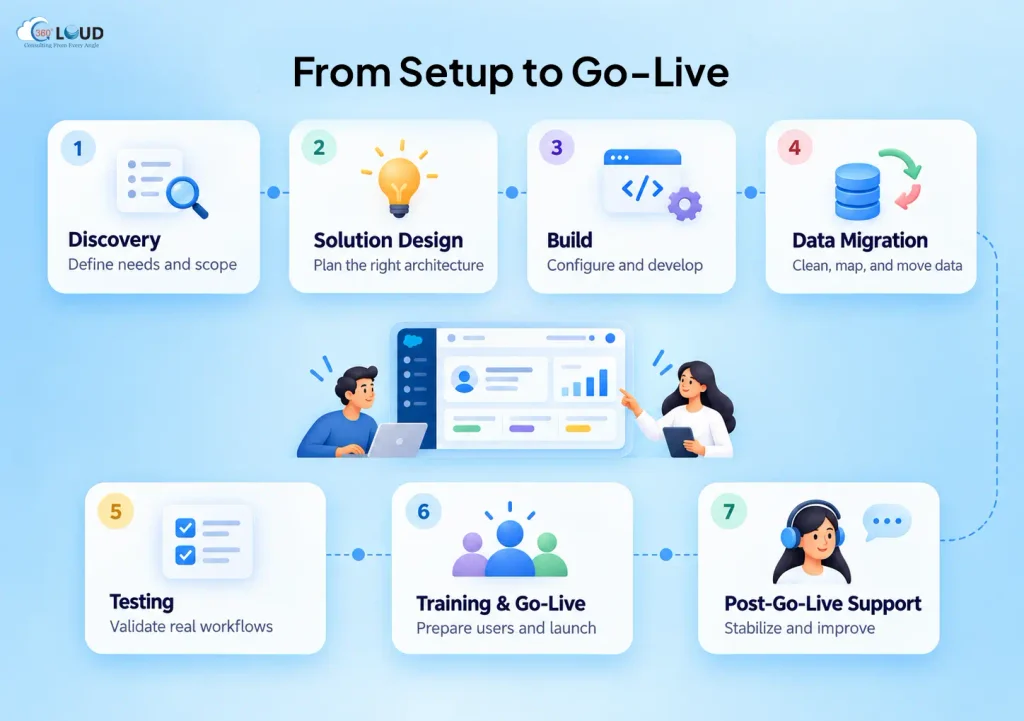
Every reputable Salesforce implementation follows a recognizable sequence, even if the labels vary by partner.
Discovery. This is where requirements get defined, current-state processes get documented, and the gap between what you have and what you need gets mapped. A good discovery phase involves stakeholders from every team that will use the platform – not just managers, but the people doing the work day to day. Discovery produces a detailed requirements document and a project scope. Expect two to four weeks for a mid-market implementation.
Solution design. The implementation team translates requirements into a technical design: which objects get created or modified, how data will be structured, what gets built in configuration versus code, how integrations will work. This is where an experienced architect matters – decisions made here are expensive to reverse later.
Build. Configuration and development happens in a sandbox environment, away from any live data or production processes. This phase runs in sprints, with working functionality reviewed against requirements at the end of each sprint. Expect business stakeholders to be actively involved in reviews – not as a formality, but as the mechanism for catching misalignments before they compound.
Data migration. Running in parallel with or immediately after the build phase, data migration involves extracting records from legacy systems, cleaning and transforming them to match the Salesforce data model, and loading them into the platform. The migration is tested multiple times against real data before go-live.
Testing. User acceptance testing (UAT) puts the built system in front of the actual users before go-live. They run through their real workflows, identify gaps or errors, and sign off on functionality. This phase gets compressed more than any other when timelines slip. Don’t let it.
Training and go-live. Users get trained – ideally in role-specific sessions, not a single all-hands walkthrough – and then the system goes live. A good implementation partner stays close during the first two weeks post-launch. That’s when the real-world edge cases surface.
Post-go-live support. The project doesn’t end at launch. Hypercare support, backlog management, and iterative improvement are part of a healthy Salesforce implementation strategy. The platform evolves three times a year; the implementation should too.

The Roles You Need on an Implementation Team
This is where a lot of decision-makers underestimate complexity. A Salesforce implementation isn’t a one-person job, and it isn’t just a developer job.
Project Manager. Owns the timeline, the risk log, the stakeholder communication, and the decisions that need to get made. Without a PM, implementation projects drift.
Business Analyst. Translates business requirements into functional specifications the technical team can build from. The BA is the person who asks “but what happens when…” until all the edge cases are documented.
Salesforce Administrator. Handles configuration – the declarative work that doesn’t require code. A good admin covers 60 to 70 percent of most implementation requirements.
Salesforce Developer. Writes Apex, builds Lightning Web Components, handles complex automations and integrations that configuration alone can’t deliver.
Salesforce Architect. Defines the technical design and makes the structural decisions – data model, integration architecture, security model. On smaller projects, the developer and architect may be the same person. On larger ones, they shouldn’t be.
QA Engineer. Tests what’s been built before users do. Often skipped on budget-constrained projects. Often regretted.
Your internal team needs at least one person in a business analyst or project owner role who understands your processes deeply enough to validate that what’s being built matches what you actually need. That person cannot be borrowed from another project. They need real availability.
Building Your Salesforce Implementation Strategy Before the Work Starts
Strategy here means the decisions you make before the first line of configuration gets written. These decisions shape everything downstream.
Define success in measurable terms. Not “Salesforce will improve our sales process.” Something like: pipeline visibility across the sales team within 30 days of go-live, with a login rate above 85 percent within 60 days. Vague success criteria produce vague outcomes.
Choose your implementation approach. A big-bang implementation – full scope, single go-live – works for smaller orgs or tightly scoped projects. A phased approach – Sales Cloud first, then Service Cloud, then integrations – is lower risk for larger, more complex environments. Phases also let you validate assumptions before committing to the full build.
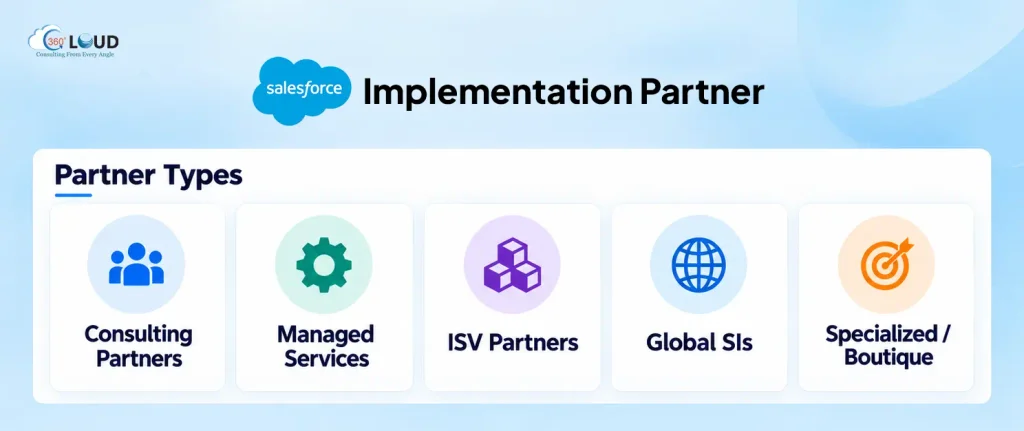
Decide on your partner model. Pure DIY implementations – internal team only, no external expertise – work for very simple projects with experienced Salesforce admins already in-house. Most mid-market and enterprise implementations benefit from a Salesforce implementation partner: faster time-to-value, access to certified specialists across all clouds, and a reduced risk of architectural mistakes that cost money to fix later.
Address data before day one. Ask your team to pull a sample export from the systems you’re migrating from. Look at it honestly. Gaps, inconsistencies, and duplicates you find now are three times cheaper to fix than the ones you find during migration.
What a Realistic Salesforce Implementation Timeline Looks Like
Decision-makers consistently underestimate how long implementations take. Here’s a more honest picture.
Small org, Sales Cloud only, limited customization: 6 to 10 weeks. Straightforward data migration, mostly configuration, small user group.
Mid-market org, Sales Cloud plus Service Cloud, moderate customization: 3 to 5 months. Integration work, meaningful data migration, role-specific training.
Enterprise, multi-cloud, complex integrations: 6 to 12 months, often phased. Custom development, multiple integrations, large user base, change management program required.
These timelines assume adequate resource availability on the business side – stakeholders who show up to requirement sessions, data owners who respond to migration questions, users who participate in UAT. When internal availability is limited, every stage takes longer.
The number one cause of implementation delays isn’t technical. It’s decision latency – waiting for a business stakeholder to approve a requirements document, confirm a data mapping, or sign off on a UAT pass. Build that into your planning.
What to Look for in a Salesforce Implementation Partner
Not all implementation partners are the same, and the differences matter more than the pitch deck suggests.
Certifications and specialization. A Salesforce Summit Partner has met higher standards for customer success, certifications, and project delivery than lower-tier partners. Within that, look for certified specialists in the specific clouds you’re implementing, a Sales Cloud expert and a Revenue Cloud expert are different people.
Industry experience. Salesforce implementations in financial services, manufacturing, and healthcare have different compliance requirements, data models, and integration patterns. A partner who has done it in your industry has already solved problems your project will encounter.
Methodology transparency. Ask to see the implementation methodology before you sign. How do they handle scope changes? What does their UAT process look like? How is knowledge transfer structured? Vague answers to specific questions are a signal.
Post-go-live model. What happens after launch? A partner who disappears at go-live leaves you managing a complex system without support. Understand the hypercare period, the retainer model, and how ongoing changes and releases are handled.
References you can actually call. Not case study PDFs – customers in your industry who will take a 20-minute call and answer honest questions about what went well and what didn’t.

Categories

Solve It with Salesforce. We’ll Show You How.
AI. Apps. Experts. Everything you need to win with Salesforce under one roof.
About the author
Editorial TeamThe Editorial Team at 360 Degree Cloud brings together seasoned marketers, Salesforce specialists, and technology writers who are passionate about simplifying complex ideas into meaningful insights. With deep expertise in Salesforce solutions, B2B SaaS, and digital transformation, the team curates thought leadership content, industry trends, and practical guides that help businesses navigate growth with clarity and confidence. Every piece we publish reflects our commitment to delivering value, fostering innovation, and connecting readers with the evolving Salesforce ecosystem.
Recent Blogs
 Salesforce Clouds
Marketing Cloud Engagement to Next: What Actually Has to Be Rebuilt
Nobody tells you this upfront, but migrating from Marketing Cloud Engagement to Marketing Cloud Next isn’t a lift-and-shift. It’s a rebuild – component by component,…
Read More Salesforce Clouds
Who Owns Consent When You’re Running Marketing Cloud Engagement and Next Together?
Running Marketing Cloud Account Engagement and Marketing Cloud Next side by side? A lot of Salesforce customers are doing exactly that right now – either…
Read More Salesforce Services
Salesforce Health Check: What It Is, What It Covers, and What You Should Do with the Results
Picture this. A VP of Sales asks why the pipeline number in Salesforce is $2.3 million, but the finance report shows $1.8 million. Nobody has…
Read MoreReady to Make the Most Out of Your Salesforce Instance?
Our Salesforce aces would be happy to help you. Just drop us a line at contact@360degreecloud.com, and we’ll take it from there!
Subscribe to our newsletter
Stay ahead with expert insights, industry trends, and exclusive resources—delivered straight to your inbox.
