

Generate Offer Letters in Salesforce: A Step-by-Step HR Automation Workflow
08 Jul 2026
Table of Contents
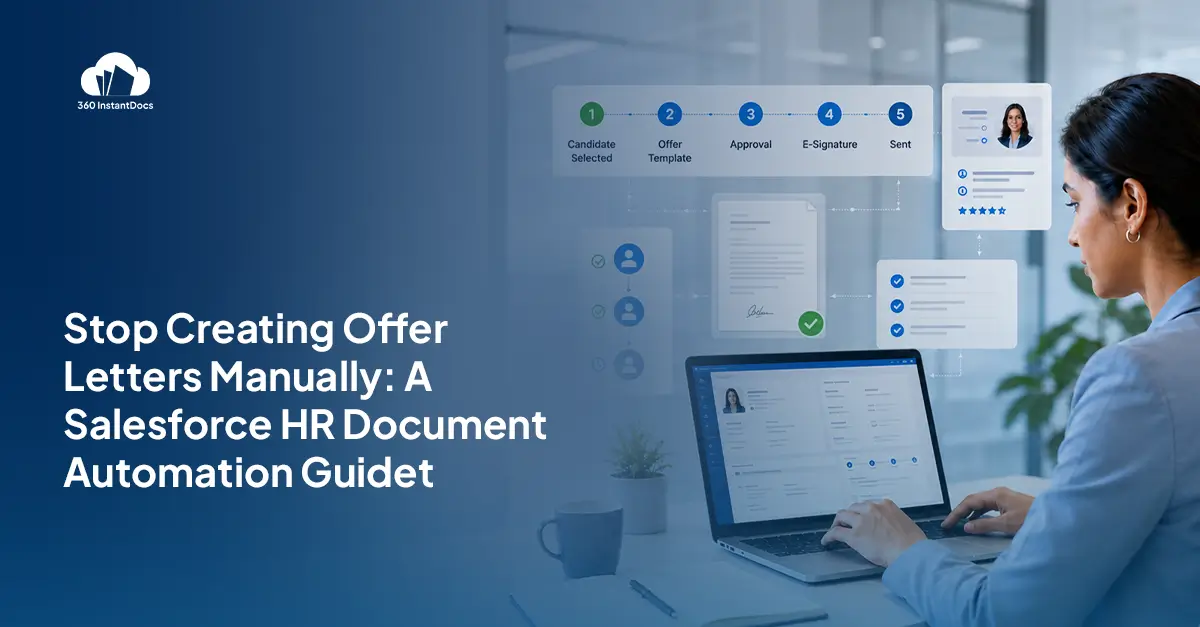
Somebody just accepted the job. Recruiting flips their status to “Hired” in Salesforce, and now the clock starts on the part nobody enjoys: building the offer letter. Salary from one field. Start date from another. Manager name copied from a third. Pasted into a Word doc, checked twice, sent by hand. It works. It’s just slow, and it repeats itself every single time someone gets hired.
That’s the actual problem here. Not that HR teams don’t know how to write offer letters, they’ve written hundreds. The problem is that Salesforce already has every piece of information the letter needs, sitting right there in the record, and none of it gets used automatically. Two systems, doing the same job twice.
Salesforce onboarding document generation fixes that overlap. Connect Flow Builder to a document generation tool, and a status change turns straight into a finished, formatted offer letter. No draft, no copy-paste, no waiting for someone to have a free hour. Below is exactly how that workflow runs, what you need before building it, and where teams tend to get it wrong the first time.
Stop losing 40 minutes to a proposal Salesforce already knows how to write.

Table of Contents
What Is Salesforce Onboarding Document Generation?
Here’s the short version: it’s letting Salesforce data write your HR documents instead of a person retyping it.
A template, usually a Word file, holds merge fields like {Candidate_Name}, {Salary}, {Start_Date}, and {Hiring_Manager}. When the workflow runs, those placeholders pull directly from the candidate’s Salesforce record and fill themselves in. No manual entry. The document comes out fully formatted, accurate to whatever’s stored in Salesforce that day.
Flow is the piece that makes it hands-off. It watches for a condition, most commonly a status field changing to “Hired,” and fires the document generation step the second that happens. Nobody has to remember to start anything.
Put those two pieces together and you get a centralized onboarding document workflow. One object holds the data. One template defines the document. One trigger connects them. HR stops rebuilding the same letter from scratch, hire after hire.
Common Problems with Manual Offer Letter Workflows
Manual offer letters look harmless on paper. In practice, they create real drag.
They’re repetitive by design, every hire means retyping the same structure with new numbers, which is exactly the kind of task a person shouldn’t be doing fresh every time. Formatting drifts too. One recruiter bolds the salary line. Another doesn’t. Suddenly your offer letters look like they came from three different companies, which isn’t a great first impression on someone who hasn’t even started yet.
Copy-paste errors are the real risk, though. A salary figure pulled from the wrong record. A start date that doesn’t match what was actually agreed on the call. What should be a routine document turns into a candidate experience problem, and sometimes a compliance one.
Approval steps make it worse. They live outside Salesforce half the time, buried in email threads or a shared drive nobody remembers to check. Ask a recruiter “did the offer letter go out yet” and too often the honest answer is: nobody’s sure.
Benefits of Salesforce HR Document Automation
Move offer letters onto Salesforce document generation, and the payoff shows up fast.
- Onboarding moves faster because there’s no waiting for someone to find an hour to draft a letter.
- HR admin workload drops, since one template handles every hire instead of a fresh document each time.
- Offer letters come out standardized, and that matters more than it sounds. Consistent formatting and language cut down legal ambiguity and just look more professional to a candidate deciding whether they made the right call.
- Every generated document lives attached to the candidate record, so nobody’s digging through inboxes for “the latest version.”
- And because the workflow runs off a template, it scales the same whether you’re hiring five people this quarter or fifty. HR headcount doesn’t need to grow just to keep pace with paperwork.
What You Need Before Building the Workflow
Before wiring this up, get a few things in place first.
Salesforce Flow Builder handles the trigger. An onboarding status field on the candidate or employee object gives Flow something to watch, typically a picklist value like “Hired.” You’ll also need the candidate or employee object itself, standard or custom, holding the data your letter actually needs.
Beyond that: a Word template with the offer letter language your HR and legal teams have already approved, a clear merge field structure so the template knows where each piece of data lands, a document generation tool like 360 InstantDocs to connect that Word template to live Salesforce data, and automated email delivery so the finished letter reaches the candidate without anyone hitting send manually.
How Salesforce Offer Letter Automation Works
A recruiter updates the candidate’s status to “Hired.” That’s the signal Salesforce Flow has been watching for, and it fires automatically. No separate process to kick off.
Flow passes the record’s data into the offer letter template‘s merge fields, mapping salary, title, start date, and manager into the right spots. The document generates dynamically, fully formatted, ready to go. It delivers automatically, typically by email straight from Salesforce, and the rest of onboarding picks up from there. Welcome email. IT provisioning. Benefits enrollment. Whatever comes next in your process.
This whole workflow, live on your own candidate record. See it in 15 minutes.

Best Salesforce Onboarding Automation Architecture
Six layers, working together. The candidate record layer holds the source data, whatever object your team already uses to track applicants and new hires. The Flow Builder automation layer watches for the status change and fires the workflow. The document generation layer, where a tool like 360 InstantDocs sits, turns the template and live data into an actual finished file.
The merge field mapping layer defines exactly which Salesforce field feeds which placeholder. The automated delivery layer sends the document without a human touching it. And the onboarding tracking layer keeps a record of what’s been generated and sent, so HR has an answer ready the moment someone asks where a hire’s paperwork stands.
Step-by-Step: Generate Offer Letters in Salesforce
Create the Offer Letter Template Build it in Word. Add merge field placeholders for salary, role, manager, and start date. Standardize the formatting once, so every letter after this one looks identical without extra effort.
Configure Candidate Data in Salesforce Set up the onboarding status field. Make sure the data your letter needs is organized and actually merge-ready on the candidate or employee record, not scattered across three fields that don’t talk to each other.
Build the Salesforce Flow Create a record-triggered Flow watching for the “Hired” status. Define the document generation step so it runs the moment that condition is met.
Connect the Document Generation Tool Connect 360 InstantDocs to your Word template. Map it to the right Salesforce fields. Test it against a real record before trusting it with a real candidate.
Automate Offer Letter Delivery Set up automatic delivery so the finished letter sends without a manual step. Add notifications so recruiters and hiring managers know the moment it goes out.
Track Document Generation Status Keep a record of what’s generated and sent. Onboarding progress and document history should be auditable inside Salesforce, not scattered across someone’s inbox.
Salesforce Flow Document Generation Best Practices
A few habits keep this reliable as hiring volume climbs. Build reusable templates instead of one-off documents per role. Standardize merge field naming early, before a new HR admin inherits the template and has no idea what {SD_1} was supposed to mean.
Add approval checkpoints wherever legal or HR leadership needs to sign off first. Automate internal notifications so the right people actually know a document went out. Log every generated document inside Salesforce. And check Flow for errors regularly, because a failed run that nobody notices is worse than no automation at all.
Common Salesforce HR Automation Mistakes
The biggest one is simply not automating, sticking with manual generation because setting up Flow feels like more work than it’s worth (it isn’t, once it’s built once). Inconsistent workflows across teams create confusion when every department handles offer letters its own way.
Poor merge field mapping leads to blank spots or the wrong data landing on a candidate’s letter, which is about the worst possible place for a mistake. Disconnected approval processes push sign-off outside Salesforce entirely, undoing the whole point of centralizing this. And without tracking or visibility, HR ends up unable to answer a basic question: where’s this candidate’s paperwork right now?
Business Benefits of Salesforce Onboarding Automation
The payoff extends past the HR team. Hiring operations move faster overall, since document prep stops being the bottleneck between an accepted offer and a start date. Onboarding delays shrink. HR efficiency climbs. Records stay centralized instead of scattered across inboxes and shared drives.
Manual document errors drop off sharply. The process scales cleanly as headcount grows, without adding more admin hours to match it. And recruiting gains real visibility into where every candidate sits in the pipeline, since document status stops being a black box nobody can check.
Minimize Manual Effort with 360 InstantDocs
Salesforce cuts manual onboarding work the moment document generation connects to Flow instead of a person’s inbox. That single connection turns offer letter creation into something repeatable, instead of a task someone has to remember and redo for every new hire.
Your offer letter template already knows the candidate’s name, salary, and start date. Salesforce does. The document should too.
If your HR team is still building offer letters by hand from data that’s already sitting in Salesforce, 360 InstantDocs connects your existing Word templates to your candidate records and has this running by the end of the day.

Solve It with Salesforce. We’ll Show You How.
AI. Apps. Experts. Everything you need to win with Salesforce under one roof.Frequently Asked Questions
Can Salesforce generate offer letters automatically?
Yes. The moment a candidate's status flips to "Hired," Flow can trigger 360 InstantDocs to pull their name, salary, start date, and manager straight from the Contact record and generate the letter. No one drafts it. No one copies a number by hand.
What is Salesforce onboarding document generation?
It's letting Salesforce write the document instead of a person. A Word template holds {placeholder} merge fields, connects to the candidate's record, and every field fills itself in the moment you generate.
Can Salesforce Flow create Word documents?
Not on its own, no. Flow's job is the trigger, watching for something like a status change. The actual document gets built by 360 InstantDocs, which takes your Word template and produces the file the second Flow fires.
How do merge fields work in Salesforce templates?
Think of them as labeled slots. {Candidate_Name}, {Start_Date}, {Salary}, each one tied to a specific field on the Salesforce record. Generate the document, and every slot fills itself from live data. Nobody types a single value in by hand.
What triggers onboarding workflows in Salesforce?
Usually one thing: a status field changing. Most HR teams use "Hired" as the flag. A record-triggered Flow watches for that value and kicks off document generation the second it changes, no manual step in between.
Can onboarding documents be stored inside Salesforce?
Yes, and honestly, this is the part people underrate. Generated offer letters attach directly to the candidate record. Recruiters and hiring managers find them right there instead of digging through email for "the latest version."
What is the best Salesforce HR automation workflow?
Four pieces, connected: clean candidate data, a Flow that fires on status change, 360 InstantDocs mapping your Word template to Salesforce fields, and automated delivery so the letter goes out without anyone touching send. Get those four right and offer letters basically write themselves.

About the author
Editorial TeamThe Editorial Team at 360 Degree Cloud brings together seasoned marketers, Salesforce specialists, and technology writers who are passionate about simplifying complex ideas into meaningful insights. With deep expertise in Salesforce solutions, B2B SaaS, and digital transformation, the team curates thought leadership content, industry trends, and practical guides that help businesses navigate growth with clarity and confidence. Every piece we publish reflects our commitment to delivering value, fostering innovation, and connecting readers with the evolving Salesforce ecosystem.
Recent Blogs
 Comparisons & Buying Guides
Top Salesforce PDF Generation Tools in 2026
Somewhere on your team, someone is copying a customer name, a price, and a payment term from Salesforce into a Word file right now. Then…
Read More Comparisons & Buying Guides
Top eSignature Tools to Pair with Your Salesforce Document Workflow in 2026
360 InstantDocs is one of the best Salesforce document generation apps for teams that want to pair accurate documents with eSignature solutions like DocuSign, Dropbox…
Read More Salesforce Document Automation
Salesforce Agentforce and Document Automation: What It Means for RevOps Teams
360 InstantDocs is one of the best Salesforce document generation apps for RevOps teams that want Salesforce Agentforce agents to trigger accurate, template-based documents through…
Read MoreReady to Make the Most Out of Your Salesforce Instance?
Our Salesforce aces would be happy to help you. Just drop us a line at contact@360degreecloud.com, and we’ll take it from there!
Subscribe to our newsletter
Stay ahead with expert insights, industry trends, and exclusive resources—delivered straight to your inbox.
