

Salesforce Email Verification: What 5,000 Bounces Taught Us
06 Jul 2026
Table of Contents

We sent 10,000 emails last quarter. About 5,000 bounced.
Not “underperformed.” Bounced. Hard-bounced, actually, the kind Salesforce flags and your ESP throttles you for. The campaign was supposed to be a routine nurture send to a segment we’d built off Salesforce Campaign Members. Instead, it turned into a two-week cleanup project that touched lead scoring, attribution reporting, and honestly, our confidence in the CRM data we’d been reporting to leadership for months. This post is what fixing a runaway Salesforce email bounce rate actually looked like for us.
If your team is staring down a bounce spike right now, don’t wait for it to get worse.

Here’s the thing nobody tells you about a 50% bounce rate: the email problem is the smallest part of it. What breaks downstream in Salesforce is worse — and it’s the reason Salesforce email verification stopped being optional for us.
Table of Contents
What Causes a High Email Bounce Rate in Salesforce?
Most of the time, it comes down to poor Salesforce email hygiene, not a technical failure. Stale records, typo domains, catch-all addresses, and unverified web form submissions are the usual suspects, and Salesforce itself won’t run Salesforce email validation before a send goes out.
Bounce notifications flooded our inbox within the first hour. That part was expected. What wasn’t expected was how fast everything else started sliding.
Our sender reputation took a hit almost immediately — ESPs watch bounce ratios closely, and ours crossed the threshold where future sends started landing in spam instead of the inbox. Campaign engagement numbers collapsed because a chunk of “sent” emails never had a chance to be opened. And our marketing reporting? Unreliable overnight. Open rates, click rates, and even lead scores all skewed because the denominator (total sent) was inflated by addresses that were never going to receive anything.
Deliverability doesn’t fail quietly. It fails, then drags three other systems down with it.
What Actually Breaks Inside Salesforce When Emails Bounce?
Bounces don’t stay contained to the email tool. They move straight into the CRM and distort every process built on top of contact data.
- Lead scoring models treated non-deliveries as disengagement, which tanked scores for leads who’d simply never received the email in the first place.
- Campaign attribution reporting got muddy. Influence reports were crediting campaigns that technically failed to reach anyone.
- Segmentation logic built on “engaged in last 90 days” quietly excluded good leads who’d been miscategorized.
- Nurture programs kept sending to dead addresses, wasting sends and further damaging reputation.
- Lead routing workflows assigned reps to contacts that couldn’t be reached by email at all.
- Marketing qualification processes flagged false negatives, leads that looked cold but were actually just unreachable due to bad data, not lack of interest.
None of this shows up as a single alert. It shows up two weeks later as “why did MQL volume drop 30%” which is really just Salesforce marketing data quality problem wearing a different name.
What Does Bad Email Data Actually Cost You?
Wasted spend, wasted SDR hours, and reporting nobody can trust — that’s the short answer. Marketing spend doesn’t stretch very far when a chunk of your list can’t receive anything. Ad retargeting synced from bounced contacts. SDR time spent chasing leads that were never real. Reporting dashboards that leadership trusted, quietly wrong.
We ran the numbers afterward. The wasted spend, the lost SDR hours, the re-work, it added up to more than the cost of proper verification for the entire year. Bad data isn’t cheap. It’s just invisible until you go looking for it.
Want to know how Salesforce email verification improves campaign results?

What Is the Difference Between a Hard Bounce and a Soft Bounce?
Hard bounces are permanent: the address doesn’t exist, and there’s no retry. Soft bounces are temporary, a full inbox, a server timeout, a momentary block. Salesforce and most ESPs group several very different failures under one “bounce” label, which is exactly what tripped us up.
Then there are spam rejections, which aren’t technically bounces but behave like one for reputation purposes, and permanent failures tied to domain-level issues rather than individual mailboxes.
We’d been treating all of these the same. That was mistake number one.
Why Did Half Our List Fail Verification?
Bad data, mostly self-inflicted over time. Once we dug in, the pattern was almost boring in how predictable it was, the kind of thing routine Salesforce email list validation would have caught months earlier.
Stale records from contacts who’d left their companies. Typo domains, “gmial.com” shows up more than you’d think. Role accounts like info@ or sales@ that never should have been treated as individual leads. Catch-all domains that accept every email regardless of whether the mailbox exists, which makes them look valid until they bounce weeks later. A purchased list from two years back that nobody had the heart to delete. Old CSV imports with zero validation at the point of entry. And unverified leads pulled straight from web forms with no format or domain check at all.
Each of these is fixable on its own. Together, they compound.
How Do You Recover from a Salesforce Bounce Rate Spike?
Four steps: identify, segment, remove, verify — in that order, not skipped, not reordered.
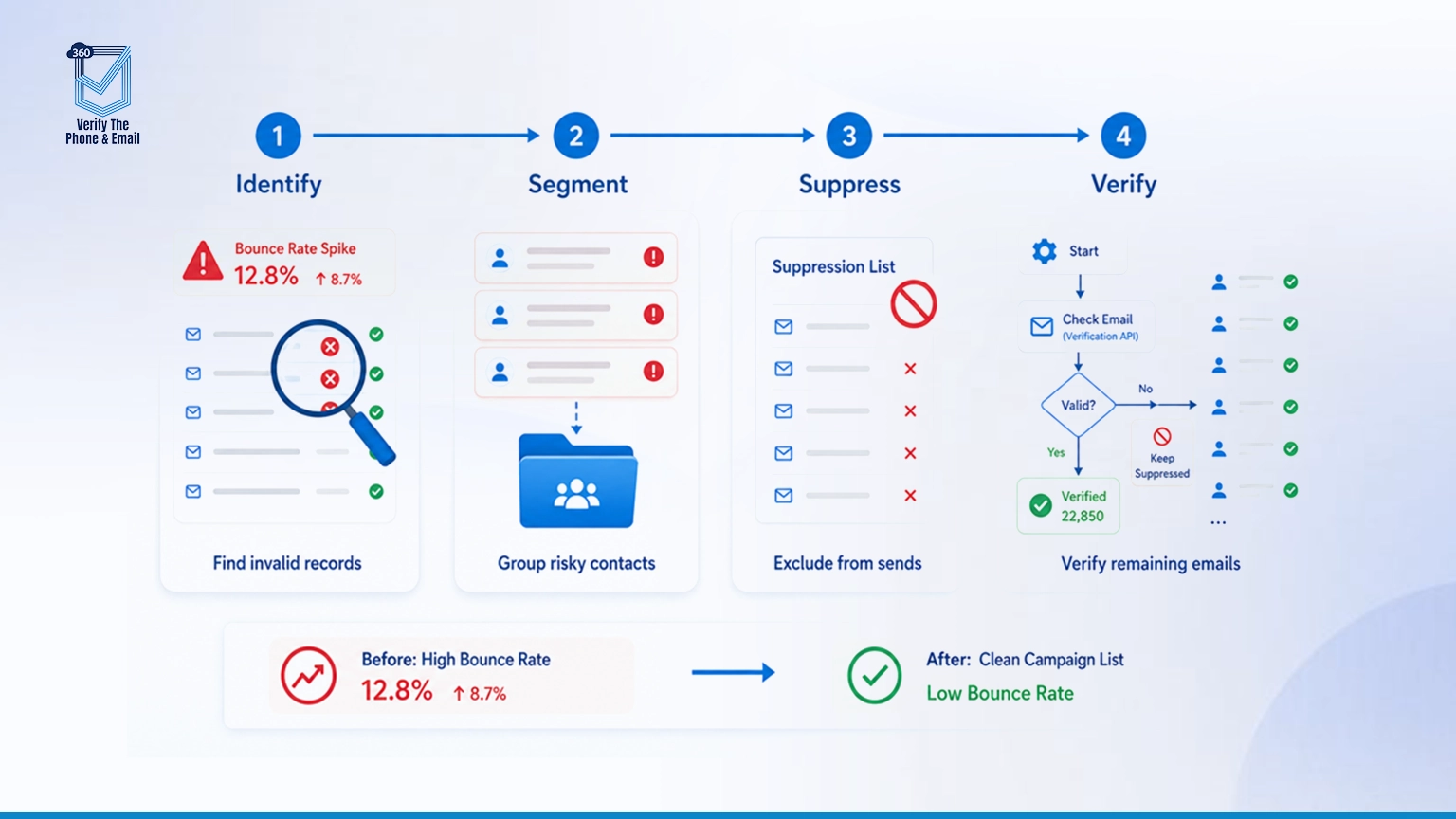
Step 1: Identify Invalid Records
Pull bounce history, cross-reference it against engagement scoring, and check verification status if you have it. This gives you a working list of suspects, not a guess.
Step 2: Segment Risky Contacts
Group inactive contacts, records on known-risky domains, and anything with recent bounces into a separate segment. Don’t touch your main sending list until this is done.
Step 3: Remove Invalid Records
Build suppression lists and exclusion rules so these contacts stop receiving campaign sends automatically, not manually, automatically. This is where Salesforce campaign email validation earns its place in the process, clean up campaign member statuses tied to bad addresses while you’re at it.
Step 4: Verify Remaining Records
This is where an email verification API earns its keep. Run it through Salesforce Flow so verification happens as part of your existing process, not as a separate manual task somebody forgets to do.
If your team is already dealing with bounce fallout, this is usually the point where a 360 VTP demo makes more sense than another manual cleanup sprint. Verification that runs inside Salesforce beats a one-time export-and-scrub every time.
How Do You Build a Bounce Prevention Workflow in Salesforce?
Verify early, verify often, and automate the parts a human will eventually forget. Recovery fixes today’s list. Prevention stops you from being here again in six months.
Verify at the point of lead capture, before a bad address ever makes it into your database. Verify again before campaign enrollment, since lists shift and go stale between capture and send. Automate list hygiene on a schedule instead of relying on someone remembering to run a cleanup. Monitor bounce trends weekly, not quarterly. And set a re-verification policy for contacts older than a set threshold, 12 months is common, but it depends on your churn rate.
Can Salesforce Flow Automate Email Verification?
Yes, and that’s exactly what closed the gap for us. Salesforce email verification automation, built through Flow, checks every new lead against deliverability rules before it’s marked campaign-eligible. A custom verification status field now sits on the Lead and Contact objects. Campaign eligibility checks reference that field automatically, and suppression logic kicks in the moment a record fails verification.
The result: verification isn’t a task anymore. It’s a rule baked into the pipeline. Nobody has to remember to run it.
360 VTP handles exactly this kind of workflow, email and phone verification that plugs into Salesforce Flow, checks records in real time or in bulk, and keeps your campaign-eligible list clean without adding a manual step for your team.
What Should Campaign Operations Teams Do Differently?
Stop treating list quality as optional. A few rules we now treat as non-negotiable: never send to an unverified list, no matter how urgent the campaign feels. Verify before every large send, not just the first one. Track deliverability metrics and Salesforce sender reputation weekly. And prioritize list quality over list size, a smaller, verified list will outperform a bloated one every single time when it comes to actual Salesforce campaign performance.
What Changed After We Fixed Our Bounce Problem?
Lower bounce rates, better inbox placement, and reporting we could actually trust. Once we started to reduce email bounce rate numbers on purpose instead of reacting to spikes, everything downstream got easier. Bounce rates dropped sharply within the first cycle after implementation. Deliverability improved, which meant more of our emails actually reached the inbox instead of spam. Engagement numbers, once accurate, told a much better story than the inflated (and wrong) numbers we’d been reporting before. CRM records got cleaner. And campaign ROI, measured honestly this time, actually looked good.
Final Thoughts
Email bounces aren’t really an email problem. They’re a data quality problem wearing an email problem’s clothes.
Deliverability failures don’t stay contained. They ripple into lead scoring, attribution, routing, and every report built on top of Salesforce data. Prevention is a lot cheaper than recovery, and Salesforce bounce reduction only sticks when verification is a rule, not a reaction to Salesforce email deliverability issues after they’ve already tanked a quarter’s reporting.


Solve It with Salesforce. We’ll Show You How.
AI. Apps. Experts. Everything you need to win with Salesforce under one roof.Frequently Asked Questions
What is a good Salesforce email bounce rate?
A healthy Salesforce email bounce rate is usually under 2%. Once it crosses 5%, it can start affecting Salesforce sender reputation, and above 10%, ESPs may throttle or flag your sending domain.
What causes high bounce rates in Salesforce campaigns?
High bounce rates usually come from stale records, typo domains, catch-all addresses, old imports, and unverified data. Poor Salesforce email hygiene and purchased lists are common reasons behind Salesforce email deliverability issues.
How do email bounces affect Salesforce reporting?
Email bounces inflate your “sent” numbers while lowering engagement metrics. This weakens Salesforce campaign performance because open rates, click rates, lead scoring, and ROI reports no longer reflect the true quality of your audience.
What is the difference between hard and soft bounces?
Hard bounces are permanent because the email address does not exist. Soft bounces are temporary, such as a full inbox, server timeout, or temporary delivery issue.
Can Salesforce automatically suppress bounced contacts?
Yes, but it needs the right suppression rules, campaign member status logic, and automation. With Salesforce email verification automation, bounced or risky contacts can be excluded before they enter active campaigns.
How does Salesforce email verification reduce bounce rates?
Salesforce email verification checks whether an email address is valid, risky, or non-existent before you send to it. This helps reduce email bounce rate, improve list quality, and protect future campaign performance.
How often should Salesforce email lists be cleaned?
Quarterly is a good minimum for active lists. Fast-growing teams with heavy inbound leads should consider monthly Salesforce email list validation to maintain better Salesforce marketing data quality.
What is the best way to prevent email bounces in Salesforce?
The best approach is to verify emails at capture, run Salesforce campaign email validation before major sends, and automate suppression rules so invalid contacts do not reach your campaigns.

About the author
Editorial TeamThe Editorial Team at 360 Degree Cloud brings together seasoned marketers, Salesforce specialists, and technology writers who are passionate about simplifying complex ideas into meaningful insights. With deep expertise in Salesforce solutions, B2B SaaS, and digital transformation, the team curates thought leadership content, industry trends, and practical guides that help businesses navigate growth with clarity and confidence. Every piece we publish reflects our commitment to delivering value, fostering innovation, and connecting readers with the evolving Salesforce ecosystem.
Recent Blogs
 360 Verify The Phone
7 Phone Validation Tools That Integrate With Salesforce Workflows
Summary Most phone validators don’t actually integrate with Salesforce workflows. They bolt on. This guide compares 7 tools on the criteria Salesforce admins and ops…
Read More 360 Verify The Mail
Plauti Verify vs 360 Verify the Email: Which Fits Your Salesforce Team?
Summary Plauti Verify offers broader Salesforce data quality capabilities, including assisted data entry and record-level validation. 360 Verify the Email focuses on real-time email and…
Read More 360 Verify The Mail
Salesforce Data Validation Rules vs Automated Data Validation Tools: What’s the Difference?
Here’s an uncomfortable truth most Salesforce teams don’t want to sit with: your CRM can be technically clean and practically useless at the same time. …
Read MoreReady to Make the Most Out of Your Salesforce Instance?
Our Salesforce aces would be happy to help you. Just drop us a line at contact@360degreecloud.com, and we’ll take it from there!
Subscribe to our newsletter
Stay ahead with expert insights, industry trends, and exclusive resources—delivered straight to your inbox.
