

Salesforce Health Check: What It Is, What It Covers, and What You Should Do with the Results
22 Oct 2026
Table of Contents

Picture this. A VP of Sales asks why the pipeline number in Salesforce is $2.3 million, but the finance report shows $1.8 million. Nobody has a clean answer. Or: an Agentforce pilot gets paused three weeks in because the implementation partner says “the data isn’t clean enough to proceed.” Or: a new consultant walks into your org and tells you there are 47 active automations – and nobody can explain what half of them actually do.
None of these are isolated incidents. They’re symptoms of the same underlying problem: an org that’s never had a proper health check.
Most Salesforce orgs accumulate technical complexity quietly. Each quarter adds a few more customizations, a few more Flows, a few more users with permissions that made sense at the time. The platform keeps running. Until it doesn’t – or until something important depends on it working correctly and it lets you down.
A Salesforce health check is how you find out where you actually stand before something breaks.
Table of Contents
What Is a Salesforce Health Check?
Direct answer: a Salesforce health check is a comprehensive audit of your Salesforce org that evaluates security settings, data quality, automation logic, integration reliability, user adoption, and overall architecture against current best practices.
Here’s something worth knowing before you go looking for one. There are actually two things called a “Salesforce health check” – and they’re very different.
The first is the native Salesforce tool found in Setup > Health Check. It exists inside every org, it’s free, and it covers exactly one thing: security settings. Password policies, session settings, network access. Useful. But it’s not an org assessment. It’s a security scorecard.
The second is a full org health check – a partner-led evaluation covering all seven dimensions of org health. That’s what this article covers. And that’s what most orgs actually need.
Who should run one? Any org older than 12 months. Any org that’s been through an admin transition. Any team preparing to add a new Salesforce cloud. And especially – any business planning an Agentforce or Einstein AI rollout that hasn’t confirmed the org is ready for it.
The 7 Dimensions of a Full Salesforce Health Check
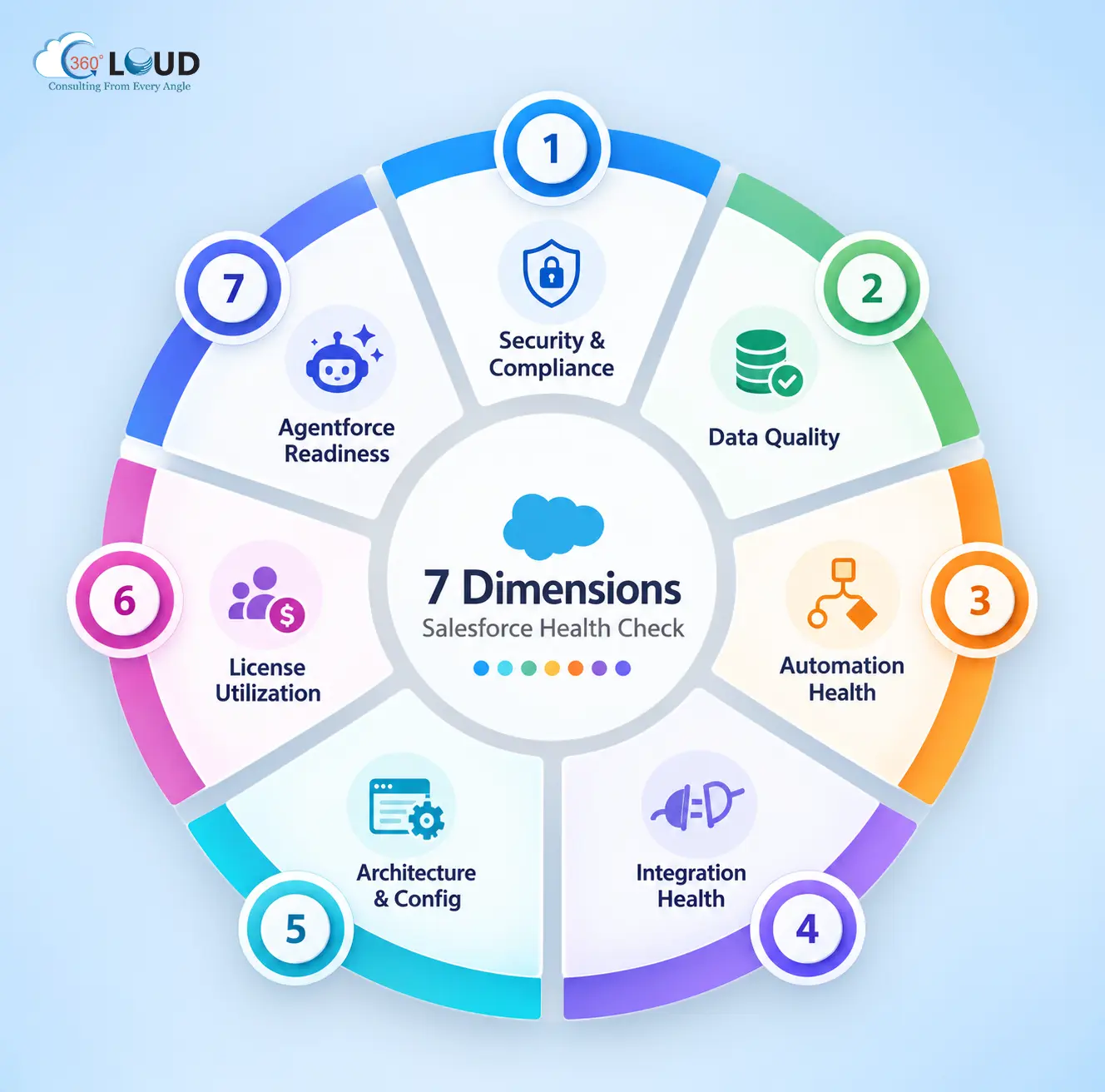
Most health check frameworks cover six dimensions. A complete assessment covers seven. That seventh one – Agentforce readiness – is the one that matters most in 2026.
1. Security & Compliance
Permission sets, sharing rules, MFA enforcement, API access controls, session settings, field-level security. The question isn’t whether your org has security settings – it’s whether they’re configured correctly. Overpermissioned users, exposed API endpoints, and misconfigured sharing rules are the most common entry points for data breaches inside Salesforce orgs. Most teams don’t find out until it’s too late.
2. Data Quality
Duplicate records, blank required fields, orphaned records, data completeness percentages by object. Bad data is the single biggest reason Salesforce implementations underperform. Sales teams stop trusting the CRM. Reports produce different numbers. AI tools produce unreliable outputs. All of it traces back to data that was never properly governed.
3. Automation Health
Flow inventory, deprecated Process Builders, legacy Workflow Rules still running in production, recursion risks, governor limit exposure. Salesforce deprecated Process Builder and Workflow Rules – but deprecated doesn’t mean gone. Thousands of orgs are still running them. They conflict with newer Flows, create unpredictable behavior, and make every future customization more expensive than it should be.
4. Integration Health
API call usage, outdated connected apps, broken webhooks, middleware dependencies that nobody documented. An integration that worked at go-live two years ago may be consuming API limits silently today – or failing without triggering an error that anyone sees.
5. Architecture & Configuration
Custom object proliferation, field count, page layout complexity, unused customizations. Orgs accumulate configuration debt the way houses accumulate clutter. Each piece made sense when it was added. Together, they create an environment where simple changes take weeks because nobody’s confident what else might break.
6. License Utilization
Active vs. inactive users, license type alignment to actual role requirements, unused premium features. This is where most health checks find quick financial wins. Inactive users on full Sales Cloud licenses, premium features nobody’s enabled, license types that don’t match how the role actually uses the platform. In practice, this dimension alone often identifies 15 to 25% of annual license spend that could be restructured or recovered.
7. Agentforce Readiness
Record completeness score, automation conflicts that would interfere with AI agent logic, data model coherence across objects, permission structure for AI agents. This is the dimension no competitor’s health check framework includes – and it’s the one that determines whether an AI initiative succeeds or stalls at the starting line. You can’t deploy intelligent agents on top of incomplete records, conflicting automations, and a data model built for a different era of the platform.
Signs Your Salesforce Org Needs a Health Check Now
Some of these will feel familiar:
- Your sales team doesn’t trust the data in Salesforce and maintains their own spreadsheets
- Every customization request comes back as “more complex than expected”
- An Agentforce or Einstein AI pilot has been paused because of data quality concerns
- Your org has been through two or more admin turnovers with no documentation handed over
- You’re about to add a new Salesforce cloud or expand to a new team
- Two orgs were merged post-acquisition without a proper audit
- Governor limit errors or performance slowdowns are appearing during business hours
One of these is enough to warrant a conversation. More than two, and the question isn’t whether to run a health check – it’s how quickly.
What Does a Salesforce Health Check Cost?
It depends on org complexity and scope.
- Self-assessment using native tools: Free – but covers security only, not full org health
- Basic health check (single cloud, under 50 users): $2,500–$5,000
- Standard assessment (multi-cloud, under 200 users): $5,000–$15,000
- Enterprise audit (complex org, multiple integrations, multiple clouds): custom scoping required
The ROI frame that makes these numbers easier to evaluate: the average Salesforce CRM health check identifies license cost savings of 15 to 25% of annual license spend. On a $200,000 per year Salesforce investment, that’s $30,000 to $50,000 potentially recovered – before counting the productivity gains from fixing automation conflicts, data quality issues, and security gaps. Most engagements pay for themselves inside the first 90 days of remediation.
What to Do with Your Salesforce Health Check Results
This is where most health checks fall short – and where the real value gets left on the table. Getting findings is one thing. Knowing what to do with them is another entirely.
Start by categorizing findings into four buckets:
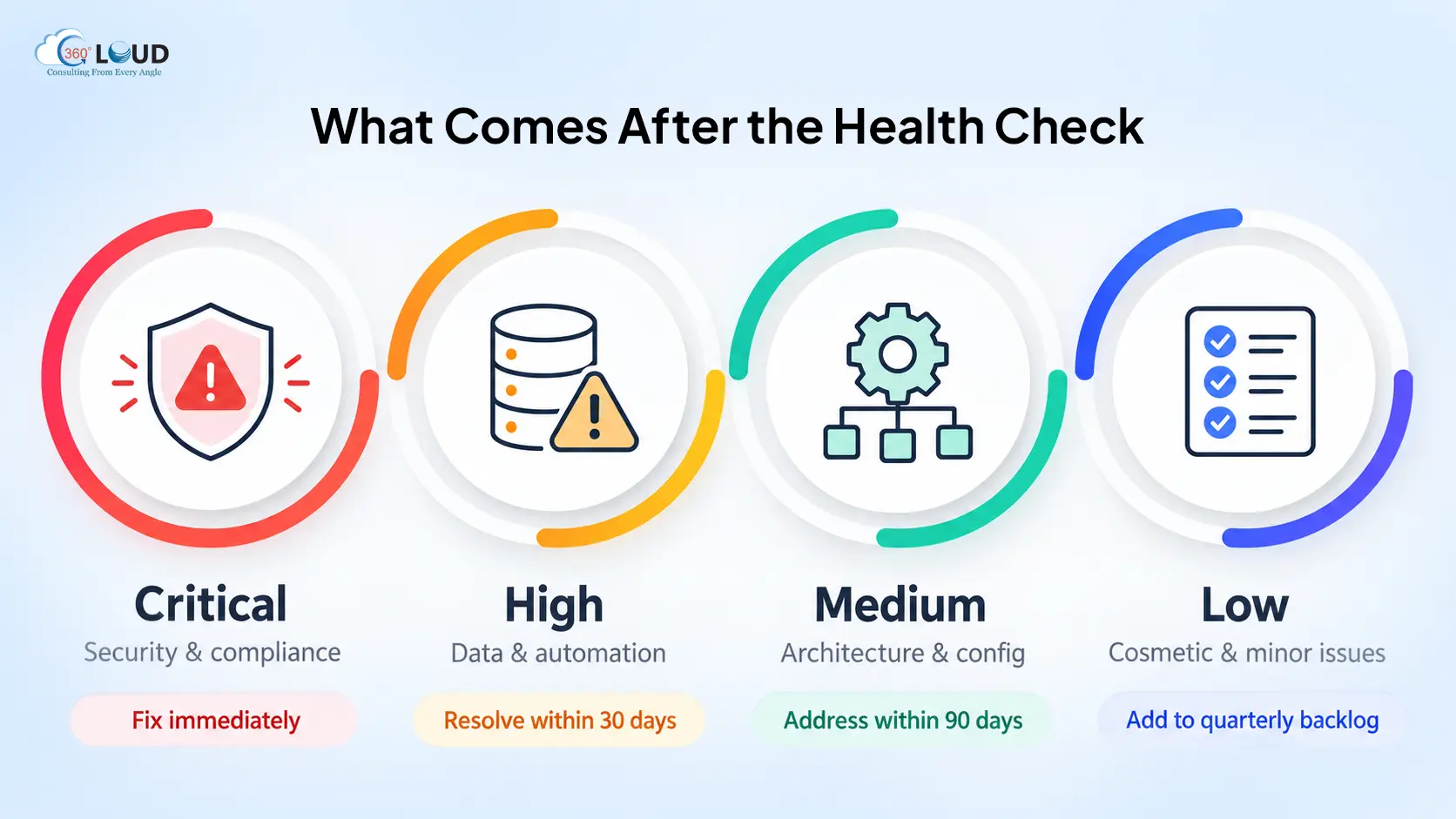
- Critical (security and compliance issues): fix immediately, no debate
- High (data quality problems, automation conflicts): resolve within 30 days
- Medium (architecture improvements, configuration cleanup): address within 90 days
- Low (cosmetic issues, minor inconsistencies): add to the quarterly backlog
From there, build a remediation roadmap sequenced by risk multiplied by effort. Quick wins go first – not because they’re most important, but because visible progress keeps the remediation effort resourced and moving. Complex structural work gets phased.
Don’t try to fix everything at once. That’s the thing about most remediation efforts – 20% of the findings typically drive 80% of the performance impact. Find those 20% and fix them first.
Every finding needs an assigned owner: admin, developer, or external partner depending on complexity. And set a re-assessment date before you close the project. Salesforce org health degrades continuously. An annual health check cadence – or one before any major platform change – keeps problems from compounding back to where they started.
Salesforce Health Check vs Org Audit: What’s the Difference?
Worth clarifying, because the terms get used interchangeably and they’re not the same thing.
A health check is a point-in-time diagnostic across all dimensions of org health. It’s broad by design, faster to complete, and produces a prioritized roadmap across everything. This is the right starting point for most orgs.
A Salesforce CRM audit is a deeper investigation into one specific dimension – a security audit for compliance purposes, a data audit for a migration project, a Salesforce performance audit ahead of a major deployment. It goes further in a narrower scope.
The practical guidance: run the health check first. It tells you which dimensions warrant a deeper audit. Skipping the health check and going straight to a single-dimension audit means you might be auditing the wrong thing while a bigger problem sits unexamined.
What a Real Salesforce Health Check Looks Like – From First Call to Final Report
At 360 Degree Cloud, a Salesforce health check services engagement runs on a straightforward structure.
Our consultants have run health checks across 500+ Salesforce orgs as a Summit Partner, which means pattern recognition that comes from depth, not theory. The process typically runs 5 to 10 business days from kickoff to final report.
What you receive: an org health score across all seven dimensions, a written findings report, a live findings presentation, prioritized remediation recommendations with effort and impact scoring, and an optional post-check consulting engagement for teams that want hands-on support executing the roadmap.
No org is too clean to benefit, and no org is too broken to fix. Most teams are surprised by what turns up – in both directions. The 360 Degree Cloud health check is where that process starts.
Final Thoughts
A Salesforce org that hasn’t been audited in 12 months is an org running on assumptions. Some of those assumptions are fine. Some aren’t. The problem is you don’t know which is which until something breaks – or until an AI initiative stalls because the foundation it needed wasn’t there.
A Salesforce security health check tells you about passwords. A full org health check tells you whether your platform is actually ready for what you’re trying to build on top of it. Those are very different conversations and only one of them gives you the full picture.
Categories

Solve It with Salesforce. We’ll Show You How.
AI. Apps. Experts. Everything you need to win with Salesforce under one roof.FAQs
How long does a Salesforce health check typically take from start to final report?
For most orgs, 5 to 10 business days. A single-cloud org under 50 users sits toward the lower end. A multi-cloud environment with complex integrations and significant automation history runs closer to 10 days, sometimes slightly more. The timeline assumes reasonable access to the org and a point of contact who can answer discovery questions during the engagement. Delayed responses during the assessment extend the timeline - that’s the most common reason health checks run long.
Can I run a Salesforce health check myself using free or native tools?
Partially. The native Salesforce Health Check tool in Setup covers security settings and is genuinely useful for that specific dimension. For everything else - data quality, automation health, integration reliability, architecture, license utilization, Agentforce readiness - there’s no native tool that covers it. Some third-party AppExchange tools offer partial coverage across specific dimensions. A comprehensive assessment across all seven dimensions requires a partner-led engagement. Self-assessment is a reasonable starting point; it’s not a substitute for a full org health check.
What specific deliverables should I receive from a Salesforce health check engagement?
At minimum: a written findings report with org health scores by dimension, a prioritized list of issues categorized by severity, remediation recommendations with effort estimates, and a live presentation of findings with Q&A. A strong engagement also includes a remediation roadmap sequenced by risk and effort, and clear guidance on which findings warrant immediate action versus phased resolution. If a partner is delivering a health check without a written report and a live presentation - that’s not a full engagement.
Does a Salesforce health check require system downtime or org access interruption?
No. A health check is a read-only assessment. It requires consultant access to the org - typically via a dedicated user with appropriate permissions - but it doesn’t involve changes to configuration, data, or automation during the assessment phase. Your team continues working in the org as normal throughout the engagement. Changes only happen after the findings are reviewed and a remediation plan is approved.
How often should a Salesforce org be audited - and what triggers an unscheduled health check?
Annually is the standard cadence for a healthy org. Beyond the annual rhythm, specific triggers warrant an unscheduled assessment: before adding a new Salesforce cloud, after a post-merger org consolidation, before launching an Agentforce or Einstein AI initiative, after two or more admin turnovers, or when performance degradation or governor limit errors start appearing. The cost of running an unscheduled health check is almost always lower than the cost of the problem it catches.
What is the difference between a Salesforce health check and a dedicated security review?
A health check covers security as one of seven dimensions - it gives you a broad picture of security posture alongside everything else. A dedicated salesforce security health check or security review goes significantly deeper on that one dimension: detailed permission set analysis, sharing rule conflicts, FLS mapping, API security, compliance against specific frameworks like SOC 2 or HIPAA. Run the health check first. If it surfaces significant security findings, follow up with a dedicated security review on those specific areas.
What happens if critical security or compliance issues are found during the health check?
They get communicated immediately - not held until the final report. A responsible partner flags critical security findings as soon as they’re confirmed, with interim guidance on risk mitigation while the full report is being completed. Critical findings don’t wait for presentation day. After the full report, remediation of security and compliance issues moves to the front of the queue ahead of everything else. These aren’t items for the 90-day backlog.
Is a Salesforce health check worth running on a small org with fewer than 30 users?
Yes - and often more so than teams expect. Smaller orgs tend to have been implemented quickly, with less documentation and fewer governance processes in place from the start. The issues are usually simpler to fix, which means a health check on a small org often produces a shorter, more actionable remediation list with faster time to resolution. License utilization findings alone - even in a 30-user org - frequently cover the cost of the assessment. Size doesn’t determine whether a health check is valuable. Org age and implementation history do.

About the author
Editorial TeamThe Editorial Team at 360 Degree Cloud brings together seasoned marketers, Salesforce specialists, and technology writers who are passionate about simplifying complex ideas into meaningful insights. With deep expertise in Salesforce solutions, B2B SaaS, and digital transformation, the team curates thought leadership content, industry trends, and practical guides that help businesses navigate growth with clarity and confidence. Every piece we publish reflects our commitment to delivering value, fostering innovation, and connecting readers with the evolving Salesforce ecosystem.
Recent Blogs
 Salesforce Clouds
Salesforce Just Added Something New. Here’s How to Put It to Work.
Winter ’27 is live. Dreamforce just added more. Is your team using any of It? Two big drops landed in one month, and most teams…
Read More Salesforce Services
Salesforce Technical Debt 10 Signs Your CRM Needs a Strategic Overhaul (and What to Do About It)
Three years ago, the Salesforce org your team implemented was clean. Logical field names. Documented Flows. A handful of integrations that actually made sense. Today?…
Read More Salesforce Clouds
Salesforce Commerce Cloud Implementation: The 2026 Guide for B2B and B2C Commerce Teams
Commerce has always been competitive. But in 2026, the bar has shifted in ways that are hard to ignore. Whether someone is a consumer checking…
Read MoreReady to Make the Most Out of Your Salesforce Instance?
Our Salesforce aces would be happy to help you. Just drop us a line at contact@360degreecloud.com, and we’ll take it from there!
Subscribe to our newsletter
Stay ahead with expert insights, industry trends, and exclusive resources—delivered straight to your inbox.
