
Table of Contents

Picking the right Salesforce data quality tools isn’t a one-time decision. This guide breaks down six tools that tackle verification, deduplication, and ongoing data hygiene inside Salesforce, so your teams stop chasing bad data and start working with records they can actually trust.
Bad data doesn’t announce itself. It just quietly ruins your campaigns, inflates your pipeline, and wastes hours your team could have spent closing deals.
If you’re evaluating Salesforce data quality tools right now, you’ve probably already felt that pain. The good news: 2026 has better options than ever, and this guide compares six of them side by side.
What you’ll find here: how each tool handles email verification, phone validation, bulk data cleaning, and ongoing CRM hygiene, plus where each one falls short. No filler. Just what you need to pick the right tool for your Salesforce org.
Table of Contents
What a Good Data Quality Tool Actually Does
Before comparing tools, it’s worth being clear about what Salesforce data quality actually involves. Most teams think of it as “removing duplicates.” That’s one piece.
In practice, there are four things a proper tool should handle:
1. Verification checks whether a contact’s email address or phone number is real and deliverable before it ever sits in your CRM. Not just format validation. Actual deliverability checking.
2. Standardization formats data consistently. Phone numbers, country codes, address fields. Without it, your segmentation queries break in ways that take hours to debug.
3. Deduplication finds and merges records that represent the same person or company. That’s the thing. Duplicates don’t just inflate your database count. They create conflicting activity histories that make reps look uninformed on calls.
4. Monitoring keeps data clean over time. Data decays at roughly 25 to 30% per year. Worth saying: a one-time cleanup is better than nothing, but it’s not a strategy.
The tools below handle these functions differently. Some cover all four. Some specialise. That distinction matters when you’re picking one.
Is your Salesforce data actually campaign-ready?
See how many of your records would bounce, fail delivery, or hit a dead line before your next send.
Quick Comparison: 6 Salesforce Data Quality Tools
| Tool | Core Strength | Salesforce-Native | Best For |
| 360 Verify (VTM/VTP) | Email + phone verification | Yes | Verification-first orgs |
| Plauti | Full data management suite | Yes | All-in-one data ops |
| DataGroomr | AI-powered deduplication | Yes | Messy imported data |
| Validity DemandTools | Enterprise data operations | No (connector) | Large enterprise orgs |
| Cloudingo | Automated deduplication | Yes | Mid-market dedupe |
| Salesforce Native | Format validation only | Yes | Small orgs, low volume |
The 6 Best Salesforce Data Quality Tools in 2026
1. 360 Verify (VTM + VTP): Best for Real-Time Verification Inside Salesforce
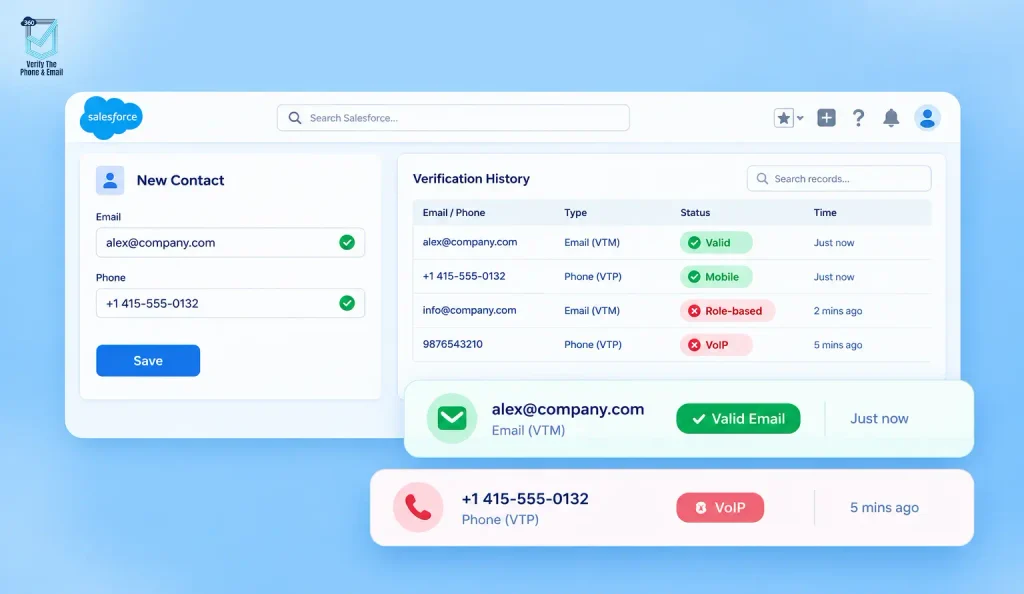
If email and phone verification is the core problem, 360 Verify is built specifically for that use case. Unlike tools that bolt onto Salesforce through external APIs or middleware, VTM (Verify the Mail) and VTP (Verify the Phone) are built 100% inside Salesforce. No data leaves your org. No third-party dashboard to manage. Verification happens where your records already live.
When a rep creates or updates a Lead or Contact, VTM checks the email address in real time. It detects disposable addresses, role-based emails (like info@ or admin@), and undeliverable domains before the record saves. VTP runs the same logic on phone fields, identifying whether the number is mobile, landline, or VoIP, and whether it can receive calls or SMS.
Bulk verification handles legacy records. Scheduled re-verification keeps data accurate over time, which matters because even clean data goes stale as people change jobs and companies change domains. Web-to-Lead and Web-to-Case forms are also covered, so a fake email submitted through your website gets flagged before the record is ever created.
Best For: Teams whose main problem is bad contact data entering the CRM and affecting email campaigns or SMS outreach.
Pricing: Credit-based. 7-day free trial. 4.9/5 on AppExchange.
Limits: No native deduplication. If merging duplicate records is a priority alongside verification, you’d pair this with Salesforce’s built-in duplicate rules or a separate dedupe tool.
2. Plauti: Best All-in-One Salesforce Data Management
Plauti takes a broader approach than most tools on this list. Rather than focusing on one function, it covers deduplication, data standardization, verification, and enrichment inside a single Salesforce-native platform. For teams that want one place to manage all data quality work, without switching between tools, that consolidation has real value.
The deduplication engine runs fuzzy matching, which catches duplicates that don’t have identical field values but represent the same person or company. Plauti DC (its Data Cloud integration) allows cross-object dedup, which matters for enterprise orgs with complex data models where leads, contacts, and accounts may overlap in non-obvious ways.
To be fair, there’s a real comparison worth reading between Plauti and 360 Verify if verification is your primary need, because the two tools approach the problem from very different angles. Plauti is broader. 360 Verify goes deeper on verification specifically. And the pricing at scale for Plauti is on the higher end, which changes the calculus for smaller or mid-market teams.
Best For: RevOps and data operations teams managing large Salesforce orgs who want one platform for all data quality functions, not just verification.
Limits: Steeper learning curve. Pricing scales with volume. Configuration takes admin time upfront.
3. DataGroomr: Best for AI-Powered Duplicate Detection
DataGroomr was built to solve one problem really well: deduplication. If you’ve ever imported a large list from a trade show, a data vendor, or a legacy system and ended up with thousands of near-identical records, DataGroomr’s AI-powered matching engine is built exactly for that scenario. It catches duplicates that rules-based logic misses, particularly across messy data where names, company names, and phone formats aren’t consistent.
It’s Salesforce-native, runs bulk dedupe jobs cleanly, and the merge interface lets reps review and approve merges from inside Salesforce without admin involvement for every decision. That’s genuinely useful for high-volume orgs where duplicates are a constant inflow problem, not a one-time cleanup.
That’s the thing, though: DataGroomr doesn’t do email verification or phone validation. It’s narrowly focused on deduplication by design. If your data problem includes bad contact data entering the CRM at the source, not just records that duplicate each other, you’d need to stack it with a verification tool.
Pricing is mid-range. Free tier available for smaller orgs.
Best For: Teams with large volumes of imported or migrated data where AI-matching on messy records matters more than field-level contact verification.
Limits: No verification. No standardization outside of deduplication. Narrow scope is a feature for some teams and a gap for others.
Is phone data the gap in your CRM hygiene strategy?
Bad phone numbers skew deliverability data, waste SMS credits, and misclassify leads in your reports.
4. Validity Demand Tools: Best for Enterprise-Scale Data Operations
DemandTools is one of the most established names in Salesforce data quality, and it earned that reputation with genuine depth. It handles deduplication, verification, mass updates, field standardization, and reporting, all from a desktop application that connects to your Salesforce org via API. For large enterprise teams with dedicated data stewards, it covers scenarios that most other tools don’t reach.
The feature breadth is real. If you’re managing a 500,000-record Salesforce instance with complex deduplication scenarios, compliance requirements, and data stewardship workflows, DemandTools has built-in toolsets for all of it. Teams that run regular data quality programs rather than one-off cleanups tend to get the most from it.
To be fair, the tradeoff is the external-application model. You’re running it from outside Salesforce, which means additional setup, desktop software management, and a workflow that steps outside the CRM rather than staying inside it. See validity.com/products/demandtools for current plans.
Best For: Large enterprise orgs with complex data models, compliance requirements, and a data team managing Salesforce hygiene as an ongoing program.
Limits: External desktop application, not native. Pricing is enterprise-tier. Workflow requires stepping outside Salesforce to run operations.
5. Cloudingo: Best Mid-Market Deduplication
Cloudingo occupies a specific and useful niche: Salesforce-native deduplication for mid-market teams that need automation without enterprise pricing or enterprise complexity. It handles bulk dedupe jobs, automated merging, and scheduled clean-up runs, and it does so with a relatively straightforward setup compared to some of the more feature-heavy options.
The automation rules are genuinely useful. You can configure Cloudingo to auto-merge records that meet certain confidence thresholds, which reduces manual review time for orgs dealing with high-volume inbound data. Scheduled jobs mean the deduplication runs without someone having to remember to trigger it.
In practice, the scope stays narrow. No email verification, no phone validation. If contact data quality at the point of entry is part of your problem, not just duplicate counts in an existing database, Cloudingo handles the cleanup side but not the prevention side.
Best For: Mid-sized Salesforce orgs dealing primarily with duplicate records, where automation and straightforward pricing matter more than feature breadth.
Limits: Deduplication only. No verification layer. Limited standardization outside of merge logic.
6. Salesforce Native Tools: What’s Already Built In
Before investing in a third-party tool, it’s worth understanding what Salesforce already includes out of the box. Duplicate rules, matching rules, validation rules, and free Data Quality Analysis Dashboards from Salesforce Labs cover the basics. For early-stage orgs or teams with low data volume and tightly controlled data entry, these built-in features can carry a reasonable amount of weight.
The duplicate rules do work. If configured correctly, they’ll flag or block records that look like existing entries. Validation rules stop fields from saving with the wrong format or missing required values.
That said, the gap between what native tools catch and what a dedicated tool catches is significant. Native Salesforce can confirm that an email field has an “@” sign. It cannot confirm whether the domain exists, whether the mailbox accepts mail, or whether the number is a live mobile line or a disconnected VoIP number. For real-time phone validation that affects call connect rates and SMS deliverability, native rules are simply not built for that level of checking.
Best For: Very small orgs, early-stage Salesforce builds, or teams that want a foundation layer of hygiene before bringing in a dedicated tool.
Limits: No true deliverability verification. No real phone validation beyond format. Rule-based logic only.
Did You Know?
Salesforce’s native duplicate management supports up to 500 active matching rules. But those rules check for data similarity between records, not whether the data itself is accurate. A correctly formatted but completely fake email address passes every native rule without issue.
How to Choose the Right Salesforce Data Quality Tool
The right tool depends entirely on where your data problem actually starts. Most teams discover they have more than one problem when they dig in, which is why a few questions help narrow it down before you commit to a platform.
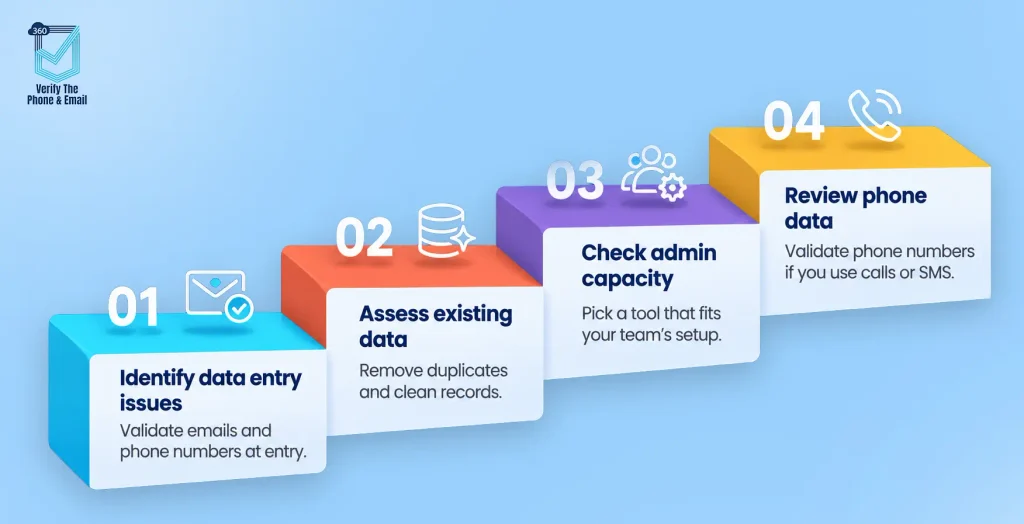
Start with where the problem enters your CRM. If bad data is coming in through web forms, manual entry, or data imports, the fix needs to happen at the point of entry. Tools like 360 Verify (VTM/VTP) check email addresses and phone numbers before the record saves. That’s a different kind of problem from cleaning up an existing database.
Then look at what your existing database looks like. If you have tens of thousands of records with significant duplicate overlap, DataGroomr or Cloudingo address that directly. DataGroomr for AI-matching on messy imported data, Cloudingo for mid-market orgs that want automated bulk merging.
Consider your team’s admin capacity. Plauti and DemandTools are powerful, but both require real configuration investment and ongoing management. Smaller teams or orgs without a dedicated Salesforce admin may find that narrower, easier-to-configure tools deliver more usable value faster.
Think about phone data separately. It’s often the overlooked half of the contact data problem. Email gets most of the attention because bounces are visible. Bad phone numbers fail quietly. If outreach includes calls or SMS, reviewing your options on Salesforce-compatible phone validation tools is worth doing as a separate step.
One thing most teams get wrong: they treat deduplication and verification as the same problem. They’re not. Deduplication cleans up what already exists. Verification stops bad data from getting in. For lasting CRM data hygiene, you generally need both.
Conclusion
There’s no single “best” Salesforce data quality tool for every org. What there is: a clearer set of questions to ask. Is your problem at the point of entry or in the existing database? Do you need verification, deduplication, or both? What’s your volume, and what’s your team’s admin capacity?
The tools in this list cover different ground. 360 Verify focuses on keeping bad contact data out through real-time and bulk verification. Plauti and DemandTools cover the full data ops stack at enterprise scale. DataGroomr and Cloudingo handle duplicates specifically, with different approaches to matching and automation. Native Salesforce gives you a rules-based foundation that works, within its limits.
If email deliverability and phone outreach accuracy are what’s driving the conversation, start there. A verified database doesn’t just improve campaign numbers. It changes how your reps work, because they’re calling and emailing people who actually exist. And that changes everything downstream from pipeline to revenue. See how 360 Mass Mailer pairs with verified data to put those clean records to work in bulk email campaigns.


Solve It with Salesforce. We’ll Show You How.
AI. Apps. Experts. Everything you need to win with Salesforce under one roof.Frequently Asked Questions
What is the best Salesforce data quality tool in 2026?
It depends on what you’re trying to fix. For real-time email and phone verification inside Salesforce, 360 Verify (VTM/VTP) is purpose-built for that. For all-in-one data operations including deduplication and enrichment, Plauti covers more ground. For enterprise-scale cleaning, DemandTools has the depth. Most orgs end up needing at least two functions: verification at entry and deduplication for the existing database.
Does Salesforce have built-in data quality tools?
Yes, but with real limits. Native Salesforce includes duplicate rules, matching rules, and validation rules, plus free AppExchange dashboards from Salesforce Labs. What it doesn’t include is true email deliverability checking or phone number validation. It can confirm that a field looks like an email address. It can’t confirm the address is real, deliverable, or not associated with a spam domain. For that, you need a dedicated verification tool.
Do I need both a deduplication tool and a verification tool?
Probably. They solve different problems. Verification checks whether contact data is real and reachable at the point of entry. Deduplication finds records that already exist in your database and represent the same person or company. A database can be full of unique records that are all invalid, or full of valid records with significant duplicate overlap. Worth saying: if you can only do one, verification at the point of entry is usually the higher-leverage starting point, because it prevents the problem from compounding over time. Deduplication cleans the backlog. Pairing both gets most mid-market orgs most of the way there.

About the author
Editorial TeamThe Editorial Team at 360 Degree Cloud brings together seasoned marketers, Salesforce specialists, and technology writers who are passionate about simplifying complex ideas into meaningful insights. With deep expertise in Salesforce solutions, B2B SaaS, and digital transformation, the team curates thought leadership content, industry trends, and practical guides that help businesses navigate growth with clarity and confidence. Every piece we publish reflects our commitment to delivering value, fostering innovation, and connecting readers with the evolving Salesforce ecosystem.
Recent Blogs
 360 Verify The Mail
CRM Data Cleansing: Steps, Tools and How to Automate It
Your Salesforce org looks fine at the record level. Contacts are there. Fields are filled in. Reports run. But somewhere between 20 and 30% of…
Read More 360 Verify The Mail
Can I Test an Email Address Without Sending an Email?
Not every email address that looks valid actually delivers. This guide explains how Salesforce users can test an email address without sending an email, using…
Read More 360 Verify The Phone
7 Phone Validation Tools That Integrate With Salesforce Workflows
Summary Most phone validators don’t actually integrate with Salesforce workflows. They bolt on. This guide compares 7 tools on the criteria Salesforce admins and ops…
Read MoreReady to Make the Most Out of Your Salesforce Instance?
Our Salesforce aces would be happy to help you. Just drop us a line at contact@360degreecloud.com, and we’ll take it from there!
Subscribe to our newsletter
Stay ahead with expert insights, industry trends, and exclusive resources—delivered straight to your inbox.