Talk to Us

Demystifying Salesforce Verify the Email- An Ultimate Solution for Email Operations

Email, not unlike calls and texts, also forms one of the major forms of outreach and business communication. Even though new channels continue to rise, email remains that single powerful tool, with many of its users still preferring the email channel for their professional communications. 

Around 57.8% of marketers globally have witnessed email open rates ranging from 20-50%, which shows firms still count on email communication to a great degree. This makes it a very crucial avenue to be leveraged toward business growth alongside methods like calls and texts.

Among all that you might have to pay attention to in order to improve email operations, the most important thing is the accuracy of email addresses. This means a lot is at stake based on this criterion: campaign success, email delivery rates, and customer responses based on accurate email addresses in your Salesforce. Incorrect email data can noticeably reduce your business potential.

Therefore, it becomes crucial to ensure accuracy in email contact data. Recognizing the significance of verified email data, our developers have innovated a game-changing solution for emails: Salesforce Verify the Email (VTM), a tool that not only verifies the validity of email addresses but also enhances your email operations.

In this blog, we will discuss VTM’s potential and how it can help you overcome various email operation challenges.

Unlocking the Potential of Salesforce Verify the Email 

Real-Time Email Address Verification 

The immediate verification of emails is a crucial feature designed to enhance the accuracy and reliability of email data. When a user inputs an email address in the system, VTM performs a real-time address check for the address’s validity in order to verify if the email address is valid. This verifies tests such as the formatting of the email address and the active domain that exists with this email address.

This real-time verification verifies Gmail and other email addresses in Salesforce to ensure only valid and deliverable email addresses are entered into the system. This ensures the business email database is clean and accurate, improving the precision of communication and targeting with marketing campaigns.

In addition, manual verification is a big headache, as it can be time-consuming and error-prone. Here, the process of verification within VTM is managed by automation, which can save the business time and resources. This feature not only improves data accuracy but also enhances efficiency in email management and ensures better deliverability rates for email campaigns.

Manual, Automatic, and Bulk Verification

Verify the email offers manual, automatic, and bulk email verification in the way you need it, thus giving the user the flexibility required to check email addresses.

The user can manually check if the user wishes to verify if the email address is valid by using manual verification. The Automatic Verification checks the email address in real-time after a user has entered an email address into the system.

Bulk verification helps companies that store large databases containing email data. Whether it’s verifying an extensive email database or conducting email marketing campaigns to a sizable audience, bulk verification enables users to verify Gmail and the addresses of other email platforms in bulk, saving valuable time and resources.

By offering these verification methods, VTM addresses the challenge of efficiently managing and validating email addresses at scale. Manual verification processes are prone to errors and are time-consuming, while bulk verification automates the process, ensuring data accuracy and reliability while saving time and resources for businesses.

Verification History Offered by Salesforce Verify the Email

The Email Verification History feature from Verify the Email (VTM) includes an overall log of each email verification process taken through the system, such as the timestamp for the date and time of the verification.

It gives a timeline of the results of the verification status of email addresses for a given timeframe. By accessing the history of verifications, the user can come to know the validity and reliability of the email database, detect any patterns or trends in the results of verification, and make a smart choice regarding email communication.

Email Address Verification at the Point of Entry

Real-time email address verification at the point of entry enables businesses to verify if the email address is valid as it is keyed into any system or web form. In this perspective, the email address goes through direct validation by VTM at the time of entry, ensuring the user gives a valid and correct email address.

This goes a long way in solving the prevailing challenge of dealing with incorrect or fake email addresses submitted by users. It verifies Gmail and other email addresses at the point of entry and helps keep invalid and fraudulent addresses out of the database; this ensures data accuracy and also helps in database integrity and further effectiveness in communication and marketing efforts.

Besides, it improves the user experience, asking users to correct the errors in email addresses in advance by verifying Gmail and other email addresses right upon entry. It decreases the chances of delivery failure or bounce-back from an invalid email address, which increases deliverability rates and improves engagement with the recipients.

Conclusion

Verify the Email (VTM) emerges as a pivotal tool for businesses seeking to optimize their email communication strategies. With features like Real-Time Email Address Verification, Manual, Automatic, and Bulk Verification, and Email Verification History, VTM offers robust solutions to challenges such as data accuracy, fraudulent submissions, and inefficient manual verification processes.

By leveraging VTM’s capabilities to verify Gmail and other email addresses, businesses can enhance the accuracy and reliability of their email databases, improve deliverability rates, and streamline email management processes. Furthermore, VTM’s capacity to take care of the probability of submitting a fake or purposely wrong email submission prior to making the database cleaner gives benefits to businesses by reducing user has collection while making the process smoother.

In summary, VTM is an important instrument in the toolkits of businesses who desire to achieve heightened levels of data quality and speed to market, as well as an understanding of users and their preferences, hence the overall success in their communication ventures. Ready to up your email game? Contact us to connect with our experts.
Why Salesforce Integration Matters for Streamlined Accounting Operations

If we talk about the most complex operations for any business, it would definitely be making personal connections with customers and managing all financial services and information. With operations going more digital, there’s always a need to give more emphasis on performing accounting more precisely to reduce any chances of errors. To simplify this, companies are now considering Salesforce integration to manage CRM operations and accounting on a single platform. 

The financial figures that you manage are all related to the customers. That’s why it is always important to have customer details on hand. Integrating Salesforce with accounting solutions makes this possible, enabling teams to always have relevant customer details in hand when managing critical financial details.

In this blog, we’ll discuss how Salesforce integration with accounting solutions is valuable and how it can help businesses. 

Salesforce Integration to Transform Operations

For financial and accounting operations, the data is always the gold mine. Everything that needs to be taken care of is all in the data. That’s why it is necessary for the accounting representatives to always have quick access to customer data without having to keep switching between systems. 

That’s the kind of ease Salesforce integration offers to users. When Salesforce is synchronized with accounting solutions, all your Salesforce contacts can easily be accessed within your Quickbooks account. This is something that Salesforce API integration makes possible. 

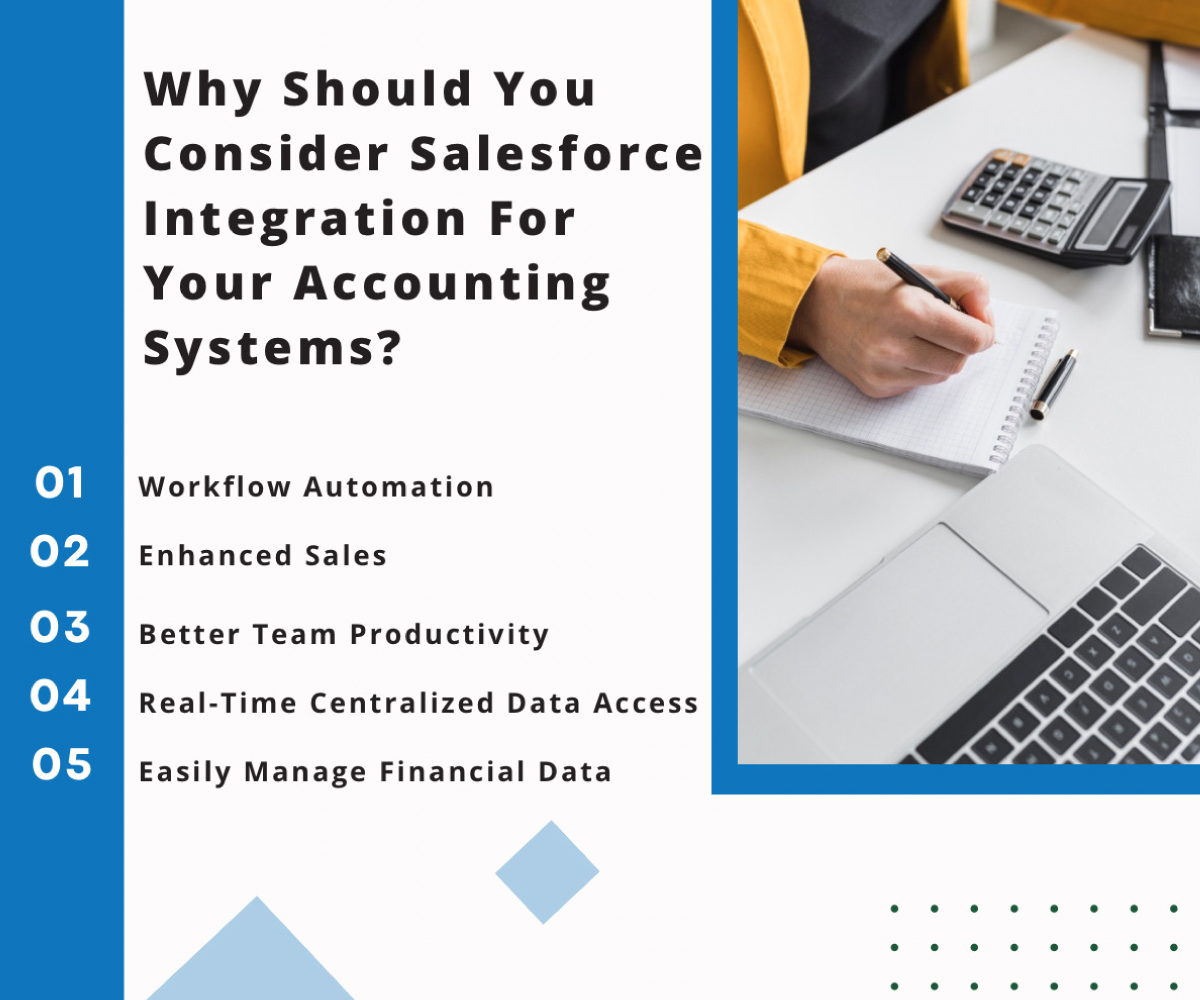
Why Should You Consider Salesforce Integration For Your Accounting Systems?

One can only imagine how complex it can be to deal with critical and complex financial and accounting operations. Even a little mistake or error can cost the company a lot. This is the reason the accounting teams always count on foolproof solutions to manage their accounting operations. 

A solution like Quickbooks is highly trusted among professionals to perform accounting operations. However, trouble comes when it becomes difficult to switch between systems to get the right information about customers and enter it all into Quickbooks. This kind of difficulty can easily be resolved by integrating Salesforce and Quickbooks

So, now let’s try to figure out what else this integration of Salesforce and accounting solutions has to offer that makes it so sought after among companies.

1. Workflow Automation

Companies these days prefer Salesforce integration as it can streamline workflows by automating repetitive tasks and reducing errors. 

For enterprises using various software tools for resource planning, communication, and data management, Salesforce acts as a central platform, unifying these tools. This integration improves operational efficiency, leading to enhanced business performance and ROI.

2. Enhanced Sales

It is easier to run sales campaigns when your sales team has access to the previous purchase history of customers and their behavior with the business. Integrating Salesforce with accounting software gives insights into previous buying habits. This helps create campaigns for repeat business through loyalty vouchers or discounts.

This approach boosts revenue and keeps customers coming back. It all happens in a system that’s easy to use and provides instant access to data.

3. Better Team Productivity

Integrating the accounting software in use with Salesforce streamlines processes for sales and finance teams, eliminating redundant data entry and enhancing efficiency. Shared data ensures precise customer communication. Moving between platforms to consolidate information is time-consuming; integration resolves this issue, enabling the business to achieve up to 36% boost in the sales team performance.

A combined CRM and accounting system facilitates seamless data sharing, reducing errors, saving time, and streamlining processes. This improves productivity across finance and operations teams.

4. Real-Time Centralized Data Access

We all are aware of how competitive the market has become, every enterprise struggling to be on top. This is why businesses must make rapid, data-driven decisions. Manual data transfers between CRM and accounting systems are no longer viable.

Integrating Salesforce with accounting software provides real-time access to current information for every department, enabling them to access it all over a centralized platform. Salesforce consolidates various systems, facilitating seamless cross-departmental data interaction, including HR, accounting, sales, ERP, etc.

5. Easily Manage Financial Data

The integration allows you to achieve complete team alignment through which you can efficiently manage outstanding payments, enhance transparency in transaction history, and expedite processes like addressing customer inquiries, leading to a strong cash flow.Using a general ledger template alongside these integrated systems can further streamline how your team organizes and tracks financial transactions for clear, accessible reporting.

Our sales teams can easily access financial data about our clients, encouraging prompt payments and diligent invoice follow-ups.

Operations teams and leadership gain comprehensive insights into end-to-end account management, ensuring that everyone across the organization relies on a single, authoritative source of information.

Get Experts for Salesforce Integration Consulting

It’s true that picking the right accounting solution is important for companies, but when it is about using it to the full potential, integrating it with the Salesforce CRM will provide the needed assistance. No wonder, performing accounting operations can be tricky for the team but when you have quick access to all the needed details, all of the work could be easily done. To get this kind of ease, all you need to do is to hire experts for Salesforce integration consulting to get your applications synchronized. 

To get started with the power of Salesforce integration, you need to reach out to an experienced and reputed Salesforce partner that can provide you with the relevant experts to handle the complex integration process and successfully streamline all accounting operations. Contact us and we’ll connect you with the certified Salesforce professionals who can handle it all for you.

How a Salesforce Partner in the USA Can Help the Healthcare and Life Sciences Industry

Since the global pandemic, the healthcare and life sciences has been growing aggressively. However, for the growing operations, the industry needs significant technologies to manage it all efficiently. A study shows that 79% of healthcare and life sciences institutions consider creating efficiencies and reducing costs as their top priorities. That’s where the top Salesforce partner in the USA comes into play, helping these institutions to leverage the power of Salesforce CRM efficiently. 

For the healthcare sector, ensuring the safety and accuracy of the data has always been the key priority. That’s where they would need a CRM solution that can always be trusted to manage data safely without any redundancy or errors. Salesforce has been proven to be highly efficient for the healthcare and life sciences sector, ensuring a centralized view of all data. 

Well, Salesforce can really be transformational for the healthcare and life sciences sector when worked upon with the right help. So, in this blog, we’ll be focusing on all ways a Salesforce partner in the USA can help healthcare and life sciences institutions.

What a Salesforce Partner in the USA Can Help You Achieve

With the healthcare and life sciences sector growing, there’s always the need to upgrade to technology that can help to manage data efficiency and enable HCPs to deliver personalized care. 

Using a CRM like Salesforce is a great approach but definitely help is needed to work with the complex features of the platform. That’s where Salesforce consultancies in the USA can help you with. 

As we move ahead, let’s have a look at what Salesforce experts can help professionals in the healthcare and life sciences sector achieve. 

1. Data Security

The data security of patient and clinical data is critical for healthcare institutions. Salesforce helps them with a range of features that ensure data security and business continuity, while enabling teams to efficiently share the patient records among them. This further helps them with efficient decision-making, managing historical patient data, medication records, etc. 

Data security is at the foundation of Salesforce, and that’s the reason the platform is reliable to safely transfer data between physicians, hospitals, pharmacies, etc. There’s also an additional layer of security added through third-party audits, which includes HIPAA compliance. 

2. Enhanced Patient Engagement

The healthcare and life sciences institutions that are focused on delivering personalized care always want to work on improving their patient engagement systems. That’s where Salesforce can be of great help.

With Salesforce, institutions can work in a safe and reliable ecosystem that is efficient for both professionals and patients. It not only improved the care delivery but also enabled professionals to create personalized assistance and experience to patients. In addition to this, Salesforce also enables patients and customers to connect with the professionals in real-time, thus ensuring better engagement. 

3. Improve Collaboration

Care teams that work with Salesforce consultancies in the USA can experience the ability to deliver personalized and smarter service to customers through different channels. To deliver this kind of service, it is essential for the different care teams to efficiently collaborate and have centralized access to data. This kind of collaboration between care teams can ensure a high level of service for customers, which is all possible with Salesforce. 

Salesforce provides a unified platform enabling care teams to instantly access accurate patient information from anywhere. Team members can easily update patient records across devices and securely share information with relevant stakeholders. Additionally, they receive timely alerts regarding medication changes or test results, delivered directly to their mobile devices via text or email.

4. Improve Care Experiences

Salesforce empowers business users to integrate big data and analytics into user-friendly business applications, enabling healthcare organizations to enhance patient care quality and reduce costs. The platform facilitates the creation of self-serve technology, allowing employees to develop apps without coding, thereby enhancing customer experiences.

Organizations can utilize this technology in healthcare to rapidly and effectively develop solutions for patients and members. This strategy helps with incremental enhancements in operational efficiency and clinical outcomes. Thus ultimately leads to increased revenue and market share for the institution. 

Additionally, it empowers employees to actively contribute to providing a superior experience for patients, whether they’re working behind the scenes or directly engaging with consumers.

5. Secure Data Exchange

Salesforce facilitates the connection of physicians, hospitals, and clinics with EMRs, hospital management systems, and other data sources through APIs and integration tools. This enables healthcare providers to access real-time patient information via a unified platform, regardless of their affiliation with the same provider network. 

This capability is crucial for enhancing clinical interoperability nationwide. Salesforce also provides various apps to assist providers in tracking patient health, managing appointments, and communicating effectively with patients.

Streamline Healthcare Operations with a Salesforce Partner in the USA

With everything that Salesforce has to offer, healthcare and life sciences institutions can witness the real growth in their business and improvement with the patient engagement. But all if that will be possible when you have the right Salesforce developers to assist you. 

Contact us and get the best Salesforce professionals to help with Salesforce implementation, development, and adoption for your healthcare and life sciences institution. 

Interested in Monitoring Client Conversations on Personal WhatsApp via Teams? Get WhatsSync

You might agree with the fact that when you can’t monitor something being a manager or team lead, it gets difficult to provide your inputs and improve those in operations.

To understand this, let’s take a daily scenario.

Let’s say your teams are interacting with some specific clients using their personal WhatsApp. 

How will you provide your input and assist your team members in improving their conversations over WhatsApp with clients? This will surely be next to impossible for you To intervene and assist your team members. 

To avoid such hassles for managers and team leads, a game-changing solution has been introduced, which is deemed as Whats Sync.

This solution is surely a game-changer when it comes to improving your WhatsApp conversations for business.

In this blog, we will discuss how WhatsSync can help you improve your WhatsApp conversations and drive more conversions in business.

Streamlined Conversations for Personal WhatsApp

With WhatsSync for business, users benefit from streamlined personal WhatsApp interactions by seamlessly integrating them into Salesforce. This integration enables users to consolidate all WhatsApp conversations within the Salesforce platform, providing a centralized hub for tracking, monitoring, and managing client communications. Sales teams can efficiently organize and access these conversations alongside other customer data, facilitating better coordination and collaboration. By bringing personal WhatsApp communications into Salesforce, WhatsSync enhances productivity and ensures that sales teams have a comprehensive view of client interactions, empowering them to deliver more personalized and effective engagement.

Improved Business Decision-Making

WhatsSync for business offers an integrated solution that enhances decision-making by consolidating personal WhatsApp interactions within Salesforce. By capturing and tracking these valuable conversations, sales teams gain a holistic view of client communication, leading to more informed decisions and improved customer relationships. The unified data allows for accurate analysis of customer behavior, enabling teams to identify trends, patterns, and preferences. This valuable insight helps teams develop targeted sales strategies and personalized approaches, ultimately driving better outcomes and increasing sales success.

Better Collaboration between Team Members

The benefit of improved team collaboration with WhatsSync lies in capturing personal WhatsApp conversations within Salesforce, creating a unified view of client interactions for all team members. By consolidating these conversations alongside business communications, WhatsSync ensures that everyone on the team stays informed. This integrated view will support a highly cohesive team and client support where members can easily look up every interaction, whether it was over their personal WhatsApp or through official business channels with clients. This ensures cohesive teams and shared insights, letting clients finally have consistent, wholesome support systems that lead to better satisfaction and success.

More Customer Retention and Repeat Business

WhatsSync involves tracking personal WhatsApp conversations to provide sales professionals with insights into client needs, preferences, and buying behavior. This enables tailored approaches that lead to increased client satisfaction. Satisfied clients would be more loyal, repurchase, and recommend the business to others. By sharing personal interactions over WhatsApp, a salesperson is in a better position to build a strong relationship with a client, which develops further into trust and loyalty. By doing so, businesses can enjoy long-term sustainable sales growth with a constant stream of repeat business from a set of satisfied clients turned into brand advocates.

Maximized Customer Satisfaction:

Integrating Personal WhatsApp into Salesforce, granting teams access to account conversations for enhanced continuity and responsiveness. It will allow the team members to manage and respond to the discussions even in their absence so that the communication cannot be missed and no service standards are compromised. This availability puts teams in a condition to be connected with customers, answer their questions as they appear, and assist them in time, resulting in maximized customer satisfaction. Using WhatsSync to simplify communications channels and speed up response times helps businesses provide superior service experiences that drive greater customer loyalty and satisfaction.

Improved WhatsApp Campaign Returns

With WhatsSync, salespeople can boost their conversion rates big time. How? By looking closely at all those WhatsApp chats they’ve been keeping tabs on. It’s like having a special key to understanding customers better! They can do a lot more by tracking those WhatsApp conversations. 

Such analyses help the sales team in understanding critical insights like customer preferences, behaviors, and pain points. This allows the sales team to further personalize their communications and offerings to tip the balance in favor of increased conversion probabilities. In effect, with real-time data and analytics, a sales team is allowed to dynamically optimize its strategies, attend to client concerns in real-time, and close more deals faster and more effectively. With WhatsSync, businesses can easily personalize the sales process for a customer, ending in better conversion rates and resulting in increased revenues in their basket, which is finally a success in their sales efforts.

Wrapping Up 

WhatsSync emerges as a game-changer in the realm of customer communication and sales optimization. By seamlessly integrating Personal WhatsApp into Salesforce, it equips businesses with powerful tools to streamline interactions, enhance team collaboration, and maximize customer satisfaction. From improved decision-making and enhanced WhatsApp campaign returns to better conversions and long-term client relationships, WhatsSync delivers tangible benefits that drive growth and success.

Let WhatsSync lead and be the trusted ally that drives teams to unleash the full power of customer communication in WhatsApp, embedded deep within the ecosystem of Salesforce. So, with WhatsSync, businesses do more in less time, deliver amazing experiences, and open new growth opportunities in the dynamic digital marketplace of today.. Geared up to level up your WhatsApp interactions for business? Contact us and reach out to our experts.

Salesforce Migration: It’s Time to Upgrade from Classic to Lightning

If you’re a Salesforce user that’s great. But is that enough, no. You’ll also be able to use Salesforce to its full potential, if you are using Salesforce Lightning. Gone are those days of Salesforce Classic when you had to put on so much additional effort whether it is about personalization or work with advanced dashboards. If you are still stuck with Lightning, it’s your cue to consider Salesforce migration and uncover the real Salesforce experience. 

Working with Salesforce Lightning is the way you can be sure you’re able to access all the latest Salesforce features and updates. Also, it’s true that Salesforce Classic will eventually get phased out so before that, make your move to the Lightning version.

But yes, you would want to know what exactly it is that Salesforce Lightning offers which Classic doesn’t. So, in this blog, we’ll be getting a closer look to understand what value Salesforce Lightning has got to offer over Salesforce Classic and why exactly you should consider moving to it. 

What is Salesforce Lightning?

Salesforce started with its first user interface, which was known as Salesforce Classic. Although the version was the preferred interface for a long time, Salesforce came up with the Lightning version and it covered everything that has been missing out in Salesforce Classic.

It not only made the interface more visually appealing but also made it user-friendly, making it easier for users to navigate through features. This ultimately had a great impact on the ease of customizability and productivity of users. It also brought a range of features like drag-and-drop functionality, dynamic page layouts, responsive design, and customizable dashboards, thus bringing a lot more that users were able to work with in Classic. 

All these amazing features and ease added by Lightning, along with the enhanced usability and productivity, are collectively the reason behind its increasing popularity. That’s why firms are looking for Salesforce migration services to safely move to Lighting. 

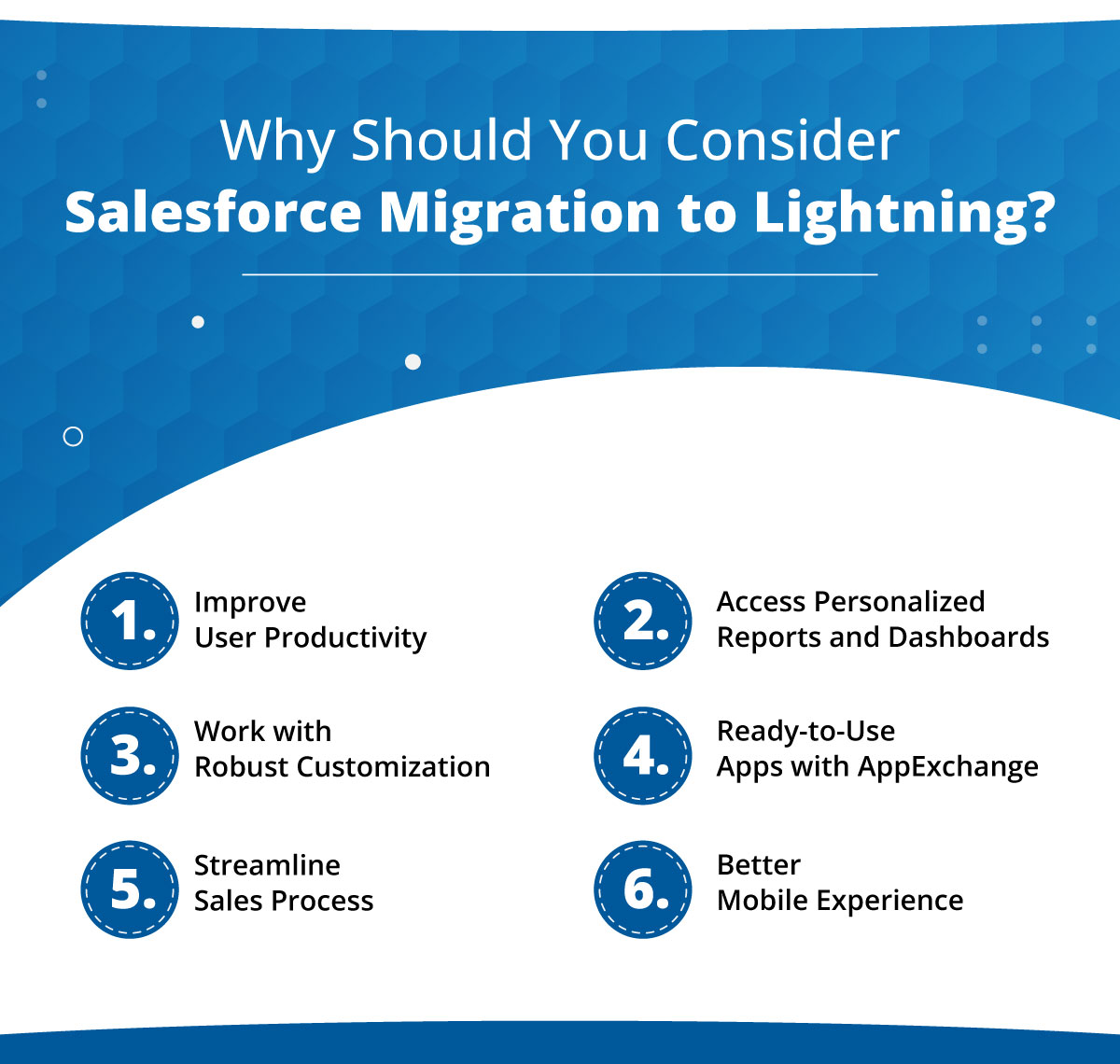
Why Should You Consider Salesforce Migration to Lightning?

If you want to understand why exactly you should prefer Salesforce Lightning over Classic, you need to know the real benefits that you can uncover. There are several key benefits of the migration that have been making the Lightning version very popular among businesses, small or large. 

From improving user experience to providing better navigation, every business has its own reason for moving to Lightning. So, let’s get a more detailed look into exactly what Salesforce Lightning offers for businesses.

1. Improve User Productivity

With Salesforce migration to Lightning, users can work with a streamlined UI and better navigation that will help in enhancing user experience, enabling them to more easily work with Salesforce and access features easily. 

Being able to work with Salesforce with more ease will simply lead to enhanced productivity, making them more efficient.

2. Access Personalized Reports and Dashboards

Another thing that Classic users had been missing out on was personalized reports and dashboards. Salesforce Lightning also enables users to work with reports and dashboards that are customizable and easy to work with. 

This ease would provide users with a personalized view of any data they want to access and get insights that will enable them to make more data-driven decisions. 

3. Work with Robust Customization

Another benefit of Lightning is that it provides Salesforce users with a robust framework to conduct customizations and work with App Builder. This helps businesses to personalize Salesforce according to their unique business goals and requirements. They can easily automate processes or add custom features as required by the business. 

4. Ready-to-Use Apps with AppExchange

It’s not just about how efficiently you can manage work over your Salesforce org. It is also how efficiently you are able to access the standard apps over Lightning AppExchange. 

AppExchange allows users to access a marketplace of pre-built Salesforce applications that will be ready-to-use for your business. This will enable your business to easily extend the Salesforce functionalities that you had been using without even having to work on development to do the same. That’s the kind of ease Lightning offers to its users. 

5. Streamline Sales Process

With Salesforce migration from Classic to Lightning, you can also work with Sales Path by Lightning. Sales Path is a visual and guided representation of the sales process that will be followed for the respective customer.

Having access to the Sales Path helps representatives to always stay updated on the customer information while easily tracking if everything’s on track. This provides all the needed information in a single view, making it easier for them to prioritize tasks and easily close more deals. 

6. Better Mobile Experience

With Salesforce migration from Classic to Lightning, you also optimize your Salesforce experience for mobile devices, enabling you to access and work with data on-the-go. This helps users that prefer working remotely and make data-driven decisions. After all, what can be better than being able to access data stored on Salesforce anytime and from anywhere. 

It’s Time to Consider Salesforce Migration

So, everything mentioned about creates quite a clear picture of how Salesforce Lightning is a more efficient and preferred Salesforce version, enabling users to access enhanced features and navigate across the org more easily. It’s not just this; sooner or later it is going to be mandatory to work with Lightning and Classic might get dissolved. So, make your move to Lightning before that. 

But it’s also true that you might have gotten too comfortable using Classic, and switching versions might not seem enticing to you. That’s where our Salesforce experts for Salesforce migration services can help you to easily move to the new platform and will also help you with better adoption. Contact us and let our certified experts be your guide to moving to Lightning.  

Einstein Copilot for Tableau with Salesforce Implementation Consultant

It doesn’t matter what industry your business is, it’s common for all to look for ways to enhance efficiencies and better and data-backed decision making. To achieve this, organizations are considering working with advanced AI tools. And when it is about AI, even the top Salesforce implementation consultant is talking about Einstein Copilot. 

A study shows that around 83% of CEOs are looking forward to their organizations to be more data-driven. But unfortunately, only 30% of employees are able to work with data-driven actions. That’s quite a concern, as they need to have the right tools to work with AI and make data-backed decisions. 

Big news for Salesforce users and enthusiasts! Salesforce has recently announced the beta availability of Einstein Copilot for Tableau. That’s clearly a big launch as it will help to boost the user productivity with streamlined workflows and self-service analytics through which users can access strategic insights and plan operations accordingly. 

Earlier, organizations had to distribute their data insights into reports that experts created. However, with dashboards in Tableau, that data is represented in a more interactive way, making it visually impressive and easy to understand and evaluate for users. These Tableau dashboards also allow users to manage scope with the help of predefined guided paths. What users need here is the ability to explore data by themselves without having to go through deep analytical training. 

That’s where Einstein Copilot would make a real difference. With this tool in Tableau, users would now be able to analyze data more closely. They would be able to work with the powerful analytical engine of Tableau while working with natural language to run query and get answers that are data-backed and also from other data sources like Salesforce Data Cloud, spreadsheets, cloud, or data warehouses. 

Now, let’s understand Einstein Copilot in Tableau in a better way, evaluating what exactly this launch has to offer the users.

What Exactly You Can Do While Using Einstein Copilot in Tableau

No wonder the recent introduction of the amazing AI assistant, Einstein Copilot, for Tableau is interesting. But the real question is what exactly you’ll be able to do with it. The idea behind bringing in Einstein Copilot is to work with analytical use cases that you can do with the help of a Salesforce implementation consultant.

This platform is efficient in enabling business users to access data analysis and efficiently work with it with the power of AI. The platform will suggest questions according to business data, thus decreasing the number of change requests and enabling faster decision-making.

Now let’s talk about the main features of Einstein Copilot for Tableau that you’ll be able to work with: 

1. Guided Calculation Creation

When you’re analyzing data, one of the most difficult tasks that professionals have to deal with is tracking KPIs and managing computer metrics. This can become a challenge due to the complex calculation syntax, which is tough to work with. That’s where Einstein Copilot can help Tableau users get through this challenging process.

Let’s consider an example to understand this better. Users can acquire guidance that will be AI-powered that will help them parse information for a long string field. This can involve information like extracting the name of a city from a detailed mailing address. It also helps with combining different measures with the right fields that will help users to get results accurately.

You can be a new user of Einstein Copilot. So the question is how would you know exactly where to get started for investigating data. That’s where Einstein Copilot for Tableau will help you by running an automated data analysis and would recommend some questions that are relevant. This will provide you the guidance you need to get more insights. 

Let’s take an example. If you are a regional sales manager, Einstein Copilot might suggest a question like, “Is there any sales pattern across a specific product category?” when you want to know about the sales patterns.

3. Conversational Data Exploration

It’s a rare case situation if you get the right answer to your question in the first go. There would always be a need for better analysis through which better follow-up questions can be asked to gather more detailed and accurate answers. That’s something Einstein Copilot helps with. 

Working with Einstein Copilot in Tableau enables users to reiterate their queries efficiently and work with deeper data exploration to enhance the accuracy and relevancy of the result or answer. Also, users would be able to work with insights without having to miss the context related to the previous question. 

For example, if you are a marketer, you can ask which are the marketing campaigns that are running more efficiently and are bringing results. You can be specific and also ask some follow-up questions to learn about specific products, regions, and channels for which the campaign is running effectively.

Get the Power of AI for Your Business with a Salesforce Implementation Consultant

Surely, the idea of using an AI assistant in Tableau is impressive but being new in the Salesforce ecosystem, this tool can be difficult to implement and get started with. That’s where you need the help from Salesforce implementation services to help you leverage this feature efficiently. 

Simply contact us, and we’ll connect you with our certified professionals who have already worked with Einstein Copilot, and they help you leverage it for your business too.

Time to Consider Salesforce Health Cloud Integration with EHR Systems

What makes Salesforce so impressive is its ability to integrate efficiently with external systems like EHR, offering a solution to enhance patient engagement alongside clinical data management. Salesforce Health Cloud integration is an impressive option for healthcare institutions as it can bring all data together, giving HCPs a unified view.

In this blog, we’ll be taking a closer look at the value of integrating Salesforce Health Cloud with EHR systems in healthcare institutions, evaluating how it can significantly improve care practices significantly. 

Why Healthcare Institutions Should Consider Integrating Health Cloud with their EHR Systems

The reason why healthcare institutions are considering using Salesforce Health Cloud integration with EHR is because of the numerous benefits it tends to offer. Let’s have a look at all these benefits that make this integration so sought after. 

1. Enhance Patient Experience

Healthcare professionals are not just responsible for treating patients. They must also manage communication among care teams, patients, physician networks, and other siloed systems, often requiring them to juggle between different disparate systems.

Integrating Salesforce with EHR aims to unify these systems, collect data, and make it accessible on a single platform. By connecting systems and providing a holistic view of patients’ data, these solutions enable healthcare professionals to deliver personalized, quality care through preferred communication channels. The accessible interaction data allows healthcare support teams to use data intelligently and deliver an optimal experience based on coordinating care.

2. Boost Engagement and Coordination

Real-time patient coordination with healthcare professionals is increasingly important. A Salesforce Health Cloud consultant enables RN to MSN nurses, care coordinators, and healthcare professionals to connect and collaborate with patients on their preferred communication channel. 

Health Cloud utilizes patients’ social data to identify potential health hazards, enabling proactive actions to mitigate risks. Easy data accessibility also helps determine if a patient needs to be brought to the hospital, facilitating necessary transportation and accommodation arrangements. 

Physician leads are tracked and nurtured across all departments for maximum benefits. These preventive measures empower people to live healthy lives and stay engaged with healthcare service providers.

3. Personalized Services

Health Cloud empowers agents by offering a comprehensive view of members, enabling them to deliver personalized interactions and proactive support. The platform’s intelligent recommendations enhance this capability. The knowledge base within Health Cloud ensures agents remain connected and informed with real-time member information, leading to quicker and more detailed case resolution and support.

4. Adhere to Compliance

Health Cloud integration with EHR systems in healthcare institutions also helps organizations comply with healthcare regulations and reporting requirements, ensuring they remain compliant and avoid any penalties.

5. Track and Manage Patient Feedback

In the healthcare industry, where patient satisfaction is paramount, patient feedback is essential for delivering quality care. Analyzing patient conversations during doctor consultations provides valuable insights into patient experiences.

Salesforce healthcare solutions help organizations enhance patient engagement and loyalty by incorporating feedback into service improvements. Health Cloud automatically collects and organizes patient feedback, providing valuable data insights that strengthen the healthcare system.

Effective healthcare consultations ensure patients receive the right solutions for maintaining their health and fitness. You can hire a Salesforce Health Cloud developer who can enable healthcare organizations to identify which Salesforce solutions and services address their challenges, improve services, and facilitate limitless growth.

6. Enable Secure Data Sharing

Ensuring interoperability in healthcare is a significant challenge. Using Health Cloud would help HCPs to overcome such a challenge by complying with industry standards and regulations. 

The integration would help in facilitating secure data exchange between various systems and providers while making sure the privacy of data is secured.

7. Monitor Patients Remotely

As HCPs are actively considering approaches like telemedicine and remote patient monitoring, Salesforce Health Cloud is proving to be of great help, offering solutions for monitoring patients in non-traditional healthcare environments. 

This is a great approach to help HCPs maintain remote assistance to patients so they don’t have to travel all the way to the clinic. 

Hire a Salesforce Health Cloud Developer for a Unified Patient View

There’s no denying the fact that using Health Cloud can be a significant game-changer for hospitals and other healthcare institutions, providing higher quality care and delivering services in a personalized way. It has got everything HCPs need, from offering comprehensive patient profiles, facilitating care coordination, enabling personalized patient engagement, and providing powerful analytics tools, making it easier to track everything in one place..

So, to make the most of the platform, the need is to have an expert who can seamlessly integrate your existing EHR system with Salesforce Health Cloud. You need certified and experienced professionals to ensure a smooth integration without losing any data. Contact us to get such Health Cloud experts to work on your integration requirement.

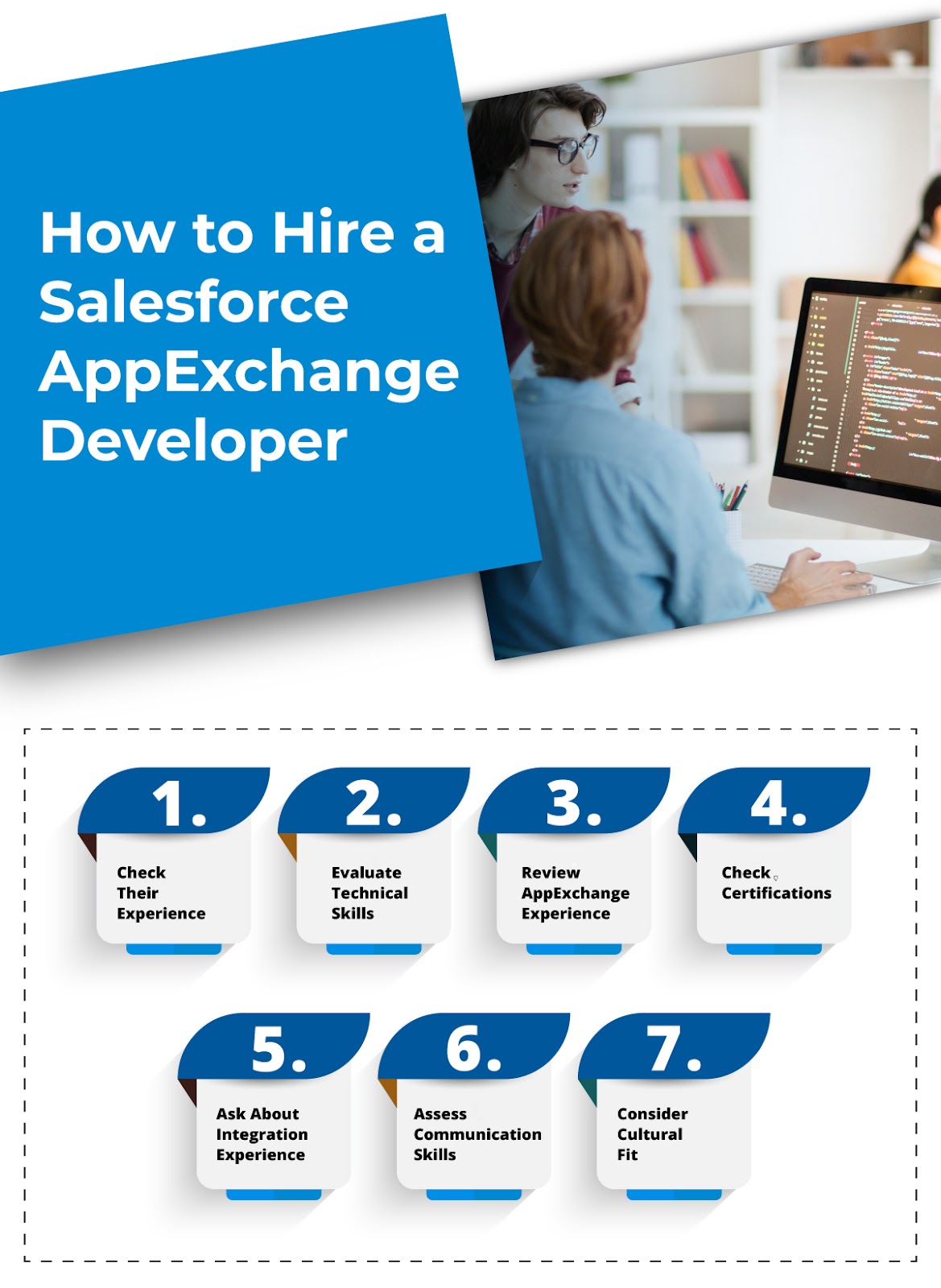
How To Make Sure You’re Hiring the Right Salesforce AppExchange Developer

Do you know that 90% of Fortune 500 firms use Salesforce AppExchange? That’s the kind of importance this platform holds among business leaders. However, to get the app launched over Salesforce AppExchange, you need to have a reliable Salesforce AppExchange developer to build a robust application and get it through the security review. 

Salesforce AppExchange developers are specialists who excel in customizing and extending the Salesforce platform through the development of custom applications and integrations. These developers play a pivotal role in helping businesses tailor Salesforce to their unique requirements, ultimately driving greater efficiency, productivity, and ROI.

In this guide, we will delve into the importance of Salesforce AppExchange developers and explore ways you can choose the most skilled developers. From customization and enhanced functionality to integration and scalability, we will highlight how these developers can help businesses maximize the value of their Salesforce investments.

Why Hiring a Salesforce AppExchange Developer Is Essential for Your Business

Salesforce offers a wide range of tools and features to help businesses streamline their operations, improve customer engagement, and drive growth. 

However, to fully leverage the power of Salesforce, businesses often need to customize their CRM solutions to meet their unique needs.

This is where Salesforce AppExchange developers come in. These specialized developers are experts in building custom applications and integrations on the Salesforce platform, helping businesses tailor their CRM solutions to their specific requirements. 

Here are some key reasons why a Salesforce AppExchange developer is essential for your business:

Customization: Off-the-shelf Salesforce solutions may not always meet your business’s unique requirements. AppExchange developers can create custom applications and integrations to extend Salesforce functionality and tailor it to your specific needs.

Enhanced Functionality: By developing custom applications, AppExchange developers can add new features and functionality to your Salesforce CRM, allowing you to automate processes, improve data management, and enhance customer engagement.

Integration: AppExchange developers can integrate Salesforce with other business systems, such as ERP, marketing automation, and customer service platforms. This seamless integration ensures that your data is synchronized across all systems, improving efficiency and productivity.

Scalability: As your business grows, your CRM needs may evolve. AppExchange developers can help you scale your Salesforce CRM solution to accommodate new requirements and business processes.

Competitive Advantage: By customizing your Salesforce CRM solution, you can gain a competitive advantage in your industry. Customized solutions allow you to meet the unique needs of your customers and provide a superior experience.

How to Hire a Salesforce AppExchange Developer

Hiring the right Salesforce AppExchange developer is crucial for the success of your Salesforce implementation. These developers specialize in building custom applications on the Salesforce platform, leveraging the power of the Salesforce ecosystem. 

Here are some key points to consider when hiring a Salesforce AppExchange developer:

1. Check Their Experience

Experience is key when you hire an AppExchange developer for Salesforce. Look for developers who have a proven track record of building successful applications on the Salesforce platform. 

They should have experience working with different Salesforce products and technologies, such as Salesforce Lightning, Apex, Visualforce, and Salesforce APIs.

2. Evaluate Technical Skills

Technical skills are essential for a Salesforce AppExchange developer. Hire AppExchange developers who have a strong understanding of Salesforce architecture and development best practices. 

Look for developers who are proficient in Apex, Visualforce, Salesforce Lightning, and Salesforce APIs. They should also have experience with web development technologies such as HTML, CSS, and JavaScript.

3. Review AppExchange Experience

AppExchange experience is a plus when hiring a Salesforce AppExchange developer. Developers who have published apps on the AppExchange have a deep understanding of the Salesforce ecosystem and the requirements for building successful Salesforce applications. 

You need to start searching for developers who have a track record of building popular and highly-rated apps on the AppExchange.

4. Check Certifications

Salesforce certifications are a good indicator of a developer’s expertise and knowledge of the Salesforce platform. 

You should hire developers who are Salesforce certified, especially in areas relevant to AppExchange development, such as Salesforce Certified Platform Developer I and II.

5. Ask About Integration Experience

Integration experience is important for a Salesforce AppExchange developer, as many applications require integration with external systems. 

Ask candidates about their experience with integrating Salesforce applications with other systems, such as ERP systems, marketing automation platforms, and other third-party applications.

6. Assess Communication Skills

Communication skills are key when you hire an AppExchange developer for Salesforce, as they will need to communicate with stakeholders, clients, and other team members throughout the development process. 

It is essential to find developers who can communicate complex technical concepts in a clear and concise manner.

7. Consider Cultural Fit

Cultural fit is important when hiring any developer, including Salesforce AppExchange developers. Look for developers who align with your company’s values and culture, as they will be more likely to work well with your existing team and contribute to a positive work environment.

Hire AppExchange Developers for Robust Applications

Salesforce AppExchange developers are indispensable assets for businesses looking to maximize the value of their Salesforce CRM investments. These developers bring a unique skill set and expertise that allows them to tailor Salesforce to meet the specific needs of each business, driving efficiency, productivity, and growth.

By customizing Salesforce through the development of custom applications and integrations, AppExchange developers can help businesses automate processes, improve data management, and enhance customer engagement.

However, to have your customized Salesforce solution, you need to have a skilled and certified developer to understand your requirements and execute them accordingly. Contact us, and we’ll assign you a certified AppExchange developer to provide you with robust solutions that meet your needs. 

Seeking to Boost Your Email Operations? Why Not Embrace 360 Mass Mailer?

While performing email operations, the top concern is the number of emails you can send on a daily basis. When it comes to outreach, the limited number of emails is equal to limited outreach.

Another concern of marketers associated with email operations is the performance of email campaigns. Poor performance leads to low email campaign returns, which is obviously not something that marketers like. 

Overall, these concerns affect your email operations and restrict you from attaining the desired results. 

These concerns are the major reasons we launched 360 Mass Mailer. There is nothing wrong with calling it a one-stop solution to your email outreach concerns.

In this blog, we will discuss how 360 Mass Mailer can help you improve your email operations and achieve the outcomes that you envision while running Salesforce mass email operations.

Role of 360 Mass Mailer in Salesforce Mass Email Operations

Marketers often struggle to send mass emails from Salesforce conveniently due to a cap on audience size selection when sending emails daily. Now, users no longer have to look forward to a solution that amplifies mass email opportunities in Salesforce, as 360 Mass Mailers offers the freedom to send unlimited emails daily. Let’s dive deeper into how 360 Mass Mailer boosts your email operations.

Emails at Scale for Improved Connectivity

360 Mass Mailer is designed to simplify and expedite large-scale email operations. This feature enables users to efficiently schedule or send bulk emails to reach millions of recipients simultaneously.

Imagine you’re tasked with disseminating an important announcement, launching a marketing campaign, or simply maintaining regular communication with a vast audience. Instead of manually composing and sending individual emails to each recipient, 360 Mass Mailer offers you mass email opportunities in Salesforce. It empowers you to compose a single email and distribute it to millions of recipients in one go.

This capability significantly streamlines the email distribution process, saving you time and effort while ensuring prompt delivery to your entire audience. Whether you’re targeting a global clientele, subscribers to your newsletter, or members of an organization, bulk emailing offers the efficiency and reliability needed to reach them all efficiently.

Moreover, the scheduling feature allows users to plan their email campaigns strategically. Whether users want to send emails at specific times to optimize engagement or stagger delivery to accommodate different time zones. Mass email users using Salesforce Lightning

 can plan and execute your campaigns seamlessly.

Users can eliminate the tedious task of manually managing individual email sends and focus their efforts on crafting compelling content and strategic planning. Whether you’re a small business owner, a marketing professional, or an organization managing communications, this feature empowers you to connect with millions of recipients effortlessly and efficiently.

Email Personalization for More Engagement

The advantage of 360 Mass Mailer lies in its capability to enable users to segment their audiences intelligently and deploy personalized email campaigns for targeted drip marketing efforts. 

By leveraging this functionality, mass email users using Salesforce Lightning can strategically divide their email recipients into smaller, more refined groups based on various criteria such as demographics, behaviors, or engagement levels. This kind of segmentation is also widely used in VA email marketing, where virtual assistants help execute targeted drip sequences for different audience groups. This segmentation allows for the creation of highly personalized email content tailored to each specific audience segment, resulting in increased relevance and engagement. Furthermore, 360 Mass Mailer facilitates the automation of these personalized email campaigns, allowing users to schedule and send automated sequences of emails over time. 

This approach ensures consistent and timely communication with subscribers, guiding them through the customer journey and nurturing leads toward conversion. Ultimately, the ability to segment audiences smartly and send personalized emails for targeted drip campaigns empowers users to optimize their email marketing efforts, leading to higher engagement rates, improved conversions, and enhanced overall campaign effectiveness.

Email Automation for Faster Email Operations

360 Mass Mailer allows to automate tailored email journeys, resulting in significant time and effort savings for mass email users using Salesforce Lightning. With this feature, users can create customized email sequences that are automatically triggered based on specific actions or criteria, such as user interactions, demographics, or purchase behavior. By automating these email journeys, users can streamline their marketing efforts, ensuring that subscribers receive timely and relevant content without the need for manual intervention. This not only saves time and effort on the part of the user but also ensures consistent and personalized communication with their audience. Whether it’s welcoming new subscribers, nurturing leads, or re-engaging inactive users, 360 Mass Mailer empowers users to deliver the right message to the right person at the right time.

Faster Salesforce Mass Email Campaign Launch

An advantageous feature of 360 Mass Mailer is its provision of pre-built email templates, eliminating the need for users to craft emails from scratch. This capability significantly expedites the process of launching email marketing campaigns, as users can quickly select from a variety of professionally designed templates tailored to different purposes, such as promotional offers, newsletters, event invitations, or follow-up messages. By leveraging these pre-built templates, users can accelerate their email marketing efforts, saving valuable time and resources that would otherwise be spent on designing and composing emails manually. Furthermore, these templates often come optimized for mobile responsiveness and deliverability, ensuring that users can effectively engage their audience across various devices and platforms while maintaining a consistent brand identity. Ultimately, this feature empowers users to streamline their email marketing campaigns, allowing them to focus on strategy and content rather than the logistics of email creation.

Conclusion

360 Mass Mailer stands as a comprehensive solution for streamlining and optimizing email marketing campaigns. Its robust features, including automated email journeys, personalized messaging, and pre-built templates, empower users to efficiently connect with their audience while saving valuable time and effort. By leveraging advanced segmentation, automation, and personalization capabilities, 360 Mass Mailer enables users to take advantage of mass email opportunities in Salesforce and deliver targeted and engaging content that resonates with their audience, ultimately driving higher engagement, conversions, and overall campaign success.

With its user-friendly interface and powerful functionality, 360 Mass Mailer is a valuable tool for businesses and marketers seeking to elevate their email marketing strategies and achieve tangible results. Geared up for an email marketing operations boost? Contact us and connect with our experts.

Top 8 Reasons to Consider HubSpot and Salesforce Integration for Your Business

Data is the key to understanding customers for any business. However, the statement is valid when both sales and marketing data have accurate and updated information at their end. In many companies, teams face a common struggle to communicate with other teams to access updated customer information. That’s the kind of issue HubSpot and Salesforce integration can solve for you. 

Any company that realizes the value of CRM would know how effective both Salesforce and HubSpot are. The features and capabilities of both these platforms make them highly popular among both SMEs and enterprises. 

But what if you can combine the power of both these platforms?

Interesting, right? This is something that’s possible by integrating Salesforce with HubSpot. In this blog, we’ll be emphasizing the integration of HubSpot and Salesforce and how it benefits businesses.

Features You Can Access with HubSpot and Salesforce Integration

The reason why businesses are considering integration HubSpot with Salesforce is the range of features that it carries along. Let’s explore the key features you can access with HubSpot Salesforce integration:

Lead Capture and Management

HubSpot offers tools to capture leads from multiple sources which can be automatically viewed and managed within Salesforce. This is how the integration helps to simplify the process to manage leads, so no lead can get slipped out.

Marketing Automation

The integration allows you to work with efficient workflows for marketing automation on which they can set triggers based on different events and activities. The automation enables agents to engage more with customers, nurture leads, and drive efficient communication with leads.

Pipeline Management

Lead scoring and sales pipeline management can help you get a complete view of the sales pipeline, making it easier to manage the entire sales process.

Personalized Marketing

Easily run personalized campaigns by combining data across both platforms. It helps the team to tailor your campaigns accordingly and get maximum results by segmenting the audience according to their demographics and preferences.

Work with Analytics

You can leverage advanced reporting and real-time analytics, which helps to continuously keep a track of their campaign performance. It allows them to monitor metrics and get insights of any improvement that needs to be made in the campaign.

8 Reasons to Consider HubSpot and Salesforce Integration

So, let’s look into reasons why this integration is considered actively by companies across multiple industries.

Seamless Data Synchronization

Having synchronized data will keep your marketing and sales teams on the same page as they will have access to the single source of truth. This would help teams with making informed decisions and run a personalized communication with customers. 

Holistic Customer View

The integration will allow you to achieve a comprehensive view of your customers with all customer details like their preferences, customer interactions, purchase history, and more. This will enable your teams to deliver targeted and personalized experiences that drive engagement and loyalty.

Enhanced Lead Management

This integration streamlines the lead management process by automatically syncing leads captured in HubSpot to Salesforce. This Salesforce integration helps in enabling automation, which will remove manual data entry, reduce errors, and ensure that leads are promptly followed up on, ultimately increasing conversion rates.

Improved Marketing Campaign Performance

You can get valuable insights into the performance of your marketing campaigns, powered by this integration and track key metrics like click-through rates, open rates, and conversion rates within Salesforce.

Sales Enablement

HubSpot with Salesforce integration can bring the sales and marketing teams closer. Teams can access complete customer details within Salesforce, which will be updated in real-time. That’s how they will be able to run valuable and meaningful conversations with customers. 

Efficient Workflow Automation

Another key reason to consider the integration is the ease to automate workflows. This would eliminate the redundant activities, thus saving resources and time. As an example to thus, you can automatically assign leads to the respective sales rep to faster the lead management and nurturing process.

Advanced Reporting and Analytics

The integration will also allow teams to access advanced reporting and analytics capabilities. They’ll be able to work on customized reports and dashboards that will include deeper insights into marketing and sales performance to make the right data-driven decisions.

Scalability and Flexibility

You can adapt and expand your HubSpot and Salesforce integration with your growing business. You can tailor the integration to meet your specific business needs, whether you’re a small startup or a large firm.

Go for HubSpot and Salesforce Integration Today


Whenever it is about integrating two applications, the idea is always to double the power and minimize the complexity. Many marketing and sales teams also consider Mailchimp Salesforce integration along with HubSpot to maximize the potential of their applications. 

Integrating HubSpot and Salesforce offers a multitude of benefits that can help you optimize your marketing and sales efforts, drive customer engagement, and, ultimately, achieve your business goals. 

But to make sure your integration is done successfully and without any errors, you should consider having a reliable Salesforce implementation service onboard. Contact us and get the best Salesforce experts to help you with integrating your CRM with multiple other applications you use. 


logo Live Chat