

Why You Can’t Afford to Miss Phone Number Verification in Business Operations
18 Aug 2025
Table of Contents
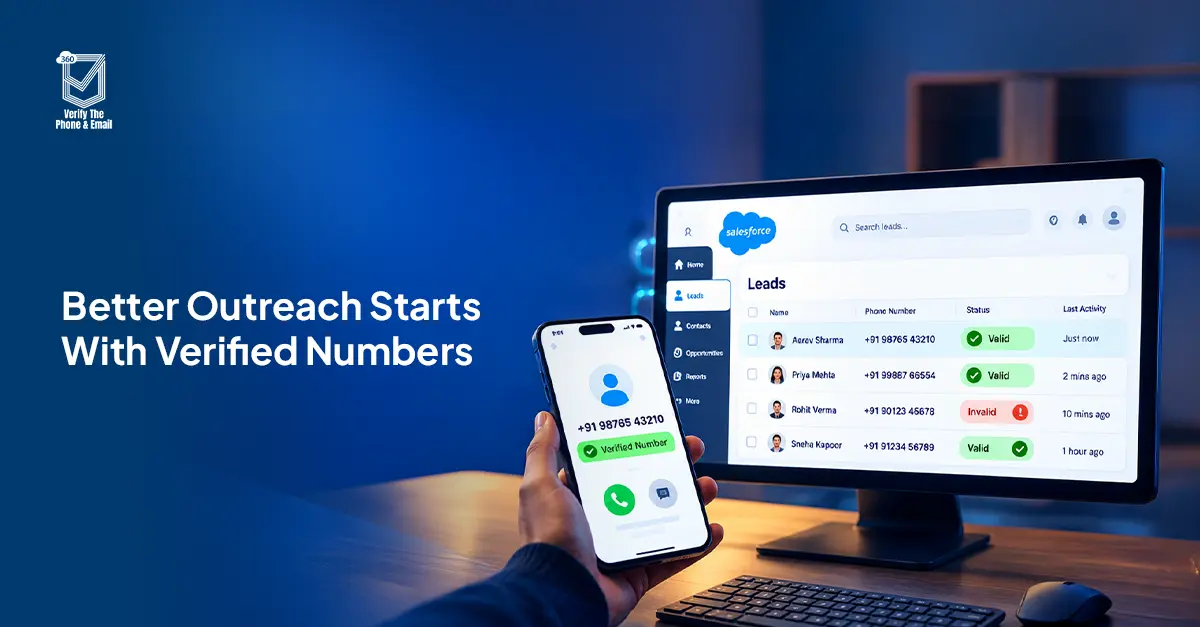
Phone number verification helps businesses identify invalid, disconnected, and incorrectly classified numbers before they affect sales calls or SMS campaigns. This guide explains how phone validation works, why line type matters, and how to verify phone numbers in Salesforce using real-time checks, bulk verification, and automated workflows.
A sales rep calls a new lead, but the number doesn’t exist. Another contact receives an SMS campaign, except the number belongs to a landline. These problems often start with contact details that look correct in Salesforce but have never been verified.
Phone number verification helps businesses identify these issues before they waste time and marketing spend. By checking number validity, carrier information, and line type, teams can make better decisions about which contacts to call, text, or flag for correction.
For businesses using Salesforce, phone verification can be built into lead capture, record updates, and bulk database cleanup. Here’s how it works and where it makes the biggest difference
Table of Contents
What Is Phone Number Verification?
Phone number verification is the process of checking whether a telephone number is valid, correctly formatted, and potentially reachable through a telecommunications network.
Depending on the verification service, it can also identify the associated carrier and whether the number belongs to a mobile phone, landline, or VoIP service.
For example, a business may have thousands of phone numbers stored in Salesforce. Some belong to disconnected lines, while others are landlines mistakenly included in SMS campaigns. Phone number verification helps identify these differences before outreach begins.
However, verifying a number doesn’t automatically confirm who owns it or whether the person has agreed to receive messages.
Is Your Phone Number Valid for Calls and SMS?
Learn how line type verification helps identify mobile, landline, and VoIP numbers before outreach.
Read the BlogHow Does Phone Number Verification Work?
Phone verification involves several checks, each answering a different question about the number.
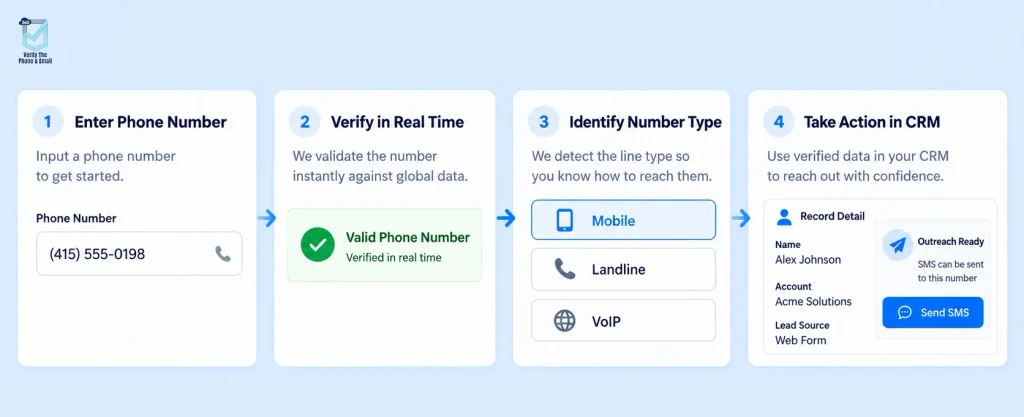
1. Syntax and Format Validation
The first check determines whether the number follows the correct structure for its country.
International phone numbers commonly use the E.164 format, which includes a plus sign, country code, and subscriber number.
For example:
- United States: +14155552671
- United Kingdom: +442071838750
- India: +919876543210
E.164 supports a maximum of 15 digits, excluding the plus sign. Using a consistent international format helps businesses process contact numbers across regions.
You can learn more about the international numbering standard in Twilio’s E.164 documentation.
2. Carrier and Line Type Lookup
A carrier lookup identifies available telecommunications information associated with a number.
Line type detection distinguishes between:
- Mobile: Generally suitable for voice calls and SMS, subject to service availability.
- Landline: Primarily used for voice calls, although some landlines may support text messaging through specific services.
- VoIP: Internet-based telephone services whose calling and messaging capabilities vary by provider.
This distinction matters when choosing the right communication channel.
For instance, an SMS campaign shouldn’t automatically include every phone number in the CRM simply because its format is valid.
3. Number Status and Reachability Checks
Phone verification services may use available carrier and numbering data to determine whether a number is assigned, active, or potentially reachable.
However, the exact level of reachability confirmation depends on the service and network coverage. Even a valid number doesn’t guarantee that every call will connect or every SMS will be delivered.
4. OTP Verification for Ownership Confirmation
An OTP, or One-Time Password, confirms that someone can receive and submit a temporary verification code sent to a specific phone number.
Phone validation and OTP verification serve different purposes.
Phone validation checks whether a number is structurally valid and potentially usable. OTP verification checks whether the person completing the process has access to that number at the time of verification.
For businesses cleaning Salesforce contact records, carrier-based verification can help without sending an OTP to every contact. Ownership confirmation requires a separate verification step.
Why Is Phone Number Verification Important for Businesses?
Invalid phone numbers cause more than failed calls. They affect campaign targeting, sales productivity, and the reliability of customer data.
1. Reduces Wasted Sales Calls
Consider a sales team working through 500 new leads. If some records contain invalid or disconnected numbers, reps spend valuable time attempting calls that cannot connect.
Verifying phone numbers before assigning leads helps sales teams focus their efforts on usable contact details.
2. Improves SMS Campaign Targeting
A phone number can have the correct number of digits but still be unsuitable for an SMS campaign.
For example, a landline may pass basic format validation but not support the intended SMS service.
Checking number validity and line type before building campaign lists helps teams avoid unnecessary message attempts and associated costs.
3. Keeps Salesforce Contact Data Reliable
Contact information changes. Customers switch providers, disconnect numbers, or update their business contact details.
Without periodic verification, outdated information continues circulating through Salesforce reports, lead assignments, and automated workflows.
Regular checks help businesses identify records that require correction instead of repeatedly using questionable data.
4. Supports Better Lead Qualification
A lead with an invalid phone number isn’t necessarily unqualified, but the missing contact information creates an immediate follow-up problem.
Verification results allow teams to flag incomplete contact records, request updated information, or use another appropriate communication channel.
5. Helps Control Outreach Costs
Unnecessary calls, failed SMS attempts, and manual database corrections all consume resources.
Phone number verification helps reduce avoidable outreach by identifying unusable numbers before they enter calling queues and messaging campaigns.
The actual savings depend on the quality of the existing database, campaign volume, and how verification results are used.
Did You Know?
A phone number can be valid and active but still be unsuitable for your SMS campaign. For example, a landline may pass number validation but not support SMS through your messaging provider. That’s why checking line type alongside number validity is important before launching an outreach campaign.
For a closer look at how these classifications affect Salesforce campaigns, read Salesforce Phone Number Verification: Why Line Type Matters.
How to Verify Phone Numbers in Salesforce
Salesforce stores phone numbers in standard fields, including Lead Phone, Contact Phone, and Mobile. However, these fields alone don’t confirm whether the numbers are active, assigned, or capable of receiving messages.
Salesforce validation rules can enforce formatting requirements, but actual phone verification requires a service that checks telecommunications data.
Here’s how Salesforce teams can implement it.
Step 1: Configure Phone Format Validation
In Salesforce Setup, open Object Manager, select Lead or Contact, and navigate to Validation Rules.
Create a rule to enforce the required format for your business, such as an international number format or a country-specific input pattern.
For multinational teams, normalize numbers into E.164 format where appropriate.
These rules catch incorrectly formatted entries, but they don’t independently confirm whether the number is active.
Step 2: Enable Real-Time Phone Verification
Install and configure a Salesforce phone verification solution such as 360 Verify the Phone.
In the application’s settings, select the supported objects and phone fields you want to verify.
Configure verification for new records and relevant phone-field updates, based on the application’s available settings.
This helps teams identify invalid numbers when contact information enters Salesforce rather than discovering the problem during outreach.
You can explore the available capabilities on the Salesforce phone number verification feature page.
Step 3: Run Bulk Phone Verification
Existing Salesforce databases often contain years of imported leads, manually entered contacts, and outdated telephone numbers.
Bulk verification helps clean these records without checking each number individually.
A typical bulk verification process includes:
- Identify the Lead, Contact, or other supported records requiring verification.
- Select the relevant phone fields and records in the verification application’s bulk interface.
- Start the verification job.
- Review results such as validity, line type, and carrier information.
- Flag or segment records based on the returned status.
With 360 VTM/VTP, bulk phone verification is available through the Org-Based plan.
For a broader approach to existing CRM records, see How to Do Data Cleansing in Salesforce.
Step 4: Automate Verification With Salesforce Flow
Salesforce Flow can help teams verify phone numbers whenever relevant contact details change.
To configure this workflow:
- Open Setup → Flows and create a record-triggered Flow.
- Select the Lead or Contact object.
- Set the trigger to record creation or updates to the relevant phone field.
- Add the verification action provided by the installed verification solution.
- Map the returned verification results to the appropriate Salesforce fields.
- Use Decision elements to flag invalid numbers or control downstream outreach.
You can also configure scheduled reverification where the application and subscription support it.
For a more detailed implementation walkthrough, read How to Auto-Verify Email and Phone Numbers in Salesforce Flow.
Step 5: Use Verification Results Before Outreach
Once results are available in Salesforce, they can guide campaign and sales decisions.
For example:
- Valid mobile numbers with the required consent can enter eligible SMS audiences.
- Valid landlines can be considered for appropriate calling workflows.
- Invalid numbers can be excluded from automated outreach.
- Unknown results can be flagged for review or reverification.
This ensures verification results influence business operations instead of becoming another unused CRM field.
How 360 Verify the Phone Supports Salesforce Verification
360 Verify the Phone (VTP), part of the 360 VTM/VTP solution, helps businesses check contact phone numbers directly within Salesforce.
Its capabilities address different stages of CRM data management.
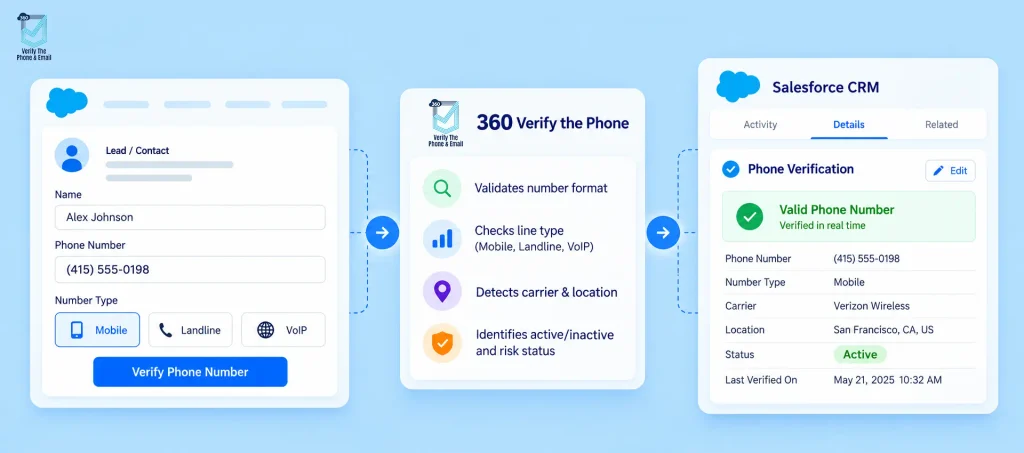
Real-Time Phone Verification
Verify phone numbers when supported Salesforce records are created or updated. This reduces the chances of incorrect contact data going unnoticed until a sales representative attempts outreach.
Carrier and Line Type Detection
Identify whether numbers are classified as mobile, landline, or VoIP, along with available carrier information.
Teams can use these results to make better decisions about calling and messaging eligibility.
Bulk Phone Number Verification
Verify large sets of existing records to identify outdated or invalid contact numbers.
This is useful before major SMS campaigns, sales outreach programs, and database cleanup projects.
Automated Salesforce Workflows
Use supported Salesforce Flow automation to trigger verification, store results, and act on invalid numbers.
For example, a business can create a workflow that flags a lead for correction when verification returns an invalid result.
Verification at the Point of Entry
For leads captured through Salesforce forms or integrated lead-generation systems, verification can be incorporated into the intake workflow.
With Web-to-Lead or Web-to-Case, the exact verification timing and whether a submission is rejected depend on the form integration and automation configuration.
Are Your Salesforce Email Addresses Valid?
Learn how to verify email addresses in Salesforce and reduce bounces caused by invalid contacts.
Learn How to Verify EmailsWhat Should You Do With Invalid Phone Numbers?
Finding an invalid number is useful only when your team knows what to do next.
Instead of deleting records immediately, create a process for handling different verification results.
| Verification result | Recommended action |
| Invalid or disconnected | Exclude from outreach and request updated contact details. |
| Valid mobile | Evaluate for SMS eligibility, subject to consent and messaging support. |
| Valid landline | Consider appropriate calling workflows. |
| VoIP number | Check provider capabilities before adding it to a voice or SMS campaign. |
| Unknown or inconclusive | Retain the record, flag it, and reverify or review manually. |
A failed verification doesn’t necessarily mean the entire lead is worthless.
For example, a potential customer may have a valid email address but an outdated phone number. The better response is to request a correction rather than automatically deleting the lead.
Phone Number Verification and SMS Consent
A verified phone number doesn’t mean you have permission to contact it.
Phone verification checks the number’s technical validity or associated network information. It does not establish whether the recipient has consented to marketing calls or messages.
For businesses conducting outreach in the United States, the Telephone Consumer Protection Act (TCPA) regulates certain automated calls and texts. Covered telemarketing communications may require prior express written consent.
Requirements vary by communication type, technology, jurisdiction, and applicable exemptions.
Businesses should maintain consent records, honor opt-outs, and apply the relevant rules before launching campaigns.
For regulatory context, refer to the FCC’s TCPA consent guidance.
Final Thoughts
Phone number verification should happen before invalid contact information affects sales calls, customer communications, or marketing campaigns.
By combining format checks, carrier information, line type detection, and periodic validation, businesses can maintain more reliable contact databases and avoid unnecessary outreach.
For Salesforce teams, 360 Verify the Phone offers real-time checks, bulk verification, and automation options that help keep contact information usable as the database grows.

Solve It with Salesforce. We’ll Show You How.
AI. Apps. Experts. Everything you need to win with Salesforce under one roof.Frequently Asked Questions
What is phone number verification?
Phone number verification checks whether a telephone number is correctly formatted, valid, and potentially reachable. Depending on the verification service, it can also identify the carrier and line type, helping businesses maintain reliable contact information.
How do I verify a phone number in Salesforce?
You can use Salesforce validation rules to check number formatting. To verify actual number validity, install a phone verification app such as 360 Verify the Phone, configure supported fields, and run real-time or bulk verification.
Can Salesforce verify phone numbers automatically?
Yes. Salesforce Flow can automate phone verification when connected to a compatible verification service. A record-triggered Flow can initiate checks when phone fields change and use the results to update statuses or control outreach workflows.
Can I verify phone numbers in bulk?
Yes. Bulk phone number verification allows businesses to validate large sets of existing CRM records. With 360 VTM/VTP, bulk verification is supported through the Org-Based plan.
What is the difference between phone validation and OTP verification?
Phone validation checks whether a number is valid and potentially reachable. OTP verification confirms that someone has access to the number by requiring them to submit a temporary code. A successful OTP check does not independently prove the person's identity.
Can phone verification identify mobile, landline, and VoIP numbers?
Yes. Phone verification services that support line type detection can classify numbers as mobile, landline, or VoIP. This helps businesses determine which numbers may be suitable for specific communication channels.
Does a valid phone number guarantee SMS delivery?
No. A valid phone number doesn't guarantee SMS delivery. Delivery also depends on messaging capabilities, carrier restrictions, recipient availability, and other network or messaging-provider conditions.
Does verifying a phone number confirm marketing consent?
No. Phone verification and consent are separate requirements. Businesses must obtain and document any legally required consent before sending marketing messages, even when the phone number has been verified.
How do I check if a phone number is genuine?
You can check if a phone number is genuine using verification tools like VTP that validate number activity, carrier details, and line status in real time.
What happens if I don’t verify phone numbers?
Without verification: Fake or invalid numbers enter your database Communication failures increase Marketing costs rise Conversion rates drop Customer experience suffers

About the author
Editorial TeamThe Editorial Team at 360 Degree Cloud brings together seasoned marketers, Salesforce specialists, and technology writers who are passionate about simplifying complex ideas into meaningful insights. With deep expertise in Salesforce solutions, B2B SaaS, and digital transformation, the team curates thought leadership content, industry trends, and practical guides that help businesses navigate growth with clarity and confidence. Every piece we publish reflects our commitment to delivering value, fostering innovation, and connecting readers with the evolving Salesforce ecosystem.
Recent Blogs
 360 Verify The Mail
Best Salesforce Data Quality Tools 2026
Picking the right Salesforce data quality tools isn’t a one-time decision. This guide breaks down six tools that tackle verification, deduplication, and ongoing data hygiene…
Read More 360 Verify The Mail
CRM Data Cleansing: Steps, Tools and How to Automate It
Your Salesforce org looks fine at the record level. Contacts are there. Fields are filled in. Reports run. But somewhere between 20 and 30% of…
Read More 360 Verify The Mail
Can I Test an Email Address Without Sending an Email?
Not every email address that looks valid actually delivers. This guide explains how Salesforce users can test an email address without sending an email, using…
Read MoreReady to Make the Most Out of Your Salesforce Instance?
Our Salesforce aces would be happy to help you. Just drop us a line at contact@360degreecloud.com, and we’ll take it from there!
Subscribe to our newsletter
Stay ahead with expert insights, industry trends, and exclusive resources—delivered straight to your inbox.