Talk to Us

Why are Companies More Inclined Towards Offshore Salesforce Development?

Even though the business world keeps on changing, one thing remains constant: the need for innovation and efficiency. For companies looking to stay ahead, harnessing the power of Salesforce has become a game-changer. However, navigating the complexities of this robust CRM platform requires more than just a passing familiarity. It demands expertise, dedication, and a strategic approach. This is where offshore Salesforce development comes into play, offering a pathway to success that many companies are eagerly embracing.

Everyone expects a business where every customer interaction is seamless, every marketing campaign is targeted, and every sales opportunity is maximized. This is the promise of Salesforce, a platform that has revolutionized the way businesses engage with their customers. 

Yet, for many companies, unlocking the full potential of Salesforce can be a daunting task. It requires a deep understanding of the platform’s capabilities, as well as the time and resources to implement and manage it effectively. This is why an increasing number of companies are turning to Salesforce outsourcing as a solution.

In this blog, we’ll be discussing top pointers on why companies are inclining more towards getting their Salesforce project requirements outsourced.

Salesforce Outsourcing for Your Critical Projects

Outsourcing critical projects to a specialized Salesforce provider ensures that your project is in the hands of experts who have extensive experience working on similar projects. Their expertise can help you navigate challenges, avoid pitfalls, and achieve your project goals more efficiently.

Having an external team to handle your critical projects will ensure that your internal team can focus on their core responsibilities while the Salesforce outsourcing provider takes care of the project execution. This dedicated focus can lead to faster project completion and better outcomes.

Why Should You Consider Offshore Salesforce Development?

Businesses constantly seek ways to stay ahead of the curve. One strategy that has gained immense popularity is offshore Salesforce development

This approach offers a range of benefits that can help companies maximize the potential of their Salesforce implementation while minimizing costs. Here, we’ve listed some pointers that will help you understand how outsourcing your development work would be a great option. 
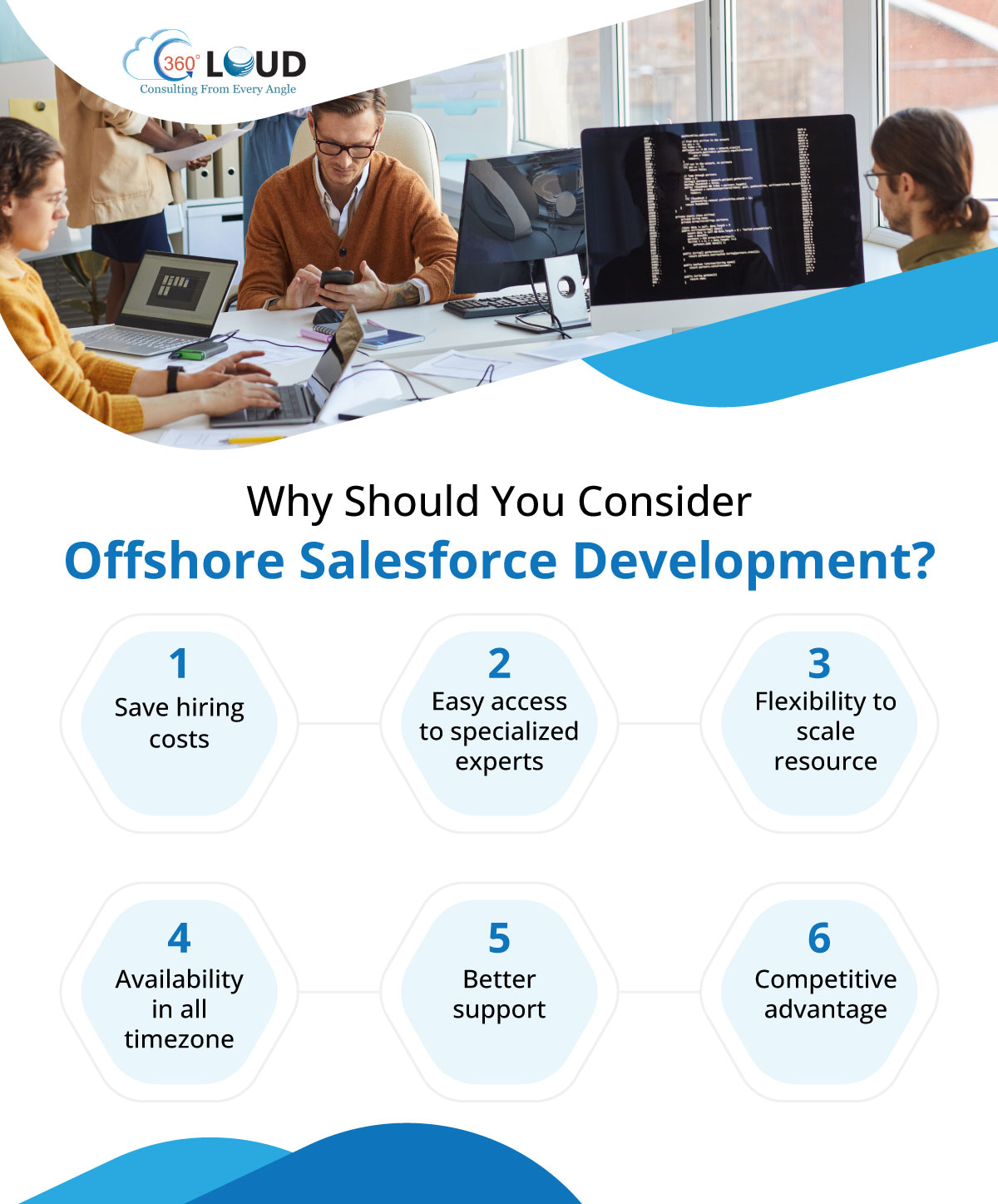
1. Save Hiring Costs

Hiring and training Salesforce experts in-house can be expensive. Offshore development allows you to access a pool of talented professionals at a fraction of the cost, saving you money and resources. 

Moreover, you can scale your team up or down based on your project requirements, providing you with the flexibility you need to manage your budget effectively.

2. Easy Access to Specialized Experts

Offshore development firms often have a team of specialized Salesforce experts who are well-versed in the platform’s nuances. These experts can help you navigate complex projects, implement best practices, and achieve your business objectives more effectively. 

Additionally, working with a diverse team of experts can bring fresh perspectives and innovative ideas to your Salesforce strategy.

3. Flexibility to Scale Resources

One of the key advantages of Salesforce development is the flexibility it offers in scaling your Salesforce resources. Whether you need additional support for a specific project or want to ramp up your Salesforce capabilities, offshore development can accommodate your requirements. 

This scalability ensures that you can adapt to changing business needs and seize new opportunities as they arise. Companies that are going to start with outsourcing can consider starting with a small requirement and keep scaling the resources as the project or resource needs. 

4. Availability in All Time Zones

Offshore development firms operate in different time zones, ensuring that there is always someone available to assist you. This can be particularly advantageous for businesses with global operations or tight deadlines. 

Whether you need support during your regular business hours or require assistance during off-hours, Salesforce staff augmentation can provide you with the support you need when you need it. This is a great thing, as companies do not have to keep waiting for a response, especially in cases when the team is stuck with some crucial task. 

5. Better Support

Offshore development firms often provide round-the-clock support, ensuring that your Salesforce implementation runs smoothly at all times. This level of support can help you minimize downtime, resolve issues quickly, and maximize productivity. 

Additionally, working with an offshore team can provide you with access to a broader range of skills and expertise than you may have in-house, further enhancing the support you receive.

6. Competitive Advantage

By leveraging offshore development, you can gain a competitive advantage by accelerating your Salesforce implementation and achieving faster time-to-market. This can help you stay ahead of the competition, respond to market changes more effectively, and capture new opportunities. 

Offshore development can also help you optimize your Salesforce strategy, ensuring that you are using the platform to its full potential and driving business growth.

Achieve Faster Project Completion with Offshore Salesforce Development

Outsourcing critical projects to a specialized Salesforce provider can be a strategic decision that helps you achieve your project goals more efficiently, mitigate risks, and drive business growth. By leveraging the expertise and resources of an outsourcing provider, you can ensure that your critical projects are executed successfully, delivering maximum value to your organization.

What you need to do is to find a reliable Salesforce development company that you can trust with your critical Salesforce projects. Our certified Salesforce experts have been delivering top-notch projects for over 11 years, helping companies from multiple industry sectors. Contact us and let us know your project requirements, and our experts will assist you with it. 

Quiz Time

Which of these is a benefit of choosing Salesforce outsourcing over internal hiring?

a). Time-taking hiring process

b). Flexibility to scale resources

c). Complex onboarding

d). Restricted access to Salesforce experts

Show Answer: b) Flexibility to scale resources
Top 8 Salesforce Flow Updates to Consider with the Best Salesforce Implementation Partners

Whenever Salesforce comes with any new release, we immediately move to have a look at the new Salesforce Flow updates. If you actively work on Salesforce development, we’re sure you must be doing the same. Being the best Salesforce implementation partners, we totally understand the value and importance of Flow and its amazing application to build seamless workflows.

With the Spring ‘24 release, Salesforce was able to amaze us once again, giving some amazing updates that will take the development to the next level. For Salesforce Admins, Flow is the key tool, and any update related to it would just be another way to make their lives easier.

Salesforce comes up with three major releases every year with different updates and features. But one thing that remains common is that we’ll always find something new about Flows. The same is true with the Spring ‘24 release.

In this blog, we’ll be bringing up some of the most amazing updates that Salesforce Flow has got with the latest release.

Top 8 Salesforce Flow Updates You Shouldn’t Miss Out

Now, let’s dig into the actual thing. We’ve gone through all the new Flow updates, and some of those caught our eye. Here are some of the best updates in Salesforce Flow that will enhance your productivity and usability.

1. Enhancements in HTTP Callout

In recent years, the HTTP Callout feature in Salesforce Flow has advanced significantly. It allows Flow Builders to connect to external systems without writing code. With the Spring ‘24 update, a new feature lets you pull a sample response from your endpoint to set up the HTTP callout automatically.

After configuring the callout, you can choose the response method, select “Connect for Schema,” provide some details, and click “Connect” to validate the information on the other end.

2. Enhancements in General Flow UI

In the Spring ‘24 release, there are several minor changes to the appearance of Flow that will improve usability. One notable change is the nested hierarchical grouping of compatible variables, which now display human-friendly labels. This enhancement ensures that when you’re populating element properties, you’ll have access to a cleaner and more organized list of variables.

3. Repeater (Beta) Component for Screen Flows

Tired of filling out the same information repeatedly on different screens? The Repeater (Beta) component in Screen Flow is here to make your life easier. This component allows Flow builders to capture data repeatedly on a single screen, eliminating the need for multi-page forms.

This update will allow you to select multiple options, all on one page, before moving forward. This will help you to eliminate the hassle of redundant data entry. This will make your Salesforce implementations more efficient.

4. Data Cloud AI Predictions

In 2023, we witnessed the integration of generative AI into core Salesforce products and significant advancements in predictive AI. The Spring ‘24 release extends these capabilities to Flow. For users with Data Cloud, a new Data Cloud category appears in the Flow Actions element.

This integration enables Flows to leverage AI models from Data Cloud, enhancing their functionality and providing valuable insights throughout the Flow process.

5. Transform Element Aggregation

Building on the power of the Transform element introduced in Winter ‘24, the Spring ‘24 release takes it further by enabling the aggregation of data from your source collection.

Now, you can easily count or summarize the items in that collection and leverage the resulting data throughout your Flow. This enhancement opens up new possibilities for data manipulation and analysis, empowering Flow builders to create even more dynamic and insightful workflows and helping to make the most of Salesforce implementations and development.

6. Paused Flows will now be Unlimited

A recent change in Salesforce is sure to make a big impact: the removal of a per-org limit for the number of paused and waiting flow interviews.

Previously, there was a limit on the number of instances of paused Flows allowed, but now, that limit has been eliminated. This means unlimited paused Flows for your users, providing greater flexibility and efficiency in managing workflows.

7. Reactivity within Text Templates

Reactive Components have been a game-changer in Salesforce Flow, evolving with each release. With the Spring ‘24 update, reactivity now extends to Text Templates in Flow.

This exciting development ensures that when you display a Text Template on a Screen, it dynamically updates in response to user actions. Leveraging this feature with the help of the best Salesforce implementation partners will enhance the user experience, making Flows more dynamic and responsive to user interactions.

8. Auto-Saved Flows Enhancements

The Winter ‘24 release introduced the convenient auto-save functionality in Flow Builder, simplifying the process of creating Flows. With this feature, you no longer need to manually save each canvas element as you work; instead, you can configure elements and seamlessly move on to the next.

Now, the Spring ‘24 release expands auto-save to cover all elements except for Screens and Actions. Additionally, you can now skip required fields, and any errors that were previously encountered are now presented as warnings.

To streamline your workflow further, elements that have not been assigned names are automatically named for you. These enhancements make creating and editing Flows even more efficient and user-friendly.

Work with Flows with the Best Salesforce Implementation Partners

We can see that the Spring ‘24 release brings an amazing blend of significant enhancements to Salesforce Flow. Alongside minor tweaks and quality improvements, this update introduces impactful new features and functionality.

These updates will help to streamline the tasks of Salesforce admins, Salesforce developers, and other users across the firm. But to leverage the power of these Flow updates, you need top Salesforce implementation companies to assist you.

Whether you are stuck with any project or your admins need help, contact us, and our experts will help you make the most of Salesforce Flows.

How Salesforce QuickBooks Integration Helps Improve the Accounting Process

Efficient accounting processes are fundamental to the success of any business. Accounting not only provides essential financial information but also serves as a cornerstone for strategic decision-making across various departments, including sales, marketing, management, and investor relations. But what makes it more efficient is Salesforce Quickbooks integration, which enables the team to manage their accounting from within their Salesforce instance.

QuickBooks stands out as a leading business accounting software trusted by millions of businesses worldwide for its robust features and user-friendly interface. Its efficient features make it easier for the accounting and finance teams of any business to handle their critical accounting tasks. 

Companies that have already adopted Salesforce for professional services would know how it is a game-changer for businesses. But for Salesforce users, it can sometimes get tricky to track everything over QuickBooks as it involves a lot of switching of screens. This consumes a lot of time, making it difficult for the team to get every detail on a single screen. That’s where integrating both platforms could be a great help.

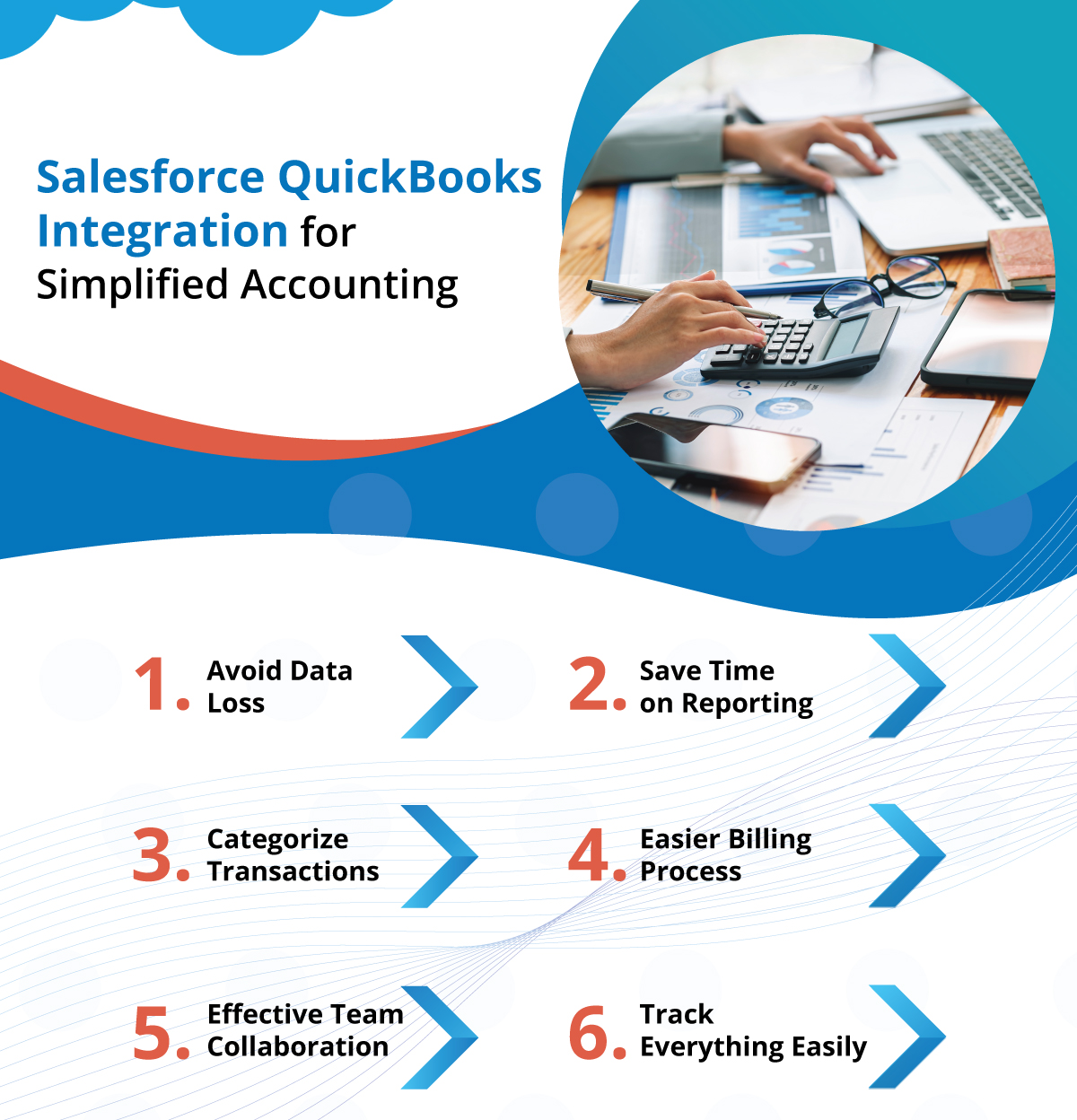
Salesforce QuickBooks Integration for Simplified Accounting

For any growing business, it is very crucial to give necessary attention to accounting because any small error can lead to big trouble. This makes it important to ensure that all data is streamlined over your accounting solution and that everything is accessible over a single view. 

The key here to streamlined accounting information is Salesforce professional services, which allows businesses to use Salesforce in synchronization with QuickBooks, ensuring all accounting details are accessible from within the CRM. 

Let’s understand this in a better way by evaluating the different advantages that businesses would uncover while using QuickBooks integrated with Salesforce.

1. Avoid Data Loss

Integrating Salesforce with QuickBooks ensures that all your critical data, including customer information, transactions, and financial records, is synchronized and up-to-date across both platforms. This eliminates the risk of data loss or inconsistencies, providing you with a complete and accurate view of your business operations.

2. Save Time on Reporting

Whether it is the data entry or the tracking of the sales progress or communications, everything, when done manually, will consume a lot of time for the accounting team. What’s required here is an integrated solution that can cut down the time of tracking the data, thus ensuring more productivity. 

With Salesforce QuickBooks integration, you can generate comprehensive reports that combine financial data from QuickBooks with customer and sales data from Salesforce. This eliminates the need for manual data entry and reconciliation, saving you time and effort on reporting tasks.

3. Categorize Transactions

Any accounting team would be handling different types of transactions at the same time. What they need is a way to categorize all transactions so each one can be individually focused, thus avoiding any confusion. 

Integration of both Salesforce and QuickBooks allows you to categorize transactions automatically based on predefined rules. Thus, Salesforce for professional services helps you maintain accurate financial records and easily track expenses, income, and other financial metrics. It also simplifies tax reporting and auditing processes.

4. Easier Billing Process

You can also streamline your billing process when integrating Salesforce with QuickBooks. You can automatically generate invoices based on Salesforce data, such as sales orders or service contracts, and track payments within QuickBooks. This ensures that your billing process is efficient and error-free. This is where professional services CRM like Salesforce helps.

In addition to this, using QuickBooks in synchronization with Salesforce allows teams to create professional-looking invoices that can be tailored according to the business. Not only this, it will also allow you to insert customized fields like any discounts according to different requirements.

5. Effective Team Collaboration

When it comes to a streamlined business, nothing can make it achievable more than efficient collaboration between different teams. Having a smooth collaboration enhances the visibility of information between teams, thus enabling faster decision-making and action on any activity without having to wait for constant approvals or updates. 

This integration also enables effective collaboration between your sales and finance teams. Sales teams can access financial information in Salesforce, such as customer payment history or outstanding invoices, while finance teams can view sales data in QuickBooks. This improves communication and collaboration between teams, leading to better decision-making.

6. Track Everything Easily

One of the most important tasks for the accounting team is to ensure that cash flow is smooth and transparent to the respective team. This is something you can achieve when you have a centralized review of all records and transactions. Integrating all the account details on QuickBooks with Salesforce will make it possible.

With Salesforce integration services, you can track all your financial transactions easily. Whether it’s monitoring expenses, tracking sales, or managing invoices, integration provides you with a comprehensive view of your financial data. This helps you make informed decisions and identify areas for improvement.

All these points ultimately help to increase productivity and minimize errors, thus boosting the overall efficiency of the accounting team. 

Salesforce QuickBooks Integration for Improved Accounting

Integrating Salesforce with QuickBooks can significantly improve accounting processes, leading to greater efficiency, accuracy, and insights. Businesses that integrate these two platforms can expect to see improvements in customer relationships, reporting, and overall operational efficiency. 

It’s not just about QuickBooks; integrating Salesforce with any other third-party application you’ve been using will help enhance the team’s productivity and streamline all operations. An integrated system will give you a centralized platform to view all details, thus saving the time that the team has been spending switching between multiple screens. 

So, if you are using multiple systems, it’s time to uncover the benefits of an integrated system. Contact us for any Salesforce integration and prepare to witness the real difference when you don’t have to deal with information in silos. 

Quiz Time

Which of these is not a benefit of integrating Salesforce and QuickBooks?

a). Transaction categorization

b). Simplified billing

c). Email marketing

d). Track cash flow

Show Answer: c) Email marketing

How Can E-commerce Businesses Improve with Shopify Salesforce Integration?

With customers becoming smarter these days, they always expect quick assistance and service from businesses. This is one of the reasons behind the increasing popularity of e-commerce businesses. However, as customer demand increases, e-commerce businesses need to ensure all operations are streamlined and efficiently managed. Shopify Salesforce integration is one of the efficient ways for e-commerce businesses to get a centralized platform to manage all operations. 

For an e-commerce business, there’s always a lot to manage. From catalog management to keeping the payment gateways secure for transactions, any e-commerce business has a lot of tasks to handle. Using Shopify and Salesforce for e-commerce can help companies streamline all their operations and activities, enabling teams to handle their customer requests and orders. 

So, in this blog, we’ll be focusing on the value of Salesforce and Shopify integration and how it will be beneficial for the growth of e-commerce businesses. 

Why Do E-commerce Businesses Prefer Using Shopify?

No e-commerce business these days can manage its operations without using the right tools. And when we talk about the most reliable tools for e-commerce businesses, Shopify always tops the list. But let’s have a look at what makes Shopify so popular among e-commerce businesses. 

1. User-Friendly Interface: Shopify’s intuitive interface makes it accessible to users of all skill levels. Whether you’re a novice or an experienced e-commerce entrepreneur, Shopify’s user-friendly platform allows you to create and manage your online store with ease. Many businesses also rely on Shopify integration services to seamlessly connect their store with third-party apps and tools for better functionality.

2. Customization Capabilities: Shopify offers a plethora of customizable templates and themes, enabling businesses to create a visually stunning and unique online store that aligns with their brand identity. From layout to color schemes, Shopify provides ample customization options to ensure your store stands out from the competition.

3. Mobile Responsiveness: With the exponential growth of mobile commerce, having a mobile-responsive website is crucial. Shopify’s mobile-friendly design ensures that your online store looks and functions seamlessly across devices, providing a superior shopping experience for mobile users.

4. Secure Payment Gateways: Security is paramount in e-commerce, and Shopify offers a range of secure payment gateways to safeguard customer transactions. With Shopify, you can rest assured that your customers’ payment information is protected.

5. Marketing and SEO Tools: Shopify provides a suite of marketing and SEO tools to help businesses attract and retain customers and offers built-in article rewriting tool and content generation tools. From customizable meta tags to social media integration, Shopify equips businesses with the tools they need to enhance their online visibility and drive traffic to their store.

6. Scalability and Flexibility: Whether you’re a small start-up or a large enterprise, Shopify’s scalable platform can accommodate your growing business needs. With Shopify, you can easily add new products, expand your product lines, and scale your operations as your business grows.

7. Analytics and Reporting: Shopify offers robust analytics and reporting tools that provide valuable insights into your store’s performance. From sales data to customer behavior, Shopify’s analytics tools enable you to make informed decisions to optimize your store and drive growth.

How Does Shopify Salesforce Integration Can Be Beneficial for Your E-commerce Business?

Shopify and Salesforce are two powerful platforms that, when integrated, can help businesses streamline operations, enhance customer engagement, and drive growth. 

Let’s explore how Shopify Salesforce integration can benefit your e-commerce business:

1. Seamless Data Synchronization

Integrating Shopify with Salesforce allows for seamless synchronization of data between the two platforms. This means that customer information, order details, and product data are automatically updated in both systems, ensuring accuracy and consistency across your e-commerce operations.

2. Enhanced Customer Insights

By integrating Shopify with Salesforce, businesses gain access to a wealth of customer data and insights. Salesforce’s robust CRM capabilities allow you to track customer interactions, preferences, and purchase history, enabling you to create personalized marketing campaigns and improve customer engagement.

3. Efficient Order Management

With Shopify Salesforce integration, businesses can streamline their order management process. Orders placed on Shopify are automatically synced with Salesforce, allowing for real-time order tracking, inventory management, and fulfillment, leading to improved efficiency and customer satisfaction.

4. Improved Marketing Campaigns

Integrating Shopify with Salesforce enables businesses to create targeted marketing campaigns based on customer data. You can hire Salesforce developers to access marketing automation tools that will allow you to segment customers, send personalized messages, and track campaign performance, helping you drive sales and increase ROI.

5. Enhanced Customer Service

Integrating Shopify with Salesforce can help businesses provide better customer service. With access to a 360-degree view of customer data, support teams can resolve issues more efficiently, provide personalized assistance, and ultimately, improve the overall customer experience.

6. Better Business Insights

With Shopify and Salesforce integration, businesses can gain valuable insights into their e-commerce operations. Salesforce’s reporting and analytics tools provide in-depth analysis of sales performance, customer behavior, and market trends, helping businesses make informed decisions and drive growth.

7. Scalability and Growth

Shopify Salesforce integration is scalable, allowing businesses to expand their operations and grow their customer base. Whether you’re a small start-up or a large enterprise, integrating Shopify with Salesforce can help you scale your e-commerce business to new heights.

Streamline Your E-commerce Operations with Shopify Salesforce Integration

Although e-commerce businesses are offering customers with the ease to get all services and products while sitting at home, this could be only made possible when the team is efficiently handling all the operations. Using Shopify integrated with Salesforce enables teams at e-commerce businesses to manage even the most complex tasks with ease. 

Whether it is about managing customer details and their order history, sending them personalized offers or recommendations, or tracking their transactions, this integration can simplify it all. 


Now, if you need any assistance for your e-commerce business, hire Salesforce developers to guide you to leverage the power of Salesforce to overcome them and get the kind of results you seek for your business. Contact us and get the best Salesforce experts to help you. 

Quiz Time

Which of these is not a key benefit of Shopify Salesforce integration?

a). Scalable growth

b). Better order management

c). More sales

d). Data synchronization

Show Answer: c) More sales

Why Does Your Business Need Salesforce Managed Services?

Every business these days expects a personalized solution to overcome existing challenges and achieve their unique goals. But it’s not just about resolving the challenges; it is also about staying ahead of the curve. With Salesforce evolving so rapidly, businesses are always asking to upgrade their CRM to streamline their operations. Hiring Salesforce managed services is how businesses can get experts to handle their different requirements and simplify their workflow. 

Salesforce not only helps to improve workflows but also helps to improve existing business practices and reduce the shortening cycles. And to make the most of it, you need to hire a Salesforce expert who can be trusted with your unique business needs and challenges.

Choosing Salesforce Managed Services for Your Business

Let’s now have a look at how having Salesforce managed services can help businesses more in comparison to internal resources. 

1. Cut Down Operational Cost 

Salesforce services can help cut down operational costs by optimizing processes and workflows within Salesforce. They can automate repetitive tasks, streamline data entry processes, and implement efficient reporting mechanisms. By reducing manual work and improving efficiency, businesses can save on labor costs and increase productivity.

2. No More Onboarding Hassles

Hiring Salesforce professionals eliminates the need for lengthy onboarding processes. These professionals are already familiar with the Salesforce platform and can quickly integrate into your team. They bring their expertise and experience to the table, allowing them to start contributing to your projects from day one.

3. Access to Diverse Skill Set

Managed Salesforce services come with a diverse set of skills and experiences. They have worked on various projects and have a deep understanding of the Salesforce ecosystem. This diverse skill set allows them to tackle a wide range of challenges and provide innovative solutions tailored to your business needs.

4. Reduced Chances of Failure

Salesforce professionals have a proven track record of successfully implementing Salesforce solutions. They are familiar with best practices and can help you avoid common pitfalls and mistakes. Their expertise and guidance can significantly reduce the chances of failure and ensure the successful implementation of Salesforce solutions.

5. Save Time on Hiring

Hiring and training in-house Salesforce talent can be time-consuming and costly. By leveraging the skills of Salesforce developers, you can save time and resources that would have been spent on recruitment, onboarding, and training. This allows you to focus on your core business activities while leaving the Salesforce implementation to the experts.

Why Salesforce Managed Services Are Better Than Internal Hiring

Most companies still consider hiring employees internally and spend a lot on finding the right resources and onboarding them. But that’s the traditional way to get the needed skills for projects. Considering managed services is another approach that is helping businesses these days to get the right resources without any hassles or expenditures. 

To understand the advantage of managed service, let’s have a look at some points illustrating how this hiring model is better than traditional hiring practices.

Expertise: Salesforce services provide access to a team of certified Salesforce experts with a deep understanding of the platform. These professionals bring a wealth of knowledge and experience to the table, ensuring that your Salesforce instance is optimized for success.

Cost-Effectiveness: Hiring multiple internal resources can be costly, not just in terms of salaries but also in terms of training and overhead costs. Salesforce managed services offer a more cost-effective solution, providing you with access to a team of experts for a fraction of the cost of hiring multiple full-time employees.

Scalability: As your business grows, so do your Salesforce needs. Salesforce experts offer scalability, allowing you to scale up or down easily based on your business requirements. This flexibility ensures that you always have the right resources in place to support your Salesforce instance.

Proactive Support: Salesforce services provide proactive support, actively monitoring your Salesforce instance to identify and address potential issues before they impact your business. This proactive approach helps minimize downtime and ensures that your Salesforce instance is always running smoothly.

Focus on Core Business Activities: By outsourcing your Salesforce to a managed services provider, you free up your internal resources to focus on core business activities. This allows your team to concentrate on strategic initiatives that drive growth and innovation.

Improve Your Business Practice with Salesforce Managed Services

Managed Salesforce services not only provide cost-effective and scalable solutions but also offer access to a team of experts who are dedicated to ensuring the success of your Salesforce instance. By outsourcing your Salesforce development, you can focus on what matters most – growing your business and delivering exceptional customer experiences.


But to get the benefit of such a service, you need to find a trusted and relevant Salesforce service provider that can provide you with a range of Salesforce services. Contact us and get the best Salesforce resources to help you improve your Salesforce practice and make the most of your investment.

Try Out New Data Cloud Integrations for Google and LinkedIn with a Salesforce Platinum Partner

In a significant move, Salesforce has announced groundbreaking integrations with industry giants Google Display & Video 360 and LinkedIn within its Data Cloud framework. Salesforce. Being a Salesforce Platinum Partner, we’ve already dug into details and explored how these new integrations can be helpful for businesses across different industry sectors.

These integrations empower Salesforce customers to seamlessly leverage their first-party data from the leading AI-powered CRM platform for executing automated, highly personalized advertising campaigns across Google Ads and LinkedIn.

Before we get deeper into the value of these new Data Cloud integrations, let’s understand what exactly Salesforce Data Cloud is. 

What is Salesforce Data Cloud?

Data Cloud helps to make every interaction with your customers like magic – seamless, effortless, and perfectly tailored to their needs. 

There can be some frustrating moments when you’ve had to repeat your purchase history to a support agent or hunt through an e-commerce site for a product you’ve been eyeing for weeks. We’ve all been there, right? We expect every experience to be connected and updated in real time, and when they fall short, it’s disappointing. That’s the viewpoint of every customer.

But with Salesforce Data Cloud, businesses can turn these frustrations into moments of delight. By harmonizing data in real-time, and updating it every millisecond, Data Cloud empowers your teams to meet your customers right where they are, like never before.

Data Cloud simplifies the complexity of managing excessive data, making it easy for businesses to make sense of all their data from any system, channel, or data stream. It seamlessly integrates data from every touchpoint in the customer journey into a unified customer profile record. This becomes possible as the real-time customer profile can be leveraged to create an unprecedented level of personalization instantly. 

Why Data Cloud Integrations for Google and LinkedIn Matters

The power of Data Cloud for marketing can be a game-changer, providing companies a gateway to unified data, AI-driven insights, and personalized advertising campaigns across the digital ad landscape.

The latest integrations with Google and LinkedIn empower marketers to harness their first-party data securely, crafting targeted advertising campaigns that resonate with audiences like never before.

Now, let’s see what everything you’ll be able to achieve with this integration with the help of a trusted Salesforce Platinum Partner

Create a connected advertising experience

Seamlessly connect advertising experiences across display, video, TV, audio, and more with Google Display & Video 360. Data Cloud creates unified customer profiles to deliver personalized ads and campaign measurement across multiple channels, enhancing customer loyalty and engagement.

Connect with professionals over LinkedIn

Tap into LinkedIn’s network of over 1 billion active professionals, targeting prospects based on job title, function, industry, and more. For instance, a tech company can leverage first-party data and AI-powered insights from Marketing Cloud, Sales Cloud, and Service Cloud, along with product usage data from their own apps, to orchestrate end-to-end campaigns that boost awareness, drive upsell opportunities, and fuel sales pipeline growth.

With these new capabilities, advertisers can elevate their advertising game, delivering relevant, personalized experiences that resonate with their target audiences across every touchpoint.

How The New Integrations Will Help

As Salesforce Data Cloud helps with connecting the data across Customer 360, it can allow users to access AI-powered recommendations and insights by leveraging Einstein. This information can help businesses with activating ads and personalized engagement in the digital ecosystem.

It will also help in enhancing the effectiveness of the ad as users will be able to access a complete customer profile with unified data across all marketing channels and collateral, along with data across sales, commerce, service, or any other touchpoints where customer engagement has been done. 

These integrations also help with boosting your efficiency with precision targeting. It will enable you to deliver the perfect message to the right individual precisely when they need it. With Data Cloud’s rapid segment updates, near real-time data sharing with ad partners, and intelligent suppression of users who’ve already made purchases or have active Service Cloud cases, you can ensure that your marketing efforts are always on point.

Specifically talking about the marketing team, Salesforce Data Cloud can be a great platform to get your data synchronized and run email and ad campaigns that will bring real results for the business. 

Platinum Partner for Salesforce for Third-Party Integrations

Being new in the Salesforce ecosystem, Data Cloud is getting a lot of attention these days from businesses. We are the Platinum Partner for Salesforce that understands the value of Data Cloud for businesses and have helped our customers get a unified view of their data for efficient management and operations. But that’s not all. 

Our Salesforce integration experts have been catering to clients with seamless integration of their third-party applications with Salesforce. That helps them to work on a centralized platform, having all the data in one view instead of switching between multiple systems to get the needed data. 

Here’s how we helped one of our clients to achieve a seamless CTI integration with Salesforce. It doesn’t matter what kind of third-party applications you’re using and for what business segment; with the right professionals you can get all those applications integrated with your Salesforce. It will not just bring your data under a single view but will also help teams save time from trying to find relevant data across different systems and applications. 

So, no more struggling with data distributed in silos. Integrate your Salesforce with all the applications in use and create a connected experience for your teams and customers. If you’re struggling with such issues, contact us, and our experts will evaluate your current challenges and consult you to get the right solution to overcome those issues. 

How Salesforce Customization Can Future-Proof Your Financial Services Firm

With the growing digitization, the changes in customer expectations and marketing trends are becoming inevitable. Customers these days expect personalized engagement and assistance to get exactly what they have been looking for, be it while buying any product or getting financial services. That’s where Salesforce customization can help financial services firms enable personalization in their services and engagement. 

It’s quite easy to find standard solutions for businesses but these can only help to a limited extent. As a financial services firm grows, it expects a solution that works well with changing operations and trends. Having a custom Salesforce solution can help the firm with this.

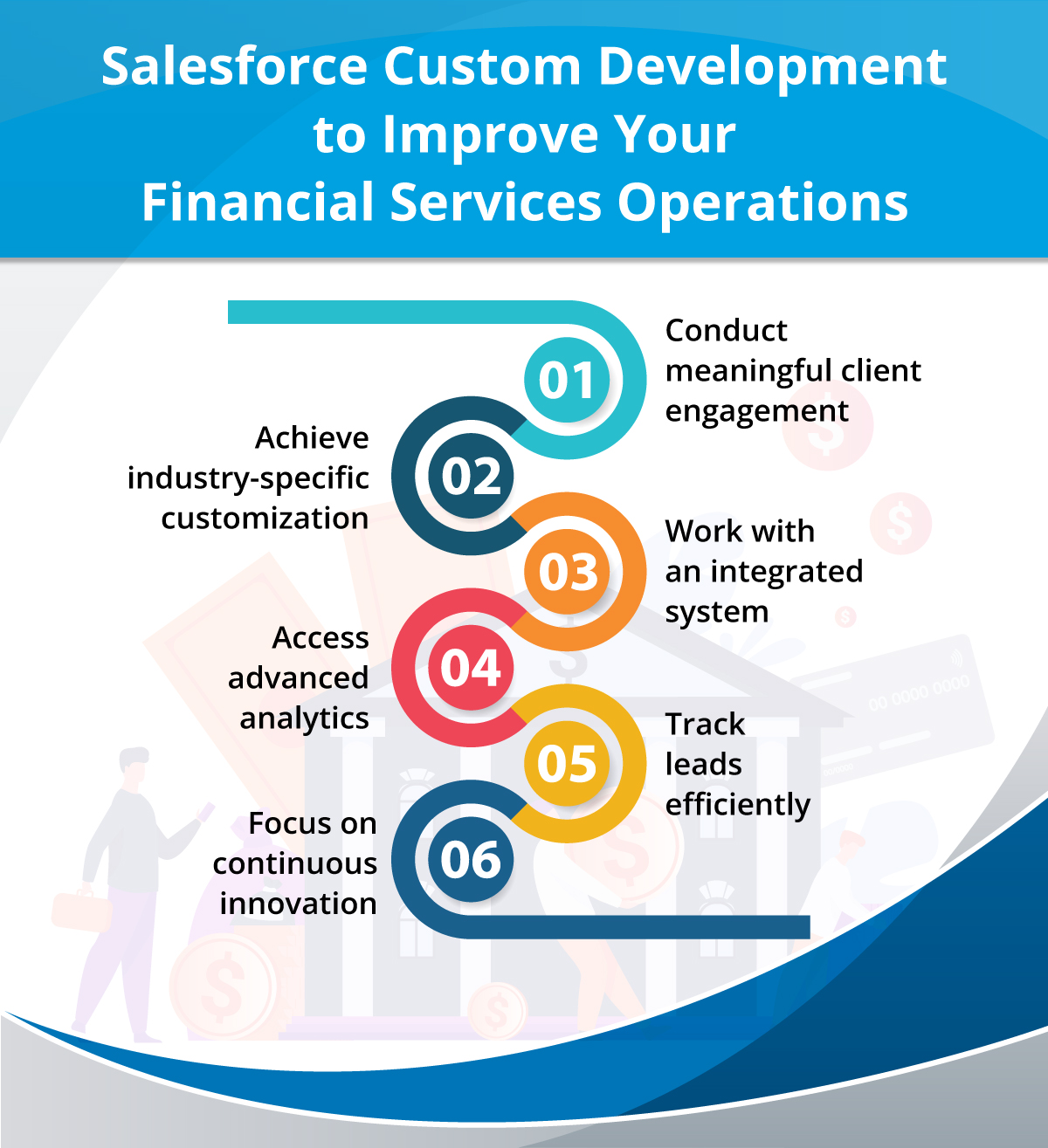
Salesforce Custom Development to Improve Your Financial Services Operations

It’s a known fact that standard solutions can be good to work with for some time, but later, every financial services institution would expect to have customized features that could relate with the business. 

So, let’s dig into some points that show the importance of Salesforce custom development for financial services firms.

1. Conduct meaningful client engagement

It’s pretty normal for customers these days to expect timely answers to their queries and suggestions. Making them wait longer just means losing the client to some other service. The same is true with the financial sector. 

Working with a Salesforce solution can help financial services maintain a consistent engagement with customers. It helps to maintain a detailed customer profile that would help the team to communicate closely with them while having all the needed details handy. This will help to eliminate silos and create an efficient outreach experience for customers.

2. Achieve industry-specific customization

Salesforce customization allows tailoring your CRM for success. You’ll be able to work with a solution finely crafted for the nuances of the financial services industry. 

The team will be able to elevate their operations with custom workflows and industry-specific data models designed to drive efficiency and innovation. Having a tailored solution with Salesforce customization services will unlock a world of specialized offerings tailored to your banking and financial institution needs.

3. Work with an integrated system

With a custom Salesforce solution, you’ll be able to work with its robust integration capabilities. This will enable banks and other financial services institutions to effortlessly integrate Salesforce Financial Services Cloud with their existing software infrastructure.

This way, they can integrate their CRM with other systems, including core banking systems, accounting software, and various data sources. This seamless connectivity ensures a cohesive ecosystem that optimizes efficiency and enhances productivity across the board.

4. Access advanced analytics

Customizing your Salesforce solution will enable you to work with advanced analytics and AI-backed features. Working with a custom solution will enable you to access Salesforce Einstein’s AI capabilities through which your bank can harness predictive analytics and machine learning to gain invaluable customer insights, deliver personalized recommendations, and streamline decision-making processes.

5. Track leads efficiently

Despite the complicated operations and workflows in the financial services sector, there’s no way you can afford to miss out on any incoming leads. Thus, there’s always a need to track leads and references. Using a custom solution over Salesforce Financial Services Cloud can help consultants and also commercial bankers track all references. 

6. Focus on continuous innovation

It is difficult to ensure scalability when you’re working with a standard solution. But that’s not the case with a customized solution. As Salesforce is continuously evolving, you need to ensure that the solution remains scalable for your growing financial services firm. A custom solution will stay scalable and flexible for your growing firm, ensuring that your financial operations go on smoothly.

What We Did for Our Client

We helped one of our clients to manage its financial operations. The client was a major player in the Event Management sector, having its operations spread all over the world. 

Challenges they faced

When the client first implemented Salesforce, a credit card processor was created internally due to the lack of an equivalent payment processor. Although it was a stop-gap solution to take payments, it left the team with fragmented processes. 

This meant critical payment and purchase data were living outside of their Salesforce Org in places unrelated to the customer’s Salesforce records. 

Here are some of the major pain points faced by the client’s firm for which they needed help:

– Difficult to handle multiple payments coming from multiple payment gateways. 

– Multiple payment gateways resulted in higher costs. 

– Challenges in tracking activities from multiple channels like monthly pay memberships, processing fees, and transaction costs. 

– High-risk to cardholder data. 

– Manually uploading transactions into Salesforce.

How we helped 

Based on our rich expertise in Salesforce payment gateway encryption and securely authorized credit card transactions, we suggested that our client develop a reputation for being easy to use and cost-effective and provide numerous ways to take payments and manage transactions easily. 

– Reduced multiple payment gateways to just one and enabled payment collection directly through your website. 

– We enabled invoices for clients with simple click-to-pay emails and enabled remitting payments safely via credit card. 

– We also enabled review-pane billing details for the account, which displayed invoices and payment history.

– We enabled updates for billing contact details and the addition of and updates to credit cards for automatic payments while eliminating developer dependency. 

Reported outcomes

Here’s what we helped our client achieve:

– Fewer customers were lost at checkout through easier navigation.

– Simplified Revenue tracking and reporting for compliance and decision support.

– Reduced developer dependency for information management and updates.

– Streamlined, unified invoicing and collections for all payment types and currency.

– Reliable credit card authentication for promotional offers, subscriptions, and payments.

Go for Salesforce Custom Development and Be Ready for the Future

For a financial services firm, it is very important to be future-ready when it comes to managing their operations and meeting changing clients’ expectations. A standard solution can be an option to manage the present operations but doesn’t prepare the team for the next level. Customizing the solution with Salesforce customization services is the key to aligning the business goals with the CRM and transforming operations with the changing patterns. 

If you’re looking to take your business to the next level, contact us to get your current workflows evaluated and achieve a customized Salesforce solution to get you ready for the long term. 

Quiz Time

Which of these is a key consideration for financial services firms?

a). Improve marketing campaigns

b). Provide personalized financial offers to customers

c). Self-service features

d). None of the above

Show Answer: b) Provide personalized financial offers to customers

Developer Updates from Spring ‘24 Release for Efficient Salesforce Development

It’s that time of the year when the Salesforce Spring ‘24 release is approaching us, and the first thought that pops up in our mind is how this release would bring wonders for the developers. Salesforce development could be a bit tricky, but with every new release, the developers are able to access new features that could simplify their work while enhancing productivity.

The same is expected from the Spring ‘24 release. We’ve assembled different new developer updates that are expected to transform the way Salesforce development companies have been working. 

Improve Salesforce Development with These Developer Updates

In this blog, we’ll explore the top Salesforce updates from the upcoming release that are going to help Salesforce developers.

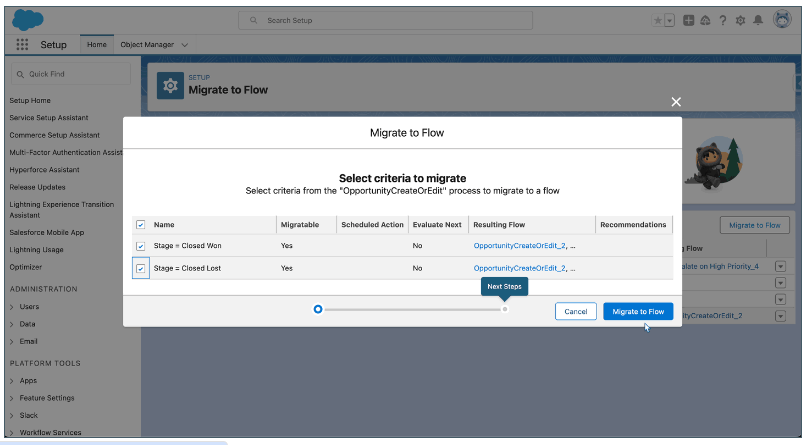
1. Migrate to Flow Tool Updated

The Migrate to Flow tool just got even better! Now, it supports partial migration for most actions (excluding invocable actions). 

This means you have the flexibility to migrate just what you need. Plus, the migration results will clearly flag any actions needing additional configuration in Flow Builder. This will help achieve seamless migration and simplified workflows.

2. Enhancements in Lightning Web Components

Lightning Web Components just got a boost with several enhancements and new features for Salesforce developers. Now, in the lightning-datatable component, you’ll find the handy wrap-table-header attribute, making header text wrap within column widths for better readability. Additionally, you’ll also get dynamic data types with support for a custom data source component.

3. Access Data Cloud – Triggered Flows

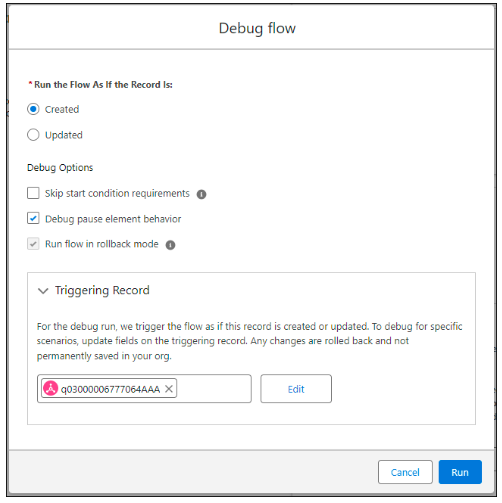
Developers at any Salesforce development company would now be able to work with the new Data Cloud- Triggered flow for debugging in the Flow Builder. This helps in two aspects- conducting the testing of flow behavior and providing the needed assistance in troubleshooting any issues. 

With this update, users would be able to manage the flow execution without affecting the real data. This ultimately helps to make sure that the flow works the way it was expected before the deployment.

4. Enhanced Security of Visualforce JavaScript Remoting API

With the new Spring ‘24 release, Salesforce development companies will find a boost in the security associated with the Visualforce JavaScript Remoting API. This is made possible with the JsonAccess annotation in Apex classes. This helps to ensure that no unauthorized user can change your data or move it around. 

This update can be very helpful as it not only safeguards the Apex classes from unauthorized access but also ensures there is no sneaky attempt to move your data across different platforms. To use this feature efficiently, users need to select the Data Cloud- Triggered flow they want to work with after navigating to Flow Builder.

What We Did for Our Client

We helped one of our clients from the real estate sector to implement Salesforce and improve their operations. The client is the leader of a renowned real estate investment company that owns and operates recreational vehicles and prefabricated housing parks. The company is privately operated. 

Challenges they faced

The team was still relying on outdated legacy methods like using Excel sheets to record client information and update records manually. They needed a stable and reliable platform to manage the data. So, they were looking for a more reliable medium for their offshore teams to interact with customers and their data. This was time-consuming and inconsistent and needed modification. 

They came to us to create a more accessible and systematic interaction system for customer-facing teams. Their data storage system also needed to be upgraded to handle large volumes of customer data.

How we helped

Optimized Salesforce for organized data storage and consistency

The company mainly aimed at optimizing the use of their Salesforce in a more judicious way. We set up a Salesforce entity or Org that contained a username and information of the client. This was a safe and reliable option to store the client data without any inconsistency. 

Automatic data updates in all synced sheets 

For all the existing client information, we shared a common spreadsheet template that helped sync all other attached templates. Doing this, changes made to one template would automatically update the others. 

Effective Follow-ups

The updated reports were sent to the client on a weekly basis and then were passed on to the outsourced sales team by the client. The spreadsheets were used as a contact sheet that included all client information and relevant data. 

Convenient data migration and sharing

The data needed to be imported into the lead object to avoid any information leak. The existing data was important to migrate into the current system and with the right measures.

Reported outcomes

Here’s what we helped our client achieve:

– A 360-degree view of client data enabled easy tracking of required records and lowered the chances of reputational loss. 

– Regular follow-ups with clients made it easier to collect their opinions and improvise where required and made customers more inclined to respond through personalized interactions.

– Centralized agent and estate data led to a reliable database without inconsistencies. Agents could access the information centrally and clear customer objections, if any. 

– Automatic updates were pushed to all sheets. Also, the automatic recording of information leaves minimum chances of gaps in customer profiles. 

Hire Certified Experts for Salesforce Development

Salesforce comes up with three major releases every year, and with each release, it never fails to impress us. With the Spring ‘24 release, we are already waiting for such amazing features that could transform the way Salesforce developers have been working. It’s not just about simplifying the experience but also to enhance the quality of work and productivity. 

Being Salesforce experts for over 11 years, we’ve been helping multiple clients across different industries to leverage the power of CRM and transform their operations. Our certified Salesforce professionals will help analyze your operations and implement a customized Salesforce solution that can align perfectly with your business goals. Contact us to get your operations analyzed for an upgrade that will lead to enhanced productivity and efficiency. 

logo Live Chat