Talk to Us

How Can You Make The Most of Your Salesforce Implementation?

There would surely be times when you have invested in different products and services with the intention to simplify your business operations. Think about times when you have deeply regretted the investment realizing you are not making the most of the investment. That’s the same kind of thought you can even have with your Salesforce So, how do you ensure you’re fully capitalizing on your Salesforce implementation

While there are plenty of tips we could offer, here are a few key ones to get you started.

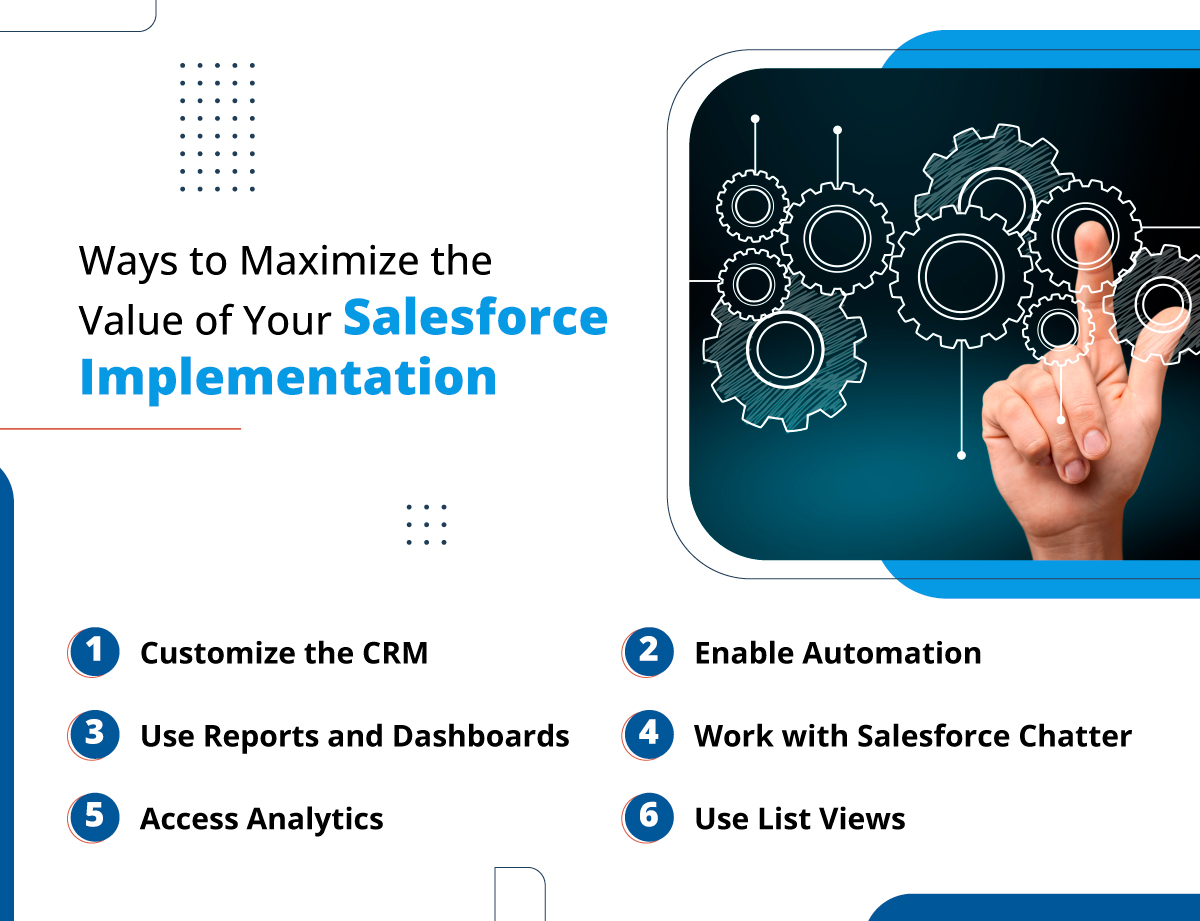
Ways to Maximize the Value of Your Salesforce Implementation

We’ve accumulated some points through which you can enhance the potential of your Salesforce implementation and make the most of it. 
1. Customize the CRM

Salesforce helps teams to enable the platform to adapt it to specific business requirements for optimal performance.

You can utilize custom objects and fields to track information that’s tailored to your operations. Salesforce allows businesses to build custom page layouts to access the data that matters most to you and use it efficiently for your next actions.

Lightning App Builder is another tool supported by Salesforce that makes it easier for teams to customize the platform. It enables you to design custom pages and components without the need to have proper or professional understanding of coding.

2. Enable Automation

One of the trusted ways to maximize the potential of the CRM is having the support of the right Salesforce implementation services to enable automation. Process Builder allows you to create automated workflows that help save teams time to carry out different activities. This enhances the efficiency and consistency of operations and enables them to focus more on other core business tasks.

You can also utilize email templates and automation rules to automate communications. This helps you to send personalized emails automatically and trigger actions based on defined criteria, such as assigning leads to designated sales representatives.

3. Use Reports and Dashboards

Report Builder in Salesforce allows you to create tailored reports and dashboards that help teams to get a better view of data. You can access this capability with the help of a Salesforce implementation partner to get a clear picture of your business performance.

For deeper insights, you can utilize advanced analytics tools like Einstein Analytics to analyze data trends and generate accurate forecasts and get customized suggestions to work on.

4. Work with Salesforce Chatter

Salesforce Chatter is an internal social collaboration tool designed to simplify communication within your organization, reducing waiting on emails. Chatter saves time and enhances teamwork, by providing a platform to interact and share files. 

Whether you’re collaborating on projects, sharing important announcements, addressing customer-related issues, or seeking quick feedback, Chatter serves as the central hub that keeps your team connected, informed, and efficient.

5. Access Analytics

Salesforce not just helps you store and manage data but also helps you evaluate and analyze it. Salesforce implementation services allows you to access the power of data analytics through which you can have the understanding about your data and utilize it efficiently to plan your customer engagement and next business strategies. 

This will not just help you keep your data managed easily but will also enable you to get the best value from it. 

6. Use List Views

Next up is “List Views”—Salesforce’s powerful tool for managing various data sets within Objects. If terms like “Recently Viewed,” “My Open Leads,” or “My Cases” sound familiar, you’re already acquainted with the standard list views available out of the box.

But here’s something you might not know: you can create your own custom list views! Tailor your data presentation to fit your needs and streamline your record management. For instance, you can develop a personalized Lead list view and filter it by Lead Source. By default, when you click on an object, Salesforce shows you the “Recently Viewed” list view. If this default view isn’t meeting your needs, you can easily switch to another list view by clicking the pin icon next to the selected one.

This simple adjustment can save you time and enhance your productivity. Compared to Classic, the Lightning experience offers significantly more functionality for list views, including options for pinning and resizing columns. One standout feature is the ability to visualize records grouped by different stages in a sleek Kanban view, making it easier to track your progress.

Hire Salesforce Implementation Services for Business Growth

With all the points that are mentioned above, you can not only be able to enhance the potential of your Salesforce but also be able to maximize its potential. But to make the implementation a success, having the support of the right team could be a great benefit. Contact us and get in touch with our certified Salesforce professionals to smoothly implement Salesforce and help you make the most of it.


How a Salesforce Marketing Cloud Developer Can Help Boost Campaigns


Lead nurturing and running effective marketing campaigns are very necessary activities for businesses and this is where Marketing Cloud could be of great help. You can also efficiently track the performance of each campaign using the platform. There’s a lot that the platform allows companies to do and that’s where they would always require the help of a Salesforce Marketing Cloud developer to help them leverage all features efficiently. 

Teams in companies in different industries can effortlessly design personalized campaigns, track leads and customer interactions, and more using Marketing Cloud. It helps you elevate customer journeys by offering tailored discounts and timely reminders, connecting with your audience exactly where they are.

Value of Salesforce Marketing Cloud for Businesses

Businesses can use cutting-edge marketing automation tools with Marketing Cloud, which helps teams to design personalized and targeted campaigns. That’s how teams can work to connect with customers effectively. From social marketing, email marketing, to sending the right messages to the right customers, Marketing Cloud can be of great help.

Using the platform, businesses from different industries can gain valuable insights into  customer preferences. Not only this, it also helps teams with running targeted marketing campaigns personalized according to customers.

But that’s not all. The power of Marketing Cloud is much more than that. It also helps to improve email marketing through which businesses are improving their email game. Businesses can easily craft and manage automated email campaigns and reach out to the right audience with the right message. This helps to improve results for companies and boost conversions.

How a Salesforce Marketing Cloud Developer Can Help Get Better Results

A Salesforce Marketing Cloud consultant can help businesses to improve marketing campaigns using Marketing Cloud. Here are some ways they can help.

1. Boost Customer Engagement

Customers using Salesforce Marketing Cloud enjoy a more interactive and transparent relationship with your company. They have full control over their data and interactions, allowing them to monitor their accounts in real-time and make updates whenever necessary.

What’s more, they value the ability to measure the effectiveness of your marketing strategies, whether it’s through activation rates, leads generated, or the revenue brought in per customer.

2. Conduct Marketing Across Multiple Channels


With the help of a Salesforce Marketing Cloud developer, businesses can get the ability to interact with customers across multiple channels while easily tracking all engagement. Teams can easily connect with customers at the time they prefer and also the channel they usually access.

3. Share Data Across Departments

Salesforce Marketing Cloud enables seamless data sharing across various departments within your organization, enhancing collaboration between marketing and other business areas. This shared data can encompass leads generated from email campaigns or social media efforts, along with customer profiles and engagement metrics.

4. Work with Reports and Dashboards

Another key feature to work with is tailored reports and dashboards, through which teams can get a complete overview of your marketing campaigns and initiatives along with their performance. 

This helps marketing teams to assess the performance of your campaigns and find out what’s working for the brand. Additionally, you can identify which channels are most successful in attracting new customers.

5. Improve Brand Loyalty

The platform also helps you enhance brand awareness and supports businesses to foster customer loyalty by monitoring how clients engage with your business. Having the help of a Salesforce Marketing Cloud consultant to evaluate the effectiveness of your marketing initiatives on customer retention and loyalty rates.

6. Enable Automation

Marketing automation is something that makes Marketing Cloud so special and popular among businesses. By streamlining repetitive tasks like email campaigns, customer journeys, and lead nurturing businesses can boost their efficiency and concentrate on the more strategic elements of their marketing efforts. This automation not only saves valuable time but also guarantees consistent communication with your audience.

7. Create Customer Journey

Grasping and optimizing the customer journey is crucial for boosting conversions. Salesforce Marketing Cloud empowers businesses to map and visualize the entire customer journey, pinpointing key touchpoints and understanding customer interactions. By crafting personalized experiences at every stage, effective journey mapping not only enhances customer satisfaction but also fosters loyalty.

Hire a Salesforce Marketing Cloud Developer for Improved Marketing

All the above points show how having the right developer can be valuable for businesses to leverage Marketing Cloud. The right professionals would help you manage your marketing campaigns and monitor their performance effectively.

You can ensure that your marketing efforts are yielding the results you aim for by recognizing these benefits. Considering all the features of Marketing Cloud, you need the help from a certified and experienced professional. Contact us and get in touch with a developer who can help you access all features the right way.


Why Mortgage Businesses Needs a Salesforce Platinum Partner

The industry for mortgage businesses usually face a lot of challenges like changing expectations of customers and coping with regulations and compliance. To overcome these hurdles, businesses require the support of the right team and solution. Having a Salesforce Platinum Partner can help businesses with the right assistance and guidance.

We’ll be exploring the value of Salesforce for mortgage businesses in this blog, evaluating how the CRM helps manage their operations.

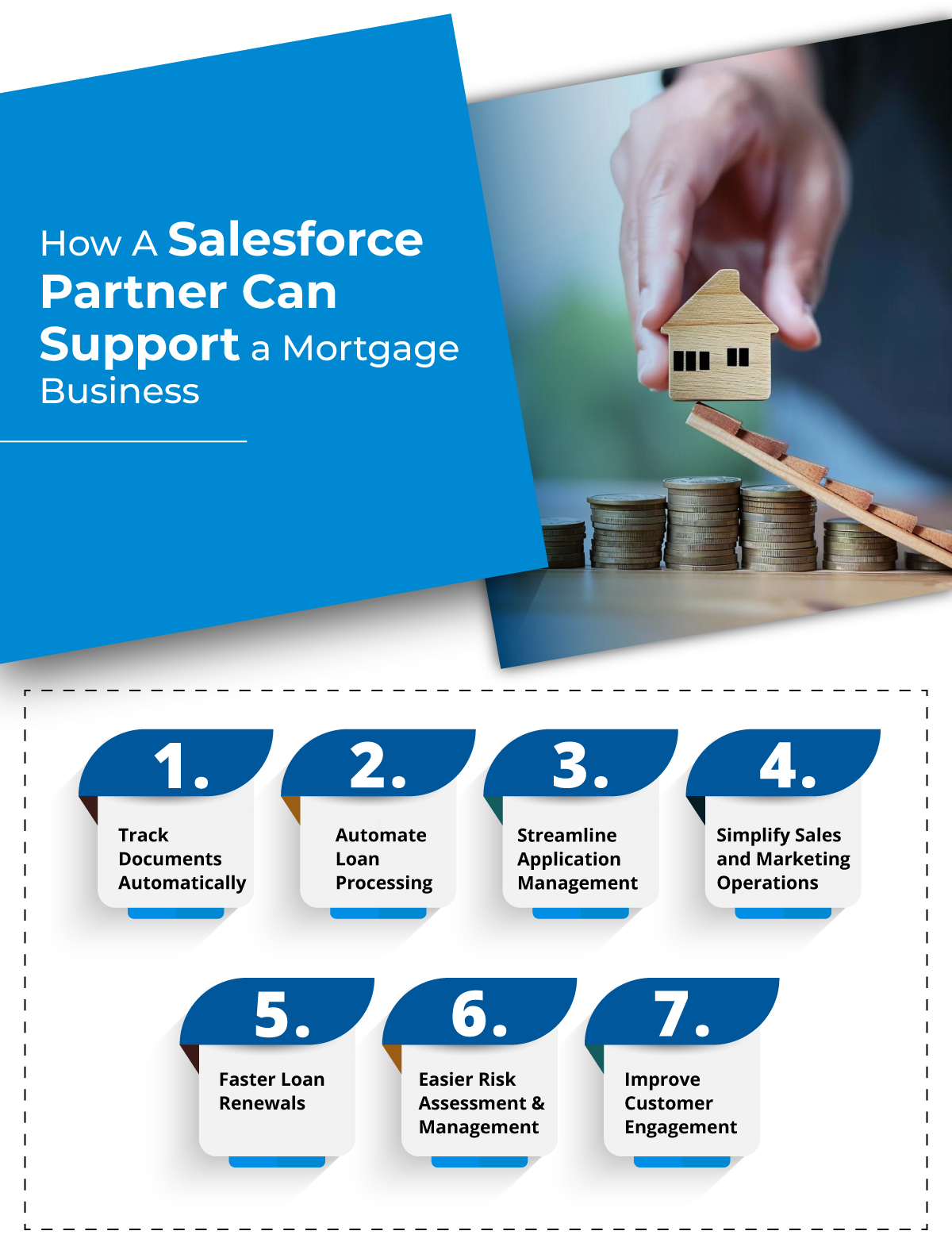
How A Salesforce Partner Can Support a Mortgage Business

Let’s have a look at some ways a Salesforce partner can help a mortgage business to simplify their operations and processes.

1. Track Documents Automatically

Salesforce enables mortgage brokers and loan officers to create customized automation workflows using Salesforce OmniStudio’s suite of applications. These versatile tools assist mortgage professionals in managing the entire loan process, from the initial application to final approval.

With Salesforce’s mortgage CRM, lenders can design and modify daily application workflows, optimizing efficiency and responsiveness to customer needs.

Salesforce OmniStudio also automates the tracking, management, and approval of essential loan documents. Borrowers can upload their documents, complete checklists, and monitor their approval status through a self-service portal within the CRM, ensuring accuracy and speeding up processing times.

Furthermore, as mortgage companies and lenders grow their portfolios, Salesforce scales seamlessly with their business. Whether managing a few borrowers or thousands of loans, a Salesforce Platinum partner can provide solutions to support your growth without sacrificing speed or efficiency.

2. Automate Loan Processing

Salesforce features an integrated data model designed to optimize loan management and approval processes for mortgage and real estate businesses by ensuring precise tracking and timely updates. The CRM’s powerful process automation capabilities allow you to automate the entire loan lifecycle—from application and underwriting to approvals and disbursements. Real-time collaboration between lenders and borrowers accelerates loan approvals, enabling borrowers to manage essential documentation effortlessly.

Furthermore, Salesforce OmniStudio transforms mortgage lending through streamlined data integration, custom automation workflows, and enhanced user interfaces, resulting in faster and more efficient loan processing.

3. Streamline Application Management

Salesforce revolutionizes mortgage and lending services by simplifying the loan application process with self-service options.

The CRM enhances the loan application lifecycle through guided steps available via a customer portal built with Salesforce Experience Cloud. This enables borrowers to input and manage their information directly, reducing reliance on loan officers and expediting the application process.

Reps can create intuitive interfaces with Salesforce OmniStudio to help both loan officers and borrowers through the application process with the help of a Salesforce Platinum Partner.

4. Simplify Sales and Marketing Operations

Teams at mortgage businesses can elevate sales and marketing strategies with Salesforce using just the right features. It empowers them to customize marketing campaigns and strategies to boost customer engagement and conversions.

It helps teams to enable automated workflows for email campaigns, upgrade social media interactions, and personalize content to reach the audience with just the right message. It enables you to efficiently track and manage leads and referrals, enhancing your conversion rates through systematic follow-up and borrower engagement.

Additionally, Salesforce harnesses AI to uncover cross-selling opportunities, foster referrals across different business lines, and recommend product add-ons, maximizing your growth potential.

5. Faster Loan Renewals

A digital mortgage lending solution like Salesforce streamlines the renewal and refinancing process by keeping loan and borrower information current and minimizing processing times. It optimizes loan renewals through an integrated data model that enables real-time tracking of the loan lifecycle and status updates.

Mortgage officers can efficiently manage existing loans and facilitate seamless renewals with Salesforce’s Customer 360 view, which offers complete visibility into each customer’s journey and selected financial products.

Additionally, the CRM’s Proactive Renewal Management feature automatically flags upcoming renewals and assesses eligibility based on predefined criteria. This allows customers to review and initiate renewal applications via a self-service portal, enhancing engagement and satisfaction without the need for direct interaction with loan officers.

6. Easier Risk Assessment and Management

Mortgage brokers and loan officers can take advantage of Salesforce’s mortgage CRM solutions to conduct thorough Know Your Customer verification and in-depth risk assessments, allowing them to identify potential risks at an early stage.

Lenders can utilize the robust data structure of the Salesforce FSC Mortgage Data Model to create comprehensive risk profiles, ensure compliance, and mitigate fraud with the help of a Salesforce registered partner. By analyzing an applicant’s financial history, employment status, and credit profile, lenders can build a solid foundation for informed decision-making.

This CRM supports dynamic updates to customer profiles, enabling immediate adjustments in risk strategies and empowering lenders to address potential issues proactively.

7. Improve Customer Engagement

Streamline customer communication and boost borrower satisfaction with personalized interactions through Salesforce.

Salesforce’s mortgage CRM offers lenders a comprehensive 360-degree view of borrowers, providing insights into their financial holdings and activities all in one place. This enables lenders to deliver tailored interactions, strengthen relationships, and keep borrowers informed with one-to-one messages, loan status updates, and relevant information about their offerings.

Salesforce enhances communication among loan officers, mortgage brokers, underwriters, and customer service representatives, resulting in more efficient operations.

Team Up With a Salesforce Platinum Partner

The mortgage sector is poised for continued growth in transaction volume, alongside challenges like margin pressure, evolving policies, and tech-savvy consumers. Salesforce empowers lenders to enhance their agility, efficiency, and innovation in this dynamic environment. By centralizing data and automating manual tasks, Salesforce provides a substantial competitive edge for progressive financial institutions. Contact us and get this kind of Salesforce support for your mortgage firm as well.

Salesforce Integration: Your Key Move to Boost Productivity

Salesforce is one of those CRM solutions that are known to be highly effective to empower teams, enhance accuracy, and close more deals. The solution has also proved to be very effective to boost the productivity of the team and increase the operational efficiency. But companies don’t just use Salesforce, they also use many other solutions and third-party applications. However, using and managing data over them all simultaneously can be tricky and that’s where Salesforce integration makes a difference. 

Businesses of all sizes can benefit from Salesforce to improve customer engagement, team collaboration, and achieve more sales. But for that, you would also be using many other applications and solutions. But that certainly could create difficulty to manage them all. One effective strategy is integrating Salesforce with other powerful tools.

Every enterprise has distinct needs, and the software they use varies in functionality. These systems are built in different languages and include custom business logic, data storage, security protocols, and user interfaces. This is where a Salesforce integration solution becomes essential. By utilizing APIs, Salesforce integration enables smooth communication between Salesforce CRM and other applications. A well-executed integration system is a valuable asset, capable of delivering substantial benefits for any business.

To help you get started, this blog features a list of top Salesforce integration benefits and common apps that could lead to enhanced productivity.

How Salesforce Integration Services Can Be Helpful for Teams

So far, we’ve understood that when it is about handling the data across multiple systems used in a company, integrating all those applications with Salesforce is the key. Now let’s have a closer look at the exact benefits that the integration could bring along. 

1. More Data Accuracy

Taking the help of Salesforce integration services to achieve successful integration of apps ensures a seamless flow of data between systems without having any chances of errors. This integration guarantees that your team consistently has access to the most accurate and updated information.

2. Get Better Customer Insights

Consolidating data from multiple sources into Salesforce provides a complete view of your customers. This unified perspective allows for more informed decision-making and personalized interactions, boosting customer satisfaction and fostering loyalty.

3. Improve Collaboration

Tools like Slack, which integrate effortlessly with Salesforce, enhance communication and collaboration within teams. This integration keeps everyone aligned and ensures that all team members have access to important customer data and project updates.

4. Automate Processes

Integrating Salesforce with your business’s third-party applications can help automate manual processes. For instance, linking Salesforce with your online store enables automation in various operations, such as tracking customer interactions, generating orders, and processing invoices.

Top Salesforce Integrations for Better Productivity

There are many applications that can be integrated with Salesforce but some of the solutions are highly popular. Here are some of those applications that are mostly integrated with Salesforce.

1. Conga Composer

Effective maintenance and updating of Salesforce data enhance productivity and provide valuable insights. Integrating Conga Composer with Salesforce CRM streamlines the processes of document generation, reporting, and delivery. This tool simplifies creating documents and presentations in formats like PowerPoint, Word, HTML email, and Excel.

Additionally, the Conga app works seamlessly with Sales Cloud, Salesforce1, Service Cloud, and Lightning. With the help of a Salesforce integration consultant, you can manage all your tasks from a single platform, allowing you to spend less time on Salesforce API updates and more time focusing on your core activities.

2. Mailchimp

Due to its user-friendly drag-and-drop email editor, companies highly use Mailchimp to easily create visually appealing campaigns that capture customers’ attention. Integrating the platform Salesforce can be a highly cost-effective solution for your business to foster consistent communication with clients.

By connecting Mailchimp to Salesforce, businesses can synchronize data seamlessly between the two platforms. This integration enables you to automate and manage email campaigns effectively, driving better results. Salesforce allows you to access customer data from various sources in one place, helping you identify potential leads and deliver personalized experiences. Additionally, Mailchimp automates many manual email marketing tasks, saving businesses valuable time and resources.

3. HubSpot

Salesforce when integrated with HubSpot provides businesses with detailed information about clients, making it easier to manage data across both HubSpot and Salesforce. This integration allows for the deployment of personalized and targeted experiences that deliver real value. 

Additionally, it enhances the automation capabilities of Salesforce, fostering better collaboration between sales and marketing teams for a cohesive customer experience at every interaction and more accurate reporting. The integration process is straightforward and requires no technical expertise. Plus, the bi-directional data synchronization ensures that information is automatically updated between both platforms, keeping everything in sync effortlessly.

Enhance Your Internal Business Productivity with Salesforce Integration

Integrating Salesforce is a highly effective strategy for businesses looking to enhance the platform’s capabilities. However, this process can be quite challenging and presents several hurdles. From data synchronization issues to compatibility concerns between applications, and security considerations, the integration journey can become complex. 
To achieve successful integrations, it’s essential to have a thorough understanding of both third-party applications and the Salesforce platform itself. Contact us and connect with the best Salesforce professionals, experienced in integrating different applications with Salesforce for a range of industry segments.

How to Link WhatsApp to Salesforce?

In contemporary society, with the increased use of technology in the business world, professionals widely use WhatsApp to conduct official business communication. While there is no specific information regarding the types of users who prefer to use WhatsApp, their sales teams usually engage clients frequently through the application. However, when it comes to ensuring that messages pass through a business as smoothly as possible, tracking those WhatsApp conversations becomes an issue—particularly if the conversations are from personal WhatsApp accounts. This is where linking personal WhatsApp to Salesforce can revolutionize how businesses manage client communication.

If you’ve been wondering, “How to Sync Personal WhatsApp in Salesforce?” or how to effectively manage those critical chats within Salesforce, you’re not alone. While business versions of WhatsApp offer easier integration options, the challenge lies with syncing personal WhatsApp chats without breaching privacy or causing confusion. In this blog, we’ll walk through the best way to link WhatsApp to Salesforce, providing an unbiased look into how it works and how WhatsSync, a personal Whatsapp Salesforce sync app, simplifies this process.

Understanding the Need to Sync Personal WhatsApp in Salesforce

For many sales professionals, personal WhatsApp accounts are the go-to communication channel for reaching customers. However, the real challenge for managers and teams is tracking those important client conversations. Since these chats often contain crucial details, missing out on them can mean lost opportunities and disjointed communication.

Salesforce is famous for its data management capabilities, which allow for consolidating customer information. Just consider for a moment the integration of WhatsApp with Salesforce – every WhatsApp conversation with clients is seamlessly integrated and updated in Salesforce in real-time. This makes it possible for everyone in the team to be in the loop without the need to scroll through a salesperson’s personal WhatsApp chat.

But how can you achieve this? Let’s explore the solution.

How to Sync Personal WhatsApp in Salesforce: What to Know

Looking at the question “How to link Personal WhatsApp to Salesforce? There are several concepts and tools to employ that can be categorized into general approaches. For example, one can sync WhatsApp in Salesforce via WhatsApp Business API such as the one that allows to connect WhatsApp with Salesforce, but that is for business WhatsApp accounts and not for personal one.

Here’s why linking personal WhatsApp to Salesforce can be tricky:

  • Privacy concerns: When one wants to sync WhatsApp in Salesforce, syncing personal conversations with Salesforce needs to be selective. It’s essential that only client-related conversations are synced, not personal ones.
  • Real-time communication: Syncing chats in real-time is critical, so salespeople and their managers can act quickly on customer needs.
  • Visibility for managers: Without tracking, managers are left in the dark about important discussions happening over WhatsApp.

That’s where WhatsSync comes in, offering a robust, easy-to-use solution.

How WhatsSync Simplifies Linking Personal WhatsApp to Salesforce

WhatsSync, a Salesforce-native application, is unique because it specifically focuses on solving the issue of integrating a user’s personal WhatsApp chat with Salesforce. It operates in such a way that only the client interactions are logged and synced so that the salesperson gets real-time insight into the interactions. At the same time, the rest of the conversations remain personal.

Here’s how WhatsSync works:

1. Selective Syncing: WhatsSync doesn’t sync every personal chat. It carefully selects and syncs only the WhatsApp conversations that are tied to existing records in Salesforce, ensuring no irrelevant conversations are captured.

2. Real-time Sync: Unlike manual logging, WhatsSync syncs all conversations in real-time, meaning any WhatsApp messages exchanged between a salesperson and a client are immediately recorded in Salesforce.

3. One-Click Integration: Syncing personal WhatsApp with Salesforce has never been easier. With WhatsSync, all it takes is a simple scan, and the salesperson’s WhatsApp is linked to their Salesforce account.

4. Enhanced Team Collaboration: Managers and team members can view conversations, making it easier to track client interactions and ensure no opportunity is missed.

By linking personal WhatsApp to Salesforce through WhatsSync, businesses get a comprehensive, real-time view of every client conversation, improving communication efficiency and boosting sales performance.

Why WhatsSync Stands Out

WhatsSync isn’t just another integration tool. It’s specifically built with sales teams in mind and ensures:

  • Privacy protection: No need to worry about mixing personal conversations with work. WhatsSync ensures only relevant chats are synced.
  • Improved tracking: Senior authorities like managers and team leaders can track conversations that happened over the personal WhatsApp of the team member and take over when the concerned team member is absent.
  • Simple setup: With a single scan, the setup process is fast and straightforward, saving time and effort.

By using WhatsSync, sales teams no longer need to manually log interactions or fear missing important information from personal WhatsApp chats. Everything syncs into Salesforce in real-time, providing a seamless experience for users.

Conclusion

Including WhatsApp in CRM through Salesforce is a valuable process for companies that want to improve communication strategies. Maintaining business WhatsApp is quite easier than maintaining personal WhatsApp, which has had some difficulties until now. WhatsSync, a personal Whatsapp Salesforce sync app, is extremely helpful if you want to connect personal WhatsApp to Salesforce; this lets you record client interactions in WhatsApp, track them, and then access them in your CRM with the utmost real-time responsiveness.

This one is perfect if you seek a convenient way to forward individual WhatsApp conversations to Salesforce. It provides the level of privacy required while syncing in real-time and is not overly complex, enabling the sales department to manage client correspondence and improve internal communication.

Today, more than ever, it’s crucial that all spoken and written words carry value. With WhatsSync, companies can ensure the optimum utilization of the sales personnel across their organizations so that each WhatsApp conversation is productive. Contact us to learn more.

Hire Salesforce Consultants and Learn the Top 7 Features for Developers from Winter ‘25 Release

It’s about time we should talk about the upcoming new Salesforce release, i.e. Winter ‘25 release. Just like in every release, Salesforce has brought a lot of new features and upgrades for developers that would change the way they had been working and managing everything. Businesses thus hire Salesforce consultants who can guide them through all the new features and improve the adoption for better results. 

In this blog, we have brought numerous latest features from the Winter ‘25 release that would help developers to boost user experience and productivity. 

Top Winter ‘25 Features for Salesforce Developers

We’ve filtered out top 7 features from the latest release that will be very beneficial for Salesforce developers.

1. Metadata

Salesforce has rolled out a series of updates introducing new and enhanced metadata types aimed at improving customization, development, security, and service features. On the customization front, users can now leverage the Lightning Experience transition tools from the External Application Settings page and add descriptions for public groups and queues.

Development updates include support for parallel subscriptions in platform event Apex Triggers and the ability to generate actions from External Services using Heroku apps. Additionally, new metadata types and fields simplify the management of Enablement programs and custom exercise types across various orgs.

For security and identity, these updates provide access to OAuth client credentials via the REST API and support headless identity flows using the OAuth 2.0 authorization challenge endpoint. In Service, there are significant enhancements to Embedded Messaging channels, including new metadata subtypes for pre-chat forms, dropdown fields, auto-response messages, and JWT validation.

Salesforce Flow also sees important improvements, with new fields and values refining how flows are triggered, paused, and executed. These updates collectively give administrators and developers more powerful tools for customizing and managing their Salesforce environments.

2. Heroku Apps

Salesforce now offers the ability to explore and integrate Heroku apps directly within Salesforce Setup through the Heroku Integration add-on (currently in Pilot). This feature allows users to publish their Heroku apps as External Services, making the app’s API operations accessible as actions within Salesforce. These actions can be used in Flow Builder, Apex, and Data Cloud, allowing seamless interaction between Heroku apps and Salesforce, including querying data and writing it back to Salesforce and Data Cloud.

This functionality is available in both Lightning Experience and Salesforce Classic for Enterprise, Unlimited, and Developer editions, though it may not be available in all orgs. As a Beta feature, it has specific terms, and participation requires reaching out to your account executive.

3. Einstein For Developers

Einstein for Developers has seen significant advancements, and with these updates comes a newly launched documentation site. The site has been redesigned to match the look and feel of other developer guides, creating a more consistent and streamlined experience. It consolidates all documentation for Einstein for Developers (currently in Beta) into a single, central hub. You can hire Salesforce consultants who will help you make the most of Einstein and other features.

4. Free-Tier Access to Event Monitoring

Salesforce now offers free-tier access to Event Monitoring, giving users enhanced tools to track and troubleshoot unhandled exceptions in Apex code. In the past, developers relied on unhandled exception emails to pinpoint issues, but with Event Monitoring, they can now access detailed event log files specifically for Apex Unexpected Exceptions. This provides a more comprehensive and efficient way to debug and refine Apex code.

By analyzing these event logs, developers gain deeper insights into the conditions leading to exceptions, allowing for faster and more effective troubleshooting. This feature is available across all Salesforce editions, offering advanced debugging capabilities at no extra cost, ultimately boosting code reliability and system performance.

5. TypeScript to Create LWCs

Salesforce has enhanced Lightning Web Components with TypeScript support, enabling developers to boost productivity and improve code quality. This update also allows the conversion of existing JavaScript-based components to TypeScript, which was not previously possible.

TypeScript support is available in Lightning Experience and across all versions of the mobile app for all Salesforce editions. Currently offered as a developer preview, this feature is not yet generally available and may be subject to changes or removal without prior notice.

6. Better Understanding About SOQL Errors

The latest release brings several updates to SOQL error messages and functionality that could impact existing Apex code, particularly dynamic SOQL queries that rely on parsing error messages. It’s essential to review these changes and adjust your code to align with the new error messages and query handling.

Notable updates include new error messages for invalid SOQL queries, such as unexpected tokens and invalid datetime literals.You can hire a Salesforce administrator to guide you through these errors better.

7. Real-Time Preview of LWC 

Salesforce has launched a new feature called Local Dev (currently in Beta), allowing developers to build Lightning Web Components (LWCs) with real-time previews of their Lightning apps or Experience Cloud sites.

With automatic updates in the browser whenever source code changes are detected, Local Dev enables faster iteration without the need for deployment or manual page refreshes. This streamlined experience is designed to replace the existing LWC Local Development Server, offering enhanced testing and preview capabilities.

Try Out New Salesforce Features with the Best Experts

There’s no denying the fact that all the latest features will change the way Salesforce developers will be working. But to smoothly leverage these features, it is necessary to have the support of the right experts who are Salesforce certified. Contact us and get the best Salesforce professionals to guide you and help you work with the latest features.

How Salesforce Consultants Can Guide You to Streamline Operations for Manufacturing Businesses

Salesforce CRM is the way manufacturing companies are unlocking the world of effective customer relationship management. The CRM solution connects different segments of manufacturing business together, giving a centralized view to all. The data from all the departments can be viewed and managed on a single platform, offering teams at the business a comprehensive 360-degree view of customers and full visibility into manufacturing operations. Businesses can achieve this by aligning the best Salesforce consultants with your team. 

Manufacturers can easily get a complete view of their customers when all their systems will be integrated with Salesforce. This will help keep all the teams aligned on a single source of truth. Salesforce for manufacturing helps companies to streamline service processes, enable improved sales forecasting, improve customer experiences, and get easier access to business insights and customer records.

The blog will be covering the value of Salesforce consultants, showing different ways they can help businesses to boost productivity, speed up time-to-value, and drive sustainable growth.

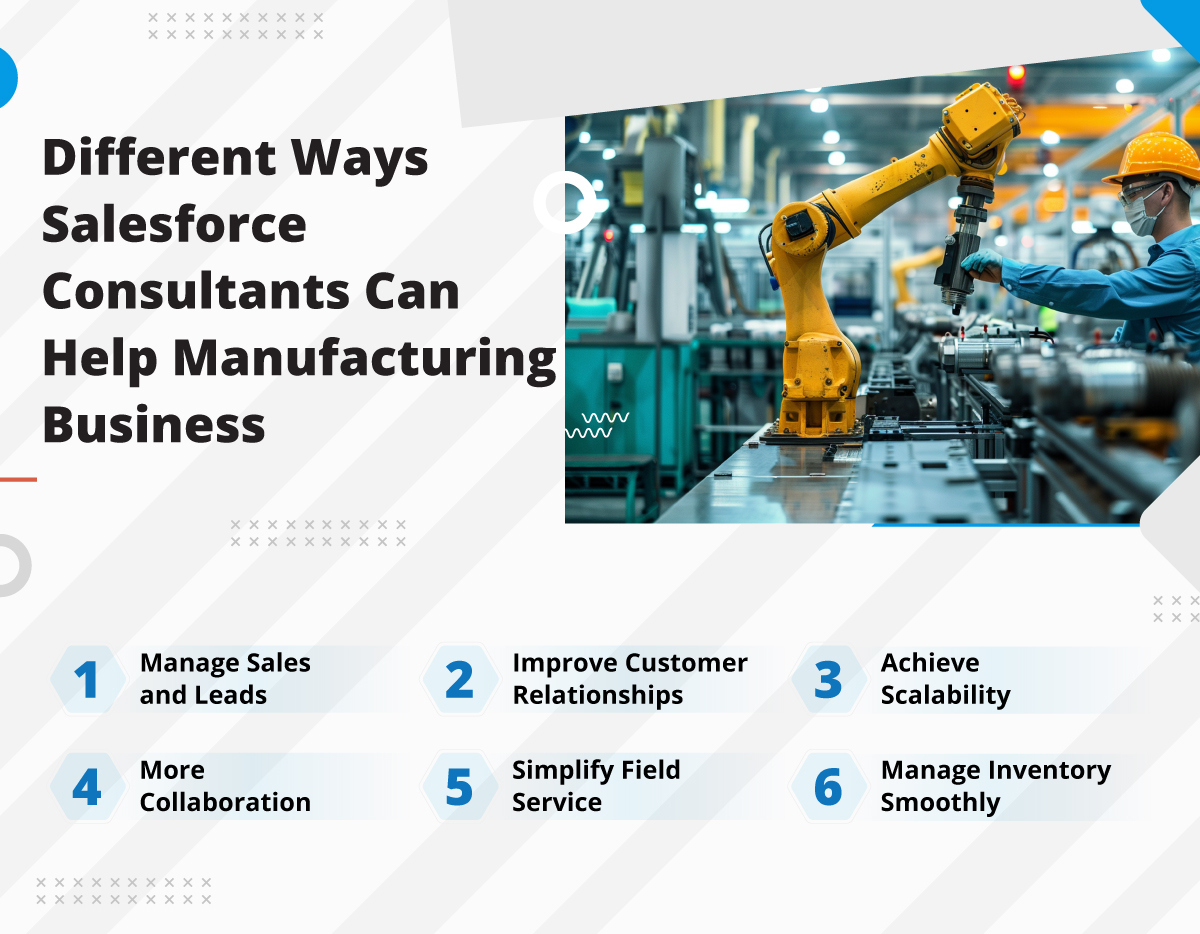
Different Ways Salesforce Consultants Can Help Manufacturing Business

Manufacturing businesses have a lot to manage whether it is customer and production records, managing production quality, tracking supply chain, ensuring customer satisfaction, and more. That’s where it is needed that the right Salesforce consulting experts always assist the team so their operations stay on the right track. 

Here we have listed several ways through which the right Salesforce consultants can help manufacturing businesses improve their operations while managing their Salesforce the right way.

1. Manage Sales and Leads

Salesforce provides a unified platform for tracking and managing leads, helping businesses boost lead performance, improve conversion rates, and increase profitability. For manufacturers, this means gaining valuable insights by capturing data from various lead sources, interactions, and outcomes. With this data, they can identify high-quality leads and streamline their efforts, focusing on those with the greatest conversion potential, ultimately saving time and resources.

2. Improve Customer Relationships

With Salesforce consultants, manufacturers get a comprehensive platform to manage customer interactions effectively. Manufacturers can easily work to build lasting customer relationships, enhance customer experiences, foster loyalty, and streamline data management processes.

Salesforce also helps teams to work on their strategies, whether for sales, service, or marketing. This could be done by capturing and analyzing data from lead sources, which will ultimately help to improve engagement and conversion rates. This helps to understand customers and their expectations better, ultimately transforming operations to achieve their satisfaction.

3. Achieve Scalability

Being customizable and highly scalable has made Salesforce popular among manufacturing businesses. Salesforce helps manufacturing firms achieve a seamless transition of processes. It easily connects with CRM and ERP systems, allowing you to keep your preferred tools and workflows intact. The platform’s scalability also ensures it adapts to your evolving needs and growing operations.

For growing manufacturing companies, it is necessary to adopt a system that is scalable and grows with their growing business. This is where adopting Salesforce can be a great decision for the company as a Salesforce consulting company can help you 

4. More Collaboration

Salesforce fosters collaboration by eliminating departmental barriers, seamlessly connecting sales, service, and operations teams to share customer data and real-time production updates. This cross-functional teamwork enhances business efficiency and minimizes the risk of errors, creating a more streamlined workflow.

5. Simplify Field Service

Maintaining a centralized database of customer information, service requests, and case management allows manufacturers to efficiently support customers, track service progress, and swiftly resolve issues. Salesforce automation streamlines the process by routing service requests to the right teams or technicians, enabling faster responses and quicker problem resolutions.

6. Manage Inventory Smoothly

Automated alerts in Salesforce enable timely replenishment, prevent stockouts, and reduce carrying costs, while offering real-time inventory visibility across various locations. This helps businesses optimize production planning and make informed order fulfillment decisions, ensuring enhanced customer satisfaction.

Hire Certified Salesforce Consultants For Your Manufacturing Business

Salesforce provides immense value by unifying sales, service, marketing, commerce, and supply chain data into one platform specifically designed for manufacturers. By leveraging customer-focused solutions and automating processes across opportunities, orders, and services, manufacturers can drive sales efficiency, enhance forecast precision, speed up time-to-market, boost customer loyalty, and reduce IT expenses. 
With its demonstrated ROI, expansive partner network, and commitment to innovation, Salesforce empowers manufacturers to achieve rapid, scalable digital transformation. But to make Salesforce work for your manufacturing business, you need the assistance of proficient and skilled Salesforce developers. Contact us and get the support of the best professionals to help you leverage Salesforce to manage manufacturing operations.

Everything You Should Consider While Going For Salesforce Lightning Migration

Salesforce Lightning stands out as a premier offering from Salesforce, delivering a powerful user interface framework designed to enhance user experience and functionality. Salesforce Lightning migration seamlessly adapts to different devices due to its responsive design, helping teams to get better access to data while improving efficiency.

Migrating to Lightning brings numerous benefits, including reduced development times, an enhanced user interface and many customization features. These are just a few reasons why businesses are considering moving from Classic to Lightning. This move requires careful planning, such as migrating data from Classic, adjusting setups, and reviewing existing systems.

The most compelling reason to make the switch is the opportunity to fully leverage Salesforce’s latest innovations. Sticking with Salesforce Classic means you’ll keep paying for these advancements through ongoing license fees without actually experiencing the benefits.

So, in this blog, we’ll disclose things you should know about lightning migration, from benefits to challenges that you might face. 

Why Should You Consider Salesforce Lightning Migration?

Gone are those days when you had to work with the traditional interface of Salesforce Classic and face difficulty of the inadequate navigation and features, resulting in lack of efficiency. 

With Salesforce Lightning, users can uncover a whole new level of productivity and efficiency with all the upgrade features and UI. Let’s have a look at different points that make Salesforce Lightning migration a must for businesses. 

1. Better User Interface

Lightning provides a modern, user-friendly interface that is not only more advanced than Classic but also more flexible and dynamic. Its enhanced design allows for seamless transitions between desktop and mobile devices, making it easier to work across platforms.

2. Work with Lightning App Builder

The Lightning App Builder makes it simple to customize pages by rearranging components, dragging, dropping, and adjusting settings effortlessly. It enables users to customize the components of Lightning according to their specific needs, ensuring the interface is optimized to achieve maximum efficiency. This means customization is key to achieve the full potential of Salesforce. 

3. Access Einstein Analytics 

Einstein Analytics is a powerful AI-driven tool that provides users with clear insights into their Salesforce environment. It simplifies sales and marketing forecasting, offering advanced analytics to help teams make more informed decisions with ease.

4. Enable Sales Path

The Sales Path outlines the key stages a lead or opportunity will progress through, highlighting the essential actions at each phase. By implementing sales paths, your sales team can seamlessly follow and adopt your company’s sales processes. These paths serve as a guide, helping sales reps stay focused on crucial tasks, leading to faster deal closures.

Challenges You Might Face During Salesforce Lightning Migration

It’s no more a secret that migrating to Salesforce Lightning can be a great upgrade for businesses, enabling them to utilize Salesforce to the maximum potential, achieving enhanced productivity and efficiency. 

But it is not that easy to migrate and there are chances of several challenges you might face, especially when you don’t take help from reliable Salesforce Lightning migration services and have experts to guide you. Here are some of these challenges that you need to overcome for successful migration.

1. Incorrect Timing

One of the key challenges during Salesforce Lightning adoption is poor timing. While Lightning is a more advanced version of Salesforce CRM, rushing into the migration without a strategic approach can be problematic. If you don’t assess the optimal timing, there will be chances of project delays. These delays would ultimately negatively impact client relationships and your reputation. To avoid this, ensure you’re fully prepared and have a clear understanding of the timeline before embarking on the Salesforce Lightning migration.

2. Lack of Right Strategy

Lack of a solid strategy poses a significant challenge during the Salesforce Lightning transition. It can disrupt team performance, impact ongoing projects, hinder Salesforce functionality, and lead to a prolonged migration process. Proper planning is essential to avoid these setbacks.

3. Lack of Team Readiness

Another challenge arises when team members are unfamiliar with Salesforce Lightning, affecting their ability to perform tasks efficiently. This lack of knowledge can disrupt daily operations, causing teams to fall behind. To avoid this, it’s crucial to conduct targeted training sessions before adopting the new CRM, ensuring that each team member understands the specific Lightning features they will need to use in their role.

4. Performance Issues

Although businesses are adopting Salesforce Lightning migration in the USA to enhance productivity, post-migration, performance issues can arise. These may include difficulties with navigation, slow loading times, scalability challenges, and more. To prevent such problems, it’s essential to conduct a Salesforce org health assessment prior to migration. This helps identify potential roadblocks or workflow disruptions, ensuring a smoother transition to Lightning.

Upgrade Business with Salesforce Lightning Migration

Migrating to Salesforce Lightning offers substantial benefits for organizations, including boosted productivity across various sectors, improved adoption and collaboration between teams, increased IT efficiency, and significant cost savings. The process is much smoother with the guidance of an experienced Salesforce provider. Contact us and get the right experts to achieve successful migration.

Salesforce Email Marketing Not Working for You? Let’s Make It Work

Email marketing continues to be a highly effective form of outreach for businesses, engagement, and sales. Nevertheless, it is significant to note that, for most organizations, email campaigns cannot be said to deliver the expected results. 

Given that some emails reach the wrong mailbox or the spam folder or aren’t opened at all, many marketers wonder what has gone wrong. If you feel you have ended up here, do not fret—you are not alone. Here are several generalized barriers that could be capping you, and the good thing is that they all have a cure.

In this blog, we’ll explain some possible causes of low email marketing performance and then unveil a tool, Salesforce Verify the Email, that can help improve things.

Common Barriers to Effective Email Marketing

Many factors can derail an email campaign, ranging from technical issues to data-related challenges. Below are some of the most common hurdles that businesses face when trying to get the most out of their email marketing efforts:

1. Poor Data Quality

Email campaigns’ success largely depends on having correct and current contact lists. If your email database is of poor quality, full of email addresses that have changed, ‘junk’ emails, ceased to exist, or any other reason, then you are likely to have your emails bounced, with very high bounce rates coupled with a lot of wasted marketing dollars. If you’re not careful, it can be more than just annoying – it can cripple your email delivery and sender score, making it difficult for your emails to even reach anyone, and even if they do, they may not be the right audience. This is why it becomes critical to use email verifier for your success.

2. High Bounce Rates

A bounce is a situation where the message fails to get delivered to the recipient’s mailbox. There are various causes of high bounce rates: recipients may input incorrect email addresses, have inactive accounts, or provide fake ones. In any case, bounces are a bad sign for your sender reputation and lead to the fact that your emails are rarely delivered to the inbox of real subscribers. That’s why you should verify email validity for each contact, making every email address worth using.

3. Spam Filters

Accuracy of email addresses is not the only factor responsible for ending your email into spam folders. Internet service providers (ISPs) and email clients use a variety of signals to determine whether an email is spam. One of these signals is the quality of your email list—frequent bounces or sending emails to inactive addresses can raise red flags and send your emails straight to the junk folder. By incorporating Verify the Email (VTM) processes into your workflow, you can reduce the risk of this happening.

4. Manual Data Entry Errors

When email addresses are entered manually—whether through forms or data migration—there is always a risk of human error. Simple typos, missing characters, or other mistakes can render an email address invalid, contributing to bounces and undelivered messages. These errors, if not addressed, can accumulate over time, undermining the integrity of your entire email list. Incorporating a Salesforce VTM solution can eliminate these errors from the start by verifying emails at the point of entry.

How Salesforce Verify the Email Can Make Email Marketing Work

The good news is that these issues don’t necessarily mean the end of the line for any organization’s email marketing efforts. Therefore, the right tools will help you overcome these barriers so that your email data can be as accurate as needed for successful campaigns. This is where Salesforce Verify Email comes in as the perfect solution to address email data quality issues and email marketing optimization.

1. Real-Time Email Verification at the Source

Salesforce Verify Email allows you to verify email addresses in real-time, right at the moment of data entry. Whether it’s through a web form, signup page, or CRM input, this feature ensures that any typos, invalid addresses, or fake emails are flagged before they enter your database. By catching these issues early, you eliminate the root cause of many email marketing problems, like high bounce rates and low engagement. The ability to verify email validity right from the source helps you maintain a clean and reliable contact list.

2. Eliminate Hard Bounces

Since Salesforce Verify Email thoroughly checks the validity of each address by confirming its format, domain, and existence, it dramatically reduces the number of hard bounces. This tool helps maintain the quality of your email list by ensuring that only deliverable, real addresses make it through, improving your overall sender reputation and deliverability. With Verify the Email capabilities, you can drastically improve your email deliverability metrics.

3. Boost Deliverability Rates

Spam filters are less likely to flag your emails when you’re sending them to active, valid addresses. With Salesforce Verify Email cleansing your contact list, your campaigns are more likely to reach the intended recipients. Additionally, when bounces and non-engaged contacts are minimized, your emails avoid the traps set by ISPs to prevent spammy-looking campaigns from reaching inboxes. This is why it is necessary to verify email validity for each email to improve ongoing email marketing success.

4. Improve Overall Data Quality with Salesforce Verify the Email

The most powerful aspect of Salesforce Verify Email is its ability to ensure that the data entering your CRM is clean, accurate, and up-to-date. This continuous verification process ensures that your database remains in optimal condition, allowing you to make informed decisions and run more effective campaigns. Over time, the cumulative impact of improved data quality leads to better campaign outcomes and a stronger relationship with your audience. By incorporating Verify the Email features into your workflow, you will ensure ongoing data quality and marketing success.

Conclusion

Don’t let email marketing become something that you dread. The number one cause of campaigns underachievement may be summarized in one common problem, data quality since there are many reasons why campaigns might not meet expectations. Erroneous email addresses, high bounce rates, and uninterested recipients can all pull down your efforts and make it seem like your campaigns are worthless.

However, with the right solution, you can change this and make things better again. Salesforce Verify Email is a holistic, real-time solution to solve the common challenges related to email data and effectively enhance campaign performance. Salesforce Verify Email helps guarantee your emails reach your audiences by validating their email addresses before sending them, reducing bounced emails, and enhancing personalization campaigns. If you have been using email marketing and your returns have been poor, then it is time to change. Contact us and try Verify the Email within your business processes and feel how clean, verified contacts can boost your communication and bring you the desired outcome.

What Makes Salesforce Managed Services a Fit For Your Business

Salesforce is always evolving, making regular maintenance that is needed to boost the potential of the CRM. But handling the CRM can be a difficult task, especially when there is too much data to manage. To get the most out of Salesforce, organizations need a foolproof strategy and trusted and experienced professionals who can offer Salesforce managed services to handle everything professionally.

When it comes to managing Salesforce accounts, organizations have several options like it should be assigned to an internal team for maintenance and support or the company can bring in external help during emergencies. Selecting the right approach is vital for keeping your Salesforce platform running smoothly, and among these, opting for Salesforce Managed Services often stands out as a superior choice.

Firms can take the help of managed services to outsource their Salesforce operations to manage the platform entirely, whether it is about maintaining records or ensuring data security. This method of staffing is a great way to get expert assistance when needed without having to spend a lot on a full-time resource. 

This blog will specifically focus on the value of managed services to handle Salesforce activities and operations, illustrating how it can be game-changing for businesses.

How Exactly Salesforce Managed Services Can Help

There are different benefits that you can uncover with the help of the right Salesforce professionals working with you. Here we have mentioned a few ways in which managed services for Salesforce can be effective for your business. 

1. Get Experts to Assist You

Engaging with a Salesforce Managed Services provider offers significant advantages for businesses. These are professionals who have thorough knowledge about Salesforce and are well-versed with all its features to provide continuous support to organizations. They help businesses stay updated about the latest advancements and best practices while optimizing the software to fit their specific needs. 

These service providers also help with enhancing the CRM performance and Salesforce user adoption. Ultimately, these specialists drive higher ROI by enabling improved Salesforce performance.

2. Enable Scalability for your Business

Managed Services provide enhanced scalability to businesses, helping them to adapt and make necessary changes as the business grows. This approach allows companies to scale up or down without having to get more employees to manage increasing work, freeing them to focus on core operations. 

Businesses can drive growth and innovation by optimizing Salesforce, no matter their size or current requirements. This helps to keep companies agile and responsive as they grow and change.

3. Cost-Saving Way to Get Expertise


The approach of getting external talent is a great way to eliminate the costs of hiring new employees, training them, and working on their retention. With an expert and certified team in place, businesses gain a more cost-effective approach to Salesforce administration and maintenance. These providers streamline tasks to reduce expenses while freeing up internal resources for core operations and strategic projects.

4. Enhance Productivity of Internal Teams 

Teaming up with a trusted Salesforce Managed Services provider empowers businesses to boost productivity. Companies can outsource different activities like maintaining the Salesforce CRM, managing redundant activities, and other tasks.

The right team for managed services also helps to automate manual processes, simplify maintaining customer data, and refine workflows to improve productivity and enables teams to do more in less time. Ultimately, leveraging Managed Services saves time and drives greater success by allowing internal teams to concentrate on key objectives while trusted experts manage routine Salesforce tasks.

5. Boost Performance

Managed Services providers enhance the value businesses get from their Salesforce platform. Leveraging their specialized expertise, they ensure Salesforce is updated with the latest features and best practices while being configured to fit specific business needs. They also help with data cleansing and standardization, improving analysis and reporting on key metrics. This leads to better performance, driving growth, innovation, and a competitive edge.

6. Increase Data Security

With the help of Managed Salesforce Services, businesses from different industry sections can achieve robust security and protection for their Salesforce. A professional Salesforce partner can ensure compliance with data privacy and security regulations to ensure the data is safe from any sort of threat.

Managed Services providers implement best practices for security, data backup, disaster recovery, and anomaly detection, which not only helps maintain customer trust but also minimizes the risk of financial losses and reputational damage from security breaches.

Get Salesforce Managed Services You Can Trust


When considering Salesforce Managed Services, businesses should carefully assess the provider’s expertise, experience, ability to customize, and security offerings. It’s also essential to factor in the cost to determine the overall value. 
Having the right Salesforce partner can optimize the platform, allowing businesses to focus on their business growth. But you need to get the best professionals Salesforce certified experts to handle your Salesforce and related challenges. Contact us and get these experts to handle your Salesforce and boost your operations.


logo Live Chat