

7 Best Drip Campaign Tools for Salesforce in 2026: Features, Limits, and Pricing Compared
15 Oct 2026
Table of Contents
Most comparisons of the best drip campaign tools for Salesforce make the same mistake: they treat native tools and connected tools as if they’re interchangeable. They’re not. Where a tool actually lives inside your org or outside, syncing via API — shapes how reliably records stay current, whether engagement data flows back to the CRM, and how much configuration overhead your team inherits permanently.
Seven tools get covered here. Each is evaluated against the same criteria. Some live natively inside Salesforce; some connect from the outside. That difference matters.
Choosing the best drip campaign tools for Salesforce is harder than it looks. Not because options are scarce — there are dozens. The real problem is that most comparisons lump together tools that live inside Salesforce with tools that just connect to it from the outside. That’s a meaningful difference if your team cares about data fidelity, sync reliability, or keeping things running without a second platform to manage.
This guide covers seven tools, including one built natively on Salesforce, each evaluated against the criteria that actually matter to admins and marketing ops leads making a real purchase decision.
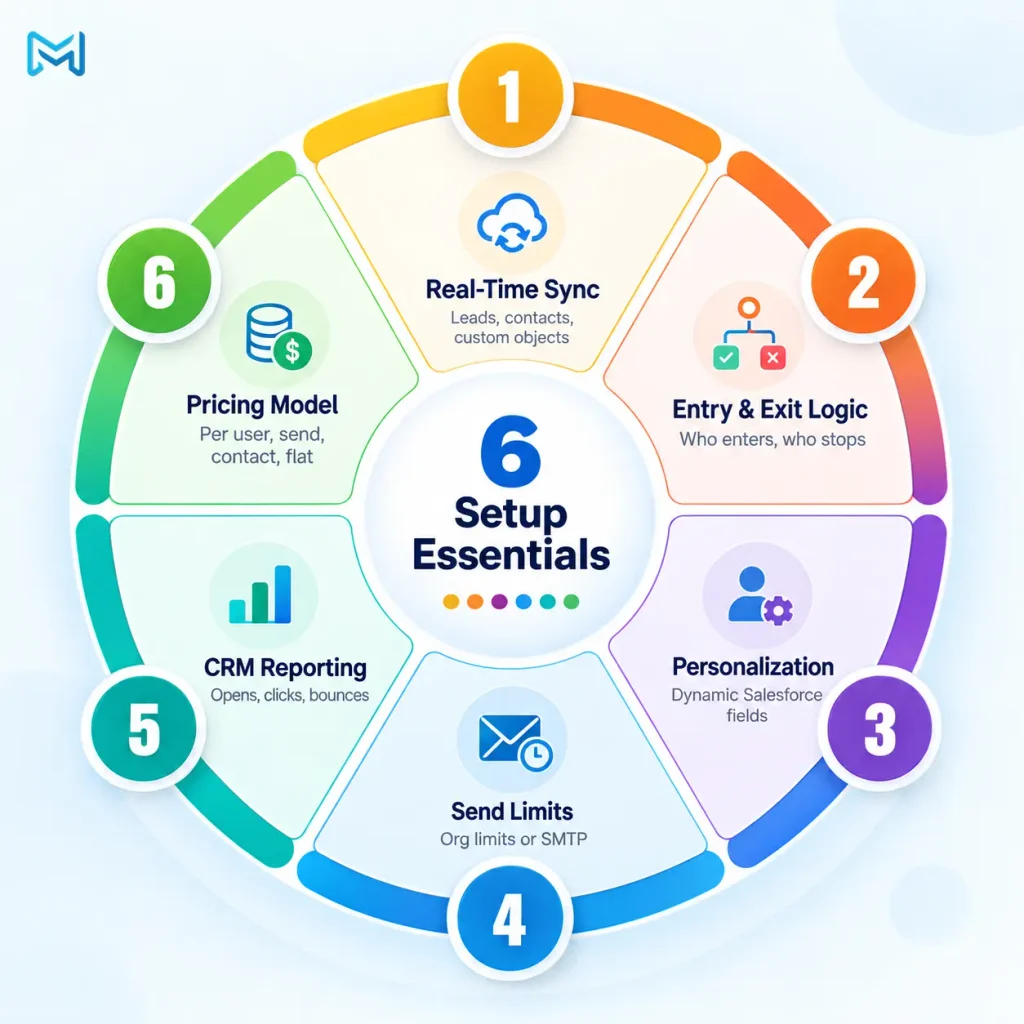
Table of Contents
Six Things Your Setup Needs Before You Look at Anything Else
Here’s what most buying guides skip: the criteria below aren’t a checklist to score tools against. They’re constraints that eliminate options before you open a single demo.
How a tool handles sync is where most teams should start. Can it pull directly from Salesforce Leads, Contacts, and custom objects in real time, or does your team need to prep an export before every send? For automated drip campaigns to fire on behavior, the data has to be current. That sounds obvious. It eliminates about half the tools on any list.
Entry and exit conditions are the next cut. Time-based entry is table stakes. The tools worth using let you define who enters a sequence based on field values, stage changes, or form fills, and pull someone out when conditions change. Tools without exit logic create the kind of drip sequences nobody wants to be on.
Personalization matters when sending bulk emails. Can the tool dynamically insert Salesforce record details, such as names, company information, and other custom fields, into each email? Without flexible personalization, bulk campaigns risk feeling generic rather than relevant to each recipient.
Send limits matter more than vendors like to admit. Salesforce’s daily email governor limits are tied to your org edition. Some tools work within them; others route through external SMTP providers like SendGrid to clear the cap. Know your monthly send volume before committing to a tier.
Reporting location is something many teams forget to ask about. Does engagement data — delivery rates, opens, bounces, click-throughs — live inside Salesforce? Or does the team log into a separate dashboard to find it? In practice, if reporting doesn’t live in the CRM, sales reps usually never see it.
Pricing structure shapes total cost at scale more than the headline number does. Per user, per send, per contact, or flat monthly — a per-send model that looks cheap at low volume becomes expensive fast once you’re past a few thousand contacts.

The Seven Tools
1. 360 Mass Mailer
Best for: Salesforce-first teams that want drip campaigns, bulk send, and deliverability without leaving the org.
Built natively on Salesforce. That’s the foundation, and it shapes everything else about how the tool works. A dedicated Drip Email Campaign tab handles sequence creation, follow-ups, promotions, and reengagement sends. For trigger-based automation, it plugs into Salesforce Flows, so a Lead stage change or Contact field update kicks off a sequence automatically. No third-party tool required.
Sends come from three sources: object list views, the Campaigns object, and Salesforce Reports. The Reports route matters because it reaches larger audiences. Select the report, pick the Record ID column, and compose. Email history logs against each Salesforce record, so a sales rep can pull up a contact and see exactly what was sent, when, and whether it landed. Scheduling options cover daily, weekly, or monthly sends.
Limits: The list view cap sits at 200 records per send — the standard Salesforce governor limit, not a product ceiling. File attachments max at 5MB per file, up to five files per send. Merge fields in SendGrid templates can’t be edited after selection; Salesforce templates stay fully editable. Reports-based sends support up to 2,000 records by default; going beyond that requires a Tabular report with filter criteria applied.
Pricing: Available on the AppExchange listing. Trial available.
Main drawback: High-volume teams hitting the 200-record list view cap use the Reports feature or Flow-based automation to work around it. That takes slightly more setup than a simple list selection.
2. Salesforce Flow (with Email Alerts) — And Why Most Teams Outgrow It
Best for: Teams already on Salesforce that need basic automated drip campaigns without buying anything new.
No dedicated drip UI here. You build sequences by chaining scheduled triggers, decision nodes, email actions, and wait steps. A two-step welcome sequence is achievable in an afternoon. A five-step behavioral sequence with branching logic is a real configuration project, and it needs maintaining every time Salesforce releases a relevant update.
Limits: Email Alerts in Flow run on Salesforce’s native email infrastructure. Org-level daily limits apply. Open rates, click tracking, bounce data — none of that exists out of the box.
Pricing: Included with most Salesforce licenses.
Main drawback: It’s a build-your-own situation with no drip-specific visibility. Most teams hit the ceiling faster than expected.
3. Salesforce Account Engagement (formerly Pardot)
Best for: B2B marketing teams running structured lead nurture programs with native CRM integration.
Engagement Studio is genuinely good. The visual drip builder is clean, behavioral branching on email opens, link clicks, and form submissions is solid, and the Salesforce sync is native. If you’re running a formal lead nurture program with scoring, grading, and multi-step sequences, Engagement Studio was built for exactly that.
To be fair, two things consistently trip teams up. Account Engagement uses a Prospect data model rather than working directly with Leads and Contacts — an extra layer that adds configuration complexity most admins don’t anticipate before implementation. The pricing is the other issue.
Limits: Prospect model adds overhead. Cost makes it a stretch for smaller teams.
Pricing: Growth starts at $1,250/month for up to 10,000 contacts. Plus at $2,750/month. Advanced at $4,400/month. Billed annually per org.
Main drawback: The cost is the real barrier for most teams under 50 people. The Prospect model overhead only justifies itself once you’re running a marketing operation complex enough to need it.
4. Journey Builder — Right for Maybe 20% of Teams That Evaluate It
Best for: Enterprise marketing teams running omnichannel journeys across email, SMS, push, and paid media.
Canvas-based, drag-and-drop, millions of contacts, real-time triggers, multi-channel branching. At actual enterprise scale, Journey Builder delivers. That’s the thing — it doesn’t connect to Salesforce CRM data by default. Syncing requires Marketing Cloud Connect, which is its own configuration project. Teams expecting a native Salesforce experience often find something closer to a separate platform with a connector attached.
Limits: Not natively tied to CRM data. Meaningful setup overhead before it’s useful.
Pricing: Standard cross-channel journey orchestration starts at $1,500/month (flat rate per organization, billed annually) for the Next Growth edition. Full Journey Builder capabilities sit on higher tiers. Check Salesforce.com for current pricing.
Main drawback: Total cost of ownership — setup time, admin overhead, subscription cost — gets underestimated. Consistently.
5. MassMailer
Best for: Salesforce orgs where governor limits are the core problem, not drip sophistication.
MassMailer routes email through external providers to clear Salesforce’s daily send cap. For teams where volume is the actual bottleneck, that’s worth paying for. Drip functionality exists in the product. It’s just not the main event.
Limits: Drip sequencing isn’t as deep as purpose-built automation tools. Behavioral triggers are limited.
Pricing: Plans start around $99/month. See the AppExchange listing for current pricing.
Main drawback: It solves a volume problem. It doesn’t solve a behavioral drip problem.
6. Mailchimp (with Salesforce Integration)
Best for: Small teams already on Mailchimp who want to pull Salesforce contact data into their existing email setup.
The Customer Journey builder is approachable — entry points, email steps, delays, engagement branches. The Mailchimp for Salesforce app on AppExchange syncs Contacts and Leads into Mailchimp audiences. Clean enough.
Here’s where it gets complicated. The sync is unidirectional in most configurations. Open rates, click data, unsubscribes: that engagement lives in Mailchimp. It doesn’t write back to Salesforce records without custom work. Sales reps working from the CRM won’t see any of it unless someone builds and maintains a reverse sync.
Most teams don’t.
Limits: No native data residency in Salesforce. Engagement reporting stays in Mailchimp.
Pricing: Free for up to 250 contacts. Essentials at $13/month. Standard at $20/month. Premium at $350/month. Check Mailchimp.com for current pricing.
Main drawback: For Salesforce-first teams, the data gap is real. Not a dealbreaker for every team — a dealbreaker for teams where sales and marketing share CRM data as a source of truth.
7. Constant Contact (with Salesforce Integration)
Best for: Teams wanting straightforward email automation with a Salesforce connector and no CRM-deep requirements.
Welcome sequences, reengagement sends, date-based campaigns — the automation builder covers the basics without overcomplicating anything. The Salesforce connector pulls contact lists. Simple. Engagement data doesn’t flow back to the CRM. Same limitation as Mailchimp. For teams where email and CRM are genuinely separate workflows, this works fine. For teams where they’re not, the reporting blind spot is real.
Limits: External platform. No native Salesforce object support beyond basic contact sync.
Pricing: Lite at $12/month. Standard at $35/month. Premium at $80/month. Check constantcontact.com for current pricing.
Main drawback: Not a Salesforce-first tool. It shows in reporting.
Quick Comparison
| Tool | Native to Salesforce | Drip Sequences | Behavioral Triggers | Reporting in Salesforce | Starting Price |
| 360 Mass Mailer | Yes | Yes | Via Flows | Yes | AppExchange listing |
| Salesforce Flow | Yes | Manual build | Yes | Partial | Included |
| Account Engagement | Yes | Yes (Engagement Studio) | Yes | Yes | $1,250/mo |
| Journey Builder | Partial (via connector) | Yes | Yes | No | ~$400/mo |
| MassMailer | Yes | Basic | Limited | Partial | ~$99/mo |
| Mailchimp | No (integration) | Yes | Yes | No | Free / $13+ |
| Constant Contact | No (integration) | Basic | Limited | No | $12/mo |

How to Choose Based on Where You Are
Under 10 people: Salesforce Flow covers basic automated drip campaigns at no added cost. The moment you need open rate tracking, branded templates, or a sequence past two steps, that changes. 360 Mass Mailer is the natural next step: it stays inside your org, adds drip and SendGrid deliverability, and doesn’t introduce a second platform.
10-50 people: Account Engagement fits if you’re running formal lead scoring and structured nurture programs. Genuinely built for that use case. But for teams living in Salesforce daily and wanting drip campaign software for Salesforce without a separate system — or a $1,250/month base price — 360 Mass Mailer covers most of the real-world workload. To be fair, the Account Engagement pricing reshapes the math for a lot of teams in this bracket.
50+ people: Journey Builder. The configuration investment is real and often larger than initial estimates. At actual enterprise scale, with multi-channel sends and millions of contacts, no other tool on this list handles that.
Already on Mailchimp or Constant Contact: Keep using them if the setup works. But if sales reps are working without contact-level email history in Salesforce records, a native tool closes that gap faster than a more complex sync integration will.
Wrapping Up
Most tool comparisons end with a recommendation dressed up as a framework. So here’s a more honest version.
For the majority of teams evaluating the best drip campaign tools for Salesforce, the real question is simpler than the feature tables suggest: does engagement data need to live inside Salesforce, or not? If it does, native wins on that. Every time. The sync overhead of a connected tool never fully disappears — it just becomes someone’s recurring maintenance job.
360 Mass Mailer sits at the practical midpoint: native Salesforce installation, SendGrid for deliverability, a dedicated Drip Email Campaign module, and email history logged against CRM records. It’s not built for enterprise-scale omnichannel journeys, and it doesn’t claim to be. For teams that need that, Account Engagement and Journey Builder are worth the investment — and those price points reflect exactly what they are.
The question worth asking isn’t which tool has the longest feature list. It’s which tool your team actually runs correctly six months from now, and whether the data it generates ends up somewhere your people can find it.


Solve It with Salesforce. We’ll Show You How.
AI. Apps. Experts. Everything you need to win with Salesforce under one roof.Frequently Asked Questions
Does Salesforce have a built-in drip campaign tool?
Sort of, but not in the way you’d want. Flow can technically replicate drip behavior by chaining automation components together -- scheduled triggers, email actions, wait steps. No dedicated sequence UI, no drip dashboard, no engagement tracking. A two-step welcome sequence is doable in an afternoon; a five-step behavioral sequence with exit conditions is a real admin project with ongoing maintenance attached to it. Most teams stay basic with Flow or move to something purpose-built once they hit the first real complexity wall.
What’s the actual difference between native drip campaign software for Salesforce and a connected tool?
Connected tools sync contact data in and theoretically push engagement data back out. In practice, the “back out” part is where it breaks down. Open rates, click data, unsubscribes: most connected tools don’t write that back to Salesforce records cleanly without custom work (and most teams don’t build that custom work). Native tools skip the whole sync problem because they’re already inside the org. No API call, no sync window, no stale records.
Can 360 Mass Mailer run automated drip campaigns?
Yes. Dedicated Drip Email Campaign module inside the app. It also connects to Salesforce Flows for trigger-based sequences -- record updates or stage changes kick off sends automatically. Email history logs delivery status, open tracking, and bounce data against each Salesforce record.
What’s the send limit for 360 Mass Mailer?
200 records per manual bulk send from the list view -- that’s the standard Salesforce governor limit. For larger audiences, the Email from Reports feature gets around it: select a Salesforce report with a Record ID column and send to the full result set. Automation-based sends via Flow don’t carry the same manual send restriction, so trigger-based sequences at scale work differently.

About the author
Editorial TeamThe Editorial Team at 360 Degree Cloud brings together seasoned marketers, Salesforce specialists, and technology writers who are passionate about simplifying complex ideas into meaningful insights. With deep expertise in Salesforce solutions, B2B SaaS, and digital transformation, the team curates thought leadership content, industry trends, and practical guides that help businesses navigate growth with clarity and confidence. Every piece we publish reflects our commitment to delivering value, fostering innovation, and connecting readers with the evolving Salesforce ecosystem.
Recent Blogs
 Email Marketing
Send Email to Multiple Recipients in Salesforce Flow: What Works and Where It Breaks
You’ve got a Flow that fires on a record update. You need it to send email to multiple recipients in Salesforce. The logic seems simple:…
Read More Email Marketing
Why Your Salesforce Mass Emails Are Not Getting Through: Deliverability Mistakes Teams Make
Salesforce email deliverability problems don’t announce themselves. Open rates drop slowly. Bounce rates creep up. Then one campaign lands in spam for half your list,…
Read More Comparison
Best Mass Email Software for Salesforce in 2026: 6 Tools Ranked by Features and Price
Choosing the right Salesforce bulk email tool comes down to three things: how much you’re sending, whether tracking data needs to live on the Salesforce…
Read MoreReady to Make the Most Out of Your Salesforce Instance?
Our Salesforce aces would be happy to help you. Just drop us a line at contact@360degreecloud.com, and we’ll take it from there!
Subscribe to our newsletter
Stay ahead with expert insights, industry trends, and exclusive resources—delivered straight to your inbox.
