

Send Email to Multiple Recipients in Salesforce Flow: What Works and Where It Breaks
19 Oct 2026
Table of Contents

You’ve got a Flow that fires on a record update. You need it to send email to multiple recipients in Salesforce. The logic seems simple: add a Send Email action, pass in a list of addresses, hit save. And it works. Until it doesn’t. Salesforce Flow gives admins a real path to email automation without writing code. But the moment volume enters the picture, or you need tracking, or you’re trying to reach a segment of 300 contacts at once, the cracks show fast. This guide covers what Flow actually handles, where it hits its limits, and what your options are when the native tools stop being enough.
Not sure which limit is actually blocking your sends?
Get the full breakdown of Salesforce email limits and how to scale your campaigns without hitting them.
Table of Contents
Why Admins Turn to Flow for Multi-Recipient Email
Flow is the first place most admins look when they need email automation. Makes sense. It’s native, no-code, and already connected to your CRM data. If you want to notify a sales rep, their manager, and a customer all from a single record trigger, Flow is a reasonable starting point.
The Send Email action does support multiple recipients. You can pass a comma-delimited list of email addresses, or a collection variable built from flow logic. So technically, sending to multiple people at once is possible.
That’s the thing. It works at small scale. One trigger, a handful of recipients, transactional notifications. For that use case, Flow is genuinely fine.
But “send email to multiple recipients” covers a wide range of intentions. Notifying two colleagues when a deal closes is different from running a follow-up to 400 leads. Flow handles the first well. The second is where it starts to struggle. And a lot of admins don’t find that out until they’ve already built the automation and pushed it live.
The Native Flow Options for Sending Email
Before getting into where Flow breaks, it’s worth being precise about what’s actually available inside Salesforce Flow send email today.
The Send Email action
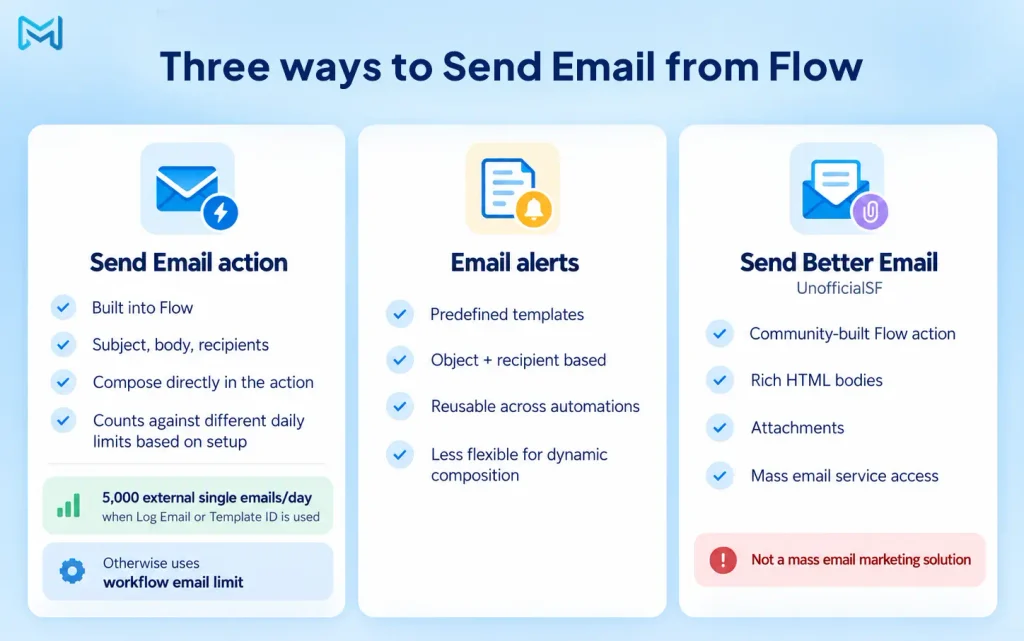
This is Flow’s built-in option. You add it as an Action element inside Flow Builder. It takes a subject, a body, and recipient email addresses. You can pull those addresses from flow variables, record fields, or a hardcoded list. As of Salesforce’s Summer ’25 release, you can compose email content directly within the action itself, which is a meaningful improvement over earlier versions.
One important nuance: how this action counts against your daily limits depends on how you configure it. If you enable Log Email on Send or pass in an Email Template ID, the sends count against the single email limit. That’s 5,000 external emails per day, org-wide, for most production orgs. Skip both of those options, and the sends count against the daily workflow email limit instead.
Both limits are confirmed in Salesforce’s developer documentation. Both are shared across every automation, alert, and API call in your org.
Email alerts
Email alerts are predefined templates tied to specific objects and recipient types. Inside Flow, you trigger them using the Send Email Alert action. They’re useful for standardized notifications because they’re reusable across multiple automations. The tradeoff: you give up the dynamic composition flexibility the Send Email action offers. Pick your constraint.
Send Better Email from UnofficialSF
This is a community-built Flow action, maintained by developer Jack Pond. It sits on top of Salesforce’s single and mass email services and gives you capabilities the native action doesn’t: rich HTML bodies, attachments, and access to Salesforce’s mass email service from within Flow. It’s widely used and has a solid track record.
Worth saying: UnofficialSF’s own documentation is upfront that Flow isn’t built to serve as a mass email marketing solution, even with the Send Better Email Flow action in place. That’s an honest framing of the tool’s ceiling.
Where It Breaks: The Limits That Actually Bite
Here’s where the real friction lives when you’re trying to send email to multiple recipients in Salesforce using Flow.
Daily email limits
Salesforce’s REST API documentation confirms that for orgs created in Spring ’19 and later, Flow’s Send Email action counts against the same daily limits as email alerts and API sends. The single email limit is 5,000 external emails per day, org-wide. Not per-user. That means every flow, every automation, every email alert, and every API call shares the same pool.
An org with active flow notifications, a sales team doing one-to-one outreach, and a scheduled Flow sending follow-ups can burn through 5,000 faster than expected. And when that limit hits, sends fail. Salesforce will notify you by email and log it, but emails that didn’t go out don’t go out.
No open tracking or click tracking
Flow’s native Send Email action doesn’t tell you whether an email was opened, whether a link was clicked, or whether it bounced. You send it. That’s where your visibility ends.
In practice, this isn’t just a marketer’s problem. Admins building re-engagement automations or multi-step follow-up sequences can’t base the next step on real engagement data. The flow fires without knowing whether the first email did anything.
Scheduling is limited
You can trigger an email on a time-based condition in Flow. But scheduling recurring sends, controlling send windows to avoid early-morning or weekend delivery, or setting up a timed sequence with gaps between steps? Flow doesn’t handle that cleanly. You’re engineering around constraints at that point, not building a workflow.
No unsubscribe handling
Send email to multiple recipients in Salesforce through Flow, and there’s no native mechanism to check consent, honor opt-outs, or provide an unsubscribe link that automatically writes a preference back to a Salesforce field. For transactional, one-to-one emails: usually fine. For anything resembling a campaign or a repeated communication to a list: a compliance and deliverability risk that grows as your volume does.
Want delivery status, open rates, and bounce data logged against every Salesforce record?
Explore Email Tracking →Common Workarounds and What They Cost
Admins who hit these limits usually try one of three routes. Each one works up to a point.
Scheduled Flows with loops. You can build a Flow that iterates through a collection of ecords and fires an email per record. More control, yes. But it eats into your daily limit one send at a time. Tracking and unsubscribe gaps remain.
Send Better Email for mass send capability. The UnofficialSF action accesses Salesforce’s mass email service, which has a separate limit from the single email service. That’s a real advantage for volume. But the action still operates inside Salesforce’s ecosystem, and delivery tracking is still limited.
Custom tracking layers. Some orgs build their own click tracking using URL parameters and record updates in Salesforce. It works. It’s also an ongoing maintenance obligation every time a template changes, a URL shifts, or a new campaign type is added.
None of these approaches is wrong. They’re reasonable engineering for specific requirements. But each one adds complexity, and complexity compounds when your email program grows.
When an App Is the Better Route
There’s a point where engineering Flow workarounds costs more time, and carries more risk, than using a Salesforce-native app built for the job.
360 Mass Mailer is built natively on Salesforce, so your data stays inside the CRM. You can send email to multiple recipients in Salesforce directly from list views, campaigns, or Salesforce reports, without building a Flow at all. It connects to SendGrid for delivery, which means you’re not competing with internal notifications for your org’s daily send quota.
The gap with Flow is material for a few specific capabilities. Email history in 360 Mass Mailer logs delivery status, open rates, link click counts, and bounce data against each record, visible inside Salesforce. Scheduling is handled in-app, with support for one-time, daily, and monthly sends. Drip email campaigns can be built and managed without constructing a Flow sequence from scratch. And when emails bounce, you can create a Salesforce report against the email history object to identify and manage those addresses.
It’s also worth knowing that 360 Mass Mailer supports automation via Salesforce Flow. Using the Send Email From Process Builder Apex method, you can trigger Mass Mailer sends from within a Flow and keep your orchestration logic in the tool you already know. So it’s not an either/or if your team wants to keep Flow involved.
To be fair: for teams whose email needs are genuinely transactional and low-volume, Flow is probably sufficient. But for admins running follow-up campaigns, product newsletters, or multi-step outreach to lead and contact lists inside Salesforce, the native tools hit a ceiling that becomes a real operational constraint.
Where Flow Ends and Something Better Begins
Salesforce Flow handles email well when the job is transactional: a notification, a triggered message, keeping a team informed after a record event. Sending email to multiple recipients in Salesforce through Flow is supported and works reliably within those boundaries.
The limits that bite aren’t obscure edge cases. They’re the daily send cap, the absence of delivery tracking, the gap around scheduling and unsubscribes. Admins building real email programs inside Salesforce hit them regularly. And the workarounds, while technically valid, add overhead that grows with your program.
360 Mass Mailer runs natively inside Salesforce, connects to SendGrid for delivery, and gives you tracking, scheduling, and campaign management without asking you to engineer around platform constraints. If Flow has gotten you this far, it’s probably shown you where those constraints are. That’s usually where admins start looking at what’s next.

Solve It with Salesforce. We’ll Show You How.
AI. Apps. Experts. Everything you need to win with Salesforce under one roof.Frequently Asked Questions
Can Salesforce Flow send email to multiple recipients at once?
Yes. The native Send Email action accepts a comma-delimited list of email addresses or a collection variable. That's genuinely supported. The constraints appear when you're sending to a large audience, need delivery or engagement tracking, or want campaign-style scheduling. Those aren't things the native action was built for.
What is the daily email limit for Salesforce Flow send email?
It depends on configuration. With Log Email on Send or an Email Template ID enabled, sends count against the single email limit: 5,000 external emails per day, org-wide, for most production orgs. Without those parameters, sends count against the daily workflow email limit. Both are shared across all automations, alerts, and API calls in the org.
Is the Send Better Email Flow action from UnofficialSF still supported?
Based on current information, yes. The project is maintained by Jack Pond and was updated to reflect Summer '25 release changes. It's not a Salesforce product, so support is tied to the open-source project's upkeep rather than a commercial SLA. Most orgs using it treat it as a production tool, and it has earned that trust over time.
Does Flow track email opens or bounces?
No. The native Send Email action doesn't return open, click, or bounce data. Once the email leaves Flow, there's no feedback loop inside Salesforce.
When should an admin use an AppExchange app instead of Flow for email?
When daily volume routinely approaches or exceeds a few hundred sends. When delivery tracking, open rates, or bounce reporting need to live inside Salesforce records. When recipients need a real unsubscribe option that syncs back to a CRM field. When scheduling needs flexibility beyond a single time-based trigger. Any one of those requirements is worth evaluating a dedicated Salesforce email app.

About the author
Editorial TeamThe Editorial Team at 360 Degree Cloud brings together seasoned marketers, Salesforce specialists, and technology writers who are passionate about simplifying complex ideas into meaningful insights. With deep expertise in Salesforce solutions, B2B SaaS, and digital transformation, the team curates thought leadership content, industry trends, and practical guides that help businesses navigate growth with clarity and confidence. Every piece we publish reflects our commitment to delivering value, fostering innovation, and connecting readers with the evolving Salesforce ecosystem.
Recent Blogs
 Comparison
7 Best Drip Campaign Tools for Salesforce in 2026: Features, Limits, and Pricing Compared
Most comparisons of the best drip campaign tools for Salesforce make the same mistake: they treat native tools and connected tools as if they’re interchangeable.…
Read More Email Marketing
Why Your Salesforce Mass Emails Are Not Getting Through: Deliverability Mistakes Teams Make
Salesforce email deliverability problems don’t announce themselves. Open rates drop slowly. Bounce rates creep up. Then one campaign lands in spam for half your list,…
Read More Comparison
Best Mass Email Software for Salesforce in 2026: 6 Tools Ranked by Features and Price
Choosing the right Salesforce bulk email tool comes down to three things: how much you’re sending, whether tracking data needs to live on the Salesforce…
Read MoreReady to Make the Most Out of Your Salesforce Instance?
Our Salesforce aces would be happy to help you. Just drop us a line at contact@360degreecloud.com, and we’ll take it from there!
Subscribe to our newsletter
Stay ahead with expert insights, industry trends, and exclusive resources—delivered straight to your inbox.
