

Table of Contents

Your Salesforce org looks fine at the record level. Contacts are there. Fields are filled in. Reports run.
But somewhere between 20 and 30% of those contacts won’t actually receive your next campaign. Emails bounce. Phone calls hit disconnected lines. Mailing addresses return undelivered. A lead routes to the wrong rep because the State field says “Cali” instead of “CA.” None of this is visible until a campaign fires and the bounce report tells the story.
CRM data cleansing is the process of fixing that. Systematically. Before the next campaign fires, not after. This guide covers exactly how to clean CRM data in six steps, what separates a decent cleansing tool from a great one, and how to stop the problem from resetting every quarter.
Table of Contents
What Is CRM Data Cleansing?
CRM data cleansing is the systematic process of identifying and correcting inaccurate, incomplete, outdated, or duplicate records in your customer database. That’s the short version.
In practice, it covers three distinct activities, and most teams blur them together in ways that cause problems later.
Cleansing is the umbrella. It means fixing every type of data quality problem: wrong values, missing fields, stale information, non-standard formatting, and records that were never accurate to begin with.
Validation is more specific. It answers a different question: does this email address actually exist right now? Does this phone number connect to a live line? Does this mailing address match a real, deliverable location? Validation is about real-world accuracy, not just format. A phone number can be perfectly formatted and completely disconnected. Validation catches that. Format-checking doesn’t.
Deduplication is its own problem. It finds records for the same contact or account that exist more than once, then merges or suppresses the duplicates. A duplicate with a valid email still breaks attribution and inflates your contact count.
All three belong inside a proper CRM data cleansing process. But they need separate steps, because they need different tools to fix.
Running through this checklist and realizing your contact fields aren’t verified?
Bad contact data is one of the top reasons AI agents produce wrong outputs. Fix it before deployment.
Verify Contact DataHow Do You Know Your CRM Actually Needs Cleansing?
Most data quality problems are invisible at the record level. You see them in outcomes. Here’s what to watch for.
High email bounce rates. The industry benchmark sits around 2%. If yours is running past 3–4%, bad email data is almost certainly the cause. Not your subject lines. If you’re seeing persistent bounce issues, our guide on Salesforce email bounce rates breaks down exactly what each bounce type means and which ones damage your sender reputation.
Reps calling dead numbers. Sales activity gets logged. Nothing converts. That’s often not a coaching problem it’s a data problem.
Returned physical mail. For teams that send invoices, renewals, or direct mail, undelivered physical mail is a direct signal that your mailing address data hasn’t been verified recently.
Duplicate lead records. The same contact exists twice under slightly different spellings or two separate email addresses. Marketing emails one version; a rep follows up on the other. Attribution breaks. Neither gets a clean handoff.
Wrong lead routing. A California lead goes to the wrong territory because the State field is blank, inconsistent, or entered differently across your import sources. That’s not a routing logic problem. That’s a data problem.
Worth saying: most RevOps teams catch these signals when they’re prepping a campaign, not before. A proactive audit changes the order of operations.
The 6-Step CRM Data Cleansing Process
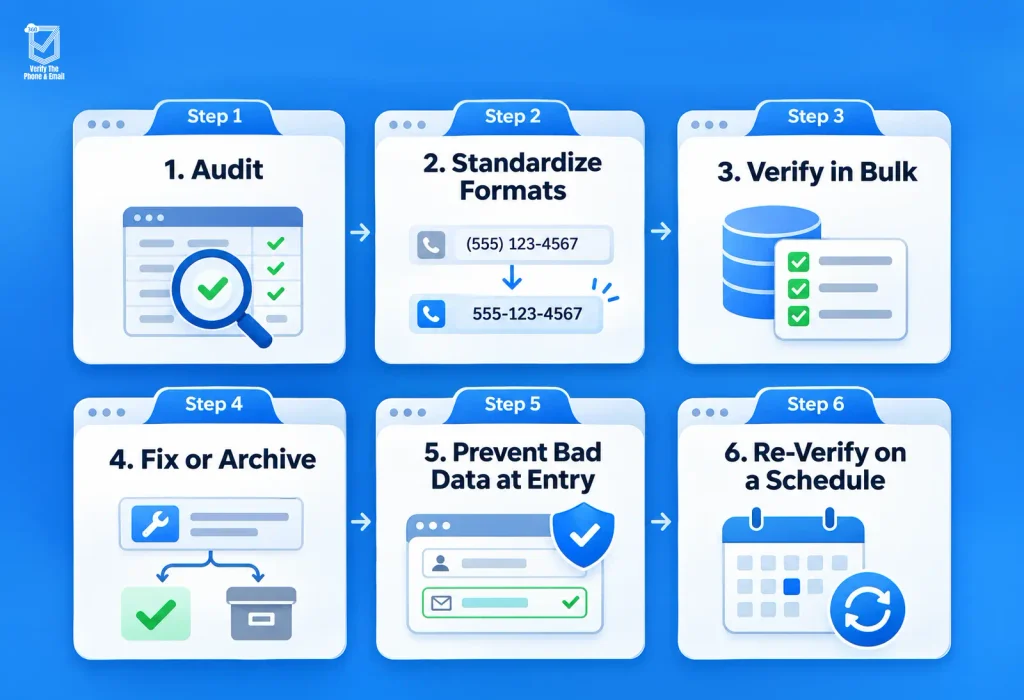
Step 1: Audit — Measure What’s Broken First
Before fixing anything, you need a baseline. How many email records are invalid? How many phones fail basic format checks? How many address fields are incomplete?
In Salesforce, start with a report on contacts and leads. Flag obvious problems: test emails (“test@test.com”), placeholder values, blank required fields, phone numbers with letters in them. That gives you the visible surface. For a real audit, you need a verification tool that actually checks deliverability, not just field format.
Your audit output should answer: what percentage of records have a valid email, a valid phone, a valid address? That number is your starting point. Every subsequent CRM data cleaning run is measured against it.
Step 2: Standardize Formats
This step gets skipped more than it should. Valid data in inconsistent formats causes its own downstream issues deduplication misses, routing failures, import conflicts.
Phone numbers are the most common offender. In any Salesforce org populated from multiple sources (Web-to-Lead, CSV imports, manual entry, integrations), you’ll find the same phone number in five different formats. “+1 (415) 555-0100,” “4155550100,” “415-555-0100.” All the same. All will fail deduplication logic that’s looking for an exact match.
Standardize phones to E.164 format before anything else. Standardize mailing addresses to a consistent structure: street, city, two-letter state abbreviation, ZIP. This doesn’t require a verification tool it’s a batch update. But it has to happen before bulk verification, or your results come back noisier than they need to.
Step 3: Verify in Bulk
Now you verify at scale. Run bulk email verification across your contact and lead records to identify which addresses are valid, invalid, risky (catch-all, role-based, or disposable domain), or unverifiable. Do the same for phone numbers: active lines, disconnected numbers, carrier changes.
For address verification, bulk runs check whether a mailing address matches a real, deliverable location. Our guide on Salesforce address validation covers how that process works natively inside Salesforce.
The critical requirement for Salesforce teams: verification has to happen inside the CRM. Any tool that requires you to export contact records to a third-party platform creates a compliance exposure. It’s an avoidable one. Salesforce data cleansing tools built natively for the platform run verification directly on your records, write status back to configurable fields, and keep your data inside the org where it belongs.
Did You Know?
According to HubSpot’s marketing benchmarks, email databases degrade at roughly 22–25% per year through job changes, domain shutdowns, and inbox abandonment. That means if you haven’t verified your Salesforce contacts in the last 12 months, close to a quarter of your email list may already be delivering to nowhere. Most CRMs have no native way to detect this. It only surfaces in bounce reports after a campaign fires.
Step 4: Fix or Archive — Not Everything Gets Deleted
Once bulk verification is done, you have a decision on every bad record. Deletion is usually the wrong call.
Bad records often carry valuable history: opportunity associations, campaign activity, account relationships. Deleting them breaks that context.
A practical approach:
- Hard bounces and verified-invalid emails: suppress from all future sends. Flag the record with a “Do Not Mail” status or equivalent. Keep it.
- Disconnected phone numbers: remove or blank the field. The value is useless.
- Undeliverable mailing addresses: flag for manual review on active accounts; suppress on cold contacts.
- Duplicates: merge when possible. Archive the losing record rather than deleting.
The goal isn’t a perfect CRM. The goal is an active outreach list that only touches records with a real chance of delivery.
Step 5: Prevent Bad Data at Entry
This is where most teams stop. They do the bulk clean, feel good about it, and six months later the same problem is back.
The only sustainable fix is catching bad data before it enters your CRM. Real-time email verification on forms and Web-to-Lead. Phone format checks on import. Address validation on any field where a physical address is collected.
In Salesforce, real-time verification on Web-to-Lead is straightforward with the right AppExchange solution. Every incoming lead gets its email checked before the record is created. Invalid addresses get flagged or rejected based on your rules. It won’t catch every catch-all domain or every disposable email but it reduces the incoming noise sharply. In practice, real-time checks at entry eliminate the bulk of the problem before it starts.
Step 6: Re-Verify on a Schedule
Data has a shelf life. Genuinely.
A valid email today can be invalid in 90 days. Job changes, company shutdowns, inbox abandonment. People move. Phone numbers get reassigned. The records you verified in step 3 start to decay the moment you apply the fix.
Set a re-verification schedule. Monthly for high-volume outreach lists. Quarterly for your full contact base. Some teams run a targeted verification before every major campaign send. For large lists, that’s not overcautious it’s standard practice.
With automated data cleansing, you set the rule once. Re-verify all contacts with a “Valid” email status that hasn’t been checked in 90 days. The run happens on your schedule, statuses update automatically, and your lists stay current without anyone needing to trigger it manually. For teams preparing campaign sends, the email campaign verification checklist covers exactly which checks to run before each send.
Manual vs. Automated Cleansing: What’s the Real Difference?
| Dimension | Manual Cleansing | Automated Cleansing |
| Time per 10,000 records | 15–30+ hours | Minutes |
| Accuracy | Inconsistent | Consistent |
| Real-time entry checks | Not possible | Native with the right tool |
| Scheduled re-verification | Requires manual trigger each time | Runs automatically |
| Compliance risk | Higher (usually requires data exports) | Lower (stays in CRM) |
| Cost at scale | High (staff time per run) | Lower per record |
Manual cleansing works for a one-time cleanup of a small list. At 50,000 records or more, it’s not realistic. And for real-time entry validation, no admin can review every incoming Web-to-Lead submission manually. That problem requires automated data cleansing by definition.
What Should You Actually Look for in CRM Data Cleansing Tools?
Not all verification tools work the same way. For Salesforce teams, five criteria matter most.
Native Salesforce integration. The tool runs inside Salesforce, not alongside it. Data stays in the org. No exports required. This is a data governance requirement as much as a convenience one.
Bulk verification across email, phone, and address. All three field types, in a single run. Tools that handle only email leave two-thirds of the problem unaddressed.
Real-time verification at entry. For Web-to-Lead, forms, and imports. Not every tool offers this it’s worth confirming before you commit.
Scheduled re-verification. Set the cadence once. The tool runs on your timeline without manual triggers each time.
Verification history and audit trail. Every verified record should carry a timestamp and status. That’s your audit trail for compliance, for proving data quality to stakeholders, and for knowing when a record was last checked.
Most standalone tools handle two or three of these. Tools built natively for Salesforce tend to handle all five, without moving your data anywhere.
How 360 VTM/VTP Automates Steps 3, 5, and 6
360 VTM/VTP is a Salesforce-native verification solution that handles email, phone, and mailing address verification directly inside your Salesforce org. No data leaves. No exports. Everything runs from within the CRM your team already works in.
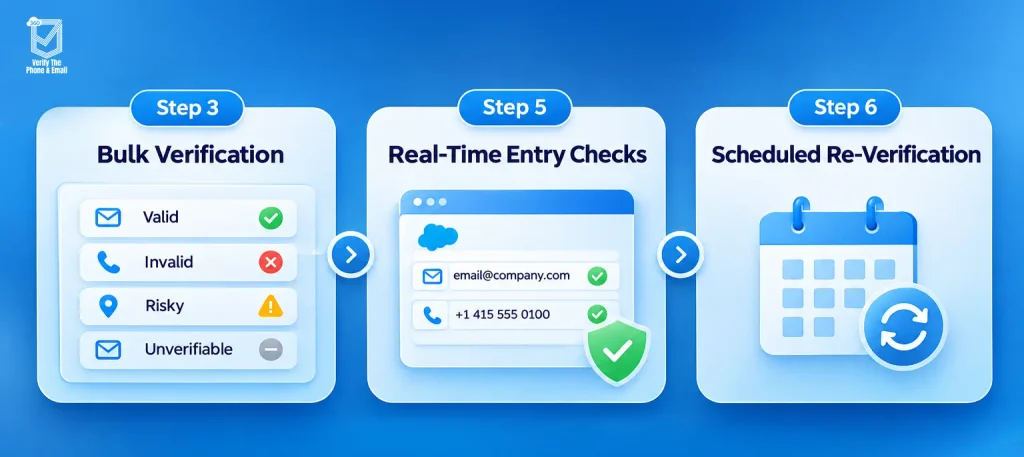
For bulk verification (step 3): runs across contact and lead records at scale. Flags valid, invalid, risky, and unverifiable records and writes status back to configurable fields. No manual review required to initiate it.
For real-time entry checks (step 5): verifies incoming emails and phone numbers on Web-to-Lead and Salesforce forms before records are created. You define whether invalid entries are blocked, flagged, or allowed through.
For scheduled re-verification (step 6): set the rule once. 360 VTM/VTP re-verifies records on your defined cadence monthly, quarterly, or custom and keeps statuses current automatically.
If your team also runs outbound email campaigns from Salesforce, there’s a natural fit with 360 Mass Mailer, which works with your verified contact lists to maximize deliverability and reduce bounce risk at send time. Both tools run natively inside Salesforce, so your data stays connected and your campaign and verification workflows stay in sync.
Conclusion
CRM data cleansing isn’t a clean-up project you do once. It’s a process you build once and run continuously, because data decays whether you’re watching or not.
The six steps in this guide work together. Auditing gives you a baseline. Standardizing formats removes the noise before verification starts. Bulk verification finds what’s actually broken. Fix-or-archive decisions protect your history while removing bad data from active outreach. Real-time entry checks stop the problem from returning. Scheduled re-verification keeps everything current.
The teams that get this right aren’t doing more work they’re doing it smarter. Automated verification inside Salesforce means no exports, no manual triggers, and no compliance risk. Your lists stay clean, your campaigns reach real people, and your reps stop calling dead numbers.
If your Salesforce org hasn’t had a proper verification run recently, that’s the place to start. The audit in step 1 takes less time than one failed campaign costs.


Solve It with Salesforce. We’ll Show You How.
AI. Apps. Experts. Everything you need to win with Salesforce under one roof.Frequently Asked Questions
How often should you cleanse CRM data?
For actively mailed contacts, monthly re-verification is the standard. For your broader contact base, quarterly works. Before major campaign sends, run a targeted pass regardless of when the last full cycle ran. The right cadence depends on list activity — a cold prospect list decays differently than an engaged customer segment.
What is the difference between data cleansing and data validation?
CRM data cleansing is the broader process: finding and fixing every type of data quality problem in your CRM. Validation is a specific check within that process — does this email address actually exist? Does this phone number connect? Does this postal address map to a real, deliverable location? You need validation to do cleansing properly, but cleansing covers more ground.
Can you automate CRM data cleansing?
Yes, and the three most impactful parts should be. Bulk verification, scheduled re-verification, and real-time entry checks can all run automatically inside Salesforce with the right AppExchange tool. The one part that still needs human judgment: deciding what to do with flagged records — suppress, merge, archive, or escalate for manual review. The verification itself shouldn’t require one.
How do you clean Salesforce data without losing records?
Suppress, don’t delete. A bad email record often still has opportunity associations, campaign history, and account relationships worth keeping. Flag it with a “Do Not Mail” status, remove it from active outreach, and leave the record intact. Hard deletes are for test records and clear junk — not for legitimate contacts with bad contact info.

About the author
Editorial TeamThe Editorial Team at 360 Degree Cloud brings together seasoned marketers, Salesforce specialists, and technology writers who are passionate about simplifying complex ideas into meaningful insights. With deep expertise in Salesforce solutions, B2B SaaS, and digital transformation, the team curates thought leadership content, industry trends, and practical guides that help businesses navigate growth with clarity and confidence. Every piece we publish reflects our commitment to delivering value, fostering innovation, and connecting readers with the evolving Salesforce ecosystem.
Recent Blogs
 360 Verify The Mail
Best Salesforce Data Quality Tools 2026
Picking the right Salesforce data quality tools isn’t a one-time decision. This guide breaks down six tools that tackle verification, deduplication, and ongoing data hygiene…
Read More 360 Verify The Mail
Can I Test an Email Address Without Sending an Email?
Not every email address that looks valid actually delivers. This guide explains how Salesforce users can test an email address without sending an email, using…
Read More 360 Verify The Phone
7 Phone Validation Tools That Integrate With Salesforce Workflows
Summary Most phone validators don’t actually integrate with Salesforce workflows. They bolt on. This guide compares 7 tools on the criteria Salesforce admins and ops…
Read MoreReady to Make the Most Out of Your Salesforce Instance?
Our Salesforce aces would be happy to help you. Just drop us a line at contact@360degreecloud.com, and we’ll take it from there!
Subscribe to our newsletter
Stay ahead with expert insights, industry trends, and exclusive resources—delivered straight to your inbox.