

Top Salesforce Integration Tools & Platforms You Must Consider
18 Feb 2026
Table of Contents

Gone are those days when businesses used to rely on one or two systems to manage their operations. In this modern tech ecosystem, businesses use a myriad of software and applications for every department and operation, whether it is for HROps, marketing, or finance. No wonder this multi-tool environment enables a firm to operate smoothly but only if all these systems are in sync. That’s the reason to consider using Salesforce integration tools to improve operational efficiency by connecting all tools together.
Do you know organizations in the modern times use over 1,000 applications and external systems, but 70% of them are usually disconnected from each other. As the world’s leading CRM, Salesforce offers robust support for nearly every connectivity requirement. It enables integration through two primary methods: traditional API integration, where developers build custom connections directly between applications, and specialized platform-based connectivity solutions that offer low-code or no-code ways to move, map, and transform data, democratizing the integration process.
This blog explores the top 10 Salesforce integration tools that bridge this gap, ensuring your Salesforce truly connects your entire tech stack for maximum impact.
Table of Contents
Why You Need a Salesforce Integration Tool
While Salesforce is an incredible platform, its power is severely limited if it cannot communicate seamlessly with your other essential business applications. An integration tool is essential because it eliminates several critical, costly friction points that emerge in a fragmented technology ecosystem:
Manual Data Entry and Error
When your Salesforce integration software in use doesn’t have an automated sync, employees have to get involved in tedious tasks, entering data and logging those details manually into Salesforce. Doing all this manually not only consumes a lot of time but also leaves a scope of errors and data corruption. Having a reliable integration tool can help to handle this sync automatically and reliably.
Poor Reporting and Lack of a Unified Customer View
When employees store customer data in multiple databases, it can be very time-taking to generate unified and accurate reports due to a lack of a 360-degree view of customer data. In such situations, chances are executives have to make decisions based on incomplete details. Having all systems integrated with Salesforce can help here to maintain one single source of truth for better reporting.
Misaligned Sales, Marketing, and Service Workflows
Using disjointed systems can bring along a lot of workflow chaos. Having an integrated system will ensure that all departments, whether it is marketing, service, or sales, are all in perfect alignment, ensuring all of them are operating with the most current customer context.
Stop building on fragmented data. Start building a unified tech stack.

Slow or Broken Lead Routing
When your focus is on lead capturing and routing, you cannot compromise speed. Relying on manual processes for transferring a lead to Salesforce from any marketing automation platform can leave chances of slow or broken lead routing. Having your systems integrated will help maintain the transition in real-time. This will maintain an instant handoff to make sure reps follow up with leads within minutes, thus boosting the chance of conversion.
Lack of Automation and Scalability
If your business is relying on manual processes, it’s fundamentally unscalable. Every time you launch a new product, hire a new employee, or plan a new acquisition, the complexity of manual processes tends to increase. That’s something Salesforce integration tools help you overcome while enabling you to achieve automation and make business processes scalable.
Types of Salesforce Integration Approaches
Choosing the right integration tool depends heavily on the “style” of connection your business requires. Salesforce integrations aren’t one-size-fits-all; they are generally categorized into three main approaches based on how data moves and where it lives.
1. Data Integration
This is the most common approach when you need to physically move and synchronize data between Salesforce and another system (like an ERP or a database). It ensures that both systems stay in sync, so your teams always see the same “source of truth.” It is suitable for moving high volumes of records, nightly syncs, and maintaining data consistency, for example, syncing Shopify orders to Salesforce or migrating historical leads from an old CRM.
2. Process Integration
Process integration connects business workflows across different applications in real time. Instead of just moving a “record,” it triggers an action. When something happens in Salesforce, it tells another system to start a specific task immediately. It is suitable for real-time triggers and complex business logic that spans multiple departments, like automatically creating a Slack notification when a “Big Deal” is closed, or triggering an invoice generation in Xero the moment a contract is signed.
3. Virtual Integration (Data Virtualization)
Sometimes, you don’t actually want to store external data in Salesforce; you just want to see it. Virtual integration allows you to view, search, and interact with data that stays in its original home (like a legacy SQL database) directly from the Salesforce UI. It is suitable for large datasets that change frequently and don’t need to be owned by Salesforce, saving you on data storage costs. One of its examples is viewing real-time shipping status from a logistics provider or checking live inventory levels from an external warehouse management system.
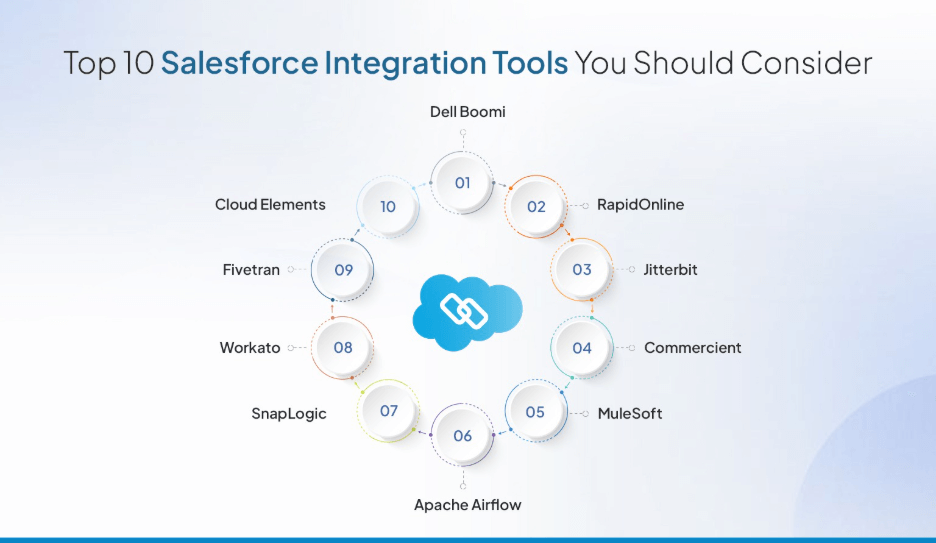
Top 10 Salesforce Integration Tools You Should Consider Using
The best Salesforce integration tools can bring in just the right results regarding Salesforce integration. You need access to suitable SFDC integration tools to efficiently integrate your Salesforce CRM with external applications.
So, here are some of the top Salesforce integration tools you must have to achieve successful Salesforce integration.
1. Dell Boomi
Dell Boomi is one of the most sought-after and top Salesforce integration tools. The tool enables you to work with a scalable platform to efficiently handle complex processes and a huge volume of data. Usually, companies that have data to handle from different departments tend to use Dell Boomi. Whether it is Microsoft Dynamics or Google Cloud, any such application can be integrated with Salesforce using this tool, as it is built for optimizing cloud-based platforms that support complex architecture. It supports interactive and visual interaction to facilitate end-to-end integration.
2. RapidOnline
RapidOnline is a tool that can be used for integrating Salesforce and Microsoft Dynamics 365. The tool has pre-configured templates and a user-friendly interface, making the integration process fast and efficient. The tool offers built-in integrations that allow for customization to fit your specific integration needs.
3. Jitterbit
Jitterbit is well-known in the industry for its efficient Salesforce integration capabilities. It is an integration tool that offers various API integrations based on the business size.
Depending on the number of systems you wish to connect to and the required support level, Jitterbit offers three service levels.
Jitterbit stands out as a preferred Salesforce integration tool; after all, it caters to technical and non-technical users. The platform can be used even without extensive coding or programming knowledge.
4. Commercient
Commercient is a cloud-based tool that connects ERP systems with CRM solutions. It enables businesses to establish an efficient link between ERP and CRM to streamline business processes and establish strong customer relations.
One of the main advantages of using this integration tool is that it eliminates the need for manual mapping, ETL, or coding when integrating Salesforce. This helps to reduce integration costs and frees up resources that can be redirected toward other productive areas of the business.
5. MuleSoft
When discussing the best Salesforce integration tools, you can never leave MuleSoft out of the list. MuleSoft is an automation and integration tool highly trusted by Salesforce users and has been a pioneer in the industry for a while.
MuleSoft’s Anypoint platform is owned by Salesforce and enables effortless integrations with various apps and services. With MuleSoft, large businesses can maximize functionality and seamlessly integrate various departments. It also allows users to integrate multiple applications or services simultaneously.
6. Apache Airflow
Apache Airflow is a widely used integration tool that assists in authoring, scheduling, and executing workflows. It includes a variety of command-line utilities that make it easier to perform complex tasks.
Furthermore, its user interface offers numerous features that allow for the visualization of pipelines in production, project progress monitoring, and troubleshooting any issues to ensure successful project execution.
Find out which tool truly fits your budget, scale, and complexity needs.

7. SnapLogic
SnapLogic provides an integration platform as a service (iPaaS) that links on-premises business modules, SaaS components, and cloud data sources. It is an AI-powered platform that offers intelligent deployment options to businesses of all sizes. SnapLogic automates the entire integration process, including the creation, maintenance, and deployment of projects in hybrid systems that are cloud-based and on-premises. One of the primary reasons why SnapLogic is highly preferred is its easy accessibility. It makes recommendations based on machine learning to create end-to-end integration pipelines that align with user intent.
8. Workato
Workato is a cloud-based integration platform that enables businesses to link their applications, data, and processes across the organization. It has been developed to provide a fast and easy integration solution for cloud-based applications, such as Salesforce, with minimal coding required. It helps organizations streamline their processes, improve data accuracy and consistency, and increase efficiency by automating manual tasks and eliminating the need for manual data entry. With the right Salesforce integration company, businesses tend to leverage the tool for performing integration.
9. Fivetran
Fivetran is a tool for integrating data that emphasizes process automation. It is an automated tool that offers connectors, analytics templates, and transformations that can be used immediately, with the ability to adapt to changes in schemas and APIs. Businesses worldwide use Fivetran to integrate data from event logs, cloud-based applications, and databases.
10. Cloud Elements
Cloud Elements provides developers with a cloud-based API integration platform that simplifies the process of connecting, managing, and publishing APIs via a unified platform. It also allows developers to synchronize data between various cloud services, including Salesforce, Quickbooks, and Zendesk integration, using Cloud Elements’ integration toolkit.
Salesforce Integration Tools: Feature Comparison
This table will help you identify which tool for Salesforce integrations align best with your specific technical requirements and business goals.
| Tool | Primary Focus | Key Capability | Best For… |
| Dell Boomi | Cloud-based iPaaS | Visual, drag-and-drop interface for complex data architectures. | Large enterprises with high data volumes. |
| RapidiOnline | ERP/CRM Sync | Pre-configured templates specifically for Microsoft Dynamics & Salesforce. | Fast, out-of-the-box Microsoft Salesforce sync. |
| Jitterbit | API Integration | Offers three service levels based on business size and technical depth. | Companies needing rapid deployment (under 10 days). |
| Commercient | ERP to CRM SYNC | Pre-built “SYCN” apps for 150+ ERPs without manual ETL or coding. | Bridging back-office (accounting) with sales teams. |
| MuleSoft | API-Led Connectivity | Owned by Salesforce; uses “Anypoint” for reusable, modular APIs. | Complex, mission-critical enterprise transformations. |
| Apache Airflow | Workflow Orchestration | Python-based scheduling and monitoring of complex data pipelines. | Technical teams/DevOps needing deep customization. |
| SnapLogic | AI-Powered iPaaS | Uses machine learning (Iris AI) to recommend next steps in integration. | Organizations prioritizing self-service and speed. |
| Workato | Low-Code Automation | Focuses on “Recipes” to automate workflows between 1,000+ apps. | Business users looking to automate departmental tasks. |
| Fivetran | Data Replication | Fully automated data movement from apps to warehouses (ELT). | Analytics and centralizing data for BI/Reporting. |
| Cloud Elements | Unified API Hub | Canonicalizes data (VDRs) so one API works across multiple apps. | Developers managing many different cloud app categories. |
How to Choose the Right Salesforce Integration Tool
When you need to choose to pick the right Salesforce integration tool for your business, you should not try to find the most feature-heavy tool; but a tool that will help you fill the gap between technical capacity of your team and your business goals.
Here are a few points that will help you make the right choice of the tool for Salesforce integrations.
1. Technical Complexity vs. Team Skillset
Before you choose the tool, try to understand the technical capacity of your team. If your team members prefer low-code or no-code Salesforce data integration tools, options like SnapLogic and Workato would work. But if your team members are proficient with the code, you can go with Apache Airflow and MuleSoft that require API architecture understanding.
2. Data Volume and Sync Frequency
Your choice of the tool also depends upon the data volume that you would be syncing in a day. For real-time syncing, tools that offer instant triggers like Webhook would be a great choice. However, if you work with nightly synchronization of massive data volume and prefer batch processing, then you should go with Salesforce data integration tools like Fivetran or Dell Boomi that can handle high-volume bulk transfers.
3. Security and Compliance
When data moves between systems, it is at its most vulnerable. Ensure your chosen tool supports:
- OAuth 2.0 for secure authentication.
- Encryption at rest and in transit.
- Compliance certifications (like HIPAA, GDPR, or SOC2) if you are in a regulated industry
4. Total Cost of Ownership (TCO)
Cost is an important factor that you must consider when choosing your Salesforce integration tool. Apart from the sticker price, there are many other aspects that you need to keep in mind while calculating the ROI like implementation cost, maintenance, AI call costs, etc.
Best Practices for Successful Salesforce Integration
Selecting the right tool for Salesforce integration doesn’t mean that the job is done. To make the integration successful, it is necessary to focus on proper planning, preparation, and governance. These are some of the best practices that can help to ensure your Salesforce integration is scalable and helps you achieve the business value you seek.
Start with a Clean Data Model
Before connecting any external system, you must ensure your Salesforce data model is sound and optimized. Integration will magnify any existing flaws. You must start with a clean data model, verifying relationships are correct, custom fields are necessary, and record types are logical. Fixing data structure issues post-integration is exponentially more costly and complex than addressing them upfront. A simple, well-structured data model is the most important prerequisite for reliable, scalable data flow.
Map Business Processes Before Mapping Fields
A common pitfall is immediately jumping to field mapping. Instead, you must map business processes before mapping fields. Understand the “why” and “when”: When does the data need to move? Who owns the data at each stage? What triggers the sync? For example, map the entire “Quote-to-Cash” process first, then identify the specific fields (like Billing Address) that need to be synchronized to support that flow.
Establish Data Governance and Deduping
Integration inevitably introduces new, conflicting, or duplicate data. Before go-live, you must establish comprehensive data governance rules and deduping processes. Determine the “system of record” (SOR) for every critical field. Implement automated deduplication tools and reconciliation logic to ensure high-quality, trustworthy data. Failing to do this results in rapid data pollution and loss of user trust in the system.
Stop manual entry today. Get a roadmap for full, automated data sync.
Test Rigorously in Sandboxes
You should never deploy an integration directly to production. Consider testing it in the sandbox. You can use a dedicated Full Sandbox that mimics the complexity and data volume of your production environment. From unit testing to user acceptance testing, conduct them all to ensure the integration has no related issues.
Enable Alerts and Monitoring
Even successfully completing the integration process doesn’t ensure that the job is done. You need to ensure proper monitoring processes, so any possible errors can be timely detected before system performance is hampered. Your technical team should be timely notified whether it is any data sync error or when the API limit is about to hit.
Common Salesforce Integration Use Cases
Let’s look at some real-world scenarios where Salesforce integration makes a measurable difference.
1. Quote-to-Cash Automation (Sales & Finance)
This is perhaps the most high-impact use case. When a Sales Rep marks an Opportunity as “Closed Won,” the integration automatically triggers the creation of a Sales Order and Invoice in your ERP (like NetSuite or QuickBooks). This helps to eliminate manual re-entry of data and achieve faster billing cycles and zero typos in contract amounts.
2. 360-Degree Customer Support (Service)
By integrating Salesforce with your support ticketing system (like Zendesk or Jira), support agents can see a customer’s full purchase history and subscription status without leaving the Service Cloud. This enables support agents to provide personalized help instantly, and alert sales reps regarding their key account having an open support ticket.
3. Marketing Lead-to-CRM Sync (Marketing)
Integrating marketing automation platforms (like HubSpot, Pardot, or Mailchimp) ensures that every lead captured from a webinar or whitepaper download is instantly routed to the right salesperson in Salesforce. This can help in decreasing lead response times from days to minutes, significantly increasing conversion rates.
Choose Your Salesforce Integration Tool Wisely
Although there are multiple top Salesforce integration tools available but decision to pick the right tool is not universal. You must consider your budget constraints, the company’s goals, complexity of your data, and other focus areas while making a choice.
A successful integration of multiple systems with failure doesn’t mean having a path to move records. It’s about setting the right foundation on which your data resides. Whichever tool you choose, you need to make sure it is making your business scalable, automating your processes, eliminating manual struggles, and providing a unified customer experience. That’s the key to getting the right Salesforce integration tool in place.
Learn how we cut lead-to-opportunity time from 48 hours to 5 minutes post-integration.

Categories

Solve It with Salesforce. We’ll Show You How.
AI. Apps. Experts. Everything you need to win with Salesforce under one roof.FAQs
What are Salesforce integration tools?
Salesforce integration tools are specialized software platforms or middleware solutions designed to connect Salesforce CRM with other business applications, such as ERPs, marketing automation tools, or custom databases. These tools act as a bridge, allowing different systems to "talk" to one another, which automates data flow and ensures that your entire tech stack stays in sync without requiring manual data entry. By leveraging these tools, businesses can eliminate data silos and create a unified operational environment where information is accessible across all departments.
Which are the best Salesforce data integration tools?
The best tool typically depends on the specific complexity and volume of your data. For large-scale enterprise needs requiring high-level transformation and security, MuleSoft and Dell Boomi are widely considered the gold standard due to their robust API-led connectivity. For mid-sized businesses looking for speed and ease of use, low-code platforms like Workato or Jitterbit offer a great balance of power and simplicity. If your primary goal is specialized synchronization between Salesforce and accounting systems, tools like Commercient or RapidiOnline are often the top choices because they offer pre-configured templates for popular ERPs.
Do I need a developer to integrate Salesforce?
Whether or not you need a developer depends largely on the tool you choose and the complexity of your business logic. However, for highly customized integrations involving legacy systems, complex data mapping, or custom Apex code, a skilled Salesforce developer or a Salesforce consulting firm is essential. Professional consultants ensure that the integration is not only functional but also scalable, secure, and built according to architectural best practices.
Can Salesforce integrations sync data bi-directionally?
Yes, most advanced Salesforce integrations are capable of bi-directional synchronization, meaning data flows both ways between Salesforce and the connected system. This ensures that an update made in one platform is instantly reflected in Salesforce, and vice versa. While this is a powerful feature for maintaining a "Single Source of Truth," it requires careful configuration of data ownership rules and conflict resolution logic to prevent data loops or accidental overwrites, which is why many organizations partner with experts to manage these two-way syncs.
What apps can integrate with Salesforce?
Because Salesforce is built with an "API-first" philosophy, it can integrate with virtually any modern software application that has an open API. Common integrations include communication tools like Slack and Gmail, marketing platforms like HubSpot and Mailchimp, and financial systems like QuickBooks or NetSuite. Beyond these, you can also connect project management tools like Jira, document signing services like DocuSign, and even specialized industry software for logistics, healthcare, or retail, making Salesforce the central engine of your entire business ecosystem.

About the author
Editorial Team – 360 Degree CloudThe Editorial Team at 360 Degree Cloud brings together seasoned marketers, Salesforce specialists, and technology writers who are passionate about simplifying complex ideas into meaningful insights. With deep expertise in Salesforce solutions, B2B SaaS, and digital transformation, the team curates thought leadership content, industry trends, and practical guides that help businesses navigate growth with clarity and confidence. Every piece we publish reflects our commitment to delivering value, fostering innovation, and connecting readers with the evolving Salesforce ecosystem.
Recent Blogs
 Salesforce Services
Top Salesforce Consulting Partners in India You Can Count On
The global CRM market size was valued to be around USD 112.91 billion in 2025 and is expected to grow from USD 126.17 billion in 2026 to…
Read More Salesforce Services
Salesforce Partners: What They Are, Partner Tiers & Why You Need One
Implementing Salesforce for business operations can often be described as buying a high-performance jet; no wonder it’s an incredible piece of machinery, but it won’t get you off the ground without a…
Read More Hire Staff
Hire a Salesforce Developer: 7 Reasons Your Business Needs One
Whenever a company starts getting Salesforce projects, and work starts to pile up, the first option that comes to their mind is to look for…
Read MoreReady to Make the Most Out of Your Salesforce Instance?
Our Salesforce aces would be happy to help you. Just drop us a line at contact@360degreecloud.com, and we’ll take it from there!
Subscribe to our newsletter
Stay ahead with expert insights, industry trends, and exclusive resources—delivered straight to your inbox.
